Archive
Chinese newspapers
- China Daily is the largest Chinese newspaper available in English. It has a variety of versions: here is the version for the US, for cross-cultural learning, while the English version for speakers of Chinese is valuable both for learners of Mandarin and English.
- The government-run newspaper People’s Daily has an English version, also with language learner glossing.
MS-Bing Dictionary for Chinese learners of English–and vice versa?
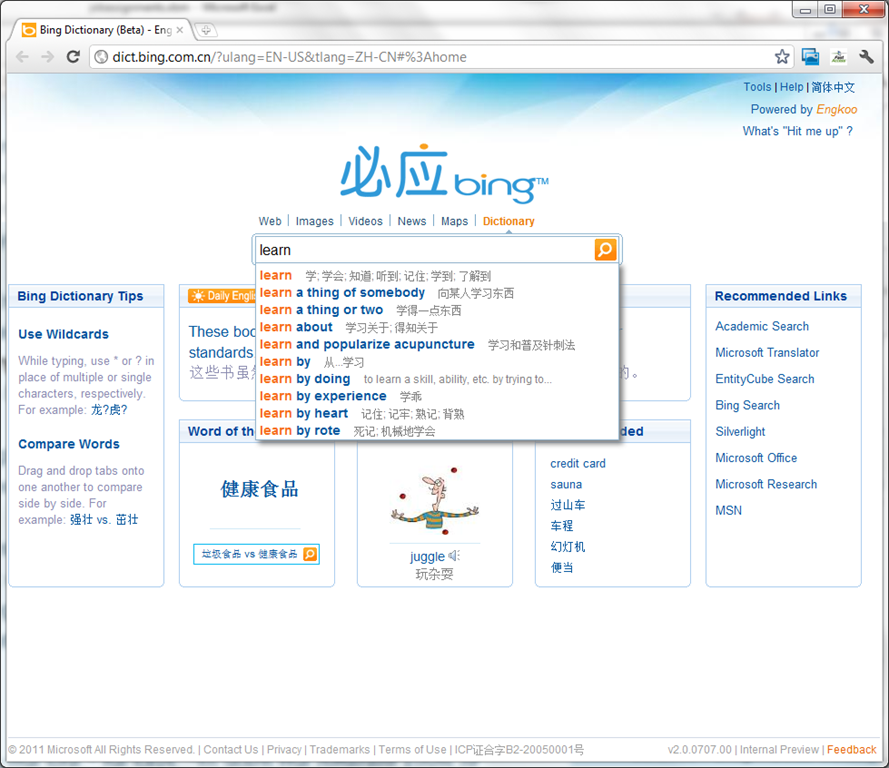
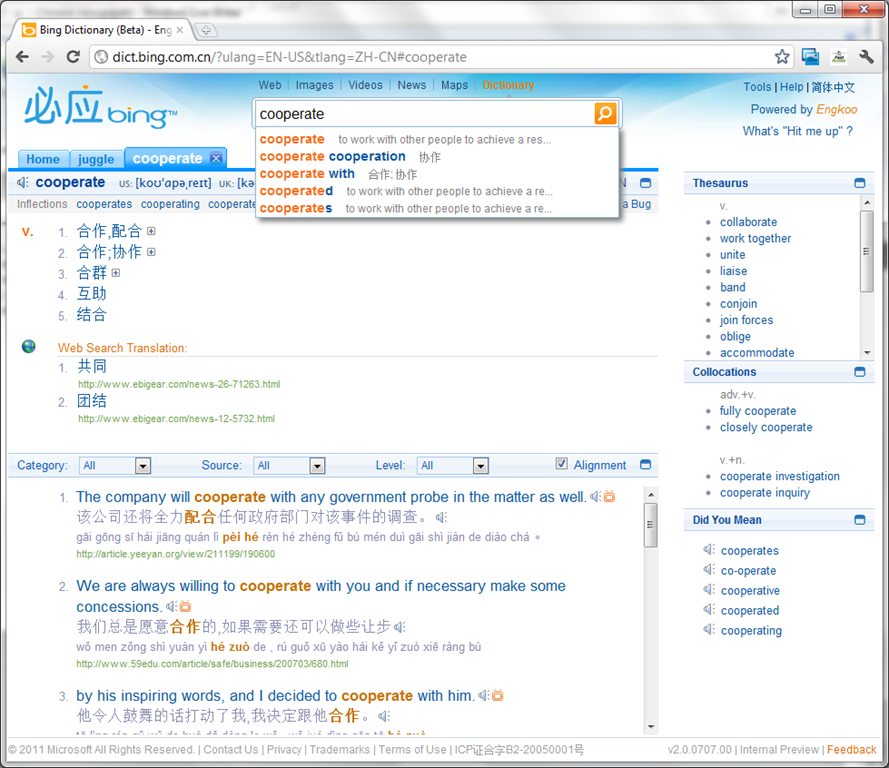
- Link: http://dict.bing.com.cn/?ulang=EN-US&tlang=ZH-CN#%3Ahome, powered by Engkoo:
- This looks like a pretty evolved learning tool: It has instant suggestions that include usage information and translations.

- Rich results that include contextual, parallel web-as-corpus matches in text and text-to-speech (that, on spot-checking, seems barely noticeably computer-generated).

Microsoft & the future of interpreting
Microsoft is at it again: making predictions on the future of interpreting right at the beginning of their new “FUTURE VISION video: In 5-10 years, how will people get things done at work, at home, and on the go?”. The glasses should state “Interpreting” instead of “Translating”, yet anything that aids in cross-cultural communication would be most welcome. But will it happen in “5-10 years”? (This movie is also about the past: viewing it from their own site in Google’s Chrome brought down my computer with a BSOD relating to video driver (phone camera did not start up quite fast enough to capture it).
Sample of how students use the foreign language TTS (text-to-speech) in the LRC
Last week, I noticed this student in the LRC working on a speaking assignment in her SLA class. First, she wrote a draft of her presentation. She then had the Deskbot TTS wizard (in the lower right of her screen) read out the draft to her. She recorded her version, modeling after the Deskbot’s pronunciation. Then she had the Deskbot read out the draft again, to compare with her own recording.
Look for the little guy in the lower right corner of the screen with the cartoon bubble over his head.
I favor the use of the Deskbot TTS (a Windows XP technology) as an easily accessible speaking dictionary, including during face-to-face teaching, when students may otherwise be too shy to make an utterance because they are not sure about the pronunciation of a single word, or even ask the teacher to pronounce it for them. Prosodically, the deskbot TTS leaves many things to be desired. Let’s hope that Windows 7 will enable us to set up more advanced TTS support in the LRC.
How to use the online Portuguese pronunciation help to generate phonetic alphabet transcriptions and text-to-speech
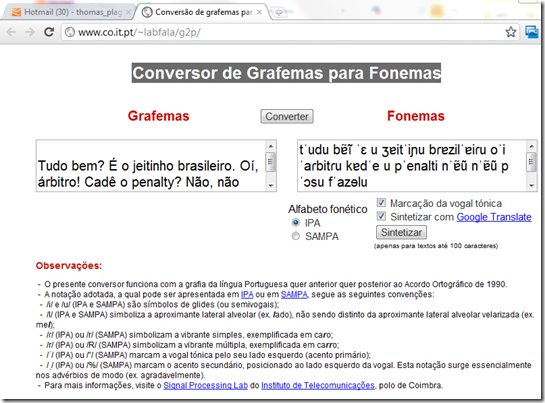
- Go to http://www.co.it.pt/~labfala/g2p/
- Write or paste your text into the textbox:“Grafemas”
- Choose your preferred phonetic alphabet (IPA, SAMPA) and other options.
- Press button: “Converter” to see results.
- Press button: “Sintetizar” to hear results.
- Like so:
- Or click here to view a demo (requires Windows Media Player) with audio (download requires Windows Media Player). Our example was:
- Input: Tudo bem? É o jeitinho brasileiro. Oí, árbitro! Cadê o penalty? Não, não posso faze-lo.
- Output: tˈudu bɐ̃ĩ ˈɛ u ʒɐitˈiɲu bɾɐzilˈɐiɾu oˈi ˈaɾbitɾu kɐdˈe u pˈenalti nˈɐ̃ũ nˈɐ̃ũ pˈɔsu fˈazɘlu

How to get from our Film-collection.xlsx to in-depth bibliographic data on worldcat.org and upcdatabase.com
- worldcat.org,
- The link is based on the item’s ISBN (barcode-scanning was rarely possible, thus checksum checking becomes mandatory).
- upcdatabase.com
- The link is based on the item’s UPC/EAN which do come with barcodes, but lookup resources leave things to be desired:
- http://www.upcdatabase.com/item/[upc # here]: yields some info for some items (newer DVDs which usually also have ISBNs?)
- http://gepir.gs1.org/v32/xx/gtin.aspx?Lang=en-US, on spot-checking, yields only “Trade Item Ownership”, but “no Trade Item Info”, and does not support GET operation.

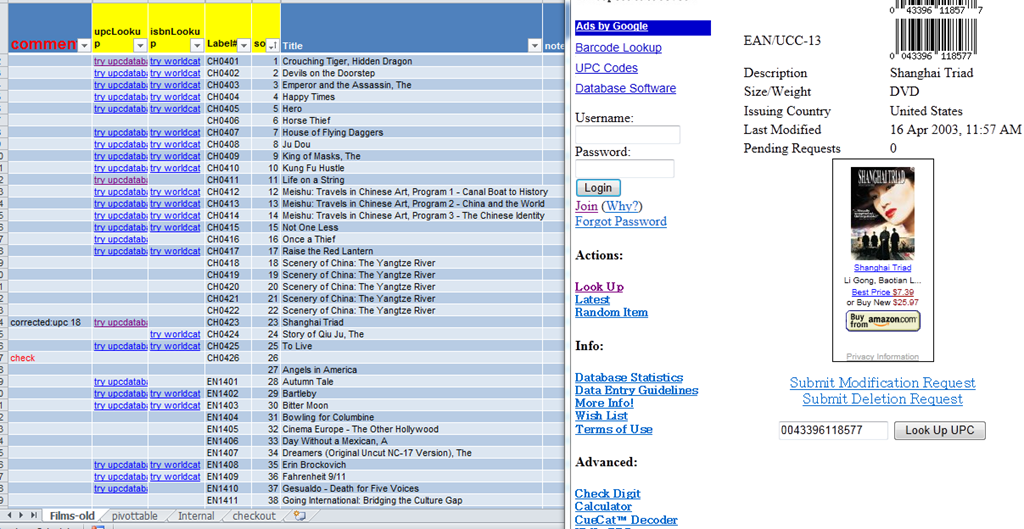
- This links another isolated and non-professional language resource center media collection to the world of non-pseudo libraries, where the power of crowdsourcing has long been known.
- The original plan – which will take more time to implement, especially since it can be automated only in a very limiting way – was to pull into the local collection spreadsheet accurate and multi-faceted bibliographic information, to prevent the common failures of even our usually basic item searches by title:
- foreign-language diacritics, given that non-foreign-language-librarians edited the local collection spreadsheet. This requires that foreign character input to be installed on the LRC help desk computers (done for Western) and that student assistant personnel can be trained (theoretically done – will need more practice)
- English translations: may provide a safety net for searches, short of automated flattening of all title diacritics.
Learn Chinese character stroke-order with slowed-down animated GIFs
Further to our prior tips on learning Chinese stroke order, now you can take your time, in the LRC: To facilitate your practicing of Chinese character stroke-order, we have used the most helpful site (also available by direct download) created by Tim Xie for the California State University, Long Beach, to create 100 different speed versions, and one comic strip like static image, for each of the several hundred of animated GIFs demonstrating Chinese character writing, and made them available on the LRC computers under Internet Explorer Favorites – Example:
 |
 |
 |
|
 |
|
 |
|
 |
|
 |
|
 |
|
 |
You can access the files with the stroke order speed of your preference from the LRCCOED434 student computers, like so:
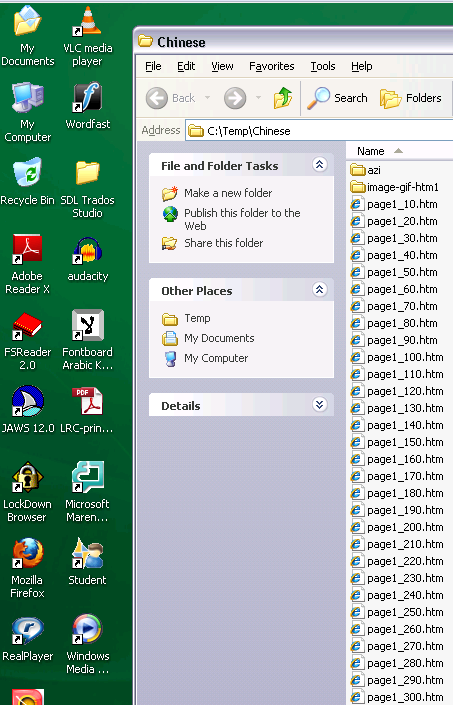
(Many thanks also to the authors of programmable ImageMagick image editor and corresponding Unix shell scripts that we could use in the production of the slowed down animated GIFs. To create your own version of these slowed down animated GIFs, or others similar websites, feel free to pick up and/or adapt our shell script here).


Questions? Read the About. Or just ask me a quick Our Databases: Resources with calendars -- Language learning material Moodle Sites, multimedia files -- films


FAQs for LRC student staff or for students or for teachers. To search our FAQs, in the browser addressbar, add after "https://plagwitz.wordpress.com/feed/?tag=faqs+/" "+TAG1" (from tag cloud below) OR "https://plagwitz.wordpress.com/feed/tag=faqs
&category_name=" "CAT1" (from category hierarchy below). OR search both categories and tags, and multiple TAGs/CATs (connect with "," for OR-search, with "+" for AND-search), like so: https://plagwitz.wordpress.com/feed/?tag=TAG1+TAG2+...TAGn&category_name=CAT1
+CAT2+...CATn"
Other ways to find help
If you cannot find it here, look there: 5,500 Language-Learning Links and Programs for learning or teaching 150 languages
Shortcuts:Our Lists, Our Maps, LRC Staff Moodle Site,LRC Project Moodle Site, 49erexpress, UNCC Moodle, Student Recordings: s:claslcslrcsanakostudent
Learning usage samples: Sanako oral exam, Kaltura webcam presentation, Dictation with speech recognition, Sanako written exam, Chinese and Japanese interactive stroke-order practice
Test the Sanako Installer, Webbrowser Popup Konfigurator for XP, or Windows7, faster LRC TeacherPC Log-in Let MS facilitate diacritics writing by installing for you US-International keyboard layout
This is my personal blog (Google+). The views expressed on these pages are mine alone and not those of my employer. The information in this weblog is provided “AS IS” with no warranties, and confers no rights.

