Archive
Pearson mygermanlab "AUDIO INIT FAILED" for Blackboard voice/Wimba setup wizard – a firewall issue?
In Firefox, Chrome, IE8 on Win 7 (64bit) …

No other missing requirement in browser tuneup but QuickTime (which is said to be not required for PC)… And here is the likely solution from the Pearson website:
“Audio Init Failed” or “Error: Communication Error”
This error occurs because the computer’s security prevents the Wimba plug-in from sending data to our servers. Please take the steps described below to be sure that communication between your computer and our servers is always allowed.
- Please configure the security program or firewall on your computer to allow the file shown below (audioproxy.exe) to connect to the internet. (If you do not know how to make this change, please contact technical support for the security program you are using.)
Windows XP or 2000
C:\Documents and Settings\[Windows Username]\Application Data\HorizonWimba\JSecureDoor\audioproxy_X.Y.Z\data\audioproxy.exe
Windows Vista
C:\Users\[Windows Username]\AppData\Local\HorizonWimba\JSecureDoor\audioproxy_X.Y.Z\data\audioproxy.exe
- Java applets or Java Script also must be allowed by personal firewall or internet security software. Some firewalls have settings to block Java applets and Java Scripting, which will prevent Wimba Voice applets from loading. You may need to contact technical support for that firewall or security program for assistance configuring that program to allow Java applets and Java Script.
- Your browser must also allow Java applets and Java Scripting.
Internet Explorer
- Open Internet Explorer and click Tools > Internet Options
- From the Internet Options window, select the Advanced tab
- Scroll down the list to Java(Sun) heading and make sure the box below it is checked
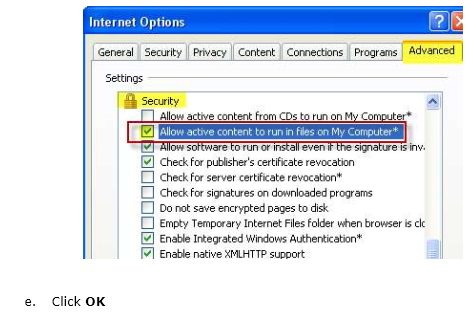
Note: If you do not see Java(Sun), go Sun’s Java website at www.java.com and click Free Java Download. - Scroll down the list to the Security heading and make sure the box beside Allow active content to run in files on My Computer is checked
- Click OK
Pasted from <http://247pearsoned.custhelp.com/app/answers/detail/a_id/7356/~/blackboard-voice-(wimba-voice)%3A-error-messages>
More info from the Pearson troubleshooting documentation:

Protected: Why requiring manual configuration of the Sanako by students does not work for us
More unsolicited Deepfreeze system reboots in the middle of working?
What gives? 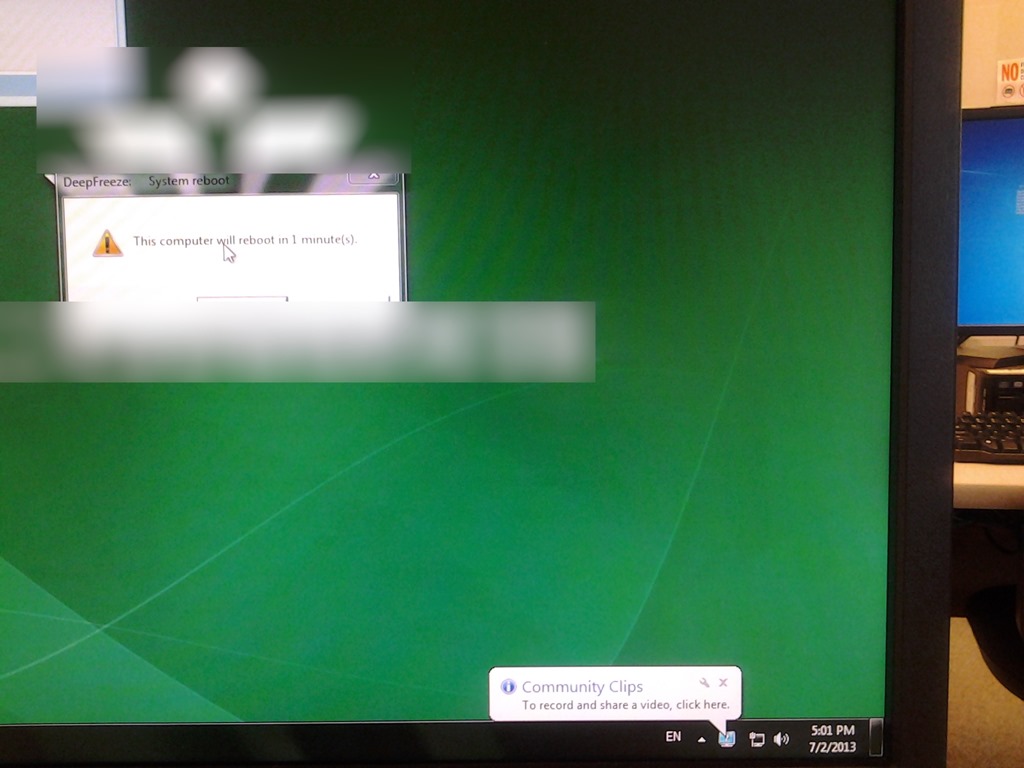
More Deepfreeze maintenance spontaneous reboots
This is not after hours of inactivity, merely minutes, and – compare the file dates – well within during opening hours

Online Tool to compress/decompress GUIDs
Could not immediately find one when I searched: Enjoy. My formula will not trim leading and trailing spaces from your input. You may have to enter the blue result field, move the cursor to the end of the formula and hit enter for the result cell to update. Download the sheet to use in Excel.
Protected: Sanako teacher station stuck on trying to verify the license


Questions? Read the About. Or just ask me a quick Our Databases: Resources with calendars -- Language learning material Moodle Sites, multimedia files -- films


FAQs for LRC student staff or for students or for teachers. To search our FAQs, in the browser addressbar, add after "https://plagwitz.wordpress.com/feed/?tag=faqs+/" "+TAG1" (from tag cloud below) OR "https://plagwitz.wordpress.com/feed/tag=faqs
&category_name=" "CAT1" (from category hierarchy below). OR search both categories and tags, and multiple TAGs/CATs (connect with "," for OR-search, with "+" for AND-search), like so: https://plagwitz.wordpress.com/feed/?tag=TAG1+TAG2+...TAGn&category_name=CAT1
+CAT2+...CATn"
Other ways to find help
If you cannot find it here, look there: 5,500 Language-Learning Links and Programs for learning or teaching 150 languages
Shortcuts:Our Lists, Our Maps, LRC Staff Moodle Site,LRC Project Moodle Site, 49erexpress, UNCC Moodle, Student Recordings: s:claslcslrcsanakostudent
Learning usage samples: Sanako oral exam, Kaltura webcam presentation, Dictation with speech recognition, Sanako written exam, Chinese and Japanese interactive stroke-order practice
Test the Sanako Installer, Webbrowser Popup Konfigurator for XP, or Windows7, faster LRC TeacherPC Log-in Let MS facilitate diacritics writing by installing for you US-International keyboard layout
This is my personal blog (Google+). The views expressed on these pages are mine alone and not those of my employer. The information in this weblog is provided “AS IS” with no warranties, and confers no rights.
 Thomas' Work Space