Archive
Archive for the ‘service-is-testing-troubleshooting-debugging’ Category
How a teacher can easily restart the Sanako Study 1200 licensing classroom server when experiencing a crash
2013/04/26
Leave a comment
- Try clicking and running this (http://goo.gl/lTVLc), if you see that:

- this is for
- if your sanako tutor hangs with status message "verifying tutor" and you are confronted with the error dialogue "Connection to the communication platform has been disconnected and the system is not able to communicate with the classroom server anymore"
- And if you run the classroom server on the same computer as the tutor (as we do)
- And if you have checked your "network connection", like gone to a website, and it is restored (e.g. If you simply had unplugged your the cable)?
- And if you do not want to "restart your system if needed" since, as in our case, that takes a big chunk time out of your class
- Hint: this can’t fix your network if that is the root cause, but may be able to work around temporary service outages.

How to resolve “WinAlign export files cannot be migrated because your User ID has not been specified”
2013/03/28
Leave a comment
- Steps to replicate:
- in Winalign window:
- menu:file / export file pair
- dialogue: “export file pair to file”, choose an name and format: text,
- wait for “export”dialogue to disappear;
- in SDL Trados Studio 2009,
- left menu pane: “translation memories”, menu button”:”open translation memories”,dialogue:”menu button: “open document”, choose the source text document, in dialogue:”open document”, dropdown: “target language”,
- dropdown: “target language”, select yours
- dropdown”: add”: “file-based translation memory”
- open dialogue:”file-based translation memory”, select exported text file;
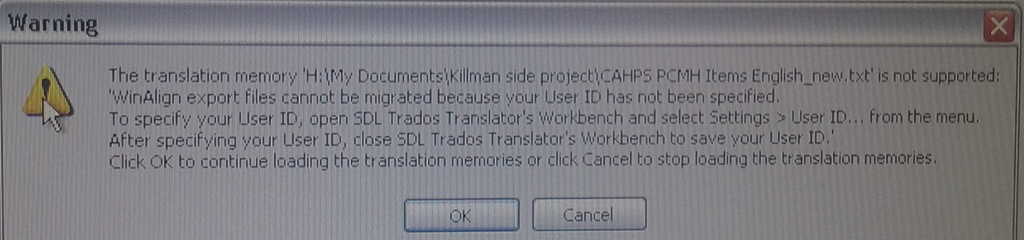
- Error pops up:

- in Winalign window:
- Resolution: follow the instructions in the error dialogue.
- Bonus points for knowing that “translator’s workbench” is a legacy application and accessible only through SDL Trados Studio 2007: open this from the start menu.
- In the left pane, click to open “Translator’s workbench”:

- Give your username:
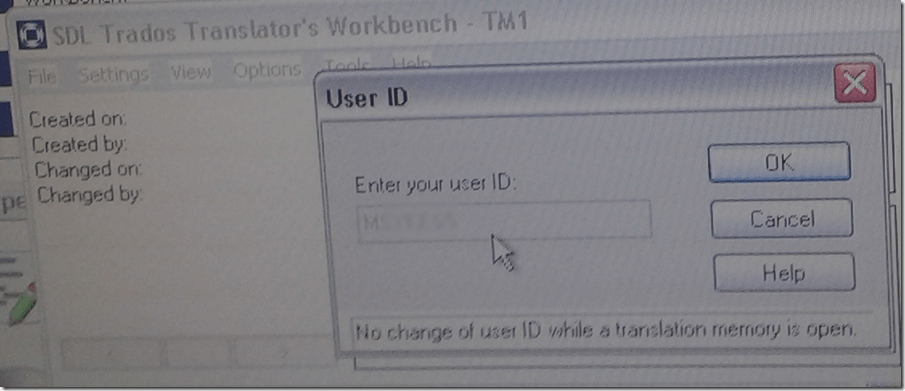
- Test: on your next try, you will get past the error into upgrade converting your winalign-exported text file into TMX:



Protected: Sanako Study 1200 hangs on “changing control method”?
2013/03/13
Enter your password to view comments.
Protected: How you can speed up log-in on the LRC teacher computer at the beginning of your class
2013/02/05
Enter your password to view comments.
How you can fix student homework “file save errors” on Sanako Study 1200 and Windows XP
2013/01/30
Leave a comment
- Background: We recently got our Sanako network share permissions set up to vendor specifications, and the privileges tightened up appropriately. Fortunately, in the process of this, I was warned to make sure Windows XP has the registry key set: MoveSecurityAttributes, as otherwise XP does not update the permissions when moving files between folders:
- Symptom: Here is how this seems to have played out with Sanako ”homework” files (which get sent from the teacher to the student for writing and submitted back), specifically with files that I had:
- uploaded from my office PC (XP without the MoveSecurityAttributes key) to the Sanako teacher share
- tried to deploy as homework from the Sanako Study 1200 teacher station (also XP without the MoveSecurityAttributes key), resulting in a “file save” error:

- Additional context:
- sending files to students failed, but not to teachers;
- student had not run out of file space on the network share;
- students did not lack permissions to the Sanako network share in general;
- we did not run into issues with Sanako exam audio recordings which are sent from the student PCs to the network share.
- Resolution:
- adding HKLM\SOFTWARE\Microsoft\Windows\CurrentVersion\Explorer\MoveSecurityAttributes, DWORD ,1, to the computer the files originates from:
- first the office pc: this did not fix the issue.
- then the teacher PC: this seems to have fixed the issue:

- Here is hoping that this can fix your “file save”error also.
- adding HKLM\SOFTWARE\Microsoft\Windows\CurrentVersion\Explorer\MoveSecurityAttributes, DWORD ,1, to the computer the files originates from:
- Update: Also consult Raymond Chen’s "Wait, so does moving a file recalculate inherited permissions or doesn’t it?", and the hearty discussion that ensued.


Does the Sanako Study 1200 tutor set the input language to Chinese (traditional)?
2012/12/12
Leave a comment
- Or why is my input language set to Chinese after the Sanako tutor install:

- Unclear whether the tutor install has an effect on the default language, but we observed this problem earlier on an XP computer that also had the Sanako study 1200 tutor.

Sanako Light Recorder insert recording has no teacher track audio, but voice graph?
2012/11/19
Leave a comment
- UPDATE: We reinstalled and this time made sure we restarted the system, and voice-insert is working fine now.
- We are trying to introduce having teachers using the Sanako voice-insert feature to issue spoken feedback into student assessment recordings, since the Sanako Recorder makes voice-insert as easy as
- the (repeated) click of red “speak” button
- and a “save as” (default format MFF preferred).
- On a teacher computer, we recorded and saved as
- either MFF (fast for the teacher to save; we were hoping to have the students download the free Sanako light recorder to be able to play this format;
- or WMA.
- We tested playing back, and hear the student original audio recording, but could not hear the teacher insertion, no matter whether we tried
- in the Sanako light recorder
- or in Windows Media Player.
- Because of the proprietary formats, it is a bit difficult to troubleshoot this. Audacity won’t open either audio format.
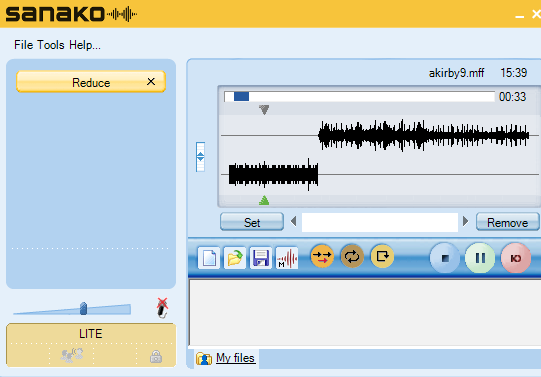
- In the Sanako light recorder, we can see the audio inserted in the 2nd track (lower) in the voice graph:

- Is this a licensing restriction? No, even the free light recorder can do this. See here for the installation options to choose when running the studentrecorder.exe on the teacher computer.
- Investigating… Update:
- Must be demonstration effect, as voice insert works fine on my office computer, as expected and it had before.
- Will try the usual suspects when getting my hands on this computer again (refresh, restart, reinstall, replace hardware…)…



Questions? Read the About. Or just ask me a quick Our Databases: Resources with calendars -- Language learning material Moodle Sites, multimedia files -- films


FAQs for LRC student staff or for students or for teachers. To search our FAQs, in the browser addressbar, add after "https://plagwitz.wordpress.com/feed/?tag=faqs+/" "+TAG1" (from tag cloud below) OR "https://plagwitz.wordpress.com/feed/tag=faqs
&category_name=" "CAT1" (from category hierarchy below). OR search both categories and tags, and multiple TAGs/CATs (connect with "," for OR-search, with "+" for AND-search), like so: https://plagwitz.wordpress.com/feed/?tag=TAG1+TAG2+...TAGn&category_name=CAT1
+CAT2+...CATn"
Other ways to find help
If you cannot find it here, look there: 5,500 Language-Learning Links and Programs for learning or teaching 150 languages
Shortcuts:Our Lists, Our Maps, LRC Staff Moodle Site,LRC Project Moodle Site, 49erexpress, UNCC Moodle, Student Recordings: s:claslcslrcsanakostudent
Learning usage samples: Sanako oral exam, Kaltura webcam presentation, Dictation with speech recognition, Sanako written exam, Chinese and Japanese interactive stroke-order practice
Test the Sanako Installer, Webbrowser Popup Konfigurator for XP, or Windows7, faster LRC TeacherPC Log-in Let MS facilitate diacritics writing by installing for you US-International keyboard layout
This is my personal blog (Google+). The views expressed on these pages are mine alone and not those of my employer. The information in this weblog is provided “AS IS” with no warranties, and confers no rights.
 Thomas' Work Space