Archive
Languages & Culture Studies Film Collection: Pivot Table and Labeling System
We analyzed the film collection for diversity and media, by setting up a pivot table (the underlying spreadsheet is getting updated currently, but is current enough for an overview), snapshot:
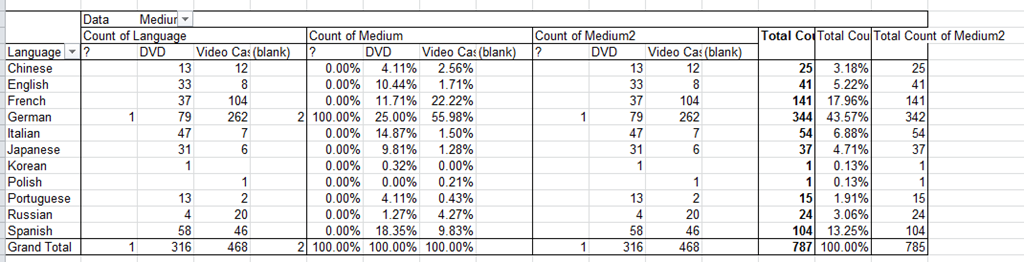
You can make your own analysis at S:\plagwitz\labconfig\spreadsheets\film-collection\film-collection.xlsx. (temporary location). The sheet also contains the new labeling system to facilitate locating videos:
|
IN |
From |
To |
Language |
|
AR |
0001 |
0400 |
Arabic |
|
CH |
0401 |
1400 |
Chinese |
|
EN |
1401 |
2400 |
English |
|
FA |
2401 |
2500 |
Farsi |
|
FR |
2501 |
3900 |
French |
|
GR |
3901 |
5300 |
German |
|
IT |
5301 |
5700 |
Italian |
|
JP |
5701 |
6700 |
Japanese |
|
KO |
6701 |
6900 |
Korean |
|
PL |
6901 |
7000 |
Polish |
|
PT |
7001 |
7200 |
Portuguese |
|
RU |
7201 |
7400 |
Russian |
|
SP |
7401 |
9400 |
Spanish |
|
SW |
9401 |
9500 |
Swahili |
|
OT |
9501 |
10000 |
Other |
Webswami, a Moodle-compatible language learning platform for self access (homework, asynchronous distance learning)
What about improving language learning through technology during homework activities?
“The greatest strength of WebSwami lies in the seamless support it provides for doing audio/visual-based tutorial activities within an existing course management system, thus allowing anywhere/anytime access for lesson designers, instructors, and students alike. Its student record keeping system, in particular the integration [duplication] of a grade book with direct access to student responses and the support it provides for multimedia response feedback, far surpasses what is available in any other virtual learning environment. Most important, it manages all of this through well established, reliable, web browser and Flash software coupled with ubiquitous, inexpensive web camera hardware.” (review by Jack Burston for CALICO (pay-link, ask me for access); see also also the freely accessible review by İlhan İnçay).
Authoring and managing authored materials is not an easy task, but gives more flexibility than using textbook provided materials. WebSwami promises the possibility of exchanging learning materials through a materials bank.
View a recording of a recent WebSwami Online Demo.
Examples of Quizzes based on MS-Word template
You can view a series of examples for formative assessments, used during face-to-face teaching (German) settings, in this screencast: .
.
How to use the MS-Word Quiz Template (and the MS-Excel subtitles spreadsheet)
How to make formative assessment quizzes for face-to-face teaching settings like in the examples here?
Part I: quiz_dot_create_excel: Watch a screencast on How to ready target language subtitle source material for the quiz template
|
0,00 |
Working with subtitle material from the source: time coding is not correct
1,40
spreadsheet formulae can fix the subtitle time codes
2,00
why using DVD chapters as learning units
2,20
filtering on chapters in the DVD
3,00
ready to copy paste the filtered learning unit text data into the quiz template
Part II: Watch a screencast on How you can apply your pedagogy with ease to a text and transform the same to a quiz, and how the student benefits from both
|
0,00 |
start quiz from word template (on file share)
0,35
paste text data, e.g. for listening comprehension, e.g. from target language movie subtitles
1,15
create markup from pedagogy
3,14
generate quiz from markup : parenthesis 1 {helpful hint}, parenthesis 2 [correct answer]
3,35
closing and saving the quiz, receiving a summary
3,55
create a backup
4,00
open the quiz to test the quiz from student perspective
4,30
what opening information the student receives
5,00
how the student inputs answers and receives feedback
5,20
language learning lookup menu , after pausing the quiz
6,30
or double-click words to look them up in the default dictionary for the set language
7,10
how the student resumes the quiz
7,20
how the student closes the quiz
Part III: Watch a screencast on How you can revise your pedagogy
|
0,15 |
open the quiz, enable macros
0,30
unprotect the quiz
0,45
office 2003: tools / macros / macros
1,00
now you can edit your pedagogical markup
1,10
regenerated the altered quiz
eRepository: How to manage multimedia learning materials? Maybe with ShareStream
Target language audio and video materials – as well as other textual, multimedia and/or interactive materials – are crucial assets (and should become “reusable learning objects”) in learning centers – how best to manage them?
I have worked for a number of HE institutions, up to the very recent past, that charge their students between $30.000 and $40.000 per year, while their learning materials handling in the learning center consisted of what DVDs and VCR tapes fit into a shoe carton, for a lab assistant to frantically browse through when faced with a learner or teacher request for materials. Not to mention teachers spending inordinate amounts of time scanning stacks of make-believe VCR and DVD “libraries” in the learning center.
I have blogged here before about various solutions that attempt to remedy this: from home-baked stop-gap measures to the introduction of eRepository offerings for digital asset management.
If you are familiar with these issues, you will understand that I am eagerly looking for better help with managing multimedia learning materials. ShareStream claims to provide a turnkey solution addressing these needs. Its architecture – according to the Tulane pilot – consists of a ShareStream server which serves as eRepository and metadata catalogue, a streaming server, and an encoding server (for lecture-capture: YAT (“yet another tag”)). ShareStream also integrates with the Blackboard LMS.
Have a look at the demo of the pilot at Georgetown University which they gave during MAALLT 2010 and which they now also offer workshops on. One interesting thing I figured out during the question period is that they avoid breaking the Digital Millennium Act when digitizing copy-protected DVD materials by capturing to digital only the analog AV output of a DVD – a reminder that a reform of copyright is sorely needed.
Language-Learning-Audio-Stretcher II: Samples
What does the Language-Learning-Audio-Stretcher introduced in an earlier blog post do to an audio file you feed in?
For illustration purposes, let’s have a look at a segment of a news broadcast. The example is(taken from the daily Langsam gesprochene Nachrichten by Deutsche Welle: a nice service of slowly spoken news for language learners – in my experience, however, not spoken slowly enough for North-American German students.
This timeline (X axis) shows what a computer program has automatically detected as pauses of varying length (Y axis) in the audio. Depending on a (safety) threshold which the user sets (manually, or, from experience, stored and loaded from a configuration file) in the dropdown boxes of the lower dialogue, the program attacks pauses from a certain threshold value up only: 
The segment below consists of a single sentence about peace negotiations with North Korea. It is shown in the following screenshot.

- 1: transcript of the original audio file
- 1a: audio graph of the original audio file
- 2: transcript of the stretched audio file. A new line in this transcript represents a pause inserted by the software.These pauses should aid language students in review the utterance last heard in memory, and hopefully parsing it correctly.
- 2a: audio graph of the stretched audio file.
- 2b: note: non-flat audio is stretched
- 2c: note: flat lines show the pauses inserted, on top of stretching the audio.
Hearing is believing:
- segment original audio:
- the same segment in the stretched audio:
This software can be applied to any of numberless public domain audio books (see Project Gutenberg or Wikipedia, audio books, as well as other free audio book sources) in mp3 or wma format (other formats can be converted). It can also can be applied to commercial audio books, if you have proper licensing.
The software comes with many options that allow you to tweak the output to your liking and needs, see prior blog post.
How to make screencasts in animated GIFs for free
If you want a persuasive web (blog) documentation solution for the most casual, time-pressed users and which is supported on the widest possible range of platforms;
and if you are lucky enough to work in environments where it is not the base infrastructure that forms the bottleneck (as this solution is not bandwidth optimized):
then even in the day of Flash 10, Silverlight 4 and HTML5, you might give some consideration the age-old animated GIF.
What you can visualize with animated GIFS will remain basic. But if the basics are what needs fixing, this approach can have remarkable benefits (think low-end, high-gain of the graph for “law of diminishing returns”).
I have been looking for a while for a “soup to nuts” write-up how to do this easily and for free, and experienced am unusually high noise to signal ratio. This is why I want to point to the following article that seems to fit the bill nicely:
http://omaralzabir.com/how-to-make-screencasts-in-optimized-animated-gif-for-free/
The author persuasively combines CamSoft, ImageMagick and the Microsoft GIF Animator.
An example to follow here.
Language-Learning-Audio-Stretcher
Time-stretched (-expanded or -slowed, versus, after “negative stretching”, sped-up or “compressed”) audio is of obvious benefit to language learners during listen comprehension skill training exercises, as well as other audio-lingual activities (commonly associated with non- or virtual (online) “language labs”) and an affordance of digital audio media.
As well as compressed audio, especially for repetitive audio-lingual exercises, beyond the obvious possibility of fitting more content into the same time frame since “listeners can process at a much higher rate than normal conversational speech, with some loss of comprehension” (see Roby (1996), Auditory Presentations and Language Laboratories. Handbook of Research on Educational Communications and Technology, 821-850).
Roby, W.B. (2004). Technology in the service of foreign language teaching: The case of the language laboratory. In D. Jonassen (ed.), Handbook of Research on Educational Communications and Technology, 523-541, 2nd ed., 526f. summarizes language learning applications of the “technical advance [of the] speech compressor–expander. This device allowed a recording to be sped up(com-pressed) or slowed down (expanded). Articles on this technology were numerous in the general educational literature from the start of the decade. Sanford Couch (1973),a professor of Russian, advocated its use. Paradoxically, it was not until 1978 that anything on speech compression appeared in the NALLD Journal (Harvey, 978). One would have expected a greater enthusiasm for this feature among language laboratory professionals. The ability to slow down a tape would seem to be a boon to students struggling with a difficult passage. Moreover, variable speed technology was not unknown in foreign-language / teaching, for Hirsch 1954) had commended the use of the soundstretcher (p.22) in the early 1950s. “

The application pictured above simplifies common audio-material producing tasks involving slowing or speeding up (or both) digital audio, with a twist: It allows for pauses being stretched more than non-pauses, thus remediating the common disadvantage of common time stretching applications that – even though pitch is now routinely maintained when altering the speed of digital audio – the result can remind one of drunk speak.
I hope this will help you use more of the many authentic foreign language audio materials available free on the internet.


Questions? Read the About. Or just ask me a quick Our Databases: Resources with calendars -- Language learning material Moodle Sites, multimedia files -- films


FAQs for LRC student staff or for students or for teachers. To search our FAQs, in the browser addressbar, add after "https://plagwitz.wordpress.com/feed/?tag=faqs+/" "+TAG1" (from tag cloud below) OR "https://plagwitz.wordpress.com/feed/tag=faqs
&category_name=" "CAT1" (from category hierarchy below). OR search both categories and tags, and multiple TAGs/CATs (connect with "," for OR-search, with "+" for AND-search), like so: https://plagwitz.wordpress.com/feed/?tag=TAG1+TAG2+...TAGn&category_name=CAT1
+CAT2+...CATn"
Other ways to find help
If you cannot find it here, look there: 5,500 Language-Learning Links and Programs for learning or teaching 150 languages
Shortcuts:Our Lists, Our Maps, LRC Staff Moodle Site,LRC Project Moodle Site, 49erexpress, UNCC Moodle, Student Recordings: s:claslcslrcsanakostudent
Learning usage samples: Sanako oral exam, Kaltura webcam presentation, Dictation with speech recognition, Sanako written exam, Chinese and Japanese interactive stroke-order practice
Test the Sanako Installer, Webbrowser Popup Konfigurator for XP, or Windows7, faster LRC TeacherPC Log-in Let MS facilitate diacritics writing by installing for you US-International keyboard layout
This is my personal blog (Google+). The views expressed on these pages are mine alone and not those of my employer. The information in this weblog is provided “AS IS” with no warranties, and confers no rights.

