Archive
Archive for the ‘Genre-is-any’ Category
Calendaring: How to view all your Moodle course assignments in Ninermail, OWA or MS-Outlook – Short version
2011/11/21
2 comments
- In Moodle:
- With Firefox (3.6 here), go to Moodle Calendar: https://moodle.uncc.edu/calendar/view.php?view=upcoming&course=1
- Right-Click on
 and choose “Copy Shortcut”: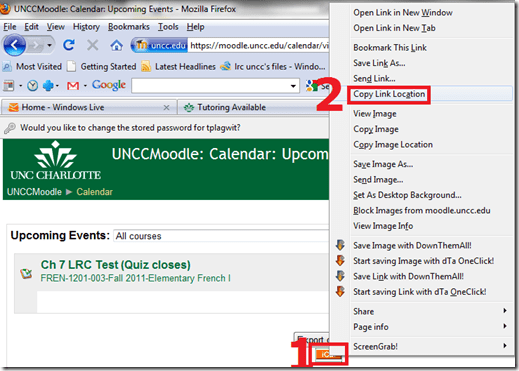
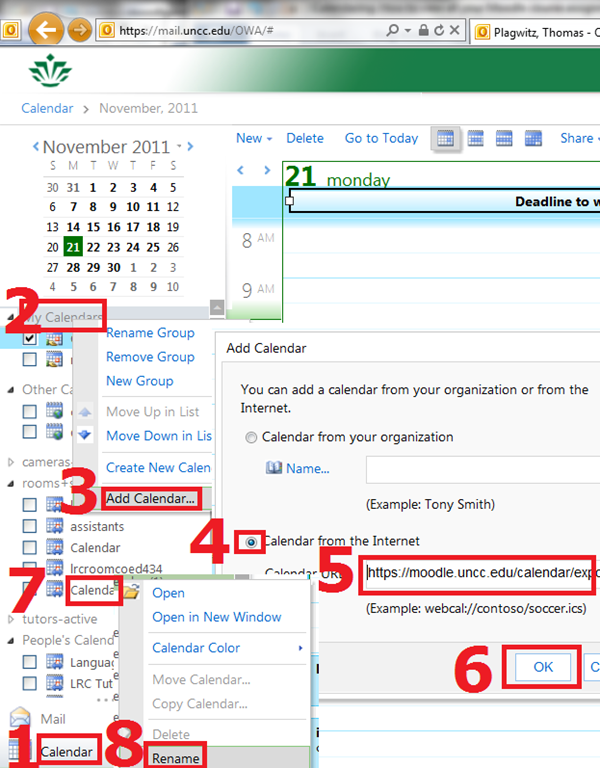
- In Ninermail/OWA: click “Calendar”, right-click “My calendars” , click “Add calendar’, click radio-button “From internet”, paste URL you put in clipboard into textbox, click button “OK”, right-click calendar added, click “rename” and call it “Moodle”

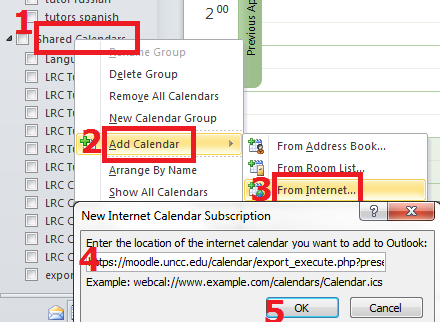
- Alternatively, in Outlook Desktop: go to “calendars”, right-click “shared calendars” , click “add calendar’, click “from internet”, paste URL you put in clipboard into textbox, click button “OK”, right-click calendar added, click “rename” and call it “Moodle”

- Want a longer explanation?

Categories: audience-is-students, audience-is-teachers, documentation, lms
calendaring, moodle, ms-outlook, OWA
How to run Windows Media Center during a Remote Assistance Session
2011/11/20
Leave a comment
-
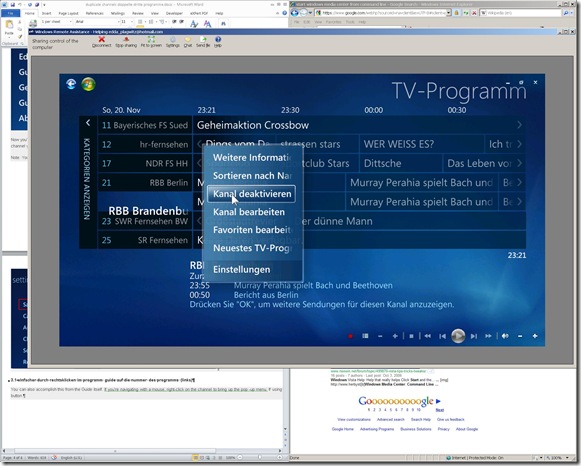
The /gdi switch for Windows Media Center allows for operating Windows Media Center full screen during
-
Windows Live Messenger Remote Assistance sessions if you have to help a relative over the internet.
-
Should also work in MSTSC Remote Desktop sessions if you manage media with Windows Media Center on your work network.
-
-
You can combine the above switch e.g. with the program guide shortcut to go directly there: /homepage:VideoGuide.xml /PushStartPage:True
-
Put the following in the “Target” field of your shortcut that you start on the remote computer (running Windows7 32-but here) during your remote assistance session:
-
%windir%\ehome\ehshell.exe /nostartupanimation /gdi /homepage:VideoGuide.xml /PushStartPage
- Voilà, or rather: “Dem Inschenör ist nichts zu schwör”.

Categories: documentation, e-infrastructure, Media
7, ms-live-messenger, ms-windows, mstsc, remote-assistance, windows-media-center
How to use the online Spanish pronunciation help to generate phonetic alphabet transcriptions and text-to-speech
2011/11/18
Leave a comment
- Go to http://showroom.daedalus.es/es/tecnologias-de-la-lengua/phonetictrans/phonetictrans.php, enter your text, select your phonetic symbol set:
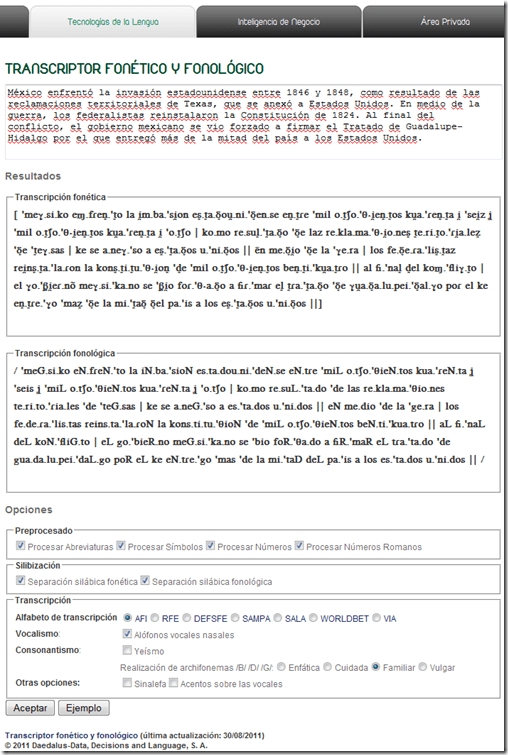
- Unlike with the Portuguese help, there is no text-to-speech option here.

Troubleshooting the wireless headsets in the TV viewing area
2011/11/18
Leave a comment
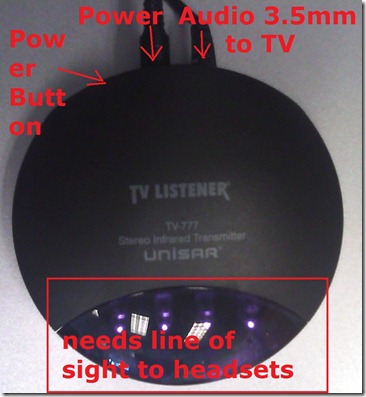
- For lack of small group work areas, the 3 headsets help sharing the LRCROOMCOED433. They amplify the sound for the TV viewing audience, allowing to turn the TV volume down so as not to disturb other users in the shared area.
- No sound?
- headsets turned on?
- headset volume turned up?
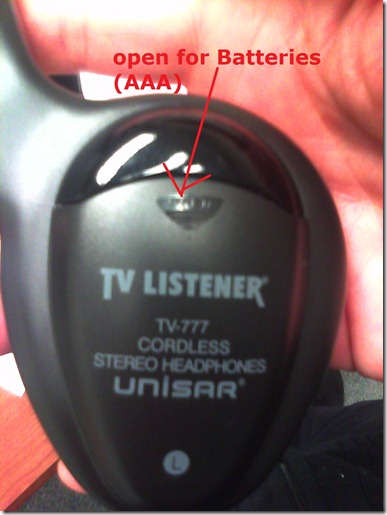
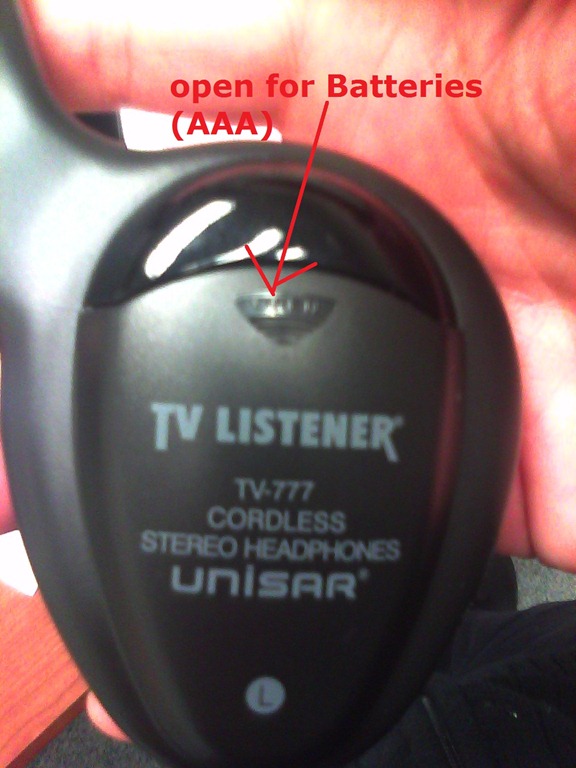
- headsets batteries dead?
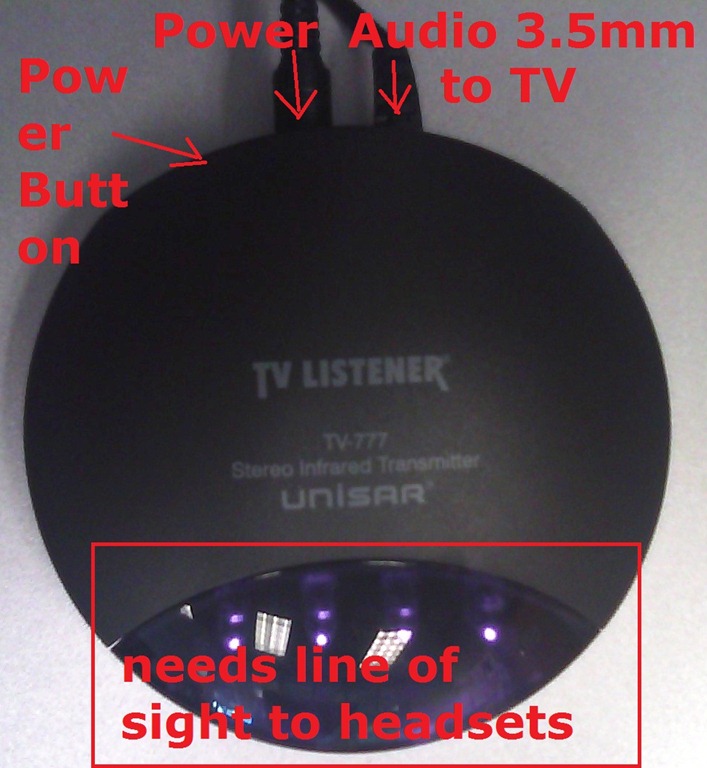
- transmitter turned on?
- Static noise on headsets?
- headsets batteries weak?
- no line of sight to transmitter?
- Other things you can try:
- a different headset. We have 3.
- a different transmitter. We have 2.
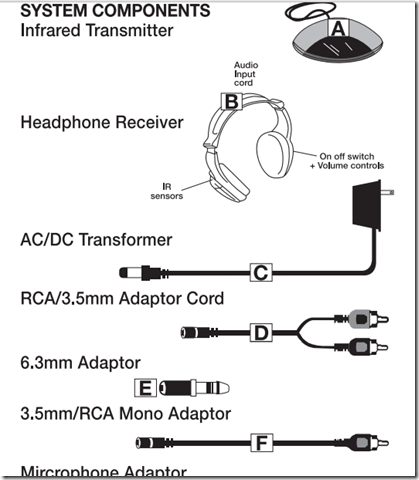
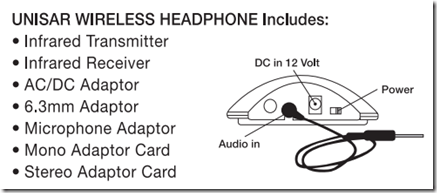
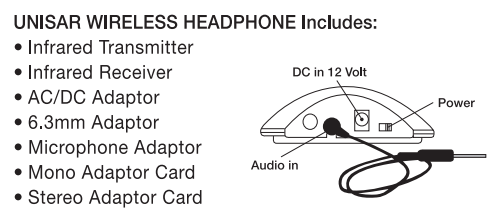
- An image says more than 1000 words:





More printing problems in the LRC: How to deal with student swipe card not being read
2011/11/16
Leave a comment
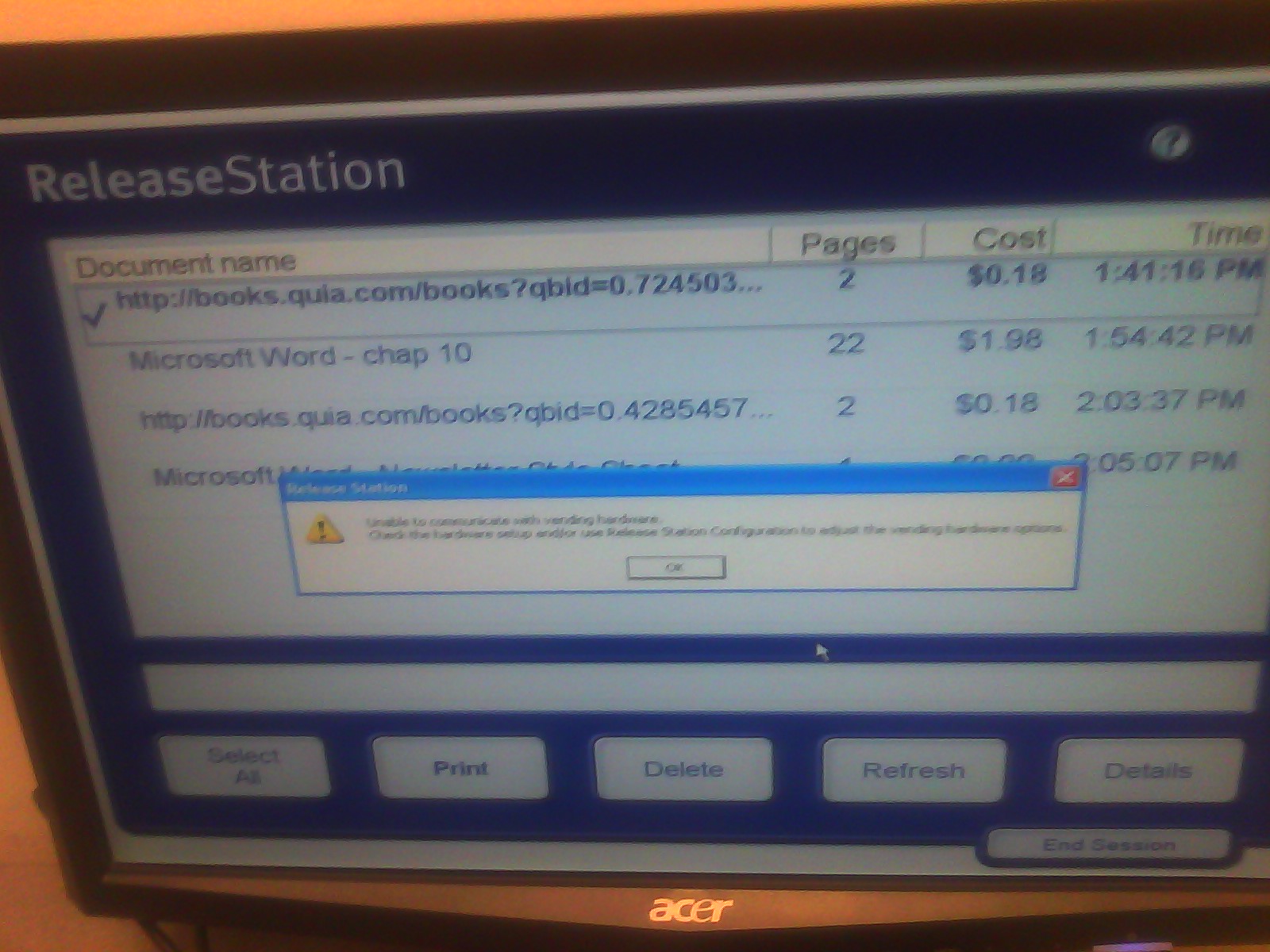
- Problem: You get this error message "Unable to communicate with vending hardware" (when student swipes the student id card):

- Things to try: Try first restarting the print release station computer (How?). If this does not help, in the past, this has indicated campus-wide problems. Call the HELPDESK to find out more. If they confirm, post a warning note for students on the print release station.
How students access language learning materials on the Library ereserves system
2011/11/11
Leave a comment
- Note the important update in red below.
- This has been tested at post date with Firefox. ereserves seems to be not compatible with Internet Explorer 8: i

- On the Library home page, from the top menu: “Research & Course Help”, choose menu item: “Course Reserves” (or, if this menu changes again, I have a hunch that deeplinking may be more stable: http://library.uncc.edu/caos/coursereserve, what’s in a URL…),
- sign in with your Ninernet ID,
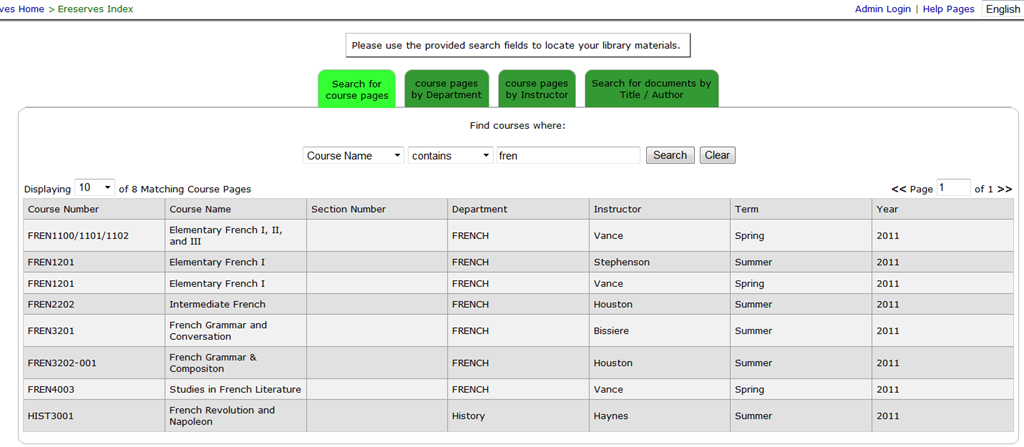
- enter search term
- select from the dropdown “search by name”, an enter part of your course name in the textbox,
- or click on tab:”Course Reserves Pages by Instructor”, and from the dropdown, select your instructor,
- click search,
- then select your course from the results grid.

- Enter the password, which has been given to your by your instructor.
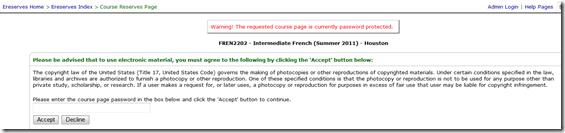
- In the results grid, click on the desired chapter and tracks. Note: You need to disable your web browser”s “popup blocker”.
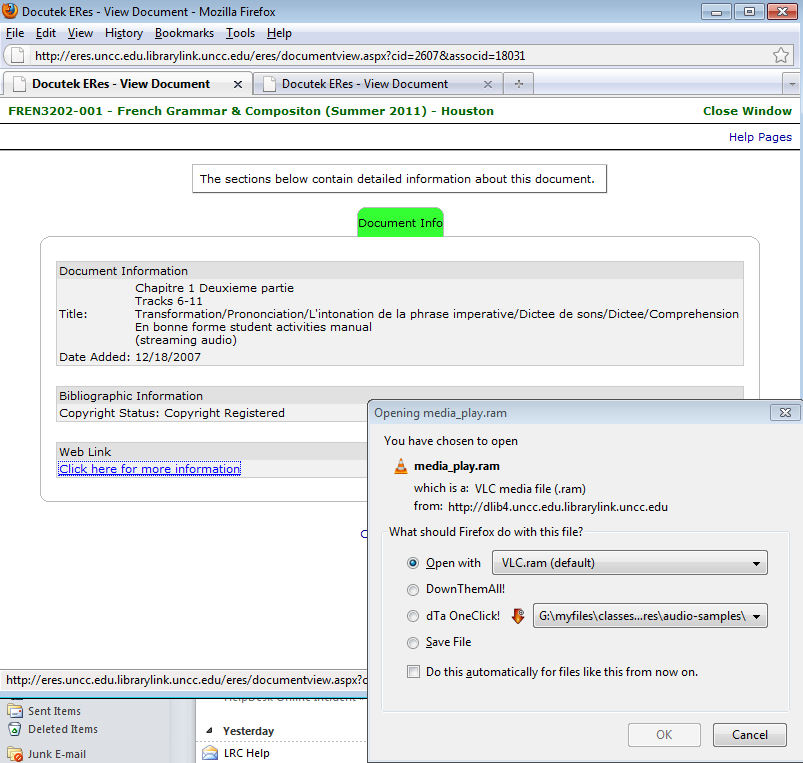
- In the popup window, click on link: “More information”,
- when offered, , like in this screenshot:
- you cannot save the file, or rather: only a text file with links to the audio which you cannot play, like rtsp://dlib4.uncc.edu:554/e_reserves/CD1bonneforme12-16.rm). That is by design.
- Instead of trying to save, select to “open” the file. You need have a streaming audio playing software installed, like Real Player or the open source VLC-Player.
- instead of VLC, as offered by default, like so :

- choose “Open with”, “Other”, pick “RealPlayer” from the list, like so:

- Here is a more on what does not work with ereserves. The only combination I could get to work with eReserves streaming audio is – see resulting screencast (requires Windows Media Player) of streaming a long file successfully – is RealPlayer 14, Firefox 3.6 on Windows XP3, and that only after resetting the Winsock catalog which I can do for the entire LRC only nownext time the lab is reimaged. For now, use instead audio from Moodle metacourses where possible.



Streaming Problems with Realmedia via RTSP from ereserves with VLC Player (and Internet Explorer. And NetOp School)
2011/11/10
Leave a comment
- VLC-player
- version 1.1.9, but also currently newest 1.1.11 as well on Windows CXP SP 3
- opens from IE8 and Firefox 3.6
- but is not able to play files (tested even multi) through. Rather, it nicely falls on its face, with the audio stream simply appearing to stop, mid-sentence, after 2:38 (pretty consistently – a buffering bug? A great way to slip through pre-testing).
- In the LRC, I could hardly bring the taskswitcher up, let alone (15 minutes of waiting) the task manager, to even find that vlc.exe is the culprit, with a CPU utilization of 99% solid (Ouch!).

- Not quite so bad in the office computer where it hovered slightly above 25%, maybe busying only one CPU core.

- My Google searches do not find anything quite similar.
- RealPlayer 14 to the rescue?
- In IE8, RealPlayer does not open when clicking on the web page link with the RM file which causes a dialogue to open if VLC-player is the default player, rather a strange unplayable content error..

- In Firefox, RealPlayer open and plays (and pre-buffers) the stream completely.

- Note that ereserves “download as zip” cannot serve as a workaround: gives you only the links like http://dlib4.uncc.edu/streaming/media_play.php?file=9364cb66b9e1cae26aed0f471e9eab5b, which require you to re-authenticate, even if in the same browser session, and do not redirect to the resource, neither audio nor web page form which you could launch the audio (in short, I do not get what this download as zip is good for)
- Next Problem: This may work on my office computer. In the lab we have NetOp School installed. That adds another layer of NetOp School problems which look like they can be resolved
next time the lab is reimaged. For now, use instead audio from Moodle metacourses where possible.next time I get around to design and run a Symantec-Ghost Software and File Action on the computers (all LRC lab PCs) and test the result (on PC10) which was now.


Netop: Nhstconf.ndb update/locking error
2011/11/10
Leave a comment

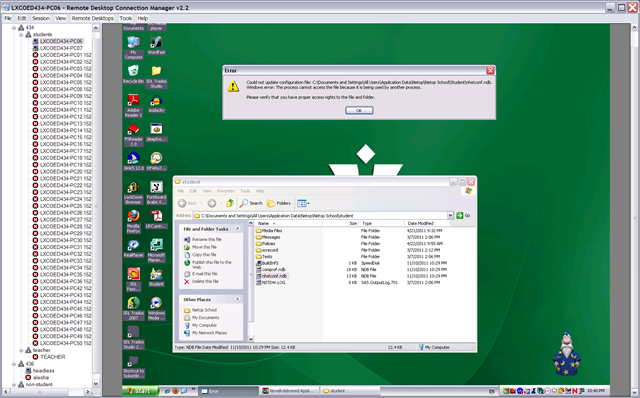
Categories: audience-is-IT-staff, e-infrastructure, Glitches&Errors
netop-school


Questions? Read the About. Or just ask me a quick Our Databases: Resources with calendars -- Language learning material Moodle Sites, multimedia files -- films


FAQs for LRC student staff or for students or for teachers. To search our FAQs, in the browser addressbar, add after "https://plagwitz.wordpress.com/feed/?tag=faqs+/" "+TAG1" (from tag cloud below) OR "https://plagwitz.wordpress.com/feed/tag=faqs
&category_name=" "CAT1" (from category hierarchy below). OR search both categories and tags, and multiple TAGs/CATs (connect with "," for OR-search, with "+" for AND-search), like so: https://plagwitz.wordpress.com/feed/?tag=TAG1+TAG2+...TAGn&category_name=CAT1
+CAT2+...CATn"
Other ways to find help
If you cannot find it here, look there: 5,500 Language-Learning Links and Programs for learning or teaching 150 languages
Shortcuts:Our Lists, Our Maps, LRC Staff Moodle Site,LRC Project Moodle Site, 49erexpress, UNCC Moodle, Student Recordings: s:claslcslrcsanakostudent
Learning usage samples: Sanako oral exam, Kaltura webcam presentation, Dictation with speech recognition, Sanako written exam, Chinese and Japanese interactive stroke-order practice
Test the Sanako Installer, Webbrowser Popup Konfigurator for XP, or Windows7, faster LRC TeacherPC Log-in Let MS facilitate diacritics writing by installing for you US-International keyboard layout
This is my personal blog (Google+). The views expressed on these pages are mine alone and not those of my employer. The information in this weblog is provided “AS IS” with no warranties, and confers no rights.

