Archive
First results with MS-Calendar Analytics for learning center management
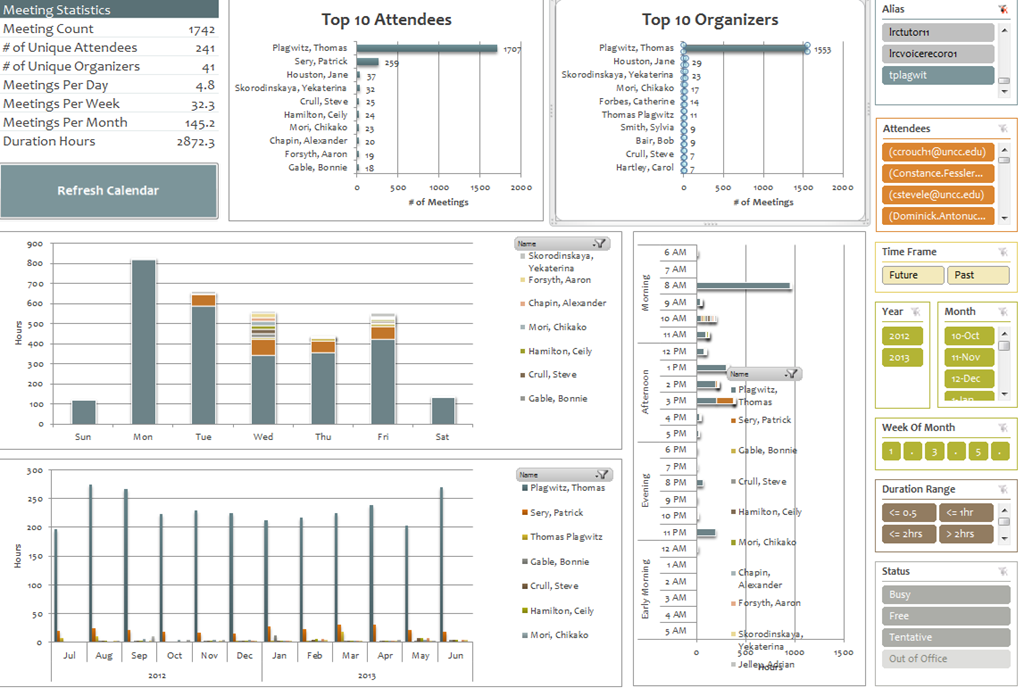
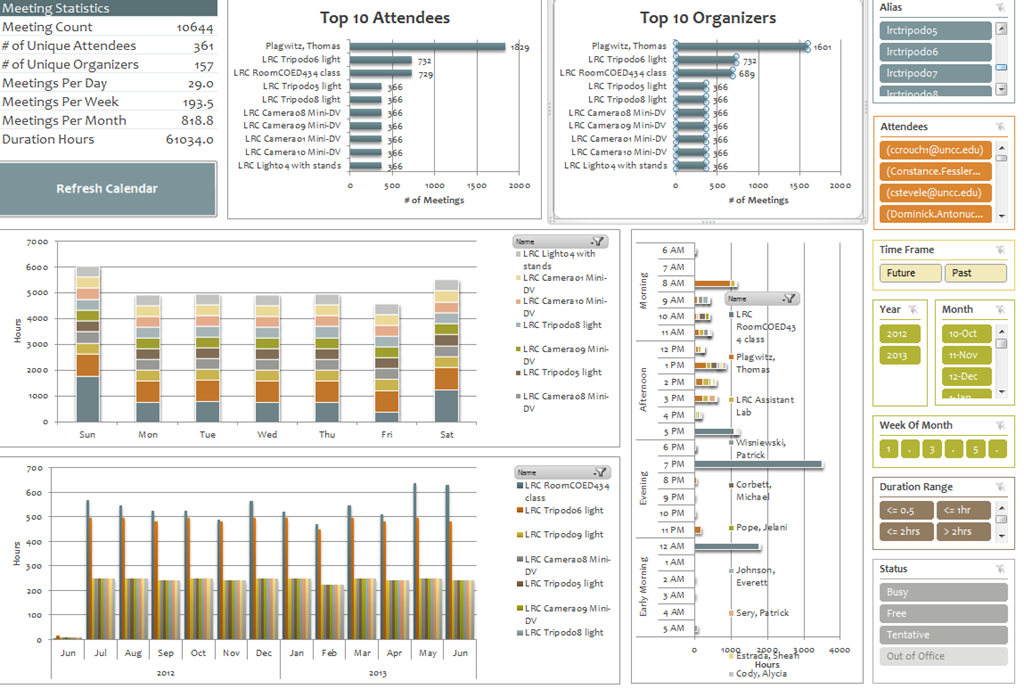
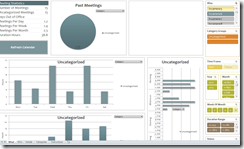
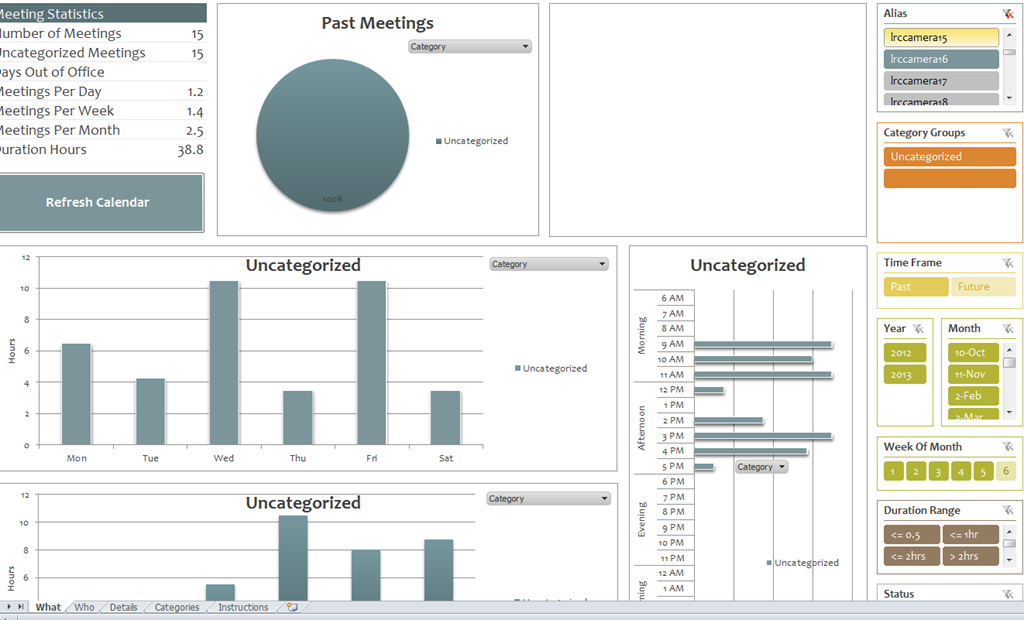
- You can use the controls on the right to drill into the detail by selecting one or more
- Aliases,
- Attendees,
- Time periods
- Status.
- The graphs on the left and in the center will automatically reflect your selection on the right.
- These results lead to more questions. E.g. why is this tripod so popular?

-
Lesson learnt: Now it comes back to haunt us that we block broken or MIA equipment from users attempting to book it by making it look “busy” with an 24/7 “Appointment“. However, It should however be possible to filter out such appointments, versus “meeting requests”.
-

First steps with MS-Calendar Analytics
- After installing Calendar analytics (and, if you do not already have it, PowerPivot), open the Calendaranalytics spreadsheet from your desktop and click on “Refresh Calendar”.
- “Enter your full email address. Users with more than 1 email address may need to try each of them.”


- “Enter a start date and end date for the timeframes for the Dashboard to reflect”/
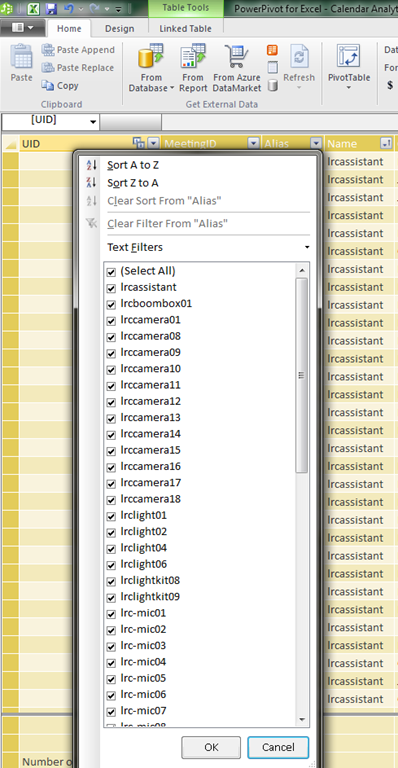
- “The interface will prompt you for the user’s aliases to add. You can add multiple.”
- “Type in users’ aliases of whom you have permission (i.e. “Full details”) to access their Outlook calendar and click Add”
-

- Do not use the fully qualified email address for the alias, or else:

- You cannot comma delimit (so AutoIt to the rescue).

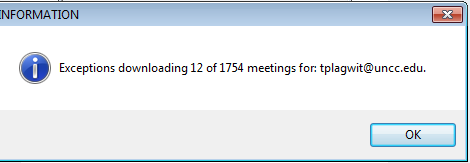
- You can continue after such a non-fatal error:


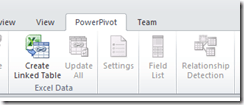
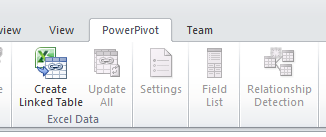
- Is your “Update all” greyed out ? Restart Excel.

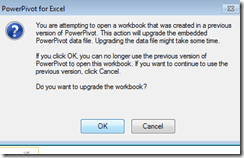
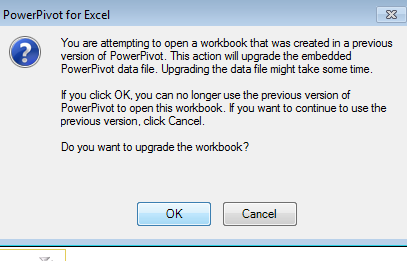
- Accept the offer to upconvert:
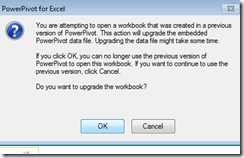


- Update all becoame available after restart of excel, even with download exceptions – maybe the unsaved update of the spreadsheet form powerpivot 1 was the root cause ?
- Not that here upconversion to the new powerpivot version does not “take”:

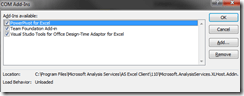
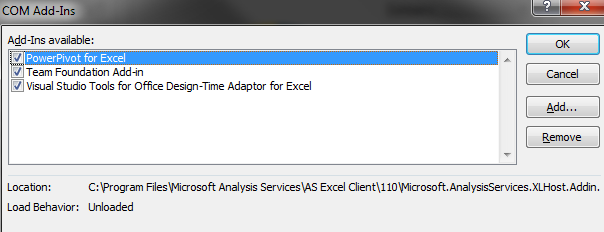
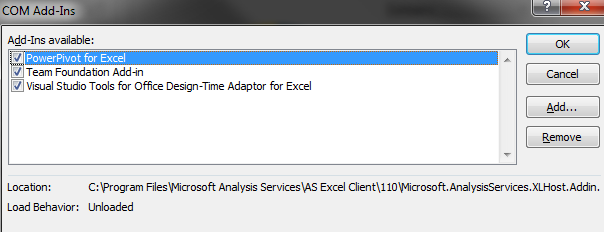
- If after a restart of excel your powerpivot tab on the ribbon does not show, reenable the powerpivot addin.
- How to reenable: excel file/ options / select dropwdown: addins, button:go, check the Checkbox in front of powerpivot:
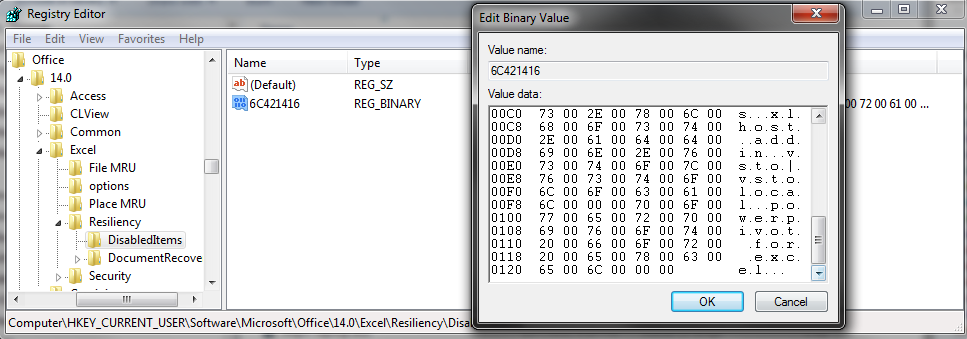
- What if even after a restart of excel, this does not “take”? See whether in the registry the key CURRENT_USER\Software\Microsoft\Office\14.0\Excel\Resiliency\DisabledItems contains the path to your powerpivot add-in,like here:
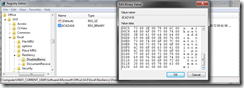
- Delete the key and restart excel, your powerpivot ribbon tab =should be back. Hope this will last?
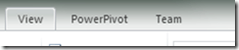
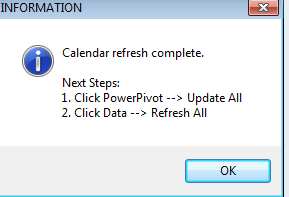
- Now updating does something:

- This opens the powerpivot window with the meeting data collected fro mms-exchange:
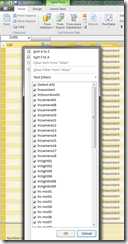
- Which can be interactively: visualized in the calendaranalytics sheet
- More results here.









How to workaround SkyDrive embed codes not working WordPress.com
- Problem: I cannot seem to get the new embed code that SkyDrive offers now to work on wordpress.com.
- Cause: No idea. Guess somebody did not get the memo? Hope it is not me.

- Workaround:
- Old skydrive embed code still works in wordpress (E.g. https://thomasplagwitz.com/tag/lists+resources/), but is a completely different syntax than what skydrive offers for embedding now (insert office code into [] to try it out):
- office width="750" height="1300" src="http://r.office.microsoft.com/r/rlidExcelEmbed?su=10634757809471938&Fi=SD25C841818181C2!126&kip=1&AllowTyping=True&Item=Table2&wdHideGridlines=True&wdDownloadButton=True"
- However, you can still convert the current embed into the old one:
- by inserting the new parameter values into the old ones:
- "cid" becomes "su" and
- "resid" becomes "Fi" .
- This example successfully embeds into a WordPress.com code now. (insert office code into [] to try it out):
- office width="750" height="1300" src="http://r.office.microsoft.com/r/rlidExcelEmbed?su=4FA3329905D7E1CE&Fi=4FA3329905D7E1CE%2162359&kip=1&AllowTyping=True&Item=Table2&wdHideGridlines=True&wdDownloadButton=True"
- No we seem to have been here before, so we shall see how long this workaround lasts.
Status of the language lab and purpose of the LangLabEmailer
- Status of the language lab: Modern language labs – digital audio labs with integrated computer classroom management systems, like the Sanako Lab 300 and Study 1200 –
- are great tools for driving the use and benefit of computer technology into the face-to-face language teaching classroom,
- but for years have been sorely lacking integration with the rest of the digital campus workflow, mostly through the web-based LMS
- Sanako once had a Blackboard integration that allowed to bring media files stored in Blackboard to the file, but not upload student assessments into the gradebook.
- I once ran a Sanako Lab 100 that acknowledged that need by providing USB thumb drives for students, and a mechanism to load class recorded files to them at the end of class.
- Online components being developed by language lab vendors seem to be lacking the face-to-face teaching component.
- Synchronous distance education software (like Adobe Connect, Blackboard Wimba, or Saba Centra) – if not just used like a giant loud speaker in supporting lecture presentations, interspersed with calling up individual students for responses – seems currently best positioned to bring some of the benefits of computer technology to the synchronous teaching arena, but in a different (not applicable to what is still the non-distance norm in language instruction), actually more challenging non-face-to-face setting, and – first and foremost – without special consideration (and tools, like a remote controllable dual track recorder) for language learning.
- Purpose of this software:
- The LangLabEmailer combines knowledge of
- how teaching and learning is done in modern language departments
- including common issues in the lab (late students)
- needs outside the lab
- grading from home
- documenting longitudinal language development for eportfolio initiatives
- how (some: you can help us!) digital audio labs save assessments,
- how AD tracks ownership,
- how MS-Exchange can be automated.
- how teaching and learning is done in modern language departments
- in order to
- let the language lab classroom activities (summative assessments, but also formative in the widest sense made so easy by digital audio labs) break out of their isolation in the lab and enter the learning workflow,
- by automatic immediate (we have set to 16 times daily) distribution of assessment files (recordings and writing)
- to teachers
- and – without or with added teacher feedback, including aural – to students via campus email ;
- in 30000 digital audio lab equipped classrooms in the world
- minus the ones that do not have MS-Exchange infrastructure
- plus the ones from other vendors than Sanako – for the above number of classrooms is from SANAKO –, if you share your lab’s configuration back.
- The LangLabEmailer combines knowledge of
- Next: Features. Or Langlabemailer (table of contents).
PostEditorStorageException when publishing from Windows Live Writer on new DELL
Not always, but more and more often – anybody else seeing this?
Version: 16.4.3508.205
OS Version: Microsoft Windows NT 6.1.7601 Service Pack 1
Runtime version: 2.0.50727.5466
Shutdown started: False
Program: "C:\Program Files (x86)\Windows Live\Writer\WindowsLiveWriter.exe"
Memory Load: 83%
Total Physical: 8146 MB
Available Physical: 1375 MB
Total Page File: 16291 MB
Available Page File: 9137 MB
Total Virtual: 2047 MB
Available Virtual: 1618 MB
Available Extented Virtual: 0 MB
Unexpected Error Occurred
An unexpected error has occurred within the application.
WindowsLive.Writer.PostEditor.PostEditorStorageException: Error Accessing Local Post – Unexpected error occurred while accessing local post (-2147287008)
Share violation–storage may already be opened.
at WindowsLive.Writer.PostEditor.PostEditorFile.SaveCore(IBlogPostEditingContext editingContext, PostEditorFile autoSaveSourceFile, String filePath)
at WindowsLive.Writer.PostEditor.PostEditorFile.SaveBlogPost(IBlogPostEditingContext editingContext)
at WindowsLive.Writer.PostEditor.BlogPostEditingManager.PrePublishHooks(Object sender, PublishEventArgs args)
at WindowsLive.Writer.PostEditor.UpdateWeblogProgressForm.OnShown(EventArgs e)
at System.Windows.Forms.Form.CallShownEvent()
at System.Windows.Forms.Control.InvokeMarshaledCallbackDo(ThreadMethodEntry tme)
at System.Windows.Forms.Control.InvokeMarshaledCallbackHelper(Object obj)
at System.Threading.ExecutionContext.runTryCode(Object userData)
at System.Runtime.CompilerServices.RuntimeHelpers.ExecuteCodeWithGuaranteedCleanup(TryCode code, CleanupCode backoutCode, Object userData)
at System.Threading.ExecutionContext.RunInternal(ExecutionContext executionContext, ContextCallback callback, Object state)
at System.Threading.ExecutionContext.Run(ExecutionContext executionContext, ContextCallback callback, Object state)
at System.Windows.Forms.Control.InvokeMarshaledCallback(ThreadMethodEntry tme)
at System.Windows.Forms.Control.InvokeMarshaledCallbacks()
What are the features of the LangLabEmailer?
- Ver 1.0.1.0
- emails as attachments new (hitherto unsent) audio recording or writing assessment or assignment files from the language lab student collection file share to originating student and teacher
- attempts to automatically
- skip sending small files created during microphone and similar systems tests
- reroute email address for files of late students that have been collected under teacher login (simple delimited list, manually editable), but renamed to valid address
- reroute files that have been sent under position number rather than student names (including at least to one student of a student pair or group recording)
- puts meaningful course name in the email subject to easily integrate with email workflow that teachers and students will already be familiar with
- provides options to
- exclude files from sending
- language lab manager: using file name patterns and extensions
- teacher:
- by marking individual files as _sent or, preferably, put them in the subfolder
- not sending or delay sending until after grading (with inserting feedback, written or voice-insert recorded aural feedback)
- send to students only
- and more…
- Not implemented yet:
- Full Support for Sanako ver 6 save files under “last name, first name”
- Send to teacher only
- Support of Exchange Online.
Which prerequisites you need for the LangLabEmailer
- MS-Exchange (2007 and up) email-server (on-premise; sorry, no Exchange online yet) with Active Directory;
- A login to an on-campus domain-joined office PC (tested on Windows 7);
- MS-.Net 4.5 (how to find out which);
- Preferably a digital audio lab file saving scheme that uses the username (more robust and flexible than always going via file ownership).
- Next: Download. Or Langlabemailer (table of contents).


Questions? Read the About. Or just ask me a quick Our Databases: Resources with calendars -- Language learning material Moodle Sites, multimedia files -- films


FAQs for LRC student staff or for students or for teachers. To search our FAQs, in the browser addressbar, add after "https://plagwitz.wordpress.com/feed/?tag=faqs+/" "+TAG1" (from tag cloud below) OR "https://plagwitz.wordpress.com/feed/tag=faqs
&category_name=" "CAT1" (from category hierarchy below). OR search both categories and tags, and multiple TAGs/CATs (connect with "," for OR-search, with "+" for AND-search), like so: https://plagwitz.wordpress.com/feed/?tag=TAG1+TAG2+...TAGn&category_name=CAT1
+CAT2+...CATn"
Other ways to find help
If you cannot find it here, look there: 5,500 Language-Learning Links and Programs for learning or teaching 150 languages
Shortcuts:Our Lists, Our Maps, LRC Staff Moodle Site,LRC Project Moodle Site, 49erexpress, UNCC Moodle, Student Recordings: s:claslcslrcsanakostudent
Learning usage samples: Sanako oral exam, Kaltura webcam presentation, Dictation with speech recognition, Sanako written exam, Chinese and Japanese interactive stroke-order practice
Test the Sanako Installer, Webbrowser Popup Konfigurator for XP, or Windows7, faster LRC TeacherPC Log-in Let MS facilitate diacritics writing by installing for you US-International keyboard layout
This is my personal blog (Google+). The views expressed on these pages are mine alone and not those of my employer. The information in this weblog is provided “AS IS” with no warranties, and confers no rights.
 Thomas' Work Space