Archive
Archive for the ‘Notes’ Category
How a teacher can easily restart the Sanako Study 1200 licensing classroom server when experiencing a crash
2013/04/26
Leave a comment
- Try clicking and running this (http://goo.gl/lTVLc), if you see that:

- this is for
- if your sanako tutor hangs with status message "verifying tutor" and you are confronted with the error dialogue "Connection to the communication platform has been disconnected and the system is not able to communicate with the classroom server anymore"
- And if you run the classroom server on the same computer as the tutor (as we do)
- And if you have checked your "network connection", like gone to a website, and it is restored (e.g. If you simply had unplugged your the cable)?
- And if you do not want to "restart your system if needed" since, as in our case, that takes a big chunk time out of your class
- Hint: this can’t fix your network if that is the root cause, but may be able to work around temporary service outages.

More Deepfreeze maintenance spontaneous reboots
2013/04/17
Leave a comment
This is not after hours of inactivity, merely minutes, and – compare the file dates – well within during opening hours

Categories: audience-is-IT-staff, Glitches&Errors
How to resolve “WinAlign export files cannot be migrated because your User ID has not been specified”
2013/03/28
Leave a comment
- Steps to replicate:
- in Winalign window:
- menu:file / export file pair
- dialogue: “export file pair to file”, choose an name and format: text,
- wait for “export”dialogue to disappear;
- in SDL Trados Studio 2009,
- left menu pane: “translation memories”, menu button”:”open translation memories”,dialogue:”menu button: “open document”, choose the source text document, in dialogue:”open document”, dropdown: “target language”,
- dropdown: “target language”, select yours
- dropdown”: add”: “file-based translation memory”
- open dialogue:”file-based translation memory”, select exported text file;
- Error pops up:

- in Winalign window:
- Resolution: follow the instructions in the error dialogue.
- Bonus points for knowing that “translator’s workbench” is a legacy application and accessible only through SDL Trados Studio 2007: open this from the start menu.
- In the left pane, click to open “Translator’s workbench”:

- Give your username:
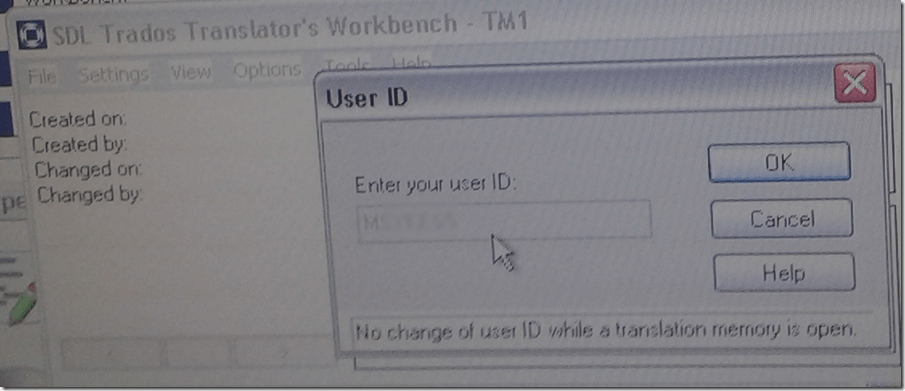
- Test: on your next try, you will get past the error into upgrade converting your winalign-exported text file into TMX:

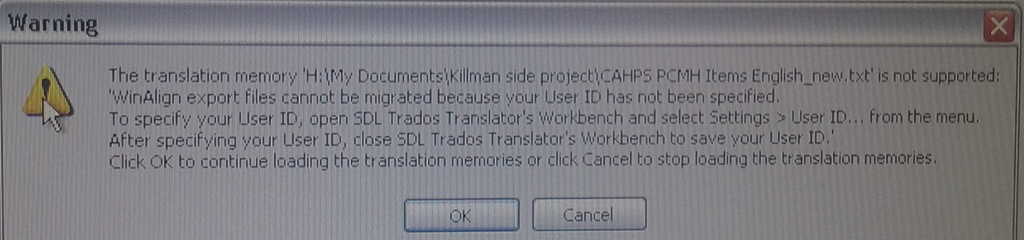


Protected: Sanako teacher station stuck on trying to verify the license
2013/03/18
Enter your password to view comments.
Categories: audience-is-IT-staff, Glitches&Errors
licensing-server, sanako-study-1200
Protected: Sanako Study 1200 hangs on “changing control method”?
2013/03/13
Enter your password to view comments.
How to prevent squealing noise on the brown headphones AKA audio feedback
2013/03/13
Leave a comment
- Symptom:high-pitched squealing sound, usually when logged into the computers along the wall (listening stations –other computers have different black headsets which are not as prone to this problem,) and not wearing the headset.
- Short answer: LRC Assistants will let the student who causes the squealing noise know:
- ”Turn the volume knob on the brown headset down!”
- “You can turn it back up once you have put the headset on”.
- Explanation:
- The brown (analog) headsets on the listening stations exhibit this squealing noise when
- the students do not wear the headset
- AND the microphone is too close to the headphone speakers
- AND the headphone volumne knob is turned up to high.
- This phenomenon is called an (audio) feedback loop:
- The headphone speakers echo what is spoken into the microphone (this is called sidetone).
- This is an important language learning feature (helps you control your pronunciation).
- However, it spirals out of control when students do not wear the headset. They also need to “wear the headset!” (general recommendation in the language lab) to have the benefit of the sidetone (and then their head insulates between speakers and microphones).
- The brown (analog) headsets on the listening stations exhibit this squealing noise when
Deepfreeze still rebooting computers in scheduled maintenance
2013/03/12
Leave a comment
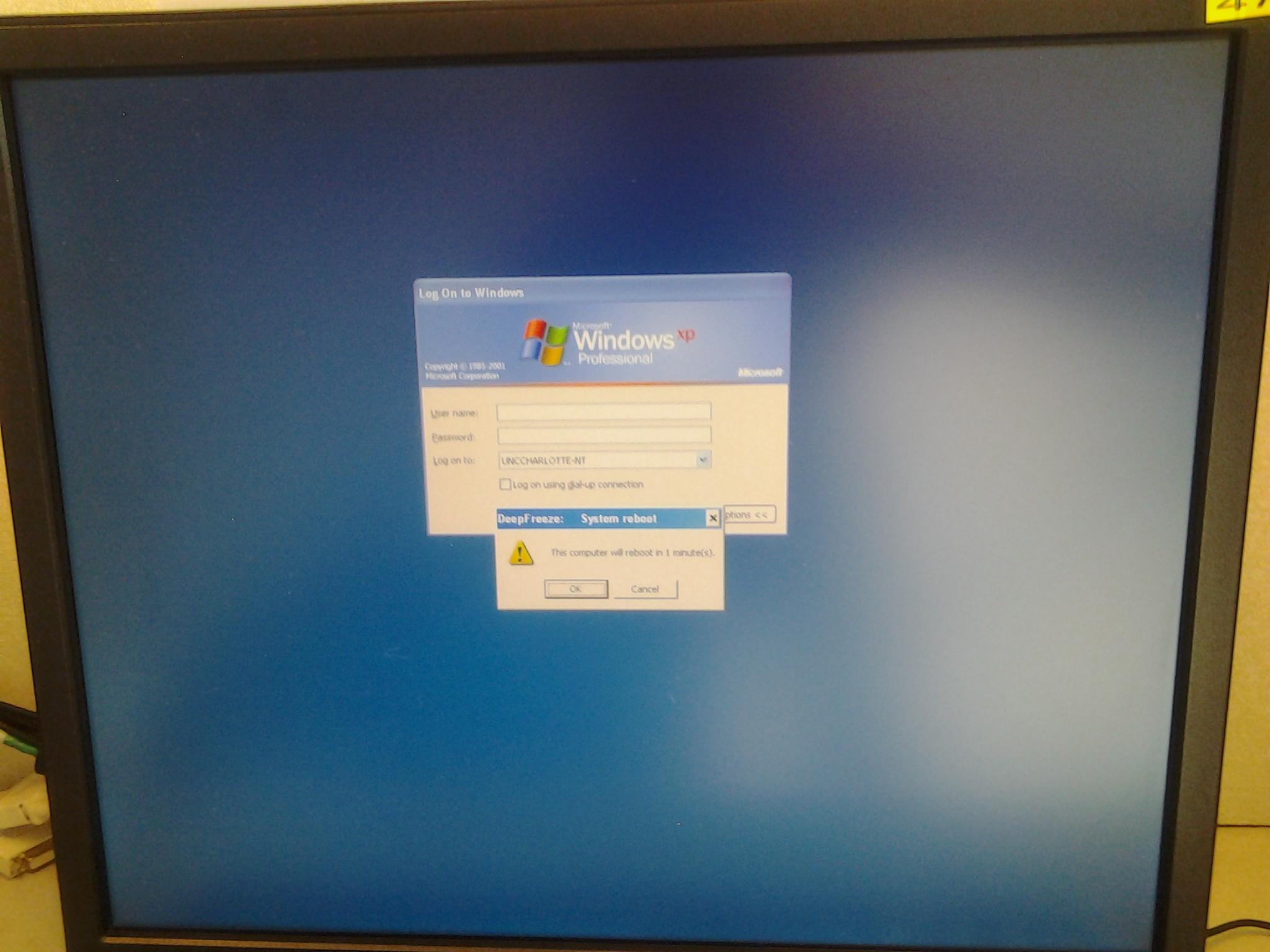
PC47.
Categories: Glitches&Errors
faronics-deepfreeze


Questions? Read the About. Or just ask me a quick Our Databases: Resources with calendars -- Language learning material Moodle Sites, multimedia files -- films


FAQs for LRC student staff or for students or for teachers. To search our FAQs, in the browser addressbar, add after "https://plagwitz.wordpress.com/feed/?tag=faqs+/" "+TAG1" (from tag cloud below) OR "https://plagwitz.wordpress.com/feed/tag=faqs
&category_name=" "CAT1" (from category hierarchy below). OR search both categories and tags, and multiple TAGs/CATs (connect with "," for OR-search, with "+" for AND-search), like so: https://plagwitz.wordpress.com/feed/?tag=TAG1+TAG2+...TAGn&category_name=CAT1
+CAT2+...CATn"
Other ways to find help
If you cannot find it here, look there: 5,500 Language-Learning Links and Programs for learning or teaching 150 languages
Shortcuts:Our Lists, Our Maps, LRC Staff Moodle Site,LRC Project Moodle Site, 49erexpress, UNCC Moodle, Student Recordings: s:claslcslrcsanakostudent
Learning usage samples: Sanako oral exam, Kaltura webcam presentation, Dictation with speech recognition, Sanako written exam, Chinese and Japanese interactive stroke-order practice
Test the Sanako Installer, Webbrowser Popup Konfigurator for XP, or Windows7, faster LRC TeacherPC Log-in Let MS facilitate diacritics writing by installing for you US-International keyboard layout
This is my personal blog (Google+). The views expressed on these pages are mine alone and not those of my employer. The information in this weblog is provided “AS IS” with no warranties, and confers no rights.
 Thomas' Work Space