Archive
Manage some of your teacher computer settings per logged in user
- Another day, another hack, and inconsequential, unless of course you are in my situation:
- If you need a simple way to change some of your Sanako settings per logged in user
- but cannot use the logged-in user system built into Sanako Study 1200:
$path = "C:\ProgramData\Sanako\Study\Tutor\"If (@UserName = "PRTOTECTTHEINNOCENT") Then; change the sanako default save to dual track supporting mff; prereq: customized settings files in the folder ready to renameFileCopy($path & "mffTutor.Settings", $path & "Tutor.Settings", 1)ElseIf (@UserName = "tplagwit") Then; change the sanako default save to dual track supporting wma, for testingFileCopy($path & "wmaTutor.Settings", $path & "Tutor.Settings", 1)Else; keep the default mp3, but we may have to reset the tutorsettings on this unfrozen computerFileCopy($path & "mp3Tutor.Settings", $path & "Tutor.Settings", 1)EndIf; tutor.exe could be hardcoded to (re)load hereIf ProcessExists("Tutor.exe") Then; determine: we could kill tutor to reload it, but that could be disruptive of a classElseRun("C:\Program Files (x86)\SANAKO\Study\Tutor\Tutor.exe")EndIfExit
Bugs in MS-Calendaranalytics?
- Is there an Off-by-1 bug in MS-Calendaranalytics pivot chart?
- I am hovering (as an example) over the first name in the upper list which displays the right name as tooltip, the first name in the second list

- I guess I could learn DAX to fix this one myself, but what I have found myself doing is copy/paste the legend control from underneath, which does not exhibit this apparent bug, as a screenshot over the wrong legend (Seems strangely inadequate!).
- I am hovering (as an example) over the first name in the upper list which displays the right name as tooltip, the first name in the second list
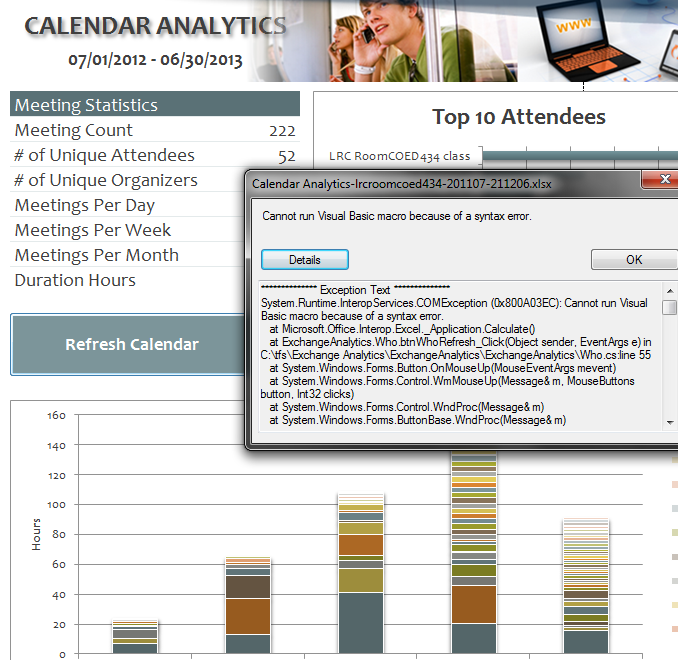
- Cannot run visual basic macro because of a syntax error”
 Version 1 on Excel 2010 (64-bit) on Windows 7 (64-bit). Restarting (Excel/Windows) made this go away.
 - This stopped working on load from one day to the next, without the file getting saved and updated in between: System.Runtime.InteropServices.COMException (0x80070490): Element not found. (Exception from HRESULT: 0x80070490)
at Microsoft.VisualStudio.Tools.Office.Runtime.Interop.IHostItemProvider.GetHostExtender(String extenderType, String extenderCookie, IntPtr& extenderObject)
at Microsoft.VisualStudio.Tools.Office.Runtime.DomainCreator.ExecuteCustomization.Microsoft.Office.Tools.IHostItemProvider.GetHostExtender(Type primaryType, String primaryCookie)
at Microsoft.Office.Tools.Excel.ControlSiteImpl..ctor(IServiceProvider serviceProvider, IHostItemProvider hostItemProvider, String primaryCookie, String identifier, Object containerComponent, UInt32 officeVersion, Control control, _OLEObject extenderControl, Boolean isDynamic)
at Microsoft.Office.Tools.Excel.FactoryImpl.Microsoft.Office.Tools.Excel.Factory.CreateControlSite(IServiceProvider serviceProvider, IHostItemProvider hostItemProvider, String primaryCookie, String identifier, Object containerComponent, Control control)
at Microsoft.Office.Tools.Excel.Controls.Button..ctor(Factory factory, IHostItemProvider hostItemProvider, IServiceProvider serviceProvider, String cookie, String extenderCookie, Object container, String identifier)
at ExchangeAnalytics.Sheet4.InitializeControls() in C:\tfs\Exchange Analytics\ExchangeAnalytics\ExchangeAnalytics\What.Designer.cs:line 169
at ExchangeAnalytics.Sheet4.Initialize() in C:\tfs\Exchange Analytics\ExchangeAnalytics\ExchangeAnalytics\What.Designer.cs:line 55
at Microsoft.VisualStudio.Tools.Office.Runtime.DomainCreator.ExecuteCustomization.ExecutePhase(ExecutionPhases executionPhases)
at Microsoft.VisualStudio.Tools.Office.Runtime.DomainCreator.ExecuteCustomization.Microsoft.VisualStudio.Tools.Office.Runtime.Interop.IExecuteCustomization2.LoadEntryPoints(IntPtr serviceProvider)

FAQs for issues with Respondus Lockdown Browser
- New to Respondus Quizzes? Read the CTL’s write-up.
- No Photo ID (Niner ID or other state-issued)? Use the reception desk camera to take a photo with sheet, like below, we will forward it to the teacher for verification.

- Issues with starting:
- Respondus won’t open: How to bypass a Moodle Popup Window when using Respondus lockdown browser
- Test won’t open and you get a warning
- in Moodle that this test must be run in Respondus Lockdown Browser? Close your regular web browser and double click on the desktop on the Moodle Lockdown Browser Icon:
 , then go to Moodle2 from in there.
 - in Respondus that “No more attempts are allowed”, but the student has not made any attempts yet and the quiz closing date is long in the past: contact the teacher to check whether the quiz needs updating.

- in Moodle that this test must be run in Respondus Lockdown Browser? Close your regular web browser and double click on the desktop on the Moodle Lockdown Browser Icon:
- Issues with Audio:
- Students are advised to test the headsets before entering Respondus Lockdown browser assessments:
- Start Audacity from the desktop, click record: if you say something, you must see something;
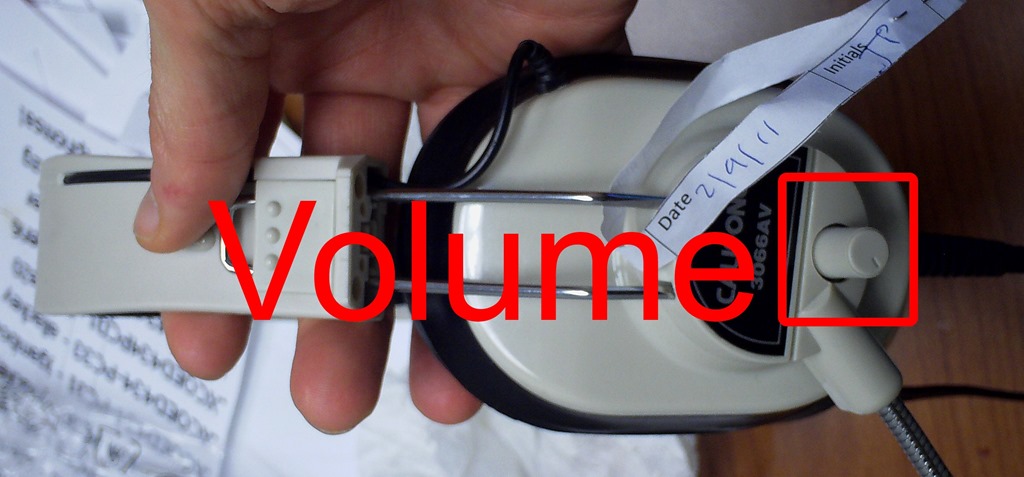
- Play back to test the speakers. Hear nothing? Try the volume knob:
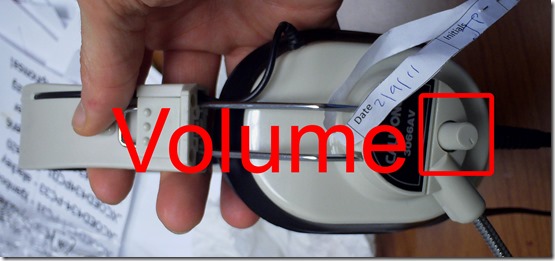
- (More detail here).
- Rewind-audio may get you stuck – to fix, next-page, then back (reloads page). More info: How to workaround Moodle quiz audio not playing to the end in Respondus Lockdown Browser
- How to bypass a Moodle Popup Window when using Respondus lockdown browser
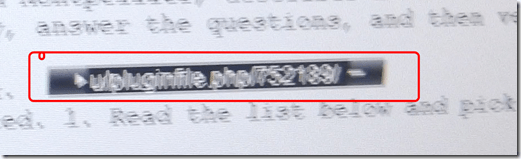 If no audio and error “pluginfile” flashes when clicking “Next”and back: notify permanent staff.
- Students are advised to test the headsets before entering Respondus Lockdown browser assessments:
- Issues with Writing:
- Lost the
 ?
?
- Clicking around nearby where it was may bring it back.
- Or
 , quickly cancel (gets you out of lockdown browser), new attempt from desktop shortcut.
 - Learn to use the installed US-international keyboard shortcuts.
 .
. - more info: Problems with accented characters in Respondus Lockdown Browser
- If your keyboard stops typing in English in a Respondus lockdown browser quiz…
- Lost the
- Issues with finishing
- If the test won’t submit, start Respondus lockdown browser on a different computer to see whether you can resume your attempt there.
- More issues? Let us know in the comments here.




 .
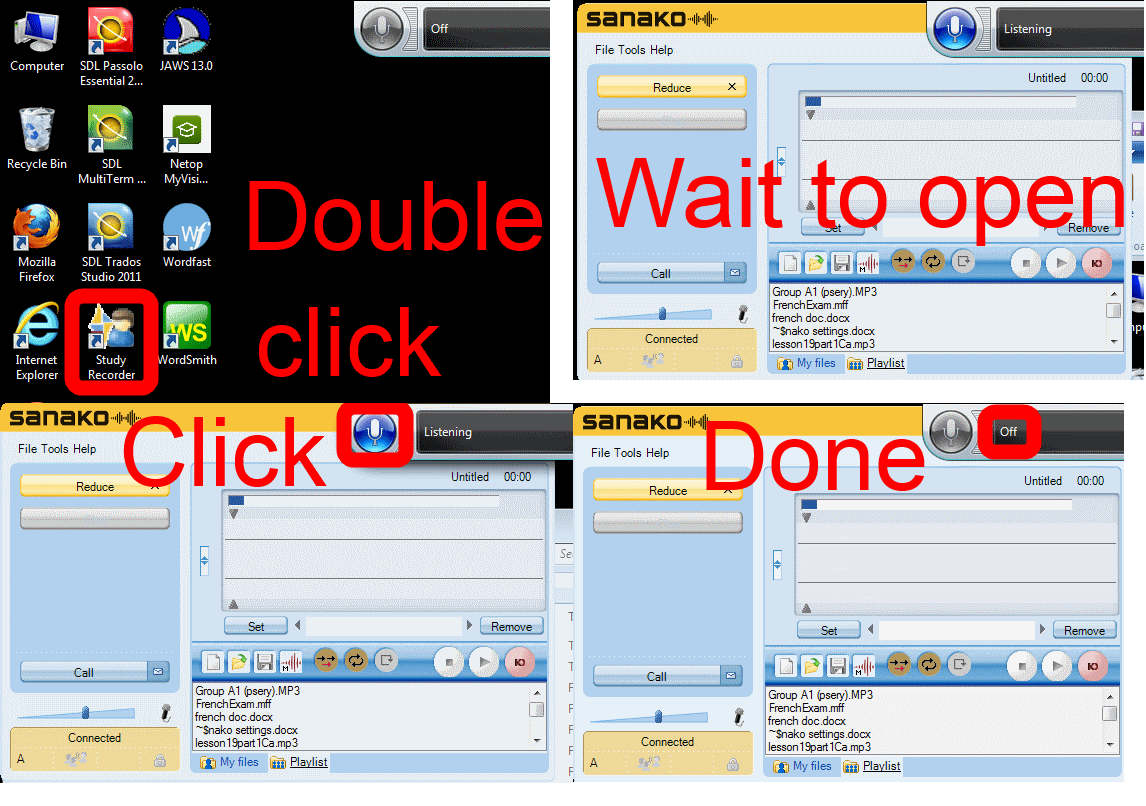
.How students need to work around Sanako startup issues at start of 2014
UPDATE: Step 1 is not necessary anymore, Step2 (Microphone click) still is.
Use CTRL+TAB to switch between tabs in Chrome kiosk fullscreen mode
- On the reception desk, when you open the NINERMAIL after logging into 49erexpress, Chrome opens NINERMAIL in another full screen tab (which hides the 49erexpress tab) – unlike full screen Internet Explorer, which opened NINERMAIL in a new window, but which we had to abandon with the introduction of offfice365.
- The 49erepxress tab is hidden, but still there, and you can switch between full screen tabs wit hthe keyboard shortcut CTRL+TAB (hold CTRL and pressing TAB repeatedly will cycle through all open Chrome tabs).
- So when a client is finished with NINEMAIL (meeting request), have them not only log out of NINERMAIL, but also CTRL+TAB back to the 49erexpress tab to log them out of 49express (and browse from the result window to the Sign-in link to be ready for the next client).
- No need to close the NINERMAIL tab. Next time somebody logs in to 49erexpress tab, Chrome will recycle the previous NINERMAIL tab.
How to workaround AntWordProfiler error “Cannot open the file”
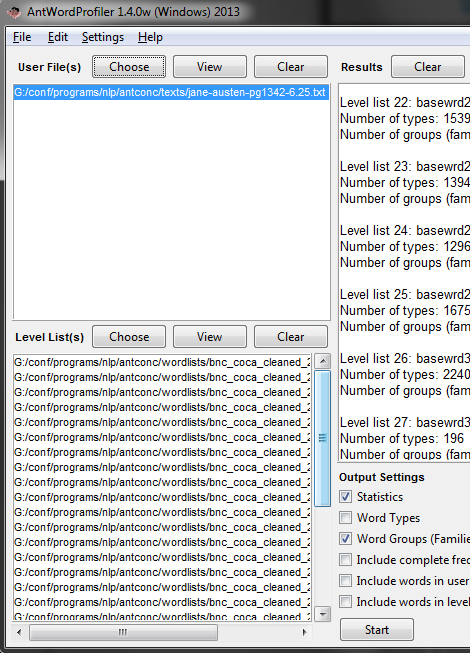
- Seems a little bug in this otherwise great program. I started getting this on Windows 7 64-bit with
-
 for all files, no matter which size.
 - It occurred to me to go to menu: Settings/ global settings / file settings / show full pathnames
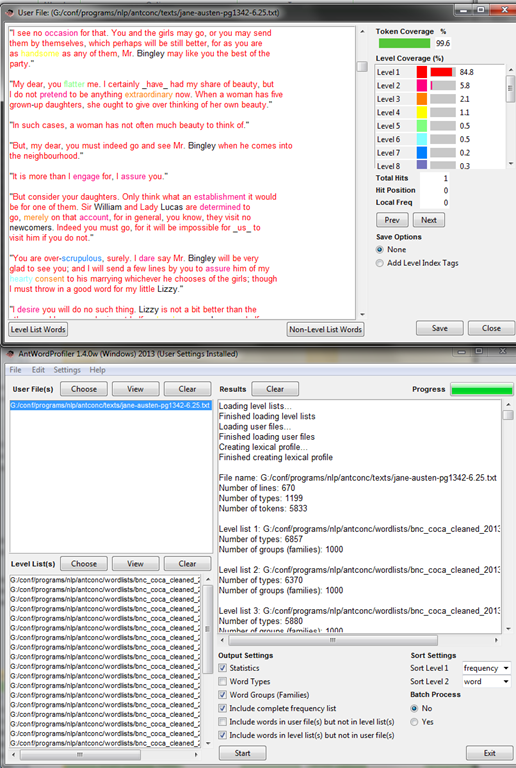
- Here is what you see: Note the duplicate path to the file.
-

-
How did I get there? Seems like you cannot take my usual preferred shortcut and paste the full file path into the browse dialogue.
-
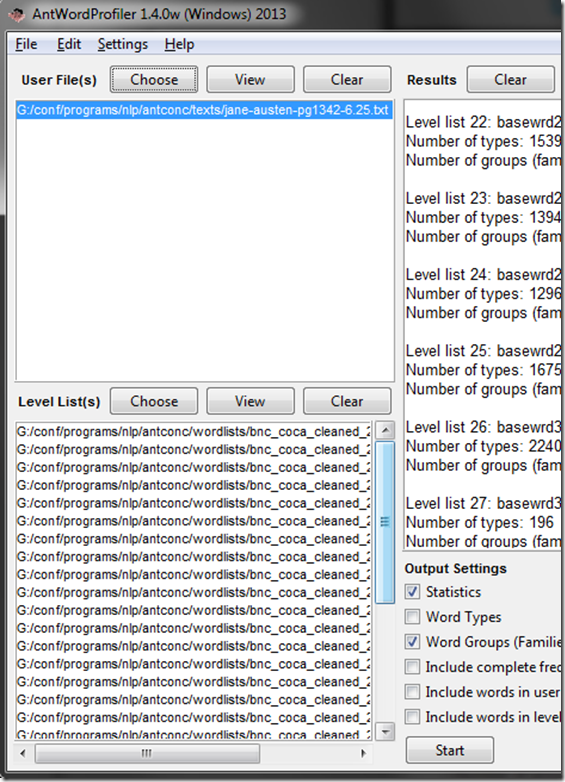
If I browse to the file and select, the same botched up double path does not appear:
-
-
I can then process the file fine.


How to run a microphone test before taking an ACTFL exam on languagetesting.com
- To avoid having your test recordings rejected for quality reasons (and having to take the entire test again), please run this simple microphone test OUTSIDE of languagetesting.com:
- This microphone test can be run either
- at the listening stations (see sign 433a, brown headsets) or
- (PREFERABLY) in the main classroom (see sign 434, black headsets).
- After logging in, put the headphones on. No need to re-plug anything.
- From the desktop, open Audacity
 .
. - In Audacity, Press the red RECORD button
 .
. - Speak into the microphone.
- Check the results:
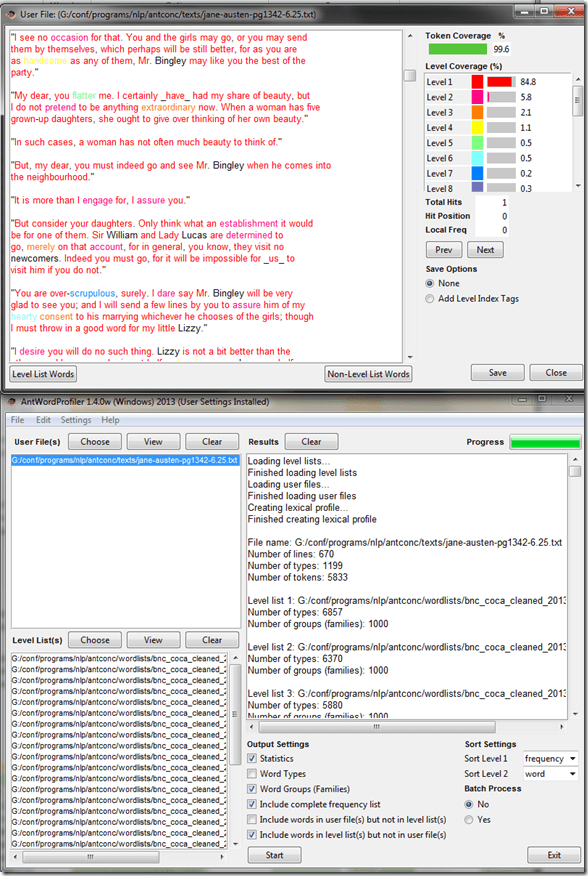
- You should see something like this:

- Press the green PLAY button
 and listen to your recording.
 - Does the recording look AND sound OK?
- NO: let the LRC staff at the reception desk know the computer number and switch computers.
- Yes: Save the recording using menu: File / Export / [name = number of computer].mp3 to your “my documents” folder (if your test gets rejected, you have evidence that you ran the test and that the LRC headset hardware you used was o.k.).
- You should see something like this:
- This microphone test can be run either
- You also need to run the test WITHIN languagetesting.com (which just tests for volume, not for quality).


How to shoot movies with the Canon Eos Rebel T2i– and “movie recording has been stopped automatically”
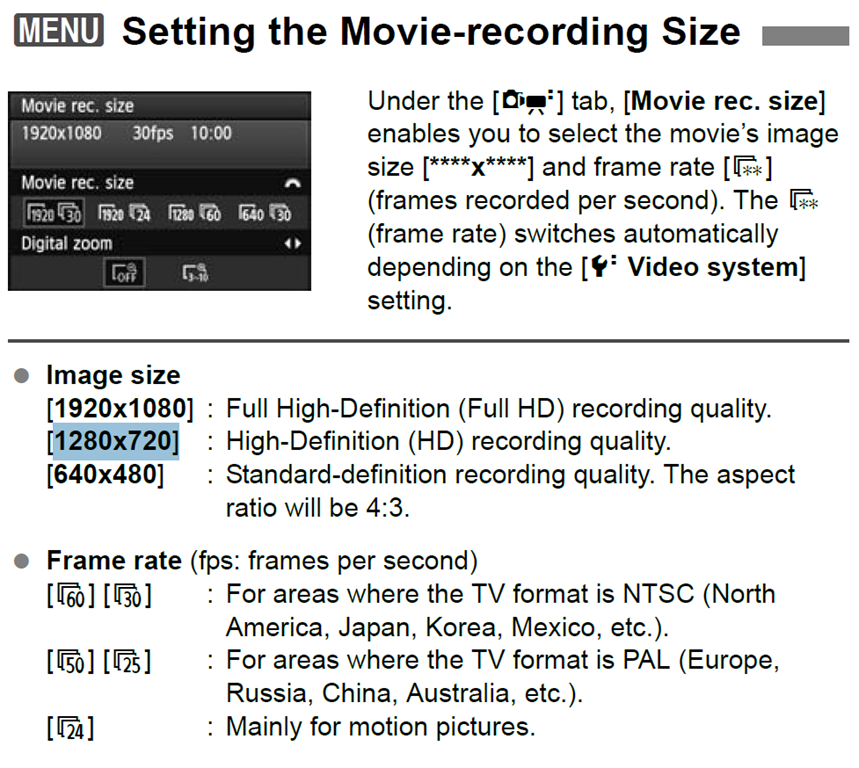
If the camera stops recording after a short while with the error “movie recording has been stopped automatically”, you most likely have an internal memory buffer overrun (there is a bar chart visible warning you off that shortly before the camera stops). This may be due to you not using a Class (6) or faster SDHC card. Try first a low level format inside the camera, or get a faster memory card. (Per the manual below, a lowering to standard HD should not help!).
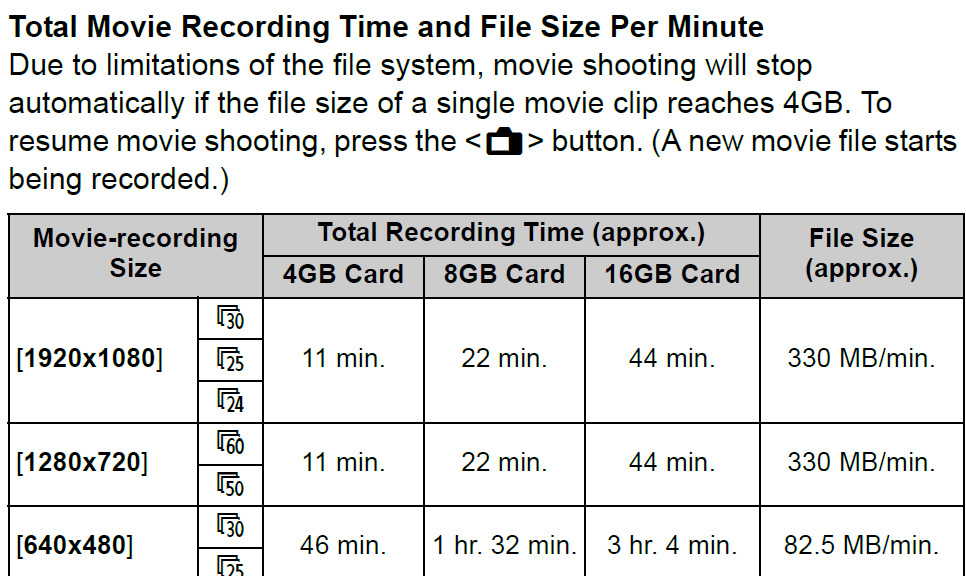
Note also: The camera stops the recording when the file size has reached 4GB (3.99 in Windows – FAT32 limit). It is left as an exercise for the reader when that point in time is. May be related to the fact that this camera is primarily meant for photos, not video. I felt I had to use the lowest HD setting with my untested SD card (the one that buffer overran slightly later with the earlier SD card: 1280*720, 60fps – which produces 1GB/3 minute).
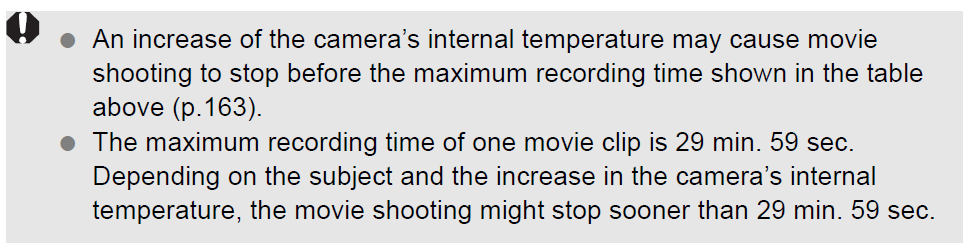
Note finally: camera might stop also due to overheating.


Questions? Read the About. Or just ask me a quick Our Databases: Resources with calendars -- Language learning material Moodle Sites, multimedia files -- films


FAQs for LRC student staff or for students or for teachers. To search our FAQs, in the browser addressbar, add after "https://plagwitz.wordpress.com/feed/?tag=faqs+/" "+TAG1" (from tag cloud below) OR "https://plagwitz.wordpress.com/feed/tag=faqs
&category_name=" "CAT1" (from category hierarchy below). OR search both categories and tags, and multiple TAGs/CATs (connect with "," for OR-search, with "+" for AND-search), like so: https://plagwitz.wordpress.com/feed/?tag=TAG1+TAG2+...TAGn&category_name=CAT1
+CAT2+...CATn"
Other ways to find help
If you cannot find it here, look there: 5,500 Language-Learning Links and Programs for learning or teaching 150 languages
Shortcuts:Our Lists, Our Maps, LRC Staff Moodle Site,LRC Project Moodle Site, 49erexpress, UNCC Moodle, Student Recordings: s:claslcslrcsanakostudent
Learning usage samples: Sanako oral exam, Kaltura webcam presentation, Dictation with speech recognition, Sanako written exam, Chinese and Japanese interactive stroke-order practice
Test the Sanako Installer, Webbrowser Popup Konfigurator for XP, or Windows7, faster LRC TeacherPC Log-in Let MS facilitate diacritics writing by installing for you US-International keyboard layout
This is my personal blog (Google+). The views expressed on these pages are mine alone and not those of my employer. The information in this weblog is provided “AS IS” with no warranties, and confers no rights.
 Thomas' Work Space