Archive
How to organize your email by creating an Inbox rule in OWA
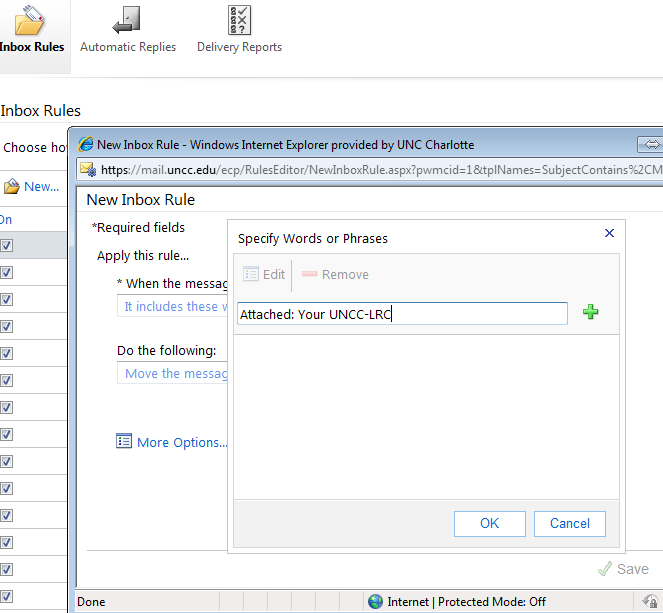
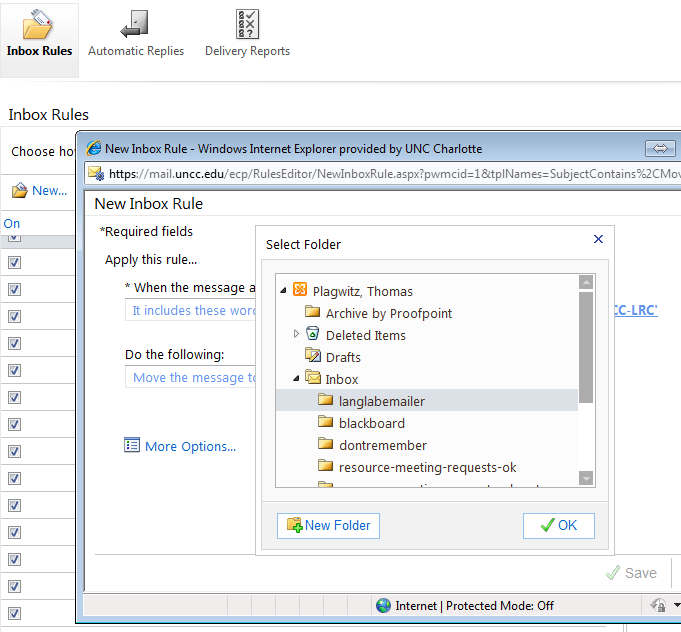
- This step-by-step GUIDE was written for filtering emails from our langlabemailer program (they happen to have “Your UNCC-LRC” in the subject) into a separate folder so that users of the LRC keep the overview:
- students (longitudinally, for their language learner ePortfolios) ,
- but especially teachers (of classes with up to 36 students, throughout the term).
- But you can easily adapt the guide to any other email purpose.
- Including other LRC workflows based on emails: LRC resource booking also relies on OWA emails. All email sent from LRC resource mailboxes have “LRC” at the beginning of the user name and email address.
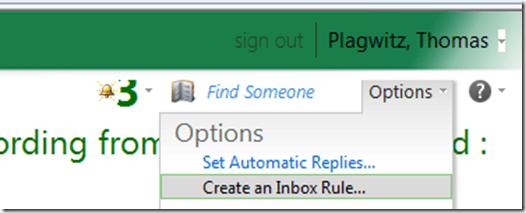
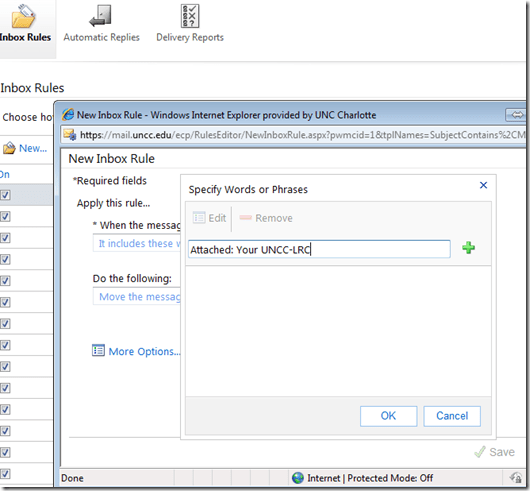
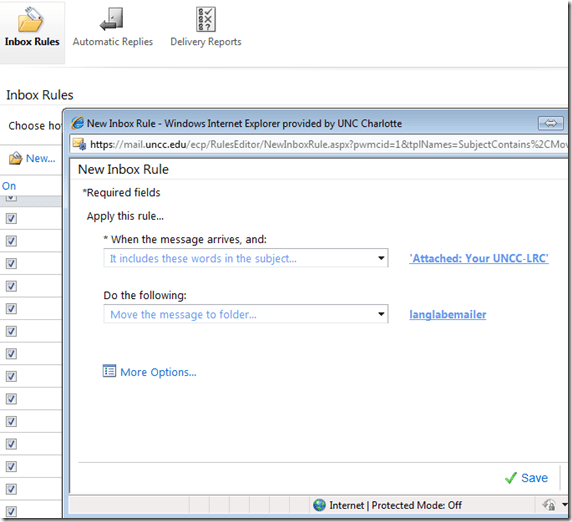
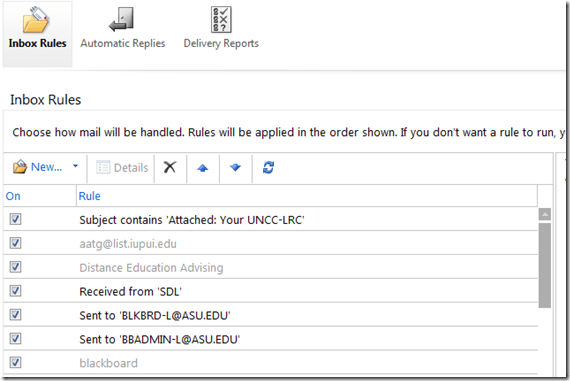
- In short: Options / Create an Inbox Rule / Click “ new” / choose a type / choose keywords / choose folder to sort the email into when it arrives. Or graphically:
-
-

-
-
-
-

-
-

-
-

-
-
-
“
-






How to make (and cancel) a room/resource booking without conflict by sending a meeting request from OWA and OUTLOOK–the ultimate training…
…using animated .gifs. Note the update for Outlook (desktop) users at the bottom. (Slower? Click the Links.)You can not only book lrcroomcoed434@uncc.edu like this, but any resource listed here.If you need the classroom repeatedly or other advanced features, read on.
To Book:
0.25sec,0.5sec, 0.75sec, 1sec, , 2sec, 3sec, 4sec, 5sec, 6sec, 7sec, 8sec, 9sec, 10sec. 1.5sec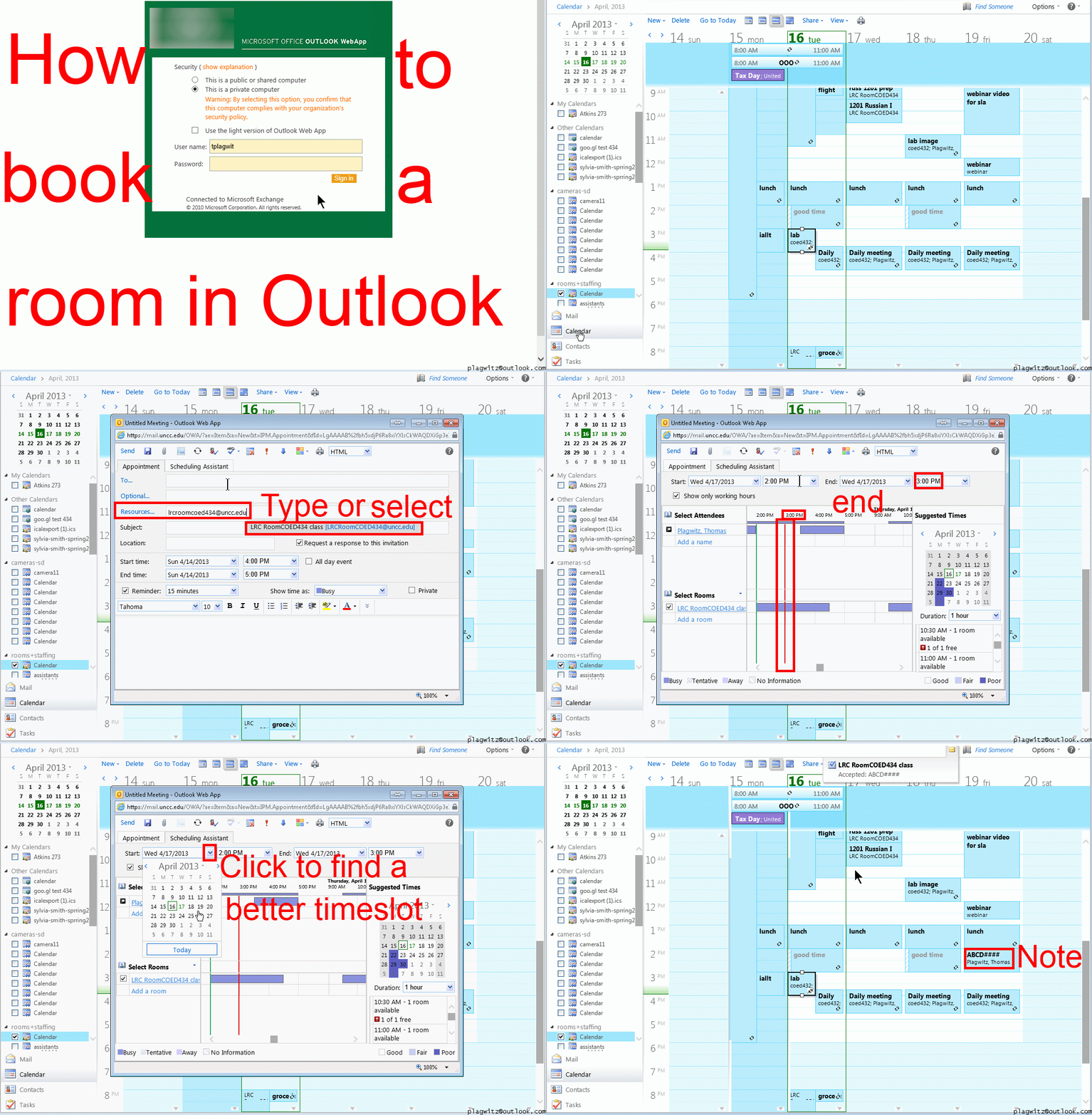
To Cancel booking (why so?):
0.25sec,0.5sec, 0.75sec, 1sec, , 2sec, 3sec, 4sec, 5sec, 6sec, 7sec, 8sec, 9sec, 10sec. 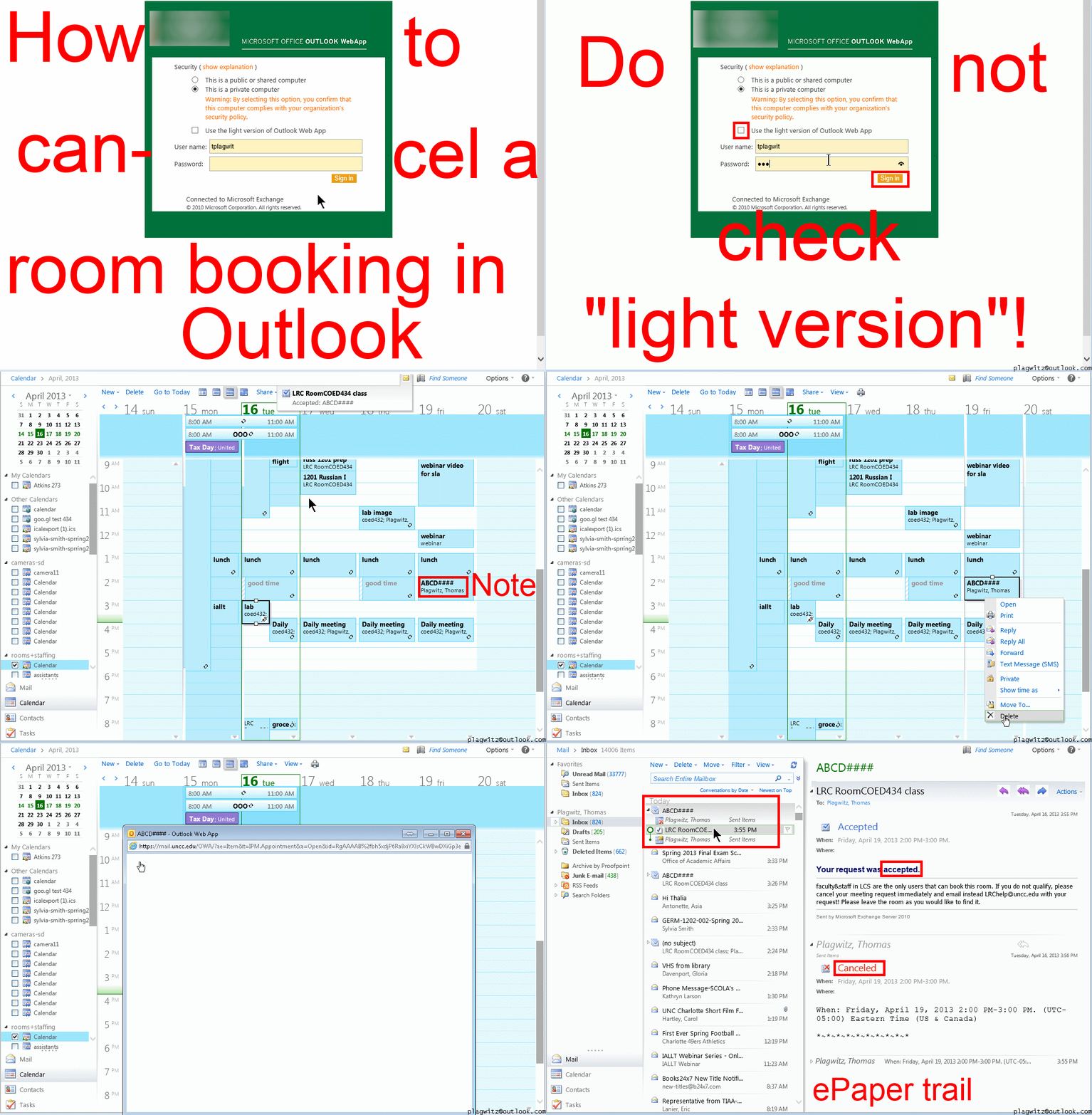
Both book and cancel booking: Compact: 0.25sec,0.5sec, 0.75sec, 1sec, , 2sec, 3sec, 4sec, 5sec, 6sec, 7sec, 8sec, 9sec, 10sec. 1.5sec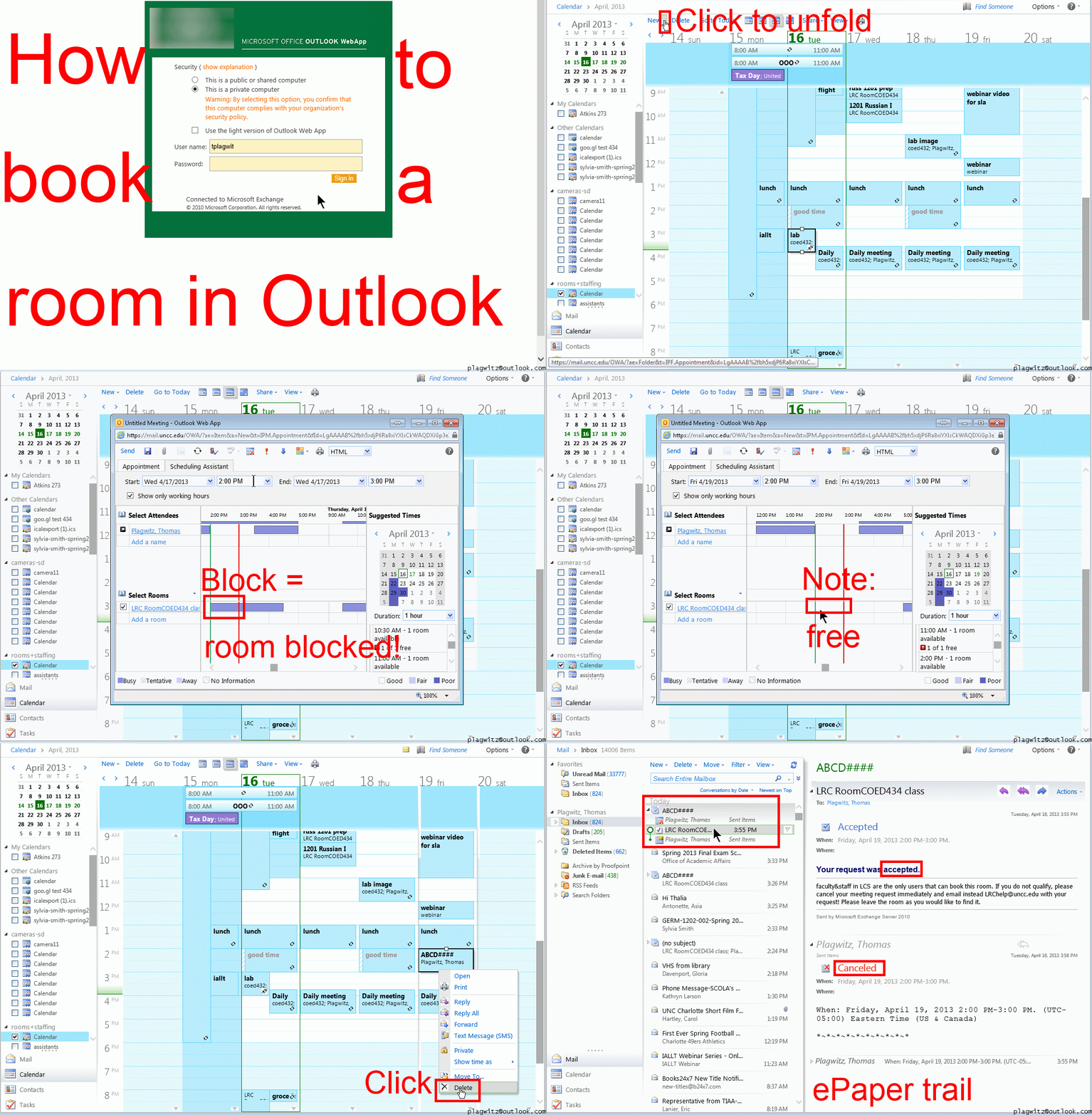 Or including unmarked frames: 0.25sec, 0.5sec, 0.75sec, 1sec, 1.5sec, 2sec, 3sec, 4sec, 5sec, 6sec, 7sec, 8sec, 9sec, 10sec.
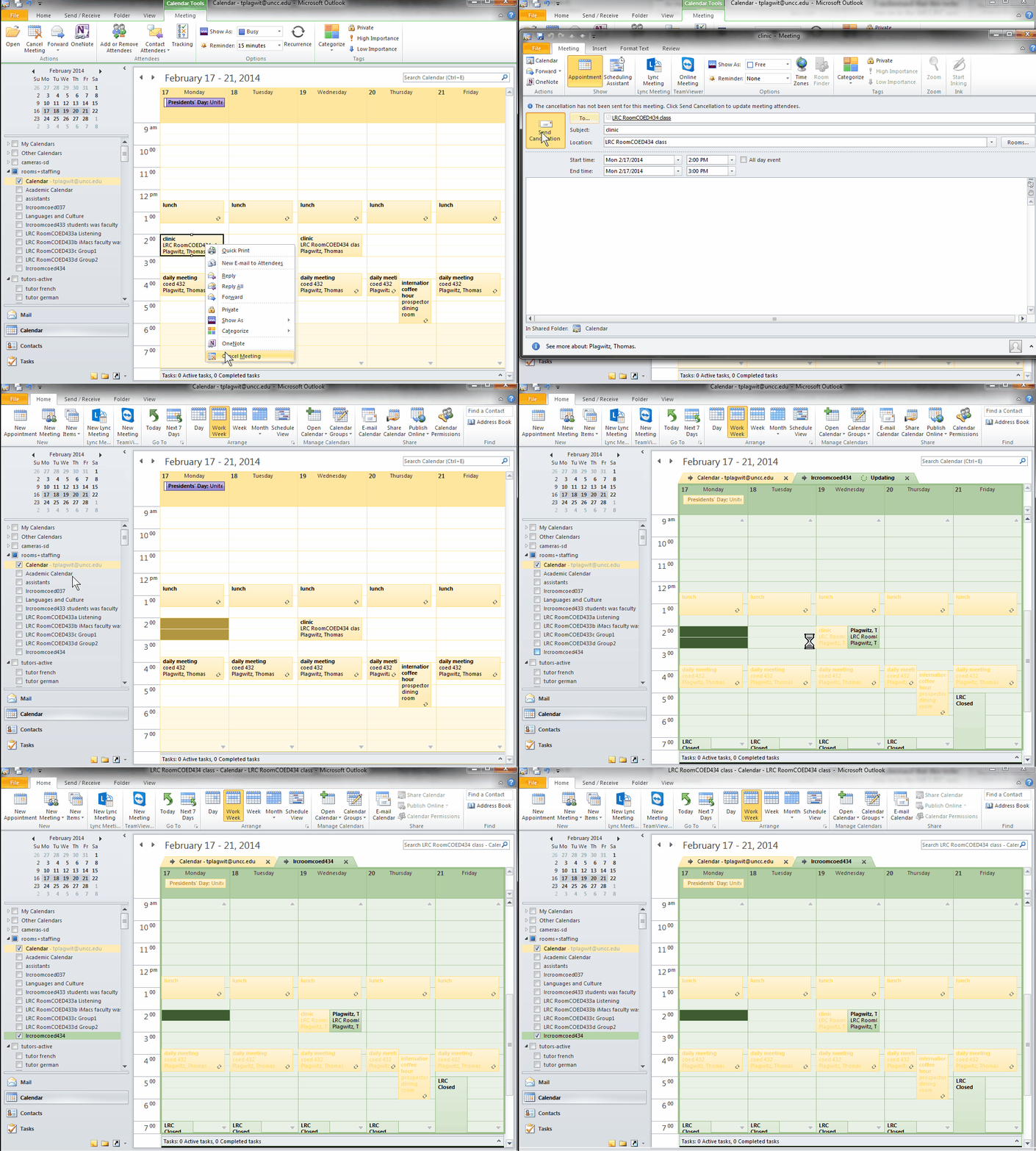
And now in addition 2 screencasts (make/cancel reservation) for our OUTLOOK (desktop) users:

You can get the LRC’s keyboard shortcuts to write foreign language characters automatically installed on your home or office PC …
..if you click on Microsoft’s FixIt here: http://support.microsoft.com/kb/306560 (’nuff said elsewhere about US International keyboard layout) . Our British Friends seem to still type French, German, and Spanish accents the old tedious way. Maybe they find it too difficult to install the MS UK-International keyboard layout which takes care of most accents in all languages that use a Roman alphabet. I wish I could recommend them also a Microsoft FixIt installer which automatically enables the UK "international" keyboard layout option built-in to Windows. However, the FixIt version automated enablement seems only available for US International, not for UK international. If you want US International without manually configuring it (interactive video) , take advantage of MS FixIt by clicking here.
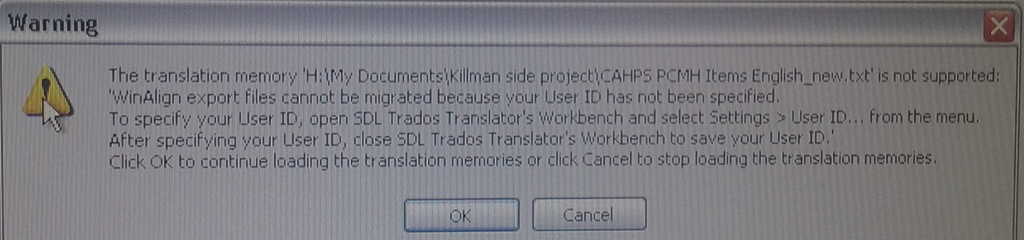
How to resolve “WinAlign export files cannot be migrated because your User ID has not been specified”
- Steps to replicate:
- in Winalign window:
- menu:file / export file pair
- dialogue: “export file pair to file”, choose an name and format: text,
- wait for “export”dialogue to disappear;
- in SDL Trados Studio 2009,
- left menu pane: “translation memories”, menu button”:”open translation memories”,dialogue:”menu button: “open document”, choose the source text document, in dialogue:”open document”, dropdown: “target language”,
- dropdown: “target language”, select yours
- dropdown”: add”: “file-based translation memory”
- open dialogue:”file-based translation memory”, select exported text file;
- Error pops up:

- in Winalign window:
- Resolution: follow the instructions in the error dialogue.
- Bonus points for knowing that “translator’s workbench” is a legacy application and accessible only through SDL Trados Studio 2007: open this from the start menu.
- In the left pane, click to open “Translator’s workbench”:

- Give your username:
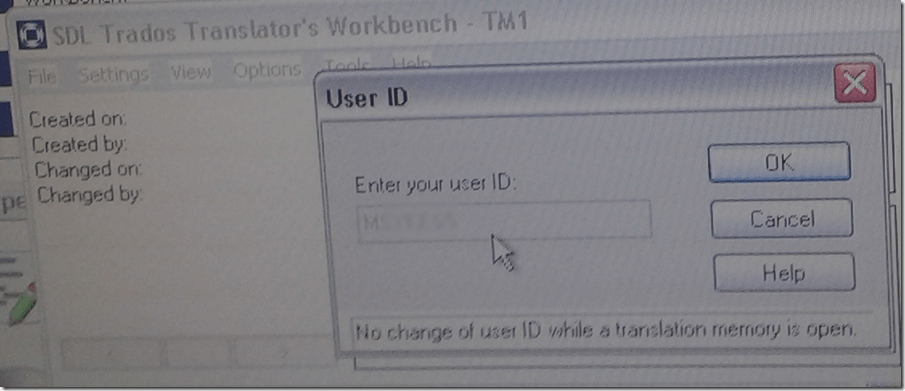
- Test: on your next try, you will get past the error into upgrade converting your winalign-exported text file into TMX:



LRC training animated-gifs
- This link gives you a nice overview list of the LRC animated gif’s for training.
- Chrome users need to install this first, still can view get only a subset.
- Neither Chrome nor Firefox offer a search-within like Internet Explorer.
- They are meant for display on the left lrc teacher station screen.
- whether you display them as student training material on the projector
- or display them as guidance for yourself
- Did you miss something?
- The animated gif’s cycle in an infinite loop. Just wait for the next round.
- If you want to restart the video now, press F5 or click the Refresh button
 in your browser address bar.
 - Or use one of the slower speed videos I made.
- I also made clickable versions that you can hand-browse (more control. More effort also).

OneNote “absolutely loved by everyone who uses it” according to LifeHacker
 Microsoft’s note-taking application OneNote is one of those apps no one really talks about much, but is absolutely loved by everyone who uses it. Heck, you guys even voted it your favorite outlining tool, personal project management tool, and minutes meeting service, not to mention third place for best note taking app. It’s available for a ton of platforms, too (despite it being part of Microsoft Office), so if you’re finding that Evernote just isn’t quite powerful enough for your organizational needs, give OneNote a shot—you might be surprised at everything it can do given its lesser-known status.” (Onenote makes #1 of Top 10 Underhyped Windows Apps, via OneNote Testing). Now how to spread that love?
Copy/paste meetings with resource mailboxes in Outlook on MS-Exchange 2010?
For schedules too complex to be managed in the repeating dialogue, why can I, in Outlook calendar, copy/paste meeting requests that include rooms into a new time slot, but while the new meeting appears immediately in my calendar, no update gets sent to the room unless I open the new meeting and click the button: “send” manually:
New keyboard shortcuts for diacritics on LRC Teacher PC
- The US international keyboard layout that has come with MS-Windows for many years (though – except in the LRC – not set as default, you need to enable it in the control panel) greatly facilitates typing of characters for most languages that use Roman script with common diacritical marks, but does not cover Pinyin and similar diacritical marks.
- Carly from Carleton, as avid a language teacher as a technologist, had the great idea to extend Microsoft’s US-international keyboard so as to include all the Pinyin tone marks (and other accents useful for linguists). Here is the upshot, extracted from her instructions, but excluding what (either shortcut or (use of common accents within Pinyin is now covered also below) purpose) has not changed from the shortcuts of the non-extended US-international keyboard that used to be the default in the LRC:
-
What you want Which keys you press (before comma is “dead” key = no result until after next key) Example acute accent, pinyin 2nd tone
‘(=apostrophe), vowel
á é í ó ú
grave accent, pinyin 4th tone
`(=grave), vowel
à è ì ò ù
macron accent, pinyin 1st tone
hyphen, vowel
ā ē ī ō ū
pinyin 3rd tone
%(=shift+5), vowel
e.g. ǎ ě ǐ ǒ ǔ
ü with pinyin tones
Accent, double-quote
e.g. ǖ ǘ ǚ ǜ
letter with dot below
; (=shift+period), letter
e.g.

letter with double acute
: (=shift+;) , o or u
ő, ű, Ő, Ű
- We are offering the extended US-international keyboard this as an optional keyboard on the teacher and student PCs with Windows 7.
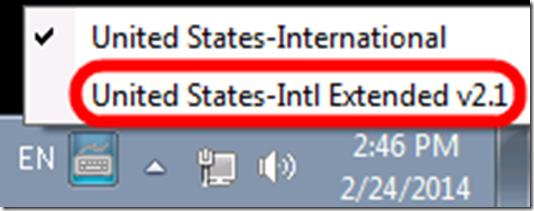
- To select the new keyboard layout, use the language toolbar, click on 2nd option:
- To explore the new keyboard layout use the Windows On-screen keyboard which will let you peek ahead after your pressed a dead key.
- To bypass a special dead key (= get the normal behavior of the key), press SPACE after it.



Questions? Read the About. Or just ask me a quick Our Databases: Resources with calendars -- Language learning material Moodle Sites, multimedia files -- films


FAQs for LRC student staff or for students or for teachers. To search our FAQs, in the browser addressbar, add after "https://plagwitz.wordpress.com/feed/?tag=faqs+/" "+TAG1" (from tag cloud below) OR "https://plagwitz.wordpress.com/feed/tag=faqs
&category_name=" "CAT1" (from category hierarchy below). OR search both categories and tags, and multiple TAGs/CATs (connect with "," for OR-search, with "+" for AND-search), like so: https://plagwitz.wordpress.com/feed/?tag=TAG1+TAG2+...TAGn&category_name=CAT1
+CAT2+...CATn"
Other ways to find help
If you cannot find it here, look there: 5,500 Language-Learning Links and Programs for learning or teaching 150 languages
Shortcuts:Our Lists, Our Maps, LRC Staff Moodle Site,LRC Project Moodle Site, 49erexpress, UNCC Moodle, Student Recordings: s:claslcslrcsanakostudent
Learning usage samples: Sanako oral exam, Kaltura webcam presentation, Dictation with speech recognition, Sanako written exam, Chinese and Japanese interactive stroke-order practice
Test the Sanako Installer, Webbrowser Popup Konfigurator for XP, or Windows7, faster LRC TeacherPC Log-in Let MS facilitate diacritics writing by installing for you US-International keyboard layout
This is my personal blog (Google+). The views expressed on these pages are mine alone and not those of my employer. The information in this weblog is provided “AS IS” with no warranties, and confers no rights.
 Thomas' Work Space