Archive
Language Learning Links of Lore: A Links Management System around Y2K
Based on GossamerThreads’ Links Management systems (one of the best open source PERL-CGI resource web database systems of its era), this language learning links system that I first implemented in Canada in the late 90s and took with me to the US.
Benefits: The system went beyond the usual “visit a website” foreign language elearning exercise of this pre-LMS day by allowing students to publish online, thus introducing a Web 2.0 collaboration element that shared meaningful exercises in the German learning community. We had contributions from Kingston, Toronto, Detroit and Des Moines.

The system was both reasonably easy to use for teachers (How_to_add_a_links_assignment_in_90secs) and productive for students who could improve their language skills by interacting with, reviewing and presenting authentic target language websites, while having quick access to other computerized language learning resources, like fledgling online dictionaries (also stored in and searchable from the same interface).
Example output:


Highlights included reviews of websites dedicated to online shopping, travel booking, mapping, live webcams, and much more…
See here is an example of an Yippee! assignment conducted during one of the face-to-face classes in the language center:
Limitations: All links needed to fit into a pre-tagging strictly hierarchical categorization tree. A GUI, but no batches – I preferred to write myself PERL scripts to batch update the underlying database files.
Learning Materials eRepositories: Thoughts & Considerations
Cost- and time-saving benefits of learning material eRepositories include:
- sharing and reuse of content for the teacher ad learner
- de-duplication for the IT support
Typical issues I have encountered with learning materials repositories:
- questionable applicability of the software-object-oriented-design (OOD)-derived concept of encapsulated and reusable learning “objects” to highly progressive subjects like language arts;
- also, a not uncommon problem of OOD gone wrong: having a “God-object” vs. SOLID-principled object-design, is even more of a risk with “learning objects”: Don’t they not always tend to be too complex to truly reap the benefits of having a design based on many small encapsulated and reusable objects in software programming?
- licensing & copyright or privacy FERPA restrictions preventing uploads and specialization of interest prevents the network effects which have made the open internet so pervasive (and disruptive to some businesses);
 curation using metadata implementing controlled vocabularies and ontologies , even if crowd-sourced, remains a daunting task for domain specialists for non-librarians, while it has been said to be the secret of librarians:

“als ob er jetzt das Geheimnis dieser Wände aussprechen müßte: ‘Herr General,’ sagt er ‘Sie wollen wissen, wieso ich jedes Buch kenne? Das kann ich Ihnen nun allerdings sagen: Weil ich keines lese!” Weißt du, das war mir nun beinahe wirklich zuviel! Aber er hat es mir, wie er meine Bestürzung gesehen hat, auseinandergesetzt. Es ist das Geheimnis aller guten Bibliothekare, daß sie von der ihnen anvertrauten Literatur niemals mehr als die Büchertitel und das Inhaltsverzeichnis lesen. ‘Wer sich auf den Inhalt einläßt, ist als Bibliothekar verloren!’ hat er mich belehrt. ‘Er wird niemals einen Überblick gewinnen!’” (Robert Musil, Der Mann ohne Eigenschaften)
eRepository implementations I have used:
- Our Moodle instance is still looking for an erepository system to integrate. We are getting some eRepository benefits (easy reuse across courses without need for term-wise recycling/re-upload; de-duplication) by implementing [your language here] metacourses in which we enroll all [your language here] “child courses”
- The equella eRepository is used by NC-LOR, and TBA:I have managed learning materials in it earlier, in conjunction with Blackboard – most recommended (at least then) among educational technologists, but not for the faint of heart, which seems to have limited the faculty adoption (and for which NC-LOR may have been a reference implementation, if I remember correctly). One of the things I did not like about equella when I used it (2006-2008) was the seemingly endless point-and-click-and-WWWait.
- The Blackboard content-system was WebDAV based and therefore, once you had established the connection of your client to the WebDAV share (which MS-VISTA WebDAV updates unfortunately temporarily broke ), featured an extremely user-friendly integration with the MS-Windows shell that allowed for batch-handling of files in a familiar, fast “fat client” interface.
- I was, when it was first released, and its metadata-tagging features advertised by Jon Udell, highly impressed by – and consequently have become an avid proponent of, and much more active photographer itself – MS-Windows Vista (now also in: Live) PhotoGallery which combines intuitive use with great speed . However, requirements for managing and sharing a personal photo and video collection are not nearly as complex as for shared learning materials (although I have also used it managing my personal work ePortfolio).
MS-Maren Morph helps reading Arabic web pages
This new IE accelerator tool from MS-Innovation Lab Cairo which provides morphological analysis, translations, derivatives, inflections, and more, is available for Internet Explorer 8 and higher from the Maren Morph homepage, or on the LRC PCs.

Recommend also checking out the other MS-Afkar tools, which are primarily designed for facilitating computer use of Arabic native speakers, but of considerable use also for learners of Arabic:
- Microsoft Maren Transliteration which we also have installed in the LRC
- Microsoft Maren Autocomplete which helps writing Arabic
- Microsoft Maren Multilingual which suggests Arabic equivalents for words input in English
UNCC LRC Language Placement Test: Web-CAPE Online Placement Exam Step-by-Step
- “The Online Placement Exam is designed to help you determine the first course you should take, based on your ability. This multiple-choice [no speaking, listening or writing required] exam presents questions of different ability levels, adapting the next question’s level according to your answers. The number of questions you will be required to complete depends upon your ability to use the language. The duration of the test varies, but it usually takes 15-20 minutes to complete [but can be finished after only 4 questions, and we will give you up to an hour time to complete the exam]”.
- The proctored exam takes place in the LRC (COED434). The exam schedule is published in the LRC COED434 calendar. Read more on how to view the LRC calendar from within the new NINERMAIL.
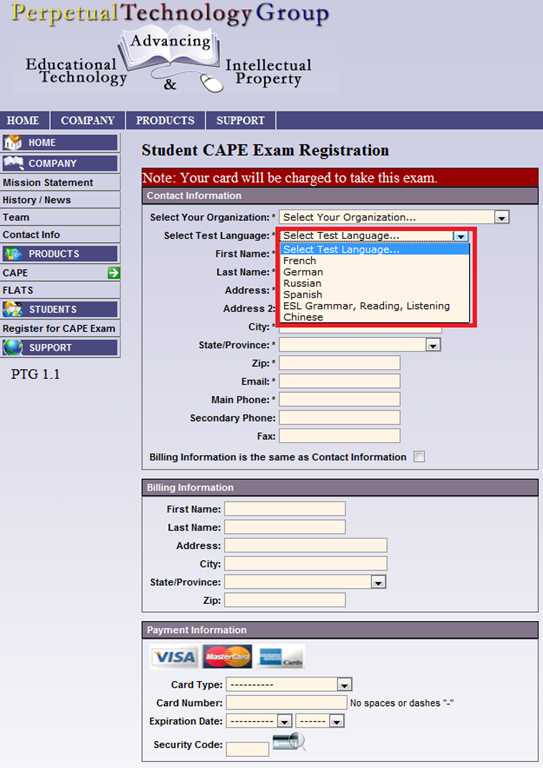
- When taking the exam during the proctored session in the language center [do not take the exam on your own], to sign up for the test, you have to go to: https://www.aetip.com/student/RegisterStudent.cfm (note: the “s” behind “http” is required), this now forwards to:https://www.perpetualworks.com/secure/register/student/, for which sthe shortcut is: http://goo.gl/PBjhhS:

- First chose UNCC (Avoid the common error of choosing another University of the UNC system, you will not be able to take the test if you do):

- Then choose your language – note that UNCC only allows testing in French, German and Spanish.

- Fill out the other form fields with your information.
- Finally, you need one of these credit cards, and the proper billing info, to take the test:

- Next, you will have to enter your NINERNET student id number.
- The exam results will eventually go to your file. However, they will have to be post-processed by the department. Do not take the exam without coordinating with the Department of Language and Culture Studies, or else your exam results will get lost!
- Remember that you can repeat the placement test, even though the number of retries per languages is limited to two (your score will get invalidated after that!).
- Remember also that is not advisable to study for (let alone cheat during) a placement exam, or else you will get placed into a course that is not right for you.



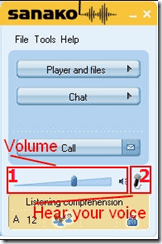
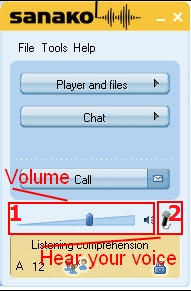
How can I change the volume on my SANAKO headsets?
- Q: How can I change the volume on my headsets? Hear my own voice on the headsets? A:Use the Sanako Student Player 1. Volume Slider and 2. (for Sidetone = echo of your speaking) Headset Icon:
-
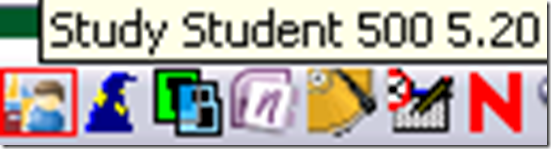
- Q: Where is the Sanako Student Player? A: Show Sanako Student by clicking on the notification bar icon:

Speaking dictionary/pronunciation help, Part 2 – The technology: Installation & configuration of the free Windows XP text-to-speech wizard
- MS-Speech synthesis which comes free with Windows XP is a mature technology which gets even better if combined with free downloadable voice/language combinations and a simple interface.
- Since 2005, I have set up the following text-to-speech environment in language learning centers, wherever I could: The pleasant, speedy interface and convenient integration into the computing productivity environment (Clipboard, Internet Explorer) seems to lead to higher usage than online speaking dictionaries. And the price is hard to beat (all components are free on Windows XP).
- The Deskbot pronunciation – most of my own testing has been for German and English, but I rely on the feedback of native speaking other teachers and tutors for other supported languages – is good on a word level . The prosody of sentence pronunciation leaves a lot to be desired, but is a start nevertheless.
- If you want to install the Deskbot Text-to-speech wizard for your users, or for your own testing and language learning, here are the steps and settings we recommend:
- Use these installers:
-
Language TTS Engine Language Add-On American English tv_enua.exe already installed British English lhttseng.exe already installed Dutch lhttsdun.exe agtx0413.exe French lhttsfrf.exe agtx040C.exe German lhttsged.exe agtx0407.exe Italian lhttsiti.exe agtx0410.exe Japanese lhttsjpj.exe agtx0411.exe Korean lhttskok.exe agtx0412.exe Portuguese (Brazilian) lhttsptb.exe agtx0416.exe Russian lhttsrur.exe agtx0419.exe Spanish lhttsspe.exe agtx0C0A.exe - Move the Deskbot near the lower right corner notification bar to have it not clutter the user interface.
- Do not automatically read clipboard when changed
- Do NOT play animation sound effect: effects wear out quickly and become distracting or annoying.
- Default set to American male: or whatever in your shared environment is the language all learners understand .
- You have to click “set” to actually effect a change, and close the options dialogue.
- Set read random greeting at startup: in a shared computer setting, you can on startup.
- Have the Deskbot introduce himself with basic usage instructions: In order to have this feature self-advertise in the LRC, beyond my face-to-face-classes in the language center, I have the Deskbot read out an informational welcome message every time it starts up (you could use this feature also to have the Deskbot issue a random greeting in your target language).
- Show balloon – useful since words scroll in as spoken.
- In the Speech control panel, you can set the speed to slow – useful for language learners.
- MS Agent Options: TBA
- You can view the Deskbot install process in sequence as a screencast:
- Or you can view the configuration options screens with recommended settings in this screenshot gallery:


- For my own – and maybe your – reference, here is a raw screencast of the most recent installation and configuration of Deskbot multilingual text-to-speech engine for MS-Windows.
-
time
content
0,00
Base install begin
2,50
Deskbot – including its installer – cannot handle the character encoding of some non-western languages that it speaks (Japanese, Korean, Russian). In order to have Deskbot speak these languages, you have to use the Deskbot option “Read Word document” (allowing Word to translate the character encoding into a format Deskbot can understand enough to aurally (even if not visually) display).
4,13
fine tuning for language learning purposes in deskbot options and speech control panel after install
6,09
“advanced character options”: set the speaking speed
Returning to the base installation of some more languages
8,04
more deskbot options
10,34
test of Spanish pronunciation with elpais.com
- In a computer lab environment with Faronics Deepfreeze and Symantecs Ghost imaging, you will also want to copy these settings to the Default user, and make sure that the deskbot startup items gets added to all users or HKLM registry hive (the interface does not allow for installing for all users).
Testing Ribbon Hero 2 as a training resource for MS-Office
“A game fit for playing at work”? I am game!
Easy to tell after a couple of rounds that this constitutes a nice effort, but…
I wish the Excel Ribbon Hero game would remember – after all, Office 2010 still does, thank you! – the Office 2003 keyboard shortcuts, like for Data / Sort.
Or do you really think I needed a hint to sort a table in Excel?
“Right, but is the game called Excel Keyboard Shortcut Hero?”. Oh well, I earned my points via the context menu, that is not a Ribbon feature either, is it?

Digital language lab audio configuration
Issues (BSODs) have been reported with simultaneously running USB sound-card driven headsets and on board audio, which have been alleviated by either USB soundcard driver updates or disabling the onboard audio or both.
To be safe, we do the latter, on this screen of the Dell-Optiplex-760-bios: f12 / System Setup / Settings / Configuration / Miscellaneous Devices (you need to push button “Unlock”and issue the BIOS password to make changes):

Dual audio is also a potential source of confusion for the user. This is the reason why we prefer hiding the MS-Windows Volume control icon in the notification bar – a setting in the control panel / sound and audio devices:

We rather stir the user to the Sanako student player audio volume slider as the single point of entry – and one which can be easily seen by the teacher: see Study 1200 teacher / PC Control / Show the student player).
This comes with added responsibility for the teacher, as the Sanako student player audio volume slider does not control the WAVE volume level. Ensure proper setting of the WAVE volume level AND proper source audio levels – or use our TBA:teacher lab audio control extensions to control the WAVE levels on student computers.

Questions? Read the About. Or just ask me a quick Our Databases: Resources with calendars -- Language learning material Moodle Sites, multimedia files -- films


FAQs for LRC student staff or for students or for teachers. To search our FAQs, in the browser addressbar, add after "https://plagwitz.wordpress.com/feed/?tag=faqs+/" "+TAG1" (from tag cloud below) OR "https://plagwitz.wordpress.com/feed/tag=faqs
&category_name=" "CAT1" (from category hierarchy below). OR search both categories and tags, and multiple TAGs/CATs (connect with "," for OR-search, with "+" for AND-search), like so: https://plagwitz.wordpress.com/feed/?tag=TAG1+TAG2+...TAGn&category_name=CAT1
+CAT2+...CATn"
Other ways to find help
If you cannot find it here, look there: 5,500 Language-Learning Links and Programs for learning or teaching 150 languages
Shortcuts:Our Lists, Our Maps, LRC Staff Moodle Site,LRC Project Moodle Site, 49erexpress, UNCC Moodle, Student Recordings: s:claslcslrcsanakostudent
Learning usage samples: Sanako oral exam, Kaltura webcam presentation, Dictation with speech recognition, Sanako written exam, Chinese and Japanese interactive stroke-order practice
Test the Sanako Installer, Webbrowser Popup Konfigurator for XP, or Windows7, faster LRC TeacherPC Log-in Let MS facilitate diacritics writing by installing for you US-International keyboard layout
This is my personal blog (Google+). The views expressed on these pages are mine alone and not those of my employer. The information in this weblog is provided “AS IS” with no warranties, and confers no rights.

