Archive
How teachers can more quickly open/update/save their Moodle files from MS-Office
MS-Education Labs has published a plugin that speeds up editing MS-Office Files in Moodle.
To use the plugin, download (for 32-bit Office) , run, and from (2007) Office Button or (2010/2003) Menu: “File”, use menu item “Open from Moodle” (and later “Save to Moodle”).

You have to (once) let MS-Office (e.g. MS-Word or Excel) know the URL of Moodle (e.g. http://moodle.uncc.edu),  , then your login credentials:
  .
.
Note that your categorization of Moodle courses (in the tree menu on the left, all courses are filed away in folders called “Training”) prevents an instant load:  .
.
Instead, search for (part of) your course title:  .
.
Select the results you want to add and click button: “Add”: 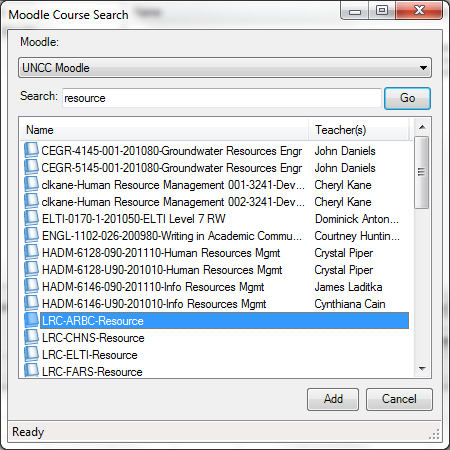 .
.
Wait for the courses to be loaded:  .
.
You can then use the left course tree to browse for matching MS-office files within each of your loaded courses: 
MS-Office files are likely involved in the majority of Moodle edits, so this promises to be a great timesaver.
For more information, see also the CTL’s step-by-step instruction Using the Office Add-in for Moodle.
Free Farsi Proofing Tools available: VafaSpellchecker
Unfortunately, the VafaSpellchecker Proofing Tools are now not available anymore for Office 2010. The links to the Office 2010 on the website have been broken for a long time, the developer seems to have left the university, the project manager has not answered my inquiry. Here is hoping they will be resurrected.
Even though proofing tools are neither designed for non-native language learners nor, traditionally, used in a pedagogically sound way by language learners without proper guidance, they form one of the greatest opportunities to apply advances in Natural Language Processing (NLP) to second language acquisition (SLA) tasks, given that they are a widely installed and commonly understood artificial intelligence providing automated feedback on natural language issues.
The management and licensing of proofing tools has been much improved since MS-Office 2007 which made it easier (and cheaper) to install modular proofing support for additional languages distributed as Language Packs.
However, in an SLA context, even this may still not be a convincing value proposition, whether for the personal computers of individual student learners, or even – due to apparent the lack of concurrent licensing options within proofing tools – for Less Commonly Taught Languages (LCTL) in an imaged computer lab environment (in our case, we would need to purchase 45 licenses à $25 before tax for a language that may have about half as many learners or less).
All the more welcome are freely downloadable add-ons- – thanks to the MS-Office platform extensibility – the VafaSpellchecker, a Persian Spell&grammar and real-word error checking system by the Natural Language and Text Processing Laboratory in University of Tehran, funded by Iranian Research Institute for ICT, available for both MS-Office 2003 and 2007. A VafaSpellchecker user guide (in Farsi) is also available.

As always with NLP in SLA, caveat emptor, use with a grain of salt, or two.
Grouping students using Sanako Study 1200 “sessions”
This sccreencast on grouping with Study 1200 demonstrates:
|
0:00
|
left activity pane – button:add
|
|
0:25
|
right classroom layout pane – click or drag frame
|
|
0:50
|
the effects of grouping
|
|
1:05
|
bottom link: show corridor
|
|
1:25
|
moving between session/groups with context menu (not shown)
|
|
1:30
|
You may have to start/end the current activity from the activity pane first
|
Sanako Study 1200: Student Basics I: The Screenshots


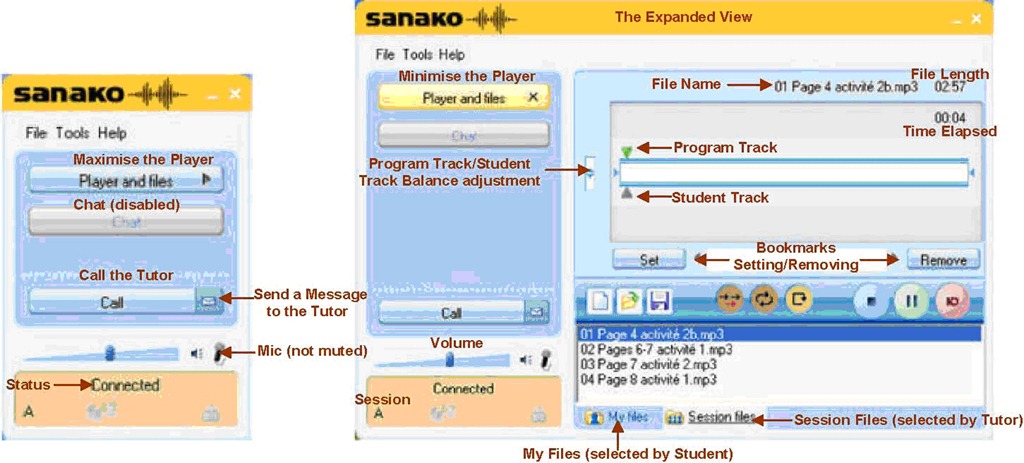
The basics, as found in the Sanako documentation. For a 5-minute student orientation, see: Student Basics II: The Screencast. For the teacher, see teacher cheat sheet.
Sanako Study 1200: Student Basics II: The Screencast
This screencast covers the basics of Study 1200 for students
For a quick guide to the Student interface, see Student Basics I: The Screenshots
MS-Expression Encoder 3: Workaround to force video cropping
In MS-Expression Encoder 3, the video cropping feature in the “Enhance”tab is broken, unless you use the workaround for cropping in this screencast.
How to efficiently find help on this blog
- Searching
- Full-text search: quick, even though dumb (“Computers are only machines…”). It may not return the most relevant results.

- Human-curated search: The author adds metadata to his posts as he sees fit. The metadata vocabulary is somewhat stable from past experience, but may change (”The author is only a human.”
 ). You effectively execute a humanly-curated search when clicking in the right column on either
- a tag link, e.g.
 https://plagwitz.wordpress.com/tag/moodle/
 - a category link, e.g.

- a tag link, e.g.
- Humanly-curated and Boolean AND search combined: This can be powerful in drilling down to an answer to a specific problem – provided there is one on the blog.
- Even though there is no easily clickable interface for this, by building URLs in the web browser address bar
 , combining tags or categories with the plus-sign, you can execute an AND-search against multiple tags(or categories) on WordPress.com
 - Example: https://plagwitz.wordpress.com/tag/moodle+erepository/ finds posts that the author related to both Moodle and eRepository. This can be especially useful for searching the FAQs: https://plagwitz.wordpress.com/tag/faq+[add your problem-technology-tag here, e.g. Audacity]/
- Even though there is no easily clickable interface for this, by building URLs in the web browser address bar
- Full-text search: quick, even though dumb (“Computers are only machines…”). It may not return the most relevant results.
- Notifications: Subscribe to RSS-feeds to receive timely updates on the topics that matter most to you. Both
- WordPress.com, providing RSS-feeds for all categories and tags (click on a tag or category link and find the
 icon, it will link to the RSS feed – Example: https://plagwitz.wordpress.com/tag/moodle/feed/) – watch either the webpage or your browser GUI for orange RSS icons you can click on to initiate a subscription -and also for multiple categories/tags (even though this feature is even better hidden, you need to construct a URL in your browser address bar. Example: https://plagwitz.wordpress.com/tag/moodle+erepository/feed/). If you want to go beyond our own metadata, WordPress allows also for subscribing to your own searches via RSS: “To keep up with your favorite search results we offer an RSS feed for all search results. Simply click the Follow this search via RSS link in the side bar of any search results page to subscribe to updates in the search result”, consult the WordPress search documentation.
 - and MS-Outlook, making RSS-subscriptions look familiar like email (of importance in certain environments), greatly facilitate this.
- WordPress.com, providing RSS-feeds for all categories and tags (click on a tag or category link and find the
- Text-messaging: Get synchronous human help through the Moodle-Wimba Room link.


First impressions: NC-LOR, the North Carolina K-20 learning materials repository
This web site collects state-wide learning resources. Contained are also the NC-net (“Network for excellence in teaching”) submissions: “The purpose of the North Carolina Network for Excellence in Teaching is to share professional development resources statewide. This helps avoid duplication and encourages replication of best practices. The Resource Exchange offers your college the opportunity to showcase and share its best professional development resources and teaching tools.”
NC-LOR is based on TheLearningEdge’s equella, one of the erepository software systems that I have managed learning materials in.
NC-LOR training materials are hosted on WordPress. Of special interest to us should be the Moodle integration: “How to Use the NCLOR with Moodle 1.9.x (4.1): This tutorial should be reviewed by faculty of institutions who use Moodle as their course management system. This tutorial includes topics like: defining LMS integration, deciding what type of learning activities to put in a course, understanding how to use Moodle with the NCLOR, understanding how to update item links and information on learning object creation”. However, UNCC has not implemented NC-LOR integration as of yet:

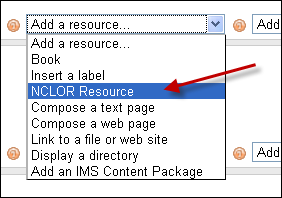
Even without the Moodle integration, while students can access NC-LOR materials only from within Moodle, as member of the UNC system, you can either browse NC-LOR as a Guest, or ask for a Contributor account, my request had a turnaround of only a few minutes. Once you have a contributor profile, you can subscribe to receiving workflow updates from within your profile:

However, what I would like to see, but cannot find is the capability to subscribe to an RSS-feed which notifies me of updates of new submissions in a certain subject-“folder”.
The most important subject folders for LCS and ELTI are here:

There are only about 120 resources (snapshot at bottom) in the root folder, mostly links (reminds me that around 2000, I managed about a 1000 language learning links in a self-adapted PERL-CGI repository…) to freely available internet resources most of which should be in subfolders which, however, are empty.

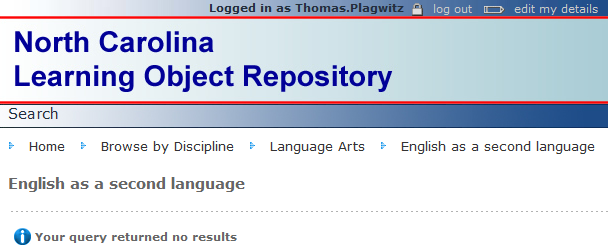
This may be indicative of a number of typical problems I have encountered with learning materials repositories.


Questions? Read the About. Or just ask me a quick Our Databases: Resources with calendars -- Language learning material Moodle Sites, multimedia files -- films


FAQs for LRC student staff or for students or for teachers. To search our FAQs, in the browser addressbar, add after "https://plagwitz.wordpress.com/feed/?tag=faqs+/" "+TAG1" (from tag cloud below) OR "https://plagwitz.wordpress.com/feed/tag=faqs
&category_name=" "CAT1" (from category hierarchy below). OR search both categories and tags, and multiple TAGs/CATs (connect with "," for OR-search, with "+" for AND-search), like so: https://plagwitz.wordpress.com/feed/?tag=TAG1+TAG2+...TAGn&category_name=CAT1
+CAT2+...CATn"
Other ways to find help
If you cannot find it here, look there: 5,500 Language-Learning Links and Programs for learning or teaching 150 languages
Shortcuts:Our Lists, Our Maps, LRC Staff Moodle Site,LRC Project Moodle Site, 49erexpress, UNCC Moodle, Student Recordings: s:claslcslrcsanakostudent
Learning usage samples: Sanako oral exam, Kaltura webcam presentation, Dictation with speech recognition, Sanako written exam, Chinese and Japanese interactive stroke-order practice
Test the Sanako Installer, Webbrowser Popup Konfigurator for XP, or Windows7, faster LRC TeacherPC Log-in Let MS facilitate diacritics writing by installing for you US-International keyboard layout
This is my personal blog (Google+). The views expressed on these pages are mine alone and not those of my employer. The information in this weblog is provided “AS IS” with no warranties, and confers no rights.

