Archive
How can I change the volume on my SANAKO headsets?
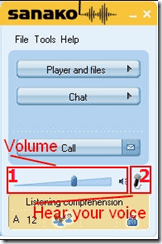
- Q: How can I change the volume on my headsets? Hear my own voice on the headsets? A:Use the Sanako Student Player 1. Volume Slider and 2. (for Sidetone = echo of your speaking) Headset Icon:
-
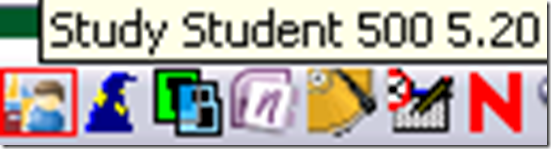
- Q: Where is the Sanako Student Player? A: Show Sanako Student by clicking on the notification bar icon:
How to rip an audio CD in MS-Windows with Windows Media Player
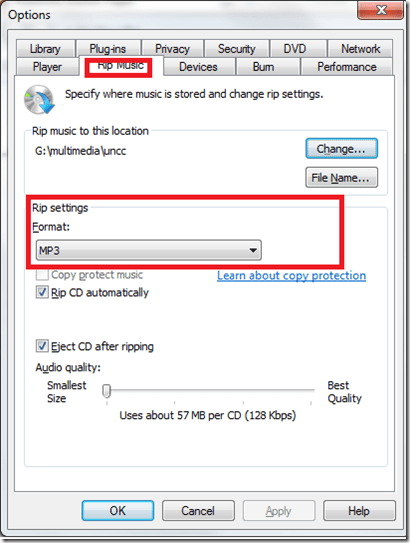
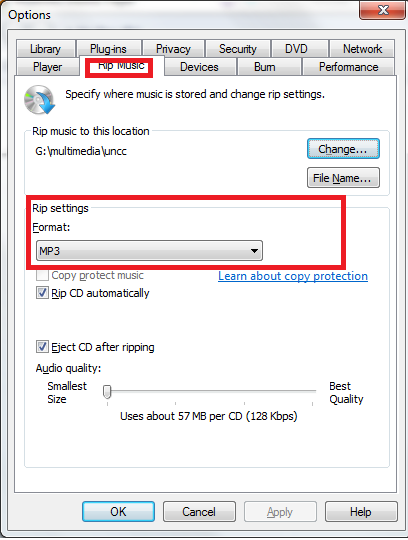
- Windows Media Player has CD-ripping capabilities built-in, WMA-format used to be the only option and is still the default in Windows 7, but can be changed under menu:”tools” / “options”/ tab:”rip music”
Protected: How to conduct an easy oral exam with Sanako1200 (Model imitation/Question Response) – Part II: Implementation/instruction of examined students
Languages & Culture Studies Film Collection: Pivot Table and Labeling System
We analyzed the film collection for diversity and media, by setting up a pivot table (the underlying spreadsheet is getting updated currently, but is current enough for an overview), snapshot:
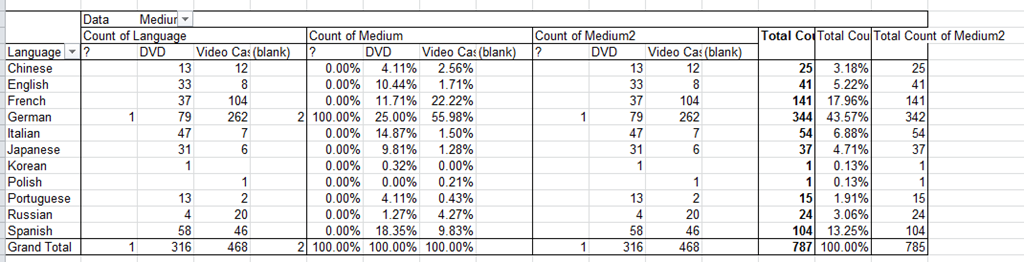
You can make your own analysis at S:\plagwitz\labconfig\spreadsheets\film-collection\film-collection.xlsx. (temporary location). The sheet also contains the new labeling system to facilitate locating videos:
|
IN |
From |
To |
Language |
|
AR |
0001 |
0400 |
Arabic |
|
CH |
0401 |
1400 |
Chinese |
|
EN |
1401 |
2400 |
English |
|
FA |
2401 |
2500 |
Farsi |
|
FR |
2501 |
3900 |
French |
|
GR |
3901 |
5300 |
German |
|
IT |
5301 |
5700 |
Italian |
|
JP |
5701 |
6700 |
Japanese |
|
KO |
6701 |
6900 |
Korean |
|
PL |
6901 |
7000 |
Polish |
|
PT |
7001 |
7200 |
Portuguese |
|
RU |
7201 |
7400 |
Russian |
|
SP |
7401 |
9400 |
Spanish |
|
SW |
9401 |
9500 |
Swahili |
|
OT |
9501 |
10000 |
Other |
Foreign Language Character Input on Windows XP in the LRC
The LRC offers the following foreign language characters writing support:
| American English | us international | not needed | us-int |
| Arabic | Google;MS;MS-maren;fontboard | maybe later, now osk | demo |
| British English | us international | not needed | us-int |
| Dutch | us international | not needed | us-int |
| Farsi | Google;MS | maybe later, now osk | demo |
| French | us international | not needed | us-int |
| German | us international | not needed | us-int |
| Greek | Google;MS | maybe later, now osk | demo |
| Italian | us international | not needed | us-int |
| Japanese | MS | not needed | |
| Korean | MS | maybe later, now osk | demo |
| Mandarin | MS;pinyinput | not needed | pinyin |
| Portuguese (Brazilian) | us international | not needed | us-int |
| Russian | Google;MS | maybe later, now osk | demo |
| Spanish | us international | not needed | us-int |
The support is best accessed from the “international toolbar”, like so: 
You can also use the windows on-screen keyboard to input non-Western characters on a computer that has not the corresponding keyboard overlay stickers. In the small-group workspaces, which have writing pads, you can also use the MS-Handwriting IME for East-Asian languages.
Poster on time-stretching audio @ NEALLT 2011
A wealth of authentic audio materials on the Internet are still out of reach for language learners, and an abundance of textbook materials not as personalized to the learners’ needs as they should since their audio speed cannot be adjusted in a naturalistic way. This poster presents a software that can batch-produce from mp3 and wma input files a user-adjustable range of audio output speeds and – for a more natural sounding output than the time-stretching mechanisms commonly built into current media players – differentiate between language and pause segments in the input when time-stretching: Time-stretching audio POSTER (big)
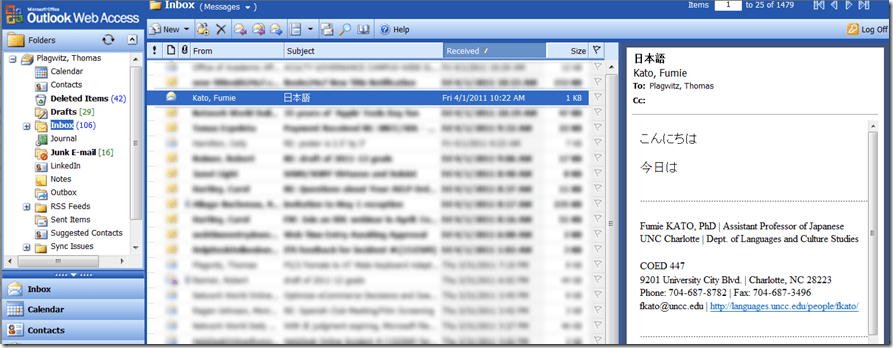
How to: Send email with non-western (e.g. Japanese) characters in Outlook Web Access (e.g. 2003, e.g. from Safari)
- If your emails with Japanese sent from Safari arrive with unreadable characters (squares or question marks, meaning the recipient’s computer cannot decode how to display the character your computer sent), you may have set your browser to the wrong characterr encoding.
- However, the encoding Unicode (e.g. UTF-8) can handle both western and .
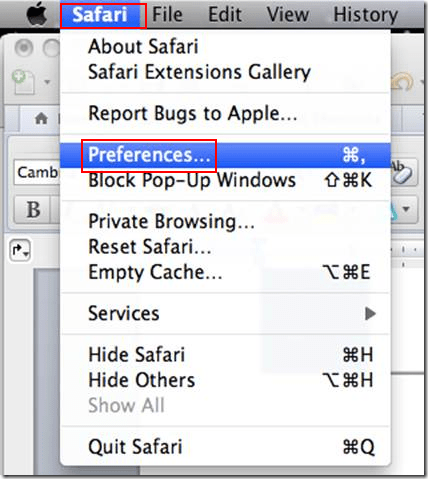
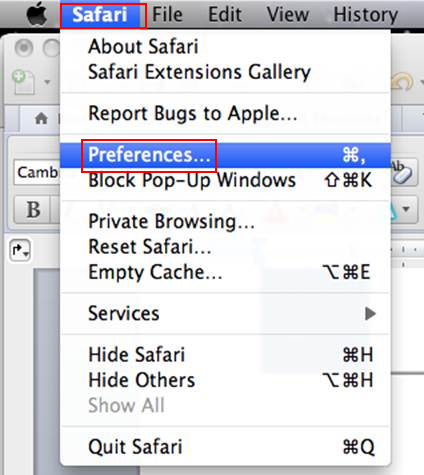
- Simply go to Safari (similarly in other browsers)/ Preferences / Appearances / Default Encoding and change to UTF-8, like so:


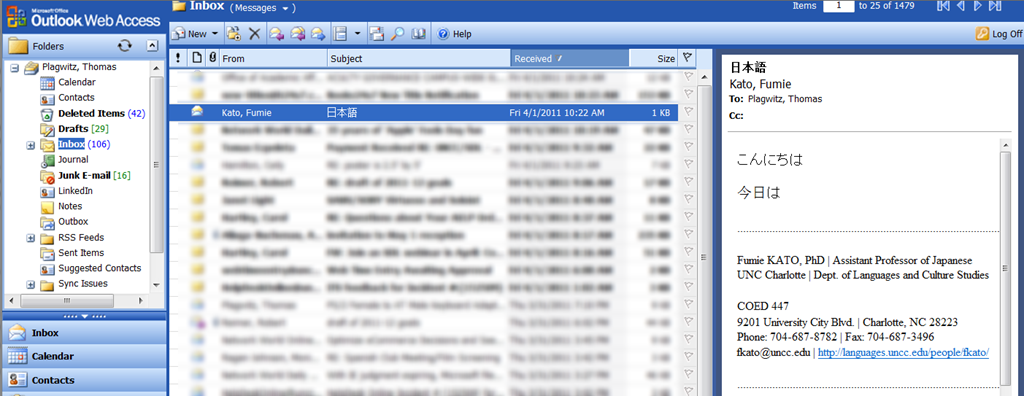
- This has been tested to work already from/to OWA 2003.
- However, for your reference, here a matrix of imminent upgrades of email clients on your computer and the corresponding university server software:


|
When? |
Your office computer |
recommended? |
Any computer (travel, home) |
University server |
|
|
mac |
pc |
|
|||
|
soon |
Outlook 2011 |
Outlook 2010 |
is better than |
Outlook web access 2010 |
Exchange 2010 |
|
recommended? |
is better than |
is better than |
|
is better than |
is better than |
|
now |
Entourage (limited support for Exchange) |
Outlook 2007 |
is better than |
Outlook web access 2003 |
Exchange 2003 |
Visual-Studio.net 2008 install experience
Symptom: Error 32003. Vsvars.bat could not be opened for write. 
Context: After VS.net 2008 Professional Install on Windows-7 home premium 64-bit , reboot, on opening Outlook 2010 32-bit.
Resolution: In the file properties, tab:security, give “full control” permissions to “Everyone”.
Comments: Changed permissions back after installer finished, have yet to see whether whether this errors again. – Error did not occur on Vista Home Premium 64-bit .


Questions? Read the About. Or just ask me a quick Our Databases: Resources with calendars -- Language learning material Moodle Sites, multimedia files -- films


FAQs for LRC student staff or for students or for teachers. To search our FAQs, in the browser addressbar, add after "https://plagwitz.wordpress.com/feed/?tag=faqs+/" "+TAG1" (from tag cloud below) OR "https://plagwitz.wordpress.com/feed/tag=faqs
&category_name=" "CAT1" (from category hierarchy below). OR search both categories and tags, and multiple TAGs/CATs (connect with "," for OR-search, with "+" for AND-search), like so: https://plagwitz.wordpress.com/feed/?tag=TAG1+TAG2+...TAGn&category_name=CAT1
+CAT2+...CATn"
Other ways to find help
If you cannot find it here, look there: 5,500 Language-Learning Links and Programs for learning or teaching 150 languages
Shortcuts:Our Lists, Our Maps, LRC Staff Moodle Site,LRC Project Moodle Site, 49erexpress, UNCC Moodle, Student Recordings: s:claslcslrcsanakostudent
Learning usage samples: Sanako oral exam, Kaltura webcam presentation, Dictation with speech recognition, Sanako written exam, Chinese and Japanese interactive stroke-order practice
Test the Sanako Installer, Webbrowser Popup Konfigurator for XP, or Windows7, faster LRC TeacherPC Log-in Let MS facilitate diacritics writing by installing for you US-International keyboard layout
This is my personal blog (Google+). The views expressed on these pages are mine alone and not those of my employer. The information in this weblog is provided “AS IS” with no warranties, and confers no rights.

