Archive
How you can fix student homework “file save errors” on Sanako Study 1200 and Windows XP
- Background: We recently got our Sanako network share permissions set up to vendor specifications, and the privileges tightened up appropriately. Fortunately, in the process of this, I was warned to make sure Windows XP has the registry key set: MoveSecurityAttributes, as otherwise XP does not update the permissions when moving files between folders:
- Symptom: Here is how this seems to have played out with Sanako ”homework” files (which get sent from the teacher to the student for writing and submitted back), specifically with files that I had:
- uploaded from my office PC (XP without the MoveSecurityAttributes key) to the Sanako teacher share
- tried to deploy as homework from the Sanako Study 1200 teacher station (also XP without the MoveSecurityAttributes key), resulting in a “file save” error:

- Additional context:
- sending files to students failed, but not to teachers;
- student had not run out of file space on the network share;
- students did not lack permissions to the Sanako network share in general;
- we did not run into issues with Sanako exam audio recordings which are sent from the student PCs to the network share.
- Resolution:
- adding HKLM\SOFTWARE\Microsoft\Windows\CurrentVersion\Explorer\MoveSecurityAttributes, DWORD ,1, to the computer the files originates from:
- first the office pc: this did not fix the issue.
- then the teacher PC: this seems to have fixed the issue:

- Here is hoping that this can fix your “file save”error also.
- adding HKLM\SOFTWARE\Microsoft\Windows\CurrentVersion\Explorer\MoveSecurityAttributes, DWORD ,1, to the computer the files originates from:
- Update: Also consult Raymond Chen’s "Wait, so does moving a file recalculate inherited permissions or doesn’t it?", and the hearty discussion that ensued.


If you cannot log into Windows because of accessibility dialogues offering you help
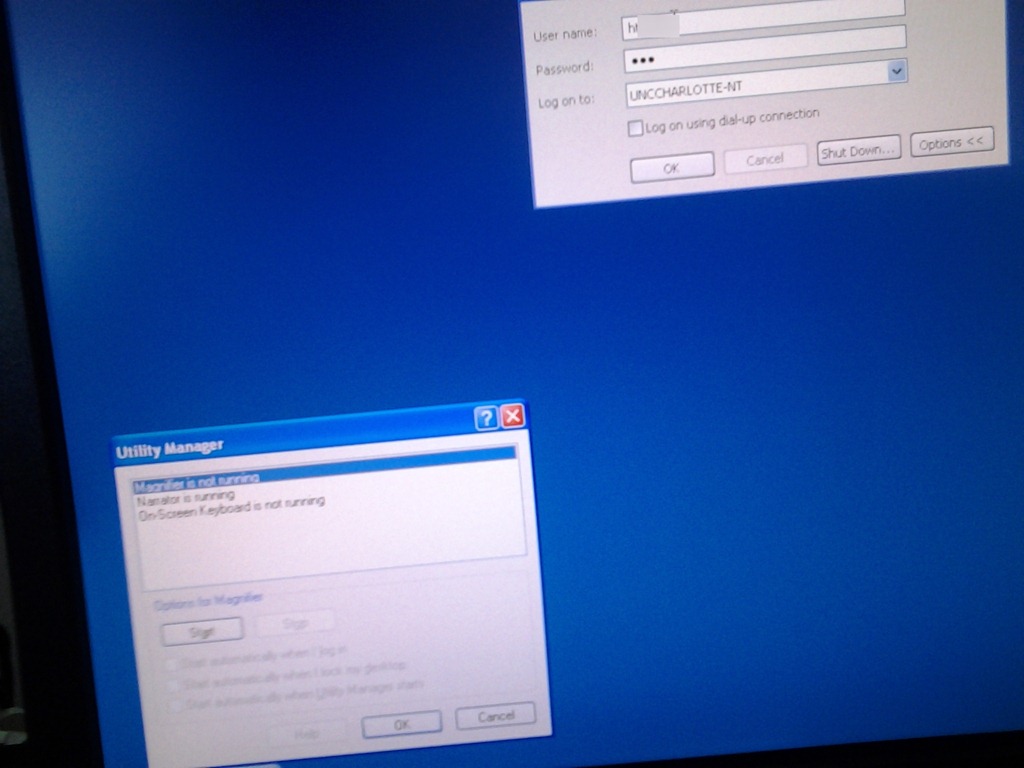
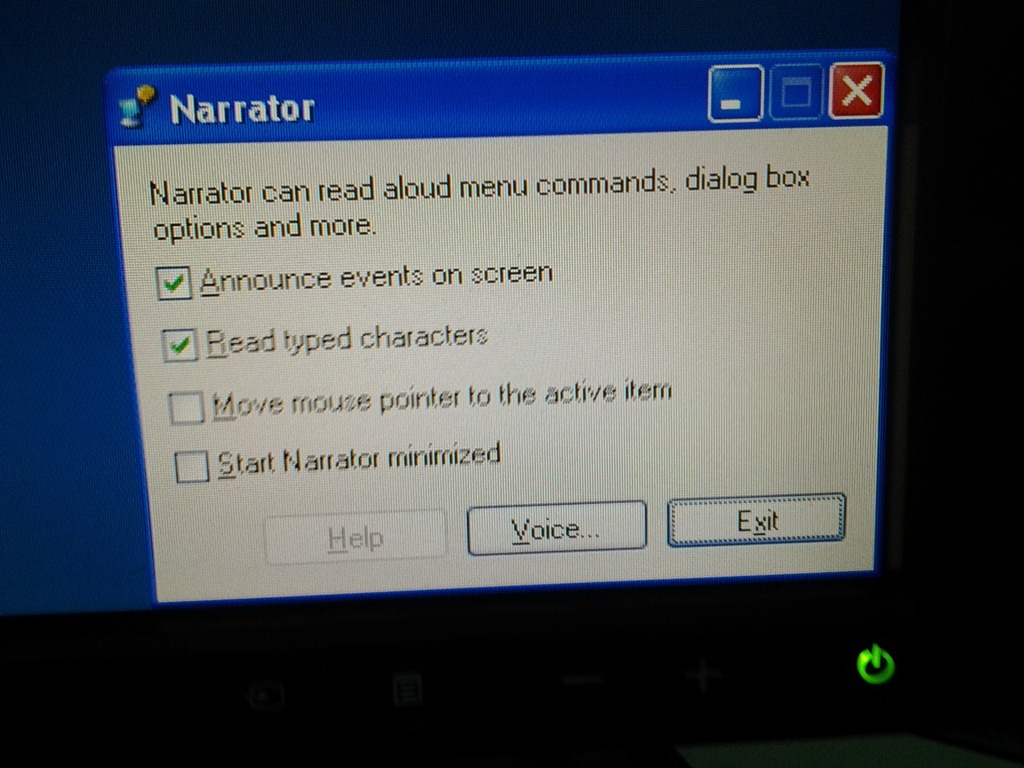
- Symptom: You cannot log in since accessibility tool dialogues (like above) come up when typing your password
- Workaround: Restart the computer (and make sure you have no item sitting on the keyboard while doing so, usual suspects: textbooks, bags). If you do not want to restart, but fix it immediately, you can read more about Windows XP accessibility features and keyboard shortcuts here.
- Root cause: You may have activated Windows accessibility features by erroneously depressing for a long time or repeatedly pressing a modifier key while the LRC computer was on the welcome screen. You may not run into this behavior from your personal computer (or read here how to disable Windows 7 Sticky and Filter Keys), but the LRC needs to be ADA compliant. Think of it as another LRC language tool that sometimes may get into your way temporarily if you do not study the language, but that you would not want to miss for the language you do study.
New keyboard shortcuts for diacritics on LRC Teacher PC
- The US international keyboard layout that has come with MS-Windows for many years (though – except in the LRC – not set as default, you need to enable it in the control panel) greatly facilitates typing of characters for most languages that use Roman script with common diacritical marks, but does not cover Pinyin and similar diacritical marks.
- Carly from Carleton, as avid a language teacher as a technologist, had the great idea to extend Microsoft’s US-international keyboard so as to include all the Pinyin tone marks (and other accents useful for linguists). Here is the upshot, extracted from her instructions, but excluding what (either shortcut or (use of common accents within Pinyin is now covered also below) purpose) has not changed from the shortcuts of the non-extended US-international keyboard that used to be the default in the LRC:
-
What you want Which keys you press (before comma is “dead” key = no result until after next key) Example acute accent, pinyin 2nd tone
‘(=apostrophe), vowel
á é í ó ú
grave accent, pinyin 4th tone
`(=grave), vowel
à è ì ò ù
macron accent, pinyin 1st tone
hyphen, vowel
ā ē ī ō ū
pinyin 3rd tone
%(=shift+5), vowel
e.g. ǎ ě ǐ ǒ ǔ
ü with pinyin tones
Accent, double-quote
e.g. ǖ ǘ ǚ ǜ
letter with dot below
; (=shift+period), letter
e.g.

letter with double acute
: (=shift+;) , o or u
ő, ű, Ő, Ű
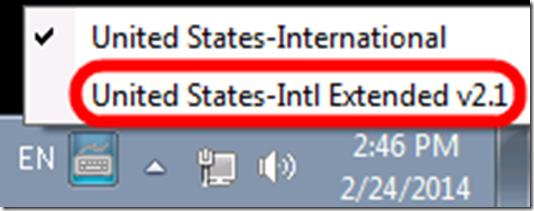
- We are offering the extended US-international keyboard this as an optional keyboard on the teacher and student PCs with Windows 7.
- To select the new keyboard layout, use the language toolbar, click on 2nd option:
- To explore the new keyboard layout use the Windows On-screen keyboard which will let you peek ahead after your pressed a dead key.
- To bypass a special dead key (= get the normal behavior of the key), press SPACE after it.

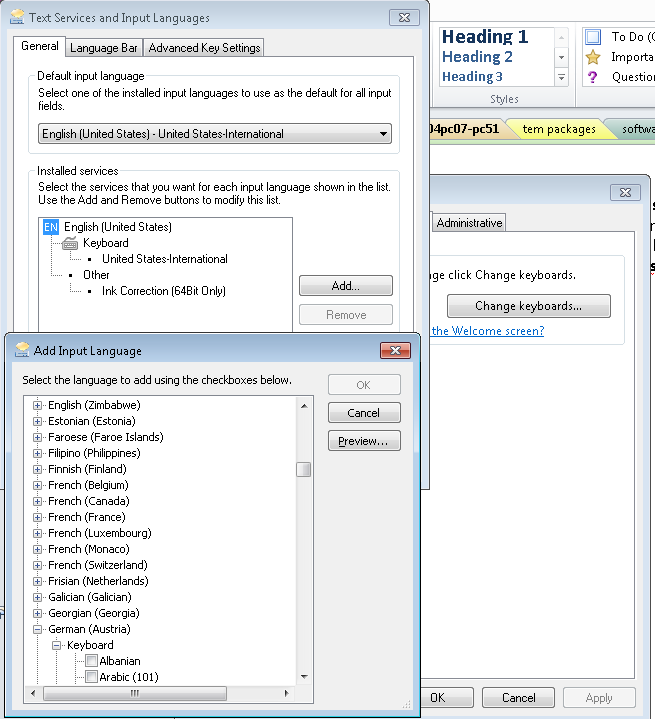
The LRC writing input methods (“keyboards”) are not configured right

- In intl.cpl, we do not want keyboards installed for western and central-European (= characters a-z, merely altered by diacritics) languages, including US. We type these languages, including US-English, with the us-international keyboard extended 2.1, which has to be set as default, and that US-English extended 2.1gets checked as the keyboard for all western languages ("show more"). The regular US keyboard gets removed/made invisible to the user, and with any reasonably recent version of MS Sysprep tools, that is no problem anymore.
- For non-Western languages, the built-in windows keyboards should be "checked", and also the alternate input that we had to download and install methods need to be "checked" under their languages: MS Maren, Google input methods nee to be enabled (checked): e.g. Farsi is not enabled (checked).
The big LRC SANAKO “How do I…?”
(Work in progress).
View larger Word version than this embed:
Some concrete examples on how to use the Sanako Study 1200 Playlist and Pairing in language teaching
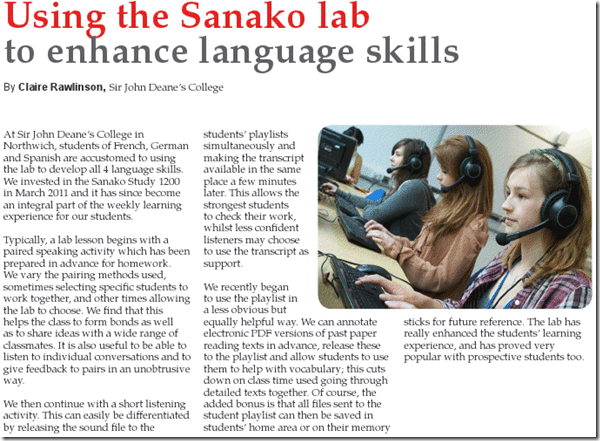
From the Sanako-UK Fall 2012 Newsletter – click on the link or article for accessing the full newsletter (Hint: No need to wear suit&tie when using the LRC Sanako; headsets, however, tend to be a required accessory ).
).
You can learn more here on how to use Playlist and Pairing. Or visit our Fall 2012 Faculty Workshop I: Intermediate Sanako Teaching Techniques and the following Fall 2012 Faculty Workshop II: Clinic on creating teaching materials for use with the Sanako
A classroom-management-system-based emporium to improve tutoring support for Hybrid Spanish students
- “[T]o bridge the gap between students’ demand for introductory Spanish courses and adequately staffing”, UNC-Charlotte – using, among others, a UNC-Chapel Hill pilot as a model, which, however, served a different student population and was soon faded out again – introduced a hybrid model for 1st year Spanish:
- Weekly contact hours were cut in half (effectively doubling student numbers per teacher ) ,
- and attempted to be replaced by more extensive assignment of homework exercises/quizzes from the online textbook component
- for lack of own technical resources (p.54), not that the components were designed for a hybrid purpose – but always nice to see language teachers adopt technology for ROI in creative ways when they have to.
- for the same reason of incapability of “adequately staffing”, so that teachers do not have to operate the computers, only those activities from the online components were chosen that could be automatically graded (while the continued reliance of online quizzes on right/wrong black/white schemes instead of at least considering editing distance (maybe reasonably also for foreign language diacritics), not to mention attempts on a truly semantic understanding of student input, makes one wonder if this subset of assignments could effectively and should be left to auto grading).
- and other, auxiliary syllabus guidelines, like:
- taking more advantage of the online textbook component for
- heavier formative testing
- outcome testing
- requiring “oral testing administered two or three times a semester” (p.46, 64)
- increased focus on taking advantage of contact hours by communicating, what is now often deemed flipped classroom pedagogy and used to be called homework preparation
- taking more advantage of the online textbook component for
- tutoring, for students that could not handle the cut in face-to-face time with teacher (note, tutors were from the grad student teacher pool – not all teachers were grad students)
- face-to-face:
- online, during off-hours (weekends):
- seems a welcome extension, and a convenient time-saver
- however, little adoption
- additionally, hindered by a technology change from Wimba to Centra.
- also hybrid? The LRC
- could be host to an emporium like Virginia Tech’s: computerized for access to online assignments, but under tutor guidance;
- could provide the Sanako classroom management and digital audio lab system for making this learning experience even ore efficient. The tutor on teacher station can monitor many students (simultaneously or automatically cycling through student stations at an interval of choice, while stopping interactively where desired) via screen sharing. Interact with any student computer via remote control, with the student over headphones, without disrupting,
- easily escalate presentation of tutor or model student screen and audio discussion of endemic problems to either student group as a whole or subset (meaningful as long as 2 or more students overlap in their assignment activity and have similar issues) via the Sanako – and of course also use the classroom projector.
- Hybrid Spanish clearly constitutes a radical program change, dictated by shortness of funds and requiring measures to efficiency and effectiveness of instruction, upholding of standards, and management of attrition.
Fall 2012 Faculty Workshop II: Clinic on creating teaching materials for use with the Sanako
- (Being planned and scheduled, therefore this post is a work in progress, please stay tuned: ).
- As a continuation (and practical application ) of our previous Intermediate Sanako Teaching Techniques Workshop (and a repetition of our Learning material creation Clinic from the summer), we will create learning materials.
- Bring some ideas and materials. The Sanako and entire LRC infrastructure aims to lower the technical authoring requirements.
- We can record remotely, all authoring teachers at the same time, your source (model/question material) which you will be able to distribute as easily (“ loop induction”) from the Sanako teacher station. Bring some questions your students should be able to respond to in L2, and be prepared to read some text that you want them to repeat, for pronunciation practive
- We can author hand-outs for so-called “homework” (actually reading and writing, with supervision and collection by the teacher as easy as the handout): It just takes opening one of our customized LRC MS-Word templates. I will hand out (more loop induction) “homework” files to aid your work. Bring some texts and essay writing tasks
- PowerPoint exam files with visual cues: bring some ideas for vocabulary quizzes.


Questions? Read the About. Or just ask me a quick Our Databases: Resources with calendars -- Language learning material Moodle Sites, multimedia files -- films


FAQs for LRC student staff or for students or for teachers. To search our FAQs, in the browser addressbar, add after "https://plagwitz.wordpress.com/feed/?tag=faqs+/" "+TAG1" (from tag cloud below) OR "https://plagwitz.wordpress.com/feed/tag=faqs
&category_name=" "CAT1" (from category hierarchy below). OR search both categories and tags, and multiple TAGs/CATs (connect with "," for OR-search, with "+" for AND-search), like so: https://plagwitz.wordpress.com/feed/?tag=TAG1+TAG2+...TAGn&category_name=CAT1
+CAT2+...CATn"
Other ways to find help
If you cannot find it here, look there: 5,500 Language-Learning Links and Programs for learning or teaching 150 languages
Shortcuts:Our Lists, Our Maps, LRC Staff Moodle Site,LRC Project Moodle Site, 49erexpress, UNCC Moodle, Student Recordings: s:claslcslrcsanakostudent
Learning usage samples: Sanako oral exam, Kaltura webcam presentation, Dictation with speech recognition, Sanako written exam, Chinese and Japanese interactive stroke-order practice
Test the Sanako Installer, Webbrowser Popup Konfigurator for XP, or Windows7, faster LRC TeacherPC Log-in Let MS facilitate diacritics writing by installing for you US-International keyboard layout
This is my personal blog (Google+). The views expressed on these pages are mine alone and not those of my employer. The information in this weblog is provided “AS IS” with no warranties, and confers no rights.
 Thomas' Work Space