Archive
Archive for October, 2012
How the LRC can help you proctoring your computer-based make-up exams
2012/10/15
Leave a comment
- We are testing
- whether we can offer proctored make-up exams for students that missed scheduled (publisher website- or Moodle-based) computerized exams that were held in the LRC. We have not been given additional resources for this service, so we have to set it up as smoothly as possible – as you and your students will desire also.
- Alternatively, you could administer your exam in your office, like you used to, but now using your office computer (where presumably you tested the exam in the first place – the LRC can temporarily borrow you a headset
- or we could group schedule all remaining students for a make-up in the main LRC classroom maybe during class meeting (likely more secure and quicker, but taking away from contact hours). Both the presence of the teacher and the lrc director may be required.
- The teacher gives
- to the studentthe exam’s
- step-by-step instructions (depends on your exam website, look at my example here regarding mylanguagelab tests (version 2012-10): goo.gl/g8q5g),
- or, if the exam is self-explanatory to the student (nothing ever seems to be, so if you want to go this route, please be prepared to troubleshoot with your students, the LRC can only help with making step-by-step guides beforehand), the link, i.e. login (e.g. mygermanlab: goo.gl/JUSUC) and exact location of exam (either path for manual browsing or (preferably, if at all possible) a direct link);
- duration
- deadline
- to the LRC coordinator the exam password. The LRC coordinator publishes the password in LRC Moodle forum “sticky notes” (to which only LRC staff has access).
- to the studentthe exam’s
- The student
- From her NINERMAILcalendar
- prepares a new/meeting request,
- “subject: [your course number] make-up exam”,
- to “resource:” lrcroomcoed433c @uncc.edu AND lrcroomcoed433d@uncc.edu, our small group rooms,
- uses the tab:”scheduling assistant” to find a free (= white, not-blocked) time-slot with the exam duration and before the exam deadline,
- and deletes that group room that s/he does not need before actual sending the meeting request (For the quietest experience, s/he should also stir clear of tutoring hours, subject:”up to ####” in the other group room http://mail.uncc.edu/owa/calendar/LRCRoomCOED433c@uncc.edu/Calendar/calendar.html http://mail.uncc.edu/owa/calendar/LRCRoomCOED433d@uncc.edu/Calendar/calendar.html ).
- The student can get help withmaking this meeting request at the LRC reception desk, including booking the room on the fly, but no group room may be immediately available for walk-in clients).
- cancels the meeting request if s/he changes her mind, to make the room available to other (we record the check-in time to report offenders who prevent other students from taking their make-up exams). Only in our 2 group rooms next to the reception desk the student can be (loosely) monitored by LRC assistants serving as proctors from behind the reception desk. We can test before term start if your website can use additional security features like Sanako controlled web browsing or Respondus Lockdown browser.
- prepares a new/meeting request,
- comes to the LRC shortly before her scheduled time slot,
- logs in on the computer in her group room first (to speed things up);
- opens her meeting request on the reception desk computer to receive a check-in code from the LRC assistant into the meeting request and “sends update”;
- places any personal possession behind the reception desk;
- opens the exam instructions (e.g. goo.gl/g8q5g) on the group room computer;
- Following instructions therein, goes to the exam website on the group room computer, opens the exam, so that the LRC assistant can type in the password from the LRC Moodle forum “sticky notes” without letting the examinee know the password.
- TBA: Will we require students to get a checkout code? The LRC assistants are not in a position to enforce exam deadlines; your testing software likely should be.
- From her NINERMAILcalendar
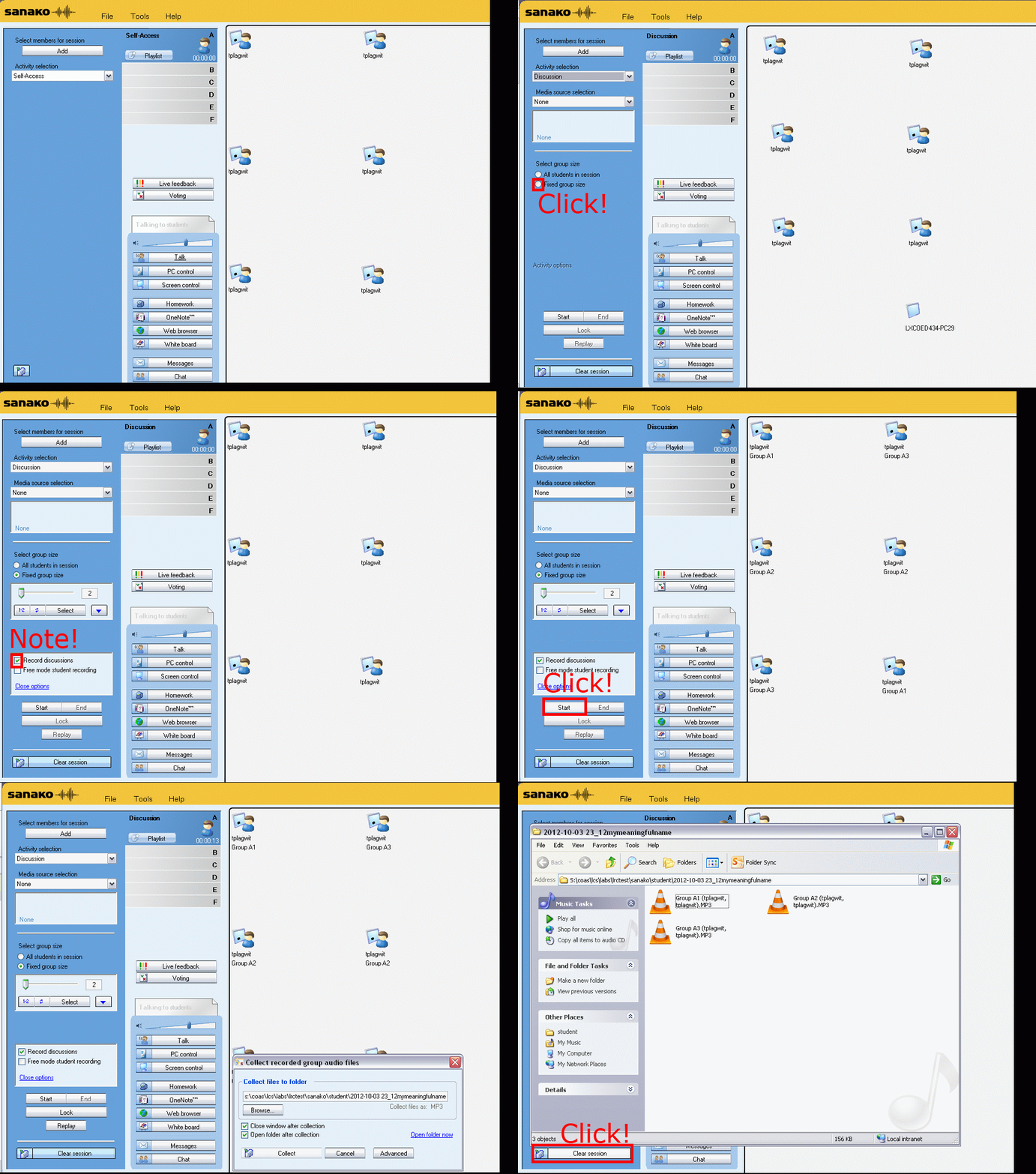
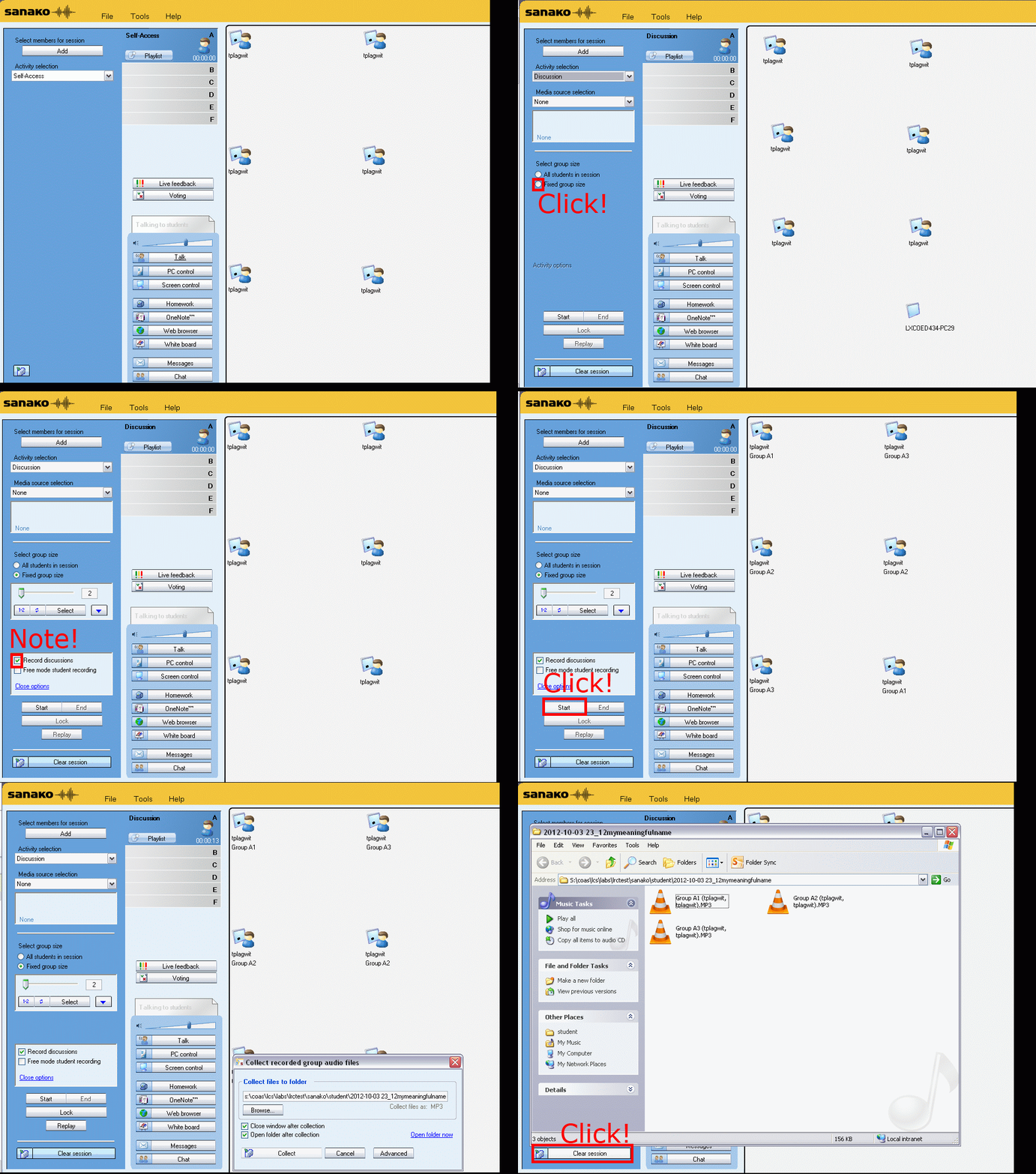
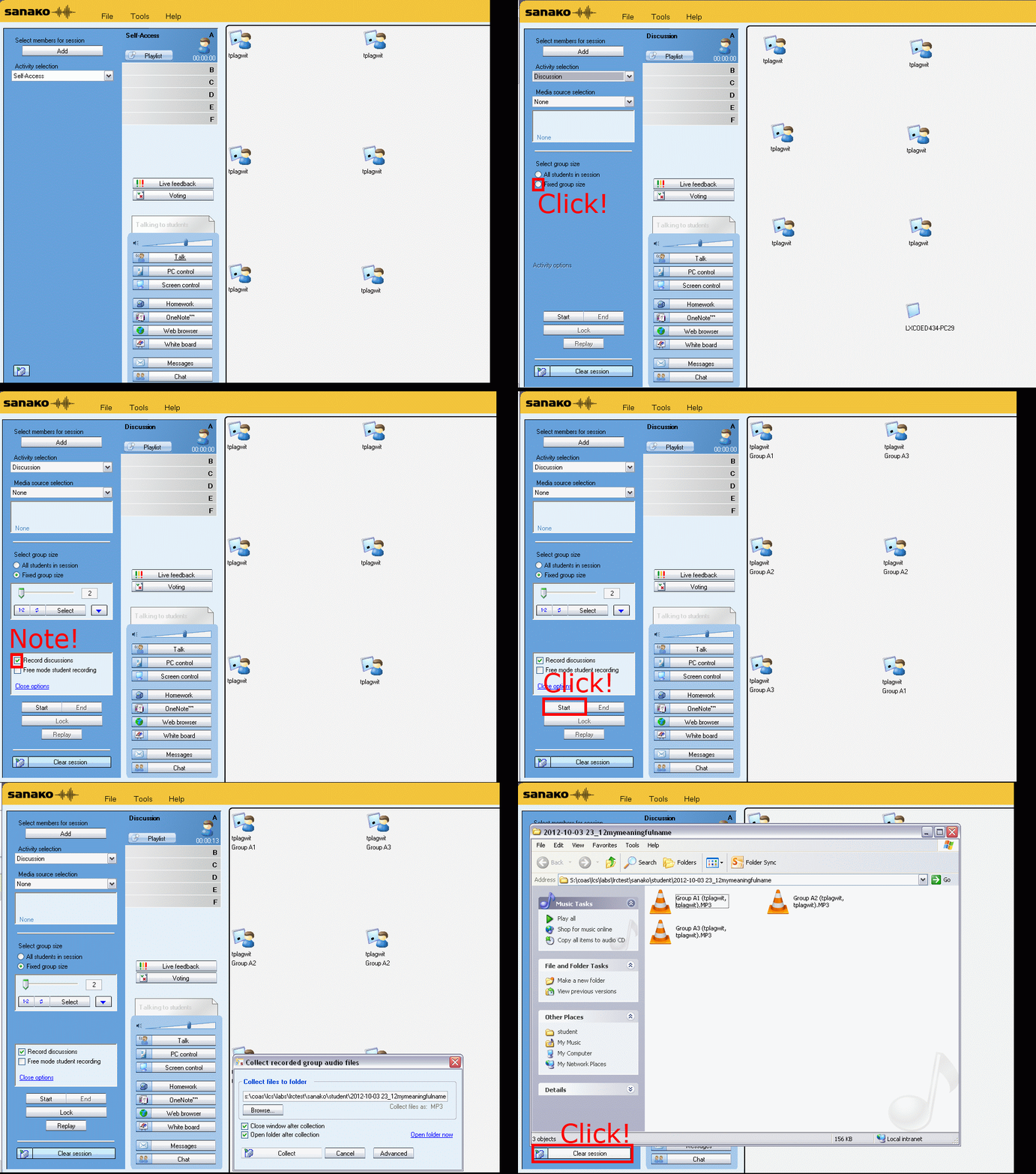
How teachers randomly pair and record students over their headphones with Sanako Study 1200–the ultimate training summary…
2012/10/12
Leave a comment
…thanks to animated gGIFs. Slower? 050ms, 075ms, 100ms, 200ms, 300ms, 400ms,500ms, 600ms, 700ms, 800ms,900ms, 1000ms. Load the speed of your choosing into the left screen of the teacher station before trying to pair your students, with the window active, press F5 to restart the animation from the beginning at any time:

Ipatrainer.com community provides free phonetic transcription tables with sounds and exercises
2012/10/11
Leave a comment
- This is looking good, but …
- There seem to be some coding issues, I am getting server errors 500 after registering.
- The site is advertisement-based.
- There is no content beyond the IPA sound which would put these bare basics in phonetics into language learning context and practice.
- Site Contains:
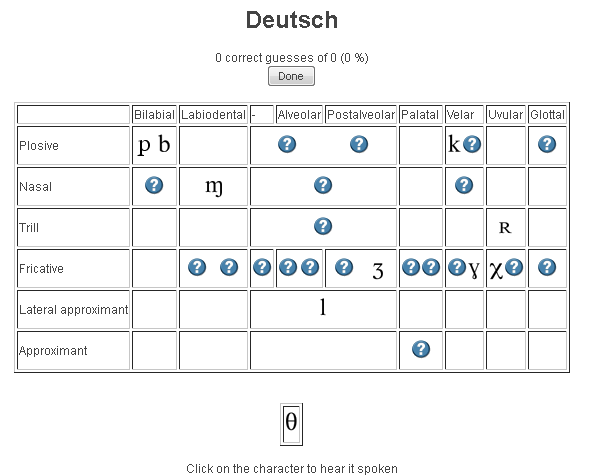
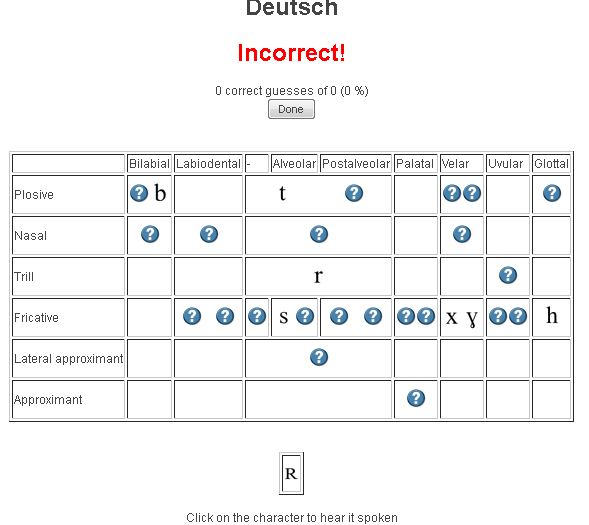
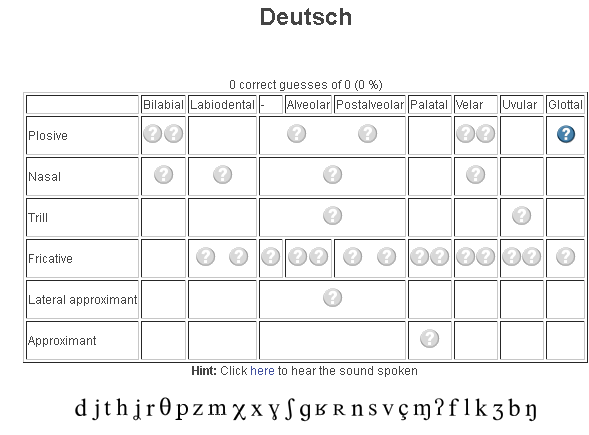
- tables for teaching your language – complete with phonetic symbols and sound samples

- and exercises for your students (e.g. Memory games, Identifying characters


 , places,
  and sounds.
- tables for teaching your language – complete with phonetic symbols and sound samples
- You can
- Create your own, after free registration,
- or assign one of the ones from many other teachers.
- Most popular ones are listed here: http://www.ipatrainer.com/user/site/?language=, and if the use numbers are accurate, there must be really some serious IPA learning going on here…
- I see no way to browse other tables without having the username of the teacher who created and assigned it.
- There is also a phonetic writer.
- And a user forum, in its infancy.



Categories: Arabic, audience-is-students, audience-is-teachers, e-languages, English, Farsi, French, German, Greek (modern), Hebrew, Hindi, Italian, Japanese, Korean, Latin, learning-materials, Mandarin, Polish, Portuguese, Russian, service-is-evaluating-learning-tools, Spanish, Speaking, Swahili, websites, Yoruba
ipa, phonetics
Delete the Flash Global Settings if the iMacs webcam displays black frame only
2012/10/11
Leave a comment
- Problem: Safari and (not recommended after last testing round) Firefox both hung on iMAC6 when a student tried to do a Moodle Kaltura Webcam assignment and got to the built-in ISight camera display page.
- Cause: maybe a Flash security problem accessing the web cam? maybe security dialogue was not answered by the student correctly earlier, and the “preference”stored in her account?
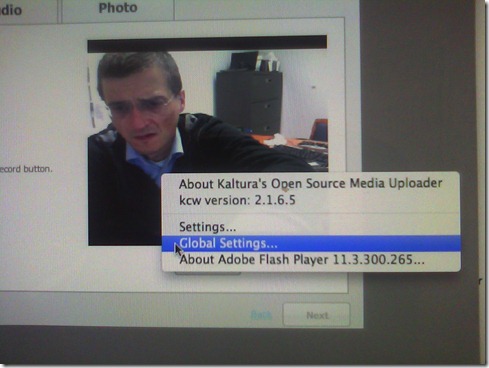
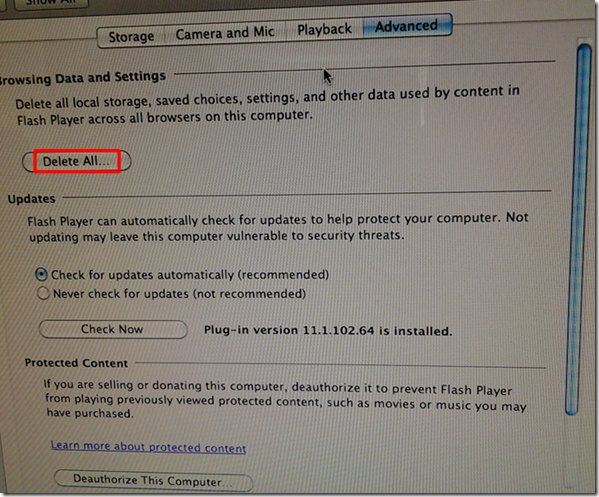
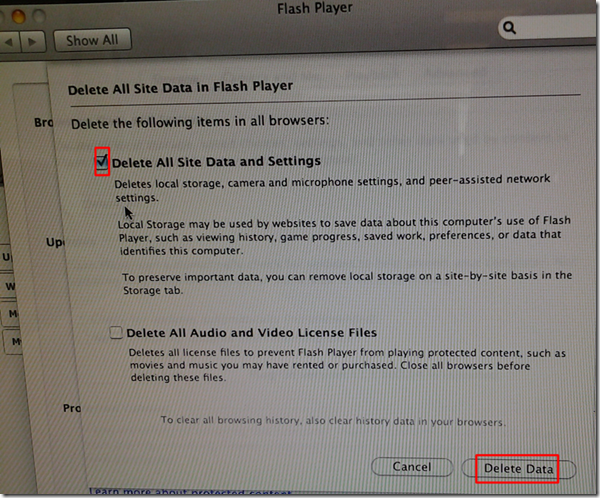
- Solution (presumably): System started working again after I deleted the Flash Global settings, by right-clicking on the webcam video preview window like so:
-
- Ceterum censeo that we need a computer management infrastructure if we want to use MACs for language learning technology. Faronics-Deepfreeze would have prevented this problem, provided we have a software imaging system (CASPER coming up apparently) that can let us start with a usable image, and the staff time to learn and configure 2 usable OS images and dual usable computer management infrastructures. TCO now > TCO dual OS infrastructure > TCO web cams for 45 PCs.


How the LRC provides volunteer tutoring services
2012/10/10
Leave a comment
- The volunteer tutor student gets a tutor calendarto publicize her services (non-personal information only) online.
- The LRC assistants at the LRC reception desk will train and set up the tutor initially. If the volunteer tutor needs more practice in using her NINERMAIL calendar than her initial training provided her with, she can come in and log in for the LRC assistants at the LRC reception desk and the LRC assistants will guide her. During LRC opening hours, at any time we have 3 computers and 2-3 LRC assistants staffing the LRC reception desk which is right next to the group rooms where the volunteer tutors work, so there should be minimal delay and overhead with maximum administrative benefit.
- From then on, the volunteer tutor is in charge of her own tutor calendar. If the volunteer tutor needs to announce changes, the volunteer tutor goes to NINERMAIL, section: calendar, and
- for single cancellations, deletes her appointment, like so: http://plagwitz.blob.core.windows.net/content/lrc/owa-cancel-by-rightclick-delete-appointment.html
- for changing the schedule, opens her old appointment (series), cancels it (only future occurrences) and creates her new altered (recurring) appointment, like so: https://thomasplagwitz.com/2012/01/10/how-to-make-changes-to-a-meeting-request/
- The volunteer tutor logs in and out of her tutor calendar appointment, whenever she starts/ends her tutoring hours, so that the LRC assistants at the reception desk can check her in and out of the LRC (LRC Assistants have a special program for this), and so that she can enter a summary of whom she tutored and on what. A the end of the term, the LRC coordinator can provide tutor supervisors with a report on the tutoring log collected this way.
- To maximize learning and minimize missed connections, bottlenecks and delays throuhg intermediaries – including tutor supervisors and LRC staff -, the volunteer tutor – the authoritative source of her tutoring time – can communicate directly through http://mail.uncc.edu/owa/calendar/LRCTutor01@uncc.edu/Calendar/calendar.html (sample only, for actual Tutor## see https://thomasplagwitz.com/?tag=lists+resources), with her stakeholders:
- the tutees who need to know her tutorung times, can communicate directly via
- the tutor supervisors, who, if they do not approve of the live or end-of-semester report tutor schedule, can let the tutor know, by asking her to change her time, deny her credit, not rehiring her…
- Currently, all tutoring is walk-up only. Enabling tuteees to sign-up for tutor help to avoid pile-ups is still TBA. If you would like to see sign-up tutoring implemented, please drop us a line explaining how this would be helpful for you.
- As far as the LRC is concerned:
- Tutors have to be within the within the opening hours of the LRC: http://mail.uncc.edu/owa/calendar/LRCRoomCOED434@uncc.edu/Calendar/calendar.html.
- The LRC being increasingly busy with classes, exams, self-access assessments and distance education sessions these days, we also require all tutors to include one of the group rooms in the box “resources:” LRCRoomCOED433c, LRCRoomCOED433d of their tutor calendar meeting request. Doing so will secure the tutor and tutee a convenient work place.
- Summaries of our tutor training in LRC language learning technology facilities are available here: https://thomasplagwitz.com/?category_name=service-is-tutoring+training.
How to fix “no audio” on the computers with black Sanako headsets
2012/10/10
Leave a comment
- First, show the Sanako student application (e.g. from button:Start / Student).
- Is the Volume Control slider set to 0? Move it up where it says “Adjust volume”:

- Still hear no audio playing on the black Sanako headsets? Then the volume slider was likely moved to 0 since the headset was not detected: On the rear of the computer, check the connection
- of the blue headset plug into the USB extension cord, and
- of the extension cord into the rear of the computer.




Questions? Read the About. Or just ask me a quick Our Databases: Resources with calendars -- Language learning material Moodle Sites, multimedia files -- films


FAQs for LRC student staff or for students or for teachers. To search our FAQs, in the browser addressbar, add after "https://plagwitz.wordpress.com/feed/?tag=faqs+/" "+TAG1" (from tag cloud below) OR "https://plagwitz.wordpress.com/feed/tag=faqs
&category_name=" "CAT1" (from category hierarchy below). OR search both categories and tags, and multiple TAGs/CATs (connect with "," for OR-search, with "+" for AND-search), like so: https://plagwitz.wordpress.com/feed/?tag=TAG1+TAG2+...TAGn&category_name=CAT1
+CAT2+...CATn"
Other ways to find help
If you cannot find it here, look there: 5,500 Language-Learning Links and Programs for learning or teaching 150 languages
Shortcuts:Our Lists, Our Maps, LRC Staff Moodle Site,LRC Project Moodle Site, 49erexpress, UNCC Moodle, Student Recordings: s:claslcslrcsanakostudent
Learning usage samples: Sanako oral exam, Kaltura webcam presentation, Dictation with speech recognition, Sanako written exam, Chinese and Japanese interactive stroke-order practice
Test the Sanako Installer, Webbrowser Popup Konfigurator for XP, or Windows7, faster LRC TeacherPC Log-in Let MS facilitate diacritics writing by installing for you US-International keyboard layout
This is my personal blog (Google+). The views expressed on these pages are mine alone and not those of my employer. The information in this weblog is provided “AS IS” with no warranties, and confers no rights.
 Thomas' Work Space