Archive
The Films on Demand subscription of Atkins library
- Benefits:
- provides access to over ten thousand streaming videos.

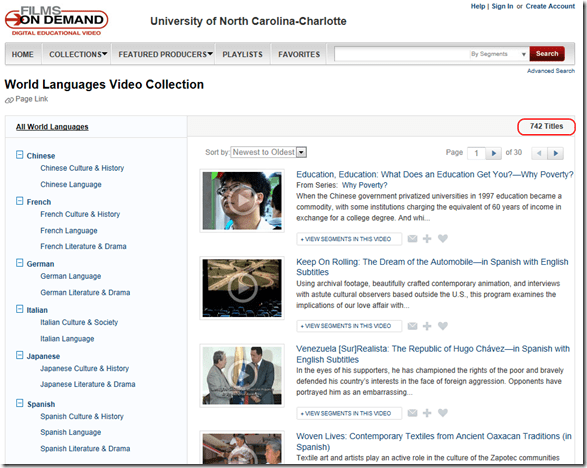
- including world languages:
- Remaining Problems:
- 741 titles for World languages is not a lot (additional materials may be applicable to language learning, but I do not see the most commonly requested foreign language films used in the department which we are currently trying to rescue across the demise of VHS). Any particular silo of information is not comprehensive (given the power of the network effect, YouTube wins hands-down most if the times),
- any content is difficult to integrate into a language skill curriculum,
- any added interface restrictions may make it more difficult, not more stable,
- not unlike YouTube, files you may have used, even linked, can get removed.
- the website seems to be available only on campus – even if you are logged into your campus account (university VPN will likely help, and not, given that it has video throughput issues).


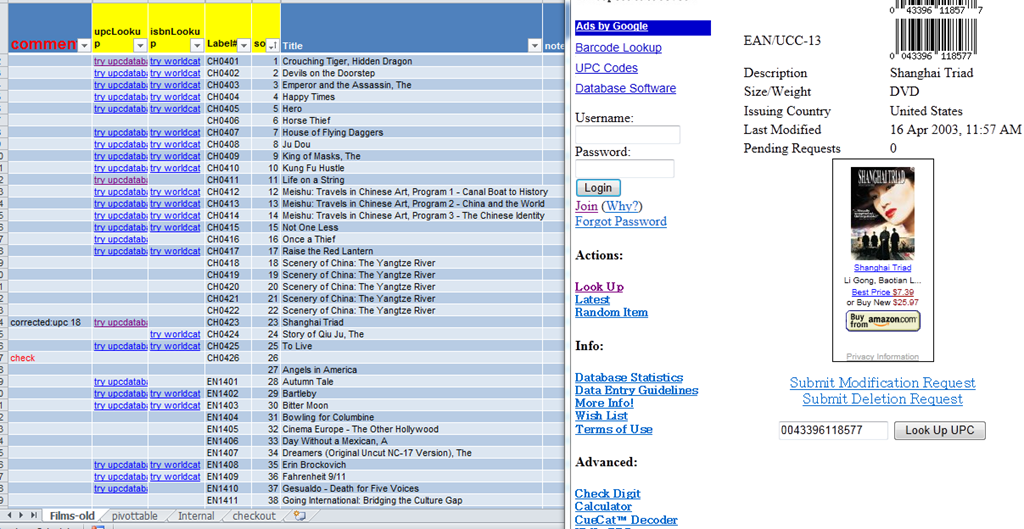
How to get from our Film-collection.xlsx to in-depth bibliographic data on worldcat.org and upcdatabase.com
- worldcat.org,
- The link is based on the item’s ISBN (barcode-scanning was rarely possible, thus checksum checking becomes mandatory).
- upcdatabase.com
- The link is based on the item’s UPC/EAN which do come with barcodes, but lookup resources leave things to be desired:
- http://www.upcdatabase.com/item/[upc # here]: yields some info for some items (newer DVDs which usually also have ISBNs?)
- http://gepir.gs1.org/v32/xx/gtin.aspx?Lang=en-US, on spot-checking, yields only “Trade Item Ownership”, but “no Trade Item Info”, and does not support GET operation.

- This links another isolated and non-professional language resource center media collection to the world of non-pseudo libraries, where the power of crowdsourcing has long been known.
- The original plan – which will take more time to implement, especially since it can be automated only in a very limiting way – was to pull into the local collection spreadsheet accurate and multi-faceted bibliographic information, to prevent the common failures of even our usually basic item searches by title:
- foreign-language diacritics, given that non-foreign-language-librarians edited the local collection spreadsheet. This requires that foreign character input to be installed on the LRC help desk computers (done for Western) and that student assistant personnel can be trained (theoretically done – will need more practice)
- English translations: may provide a safety net for searches, short of automated flattening of all title diacritics.
Subtitling language learning exercises with Sanako Study 1200 Student
I love to work with target language subtitles in the media-rich environment of the Language Resource Center: Target language subtitles provide readily available transcripts of non-ephemeral, often authentic target language to base language learning exercises on.
More and more target language subtitles are included in newer editions of movies. In addition, projects that crowd-source subtitles for other video materials, have sprung up on the web also, e.g. http://www.universalsubtitles.org/en/ . So if you just want the transcripts to build language learning exercises from, you have a variety of choices.
If however you think “Der Weg ist das Ziel” and the listening comprehension and writing activities in creating subtitles are valuable language learning exercises in themselves, the Sanako Student player comes with a subtitling mode:
In the following screencast I subtitle one of my own training screencasts (explaining how to access timestretched animated GIFs for practicing Chinese stroke order in the LRC environment) in a 3-step process: type along as fast as you can while listening to a first run of the screencast; listen to the screencast again and correct errors; finally, to adjust the timing of the subtitles (which the Sanako makes especially easy), listen to the screencast for a third time (talk about “massed presentation”).


Questions? Read the About. Or just ask me a quick Our Databases: Resources with calendars -- Language learning material Moodle Sites, multimedia files -- films


FAQs for LRC student staff or for students or for teachers. To search our FAQs, in the browser addressbar, add after "https://plagwitz.wordpress.com/feed/?tag=faqs+/" "+TAG1" (from tag cloud below) OR "https://plagwitz.wordpress.com/feed/tag=faqs
&category_name=" "CAT1" (from category hierarchy below). OR search both categories and tags, and multiple TAGs/CATs (connect with "," for OR-search, with "+" for AND-search), like so: https://plagwitz.wordpress.com/feed/?tag=TAG1+TAG2+...TAGn&category_name=CAT1
+CAT2+...CATn"
Other ways to find help
If you cannot find it here, look there: 5,500 Language-Learning Links and Programs for learning or teaching 150 languages
Shortcuts:Our Lists, Our Maps, LRC Staff Moodle Site,LRC Project Moodle Site, 49erexpress, UNCC Moodle, Student Recordings: s:claslcslrcsanakostudent
Learning usage samples: Sanako oral exam, Kaltura webcam presentation, Dictation with speech recognition, Sanako written exam, Chinese and Japanese interactive stroke-order practice
Test the Sanako Installer, Webbrowser Popup Konfigurator for XP, or Windows7, faster LRC TeacherPC Log-in Let MS facilitate diacritics writing by installing for you US-International keyboard layout
This is my personal blog (Google+). The views expressed on these pages are mine alone and not those of my employer. The information in this weblog is provided “AS IS” with no warranties, and confers no rights.
 Thomas' Work Space