Archive

Posts Tagged ‘lists’

Language Resource Centers computer configuration

  1. This list documents customizations on LRC computers to facilitate language learning.
    1. Click here to view the list.
    2. LRC staff click here for edit in browser access.

Film-and-media-collection.xlsx online database under construction

2011/10/13 1 comment

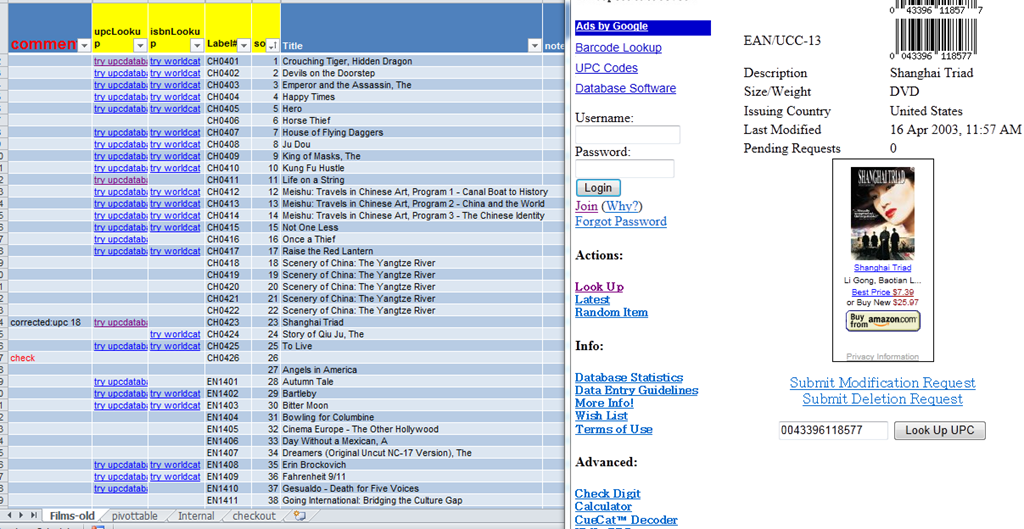
Sneak preview (larger view here) of the searchable online database with internet background information lookup (Note: work in progress, hard-“head” area!):

Friends of the UNCC-LRC can open this link in Excel-web-app (in your web browser, internet explorer or Firefox): https://skydrive.live.com/edit.aspx?cid=0025C841818181C2&resid=25C841818181C2%21164

More than one LRC assistant can edit the sheet at the same time, just not the same cell. so: if there is more than 1 lab assistant on duty, the one whose first name is closer to the end of the alphabet starts from the bottom row of the spreadsheet and works her way up

Click on the link “try UPC lookup”,

On the page that opens, if there is a picture of the movie with “buy from amazon”, right click on the link to amazon.com, select “copy shortcut”, and paste the shortcut into the column “buy from amazon”

Find the original movie title on the page, copy it into spreadsheet  column “UPC title original”,

If there is title English translation, copy it into “UPC title English translation”

Click on link “try worldcat”,  do the same as above with the spreadsheet columns “ISBN title original” and “translation”,

How to get from our Film-collection.xlsx to in-depth bibliographic data on worldcat.org and upcdatabase.com

  1. To access more in-depth (and accurate, especially foreign language-wise) information about the films in our media collection that we can possibly maintain ourselves, we added the ISBN and UPC/EAN identifiers from the collection items to our new online film-collection list. This allows us to link collection items to
  2. worldcat.org,
    1. film-collection-isbn-worldcat
    2. The link is based on the item’s ISBN (barcode-scanning was rarely possible, thus checksum checking becomes mandatory).
  3. upcdatabase.com
    1. film-collection-upc-upcdatabase
    2. The link is based on the item’s UPC/EAN which do come with barcodes, but lookup resources leave things to be desired:
      1. http://www.upcdatabase.com/item/[upc # here]: yields some info for some items (newer DVDs which usually also have ISBNs?)
      2. http://gepir.gs1.org/v32/xx/gtin.aspx?Lang=en-US, on spot-checking, yields only “Trade Item Ownership”, but “no Trade Item Info”, and does not support GET operation.
  1. This links another isolated and non-professional language resource center media collection to the world of non-pseudo libraries,  where the power of crowdsourcing has long been known.
  2. The original plan – which will take more time to implement, especially since it can be automated only in a very limiting way – was to pull into the local collection spreadsheet accurate and multi-faceted bibliographic information, to prevent the common failures of even our usually basic item searches by title:
    1. foreign-language diacritics, given that non-foreign-language-librarians edited the local collection spreadsheet. This requires that foreign character input to be installed on the LRC help desk computers (done for Western) and that student assistant personnel can be trained (theoretically done – will need more practice)
    2. English translations: may provide a safety net for searches, short of automated flattening of all title diacritics.


DeReWo German Word Frequency Lists

Frequency-based word (lemma and forms) lists and instructions are based on the Deutsche Referenzkorpus DeReKo of the IDS (Institut für deutsche Sprache).

If you are not bound by a textbooEditk:

  1. Frequency level  1-9 contain the 550 most frequent words = 1st term?
  2. Frequency level 1-10 = about 1200 words = 1st year?

An online spreadsheet of the 40k list of 2009 with frequency level comparison and English-German dictionary links is here and partially embedded below.

American National Corpus English Word Frequency Lists

The American National Corpus list is long (~300k) and  lemmatized: http://americannationalcorpus.org/SecondRelease/data/ANC-all-count.txt.

List of LRC rooms, equipment & tutor hours that can be booked or checked out

2011/08/21 10 comments

The LRC has 98 resources (in black letters and green (NEW Winter2012) versus purple is w/o email address and booking is still paper-based; yellowis broken;red: is missing), that, per new procedure since Fall 2011 (explained in one screenshot), from NINERMAIL or MS-Outlook (Desktop), using their email address listed in column address@uncc.edu, can

  1. be booked online by sending meeting requests (all, except ccurrently tutors&LRC assistants. See column “users” for who is allowed to book).
  2. or whose schedule can be viewed (all by staff; the calendars that can be viewed/subscribed to by students are indicated by “View” below)

Note that as of Winter 2012, physical items can only be picked up and returned when the CIRCULATION window LRCCOED436 is open which is less often than the LRCAssistant is present at the RECEPTION desk. Please check both calendars (solid color = service available = good ) before booking AND (latebreaking changes) before picking up.

The following table comprises only rooms, hardware and “human resources” of the LRC. The LRC’s physical media and learning materials can be checked out using a different system.

In the table, the column “program” explains which department and study program this resource is available for (the LRC supports LCS, and film studies there in particular, and ELTI), “user” who within the study program is allowed to book the resource (teacher, students, LRC staff, including both assistants and tutors), “resource type” whether the resource is a room/office hour, or a piece of movable equipment,  “address@uncc.eduwhich email address to send a meeting request to (shortform because of NINERMAIL length restriction), “display name” which searchable name you can find the email address under in NINERMAIL (includes tutors’s languages, explanation of room, camera and other equipment type), “make and model+manual field” the make and model of equipment items, including a link to the online maniual, if applciable, “calendar” a link to the publically viewable calendar of the resource, “max hours” the maximum duration a resource can be booked for (in hours, or 0 if there is no limit), and the “components” columns contain a parts list  for movable resources.

You can also filter, by clicking on the column header triangles, or enlarge (or hold CTRL and press +), or, if you are friends with the UNCC-LRC, edit.

Configuring the LRC Resource Mailboxes in MS-Exchange 2010

Compare the options here:

London Metropolitan University Shortcuts

Archived Interpreting Links:
trpRecord
Videos
Williamssound bidules
Usage policies
Calendar
Translation Links:
Swift FAQ
e-Infrastructure Links: network shares
J: or \\lgu.ac.uk\lgu$\londonmet departments
K: or \\stushare_server\StuShare
O: or \\lgu.ac.uk\lgu$\multimedia student\mmedia\
X: or \\venus\homes
ServicePhone##:
ICT:x4444,
Media:x1683
Language:x3215
To message me, in MG, click “Start”, “Run”, paste: “C:\Program Files\Messenger\msmsgs.exe”, click “OK” or see bottom of this page or read .more.