How to open multiple windows in OneNote 2013 on Windows 8 (desktop)
2014/08/22
Leave a comment
CTRL-M still works… Reason I am jotting this down: On Windows 7, I used to open multiple windows by going through the OneNote program icon in the Start bar. But on Windows 8. the OneNote tile from “Tile world” just goes back to the last OneNote window. (As always: Live and learn.)
Categories: office-software
ms-onenote
Solved: Cannot remote desktop into 2nd Microsoft account on Windows 8
2014/08/22
Leave a comment
- MSTSC’ing from the remote computer simply fails with a non-descriptive error message.
- However, if you get as far as the remote computer login screen, you get a valuable hint: Your 2nd Microsoft account has not been added to the Remote Desktop Users Group (presumably this happens by default when you create your first Microsoft account).

- To fix this, log in as admin on your Windows 8 machine (either locally or remotely with an account which is in the Remote Desktop Users Group), windows key+f, “users”, click on “settings”, and use the direct shortcut to “remote desktop users group” to add the user in question (with the Microsoft account email) to the permitted users group.
- Adding what I believed was the local account equivalent of the 2nd Microsoft account via desktop / windows-ley x/ “computer management” / “users and groups” to the “remote desktop users group” did not work.


Categories: e-infrastructure, os
mstsc, security
How to remote desktop from a vertical dual-monitor config on MS-Vista (and up) to MS-Vista (and up)
2014/08/22
Leave a comment
Just let mstsc figure it out: mstsc /span /v:<servername>
Trying to feed the resolution /v and /h commandline parameters did fail.
The new span dual monitor support in the MS-Vista MSTSC does not only support horizontal monitor configurations (mine are 2*w:1050*H:1680), seems a tad slow, though).
Categories: Back office, e-infrastructure
ms-vista, ms-windows, mstsc, multi-monitor
Bad audio quality in Moodle Kaltura recordings on iMacs under ambient sound conditions. A running log (closed)
2014/08/22
Leave a comment
- Symptom: See title.
- Cause: While speakers of the 3.5 mm headset take over from the iMac speakers, when plugged in, the 3.5 mm headset micro does not disable the webcam micro. The webcam micro remains the recording source for Moodle Kaltura (mac os x.6, safari 6, flash 10).
- Possible solutions:
1st choice: is there a way for the admin to override this permanently?2nd choice: is there a way for the end user to override this on a case-by-case basis?- "The Califone 3066AV is compatible with both Windows and Mac audio outputs (but is not compatible with iMacs)." ("The Wow starts now!").. Do we have to tie up our boom and lavalier microphones for this?
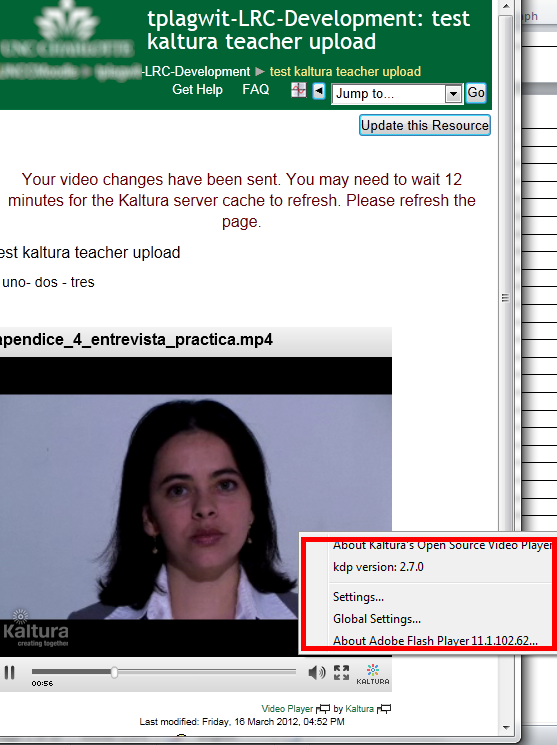
- Try the flash settings by right clicking in the video window, selecting the microphone icon, then choosing the external (= non-webcam) microphone for input.
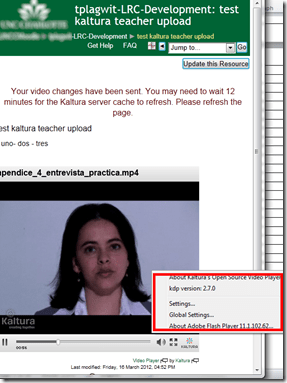
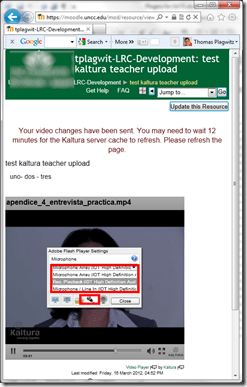
- Fail. The real culprit is the iMacs line-in audio-in for which you need a preamp to get it to work with analog microphones. Preamps seem to start at $40, but for that I can get a PC webcam (Microphone included).

How to get dkRandomdata to run on 64-bit Excel
2014/08/22
Leave a comment
- Dick Kusleika made this very useful random data generator for Excel (more random data sources I plan to list here).
- To get this to run on 64-bit Excel 2013, I need to make a few quick changes in the source (which will break on 32-bit Excel):
- First, the usual “must be updated for use on 64-bit systems”:
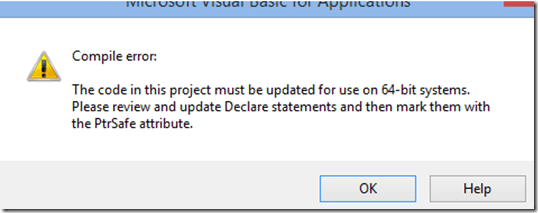 , fixed by this (but note the 1st line):
Private mlParentPtr As LongPtr 'trp:Long
#If VBA7 Then
Private Declare PtrSafe Sub CopyMemory Lib "kernel32" Alias "RtlMoveMemory" _
	(dest As Any, Source As Any, ByVal bytes As Long)
#Else
Private Declare Sub CopyMemory Lib "kernel32" Alias "RtlMoveMemory" _
(dest As Any, Source As Any, ByVal bytes As Long)
#End If
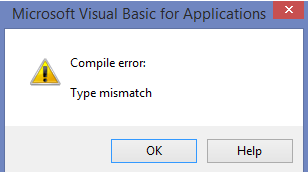
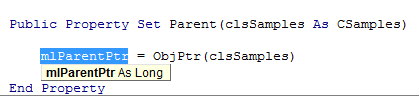
- Then, to fix the various “Type mismatch” errors
 , e.g. at
  , change Lomg into PtrLong: in these locations:
-
above: Private mlParentPtr As LongPtr 'trp:Long
-
Private Function ObjFromPtr(ByVal pObj As LongPtr) As Object
'trp Private Function ObjFromPtr(ByVal pObj As Long) As Object
-
- First, the usual “must be updated for use on 64-bit systems”:
- Then I am finally getting to the xmlDoc As MSXML2.DOMDocument error on Windows 8.1, but that has been solved in the comments here earlier this year (also for Windows 8.1, but apparently with Excel 32-bit): I changed MSXML2.DOMDocument to MSXML2.DOMDocument60 where I could:
-
Dim xmlDoc As MSXML2.DOMDocument60 'trp: Dim xmlDoc As MSXML2.DOMDocument
-
WriteToFile:
-
Dim xmlDoc As MSXML2.DOMDocument60 'here it is already fixed? Dim xmlDoc As MSXML2.DOMDocument6
-
Dim xmlStyle As MSXML2.DOMDocument60
-
Dim xmlOutput As MSXML2.DOMDocument60
-
-
LoadFromFile(): Dim xmlDoc As MSXML2.DOMDocument60
'trp: Dim xmlDoc As MSXML2.DOMDocument
-
testxml() (looks like the XML issue has been worked on since the comments):
-
Dim xmlDoc As MSXML2.DOMDocument60 'trp: Dim xmlDoc As MSXML2.DOMDocument
-
Set xmlDoc = New MSXML2.DOMDocument60 'trp: New MSXML2.DOMDocument
-
-
test_writetofile():
-
Set xmlDoc = New MSXML2.DOMDocument60 'here it is already fixed, and here
-
Set xmlStyle = New MSXML2.DOMDocument60
-
Set xmlOutput = New MSXML2.DOMDocument60
-
-
- Finally, if you have trouble getting the add-in buttons to show in Excel 2013 ribbon, close all workbooks, and you may (but I did not) have to restart Excel (KB2761240):

- Viola. And I sure like me some Seinfeld references in my sample data….



Categories: e-infrastructure, office-software, service-is-programming
64-bit, addins, Dkrandomdata, MS-Excel, VBA
Another possible cause for WHEA_UNCORRECTABLE_ERROR: Overheating?
2014/08/15
Leave a comment
- Problem:
- Win8.1. System experiences terrible slow downs.
- Eventually even BSODs with whea_uncorrectable_errors crop up.
- Root Cause:
- Trying to do root cause analysis, I consider:
- Search for “Windows woes after 8.1 upgrade” (online searches lead to results, but seem not applicable here).
- Internet (speed test shows normal):

- Virus: I have Window Essentials, but also try Malwarebytes – prognosis negative.
- GPU (Bitcoin miner?), CPU. GPU-Z shows no problem there :

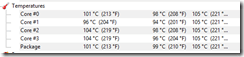
- CPUID HWMonitor to the rescue: GPU utilization looks good here also, but what is this with the CPU temperatures?!?!
- On opening up the case and examining the CPU: poorly managed cable blocked the fan heat sink.
- Trying to do root cause analysis, I consider:
- Solution: Cable ties! (This new video card install proved more expensive than it should).
- Other thoughts:
- Why did Windows Performance Metering show the apparently throttled CPU still as mostly idle (It still showed single digit percentages for CPU utilization even when computer was positively crawling)?


Categories: e-infrastructure, hardware
gpu-z, heatsink, hwmonitor
Windowing system infinite loop on windows 8.1
2014/08/05
Leave a comment
-
Rather annoying, no getting out of this loop, endless window foreground switching, but also unclear about the screen resolution, it seems. Ha
-
Oh, wait, I changed the dpi scaling, but chose to not log off, has that got something to do with this? Well, I have seen this loop behavior before, and I also frequent get terrible slowdowns which I have not been able to do root cause analysis for (also video-related? or network? )
-
Either way, likely related frequent explorer crashes which downgrade from aero. Sometimes I lose Aero’s advanced task scheduler completely, here I have a screenshot of it just coming back:

-
Have not been able to find other similar problem / but reports – something wrong with my setup then? (never mind that my camera has its own infinite loop auto focus bug.

Categories: Glitches&Errors, Screencasts, Uncategorized
aero, ms-windows


Questions? Read the About. Or just ask me a quick Our Databases: Resources with calendars -- Language learning material Moodle Sites, multimedia files -- films


FAQs for LRC student staff or for students or for teachers. To search our FAQs, in the browser addressbar, add after "https://plagwitz.wordpress.com/feed/?tag=faqs+/" "+TAG1" (from tag cloud below) OR "https://plagwitz.wordpress.com/feed/tag=faqs
&category_name=" "CAT1" (from category hierarchy below). OR search both categories and tags, and multiple TAGs/CATs (connect with "," for OR-search, with "+" for AND-search), like so: https://plagwitz.wordpress.com/feed/?tag=TAG1+TAG2+...TAGn&category_name=CAT1
+CAT2+...CATn"
Other ways to find help
If you cannot find it here, look there: 5,500 Language-Learning Links and Programs for learning or teaching 150 languages
Shortcuts:Our Lists, Our Maps, LRC Staff Moodle Site,LRC Project Moodle Site, 49erexpress, UNCC Moodle, Student Recordings: s:claslcslrcsanakostudent
Learning usage samples: Sanako oral exam, Kaltura webcam presentation, Dictation with speech recognition, Sanako written exam, Chinese and Japanese interactive stroke-order practice
Test the Sanako Installer, Webbrowser Popup Konfigurator for XP, or Windows7, faster LRC TeacherPC Log-in Let MS facilitate diacritics writing by installing for you US-International keyboard layout
This is my personal blog (Google+). The views expressed on these pages are mine alone and not those of my employer. The information in this weblog is provided “AS IS” with no warranties, and confers no rights.
 Thomas' Work Space