Archive
Why to save Audacity projects locally …
… with enough file space to avoid unspecific problems, including later parts of your recording becoming inaudible.
This problem was caused by attempting to save an Audacity project to a network share over a slow network and with limited storage space.
This Audacity project (.aup extension, with subfolders) had a size of a 200MB – the exported .mp3 likely less than 1% off that.
So always save Audacity projects you are working on on local hard drive or USB thumb drive.
Shortlinks for RUSS1201, RUSS1202 classes with Sanako Study 1200
|
1 |
sanako-study-1200;students;teachers;intro;cheatsheet;faqs;screencasts |
|
|
2 |
russian;students;writing;teacher |
|
|
3 |
sanako-study-1200;students;teachers;intro;cheatsheet;faqs |
|
|
4 |
sanako-study-1200;teachers;intro;cheatsheet;faqs |
Or use OSK: https://thomasplagwitz.com/tag/osk/o
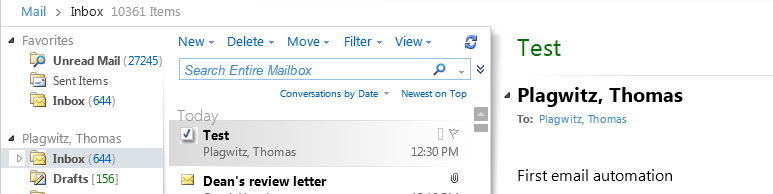
EWS are working
How to download Centro Spanish Textbook audio
The audio is in (compressed) mp3 format. Just right-click on any audio link and choose save target/link as (or similar, depending on browser), like so: 
Example from Centro – Puntos de partida: Online Laboratory Manual, 8th Edition (you need access privileges to follow this link, but you can send links around, users can open them, provided their webbrowser is already logged into the centro site – getting access and finding you way around the website is the real issue. Webspiders are prohibited, though – and even Downthemall saves only files without extensions: rename them to .mp3 or save them manually as .mp3 in the first place, as shown above. Does not work as above? Try a different web browser.

How LRC assistants get paid: paper time sheet if no web time entry
- If there is a delay at the beginning of the term getting you into the web time entry system we normally use,
- print a paper timesheet for Work Study Student,
- get it signed from the LRC coordinator or director,
- on or before the 31st, turn it in to Payroll which is on Reese 3rd Floor (consult the Campus Map).
Getting answers for the LRC management from Report Express
- Report Express is a powerful tool to get current enrolment data which seems vital for running the LRC, but which I have not been able to get my hands on before easily (SCT-Banner limits access too much).
- Excel download format – which I recommend : cleaner (fewer graphics) and more information – DOES work, but for Excel 2010, I have to rename the download file extension from XLS to HTML (which the download is) and “open with” –> Excel.
- I have not been successful merging these output files per language on the command line into one large HTML file and cleaning up the <html><body> framework – so I have to open each one, merge by copy/paste the contents of the result worksheet into a new worksheet and clean up the data in there by converting into an Excel Table and sorting by a suitable table column, e.g. ID, which puts all actual enrolment data sequentially, and separates all (redundant anyways) header and footer information.
- I finally added table columns with array formulas to calculate the enrolment aggregates,
- per this section (to answer questions like: will this class fit into the language resource center?),
- this course # (to answer questions like: where can we have maximum impact on improving learning with technology with creating the minimum of new learning/assessment materials. Assessment is standardized per course #.)
- and per language-level.
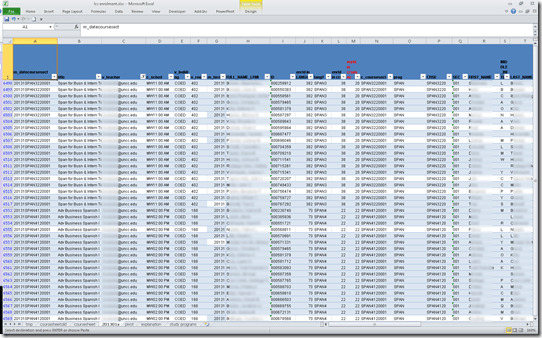
- Finally, vlookup-columns allow me to link the instructor of record and other missing class information (room, building, time) to the student enrolment rows. This allows me to filter, sort and search the enrolment sheet with real-life questions, like
- can we support this size class/course/level and language in the LRC
- is it practical to relocate this course for part/a whole class meeting to the LRC
- which students need be given access permissions to the SANAKO
- etc.
-
Sample filter of the aggregate sheet:

Query treebanks with Fangorn for English SLA?
To provide inductive empirical examples, SLA classes have benefitted from query interfaces to target language text corpora in SLA. But corpora are usually POS-tagged – and queried – at best, which constitutes a certain “impedance mismatch” to what SLA classes actually teach. The Fangorn very large treebank query language beta demonstration page

looks already interesting for analyzing English in SLA (hover over tree elements to highlight the corresponding text), including, thanks to its capability of editing and refining queries graphically from the search results, for demonstrations during face-to-face classes. Wondering whether other corpora than Penn Treebank, Wikipedia (5k and 5000k sentences) will be made available online, and other languages but English will be supported.


Questions? Read the About. Or just ask me a quick Our Databases: Resources with calendars -- Language learning material Moodle Sites, multimedia files -- films


FAQs for LRC student staff or for students or for teachers. To search our FAQs, in the browser addressbar, add after "https://plagwitz.wordpress.com/feed/?tag=faqs+/" "+TAG1" (from tag cloud below) OR "https://plagwitz.wordpress.com/feed/tag=faqs
&category_name=" "CAT1" (from category hierarchy below). OR search both categories and tags, and multiple TAGs/CATs (connect with "," for OR-search, with "+" for AND-search), like so: https://plagwitz.wordpress.com/feed/?tag=TAG1+TAG2+...TAGn&category_name=CAT1
+CAT2+...CATn"
Other ways to find help
If you cannot find it here, look there: 5,500 Language-Learning Links and Programs for learning or teaching 150 languages
Shortcuts:Our Lists, Our Maps, LRC Staff Moodle Site,LRC Project Moodle Site, 49erexpress, UNCC Moodle, Student Recordings: s:claslcslrcsanakostudent
Learning usage samples: Sanako oral exam, Kaltura webcam presentation, Dictation with speech recognition, Sanako written exam, Chinese and Japanese interactive stroke-order practice
Test the Sanako Installer, Webbrowser Popup Konfigurator for XP, or Windows7, faster LRC TeacherPC Log-in Let MS facilitate diacritics writing by installing for you US-International keyboard layout
This is my personal blog (Google+). The views expressed on these pages are mine alone and not those of my employer. The information in this weblog is provided “AS IS” with no warranties, and confers no rights.

