Archive
How to Join one of our Windows Live Groups at London Metropolitan
Go the group’s web address (not from your londonmet email client’s browser) and click “Sign in”. 
If you have a windows live account (hotmail or msn qualify), click “sign in”, otherwise click “sign up”.

Go through an account creation process (you only have to do this once): 
Afterwards, you will be automatically signed in (you may have to answer an email first at the address you have given during sign-up) and redirected to the invitation page for the group, click on “Ask to join”. 
Now you are done: 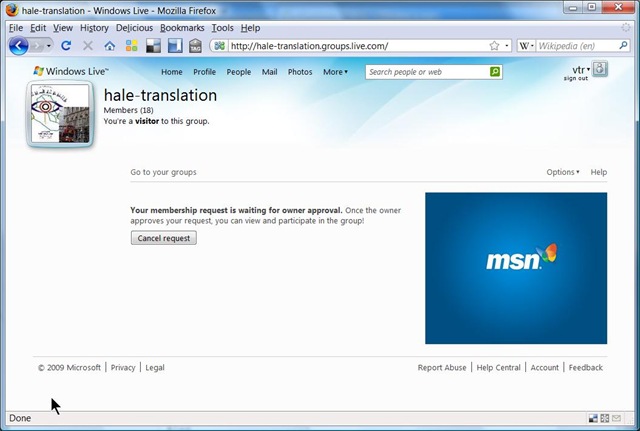
Don’t forget to write down your user name and password.
Classroom management software Vendors at BETT 2009
I visited a number of more generic classroom management systems (NETSUPPORT, Synchroneyes).
These have limited audio (no recording) support, but provide all the essentials for computer use in class at a much lower cost. Could be a temporary solution, if we add some customizing through in-house programming.
Auralog Tell-me-more Demo Screencasts
An overview, mostly narrated:
Automating Auralog Tell-Me-More with AutoIt. Presentation at EUROCALL 2008
Auralog Tell-Me-More is a leading language learning software system which provides a vast amount of content in an advanced technical infrastructure that we found lacking in usability within an higher education language learning environment.
AutoIt is a programming language for GUI automation which I used to better integrate the Auralog software into the higher education language learning process, including
- programmatic
 creation of courses and accounts
 - programmatic extraction and digital repository management for over 30.000 learning units.

- programmatic creation of 10,000s of learning paths,

Results  were presented (screencast) at EUROCALL 2008: “Automating Auralog (pdf)”:
creates 100s of courses  , creates
  and enrols
  up to 2,000 student accounts every term,
- content extraction
 produces files
 for adding search
  and spreadsheet for sort/filter functionality:
- learning path creation.
More detailed background information here: plagwitz_auralog_accounts_project_pub.pdf, plagwitz_auralog_project_pub.pdf
Blended Learning Templates for the e-Learning Center. Download
- Download the Blended Learning Templates for the e-Learning Center, as presented here:
- MS-Word VBA-based quiz template for Students
- MS-PowerPoint Template for Teacher
- VBA-Lookup-Add-In for teacher computer’s MS-PowerPoint installation. (included with student quiz template).
- Find more instructions here.
Do more with LLAS. Aston e-Learning Centre Year 1.
Presentation given at the CETL Symposium – Digital Language Labs: exploring good practice, March 15, 2007. SOAS, London, UK.

How to enable your SMEs to collaboratively define and add metadata to learning materials
- We have been asked to manage digital assets (including web links) and enabling incorporating them as learning materials within a series of study programs.
- We researched a number of metadata schemas and controlled vocabularies that have been applied to language and social sciences learning materials before,
- and incorporated those into the below MS-Excel application, to allow for easy marking up of existing assets by SMEs – using collaborative tagging instead of the more familiar, but more easily conflicting, since mutually exclusive folder hierarchy (unidirectional-tree structure).
- In addition, SMEs can expand and develop the controlled vocabulary, by adding tags of their own, as you can see at the end of this demo:


Questions? Read the About. Or just ask me a quick Our Databases: Resources with calendars -- Language learning material Moodle Sites, multimedia files -- films


FAQs for LRC student staff or for students or for teachers. To search our FAQs, in the browser addressbar, add after "https://plagwitz.wordpress.com/feed/?tag=faqs+/" "+TAG1" (from tag cloud below) OR "https://plagwitz.wordpress.com/feed/tag=faqs
&category_name=" "CAT1" (from category hierarchy below). OR search both categories and tags, and multiple TAGs/CATs (connect with "," for OR-search, with "+" for AND-search), like so: https://plagwitz.wordpress.com/feed/?tag=TAG1+TAG2+...TAGn&category_name=CAT1
+CAT2+...CATn"
Other ways to find help
If you cannot find it here, look there: 5,500 Language-Learning Links and Programs for learning or teaching 150 languages
Shortcuts:Our Lists, Our Maps, LRC Staff Moodle Site,LRC Project Moodle Site, 49erexpress, UNCC Moodle, Student Recordings: s:claslcslrcsanakostudent
Learning usage samples: Sanako oral exam, Kaltura webcam presentation, Dictation with speech recognition, Sanako written exam, Chinese and Japanese interactive stroke-order practice
Test the Sanako Installer, Webbrowser Popup Konfigurator for XP, or Windows7, faster LRC TeacherPC Log-in Let MS facilitate diacritics writing by installing for you US-International keyboard layout
This is my personal blog (Google+). The views expressed on these pages are mine alone and not those of my employer. The information in this weblog is provided “AS IS” with no warranties, and confers no rights.

