Archive
Live a little: Get standard software
You make not only your own, but everybody’s life easier if you upgrade to standardized software. The University is now on Win XP Service-Pack 2, with Office 2003 and Internet Explorer 7 and Firefox 3. At work, call x4444 to get upgraded. At home, you can download Internet Explorer 7 or Firefox 3 (also available for MAC OS-X) for free. Plus, as University employee, you can get other Microsoft software “for cheap”, as I explained here.
Whisper interpreting with radio transmitter/receiver (“bidule” by williamssound.com)

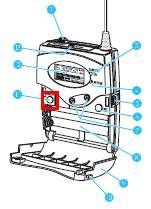
We have:
- 3 transmitters (larger antenna), with headset (with microphone) or collar microphone:
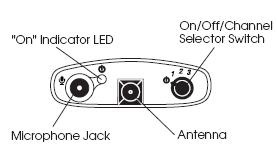
- 10 receivers with regular 3.5 mm headphones (without microphones):
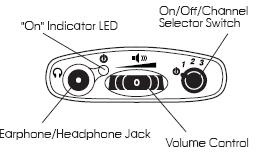

Usage:
- Speaker speaks
- Interpreter
- listens to speaker in room
- wearing one of the transmitters, whisper interprets into target language channel 1,2or 3
- delegates
- wearing receiver and headphones, listens to one of the interpreter channels
Troubleshooting:
- If you cannot send/receive audio at all, check
-
Channel selector on top of unit: make sure you are on the right channel
-
Power indicator light is on? If not , adjust batteries in compartment at rear of unit
- If you cannot send/receive audio well, check
-
Transmitter:
- microphone adjustment wheel under rear panel door
- position yourself and the microphone so that there is no ambient noise going into your (sensitive) microphone, especially not from the speaker
-
Receiver: Volume wheel on top of unit
Learning materials management: Online_resources.xls II: E-repository (2006-7)
I participated in the implementation of a “ learning object” repository – is there such a thing as a learning “object” in a progression-oriented field like SLA? Anyhow, the software of choice was Equella which, as I read on the listservs, is favored by Blackboard Admins for its Blackboard module and is supposed to provide the primary interface to the equella for instructors in their Blackboard course websites.
Since this did not get implemented during my time, we used what seems primarily the admin-interface and, since equella does not come with one, attempted to implement a metadata schema, based on the prior work of an LLAS-sponsored group. We also soon found that despite complexity, the metadata schema was still lacking (E.g. you won’t get through French 101 without several sections on “Negation”. nor German, nor Spanish etc.).

Excel to the rescue once more: Here is a spreadsheet in action that not only allows adding, tagging, searching and filtering links to, once more – easier than to make your own – web-based exercises, but now also allows the collaborative building of a metadata schema. But alas, the number of fields is growing again.
Learning materials management: Online_resources.xls I: Intranet (2003-2009)
Language labs tend to have many multimedia files (audio and video) on network shares – still more flexible than the web-based interfaces we are given (1 user operation does a batch on many files versus multiple clicks are needed for an operation on 1 file).
As a variation on the spreadsheet for multimedia file collections, I created a cataloging spreadsheet that imports lists of audio and video files, including metadata which gets preserved when windows media center records commercial digital TV, from a language center network share – you can find sample code on MS-Excel lists. You can see the import code in action in this screen cast.
Unfortunately, no recursion into subfolders and once more meant to move the files off the network and store on DVDs, for lack of space. Here at least the fields are less and the search relies more on regular expressions.
The current quick and dirty incarnation of self-made source material for interpreting exercises is here: 
Learning materials management: Links (1998-2004)
Originally implemented for a series of Canadian universities teaching Wirtschaftsdeutsch, then continually expanded into all of German for Queen’ s University, and multiple languages, including non-western, for university of Michigan-Dearborn and Drake university.
Was based on an open source software project by Gossamer Threads popular for web 2.0 precursors of collaborative links collections, whose Perl-CGI code needed only minor modification to facilitate the “”commenting”” on instructor-“posted” ( i.e. assigned links) by students.
The model was Yahoo’s human-edited web-catalogue. the data structure was the tree (nested folders, unidirectional graph). For managing, I implemented a secondary branch mirroring the primary under the root “old links” for, using Perl regex, automatically moving links which a batch link-checking management script in the open source had identified and logged as “broken” (404 and a few other similarly bad http return codes) into.
The original layout of the “ontology” first introduced me to the complexity of such a task. The basic content division was between 2 branches.
- web-based ready-made teaching materials for commenting (recommending, categorizing) by instructors and self-access by students (no feedback of student data to the instructor mostly, except by email, and outside of the application, in those days).
- the other content branch consisted of not teaching-related “”authentic materials””: the early day web applications, sometimes multimedia (maps, audio and video collections, news), often times also self-service database interfaces (online shopping and public services) whose language-wise rather restricted interface and topical focus (think Wirtschaftsdeutsch) lent themselves to capstone exercises at the end of textbook chapters (our “Friday in the lab””, not even a language lab then. Geek bonus points: one of these Fridays, a future queens university educated engineer asking me whether i had written all these pages they browsed through in the searchable catalogue of eventually 1500 links. Well, dynamic web pages were not common at all in education in those days, and the credit goes to Gossamer Threads.).
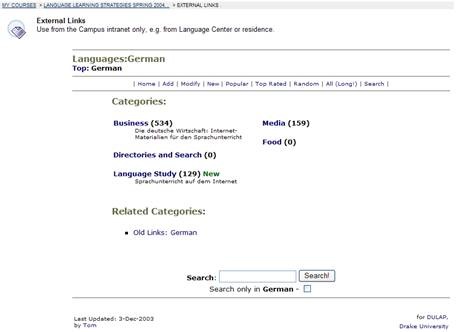


While there was hope to collect a comprehensive teaching resource through collaboration, “der Weg war das Ziel”, having students interact with and review foreign language web content. The links database remained definitely, as it grow in bursts revolving around the topics of our chapters. I had a lot of fun finding instructional ways to having students review all those fancy web applications in which endless amounts of money were poured before the first bubble in this millennium burst. E.g. the first early online city maps for “Wegbeschreibung” in German 102. as well web 2.0 like developments, like grassroots web cams (Germans allowing the world to spy on their surroundings 24/7, including remote camera panning – you could go all kinds of places, “”Wie heißt der bürgermeister von Wesel? was macht das wetter in der Schweizzzzzz?” but alas, the time lag, especially during winter term.
A couple of screen casts for instructor training are here and here.
How to access trprecord.exe
In the interpreting suite, students can click  , click
  , paste “\\lgu.ac.uk\lgu$\multimedia student\mmedia\mmedia1\language_services\software\trprecord.exe”, click
  . More help.
Blackboard VLE Training Videos Overview
|
2006 |
Video |
|
|
2006 |
Video |
|
|
2007 |
Video |
|
|
2007 |
Video |
|
|
2007 |
Video |
|
|
How to do a language lab recording exercise as Blackboard assignment |
2007 |
Video |
| Blackboard controlpanel_export_import_course_or_parts.wmv | 2008 |
Video |
| Blackboard dropbox_sort_filter.wmv | 2008 |
Video |
|
Blackboard Content System: Add a content item instead of attaching a file |
2009 |
Video |
|
2010 |
Video |
|
|
2010 |
Video |
|
|
2010 |
Video |
|
|
2010 |
Video |
Help with playing videos
- Some videos require special codecs to display properly/ at all.
- Here is info on the H.264 codec.
- Often, it is best to try, instead of Windows Media Player (which may be the default player that opens when you (double)click on a video, but not be able to display it without manual configuration),
- the free VLC player which you can download here, if you must, and install, if you are permitted. Then right-click video, “open with”, “VLC media player”, like here:



Questions? Read the About. Or just ask me a quick Our Databases: Resources with calendars -- Language learning material Moodle Sites, multimedia files -- films


FAQs for LRC student staff or for students or for teachers. To search our FAQs, in the browser addressbar, add after "https://plagwitz.wordpress.com/feed/?tag=faqs+/" "+TAG1" (from tag cloud below) OR "https://plagwitz.wordpress.com/feed/tag=faqs
&category_name=" "CAT1" (from category hierarchy below). OR search both categories and tags, and multiple TAGs/CATs (connect with "," for OR-search, with "+" for AND-search), like so: https://plagwitz.wordpress.com/feed/?tag=TAG1+TAG2+...TAGn&category_name=CAT1
+CAT2+...CATn"
Other ways to find help
If you cannot find it here, look there: 5,500 Language-Learning Links and Programs for learning or teaching 150 languages
Shortcuts:Our Lists, Our Maps, LRC Staff Moodle Site,LRC Project Moodle Site, 49erexpress, UNCC Moodle, Student Recordings: s:claslcslrcsanakostudent
Learning usage samples: Sanako oral exam, Kaltura webcam presentation, Dictation with speech recognition, Sanako written exam, Chinese and Japanese interactive stroke-order practice
Test the Sanako Installer, Webbrowser Popup Konfigurator for XP, or Windows7, faster LRC TeacherPC Log-in Let MS facilitate diacritics writing by installing for you US-International keyboard layout
This is my personal blog (Google+). The views expressed on these pages are mine alone and not those of my employer. The information in this weblog is provided “AS IS” with no warranties, and confers no rights.

