Archive
Exchange 2010 and Live@edu: How to use resource calendar publishing to implement a help desk timetable and signup sheet
- Calendar sharing with students that have only cloud accounts in live@edu requires them to be mail-enabled users in on-premise AD and only works if a users privileged to share shares with individuals through the GUI (in our circumstances: no groups, no PowerShell access).
- Workaround to share resource calendar information is: publish calendars to the internet. This needs careful consideration of privacy issues, but Exchange 2010 provides you with a number of helpful options, including “availability only”.

- If you publish, you can easily generate the links from the resource mailbox name, and manage large sets of calendars e.g. in an MS-Excel Web app.
- As you can see in the below LRCTutor12 calendar subscribed to in either OWA or Windows Live, the Exchange 2010 ICS does not seem to provide the calendar name, users have to update it manually (maybe use the resource mailbox account name from the calendar URL).
![student-internet-calendar-in-owa-error_thumb[2]](https://thomasplagwitz.com/wp-content/uploads/2011/09/student-internet-calendar-in-owa-error_thumb2_thumb.png?w=526&h=287 "student-internet-calendar-in-owa-error_thumb[2]")
![student-internet-calendar-in-windows-live-works_thumb[2]](https://thomasplagwitz.com/wp-content/uploads/2011/09/student-internet-calendar-in-windows-live-works_thumb2_thumb.png?w=545&h=342 "student-internet-calendar-in-windows-live-works_thumb[2]")
- If you “hack” resource calendars to be a help desk timetable (support personnel, like lab assistants/tutors, one calendar per language, sharing the support role), and have personnel update their availability with late-breaking changes through their Outlook calendars (“cancel this occurrence”) and automatically get these changes pushed out to all users over the internet.
- You can also “hack” a signup sheet “on steroids”:
- enforce a MaximumDurationInMinutes suitable for a sign-up appointment duration)
- set the AutomateProcessing option to AutoUpdate,
- accept the meeting requests of lab assistants/tutors at term start, so that they appear as solid blocks in the calendar, and advise clients trying to sign-up that only 1 client can sign-up during any given solid block with the office.
- Then ignore meeting requests of clients during the term (but communicate the rule to clients: only one client can sign up for support from the “office” during any given time slot. There is in my knowledge no way to set a number in Exchange 2010. Neither MaximumConflictInstances nor ResourceCapacity are applicable). The client meeting requests will remain tentative and appear hatched in the calendar for any other client to see.
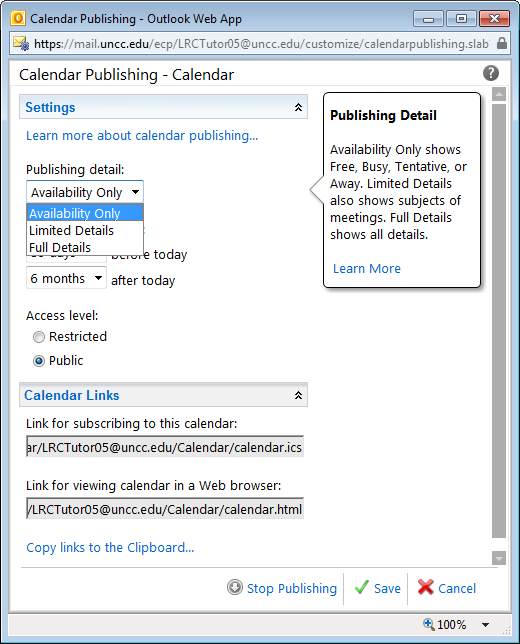
- It is advisable to publish the calendar not with “Availability” only, but with “Limited Detail”, so that additional information (office hours dedicated to specific support topics/clinics, specific requests by clients) can be passed back and forth between support personnel and clients (and anything is better than “Free/Busy” which is especially misleading for such office calendars). Note that even if OrganizerInfo is included on-premise, it seems not included on calendars published to the internet (option “public”; “restricted” has not been tested), which makes Limited Detail possible in our environment.
- Publishing the calendar to the internet with “Full details” could be used for passing additional information, like special handling instructions to student workers,
- like this:
 (this is the publically viewable HTML – oddly)
 - This notes passing does not work with cloud-accounts that are subscribed to the calendar ICS that are not mail-enabled in AD: no notes field gets through to them in OWA)
- But the one-size-fits-all approach is unsatisfactory. If the group of student workers is small, it could (once mail-enabled in AD) be shared the calendar with instead.
- incidentally, what happens with the organizer field under “full details”
- Ìt appears that a calendar can not simultaneously be published "public" and "restricted" (need to know the obscure URL), let alone with different levels of information included.
![student-internet-calendar-in-owa-error_thumb[2]](https://thomasplagwitz.com/wp-content/uploads/2011/09/student-internet-calendar-in-owa-error_thumb2.png "student-internet-calendar-in-owa-error_thumb[2]")
![student-internet-calendar-in-windows-live-works_thumb[2]](https://thomasplagwitz.com/wp-content/uploads/2011/09/student-internet-calendar-in-windows-live-works_thumb2.png "student-internet-calendar-in-windows-live-works_thumb[2]")

How to use the LRC Lists
- The LRC lists are built with MS-Excel Web app, one of the new features which came with NINERMAIL (live@edu, try logging into http://skydrive.com .
- Important benefits of MS-Excel Web app include
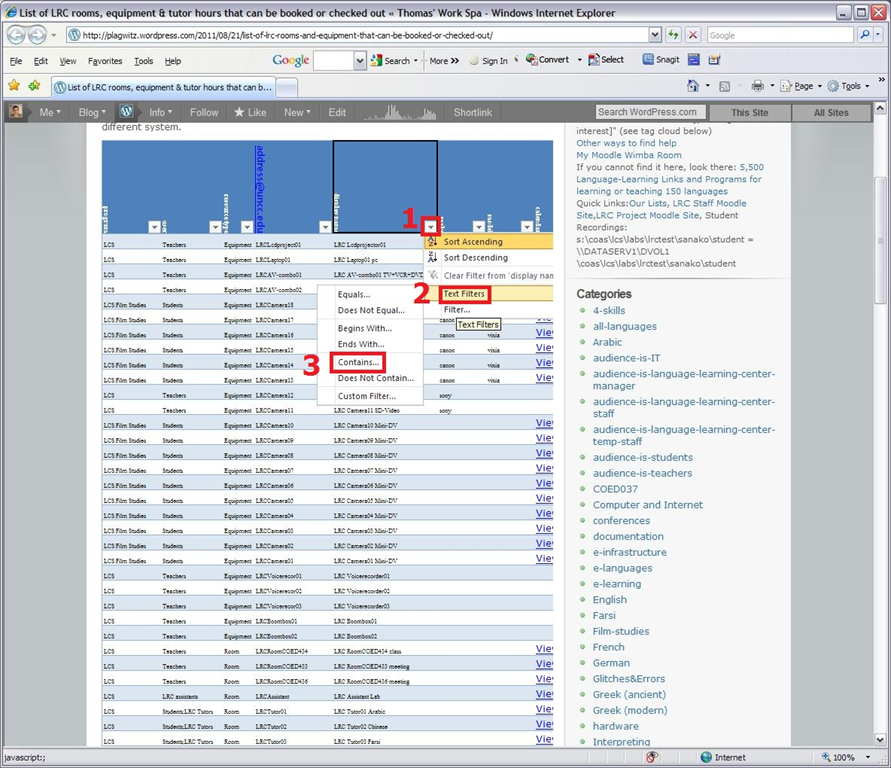
- sorting: click on column header / down arrow, and choose menu item: “Sort Ascending/Descending”
- filtering: click on column header / down arrow, and choose menu item:
- either “filter”,
 , to choose from a condensed overview of all unique items that occur in the column, and e.g. filter out “Blanks” by removing the checkmark in front of it: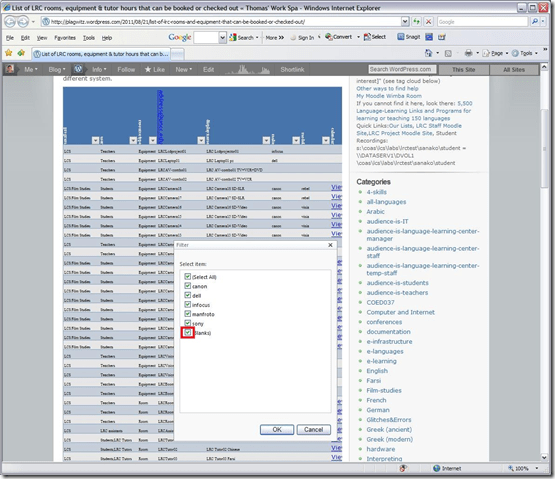
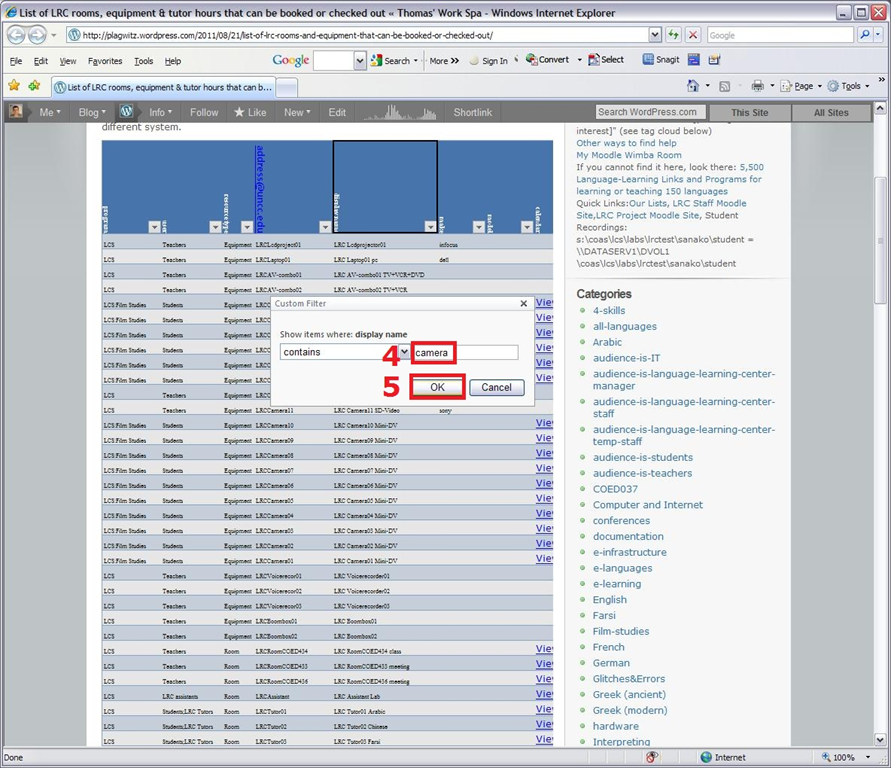
- or the advanced “number filter” (in columns with numbers) or “textfilter”,
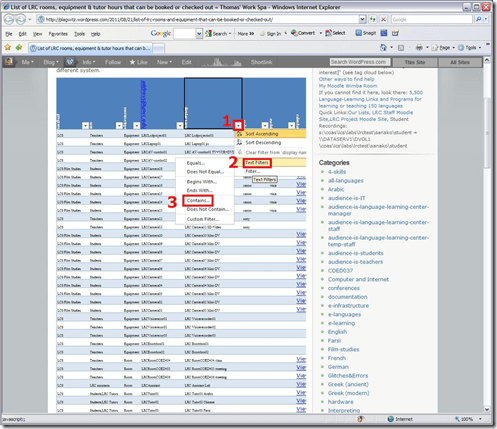 , to do more advanced searches, like for all items that contain “camera”: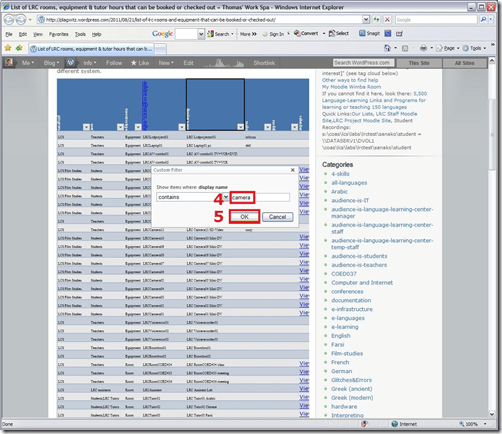
- sharing beyond viewing: Authorized users can click on an “edit link” below the list display to update the information from their web browser.
- either “filter”,


Our Office 2010 natural language features upgrade: A running log
- Just logging some notes, observations, issues, step-by-step instructions… – other than non-natural-language, most collaboration features, which are being logged here.
- Office 2010 proofing tools (proofing-tools2010-install.wmv),:
- again, we select custom install, “run all from Computers”
- install is extensive, but uneventful
- Office 2010 proofing tools (proofing-tools2010-first-run-German-set-language.wmv), first run:
- German is not autodetected. You have to set the language of the selected text manually, and first find the button on the ribbon:reviewing
- While choosing the language, you can see from the checkmark which languages now have proofing tools installed
- Foreign Language Support
- One of the strongest benefits of upgrading to MS-Office 2010 in the language center is the improved foreign language support licensing for so called “Language Packs”, and that we have a complete set of licenses to the MS-Proofing Tools.
- In addition MS-Office supports free download of so called “Language interface packs” which seem essentially downscaled language packs for LCTL (usually come only with (see feature list) a spell checker and help in the language). Compare: “If a language is available in a language pack or as a fully localized version, it is not available as a language interface pack”.
- Unfortunately multi-user (= learner of different language) support is not the primary usage scenario of these tools. It is, however, possible, to set the language to a default (e.g. Spanish, Arabic or Chinese, depending on your environment). Switching to another language is relatively easy for a user
- changing the screen-tip language: http://skydrive.live.com/embedicon.aspx/screencasts/office-2010-switch-screentip-language.wmv?cid=4fa3329905d7e1ce&sc=photos
Links Dual-Monitor
Adapting a Symantec Ghost 11 Dell Optiplex 760 imaging setup to 780 hardware using Boot Wizard Win-PE editor
-
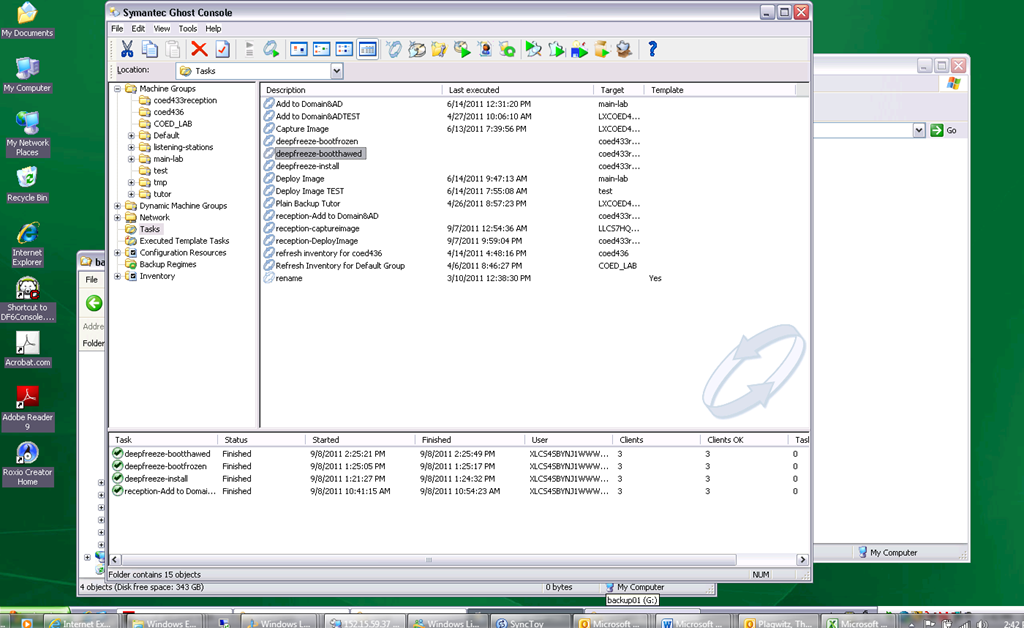
I have set up locally, and documented, a default installation of Symantec Ghost 11 (Ghost console version 11.5.1.2266) that can image a computer lab of dell OptiPlex 760 (not sure how I ended up with doing even this part).
-
Trying to set to implement use of our new live@edu communications infrastructure in this environment, I need to image a Dell OptiPlex 780 lab with this setup results in an error: “To Virtual Partition Drivers could not be found in the PreOS for the following devices:Manufacturer: "Intel", Description: "Intel(R) ICH10D/DO SATA AHCI Controller", PCI Vendor: 0x8086, PCI Device: 0x3a02, PCI Subsystem: 0x4201028”
-
The institution has not produced any documentation on this adaptation, so here goes: You can get a complete set of MS-Vista 32 drivers (which is the OS version that Ghost 11 Win-PE uses ) for Dell Optiplex 780 from Dell’s Driver CABs Homepage, including a table of contents.
-
You can expand this in Windows Explorer and look for the x86 storage driver, and you will find only one suitable: R222843, Matrix Storage Manager (OS Pre-Install Driver Only), A17, 8.8.0.1009
-
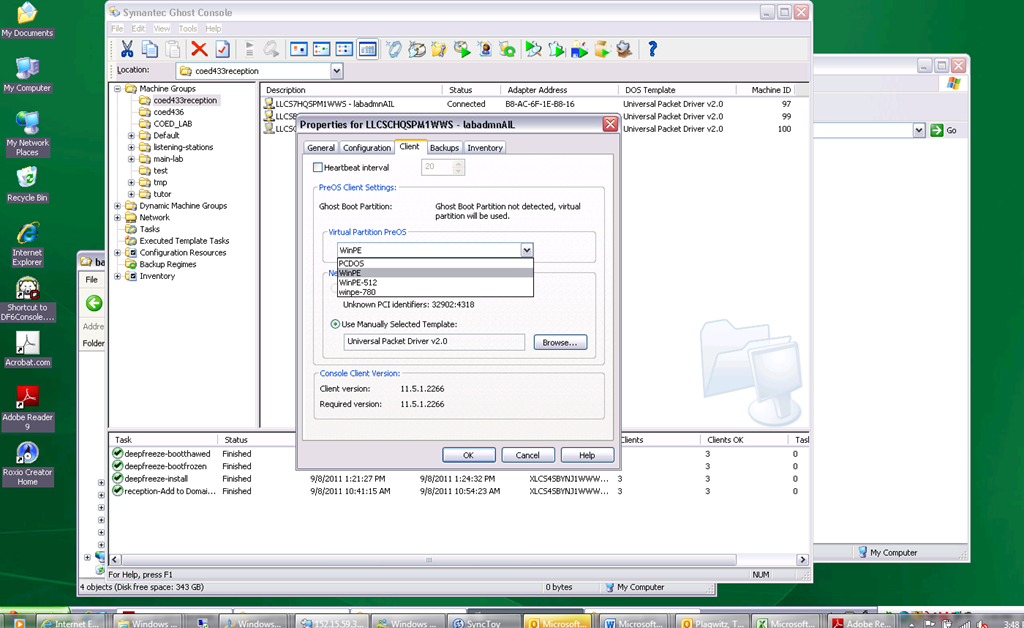
In Ghost console / tools / boot wizard, You can add this driver (entire dir, as long as it has a friendly name for ghost – could you have done this with the entire dell driver cab of 300mb?) to the win-pe-780 (I made a copy of the default win pee environment which I still need to use for a different set of hardware) (which then compiles the win-pe image), and
-
You also have to check the driver , to have it included (which compiles the win-pe image again – why? ).
-
You have to set in Ghost console menu; tools / options / the win-pe as the default remote boot os (this will have to be changed for 760 imaging back to win-pe).
-
Now, did this really “take”?

-
This allows the reception-captureimage task to complete.
-
Additional tasks reception-DeployImage and reception-Add to Domain&AD can be derived from the default installation.
-
We can also deploy and manage Deepfreeze now from the Ghost Console, bypassing Deepfreeze Console.
-
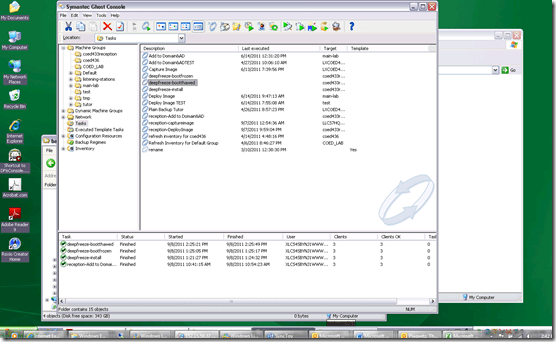
-
I hope this was my last trip down the “general computing” infrastructure Geisterbahn for a while. I was actually trying to apply productivity software infrastructure to a local business process, and merely to free up some time for elearning pedagogy…
How to transfer calls on the Cisco IP Phone 7912

If you mistype, don’t leave the caller hanging, but rather follow these steps (kindly provided by Alesha) to recover: Likely you left the caller on hold.
- Press the hold key (illuminated red button that is shaped like a stop sign)
- Press transfer
- Dial appropriate extension
- Press transfer again!
- Because the telephone is already in the cradle, students do not need to hang up or press the EndCall key.
The LRC staff Moodle site: An Introduction
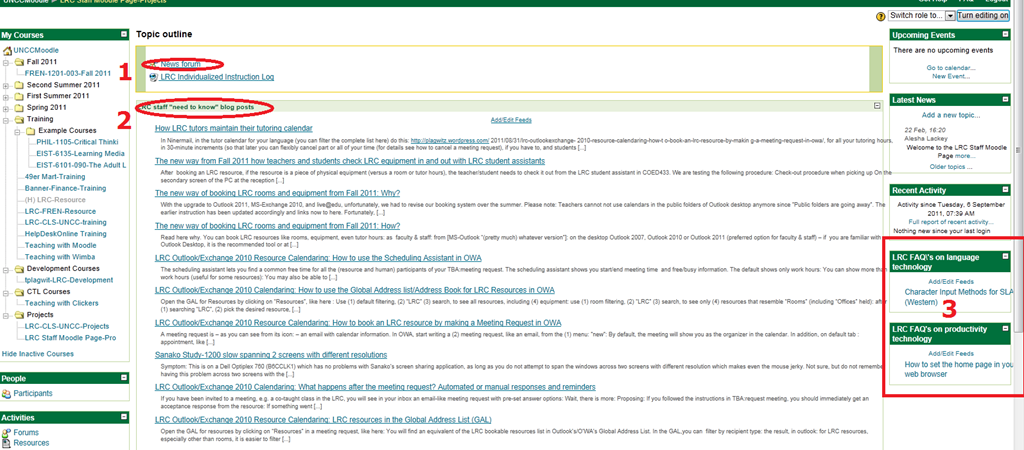
- The LRC has now a Moodle site for staff. All permanent and temporary LRC staff members will be enrolled in this site.
- All permanent and temporary LRC staff members will participate in this site. This means logging in at shift start and reviewing the following sections for new items:
- The news forum: here LRC assistants can find announcements and assigned jobs, as well as post notes of their own for all colleagues and responses.
- The most recent LRC assistant training articles appear here. In these tasks, LRC assistants are supposed to assist clients hands-on with more general
- LRC FAQ’s: LRC assistants have to monitor this block to be in the know about what the LRC has in terms of answer guides to FAQs about technology use in learning, and be able to point clients with questions to these answer guides (i.e. identify an applicable answer guide, display it on the reception computer, email the client the link for the client to review the guide).
Film-studies educational community can get free Autodesk Software
Autodesk offers free software licenses to the educational community if you register (free), some of which may be of interest for film studies (see selection of software below). Make sure you check fit into the licensing conditions: “Important Note :The Autodesk Student Version software incorporates all the functionality of our professional licenses, but includes a print banner making the software inappropriate for professional, commercial, or for-profit purposes. Autodesk Student Version software may not be used in the classroom or lab for instructional purposes, or for commercial or for-profit purposes. Annual licenses of Autodesk student software are not eligible for product upgrade or transfer to a commercial license. View print banner sample.”
Autodesk Maya
Autodesk® Maya® 2012 software delivers powerful new toolsets for previsualization and games prototyping; offers extended simulation capabilities; and opens the way for better pipeline integration.
Autodesk MotionBuilder
Autodesk® MotionBuilder® 2012 software delivers new tools for virtual movie-making, performance animation, and stereoscopic productions, and enhanced interoperability with other products in the Autodesk® Entertainment Creation Suites 2012.
Autodesk Mudbox
Autodesk® Mudbox™ 2012 software delivers enhancements to the painting toolset; innovative new UV and topology-independent workflows; practical posing tools; and improved performance and large dataset handling.
Autodesk 3ds Max Design
Autodesk® 3ds Max® Design 2012 software delivers powerful new rendering toolsets, accelerated iterative workflows, and enhanced interoperability that together help increase overall productivity.
Autodesk Softimage
Autodesk® Softimage® 2012 software delivers innovative new creative toolsets; enhanced interoperability with Autodesk®
Autodesk Smoke for Mac OS X
Autodesk® Smoke® 2012 software offers a timeline-based, all-in-one creative toolset for editorial finishing that spans color correction, keying, tracking, paint, cleanup, titling and 3D visual effects.

Questions? Read the About. Or just ask me a quick Our Databases: Resources with calendars -- Language learning material Moodle Sites, multimedia files -- films


FAQs for LRC student staff or for students or for teachers. To search our FAQs, in the browser addressbar, add after "https://plagwitz.wordpress.com/feed/?tag=faqs+/" "+TAG1" (from tag cloud below) OR "https://plagwitz.wordpress.com/feed/tag=faqs
&category_name=" "CAT1" (from category hierarchy below). OR search both categories and tags, and multiple TAGs/CATs (connect with "," for OR-search, with "+" for AND-search), like so: https://plagwitz.wordpress.com/feed/?tag=TAG1+TAG2+...TAGn&category_name=CAT1
+CAT2+...CATn"
Other ways to find help
If you cannot find it here, look there: 5,500 Language-Learning Links and Programs for learning or teaching 150 languages
Shortcuts:Our Lists, Our Maps, LRC Staff Moodle Site,LRC Project Moodle Site, 49erexpress, UNCC Moodle, Student Recordings: s:claslcslrcsanakostudent
Learning usage samples: Sanako oral exam, Kaltura webcam presentation, Dictation with speech recognition, Sanako written exam, Chinese and Japanese interactive stroke-order practice
Test the Sanako Installer, Webbrowser Popup Konfigurator for XP, or Windows7, faster LRC TeacherPC Log-in Let MS facilitate diacritics writing by installing for you US-International keyboard layout
This is my personal blog (Google+). The views expressed on these pages are mine alone and not those of my employer. The information in this weblog is provided “AS IS” with no warranties, and confers no rights.


