Archive


Summer 2012 Learning materials creation clinic for preparing oral assessments/assignments
1. I am holding a “Clinic”, open to anybody who needs help with preparing their classes using oral assessments/assignments in the LRC this fall term – RVSP if interested.
2. This clinic focuses on material creation for delivery in upcoming specific courses – based on, but different from my faculty workshops on this topics, If you have not attended, please view the below links for what was covered in the workshops
a. https://thomasplagwitz.com/2011/08/18/sanako-study-1200-workshop-spring-2011/
Specifically:
1. Materials creation
- with SANAKO
i. make teacher audio recording for model-imitation/question-response oral exam: https://thomasplagwitz.com/2012/01/25/how-a-teacher-best-adds-cues-and-pauses-to-an-mp3-recording-with-audacity-to-create-student-language-exercises/
ii. Make teacher recording (https://thomasplagwitz.com/2012/01/11/recording-with-audacity/) for model imitation with voice insert (like reading practice homework assignment, https://thomasplagwitz.com/2012/01/24/how-a-teacher-creates-audio-recordings-for-use-with-sanako-student-voice-insert-mode/ ):
- with Moodle
i. Moodle Kaltura webcam recording assignment: https://thomasplagwitz.com/2011/11/02/how-to-grade-a-moodle-straming-video-assignment-and-moodle-streaming-video-recording-assignment-glitch-2/
ii. Prepare Moodle metacourses learning materials upload: https://thomasplagwitz.com/2011/06/17/moodle-metacourses-part-iv-the-support-workflow-uploading/ and https://thomasplagwitz.com/2011/01/26/moodle-batch-upload-learning-materials-give-students-access/
- with PowerPoint (visual speaking cues with timers): https://thomasplagwitz.com/2009/11/18/create-a-powerpoint-slide-with-a-timer-from-template-for-a-timed-audio-recording-exercise/
- Materials delivery with SANAKO
- remote control student pcs, collaborate over headphones: https://thomasplagwitz.com/2012/05/04/how-you-can-view-the-computer-screens-of-your-class-using-sanako-study-1200/
- pairing students’ audio using headphones: https://thomasplagwitz.com/2011/05/11/study-1200-pairing/
- You must bring some assessment ideas that fit into your skills course which we will turn into audio recordings. You can also bring prerecorded audio files from textbooks as mp3 which we can edit to turn them into materials. If you would like some examples of what colleagues have done
- With Moodle Kaltura: https://thomasplagwitz.com/feed/?category_name=learning-usage-samples&tag=kaltura
- With Sanako oral (formative) assessments/(outcome) exams: please email me, I make accessible to you samples that we do not publish to preserve exam integrity.
Watching workshop screencast recordings
We added a dual-screen setup to the teacher computer. We produce two screencasts, for archiving and reviewing, per training held, one of the left and one of the right screen. On a typical desktop computer, you should be able to view both side-by-side, like so (using Windows 7 Aero Snap, just activate the right/left window and on your keyboard, press Windows key + right- or left-arrow):

We hope to have screencast recording software, video drivers and scree/projection hardware that will enable us to provide a single screencast of both screens. However, other upgrades are higher up in the priority list.
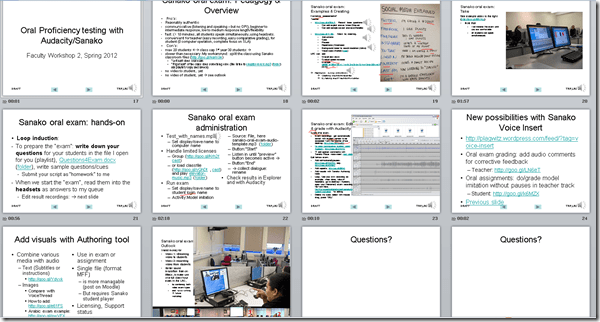
Spring 2012 Faculty Workshop II: Oral Proficiency testing with Audacity/Sanako
- View screens (best viewed side by side, but note that left and right screen are not synchronized):
- for full slide show (note the included short links for convenient further reading), left screen

- for Sanako interface and full audio track, right screen
 .
.
- for full slide show (note the included short links for convenient further reading), left screen
- Table of contents:
- Overview of a Sanako Oral Exam
- Examples of Exam teachers’ exam question recordings
- Example of a Sanako Exam
- Loop induction
- creating an exam question recording
- by taking a Sanako exam as a student
- Step-by-Step of administering a Sanako oral exam
- Grading Sanako oral exam student files
- Sanako voice insert for
- facilitating recording oral assignments for student without hard-coded pauses
- commenting on student responses during grading
- Sanako voice insert for
- Sanako authoring tool for providing visual on top of aural cues to students

LRC Workshop Demand Survey Results
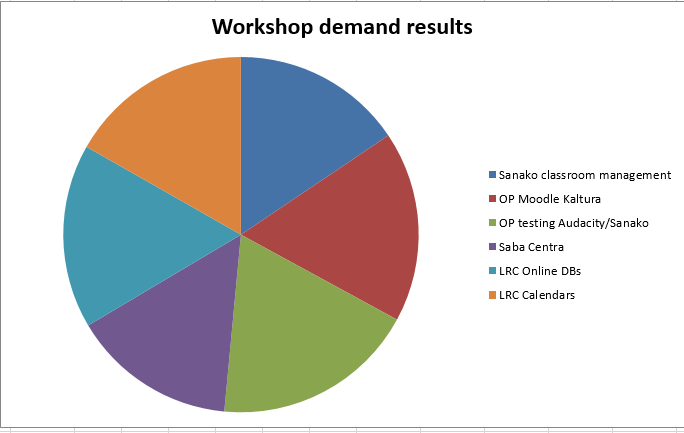
7 responded, 1 commented. OP=Oral Proficiency.


Questions? Read the About. Or just ask me a quick Our Databases: Resources with calendars -- Language learning material Moodle Sites, multimedia files -- films


FAQs for LRC student staff or for students or for teachers. To search our FAQs, in the browser addressbar, add after "https://plagwitz.wordpress.com/feed/?tag=faqs+/" "+TAG1" (from tag cloud below) OR "https://plagwitz.wordpress.com/feed/tag=faqs
&category_name=" "CAT1" (from category hierarchy below). OR search both categories and tags, and multiple TAGs/CATs (connect with "," for OR-search, with "+" for AND-search), like so: https://plagwitz.wordpress.com/feed/?tag=TAG1+TAG2+...TAGn&category_name=CAT1
+CAT2+...CATn"
Other ways to find help
If you cannot find it here, look there: 5,500 Language-Learning Links and Programs for learning or teaching 150 languages
Shortcuts:Our Lists, Our Maps, LRC Staff Moodle Site,LRC Project Moodle Site, 49erexpress, UNCC Moodle, Student Recordings: s:claslcslrcsanakostudent
Learning usage samples: Sanako oral exam, Kaltura webcam presentation, Dictation with speech recognition, Sanako written exam, Chinese and Japanese interactive stroke-order practice
Test the Sanako Installer, Webbrowser Popup Konfigurator for XP, or Windows7, faster LRC TeacherPC Log-in Let MS facilitate diacritics writing by installing for you US-International keyboard layout
This is my personal blog (Google+). The views expressed on these pages are mine alone and not those of my employer. The information in this weblog is provided “AS IS” with no warranties, and confers no rights.
 Thomas' Work Space