Archive
Posts Tagged ‘MS-Excel’
MS-SkyDrive-related blog posts
2013/01/08
Leave a comment
Categories: e-infrastructure
MS-Excel, MS-OneDrive, ms-powerpoint, web-apps
How you can share MS-Office files via MS-OneNote instead of directly through MS-SkyDrive
2013/01/02
Leave a comment
- Simple steps:
- Drag and drop your MS-Office File to your MS-OneNote page.
- When prompted, choose to “insert a copy” (rather than merely linking the original file).

- This puts a copy of the file in the MS-OneNote folder on your local drive,
- which (file and folder) gets synched with your online (MS-SkyDrive) version,
- which, if you shared it, gets synched with the MS-OneNote folder on the local drive of the PC of the person you are sharing with,
- who, by double-clicking, can open and edit his synched local version of MS-Office file in the corresponding MS-Office application.
- Stepping back:
- Benefit: If you have a working MS-OneNote-based workflow, embedding MS-Office file can quickly extend this workflow.
- Risk: If you do not share the MS-OneNote with other editors, you should have no problem. Be aware, though, that concurrency is limited. Unlike accessing the MS-Office file in MS-Office through Office Web apps from MS-SkyDrive directly, editing the MS-Office file from MS-OneNote does not block updating the MS-Office file on remote computers – so expect synching conflicts later if you do not manage concurrency (e.g. by limiting editing sessions).

Categories: e-infrastructure, office-software
2010, MS-Excel, ms-o, ms-office, ms-onenote, MS-Word
Getting answers for the LRC management from Report Express
2012/08/30
Leave a comment
- Report Express is a powerful tool to get current enrolment data which seems vital for running the LRC, but which I have not been able to get my hands on before easily (SCT-Banner limits access too much).
- Excel download format – which I recommend : cleaner (fewer graphics) and more information – DOES work, but for Excel 2010, I have to rename the download file extension from XLS to HTML (which the download is) and “open with” –> Excel.
- I have not been successful merging these output files per language on the command line into one large HTML file and cleaning up the <html><body> framework – so I have to open each one, merge by copy/paste the contents of the result worksheet into a new worksheet and clean up the data in there by converting into an Excel Table and sorting by a suitable table column, e.g. ID, which puts all actual enrolment data sequentially, and separates all (redundant anyways) header and footer information.
- I finally added table columns with array formulas to calculate the enrolment aggregates,
- per this section (to answer questions like: will this class fit into the language resource center?),
- this course # (to answer questions like: where can we have maximum impact on improving learning with technology with creating the minimum of new learning/assessment materials. Assessment is standardized per course #.)
- and per language-level.
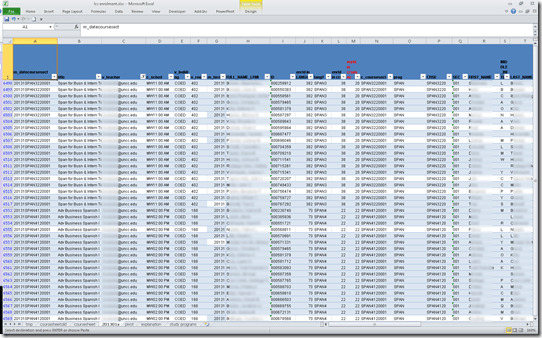
- Finally, vlookup-columns allow me to link the instructor of record and other missing class information (room, building, time) to the student enrolment rows. This allows me to filter, sort and search the enrolment sheet with real-life questions, like
- can we support this size class/course/level and language in the LRC
- is it practical to relocate this course for part/a whole class meeting to the LRC
- which students need be given access permissions to the SANAKO
- etc.
-
Sample filter of the aggregate sheet:

How to take roll in class using Sanako Study 1200
2012/08/29
Leave a comment
- Today:
- I had to work on getting my Sanako classroom layouts back up after a network cutover on the first day of the academic year.
- I could observe a teacher new to the Sanako lab taking roll on paper, reading out each student’s name and finding the student in the classroom . This is a known good way to learn to put a face to a students’ name. Once that is done (and maybe could be done also faster using student thumbnails in university computer systems like the LMS), one can save teaching time taking roll doing the following :
- At the beginning of each of your class meetings:
- You cannot start a sanako class before your students have logged in and their sanako student clients have started up – that is the first I always ask my students to do.
- In the initial Sanako tutor startup dialogue, open an empty class.
- Wait for the “corridor” to be fully populated, then select all.
- Have the sanako tutor populate the classroom layout.
- Choose menu file / save classroom layout as, and save in your tutor folder with the date as the filename.
- (Load your familiar class layout to actually begin your class – this will take little extra time, for Sanako tutor does not need to wait again for the Sanako student clients to start up).
- After the last day of classes:
- load each saved file into MS-Excel (as an XML table),
- first column will be class date, hide all columns in between that and your student login name,
- select and copy these 2 columns into an attendance spreadsheet (if you find a way to strip the xml wrapper, you can merge the files on the command line – after all, the classroom layout files are just plain text),
- in the attendance spreadsheet, calculate attendance
- either sort first by date, then by login name, and count attendance manually using the dates;
- or have Excel count for you with an array formula pasted into a third column that checks for and counts identical dates.
- Final thoughts: Your mileage may vary if you don’t teach all your classes in a Sanako lab – I used to and have come to appreciate an institutionally provided and maintained lab infrastructure which is stable – compared with complaints I have heard about having to rely on your students not forgetting their clickers if you want to use technology rather than class time for taking roll outside of a stable infrastructure.
Download WordPress blog post overview into Excel table
2012/03/15
Leave a comment
See what I mean:  Downloading and browsing the full content XML is of course more powerful than this.
Categories: blog, documentation, Screencasts, service-is-documenting
MS-Excel, wordpress
How to identify graded participants in Moodle Course Activity Reports using Vlookup
2012/02/23
Leave a comment
- Having a chart of full names, Moodle id # and usernames would be useful (e.g. for debugging with the Activity Reports that in some cases do not resolve Moodle id# so Excel vlookup has to rescue the day once again…)
- The Moodle “Participants” affords the instructor a convenient list, with paging, sort, filter (by role), and different detail-level views.
- However, the overview does link course and student id #, but not institutional username while the detail view contain the username as part of the email, but is not truly tabular (consists of an array of tables, each containing one user; at least you can avoid the paging).
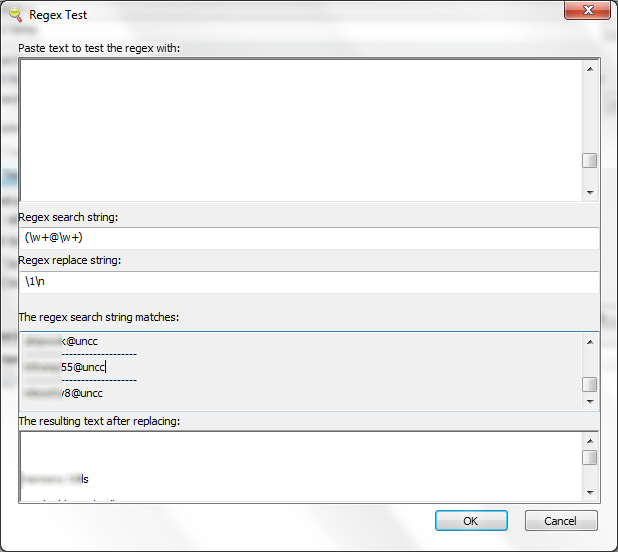
- Enter grepwin to extract the emails:

- and copy paste them into the Excel created from the tabular overview:
 Is there an easier way?

Unable to edit MS-Excel online spreadsheet because of other user locking
2012/02/08
Leave a comment
- Problem: Why is a user opening a spreadsheet in the browser (even if with edit.aspx URL) causing a warning "The spreadsheet is locked by another user" if i try to open it in MS-Excel? I thought Excel Web App allows multiple uses to edit the spreadsheet at the same time?
- Solution: Opening the spreadsheet for editing in the browser still locks it for being opened in MS-Excel (and vice versa), but not for opening it for editing in another browser.
ECAR National Study of Undergraduate Students and Information Technology, 2011 Report released
2011/10/28
Leave a comment
- The Educause ECAR for 2011 Lists among its top actionable survey results: “Nail the basics. Help faculty and administrators support students’ use of core productivity software for academic work.
- Not a language learning specific result , but a reminder also for the LRC to prioritize:
- LRC posts on “productivity software”,
- and most of our students’ “academic work” lives online in Moodle.


Questions? Read the About. Or just ask me a quick Our Databases: Resources with calendars -- Language learning material Moodle Sites, multimedia files -- films


FAQs for LRC student staff or for students or for teachers. To search our FAQs, in the browser addressbar, add after "https://plagwitz.wordpress.com/feed/?tag=faqs+/" "+TAG1" (from tag cloud below) OR "https://plagwitz.wordpress.com/feed/tag=faqs
&category_name=" "CAT1" (from category hierarchy below). OR search both categories and tags, and multiple TAGs/CATs (connect with "," for OR-search, with "+" for AND-search), like so: https://plagwitz.wordpress.com/feed/?tag=TAG1+TAG2+...TAGn&category_name=CAT1
+CAT2+...CATn"
Other ways to find help
If you cannot find it here, look there: 5,500 Language-Learning Links and Programs for learning or teaching 150 languages
Shortcuts:Our Lists, Our Maps, LRC Staff Moodle Site,LRC Project Moodle Site, 49erexpress, UNCC Moodle, Student Recordings: s:claslcslrcsanakostudent
Learning usage samples: Sanako oral exam, Kaltura webcam presentation, Dictation with speech recognition, Sanako written exam, Chinese and Japanese interactive stroke-order practice
Test the Sanako Installer, Webbrowser Popup Konfigurator for XP, or Windows7, faster LRC TeacherPC Log-in Let MS facilitate diacritics writing by installing for you US-International keyboard layout
This is my personal blog (Google+). The views expressed on these pages are mine alone and not those of my employer. The information in this weblog is provided “AS IS” with no warranties, and confers no rights.
 Thomas' Work Space