Archive
Archive for the ‘service-is-learning-materials-creation’ Category
How to use the MS-Office Labs Community Clips Screen Capture Tool
2012/05/31
7 comments
- I seem to remember this initiative of having MS-Office users sharing tips and tricks using screencasts has been faded out – but the screen capture tool is still available, and it is not restricted to recording MS-Office applications.
- After download and install (here on Windows 7),

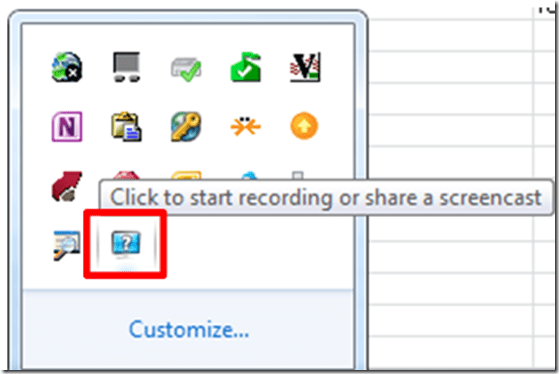
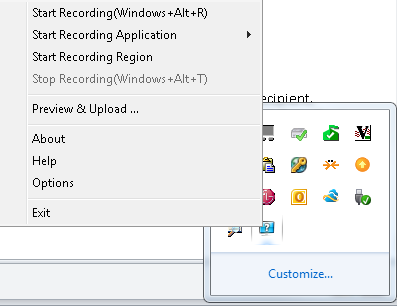
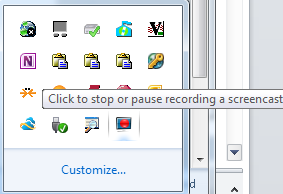
- click the community clips system tray icon to easily start a screen capture:
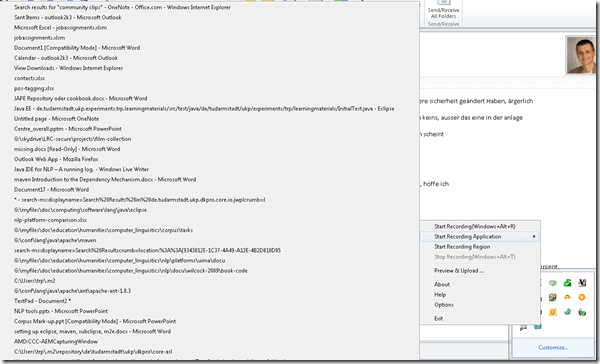
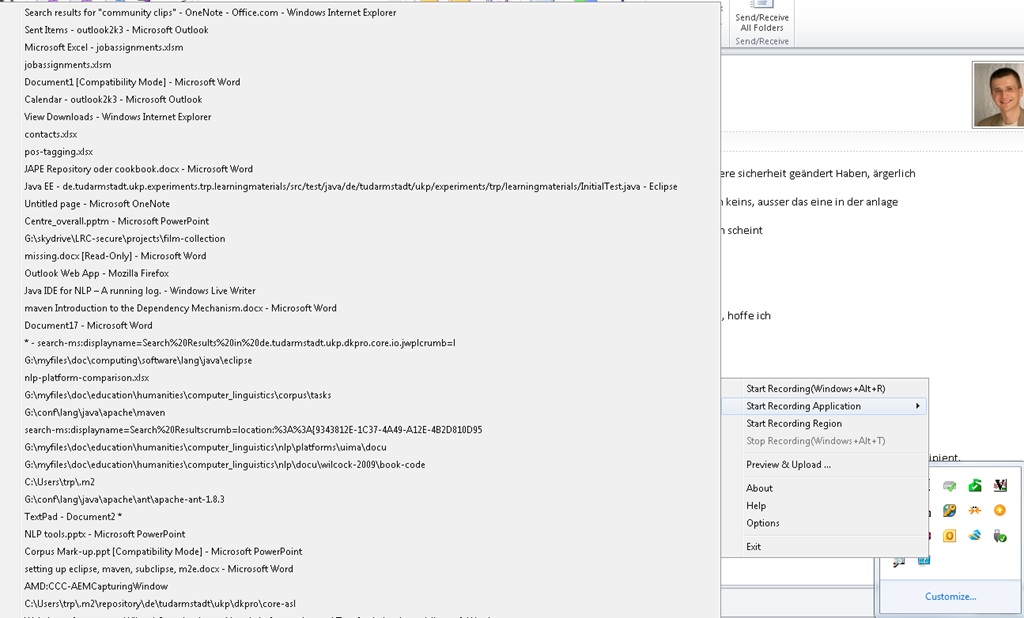
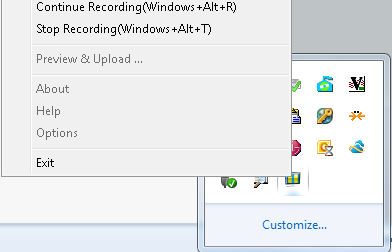
- Or access the context menu with advanced options:

- including restricting recording to specific windows:
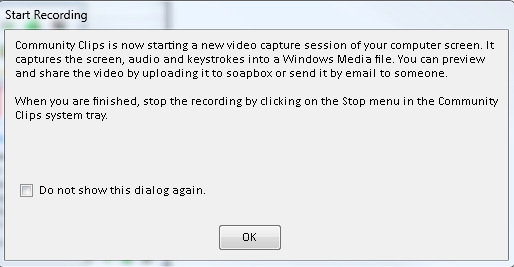
- It does not start up very fast:

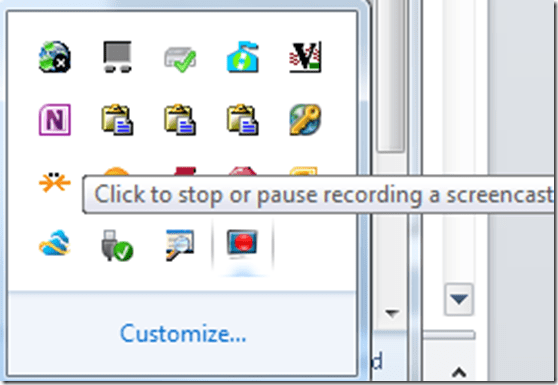
- It flashes a frame around the recorded area.
- This is a test…


- The preview starts automatically:
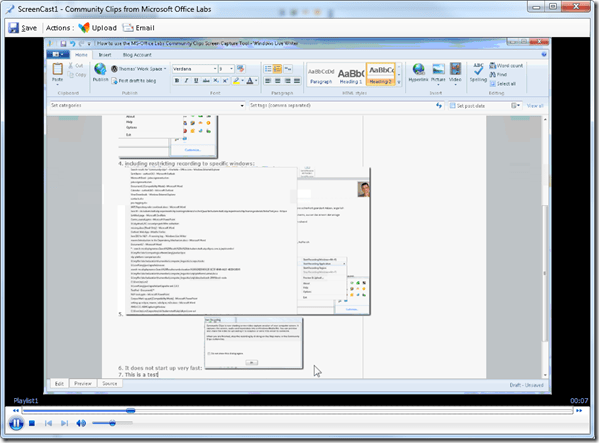
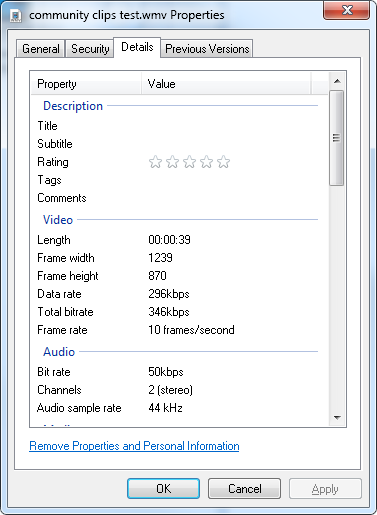
- About the file quality:

- Both the save and the email option
 work, only the built-in upload fails, likely due to the demise of MS-Soapbox:
  , but can be easily uploaded to other services, e.g. MS-SkyDrive
 - Unfortunately, like the Windows Media Encoder clips, it won’t preview without download on SkyDrive – unlike the (newer) MS-PowerPoint 2010-recorded screencasts:

- Still, the MS-Office Labs Community Clips Screen Capture Tool seems to have a friendlier interface than Windows Media Encoder, and is as free.






Categories: audience-is-IT-staff, audience-is-language-learning-center-staff, audience-is-language-learning-center-temp-staff, audience-is-students, audience-is-teachers, e-infrastructure, multimedia-recording, service-is-documenting, service-is-learning-materials-creation, software, Student-Computers
ms-community-clips
Java IDE for NLP with DkPro – A running log.
2012/05/19
2 comments
- UPDATE: dkPro has been updated, see the comment below by the dkPro Project Lead.
- MyLyn Web Connector 3.8 for Eclipse Indigo

- I next got an error (“Cannot complete the install because one or more required items could not be found.
Software being installed: Mylyn Incubator SDK (Incubation) 3.8.0.I20120414-0402 (org.eclipse.mylyn.experimental_sdk_feature.feature.group 3.8.0.I20120414-0402)
Missing requirement: Mylyn Tasks Connector: Web Templates (Advanced) (Incubation) 3.8.0.I20120414-0402 (org.eclipse.mylyn.web.tasks_feature.feature.group 3.8.0.I20120414-0402) requires ‘org.eclipse.mylyn_feature.feature.group [3.8.0,4.0.0)’ but it could not be found
Cannot satisfy dependency:
From: Mylyn Incubator SDK (Incubation) 3.8.0.I20120414-0402 (org.eclipse.mylyn.experimental_sdk_feature.feature.group 3.8.0.I20120414-0402)
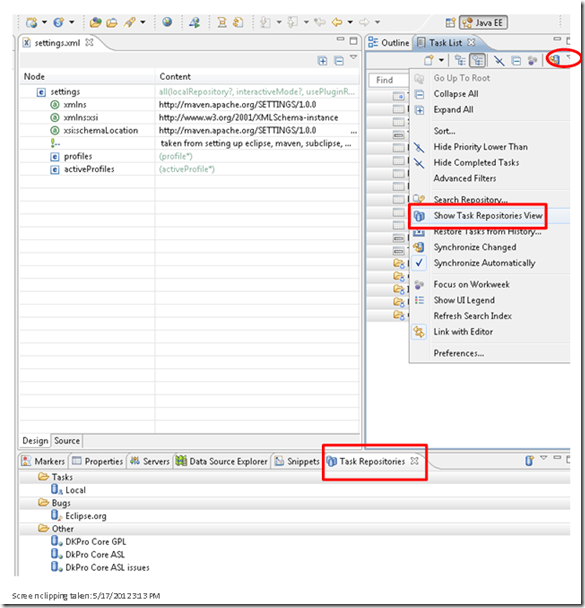
To: org.eclipse.mylyn.web.tasks_feature.feature.group [3.8.0,4.0.0)”), but starting over and updating my MyLyn installations form menu: Help / Install Updates fixed that. - Show Task repositories window:
- Error: “Query Synchronization Failed _______ Q Failed to parse RSS feed: “Invalid XML: Error on line 114: The element type “meta” must be terminated by the matching end-tag “«meta>”,””
- . Well, the Google Code integration is anyways only for users that cannot run Maven. Maybe I can
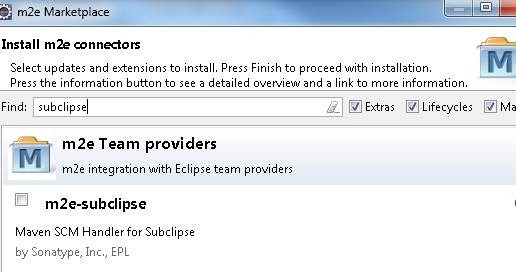
- [window /]Preferences -> Maven -> Discovery -> Open Catalog
- search for “subclipse”

- Install Fails also (“Missing requirement”, again: this time it is “org.sonatype.m2e.subclipse.feature.feature.group 0.13.0.201107071330”), and here we are up the creek with no paddle: You do not want to read a thread on the developer site that ends in ”this must be a bad joke”.
- Then there are the heroes (as opposed to process) who make it work nevertheless: To bring back back the SVN SCM handler, extract this to your Eclipse dropins folder.

- Unless of course you suffer from extremely bad timing:
- Now to the real getting started
- Wait: “First Programming Steps with DKPro Core: This page is currently outdated. We are working on a new DKPro Core release which makes several steps of this tutorial obsolete and changes others (Updated May 8, 2012)”. Can referring to the help provided on the mailing list may bridge that gap for you? Or may this “Setting up Maven and Eclipse for DKPro Core development (Updated May 10, 2012)” currently be the best instruction?
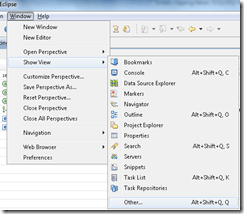
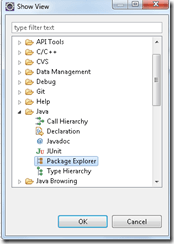
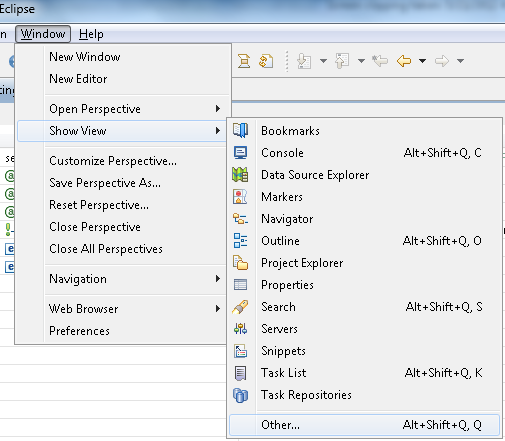
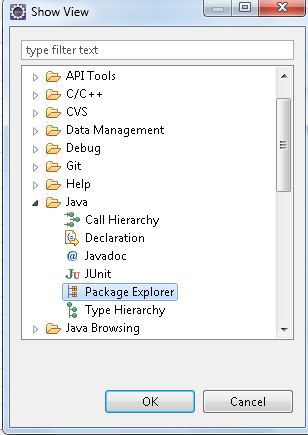
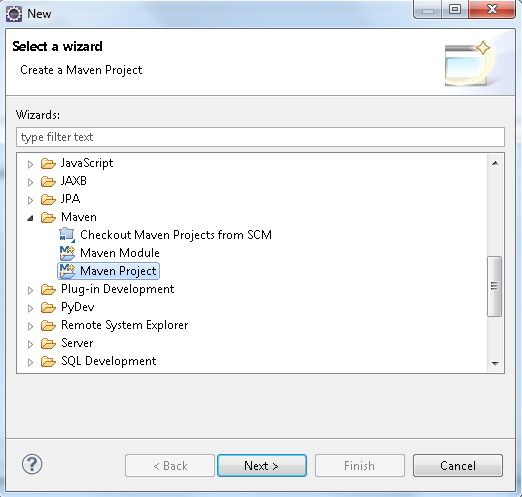
- “Go to the Package Explorer in Eclipse [Window->Show View->Other…->Java->Package Explorer] and create new a Maven Project”:
-


- Other potential sources of confusion:
- settings.xml: There are 2, one in your Maven install directory and one in your .m2e directory – it seems the latter which counts
- my .m2e recursed (think ~/.m2e/.m2e) – did I cause this when trying to change its location (which supposedly you can)?
- file: nexus-maven-repository-index, in various forms of compression: What is this, and what prevents it from getting downloaded?
- maven repositories:
- the expansion option for the ukp-oss-releases comes and goes. if I right-click / rebuild index, I even get an error “Unable to update index for ukp-oss-releases”, but afterwards, the expansion option reappears.
- You are provided a settings.xml for Maven (m2eclipse) that points to the dkPro online Maven repository.
- Which looks like it needs an update to include a pluginrepository for snapshots.
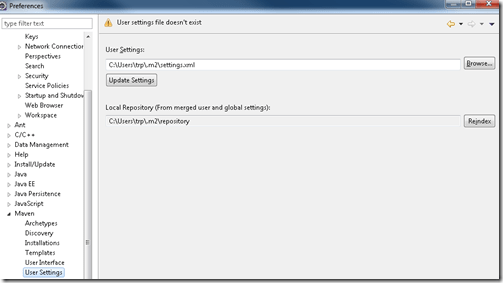
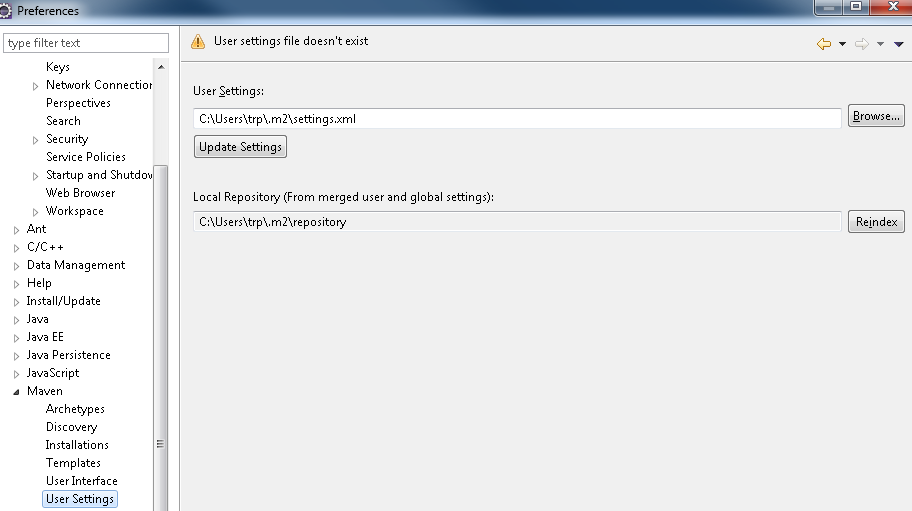
- Check you are loading it alright by going to Menu: Window / Preferences / Maven / User Settings:
- You are advised “to check if your Maven and Eclipse are configured correctly, try opening the “Maven Repositories” view in Eclipse, open “Global Repositories” and check if there is a “ukp-oss” folder in it with contents”, like so:
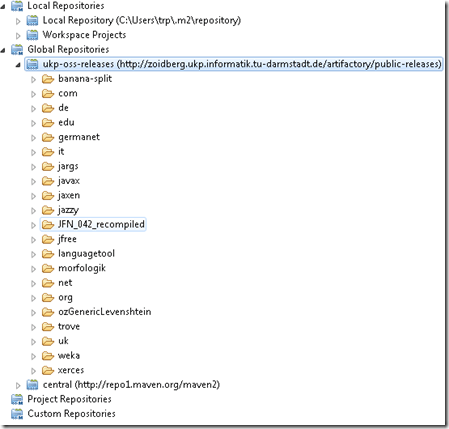 , or else fix your /m2e/settings.xml or Eclipse:
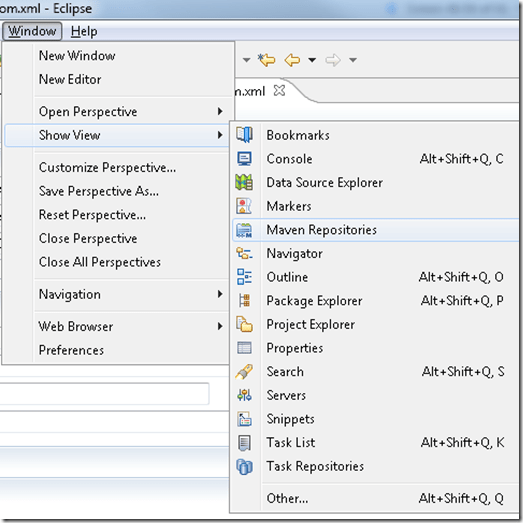
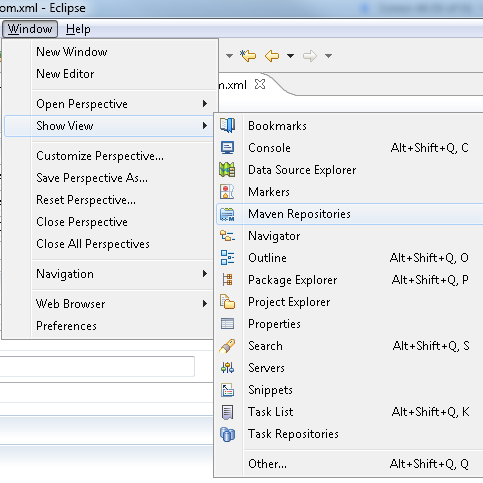
 - Show Maven Repositories View by going to Menu:Windows/ Show View / Maven Repository:
- Like so:

- You get an overview of updating
- You are advised “to check if your Maven and Eclipse are configured correctly, try opening the “Maven Repositories” view in Eclipse, open “Global Repositories” and check if there is a “ukp-oss” folder in it with contents”, like so:

- and finally:

- TBA: what causes the central maven repository to not get resolved?
- Build your own project, with guidance from a variety of documents (some need updating) and mailing lists
- My attempts to “browse” for the parent when creating my own project have remained unsuccessful:

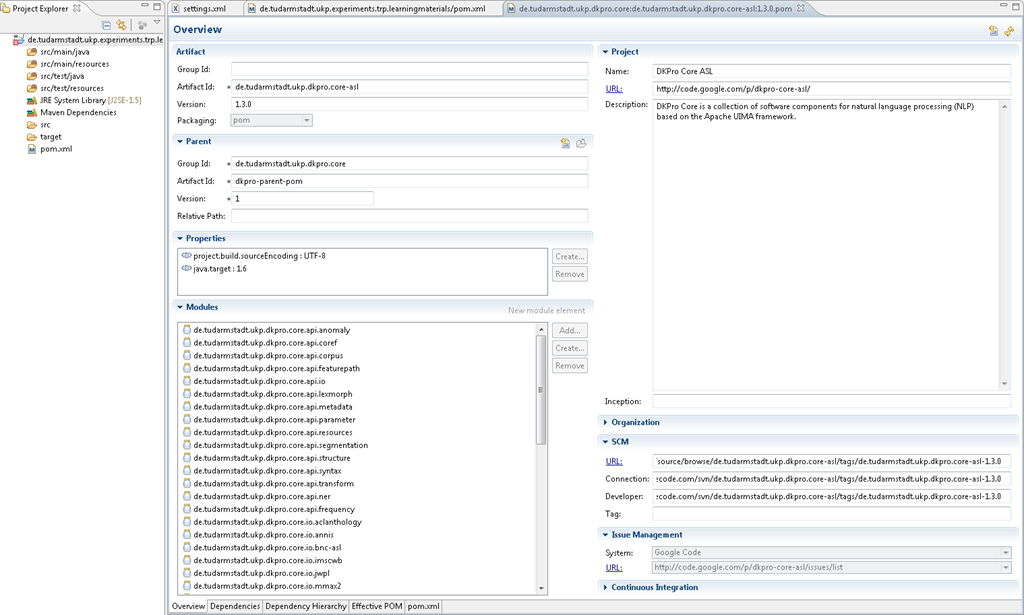
- I could however use as a model an existing POM.xml that loads a parent:

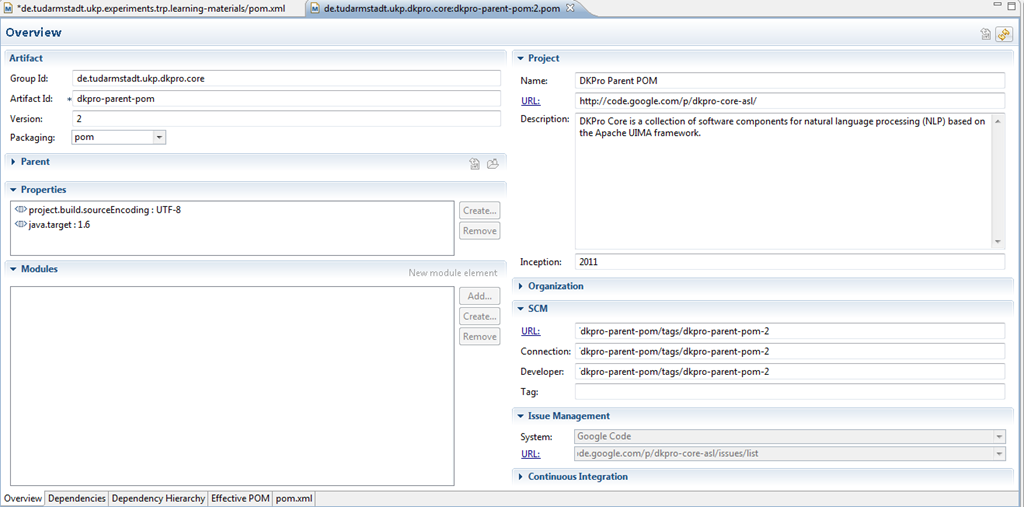
- Which seems to work, at least if you click “open parent pom”,

- it connects you to the dependency:
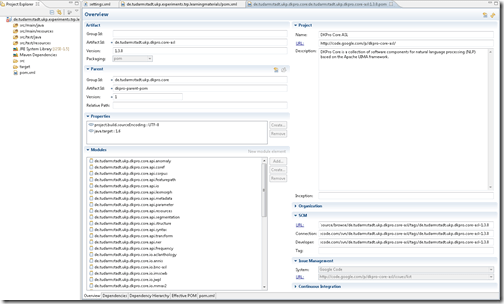
- Afterwards, the search feature started working when selecting dependencies:

- For the DkPro version updated 05-28, I also could not browse for parents or dependencies from m2eclipse, but needed to first manually add to my pom.xml (the syntax of which is explained here and here)
- the <parent> entry
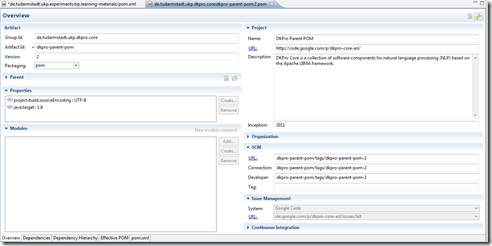
- Managing dependencies from within m2eclipse started to work for me only once I had added manually the <dependencyManagement> entries. This allows for autodiscovery of the snapshot-version (1.4.0 currently) version, whether you add a <dependency> into the pom.xml without <version>, like here:
 , or browse for and select the latest released version (1.3.0 – I cannot browse for snapshots). like here:
- the <parent> entry
- While I still can only browse for release versions (1.3 currently), the <dependencymanagement> updates
- Reminder: Given the current transitional status of DkPro, you need to first enable snapshots like in my settings.xml.
- HINTS
- You cannot “remove” through the gui-button a dependency that you erroneously added as empty.
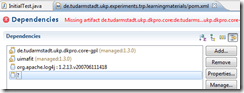 Open the pom.xml with a text/xml editor and remove it there, then have the GUI reload the pom.
- See here for some tools that helped me debug my project setup in Eclipse.
- You cannot “remove” through the gui-button a dependency that you erroneously added as empty.
- If you cannot use the built-in javadoc help for stanford-corenlp, and/or, when trying to set up, get “Can’t download JavaDoc for edu.stanford.nlp:stanford-corenlp:1.3.2:javadoc”, this is a known issue, seems to have no resolution currently, but may have one in the future.
 Workaround: browse the source elsewhere…
- My attempts to “browse” for the parent when creating my own project have remained unsuccessful:













How to easily upload, distribute, share and play large multimedia files with Google Apps
2012/05/11
Leave a comment
- Tired of burning, lugging around, inserting, ejecting, or forgetting, losing, scratching and replacing CD- and DVD- media, or hard- and thumb drives to handle your large multimedia files? Do you have internet and web browser where you need to access and play your files? Then you can use UNCC Google Apps instead.
- Go to your UNCC Google Apps (you have to log into UNC)
- Click on the Hard-drive-icon in the upper left
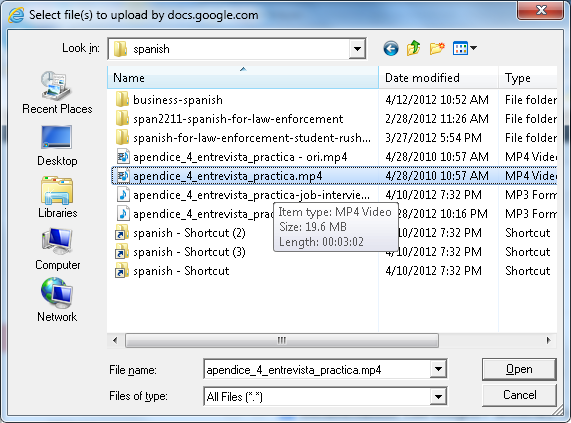
 and on “files”, select a video file:
 (many formats and underlying codecs supported, including Flash, MOV, AVI, WMV, MPG. File size limits: currently “every user is given 1GB of free storage space for files” (not enough for much HD footage, but difficult to upload, and didn’t Google Drive just increase this limit to 5GB, or does this not carry over to Google Apps? Stay tuned for updates), click “Start upload”..
- Wait until upload is finished,
 and then, depending:
- if you want to share the file with colleagues, click on “share” (appears after “cancel”) and fill out the dialogue. You can share your file both
- inside the university community and

- inside the university community and
- outside of the university community:
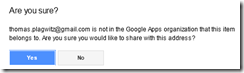

- if you want to share the files with students in your course, there is a better way using Moodle Kaltura video upload;
- if you just want to play the file yourself (including to your students in the classroom), you are already done.
- Go to your files
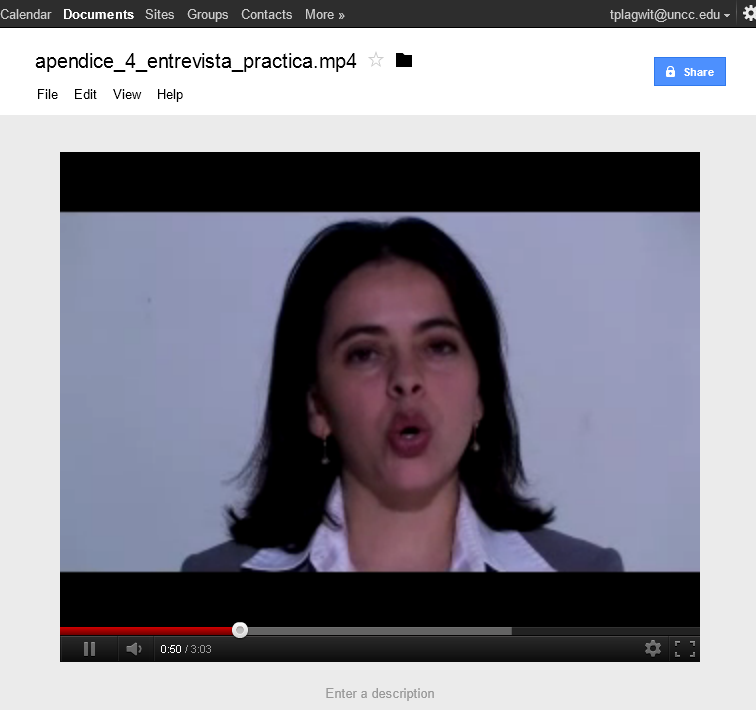
 and click on the file in the list to play the video: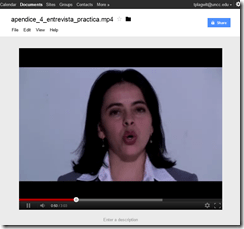
- Also, you can always “get your file back” by “Download”:
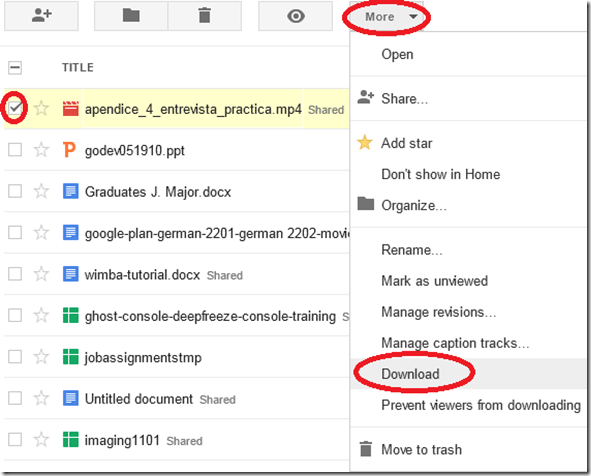 (and note you can also prevent users from downloading the files. This is useful if you only want to temporarily share it, but later revoke permissions).
- if you want to share the file with colleagues, click on “share” (appears after “cancel”) and fill out the dialogue. You can share your file both
- More help is available from the from the source




How to easily merge MP3 files
2012/05/11
Leave a comment
- There are many ways, including many that are easier than doing it manually in Audacity.
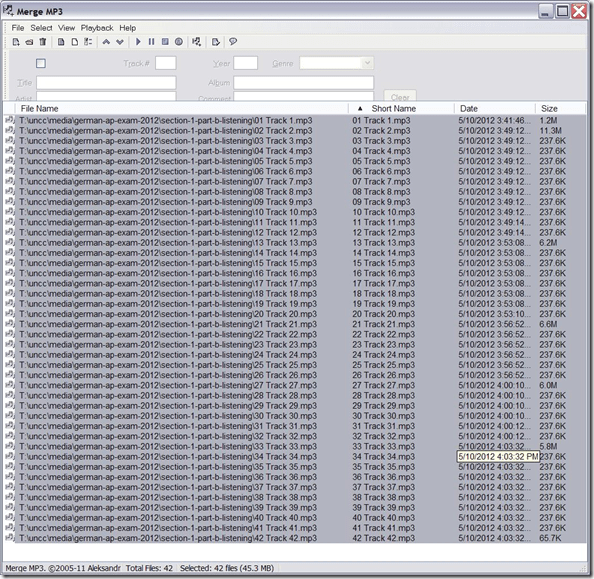
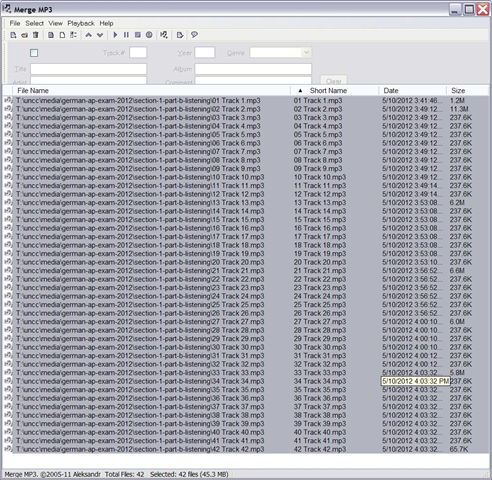
- MergeMP3 is a free and easy one that worked here:
How to stream video clips to students in classroom and at home, using Moodle Kaltura
2012/05/02
Leave a comment
- DVDs are getting a bit long in the tooth, not to mention VHS, and can form a real obstacle or time-consuming distraction in an educational setting, from handling the media to finding compatible software and/or hardware players for the media.
- Fortunately, there is a now a better way to make video clips available to students than uploading them to YouTube.com:
- university-supported,
- more compliant with copyright and fair use restrictions (which still apply)
- also requiring only a web browser (available on all campus computers, including teacher computers in classrooms, including those that have no (region-free) DVD-player installed)
- and a course enrolment. But access to a Moodle course can now be considered a given, both for teachers and students.
- Moodle Kaltura allows for easy
- uploading of a video file by the teacher
- viewing by the student (streamed – Flash required, not different from YouTube.com).
- View a screencast example how easy it is with Moodle Kaltura to upload and playback a video clip from a movie DVD.

- Not different from YouTube.com, you still need to edit out the segment from the DVD that you want to show in your class, uploading a full DVD I do not intend to test.
- From this example, you can also get an idea how long the server-side encode takes before the video an be streamed back to students: the short clip of a few minutes here starts playing back at 12:40. Naturally, a teacher would prepare their course, including all video uploads, before the term starts or possibly before the week starts, or, in extremis, before the class starts – in practice, only the – extremely unlikely – scenario where the teacher would try and upload the video during the class is not supported.
Spring 2012 Faculty Workshop II: Oral Proficiency testing with Audacity/Sanako
2012/04/30
Leave a comment
- View screens (best viewed side by side, but note that left and right screen are not synchronized):
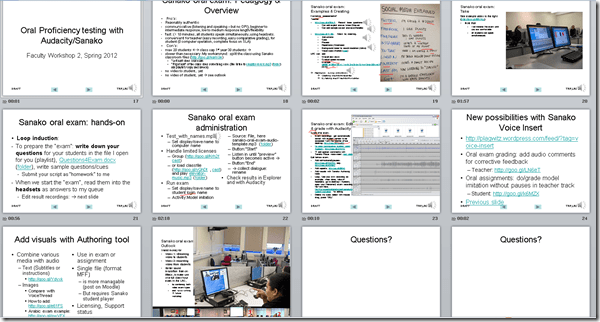
- for full slide show (note the included short links for convenient further reading), left screen

- for Sanako interface and full audio track, right screen
 .
.
- for full slide show (note the included short links for convenient further reading), left screen
- Table of contents:
- Overview of a Sanako Oral Exam
- Examples of Exam teachers’ exam question recordings
- Example of a Sanako Exam
- Loop induction
- creating an exam question recording
- by taking a Sanako exam as a student
- Step-by-Step of administering a Sanako oral exam
- Grading Sanako oral exam student files
- Sanako voice insert for
- facilitating recording oral assignments for student without hard-coded pauses
- commenting on student responses during grading
- Sanako voice insert for
- Sanako authoring tool for providing visual on top of aural cues to students

Categories: Absolute-Beginner, Advanced, Arabic, audience-is-teachers, Beginner, digital-audio-lab, e-languages, English, Farsi, French, German, Greek (modern), Hindi, Intermediate, Italian, Japanese, Korean, Listening, Mandarin, multimedia-recording, Polish, Portuguese, Presenter-Computer, Russian, Screencasts, service-is-assessing, service-is-learning-materials-creation, Slideshows, Spanish, Speaking, step-by-step-guides, Student-Computers, Swahili, workshops, Yoruba
audacity, authoring-tool, sanako-study-1200, student.exe
How to use Audacity to repeat audio cues for students when creating listening learning materials
2012/04/27
Leave a comment
 .
.How to combine oral cue audio with images in Sanako Study 1200 authoring-tool
2012/04/26
Leave a comment
- This 100-second authoring tool screencast
 shows how to
 - preview the audio in the authoring tool,
- add an image and
- set its display time on the timeline,
- If you make an error by assigning non-sensible times, the authoring tool helps you by flagging it red:
- save (save frequently, on my Windows-XP SP3 machine, the image display within the authoring tool caused frequent BSODs, seemed video-driver-related).
- View results (application during a class) here.



Questions? Read the About. Or just ask me a quick Our Databases: Resources with calendars -- Language learning material Moodle Sites, multimedia files -- films


FAQs for LRC student staff or for students or for teachers. To search our FAQs, in the browser addressbar, add after "https://plagwitz.wordpress.com/feed/?tag=faqs+/" "+TAG1" (from tag cloud below) OR "https://plagwitz.wordpress.com/feed/tag=faqs
&category_name=" "CAT1" (from category hierarchy below). OR search both categories and tags, and multiple TAGs/CATs (connect with "," for OR-search, with "+" for AND-search), like so: https://plagwitz.wordpress.com/feed/?tag=TAG1+TAG2+...TAGn&category_name=CAT1
+CAT2+...CATn"
Other ways to find help
If you cannot find it here, look there: 5,500 Language-Learning Links and Programs for learning or teaching 150 languages
Shortcuts:Our Lists, Our Maps, LRC Staff Moodle Site,LRC Project Moodle Site, 49erexpress, UNCC Moodle, Student Recordings: s:claslcslrcsanakostudent
Learning usage samples: Sanako oral exam, Kaltura webcam presentation, Dictation with speech recognition, Sanako written exam, Chinese and Japanese interactive stroke-order practice
Test the Sanako Installer, Webbrowser Popup Konfigurator for XP, or Windows7, faster LRC TeacherPC Log-in Let MS facilitate diacritics writing by installing for you US-International keyboard layout
This is my personal blog (Google+). The views expressed on these pages are mine alone and not those of my employer. The information in this weblog is provided “AS IS” with no warranties, and confers no rights.
 Thomas' Work Space