Archive
How to identify graded participants in Moodle Course Activity Reports using Vlookup
- Having a chart of full names, Moodle id # and usernames would be useful (e.g. for debugging with the Activity Reports that in some cases do not resolve Moodle id# so Excel vlookup has to rescue the day once again…)
- The Moodle “Participants” affords the instructor a convenient list, with paging, sort, filter (by role), and different detail-level views.
- However, the overview does link course and student id #, but not institutional username while the detail view contain the username as part of the email, but is not truly tabular (consists of an array of tables, each containing one user; at least you can avoid the paging).
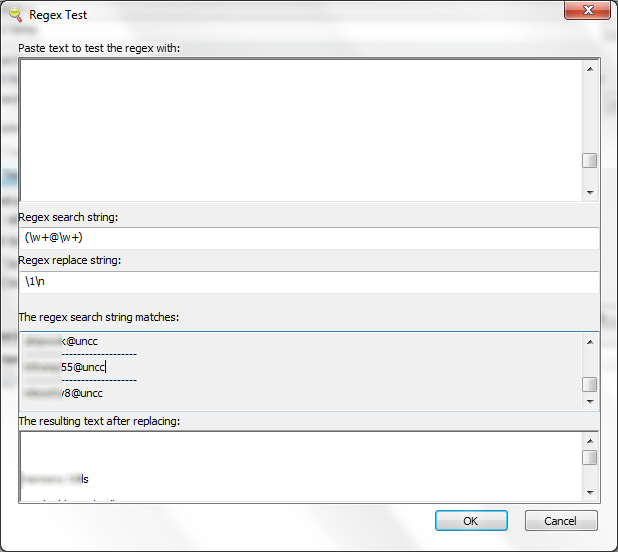
- Enter grepwin to extract the emails:

- and copy paste them into the Excel created from the tabular overview:
 Is there an easier way?

Protected: Moodle streaming video recording assignment glitches 3, 4, 5, 6, 7 & 8: A running log
How to use Google translate for writing Cyrillic letters with a western keyboard, pronunciation help, and text-to-speech
Go to Google translate and do like so. Useful for learning, as well as typing when teaching.
Wimba Classroom –> Saba Centra: A running log
- http://teaching.uncc.edu/ctl-blog/centra-classroom-replace-wimba
- As this pertains to the LRC, more info will be posted here, as it becomes available, and issues and resolutions, as they come up.
Nice Syntax highlighter tool from wisc.edu @ Madison
-
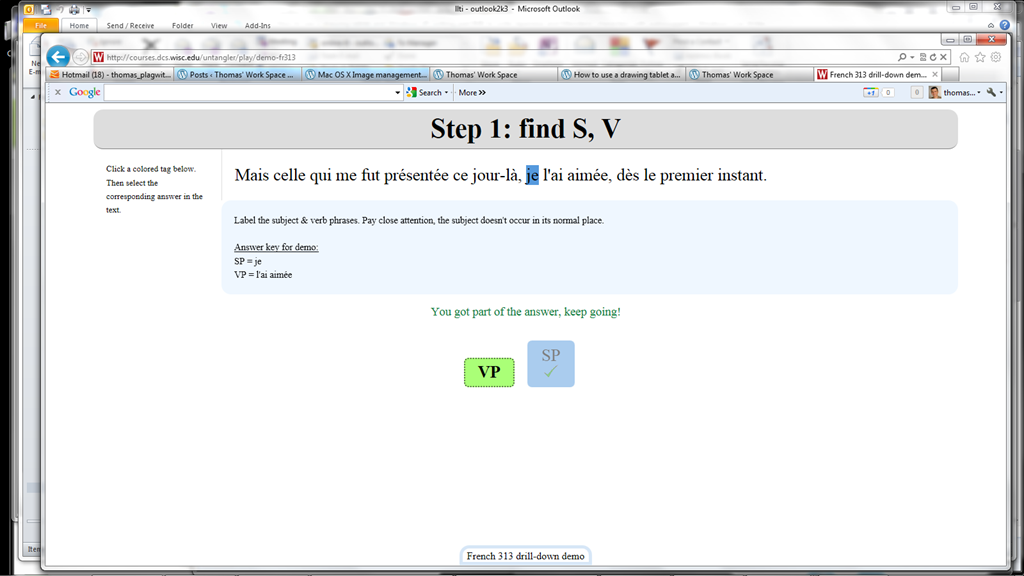
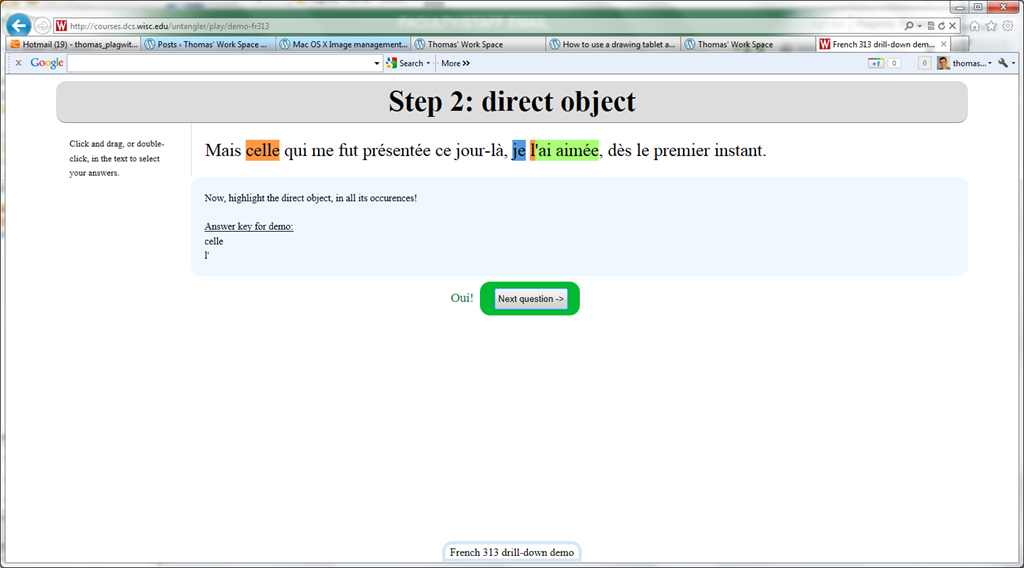
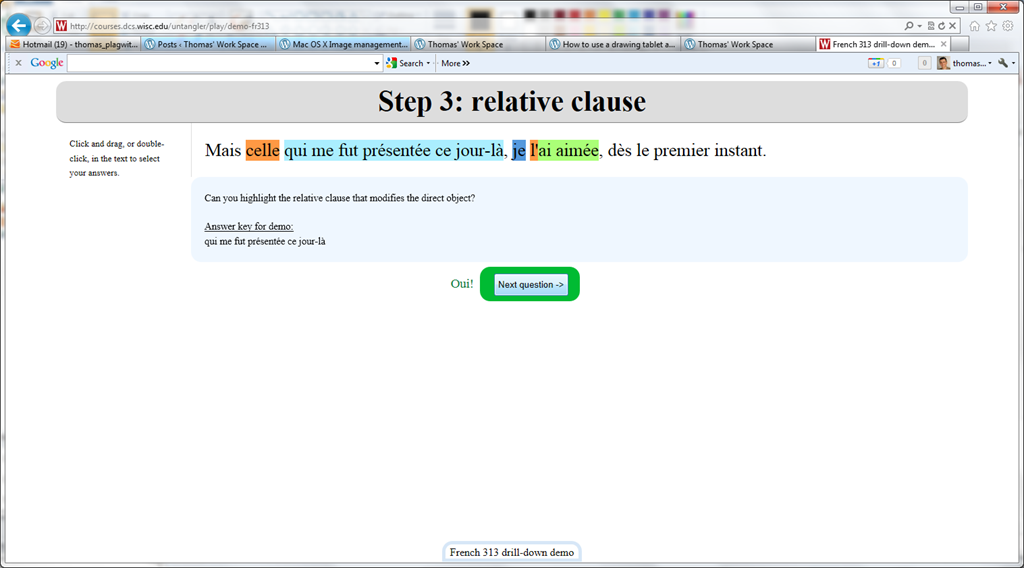
Wish my Latin teacher at home would have had such a nice tool when he analyzed the “Ante mare et terras et quod tegit omnia caelum / unus erat toto naturae vultus in orbe / quem dixere chaos”, he had only me:

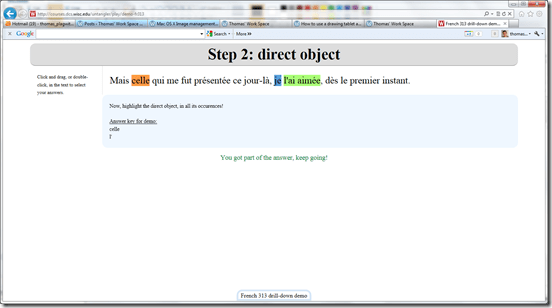

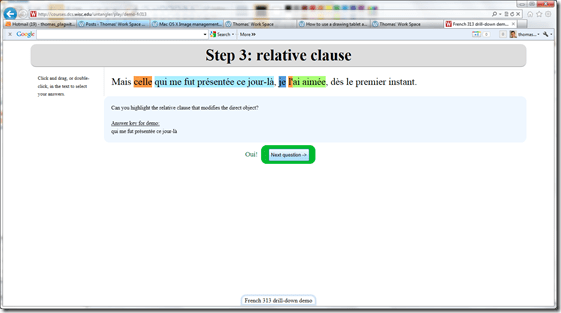

- Now how could such exercise creation made more automated by having it accept the output of NLP tools like Treetagger?


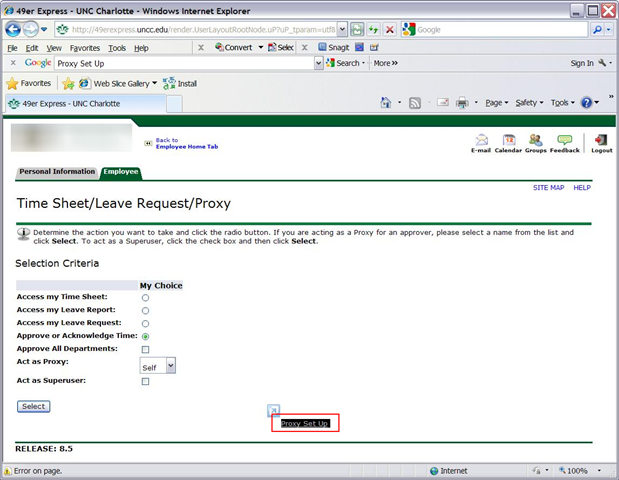
Acting as a Proxy when approving student workers’ time of behalf of others in Webtimeentry
- You need to be set up as a proxy by the primary approver:

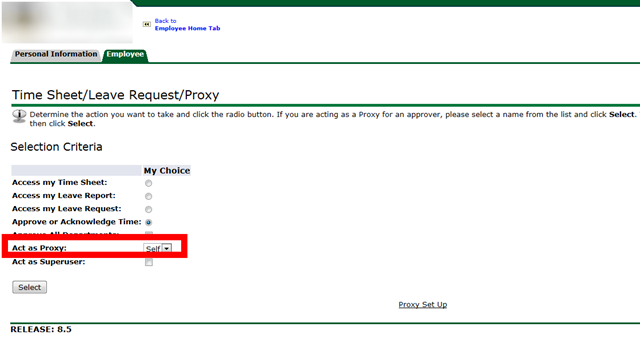
- Once you have been set up as a proxy:

- you can follow the instructions for the dropdown on the approve times screen:


LRC demo, troubleshooting and debugging screencasts
- The LRC student PC image contains a file C:\temp\screencastfullhighaudio.wme
- Doubleclick or run the file, in the encoder window that comes up, click the green menu button to record your screen.
- When done demonstrating on screen, swtich back to the encoder window and click the red button to stop recording.
- Rename and archive (the student hard drive is “frozen”) the screencast video output file which you will find in c:\temp\screencast.wmv.
Using WebParts syntax to navigate OWA?
When you train in OWA, you can take advantage of sending your students directly to certain interfaces of OWA, for doing specific hands-on tasks. If they are not alreay logged in, they seem to get redirected to the desired view in the end Working example:
https://mail.uncc.edu/owa/?cmd=contents&fpath=Calendar&view=Weekly&archivestub=1
Limitations seem to be in the browsers: IE> Firefox > Safari.
However, I could not find a way to send a user to a specific view of an OWA published calendar (seems to default always to monthly). Non-working eexamples:
bad request http://mail.uncc.edu/owa/calendar/LRCtutor11@uncc.edu/Calendar/calendar.html?view=Weekly 404 http://mail.uncc.edu/owa/calendar/LRCtutor11@uncc.edu/Calendar/Weekly/calendar.html#
See documentation here: http://technet.microsoft.com/en-us/library/bb232199.aspx
Can you use webbparts to save your users to have to change the view  when they open up a calendar like http://mail.uncc.edu/owa/calendar/LRCRoomCOED434@uncc.edu/Calendar/calendar.html#, or another way to open this calendar not in its (monthly) default view?


Questions? Read the About. Or just ask me a quick Our Databases: Resources with calendars -- Language learning material Moodle Sites, multimedia files -- films


FAQs for LRC student staff or for students or for teachers. To search our FAQs, in the browser addressbar, add after "https://plagwitz.wordpress.com/feed/?tag=faqs+/" "+TAG1" (from tag cloud below) OR "https://plagwitz.wordpress.com/feed/tag=faqs
&category_name=" "CAT1" (from category hierarchy below). OR search both categories and tags, and multiple TAGs/CATs (connect with "," for OR-search, with "+" for AND-search), like so: https://plagwitz.wordpress.com/feed/?tag=TAG1+TAG2+...TAGn&category_name=CAT1
+CAT2+...CATn"
Other ways to find help
If you cannot find it here, look there: 5,500 Language-Learning Links and Programs for learning or teaching 150 languages
Shortcuts:Our Lists, Our Maps, LRC Staff Moodle Site,LRC Project Moodle Site, 49erexpress, UNCC Moodle, Student Recordings: s:claslcslrcsanakostudent
Learning usage samples: Sanako oral exam, Kaltura webcam presentation, Dictation with speech recognition, Sanako written exam, Chinese and Japanese interactive stroke-order practice
Test the Sanako Installer, Webbrowser Popup Konfigurator for XP, or Windows7, faster LRC TeacherPC Log-in Let MS facilitate diacritics writing by installing for you US-International keyboard layout
This is my personal blog (Google+). The views expressed on these pages are mine alone and not those of my employer. The information in this weblog is provided “AS IS” with no warranties, and confers no rights.

