Archive
Archive for the ‘Advanced’ Category
How to use the online Spanish pronunciation help to generate phonetic alphabet transcriptions and text-to-speech
2011/11/18
Leave a comment
- Go to http://showroom.daedalus.es/es/tecnologias-de-la-lengua/phonetictrans/phonetictrans.php, enter your text, select your phonetic symbol set:
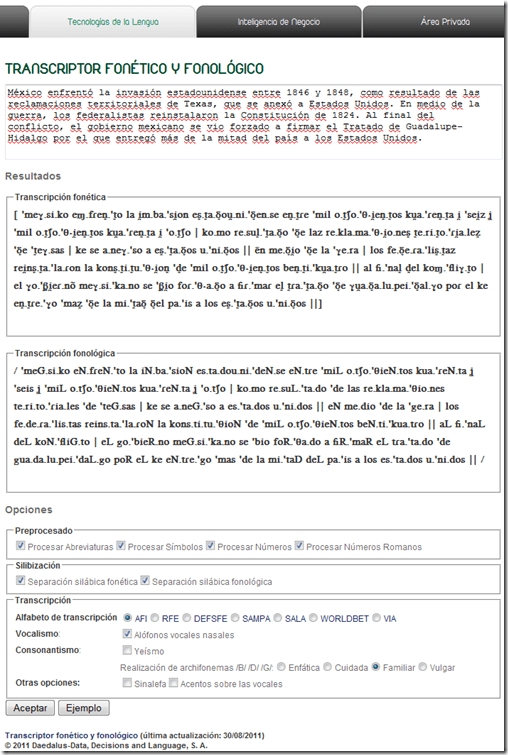
- Unlike with the Portuguese help, there is no text-to-speech option here.

Web-based romanized letters to Cyrillic transliteration tool.
2011/11/16
Leave a comment
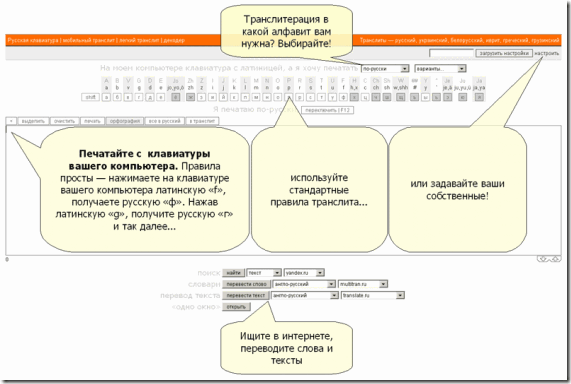
- Our Russian tutor uses this transliteration tool HTTP://TRANSLIT.RU which allows for phonetic input on a keyboard that does not have Cyrillic letters and seems popular with native speakers of languages written in Cyrillic.
- As so often, that implies: not designed for language learners. The explanation attests to that:
Categories: Advanced, audience-is-students, audience-is-teachers, e-languages, Intermediate, Russian, websites, Writing
character-input, websites
Microsoft Contextual Translator
2011/11/14
Leave a comment
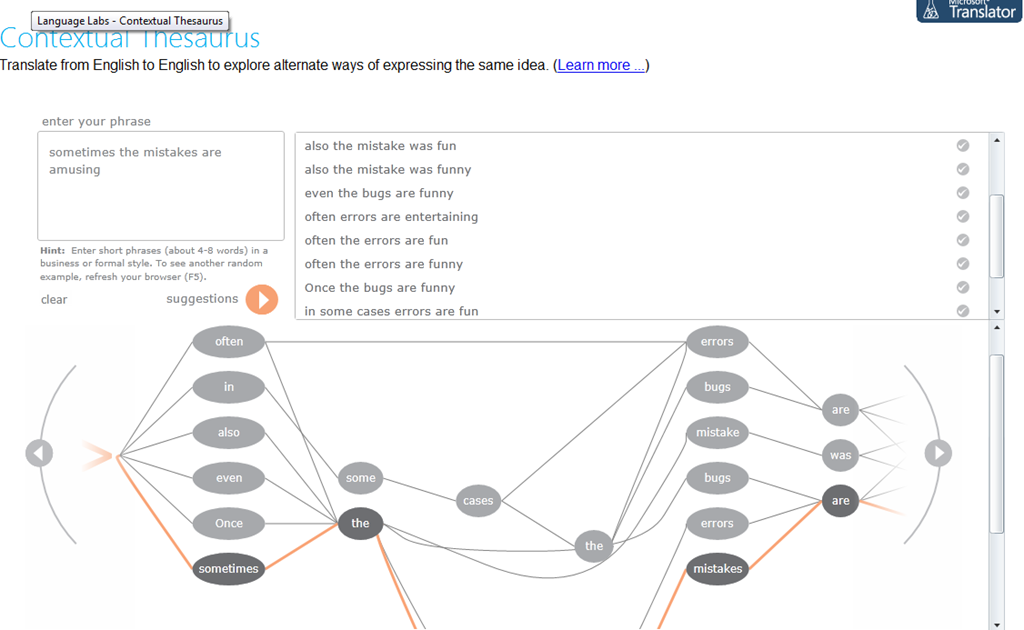
Certainly an advance over the MS-Word thesaurus (unlike the MS-Word 2007 and up spell check, still not contextual). Does this work at least well enough to serve as a fruitful pedagogical exercise: “Which phrase does not belong in the group?”
Categories: Advanced, audience-is-students, audience-is-teachers, Beginner, e-languages, English, Intermediate, Speaking, websites, Writing
links, thesaurus
MS Universal Language Input Tool offers correction and transliteration on any web page
2011/11/10
Leave a comment
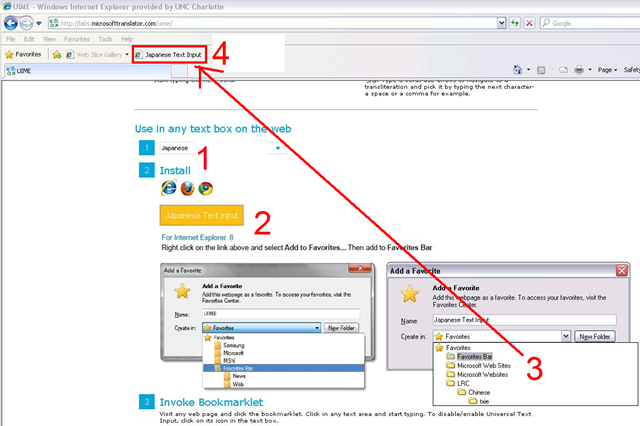
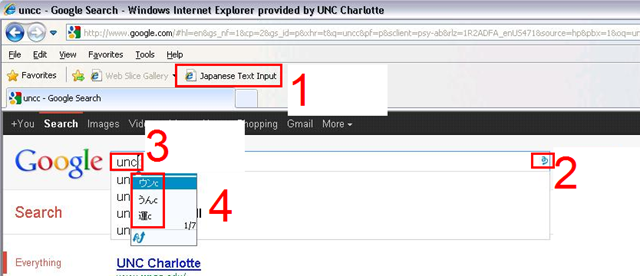
Using the UIME, you can “type any language with any keyboard on any web page, using only the Roman characters present on every keyboard.”

And you can install your favorite input language in your web browser, like so:
Categories: Absolute-Beginner, Advanced, Arabic, Beginner, e-languages, English, French, Greek (modern), Intermediate, Japanese, Mandarin, Russian, software, websites, Writing
character-input, ms-uime
MS-Engkoo glossing of Chinese newspaper text
2011/10/28
Leave a comment
- Learners of Mandarin can increase not only their cross-cultural knowledge, when using the English versions of two of the biggest Chinese newspapers: “China Daily has adopted Engkoo’s “hover translation” feature—hover your cursor over an English word or phrase and get an inline Chinese translation— on its China-facing website” and the People’s Daily, the largest official newspaper in China, uses the same feature in its English website”
- Make sure you are on the right version (English version for Chinese user) of the site (
 are the choices you want to see on top) and “Enable Bing Dictionary”in lower right corner:
 ![china daily engkoo enable_thumb[1]](https://thomasplagwitz.com/wp-content/uploads/2011/10/china-daily-engkoo-enable_thumb1_thumb.png?w=244&h=40 "china daily engkoo enable_thumb[1]")
- Then hover:
![china daily engkoo example_thumb[1]](https://thomasplagwitz.com/wp-content/uploads/2011/10/china-daily-engkoo-example_thumb1_thumb1.png?w=559&h=462 "china daily engkoo example_thumb[1]") .
.

![china daily engkoo enable_thumb[1]](https://thomasplagwitz.com/wp-content/uploads/2011/10/china-daily-engkoo-enable_thumb1.png "china daily engkoo enable_thumb[1]")
![china daily engkoo example_thumb[1]](https://thomasplagwitz.com/wp-content/uploads/2011/10/china-daily-engkoo-example_thumb11.png "china daily engkoo example_thumb[1]")
Categories: Advanced, Beginner, e-languages, Intermediate, Mandarin, Media, Reading, Vocabulary, websites
engkoo, glossing, links, microsoft, newspapers
Chinese newspapers
2011/10/28
Leave a comment
- China Daily is the largest Chinese newspaper available in English. It has a variety of versions: here is the version for the US, for cross-cultural learning, while the English version for speakers of Chinese is valuable both for learners of Mandarin and English.
- The government-run newspaper People’s Daily has an English version, also with language learner glossing.
Categories: Absolute-Beginner, Advanced, Beginner, English, Intermediate, Mandarin, Media, Near-Native, Reading, websites
newspapers
MS-Bing Dictionary for Chinese learners of English–and vice versa?
2011/10/28
Leave a comment
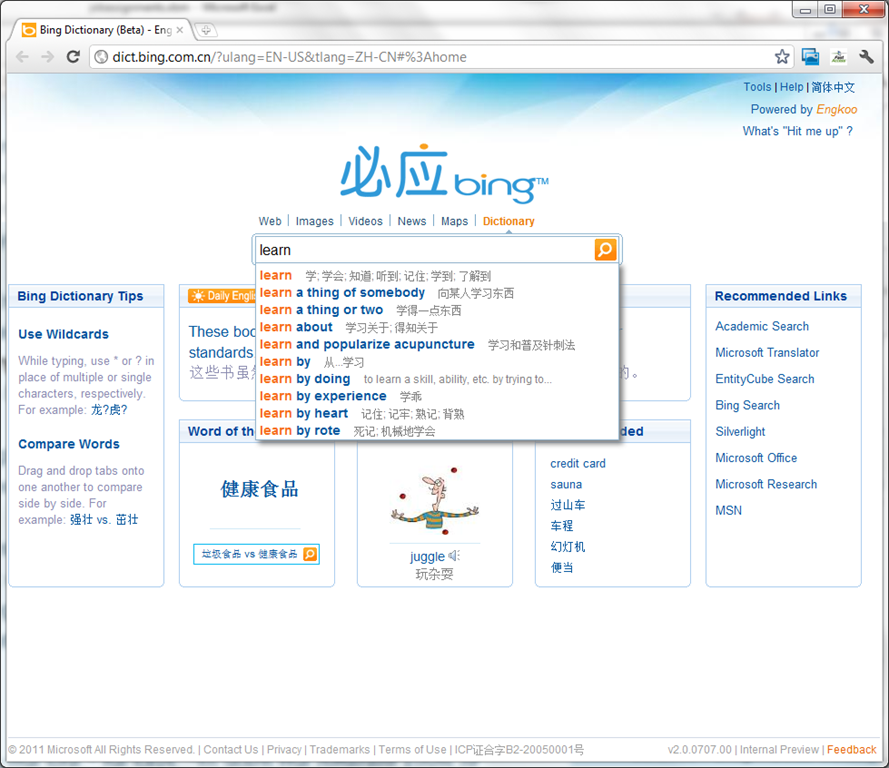
- Link: http://dict.bing.com.cn/?ulang=EN-US&tlang=ZH-CN#%3Ahome, powered by Engkoo:
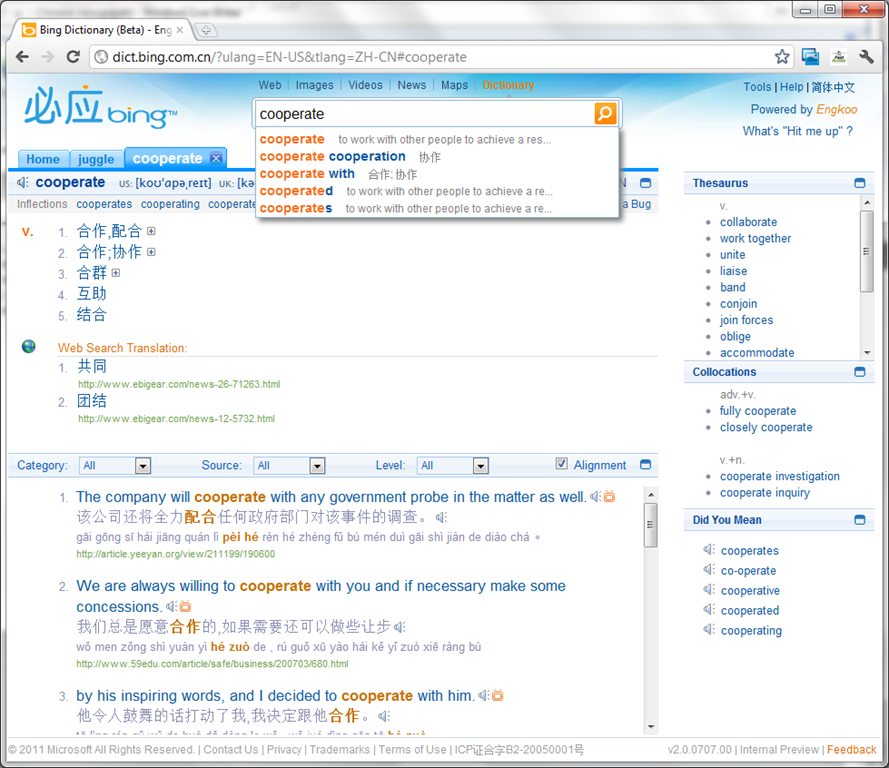
- This looks like a pretty evolved learning tool: It has instant suggestions that include usage information and translations.

- Rich results that include contextual, parallel web-as-corpus matches in text and text-to-speech (that, on spot-checking, seems barely noticeably computer-generated).

Categories: Absolute-Beginner, Advanced, Beginner, corpora, Dictionaries, English, Intermediate, Listening, Mandarin, Reading, Vocabulary, websites
links, ms-bing.ms-eengkoo


Questions? Read the About. Or just ask me a quick Our Databases: Resources with calendars -- Language learning material Moodle Sites, multimedia files -- films


FAQs for LRC student staff or for students or for teachers. To search our FAQs, in the browser addressbar, add after "https://plagwitz.wordpress.com/feed/?tag=faqs+/" "+TAG1" (from tag cloud below) OR "https://plagwitz.wordpress.com/feed/tag=faqs
&category_name=" "CAT1" (from category hierarchy below). OR search both categories and tags, and multiple TAGs/CATs (connect with "," for OR-search, with "+" for AND-search), like so: https://plagwitz.wordpress.com/feed/?tag=TAG1+TAG2+...TAGn&category_name=CAT1
+CAT2+...CATn"
Other ways to find help
If you cannot find it here, look there: 5,500 Language-Learning Links and Programs for learning or teaching 150 languages
Shortcuts:Our Lists, Our Maps, LRC Staff Moodle Site,LRC Project Moodle Site, 49erexpress, UNCC Moodle, Student Recordings: s:claslcslrcsanakostudent
Learning usage samples: Sanako oral exam, Kaltura webcam presentation, Dictation with speech recognition, Sanako written exam, Chinese and Japanese interactive stroke-order practice
Test the Sanako Installer, Webbrowser Popup Konfigurator for XP, or Windows7, faster LRC TeacherPC Log-in Let MS facilitate diacritics writing by installing for you US-International keyboard layout
This is my personal blog (Google+). The views expressed on these pages are mine alone and not those of my employer. The information in this weblog is provided “AS IS” with no warranties, and confers no rights.
 Thomas' Work Space