Archive
Archive for the ‘Multimedia-is-any’ Category
What does your computerized classroom feel like?
2013/03/22
Leave a comment


Language lab: You can get there fast, but only if you know how to land, not crash.
Categories: audience-is-teachers, digital-audio-lab, marketing, Photos
Online Tool to compress/decompress GUIDs
2013/03/21
Leave a comment
Could not immediately find one when I searched: Enjoy. My formula will not trim leading and trailing spaces from your input. You may have to enter the blue result field, move the cursor to the end of the formula and hit enter for the result cell to update. Download the sheet to use in Excel.
Categories: audience-is-IT-staff, e-infrastructure, Spreadsheets
CLSID, GUID, guids, windows, windows-installer, windows-registry
LRC training animated-gifs
2013/03/18
Leave a comment
- This link gives you a nice overview list of the LRC animated gif’s for training.
- Chrome users need to install this first, still can view get only a subset.
- Neither Chrome nor Firefox offer a search-within like Internet Explorer.
- They are meant for display on the left lrc teacher station screen.
- whether you display them as student training material on the projector
- or display them as guidance for yourself
- Did you miss something?
- The animated gif’s cycle in an infinite loop. Just wait for the next round.
- If you want to restart the video now, press F5 or click the Refresh button
 in your browser address bar.
 - Or use one of the slower speed videos I made.
- I also made clickable versions that you can hand-browse (more control. More effort also).

Protected: Sanako Study 1200 hangs on “changing control method”?
2013/03/13
Enter your password to view comments.
General digital audio lab introduction for student users of the LRC
2013/03/02
Leave a comment
- The LRC has been upgraded from use of solely Audacity to a digital audio lab and classroom management system geared towards language learning, and teaching. The Sanako Study 1200 is a professional software suite that includes a remote-controlled dual track audio recorder with many specialized features not found in OSS audio editors and simple free web-based recorders. It successful use, even by so-called “digital natives”, requires, for lack of exposure, training .
- Archived online versions of overview training (for your review; sorry: viewing is NOT equivalent to taking the training) were published here when the Sanako was first set up:
- Specific tasks:
- How student downloads, edits and submits files sent from the teacher with Sanako Study 1200 Homework –the ultimate training summary….
- How students can do voice insert recordings with Sanako Study 1200 student recorder – the ultimate training summary…
- More student task training videos are being added continuously as time permits, check back at this link: Sanako step-by-step training videos for students.
- Sorry, we have no self-study online tests to check learning outcomes in digital audio lab proficiency. However, we offer interactive live trainings for classes.
Automating language learning listening material creation with Google Translate text-to-speech: The technology
2013/02/28
Leave a comment
- A digital audio lab heavily depends on the availability of, but does not usually come with digital learning materials (and recent exceptions are exceptions for a reason) Some digital audio materials that come with your textbook may be adaptable. “Rolling your own” has all kinds of advantages (allows for personalization, for both teachers to express themselves, and for students to learn), but can be a chore.
- Can the LRC find a workaround? Here is one attempt: making Google translate (too often abused by students in its original interface) text-to-speech (unusable for learning material in its original interface since severely crippled) usable for digital audio learning material production, provided you have a source text in the target language.

- GoogleTTS can serve as the gateway to better suiting Google Translate text-to-speech features to the needs of the LRC:
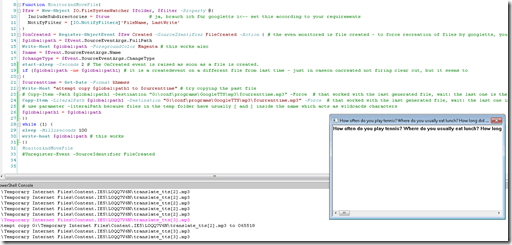 GoogleTTS allows for arbitrary-length input text (it chunks it automatically).
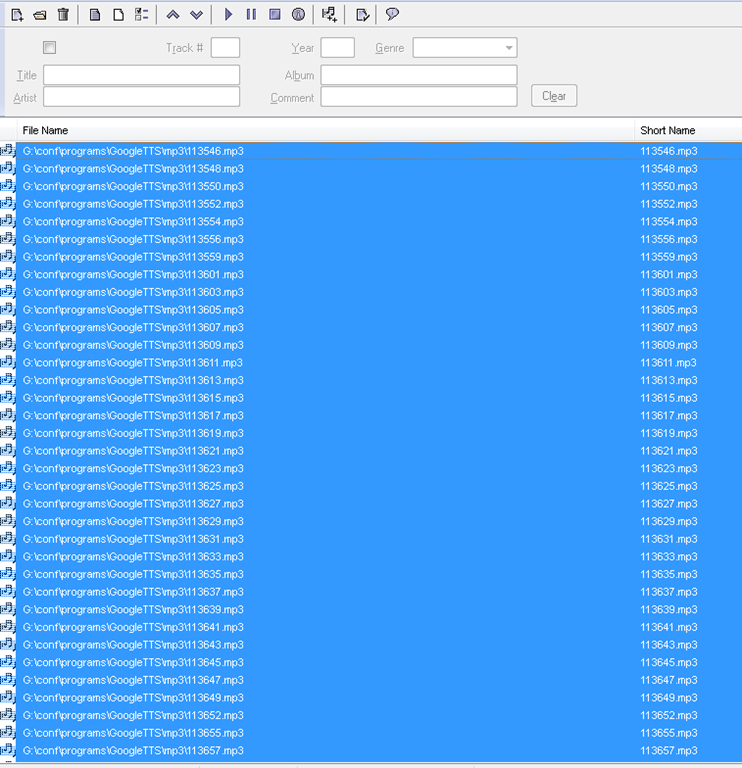
- GoogleTTS produces intermediate local audio files which we can postprocess.
- Google Translate’s automatic language recognition remains a sore point: it is not reliable. Unlike Google Translate, GoogleTTS has no interface to set the language manually when the automatic recognition fails.
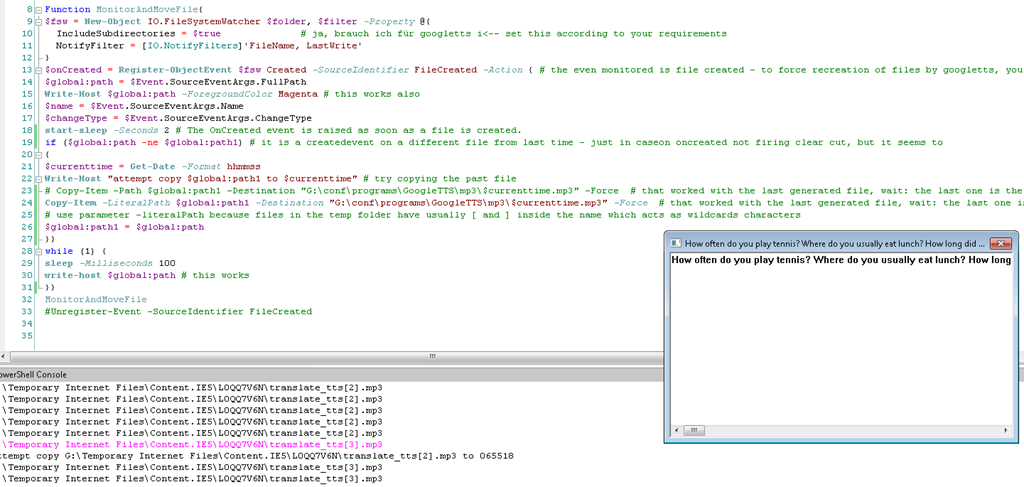
- Batch-download the files from Google Translate, using MS-PowerShell: <
$global:folder = 'G:\Temporary Internet Files\Content.IE5' $filter = '*.mp3' # <-- set this according to your requirements $global:destination = 'G:\conf\programs\GoogleTTS\mp3' $global:path $global:path1 $currenttimeFunction MonitorAndMoveFile{ $fsw = New-Object IO.FileSystemWatcher $folder, $filter -Property @{ IncludeSubdirectories = $true # ja, brauch ich für googletts i<-- set this according to your requirements NotifyFilter = [IO.NotifyFilters]'FileName, LastWrite' } $onCreated = Register-ObjectEvent $fsw Created -SourceIdentifier FileCreated -Action { # the even monitored is file created - to force recreation of files by googletts, you may have to clear watched folder of all mp3 < 100kb first $global:path = $Event.SourceEventArgs.FullPath Write-Host $global:path -ForegroundColor Magenta # this works also $name = $Event.SourceEventArgs.Name $changeType = $Event.SourceEventArgs.ChangeType start-sleep -Seconds 2 # The OnCreated event is raised as soon as a file is created. if ($global:path -ne $global:path1) # it is a createdevent on a different file from last time - just in caseon oncreated not firing clear cut, but it seems to { $currenttime = Get-Date -Format yyyy-MM-dd-hhmmss Write-Host "attempt copy $global:path1 to $cuurrenttime" # try copying the past file # Copy-Item -Path $global:path1 -Destination "G:\conf\programs\GoogleTTS\mp3\$currenttime.mp3" -Force # that worked with the last generated file, wait: the last one is the one that remaisn behind, earlier ones get overwritten Copy-Item -LiteralPath $global:path1 -Destination "G:\conf\programs\GoogleTTS\mp3\$currenttime.mp3" -Force # that worked with the last generated file, wait: the last one is the one that remaisn behind, earlier ones get overwritten # use parameter -literalPath because files in the temp folder have usually [ and ] inside the name which acts as wildcards characters $global:path1 = $global:path }} while (1) { sleep -Milliseconds 100 write-host $global:path # this works }} MonitorAndMoveFile #Unregister-Event -SourceIdentifier FileCreated - Merge the downloaded files (wisely numbered sequentially):
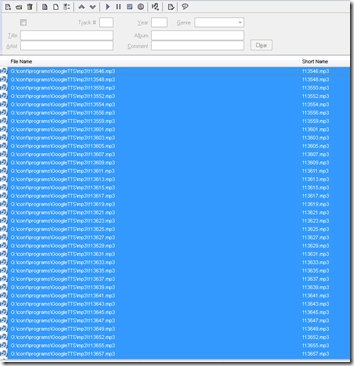
- Fix minor errors in your audio editor:
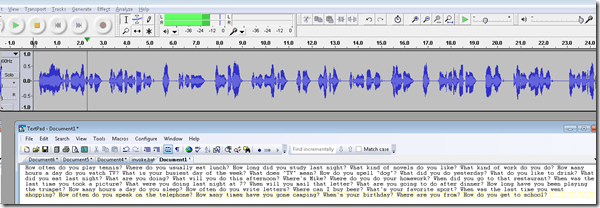
- Done:
- Here I have a lot of questions for a speaking exam in ESL, and with a much better accent than my own.
- Nifty, plus output sounds even better for German than for English. Note, there is no attempt to parse sentences semantically. Some languages chunk better than others (I made some little improvements in this regard to the original program). Other common problems include numbers and in German I find myself, when listening, tending to look up once in a while and shake a high school students by the shoulders, asking him: “Do you actually understand what you are reading?!”
 – which in my eyes is an indicator to the progress made in speech-synthesis.
 - Other examples include French,
- Hindi,
- Italian,
- Spanish.
- So can the LRC relieve teachers from recording their cue files for the digital audio lab listening comprehension and exam? Within limitiations.


Categories: audience-is-language-learning-center-manager, audience-is-teachers, digital-audio-lab, English, French, German, Hindi, Italian, learning-materials, Listening, service-is-applying-learning-tools, service-is-learning-materials-creation, service-is-programming, sourcecode, Spanish
automation, google-translate, powershell, text-to-speech
How a teacher can show a model student screen to other student computers in Sanako Study 1200–the ultimate training summary…
2013/02/18
Leave a comment

How a teacher can divide a class into groups, each sharing audio and one screen, in Sanako Study 1200–the ultimate training summary…
2013/02/18
Leave a comment
- … using animated GIFS
- make groups (=sessions) like shown here;
- share audio/screen within each group so that (ideal for enforcing oral communication during a shared computer task)


Questions? Read the About. Or just ask me a quick Our Databases: Resources with calendars -- Language learning material Moodle Sites, multimedia files -- films


FAQs for LRC student staff or for students or for teachers. To search our FAQs, in the browser addressbar, add after "https://plagwitz.wordpress.com/feed/?tag=faqs+/" "+TAG1" (from tag cloud below) OR "https://plagwitz.wordpress.com/feed/tag=faqs
&category_name=" "CAT1" (from category hierarchy below). OR search both categories and tags, and multiple TAGs/CATs (connect with "," for OR-search, with "+" for AND-search), like so: https://plagwitz.wordpress.com/feed/?tag=TAG1+TAG2+...TAGn&category_name=CAT1
+CAT2+...CATn"
Other ways to find help
If you cannot find it here, look there: 5,500 Language-Learning Links and Programs for learning or teaching 150 languages
Shortcuts:Our Lists, Our Maps, LRC Staff Moodle Site,LRC Project Moodle Site, 49erexpress, UNCC Moodle, Student Recordings: s:claslcslrcsanakostudent
Learning usage samples: Sanako oral exam, Kaltura webcam presentation, Dictation with speech recognition, Sanako written exam, Chinese and Japanese interactive stroke-order practice
Test the Sanako Installer, Webbrowser Popup Konfigurator for XP, or Windows7, faster LRC TeacherPC Log-in Let MS facilitate diacritics writing by installing for you US-International keyboard layout
This is my personal blog (Google+). The views expressed on these pages are mine alone and not those of my employer. The information in this weblog is provided “AS IS” with no warranties, and confers no rights.
 Thomas' Work Space