Archive
How teachers can more quickly open/update/save their Moodle files from MS-Office
MS-Education Labs has published a plugin that speeds up editing MS-Office Files in Moodle.
To use the plugin, download (for 32-bit Office) , run, and from (2007) Office Button or (2010/2003) Menu: “File”, use menu item “Open from Moodle” (and later “Save to Moodle”).

You have to (once) let MS-Office (e.g. MS-Word or Excel) know the URL of Moodle (e.g. http://moodle.uncc.edu),  , then your login credentials:
  .
.
Note that your categorization of Moodle courses (in the tree menu on the left, all courses are filed away in folders called “Training”) prevents an instant load:  .
.
Instead, search for (part of) your course title:  .
.
Select the results you want to add and click button: “Add”: 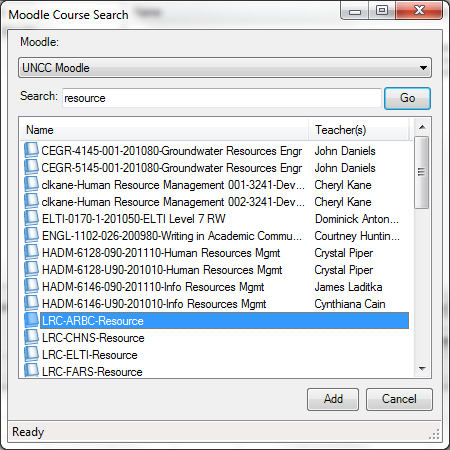 .
.
Wait for the courses to be loaded:  .
.
You can then use the left course tree to browse for matching MS-office files within each of your loaded courses: 
MS-Office files are likely involved in the majority of Moodle edits, so this promises to be a great timesaver.
For more information, see also the CTL’s step-by-step instruction Using the Office Add-in for Moodle.
Free Farsi Proofing Tools available: VafaSpellchecker
Unfortunately, the VafaSpellchecker Proofing Tools are now not available anymore for Office 2010. The links to the Office 2010 on the website have been broken for a long time, the developer seems to have left the university, the project manager has not answered my inquiry. Here is hoping they will be resurrected.
Even though proofing tools are neither designed for non-native language learners nor, traditionally, used in a pedagogically sound way by language learners without proper guidance, they form one of the greatest opportunities to apply advances in Natural Language Processing (NLP) to second language acquisition (SLA) tasks, given that they are a widely installed and commonly understood artificial intelligence providing automated feedback on natural language issues.
The management and licensing of proofing tools has been much improved since MS-Office 2007 which made it easier (and cheaper) to install modular proofing support for additional languages distributed as Language Packs.
However, in an SLA context, even this may still not be a convincing value proposition, whether for the personal computers of individual student learners, or even – due to apparent the lack of concurrent licensing options within proofing tools – for Less Commonly Taught Languages (LCTL) in an imaged computer lab environment (in our case, we would need to purchase 45 licenses à $25 before tax for a language that may have about half as many learners or less).
All the more welcome are freely downloadable add-ons- – thanks to the MS-Office platform extensibility – the VafaSpellchecker, a Persian Spell&grammar and real-word error checking system by the Natural Language and Text Processing Laboratory in University of Tehran, funded by Iranian Research Institute for ICT, available for both MS-Office 2003 and 2007. A VafaSpellchecker user guide (in Farsi) is also available.

As always with NLP in SLA, caveat emptor, use with a grain of salt, or two.
Grouping students using Sanako Study 1200 “sessions”
This sccreencast on grouping with Study 1200 demonstrates:
|
0:00
|
left activity pane – button:add
|
|
0:25
|
right classroom layout pane – click or drag frame
|
|
0:50
|
the effects of grouping
|
|
1:05
|
bottom link: show corridor
|
|
1:25
|
moving between session/groups with context menu (not shown)
|
|
1:30
|
You may have to start/end the current activity from the activity pane first
|
Sanako Study 1200: Student Basics I: The Screenshots


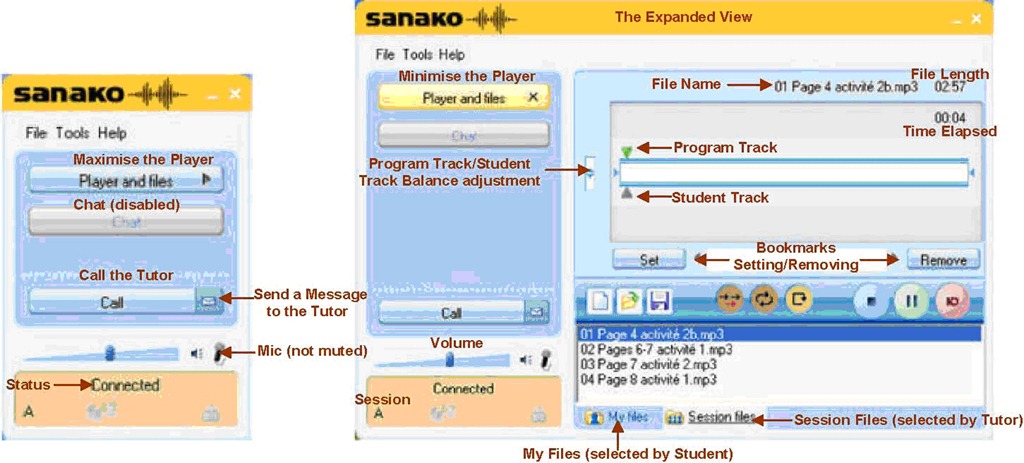
The basics, as found in the Sanako documentation. For a 5-minute student orientation, see: Student Basics II: The Screencast. For the teacher, see teacher cheat sheet.
Sanako Study 1200: Student Basics II: The Screencast
This screencast covers the basics of Study 1200 for students
For a quick guide to the Student interface, see Student Basics I: The Screenshots
MS-Expression Encoder 3: Workaround to force video cropping
In MS-Expression Encoder 3, the video cropping feature in the “Enhance”tab is broken, unless you use the workaround for cropping in this screencast.
MS-Maren Morph helps reading Arabic web pages
This new IE accelerator tool from MS-Innovation Lab Cairo which provides morphological analysis, translations, derivatives, inflections, and more, is available for Internet Explorer 8 and higher from the Maren Morph homepage, or on the LRC PCs.

Recommend also checking out the other MS-Afkar tools, which are primarily designed for facilitating computer use of Arabic native speakers, but of considerable use also for learners of Arabic:
- Microsoft Maren Transliteration which we also have installed in the LRC
- Microsoft Maren Autocomplete which helps writing Arabic
- Microsoft Maren Multilingual which suggests Arabic equivalents for words input in English
How can I change the volume on my SANAKO headsets?
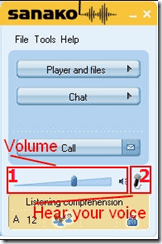
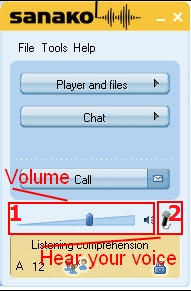
- Q: How can I change the volume on my headsets? Hear my own voice on the headsets? A:Use the Sanako Student Player 1. Volume Slider and 2. (for Sidetone = echo of your speaking) Headset Icon:
-
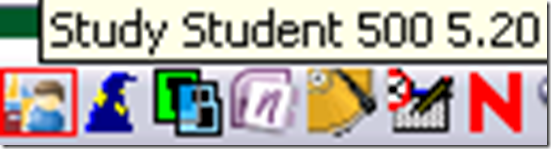
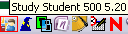
- Q: Where is the Sanako Student Player? A: Show Sanako Student by clicking on the notification bar icon:


Questions? Read the About. Or just ask me a quick Our Databases: Resources with calendars -- Language learning material Moodle Sites, multimedia files -- films


FAQs for LRC student staff or for students or for teachers. To search our FAQs, in the browser addressbar, add after "https://plagwitz.wordpress.com/feed/?tag=faqs+/" "+TAG1" (from tag cloud below) OR "https://plagwitz.wordpress.com/feed/tag=faqs
&category_name=" "CAT1" (from category hierarchy below). OR search both categories and tags, and multiple TAGs/CATs (connect with "," for OR-search, with "+" for AND-search), like so: https://plagwitz.wordpress.com/feed/?tag=TAG1+TAG2+...TAGn&category_name=CAT1
+CAT2+...CATn"
Other ways to find help
If you cannot find it here, look there: 5,500 Language-Learning Links and Programs for learning or teaching 150 languages
Shortcuts:Our Lists, Our Maps, LRC Staff Moodle Site,LRC Project Moodle Site, 49erexpress, UNCC Moodle, Student Recordings: s:claslcslrcsanakostudent
Learning usage samples: Sanako oral exam, Kaltura webcam presentation, Dictation with speech recognition, Sanako written exam, Chinese and Japanese interactive stroke-order practice
Test the Sanako Installer, Webbrowser Popup Konfigurator for XP, or Windows7, faster LRC TeacherPC Log-in Let MS facilitate diacritics writing by installing for you US-International keyboard layout
This is my personal blog (Google+). The views expressed on these pages are mine alone and not those of my employer. The information in this weblog is provided “AS IS” with no warranties, and confers no rights.

