Archive
How to fix MS-Word not creating PDF Bookmarks for your Headings
- Problem: No navigation bar in Acrobat Reader when viewing your PDF created from MS-Word.
- Solution: Check this setting first in the Save as PDF Options:
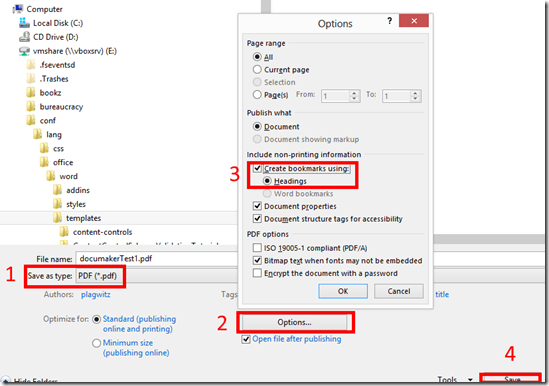
-
But: Word 2013’s “Save as PDF” with “Create Bookmarks” may remains greyed out since it won’t even see your own heading styles, even if you based these styles on the built-in heading styles (which are known to contain “hidden magic” not easily replicated) , including their outline level, if
-
Heading appears in Content control.
-
Heading appears in Table.
-
-
Workaround:
-
Move headings out of Content Controls (you can still “lock”the text with Grouping, which will be enabled on the Developer Tab once you select at least a conten control and text (meant for form field labels).
-
Move headings outside of tables.
-

Can speech recognition tools be soundly applied for speaking practice in second language acquisition programs? Paper at SLRF 2014
For your convenience, I provide two versions of this presentation: the slide deck:
And a screencast of my presentation:

(Unfortunately, PowerPoint 2013 seems to have introduced a bug in alignment of narration and video. If they fix it, I will republish),
How to fix primary screen on Linux laptop not coming out of sleep
- Problem: My Debian (Jessie) Linux laptop has issues with juggling a secondary screen and sleeping at the same time. More specifically, it seems:
- It seems if you come out of sleep with a secondary screen connected, even if you put the laptop to sleep with “it” (o.k., not the same “it”, just spec-wise the equivalent FULL HD LCD screen on VGA – being able to easily move the laptop to work in multiple places is kind of the point of having one in the first place), the primary laptop screen seems to remain asleep completely. FN keys to switch primary and secondary screen on laptop have no effect.
- If you disconnect the secondary screen, Linux does fall back onto the primary screen, however, “forgets” to turn the backlight on. FN keys to up brightness have no effect
- have not found a reliable way avoiding the issue – maybe always disconnecting secondary screen before putting laptop to sleep? If you don’t want to have to do this, or forget, try to use this:
- Workaround:
- While I could get to the tty shell on secondary screen using
CTRL+ALT+F1, but usingxrandr --autogavecan't open display. - However, try installing this utility which I found recommended in a different context:
aptitude search xbacklightxbacklight - simple utility to set the backlight levelaptitude install xbacklight- Switch to a non-elevated user (or else you’ll get:
No protocol specified" , "Primary laptop", "Can't open display :0", Why can't I run GUI apps from 'root': "No protocol specified"? : " In Debian $XAUTHORITY is usually not set explicitly.", "xauth list xauth: file /root/.Xauthority does not exist"). - Then issue:
xbacklight -set 50ORissuexbacklight -inc 50. - Viola: “Fiat lux”…
- Sleep takes out your primary screen and you are not good at blind starting, finding and typing into your Konsole? Right-click on the desktop of your secondary scree, “Run command”, and issue the same command line.
- Thank you, xbacklight.
- While I could get to the tty shell on secondary screen using
VBA script to more easily examine the properties of your Content Control-based forms
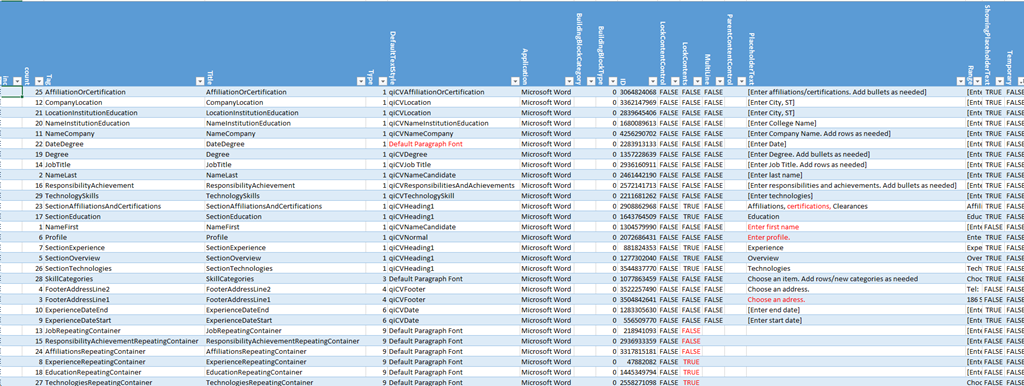
- The routine loops through the Content Controls and outputs properties as text into the VBA-Editor immediate window,
- from where it can be easily converted into an Excel-table which makes it easy t o spot and mark inconsistencies and outright oversights, like so:

Sub ccPropertiesPrint()
On Error Resume Next
Dim strHeadings, strProps As String
Dim count As Integer
Dim response

strHeadings = strHeadings & "~" & "count"
strHeadings = strHeadings & "~" & "Tag"
strHeadings = strHeadings & "~" & "Title"
strHeadings = strHeadings & "~" & "Type"
strHeadings = strHeadings & "~" & "DefaultTextStyle"
strHeadings = strHeadings & "~" & "Application"
strHeadings = strHeadings & "~" & "BuildingBlockCategory"
strHeadings = strHeadings & "~" & "BuildingBlockType"
'strHeadings = strHeadings & "~" & "Checked"
'strHeadings = strHeadings & "~" & "Creator"
'strHeadings = strHeadings & "~" & "DateCalendarType"
'strHeadings = strHeadings & "~" & "DateDisplayFormat"
'strHeadings = strHeadings & "~" & "DateDisplayLocale"
'strHeadings = strHeadings & "~" & "DateStorageFormat"
'strHeadings = strHeadings & "~" & "DropdownListEntries"
strHeadings = strHeadings & "~" & "ID"
strHeadings = strHeadings & "~" & "LockContentControl"
strHeadings = strHeadings & "~" & "LockContents"
strHeadings = strHeadings & "~" & "MultiLine"
'strHeadings = strHeadings & "~" & "Parent"
strHeadings = strHeadings & "~" & "ParentContentControl"
strHeadings = strHeadings & "~" & "PlaceholderText"
strHeadings = strHeadings & "~" & "Range"
strHeadings = strHeadings & "~" & "ShowingPlaceholderText"
strHeadings = strHeadings & "~" & "Temporary"
'strHeadings = strHeadings & "~" & "XMLMapping"
Debug.Print strHeadings
  If ActiveDocument.ContentControls.count > 0 Then
    For Each oCC In ActiveDocument.ContentControls
    'debug
    'If oCC.Type = 9 Then 'debug: repeating
count = count + 1
If count = 50 Then
'dim response = vbmsgboxresponse
    Exit For
End If

' useless cannot access immediate window If count = 15 Then response = MsgBox("paused", vbOKOnly) End If
strProps = "" 'start over
strProps = strProps & "~"
strProps = strProps & count 'CStr(count)
strProps = strProps & "~"
strProps = strProps & CStr(Replace(Replace(oCC.Tag, Chr(13), "#"), Chr(10), "#"))
strProps = strProps & "~"
strProps = strProps & CStr(Replace(Replace(oCC.Title, Chr(13), "#"), Chr(10), "#"))
strProps = strProps & "~"
strProps = strProps & CStr(Replace(Replace(oCC.Type, Chr(13), "#"), Chr(10), "#"))
strProps = strProps & "~"
strProps = strProps & CStr(Replace(Replace(oCC.DefaultTextStyle, Chr(13), "#"), Chr(10), "#"))
strProps = strProps & "~"
strProps = strProps & CStr(Replace(Replace(oCC.Application, Chr(13), "#"), Chr(10), "#"))
strProps = strProps & "~"
strProps = strProps & CStr(Replace(Replace(oCC.BuildingBlockCategory, Chr(13), "#"), Chr(10), "#"))
strProps = strProps & "~"
strProps = strProps & CStr(Replace(Replace(oCC.BuildingBlockType, Chr(13), "#"), Chr(10), "#"))
'strProps = strProps & "~"
'strProps = strProps & CStr(Replace(Replace(oCC.Checked, Chr(13), "#"), Chr(10), "#"))
'strProps = strProps & "~"
'strProps = strProps & CStr(Replace(Replace(oCC.Creator, Chr(13), "#"), Chr(10), "#"))
'strProps = strProps & "~"
'strProps = strProps & CStr(Replace(Replace(oCC.DateCalendarType, Chr(13), "#"), Chr(10), "#"))
'strProps = strProps & "~"
'strProps = strProps & CStr(Replace(Replace(oCC.DateDisplayFormat, Chr(13), "#"), Chr(10), "#"))
'strProps = strProps & "~"
'strProps = strProps & CStr(Replace(Replace(oCC.DateDisplayLocale, Chr(13), "#"), Chr(10), "#"))
'strProps = strProps & "~"
'strProps = strProps & CStr(Replace(Replace(oCC.DateStorageFormat, Chr(13), "#"), Chr(10), "#"))
'strProps = strProps & "~"
'strProps = strProps & CStr(Replace(Replace(oCC.DropdownListEntries.count, Chr(13), "#"), Chr(10), "#"))
strProps = strProps & "~"
strProps = strProps & CStr(Replace(Replace(oCC.ID, Chr(13), "#"), Chr(10), "#"))
strProps = strProps & "~"
strProps = strProps & CStr(Replace(Replace(oCC.LockContentControl, Chr(13), "#"), Chr(10), "#"))
strProps = strProps & "~"
strProps = strProps & CStr(Replace(Replace(oCC.LockContents, Chr(13), "#"), Chr(10), "#"))
strProps = strProps & "~"
strProps = strProps & CStr(Replace(Replace(oCC.MultiLine, Chr(13), "#"), Chr(10), "#"))
'strProps = strProps & "~"
'strProps = strProps & CStr(Replace(Replace(oCC.Parent, Chr(13), "#"), Chr(10), "#"))
strProps = strProps & "~"
strProps = strProps & CStr(Replace(Replace(oCC.ParentContentControl, Chr(13), "#"), Chr(10), "#"))
strProps = strProps & "~"
strProps = strProps & CStr(Replace(Replace(oCC.PlaceholderText, Chr(13), "#"), Chr(10), "#"))
strProps = strProps & "~"
strProps = strProps & CStr(Replace(Replace(oCC.Range, Chr(13), "#"), Chr(10), "#"))
strProps = strProps & "~"
strProps = strProps & CStr(Replace(Replace(oCC.ShowingPlaceholderText, Chr(13), "#"), Chr(10), "#"))
strProps = strProps & "~"
strProps = strProps & CStr(Replace(Replace(oCC.Temporary, Chr(13), "#"), Chr(10), "#"))
'strProps = strProps & "~"
'strProps = strProps & CStr(Replace(Replace(oCC.XMLMapping, Chr(13), "#"), Chr(10), "#"))
Debug.Print vbCrLf & strProps & vbCrLf
'End If 'oCC.Type=9  then 'debug: repeating
 Next
 End If
End Sub
Has the “text effects” cheese been moved only in Word 2013 styles?
Used to have its own separate button – don’t despair, it is still there, now under the “Format” button:

How to change the display language and speech recognition language on Windows 8 computers
- I seem to be getting a lot of hits on this post for Windows 7 where the globalized language features are still limited to Enterprise and Ultimate SKU (and especially not available in Home and Home basic which most language learning users will work with).
- Windows 8 to the rescue, as per Steven Sinofsky’s blog post:
- Or if you need a visual step-by-step, here is me adding German to English on Windows 8.1 Professional:



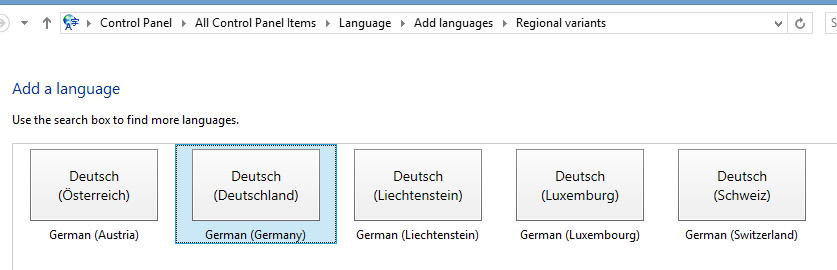
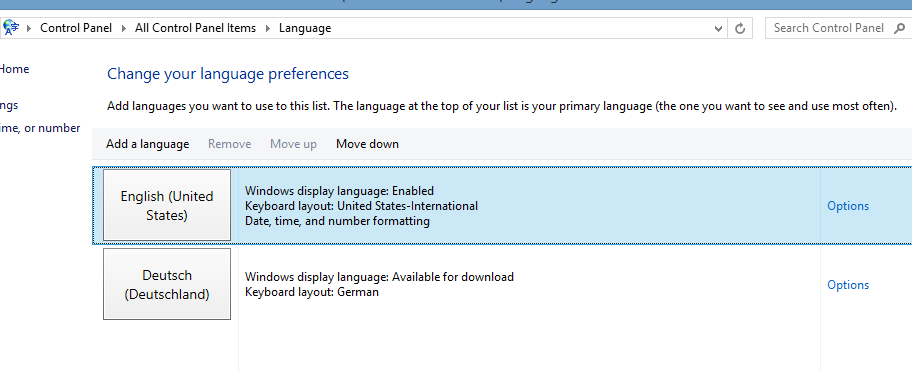

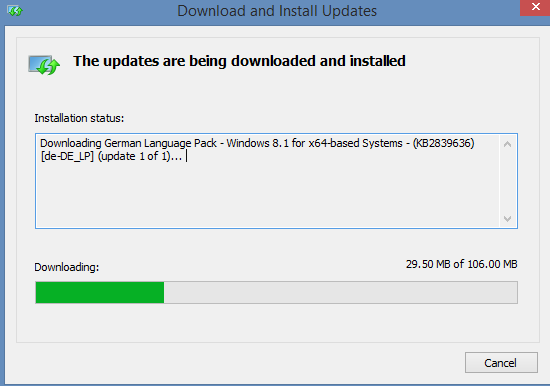


Just 1 easy option now is they input language: 
Skype video conference live machine translation –“way to go…”?
… as in “has a way to go”- there are many more such difficulties in natural language for machine translation.
These sample screenshots from a recent demo show a lot of them in a nutshell.
You can probably sense that something is wrong with this company representative’s smile, 
even if you do not speak German. If you do:

… as in “NOT!”  (Don’t forget, though, that there is an initial speech recognition layer in this demo which seems to have become almost transparent as a technology now? See Gartner’s hype cycle of 2014.)


Questions? Read the About. Or just ask me a quick Our Databases: Resources with calendars -- Language learning material Moodle Sites, multimedia files -- films


FAQs for LRC student staff or for students or for teachers. To search our FAQs, in the browser addressbar, add after "https://plagwitz.wordpress.com/feed/?tag=faqs+/" "+TAG1" (from tag cloud below) OR "https://plagwitz.wordpress.com/feed/tag=faqs
&category_name=" "CAT1" (from category hierarchy below). OR search both categories and tags, and multiple TAGs/CATs (connect with "," for OR-search, with "+" for AND-search), like so: https://plagwitz.wordpress.com/feed/?tag=TAG1+TAG2+...TAGn&category_name=CAT1
+CAT2+...CATn"
Other ways to find help
If you cannot find it here, look there: 5,500 Language-Learning Links and Programs for learning or teaching 150 languages
Shortcuts:Our Lists, Our Maps, LRC Staff Moodle Site,LRC Project Moodle Site, 49erexpress, UNCC Moodle, Student Recordings: s:claslcslrcsanakostudent
Learning usage samples: Sanako oral exam, Kaltura webcam presentation, Dictation with speech recognition, Sanako written exam, Chinese and Japanese interactive stroke-order practice
Test the Sanako Installer, Webbrowser Popup Konfigurator for XP, or Windows7, faster LRC TeacherPC Log-in Let MS facilitate diacritics writing by installing for you US-International keyboard layout
This is my personal blog (Google+). The views expressed on these pages are mine alone and not those of my employer. The information in this weblog is provided “AS IS” with no warranties, and confers no rights.
 Thomas' Work Space
How to get Square brackets (and hide comments) with ISO690 in Word 2013 bibliography styles
<!– trp: –>
[
–>
ISO 690YOURNAMEHERE