Archive
Mimicking the annual “All-Japan Phone-Answering Competition” in the digital audio lab?

One of my first endeavors in a digital audio lab was pairing distant students over the headphones to have them practice doing business over the phone in Spanish. Today’s New York Times article on the annual “All-Japan Phone-Answering Competition” made me wonder whether a digital audio lab could not mimic this also (especially since the digital audio lab is quite conducive to “drilling in” rules and – as the competition does, too – focusing on intonation and articulation).
“Formal phone answering is serious business in Japan, with many rules intended to head off offensive or awkward moments. A search on Amazon’s Japanese website found more than 60 books specifically on phone manners, and dozens more on business etiquette in general. Most appeared to be aimed at women, like “How to Talk Like a Workplace Beauty.”
A polite office worker picks up calls during the first or second rings; if, for unavoidable reasons, the caller is left waiting for three rings or more, an apology is in order. The conversation itself is carried out in a formal, honorific spoken form of language — peppered with exclamations like “I’m horrified to ask this request, but …” At the end of the call, the receptionist must listen for the caller to hang up before putting down the receiver. Hanging up first is a serious faux pas. (…)Each contestant runs through a three-minute conversation. Judges scrutinize the conversations for impeccable Japanese phone etiquette: good tone, volume, speed, pronunciation, articulation and use of words. A strong contestant takes appropriate pauses between phrases, and stays friendly, but not overly friendly. Throughout, proper exclamations to signal attention and empathy must be used.”
The latter scrutinization could possibly be conducted as a peer evaluation.
The Times article seems highly critical of the traditional, clerical role of women who still dominate these competitions. However, in the reader commentaries, there is an interesting backlash from people who have experienced, enjoyed and brought back Japanese culture to this country.
So the lesson plan sounds like it could quite easily transcend the above digital audio lab utilization into the intercultural realm and lead to interesting comparisons and discussions.
Testing and semi-automatically changing the Sanako student audio configuration
- Problem
- We have had teacher complaints about too much background noise from neighboring students being recorded in our Sanako Study 1200, with SLH-07 headsets.
- In addition, upon looking through some recordings as samples for a workshop, I found cases of clipping audio, especially in pair recordings.
- We are using the default settings for the Sanako SLH-07 headset. However, the default recording level (67) seems high.
- Solution approach
- We need to test
- many other settings quickly for these recording levels. We use my sanakoaudioconfigonthefly utility for this
- in an acoustically realistic environment: 5 Lab assistants site in tight lab area and read out sample English text during a Sanako reading activity
- Reading practice
- Todo: Pairing
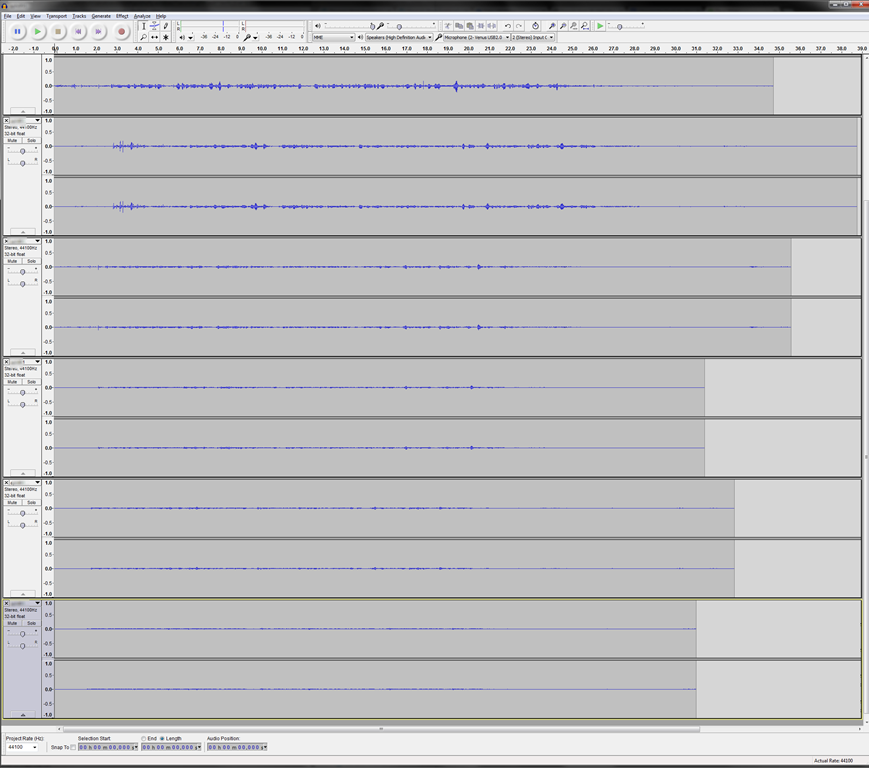
- Here is a “window” into the recorded results set, a student’s audio recording shown in Audacity at various (but all lowered) recording levels from (visible) 30 to 5, you can see the diminishing waveform amplitude.

- The waveform per se is not conclusive. You will have to listen in and compare, especially to evaluate background noise (the original complaint – we have no and will not be able to go back to language lab carrels). The Sanako SLH-07 headset microphones are supposed to be highly directional. However, our students to not always wear the headsets properly. And our acoustics is marred by large (almost 50%) window spaces and a tight positioning of the student seats.
- Any test recording is only as good as it can mimic the acoustics during an actual class session which we did as much as we could with only 6 concurrent LRC staff. This means unfortunately some more testing will have to spill into actual classes, but this test is a start.
- We need to test
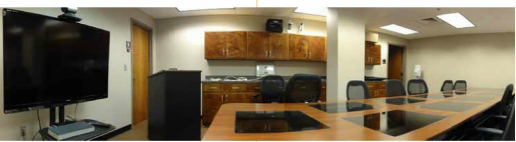
A few examples of recessed aka downview computer screens in face-to-face learning environments
Receded computer screens would save us having to rename the LRC learning environment from “face-to-face” to “face-hidden-behind-screen-from-face”,  and are especially good for communicative language class activities that are not computer-mediated, but only –aided. Receded screens also provide pretty good privacy, and are essential for written exam integrity.


Newer design claim ergonomic problems of older designs and are not as recessed, but make it easier to cheat in exams:


Static noise on sanako headsets
We seem to have one of these outages in ever class recently. Not sure, whether it is the hardware – the headphone seems not always have static, but frequently. What would be a good way to test this before class, or – to not have to log in individually on all lab computers – at beginning of class?
A few thoughts on headphones for the language lab
- Analog (3.5mm connector): the traditional way; still cheaper.
- Digital (USB connector): comes with its own soundcard – potentially better compatibility, especially with software form the same vendor (digital audio labs)
- Sanako SLH-07 has long connectors that stick out too much for our purposes. Students have broken them open inadvertently with their backrests of their chairs. But you can defuse this risk with a simple male-female USB extension cord (disadvantages: extra cost, extra layer of items to be managed and extra connection that can break…)
- Sometimes there is (intermittent or permanent) static on startup – must be some driver loading error. Restart the computer.
- Sans SHS-100 (for the Sony Virtuoso) have short connectors. I have only briefly tested a Sony headset, seemed fine.
- For any USB headset, I recommend having the built-in analog audio card that comes with the computer disabled (normally done in the BIOS). Again: more options means here more failure points and more confusion and distraction from language learning.
- Sanako SLH-07 has long connectors that stick out too much for our purposes. Students have broken them open inadvertently with their backrests of their chairs. But you can defuse this risk with a simple male-female USB extension cord (disadvantages: extra cost, extra layer of items to be managed and extra connection that can break…)
- For either analog or digital:
- Less is more. Volume control and mute are available through software. duplicate that, and you multiply potential for error, confusion and troubleshooting. Also, what is not there, cannot break.
- Light headsets may be fashionable, but, in a shared “lab”environment, what about
- sound insulation in a , now that the cubicles are long gone (outside of professional interpreter facilities)?
- ruggedness? I recommend buying headsets that have as few movable parts as possible, especially not the microphone boom: short circuits will ensue in no time (case in point: Sanako and Sony have zero moving parts)
- connect your headsets on the rear – out of the way and out of reach (and secured, cable-tied: to avert theft, but also “troubleshooting” by troublemakers).
How-to for the new Vixia HF M500 camera
Here it is, and available for checkout per instructions here. Also see the video size considerations.
Step-by-step for Basic Recording:


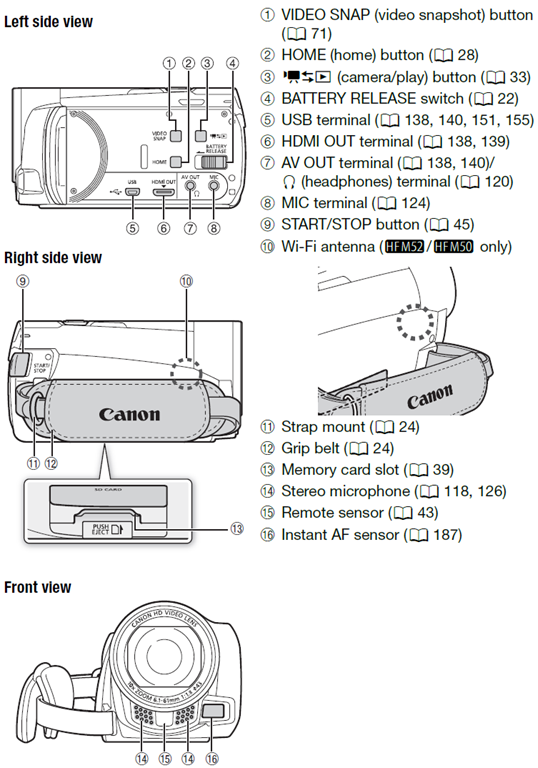
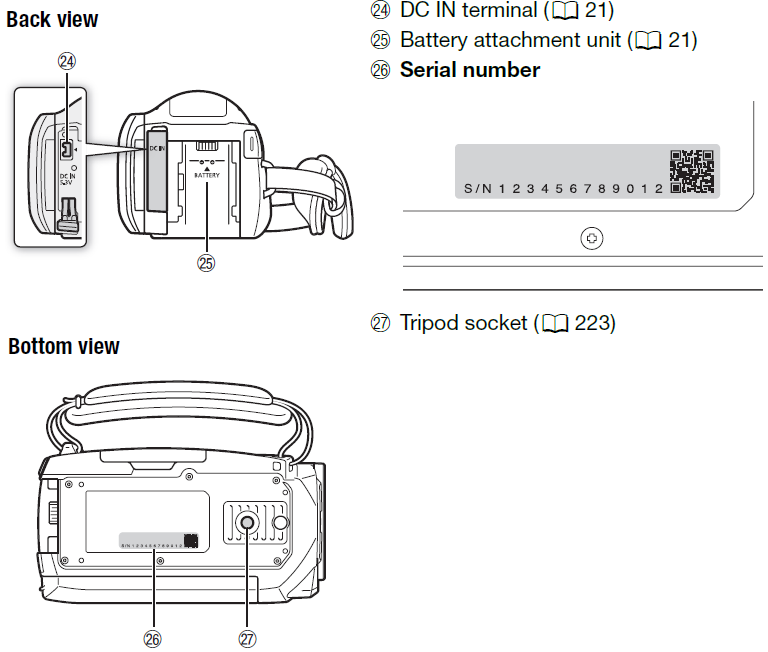
The Parts and Controls of the Camera:

Protected: A checklist for our regular equipment inventories




Questions? Read the About. Or just ask me a quick Our Databases: Resources with calendars -- Language learning material Moodle Sites, multimedia files -- films


FAQs for LRC student staff or for students or for teachers. To search our FAQs, in the browser addressbar, add after "https://plagwitz.wordpress.com/feed/?tag=faqs+/" "+TAG1" (from tag cloud below) OR "https://plagwitz.wordpress.com/feed/tag=faqs
&category_name=" "CAT1" (from category hierarchy below). OR search both categories and tags, and multiple TAGs/CATs (connect with "," for OR-search, with "+" for AND-search), like so: https://plagwitz.wordpress.com/feed/?tag=TAG1+TAG2+...TAGn&category_name=CAT1
+CAT2+...CATn"
Other ways to find help
If you cannot find it here, look there: 5,500 Language-Learning Links and Programs for learning or teaching 150 languages
Shortcuts:Our Lists, Our Maps, LRC Staff Moodle Site,LRC Project Moodle Site, 49erexpress, UNCC Moodle, Student Recordings: s:claslcslrcsanakostudent
Learning usage samples: Sanako oral exam, Kaltura webcam presentation, Dictation with speech recognition, Sanako written exam, Chinese and Japanese interactive stroke-order practice
Test the Sanako Installer, Webbrowser Popup Konfigurator for XP, or Windows7, faster LRC TeacherPC Log-in Let MS facilitate diacritics writing by installing for you US-International keyboard layout
This is my personal blog (Google+). The views expressed on these pages are mine alone and not those of my employer. The information in this weblog is provided “AS IS” with no warranties, and confers no rights.
 Thomas' Work Space