Archive
Archive for the ‘Genre-is-any’ Category
Sanako Study 1200 student in-class web browsing activity caveats, errors&glitches
2012/03/01
Leave a comment
- If we put the full URI of the website (e.g. http://www.dict.cc), we experience the student web browser not opening up (either hanging at "verifying access" dialogue or empty browser window and definitely no table of contents browser window). Workaround: put just e.g. http://www.dict.cc.
- CAVEAT: make sure you actually know which sub-pages will be loaded (and thus need to be allowable) during your web browsing activity
- the address-bar is misleading when a your pages are loaded within a frameset. like in this example:
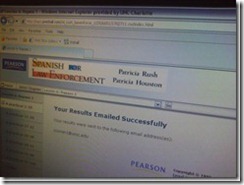 . In this example, allow all links in the left menu.
 - your list of allowable pages should cover the entire workflow, including feedback pages that the student may receive
- TBA: it is sufficient for a web page to be allowed/blocked if its URL string contains your listed URL as a substring
- the address-bar is misleading when a your pages are loaded within a frameset. like in this example:
- We have observed `the following issues:
- that the sanako web browser may hang, on startup or later, but a common workaround is closing a hanging sanako web browser which will reopen it on the table of contents page.
- that the “verifying access rights” window can disappear quickly, but may delay web browsing for a considerable time before your students are allowed to browse to a web page – please allow time for that (we are investigating whether the size of the class or the type of allow/deny list or individual allow/deny links cause this delay).
![sanako-webbrowsing-strict-policy_thumb[1]](https://thomasplagwitz.com/wp-content/uploads/2012/03/sanako-webbrowsing-strict-policy_thumb1_thumb.jpg?w=244&h=185 "sanako-webbrowsing-strict-policy_thumb[1]")
- that the sanako web browser on some computers (despite them have identical software images?) arbitrarily opening new windows which muddies the waters considerably – and also seems to require more time for the verifying –, but does not make the exercise fail:

![sanako-webbrowsing-strict-policy (1)_thumb[2]](https://thomasplagwitz.com/wp-content/uploads/2012/03/sanako-webbrowsing-strict-policy-1_thumb2_thumb1.jpg?w=600&h=451 "sanako-webbrowsing-strict-policy (1)_thumb[2]")

![sanako-webbrowsing-strict-policy_thumb[1]](https://thomasplagwitz.com/wp-content/uploads/2012/03/sanako-webbrowsing-strict-policy_thumb1.jpg "sanako-webbrowsing-strict-policy_thumb[1]")

![sanako-webbrowsing-strict-policy (1)_thumb[2]](https://thomasplagwitz.com/wp-content/uploads/2012/03/sanako-webbrowsing-strict-policy-1_thumb21.jpg "sanako-webbrowsing-strict-policy (1)_thumb[2]")
Protected: Mock exam for Spanish combines various learning technologies in the LRC
2012/03/01
Enter your password to view comments.
Categories: audience-is-teachers, classroom-management-system, e-languages, iMacs, learning-usage-samples, Listening, Listening-Stations, lms, LRCRoomCoed434, marketing, multimedia-recording, Photos, Practice&Demos, Reading, service-is-assessing, Spanish, Speaking, Vocabulary
kaltura, moodle, sanako-study-1200, web-browsing-activity
Face-to-face-teaching exam using Sanako Study 1200
2012/03/01
Leave a comment
- Sanako Exam is an add-on at additional cost and not currently available in our setup.
- Sanako Exam teacher-created content is stored locally, file management beyond that is up to the user. This makes such polls less portable, but potentially sharing within a department might be easier.
- Student Results can be identified by student, and saved.
 View here a screencast demo of how a Sanako Exam can be
- authored and
- deployed.
Replace clickers with students’ phones using PollEverywhere.com
2012/02/29
Leave a comment
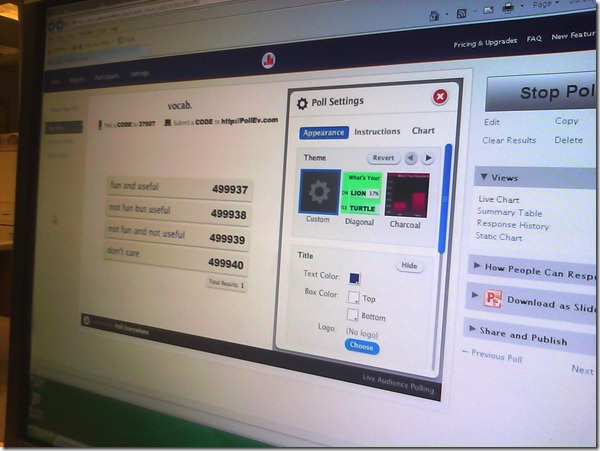
- PollEverywhere.com allows teachers to set up polls with answer options that students choose by sending a number code as text message.
- Pro’s
- Freemium.
- Low- to No- university infrastructure requirements. Best-used in a non-computerized classroom or during startup time of students’ computers.
- Content can be managed online.
- Con’s
- Freemium:
- “You get what you pay for”. “You may be the business”. What happens with your data
- Not free for students unless you consider a phone plan that comes with unlimited texts free. With increasing use of other messaging options over SMS, that may be not a given even if you deal mostly with an affluent student population.
- Low- to No- university infrastructure requirements:
- you are relying on students providing the infrastructure. Are they better keeping their phones in service (on them, charged, turned on) than we are keeping our computer labs up and running?
- you are relying on mobile network operators, including the choices of operator that your students made.
- Anonymous: Not useful for assessment purposes.
- The number codes are long (6 digits, while 1 could be sufficient).
- Freemium:
- Competitors
- The university has a clicker infrastructure which is partially outsourced to students (purchase and bring).
- The LRC has a Classroom Management system infrastructure which supports clicker-like activities.
- Sanako Study 1200 comes with Live Feedback and Voting.
- NetOp School comes with an examination/polling feature also.

How to get sound on listening station computers by increasing the volume-levels
2012/02/29
Leave a comment
- On the listening stations, if you have the headsets plugged into the connectors on the rear of the computer, and hear no sound, you may have the volume set to too low.
- Go to (1) control panel, (2) icon:sound, (3) tab:audio, (4)button:volume
- in the mixer dialogue, (6) menu:options, make sure that all the (6) volume slider controls are checked, i.e. shown, click “OK”.

- Move the volume sliders up for WAVE and SW SYNTH

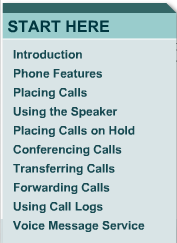
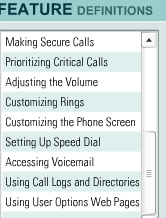
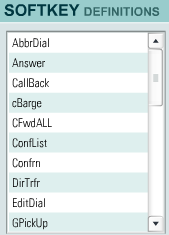
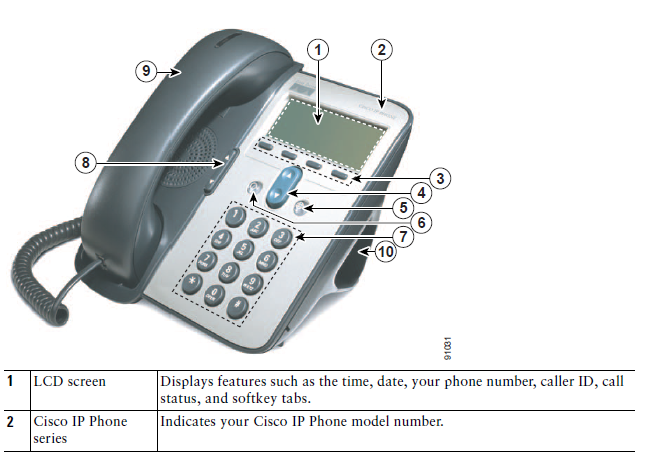
Cisco IP Phone 7912G Tutorial & Manual
2012/02/24
Leave a comment



Categories: documentation, Documents, e-infrastructure, Interactive-documents, phones
cisco-7912


Screencast showing how to “Add resource: link to a file” in Moodle, including file upload into file area
2012/02/23
Leave a comment
If you do not know how to make an MS-Word or audio or other file accessible to your course through Moodle, you can view a demo here.
Categories: audience-is-teachers, documentation, e-infrastructure, lms
link-to-a-file, moodle


Questions? Read the About. Or just ask me a quick Our Databases: Resources with calendars -- Language learning material Moodle Sites, multimedia files -- films


FAQs for LRC student staff or for students or for teachers. To search our FAQs, in the browser addressbar, add after "https://plagwitz.wordpress.com/feed/?tag=faqs+/" "+TAG1" (from tag cloud below) OR "https://plagwitz.wordpress.com/feed/tag=faqs
&category_name=" "CAT1" (from category hierarchy below). OR search both categories and tags, and multiple TAGs/CATs (connect with "," for OR-search, with "+" for AND-search), like so: https://plagwitz.wordpress.com/feed/?tag=TAG1+TAG2+...TAGn&category_name=CAT1
+CAT2+...CATn"
Other ways to find help
If you cannot find it here, look there: 5,500 Language-Learning Links and Programs for learning or teaching 150 languages
Shortcuts:Our Lists, Our Maps, LRC Staff Moodle Site,LRC Project Moodle Site, 49erexpress, UNCC Moodle, Student Recordings: s:claslcslrcsanakostudent
Learning usage samples: Sanako oral exam, Kaltura webcam presentation, Dictation with speech recognition, Sanako written exam, Chinese and Japanese interactive stroke-order practice
Test the Sanako Installer, Webbrowser Popup Konfigurator for XP, or Windows7, faster LRC TeacherPC Log-in Let MS facilitate diacritics writing by installing for you US-International keyboard layout
This is my personal blog (Google+). The views expressed on these pages are mine alone and not those of my employer. The information in this weblog is provided “AS IS” with no warranties, and confers no rights.

