Archive
Archive for May, 2012
How to easily merge MP3 files
2012/05/11
Leave a comment
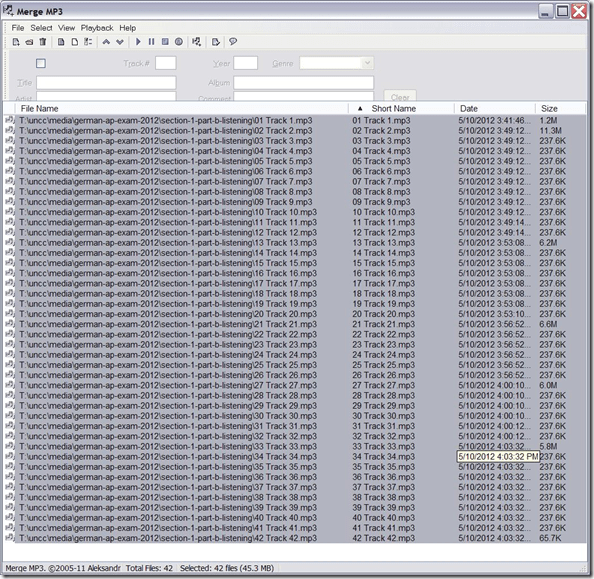
- There are many ways, including many that are easier than doing it manually in Audacity.
- MergeMP3 is a free and easy one that worked here:
Setting up European Union translation memories and document corpora for SDL-Trados
2012/05/10
Leave a comment
-
SDL-Trados installation allows the translation program to teach this industry-standard computer-aided translation application . So far, however, we had no actually translation memory loaded into this translation software.
-
The European Union is a powerhouse for translation and interpreting – at least for the wide range of their member languages many of which are world languages – , and makes some of their resources – which have been set up for translation and interpreting study use here before – available to the community free of charge as reported during a variety of LREC’s.
-
This spring, the Language Technology Group at the Joint Research Centre of the European Union this spring updated their translation memory offer DTG-TM can fill that void at least for the European Languages that have a translation component at UNC-Charlotte.
-
We download on demand (too big to store: http://langtech.jrc.ec.europa.eu/DGT-TM.html#Download)
-
Is the DGT-TM 2011 truly a superset of the 2007, or should both be merged? probably too much work?
-
-
and extract only the language pairs with English and the language only the languages “1”ed here : “G:\myfiles\doc\education\humanities\computer_linguistics\corpus\texts\multi\DGT-tm\DGT-tm_statistics.xlsx” (using “G:\myfiles\doc\education\humanities\computer_linguistics\corpus\texts\multi\DGT-tm\TMXtract.exe”)
-
and convert
-
English is the source language by default, but should be the target language in our programs,
-
The TMX format this translation memory is distributed provided in, should be “upgradeable ” to the SDL Trados Studio 2011/2011 SP1 format in the Upgrade Translation Memories wizard”.,
-
TBA:where is this component?
-
-
-
configure the Trados to load the translation memory
-
how much computing resources does this use up?
-
how do you load a tm?
-
can you load in demand instead of preload all?
-
- Here are the statistics for the translation memories for “our” languages
-
uncc Language Language code Number of units in DGT – release 2007 Number of units in DGT – release 2011 1 English EN 2187504 2286514 1 German DE 532668 1922568 1 Greek EL 371039 1901490 1 Spanish ES 509054 1907649 1 French FR 1106442 1853773 1 Italian IT 542873 1926532 1 Polish PL 1052136 1879469 1 Portuguese PT 945203 1922585 Total 8 8 7246919 15600580
-
-
Would it be of interest to have the document-focused jrc-acquis distribution of the materials underlying the translation materials available on student/teachers TRADOS computers so that sample texts can be loaded for which reliable translation suggestions will be available – this is not certain for texts from all domains – and the use of a translation memory can be trained in under realistic conditions?
-
“The DGT Translation Memory is a collection of translation units, from which the full text cannot be reproduced. The JRC-Acquis is mostly a collection of full texts with additional information on which sentences are aligned with each other.”
-
It remains to be seen how easily one can transfer documents from this distribution into Trados to work with the translation memory
-
Here is where to download:
-
uncc
lang
inc
1
de
1
en
1
es
1
fr
1
it
1
pl
1
pt
-
The JRC-Acquis comes with these statistics:
-
-
uncc
Language ISO code
Number of texts
Total No words
Total No characters
Average No words
1
de
23541
32059892
232748675
1361.87
1
en
23545
34588383
210692059
1469.03
1
es
23573
38926161
238016756
1651.3
1
fr
23627
39100499
234758290
1654.91
1
it
23472
35764670
230677013
1523.72
1
pl
23478
29713003
214464026
1265.57
1
pt
23505
37221668
227499418
1583.56
Total
7
164741
247374276
1588856237
10509.96
-
- What other multi corpora are there (for other domains and other non-European languages)?
How to automatically uninstall Visual Studio.net 2008/2010 and components
2012/05/09
Leave a comment
- Although not well-publicized, Microsoft has uninstall tools available for VS.net 2008 and 2010 (English).
- This one did the job of stringing together the individual uninstallers nicely here:

- which beats doing it semi-manually as was explained here.

Categories: e-infrastructure
2008, 2010, ms-visual-studio
Does Respondus-lockdown–browser block when a user attempts to load a Moodle quiz on 2 different computers?
2012/05/08
Leave a comment
- We experienced slowness of Moodle during an exam where about 12 students
- load a Moodle quiz into the Respondus lockdown browser (lockdown browser hangs with message "page loading"),
- but also already when logging into Moodle with a regular browser (hangs on login page).
- Turns out large classes used the Moodle quiz function elsewhere on campus which put lots of load on the Moodle servers.
- What can we do on our end to work around this as smoothly as possible?
- First, be patient while Respondus-lockdown–browser displays “Page loading”
- “Refresh” or “Back/forward” are the next resort once “Page loading” attempt has stopped and the page
- states it cannot be loaded
- displays an error about missing CSS component (likely due to incomplete load before timeout)
- says it “can be loaded only in Respondus-lockdown–browser” while you are in Respondus-lockdown–browser (Huh?).
- Keep calm and carry on, i.e. on your current computer.
- In general, trying on additional “fallback” computers is likely to make matters only worse, since even more load is put on the Moodle server system.
- Specifically, however, does Respondus-lockdown–browser block when a user attempts to load a Moodle quiz in Respondus-lockdown–browser on 2 different computers simultaneously? One student kept getting “can be loaded only in Respondus-lockdown–browser” consistently, until closing Respondus-lockdown–browser on this computer. Then the quiz would finally load in Respondus-lockdown–browser where she was logged in on another computer (can this being tracked by the Respondus-lockdown–browser security layer that checks whether a page is loaded within Respondus-lockdown–browser? Why then no more helpful error message, or is this “Security by obscurity”? Data seems inconclusive).
- Additional tips for takers (and authors) of Moodle exams are available.
Bootsect (the command formerly known as fixmbr), may enable your Windows 7 installation to start up from a CorruptVolume
2012/05/07
Leave a comment
- I am trying to back up my system partition to external media. The 3rd party utility I boot into refuses to get to work since it sees inconsistencies on the partition.
- I schedule a chkdsk /f /r from Windows 7 which on restart runs without errors.
- Upon completion, however, Windows 7 fails to boot.
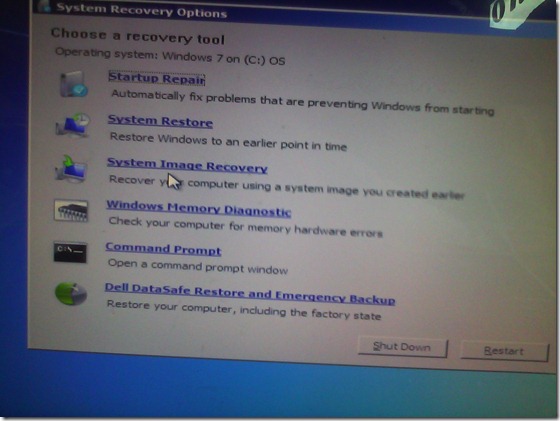 I go in the Startup Repair, but System Repair tells me it cannot fix my problem, but offers System Restore, which I try twice, to no avail.
 Cryptic Error IDs 21200664, googling of which leads to nothing but MS System Engineers advising reimaging the system partition to the factory copy which would lose my 16 months worth of system customizations.
- I feel I have other things to do to research the innards of Windows 7. Faintly I remember that fixmbr used to get me out of fixes with non-starting XP installations. It has been replaced by bootsect /nt60 <driveletter>, and on top of that, it responds with an apparent failure “since the volume could not be locked during the update” (actually deemed likely harmless, or use /force).
- Windows 7 starts up. (WTH?! Check disk versus the master boot record?!)
- Now, am I supposed to use a 3rd party or a Microsoft tool for my system partition backup?


Categories: e-infrastructure, Glitches&Errors
bootsect, bsod, corruptvolume, fixmbr, startup-repair, system-repair, windows-7
How you can view the computer screens of your class using Sanako Study 1200
2012/05/04
Leave a comment
- Here is a 2.5 minute screencast showing off the different ways how you can view your students’ screens using the Sanako Study 1200,
 .
. - from smallest to biggest, all accessible form the button:”screensharing”
- first thumbnails
- then thumbnails in extra window
- finally autoscan
- There will always be tradeoff on the teacher computer between size of individual student screen and overview over class.
- for as long as the teacher screen resolution is nowhere near the combined sizes of the student screen resolution;
- having the same screen resolution is also desirable, for projecting the teacher screen to the students; multi-monitor teacher stations are a nice compromise.
- However, as you can see in the screencast, there a number of nice options that make switching between large size and overview (drilling in and moving back out) easy.
- The newer versions of the Sanako (here 5.2) allow you to choose many different student screen sizes.
- The newest version of the Sanako (5.4) also allows to fit many students screens on a teacher screen by implementing by letting the teacher scroll through the classroom layout).
Loading the right classroom file for an exam that uses Sanako
2012/05/04
Leave a comment
 Currently the preferred layout is Exam 2: Choose this when the Sanako starts
Sanako Study 1200 Version 5 now allows for larger student screen thumbnails, but still limits the classroom layout size
2012/05/04
Leave a comment
- The capability of increasing the size of the student thumbnails, to be able to easily read the MS-Word writing student exercises template that I had programmed for Sanako Lab 300 was sorely missed in version 1 and 2 of the Sanako Study 1200 software.
-
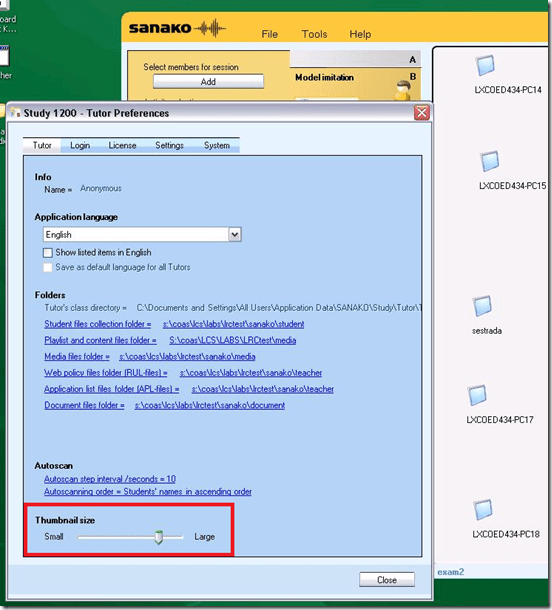
In version 5, the capability to adjust the size has been added. In Tutor.exe, Go to Menu: tools / preferences / thumbnail-size.
- Now, however, the 20 licensed student seats we have, already fill up the entire Teacher software’s screen estate since the software window cannot be spanned across our multi-monitor setup (The Sanako software seems to have this single-screen limitation built-in. Our unusual asymmetric (1280 and 1024) dual-monitor system may have something to do with it).
- Fortunately, in the newest version 5.42 for of Sanako Study, scrollbars appear and allow for panning the classroom layout window if there are more student icons/thumbnails than will fit on the screen.
- Upgrading to a screen with a larger screen resolution on the teacher computer would be even better.
- We hope to teach up to 30 students (class sizes seem to be constantly increasing, but the LRC also caters to visits of merged class sections which may be even larger than 30 students) in this large classroom setup:




Questions? Read the About. Or just ask me a quick Our Databases: Resources with calendars -- Language learning material Moodle Sites, multimedia files -- films


FAQs for LRC student staff or for students or for teachers. To search our FAQs, in the browser addressbar, add after "https://plagwitz.wordpress.com/feed/?tag=faqs+/" "+TAG1" (from tag cloud below) OR "https://plagwitz.wordpress.com/feed/tag=faqs
&category_name=" "CAT1" (from category hierarchy below). OR search both categories and tags, and multiple TAGs/CATs (connect with "," for OR-search, with "+" for AND-search), like so: https://plagwitz.wordpress.com/feed/?tag=TAG1+TAG2+...TAGn&category_name=CAT1
+CAT2+...CATn"
Other ways to find help
If you cannot find it here, look there: 5,500 Language-Learning Links and Programs for learning or teaching 150 languages
Shortcuts:Our Lists, Our Maps, LRC Staff Moodle Site,LRC Project Moodle Site, 49erexpress, UNCC Moodle, Student Recordings: s:claslcslrcsanakostudent
Learning usage samples: Sanako oral exam, Kaltura webcam presentation, Dictation with speech recognition, Sanako written exam, Chinese and Japanese interactive stroke-order practice
Test the Sanako Installer, Webbrowser Popup Konfigurator for XP, or Windows7, faster LRC TeacherPC Log-in Let MS facilitate diacritics writing by installing for you US-International keyboard layout
This is my personal blog (Google+). The views expressed on these pages are mine alone and not those of my employer. The information in this weblog is provided “AS IS” with no warranties, and confers no rights.
 Thomas' Work Space