Archive
Posts Tagged ‘sanako-study-1200’
How to fix exception: Sanako Graph Data not installed
2013/07/05
Leave a comment
- Problem: When trying to administer an oral exam, using model imitation, source: file, I could not, but rather I got this error
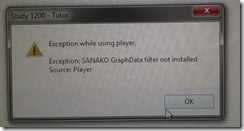
- Root: The same feature had worked in the morning – however, then the Sanakorecorder interfered with the Sanako tutor. Turned out that the Sanako tutor had been installed over a Sanako Student recorder which caused the tutor pc to connect to itself (distracting, also potentially a liability since it eats up licenses if not managed). In between morning and afternoon exam, the student recorder was uninstalled, but without the required functionality testing afterwards. So this exam had to become the test.
- Workaround: Reinstall the student recorder. We used the “test the Sanako installer” program on my home page to not delay the exam too much.

- Solution: do not install the Sanako tutor over a student installation in the first place.
- Either remove the Student recorder after imaging the teacher station with the student image,
- or better, image the PC without the added baseline task “Student recorder”.


Request to download the Sanako Study 1200 licensing server, student and classroom name reset, program and source
2013/06/11
Leave a comment
Your message has been sent

Back to description for reset of server reset program.
Request to download the Sanako Study 1200 Recorder Installer source
2013/06/11
Leave a comment
(Please be advised that there is no compiled code download for this software program since any implementation is institution-specific. The source code (written in AutoIT) download is for demonstration purposes only and not ready to run without you making the necessary adaptations to your environment).
Your message has been sent
Back to description of sanako recorder install faculty program
Status of the language lab and purpose of the LangLabEmailer
2013/06/07
3 comments
- Status of the language lab: Modern language labs – digital audio labs with integrated computer classroom management systems, like the Sanako Lab 300 and Study 1200 –
- are great tools for driving the use and benefit of computer technology into the face-to-face language teaching classroom,
- but for years have been sorely lacking integration with the rest of the digital campus workflow, mostly through the web-based LMS
- Sanako once had a Blackboard integration that allowed to bring media files stored in Blackboard to the file, but not upload student assessments into the gradebook.
- I once ran a Sanako Lab 100 that acknowledged that need by providing USB thumb drives for students, and a mechanism to load class recorded files to them at the end of class.
- Online components being developed by language lab vendors seem to be lacking the face-to-face teaching component.
- Synchronous distance education software (like Adobe Connect, Blackboard Wimba, or Saba Centra) – if not just used like a giant loud speaker in supporting lecture presentations, interspersed with calling up individual students for responses – seems currently best positioned to bring some of the benefits of computer technology to the synchronous teaching arena, but in a different (not applicable to what is still the non-distance norm in language instruction), actually more challenging non-face-to-face setting, and – first and foremost – without special consideration (and tools, like a remote controllable dual track recorder) for language learning.
- Purpose of this software:
- The LangLabEmailer combines knowledge of
- how teaching and learning is done in modern language departments
- including common issues in the lab (late students)
- needs outside the lab
- grading from home
- documenting longitudinal language development for eportfolio initiatives
- how (some: you can help us!) digital audio labs save assessments,
- how AD tracks ownership,
- how MS-Exchange can be automated.
- how teaching and learning is done in modern language departments
- in order to
- let the language lab classroom activities (summative assessments, but also formative in the widest sense made so easy by digital audio labs) break out of their isolation in the lab and enter the learning workflow,
- by automatic immediate (we have set to 16 times daily) distribution of assessment files (recordings and writing)
- to teachers
- and – without or with added teacher feedback, including aural – to students via campus email ;
- in 30000 digital audio lab equipped classrooms in the world
- minus the ones that do not have MS-Exchange infrastructure
- plus the ones from other vendors than Sanako – for the above number of classrooms is from SANAKO –, if you share your lab’s configuration back.
- The LangLabEmailer combines knowledge of
- Next: Features. Or Langlabemailer (table of contents).
How to get access to the LRC Sanako (teacher materials, student recordings) from your office or home PC
2013/05/15
1 comment
- Run the Sanako Installer (first meant for faculty offices only, but now faculty also want to have access from home, so I added that functionality).
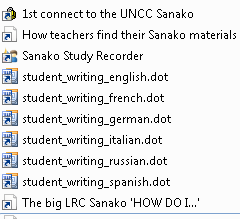
- On your office and or home PC, you get a folder “SANAKO” on your desktop. This folder will contain all you need to access student assessments from past classes or upload learning materials for future classes:
- In the office:
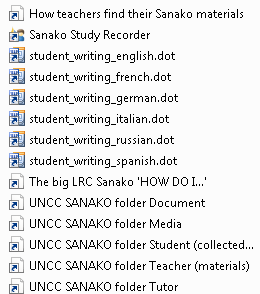
 : It is sufficient to click the additional “UNCC…” links at the bottom of the list .
 - At home:
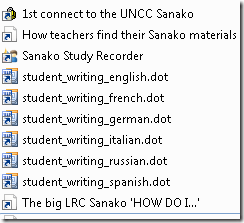
- Click “1st connect…” and log into the campus.
- Click “How teachers find…”, log in with the blog password, open the PDF, click the links in the PDF to the Sanako off-campus folders, log in again with the network credentials as shown in the PDF (sigh…).
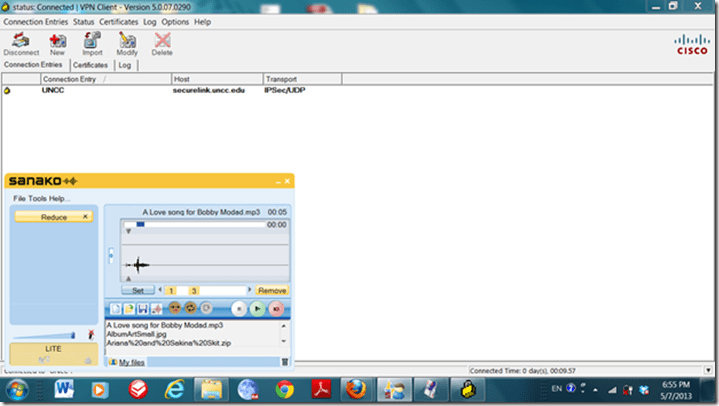
- EXAMPLE: Here you can see on a faculty home PC:
- the sanako recorder and campus connector:
- the SANAKO desktop folder shortcuts:

- You get the Word templates only if you can use them (have WORD installed – remember you can install MS-Office with your free faculty license from here).
- (No, you won’t get the “UNCC…”shortcuts at home, we simplified since.)
- the sanako recorder and campus connector:
- Both office and home:
- Drag any audio files into the Sanako study recorder window (further reading on why the Sanako study recorder is useful for teachers).
- Need to record? configure your microphone in Sanako study recorder, menu Tools.
- In the office:


Categories: audience-is-teachers, documentation, e-infrastructure, e-languages, faculty-offices, Institution-is-University-of-North-Carolina-Charlotte, service-is-configuring-learning-tools, service-is-it-managing, service-is-programming
autoit, iallt2013, MS-Word, sanako-study-1200, sanakorecorderinstall.exe, student.exe, vpn
Sanako Spring 2013 Newsletter is out: Nottingham University now boasts 11 Sanako Study 1200 language labs…
2013/05/02
Leave a comment
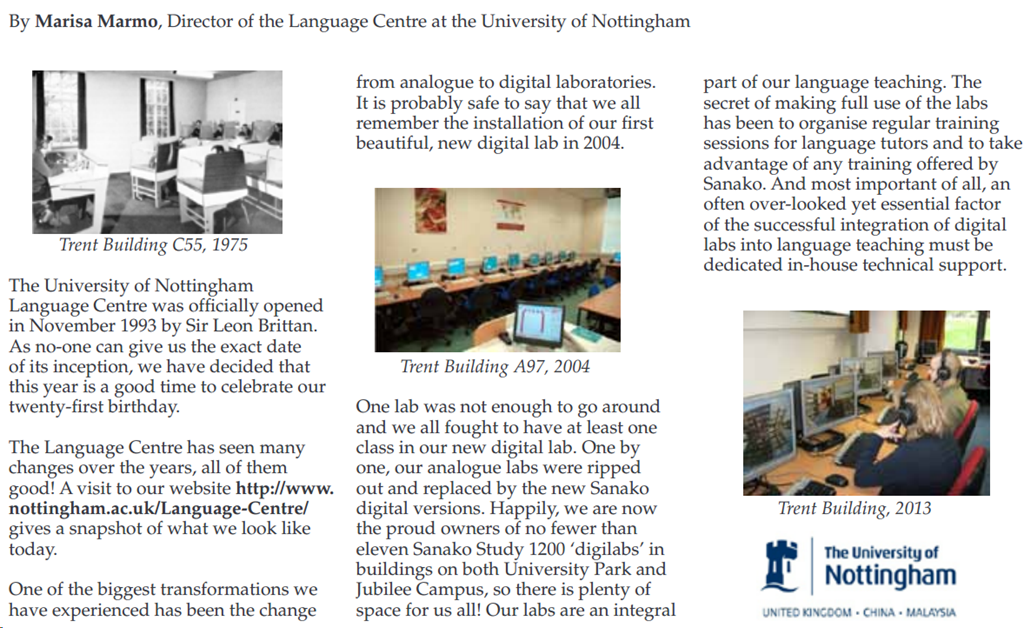
…for about the same size undergraduate student body (wow!), emphasizes need for training (I trained in their lab when it was still a Sanako Lab 300). Read the whole Sanako Spring 2013 newsletter here.
Protected: LRC Language Teaching with Technology Faculty Showcase Spring 2013
2013/05/01
Enter your password to view comments.


Questions? Read the About. Or just ask me a quick
Your message has been sent
FAQs for LRC student staff or for students or for teachers. To search our FAQs, in the browser addressbar, add after "https://plagwitz.wordpress.com/feed/?tag=faqs+/" "+TAG1" (from tag cloud below) OR "https://plagwitz.wordpress.com/feed/tag=faqs
&category_name=" "CAT1" (from category hierarchy below). OR search both categories and tags, and multiple TAGs/CATs (connect with "," for OR-search, with "+" for AND-search), like so: https://plagwitz.wordpress.com/feed/?tag=TAG1+TAG2+...TAGn&category_name=CAT1
+CAT2+...CATn"
Other ways to find help
If you cannot find it here, look there: 5,500 Language-Learning Links and Programs for learning or teaching 150 languages
Shortcuts:Our Lists, Our Maps, LRC Staff Moodle Site,LRC Project Moodle Site, 49erexpress, UNCC Moodle, Student Recordings: s:claslcslrcsanakostudent
Learning usage samples: Sanako oral exam, Kaltura webcam presentation, Dictation with speech recognition, Sanako written exam, Chinese and Japanese interactive stroke-order practice
Test the Sanako Installer, Webbrowser Popup Konfigurator for XP, or Windows7, faster LRC TeacherPC Log-in Let MS facilitate diacritics writing by installing for you US-International keyboard layout
This is my personal blog (Google+). The views expressed on these pages are mine alone and not those of my employer. The information in this weblog is provided “AS IS” with no warranties, and confers no rights.
 Thomas' Work Space