Archive
Posts Tagged ‘resources’
The Scheduling Assistant is simply multiple calendars displayed as parallel timelines for easier comparison
2013/09/09
Leave a comment
- We are all conversant in reading a daily – like here for the classroom-, weekly or monthly calendar sheet:
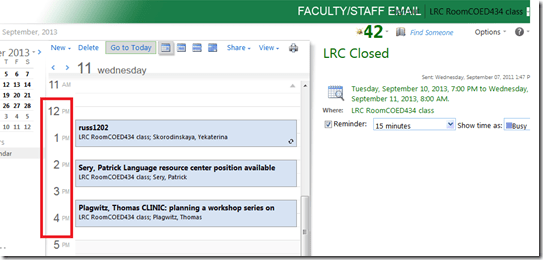
- If you send a Meeting request to the classroom to book it, the Scheduling Assistant displays exactly the same free/busy information for the classroom.
- Same pattern of events as above:
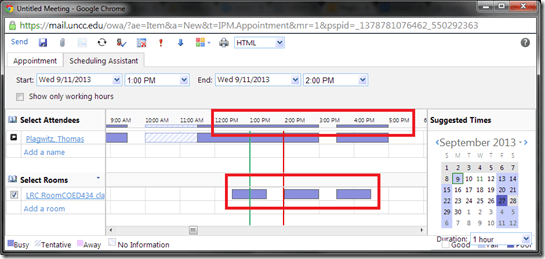
- Except that it is folded from a calendar into a timeline format (and in OWA does not display text explanatory beyond with what/whom the room is busy).
- This timeline format may be less familiar, but is much more practical to compare the availability for the multiple participants of a meeting.
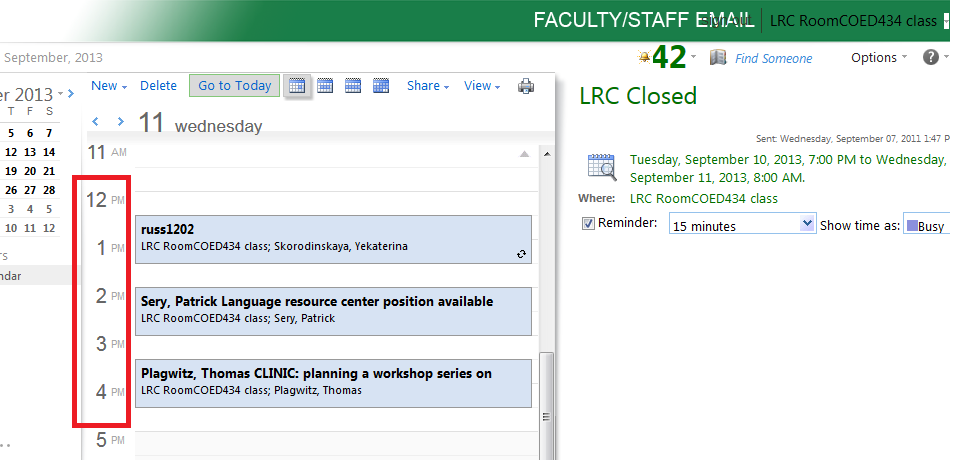
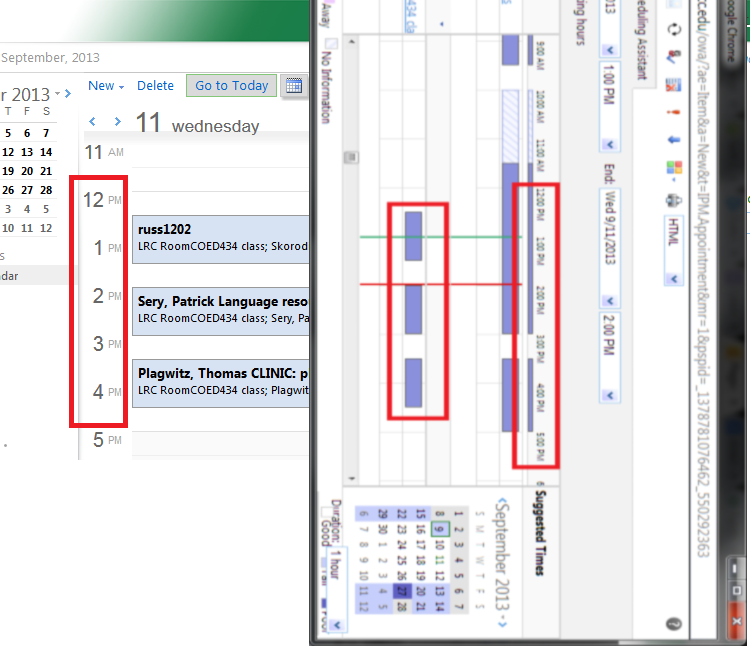
- Same pattern of events as above:
- Compare here: Same pattern for the room booking on both views.

“I can haz all my online appointment and schedule information in one merged calendar in NINERMAIL?”
2013/09/06
Leave a comment
- Yes, you can! Overlay calendars, a much needed feature from Outlook Desktop (as we mentioned earlier) has finally made it into the web version of Outlook (in Office365 the migration of which from live@edu will be finished by the end off the month), as was announced today: “Users can have multiple calendars in a merged view.”
- Example: In Outlook Desktop (not available to students), you can not only add a calendar like, icsexport.ics to the right, but, if you click on the (1) little black arrow, add/merge icsexport.ics to the (2) already overlaid calendars on the left, which is much more usable if you need to aggregate content from different sources:

- And now also in OFFICE365 NINERMAIL:

- This should make the sharing of calendar information much easier, not only for the about 100 LRC resource calendars, but also for other useful calendars that are published on campus:
- the new LCS calendar
- the registrar’s academic calendar
- the campus-wide faculty calendar
- last not least: your Moodle calendar (view all your moodle assignment deadlines in one place, the same place you check your email)
- And more… ? Do you know of other calendars, and/or a way to discover them?
- The details
- yet need to be panned out. We assume the feature will “just work” like above in Outlook Desktop when you
- We’ll provide more information and examples once we see this feature… TBA

Categories: audience-is-language-learning-center-staff, audience-is-language-learning-center-temp-staff, audience-is-students, audience-is-teachers, e-infrastructure, Institution-is-University-of-North-Carolina-Charlotte, office-software
calendaring, live@edu, ms-exchange, office365, outlook, outlook-live, resources, scheduling, sharing, subscribing
How to find resources that best fit your schedule using the OWA scheduling assistant parallel timelines
2013/09/02
Leave a comment
- Load all equivalent resources for each resource type that you require.
- Using the parallel free/busy timelines in the “Scheduling Assistant”, look for and “plug the holes” (in white):

- In the above example,
- for the given time frame (between rad/green line), no item is completely available;
- however, if you adjust your time frame slightly to earlier in the morning, you would be able to book either camera13 and 17 (assuming you need only one) and micboom 2
- In the above example,
- Remove the resources from the “Attendee list that are non-white = busy for the start/end time that you require the resources for.
- Click upper left menu: “Send” to book.

Fall2013 LRC room booking and equipment circulation improvements
2013/08/22
Leave a comment
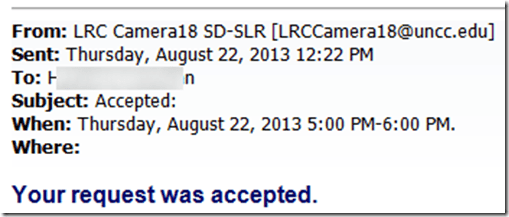
- We had a lot of problems over the last 2 years with students, unlike faculty and staff, not getting automated accepted/declined responses to their resource booking requests. This seems now finally a thing of the past:
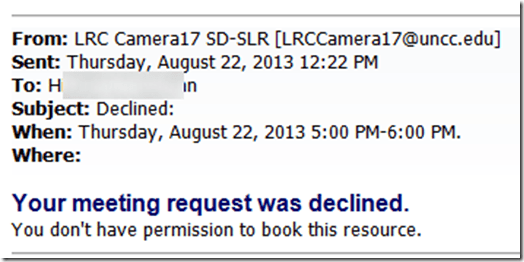
- In addition to automated responses in cases of policy violations or booking conflicts, we meant to automatically enforce policies that restrict booking of certain resources to certain groups. While groups still need to be maintained manually, this is now possible (and being implemented first for film studies and film club students that have exclusive rights to our film equipment). And here is what it will look like: “You don’t have permission to book this resource”. Don’t hand out equipment to clients who got this response.
- Now onto the next problem: about seeing those responses from within in meeting request in OWA? (works in Outlook Desktop, but that does not help us at the reception desk).


How to easily view resource mailboxes calendar free/busy using Outlook calendar groups
2013/05/29
Leave a comment
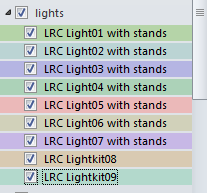
- Display all items in a category with a single click on the checkbox I front of the calendar group
-
Display any portion of the time line in " scheduling view" by
-
Selecting the days in the square calendar sheet in the upper left
-
Navigate the time line with the bottom horizontal scrollbar
-
Note the additional helpful "from [start date]" indicator in a mailboxes booking that is not displayed completely
-


How to quickly add resource mailbox calendars as an Outlook calendar group
2013/05/29
Leave a comment
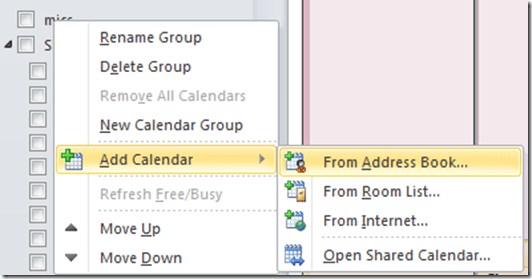
- Right-click the left calendar tree.
-
Choose context menu item: add calendar group / from address list:
-
-
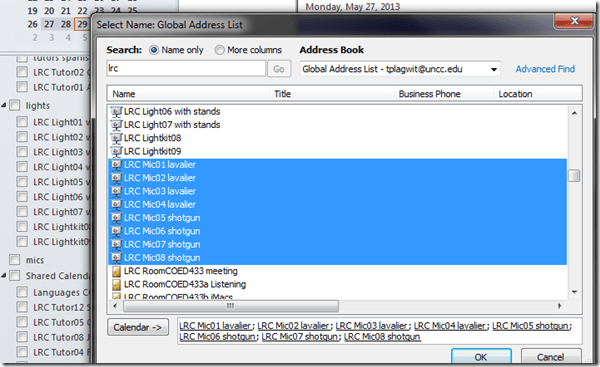
Type " LRC" to search – or the consistent naming scheme you implemented (I hope!).
-
Select all relevant calendars to add.
-
Click on button: "calendar".
-
Click on button: "ok":
-
-
Done:
-




Questions? Read the About. Or just ask me a quick Our Databases: Resources with calendars -- Language learning material Moodle Sites, multimedia files -- films


FAQs for LRC student staff or for students or for teachers. To search our FAQs, in the browser addressbar, add after "https://plagwitz.wordpress.com/feed/?tag=faqs+/" "+TAG1" (from tag cloud below) OR "https://plagwitz.wordpress.com/feed/tag=faqs
&category_name=" "CAT1" (from category hierarchy below). OR search both categories and tags, and multiple TAGs/CATs (connect with "," for OR-search, with "+" for AND-search), like so: https://plagwitz.wordpress.com/feed/?tag=TAG1+TAG2+...TAGn&category_name=CAT1
+CAT2+...CATn"
Other ways to find help
If you cannot find it here, look there: 5,500 Language-Learning Links and Programs for learning or teaching 150 languages
Shortcuts:Our Lists, Our Maps, LRC Staff Moodle Site,LRC Project Moodle Site, 49erexpress, UNCC Moodle, Student Recordings: s:claslcslrcsanakostudent
Learning usage samples: Sanako oral exam, Kaltura webcam presentation, Dictation with speech recognition, Sanako written exam, Chinese and Japanese interactive stroke-order practice
Test the Sanako Installer, Webbrowser Popup Konfigurator for XP, or Windows7, faster LRC TeacherPC Log-in Let MS facilitate diacritics writing by installing for you US-International keyboard layout
This is my personal blog (Google+). The views expressed on these pages are mine alone and not those of my employer. The information in this weblog is provided “AS IS” with no warranties, and confers no rights.
 Thomas' Work Space