Archive
What are best practices for recycling Moodle course teaching content? A running log
- Guiding Questions:
- I am in the process of creating Moodle assignments with instructors. I am inclined to tell them that this is best done now, before the term starts. I have met several instructors who seem to redo all their Moodle assignments and other content, for each term and each section, and who change Moodle courses on the fly, in the middle of the term, adding identical assignments to multiple sections. When I taught with the LMS (in Blackboard environments), the entire course (content) was “rolled over” between terms (and copied into sections), after subtracting student data. What are best practices in Moodle for reusing/recycling such course content, across terms, sections, and instructors?
- Is it possible to get entire course+instructor combinations recycled centrally and automatically, whenever an instructor teaches a course again, from the archive of the last version of the course, sans student data?
- Or does each instructor, any time she reteaches a course, have to manually reimport all materials she wants to reuse from her old courses? So far, I have followed this page: http://teaching.uncc.edu/Moodle/how-to/importing-Moodle-course (here is an example of using the import feature when adding assignments into multiple sections in the middle of the term: https://plagwitz.wordpress.com/tag/importing+moodle/). Can this be done before term start at least into one section, from which the other section is created by copying? What would be the cut-off date for that?
- Would instructors use the last live version of the course to go forward, like I did with Blackboard, or are instructors advised to develop all content in separate development courses, and selectively import content from there into live courses? Does each instructor have a development course by default? Is it possible/advisable for an instructor to have one development course per actual course she teaches (repeatedly)? Does access of instructors to past courses expire when they get archived, and when would that be?
- Finally, how could assignments be exchanged between instructors who teach the same courses?
- Courses seem to be complex packages. Repackaging individual assignments from one generic development course into course packs while importing seems administrative overhead, unless there is a in-built support for packaging that allows to add course tags to content. On the other hand, courses need to be easily updateable: student data needs to be added and removed easily. Teacher content needs to be refined, possibly updated with some current materials each term.
- Exploration:
- files planning:
- When publishing files, I have been trying to restrict all information that needs regular updating (dates, fine tuning of assignments and grading) to the syllabus files which I upload every term. So that I can “roll over” the rest of the course, including its files.
- observe the (max 64mb) file size limit in your Moodle courses
- You cannot use this procedure to share Kaltura videos, not even the ones a teacher made
- importing
- importing steps see here.
- To be seamless, source and target course need to have the same format (settings / topical, weekly or other). Otherwise, your exports from a weekly formatted course into a topically formatted course will get put into the topic number corresponding to the week # (which, if you have set to fewer topics than you had weeks, may effectively hide them. Not to worry, you can still retrieve them by adding topics to your course, then moving the assignments where you want them).
- backing up/restoring
- backing up see here
- restoring see here
- more on backup/restore from the Moodle docs FAQ
- primary instructor can use assign roles to add other teachers to give them access to importing; better create an intermediate, not student-accessible Moodle course for sharing instead
A team calendar for work groups on Windows Live
I have been asked whether we can have a workgroup calendar to coordinate who is on campus when.
We can use the hale-interpreting (http://hale-translation.groups.live.com) and hale-translation groups in Windows Live for this (http://hale-interpreting.groups.live.com).
Remember: Members only! You need to be a member of these groups to have access to their calendars. If you have not accepted my invitation email from a long time ago, you are not a member – and there is no point in digging that email out now, since it will have expired. However, you can go to either of the group’s home pages linked above and ask for being added. Then wait for the confirmation email response.
If you go to your calendar home page (http://calendar.live.com), all events from all “calendars” that you have access to (in the time span which you chose as your default – I use week view) display be default in one and the same “calendar”.
A bit of terminology: Lemma “calendar”, meaning: (1) a web page which looks like a paper calendar. (2) a series of related events (E.g. the MGB-36 events belong in one such “calendar” (2) as they all take place in this room).
Windows Live puts/displays all “calendars” (2) you have access to in one “calendar” (1), and differentiates the “calendars” (2) by giving each “calendar” (2) a distinct colour within “calendar” (1). The colours displayed in the picture below may be different for you – you can choose you own colour scheme from the calendar options –, but you, too, will have different colours per calendar.
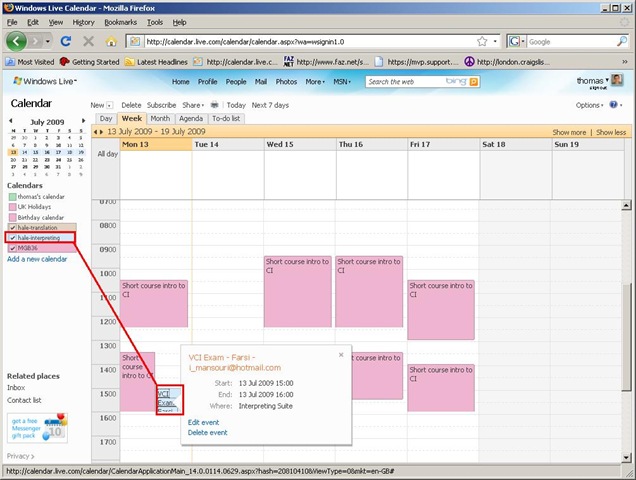
You will note that the Monday “Exam” above should be in the (red) MGB-36 calendar, not in the (light blue) interpreting group calendar. That is something you will have to pay attention to when you add an event, now that you have more than one ”calendar” (2) at your disposal (actually, you always had, and the most common initial error was users putting events in their personal ”calendar” (2) (coloured green above), with the result that nobody else but them could see those events).
You can set which “calendar” (2) to add an event to in the dropdown box labelled “Calendar” (framed red below, meaning “Which one?”). Also note the “All day [event]” option which should prove especially useful for a work group leave calendar (If you find a multi-day span option, let me know).
And here is the result, viewable for all users that have access to the hale-interpreting group calendar:
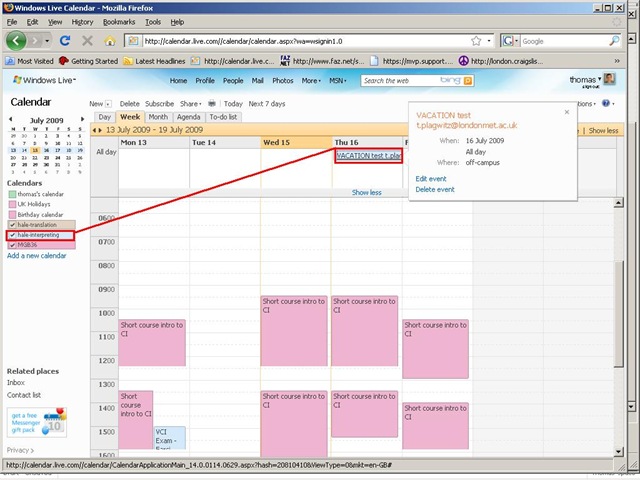
If colouring is not clear enough, filter the calendar (1) for specific “calendars”(2) = display only events from selected “calendars”(2). To do that, in the left menu, uncheck the box next to the calendar to hide all events from this calendar. Result if you view only the interpreting group calendar:
The natural next step is to have better collaboration even when not all workgroup members are in the same location, using instant messaging, including what is called presence. Windows Messenger 4.7 is already installed and ready on our computers (NOT if you have not abandoned Windows 2000 yet – do it now!). Just follow the quick start under my portrait picture at the right of my spaces home page . If you use your Windows Live login, a few things things should just fall into place. If you also want group messaging (multipoint), have the newer Windows Live Messenger installed.

Blog Stats
- 526,745 hits

Questions? Read the About. Or just ask me a quick
FAQs for LRC student staff or for students or for teachers. To search our FAQs, in the browser addressbar, add after "https://plagwitz.wordpress.com/feed/?tag=faqs+/" "+TAG1" (from tag cloud below) OR "https://plagwitz.wordpress.com/feed/tag=faqs
&category_name=" "CAT1" (from category hierarchy below). OR search both categories and tags, and multiple TAGs/CATs (connect with "," for OR-search, with "+" for AND-search), like so: https://plagwitz.wordpress.com/feed/?tag=TAG1+TAG2+...TAGn&category_name=CAT1
+CAT2+...CATn"
Other ways to find help
If you cannot find it here, look there: 5,500 Language-Learning Links and Programs for learning or teaching 150 languages
Shortcuts:Our Lists, Our Maps, LRC Staff Moodle Site,LRC Project Moodle Site, 49erexpress, UNCC Moodle, Student Recordings: s:claslcslrcsanakostudent
Learning usage samples: Sanako oral exam, Kaltura webcam presentation, Dictation with speech recognition, Sanako written exam, Chinese and Japanese interactive stroke-order practice
Test the Sanako Installer, Webbrowser Popup Konfigurator for XP, or Windows7, faster LRC TeacherPC Log-in Let MS facilitate diacritics writing by installing for you US-International keyboard layout
This is my personal blog (Google+). The views expressed on these pages are mine alone and not those of my employer. The information in this weblog is provided “AS IS” with no warranties, and confers no rights.
Top Posts & Pages
- How to display Furigana phonetic guide for Japanese Kanji in MS-Word 2010
- Quizlet.com for Vocabulary learning practice
- How to type phonetic symbols on a computer
- Run mmsys.cpl if you get no audible output in a Blackboard IM call on your PC
- Imran’s Phonetic Keyboard for Arabic
- How to fix “Print to OneNote”, “OneNote cannot find a page on which to insert your printout”
- How to fix MS-Word not creating PDF Bookmarks for your Headings
- Bootsect (the command formerly known as fixmbr), may enable your Windows 7 installation to start up from a CorruptVolume
- Mac Mini (Mid 2010) Overview
- Download for free Arabic diacritizer, romanized to Arabic script converter for Office 2013
Top Clicks
Categories
- Area-is-any (194)
- Back office (10)
- Coed432 (2)
- LRCRoomCoed435a (1)
- LRCRoomCoed436 (4)
- COED037 (14)
- presenter-computer (9)
- student-computers (6)
- faculty-offices (3)
- LRCRoomCoed433 (68)
- iMacs (14)
- Listening-Stations (23)
- printer (1)
- Reception-desk (33)
- small-group-work-spaces (12)
- TV-viewing-area (3)
- LRCRoomCoed434 (117)
- Presenter-Computer (78)
- Student-Computers (69)
- MGB-36 (4)
- Back office (10)
- audience-is-any (683)
- Computer and Internet (3)
- Utilities (1)
- Genre-is-any (643)
- announcements (21)
- bad-ideas-and-other-mistakes-samples (1)
- cheat-sheets (2)
- checklists (31)
- documentation (151)
- feedback (2)
- flowcharts (3)
- Internal (1)
- learning-materials (86)
- learning-usage-samples (21)
- marketing (18)
- Notes (228)
- Glitches&Errors (190)
- Learning-logs (24)
- mental-notes (20)
- policies (5)
- Practice&Demos (26)
- conferences (17)
- tradeshows (3)
- projects (9)
- proposals (13)
- reports (11)
- research (2)
- reviews (3)
- step-by-step-guides (38)
- table-of-contents (8)
- training (80)
- clinics (6)
- faculty-showcases (2)
- workshops (29)
- Institution-is-any (193)
- Institution-is-Aston-University (13)
- Institution-is-Drake-University (2)
- Institution-is-London-Metropolitan-University (33)
- Institution-is-Loyola-University-Maryland (27)
- Institution-is-Queen's-University (1)
- Institution-is-University-of-Michigan-Dearborn (3)
- Institution-is-University-of-North-Carolina-Charlotte (120)
- Institution-is-University-of-Tampa (4)
- K12 (1)
- Learning-activity-is-any (82)
- assessments (44)
- assignments (35)
- classroom-activities (8)
- grading (11)
- presentations (4)
- Learning-Tool-is-any (683)
- Classroom-technology (162)
- erepository (19)
- hardware (86)
- audiovisual (28)
- faculty-equipment (10)
- film-studies-equipment (14)
- furniture (1)
- headphones (18)
- mobile-computing (8)
- mobile-phones (4)
- tablets (4)
- phones (6)
- audiovisual (28)
- Media (32)
- multimedia-recording (79)
- software (215)
- Authoring-tools (3)
- Polls (2)
- GIS (4)
- office-software (87)
- Operating-system (20)
- os (16)
- recording-software (15)
- translation-software (9)
- web-browsers (12)
- Authoring-tools (3)
- software-old (7)
- textbooks (22)
- websites (208)
- blog (12)
- eportfolio (7)
- lab-portal (4)
- lms (95)
- Metrics (22)
- Analytics (7)
- Visualizations (8)
- Multimedia-is-any (269)
- animated-GIFs (43)
- Audiofiles (1)
- Charts (8)
- compiledcode (17)
- Documents (15)
- forms (4)
- Interactive-documents (1)
- Photos (11)
- Pictures (1)
- polls (1)
- Scans (2)
- Screencasts (87)
- screenshot-albums (5)
- Screenshots (16)
- Slideshows (24)
- sourcecode (21)
- Spreadsheets (35)
- Videos (13)
- Personal (22)
- second-language-acquisition (249)
- 4-skills (216)
- Grammars (4)
- Proficiency-Levels (36)
- Absolute-Beginner (19)
- Advanced (28)
- Beginner (26)
- Intermediate (29)
- Near-Native (9)
- Syntax (2)
- Vocabulary (52)
- Corpus-linguistics (16)
- corpora (9)
- Dictionaries (18)
- Corpus-linguistics (16)
- service-is-any (454)
- service-is-applying-learning-tools (23)
- service-is-assessing (21)
- service-is-configuring-learning-tools (34)
- service-is-documenting (70)
- service-is-evaluating-learning-tools (38)
- service-is-hr-managing (15)
- service-is-it-managing (20)
- service-is-learning-materials-creation (90)
- service-is-library (99)
- service-is-outreach (2)
- service-is-programming (66)
- service-is-project-managing (16)
- service-is-testing (2)
- service-is-testing-troubleshooting-debugging (71)
- service-is-training (14)
- service-is-tutoring (19)
- Study-program-is-any (314)
- all-languages (228)
- Film-studies (38)
- Interpreting (36)
- Translation (27)
- Teaching-delivery-format-is-any (27)
- technology-domains-is-any (853)
- digital-humanities (7)
- e-commerce (2)
- e-infrastructure (471)
- e-languages (297)
- e-learning (103)
- e-research (2)
- Uncategorized (38)
- unit-is-any (4)
Archives
- September 2017
- April 2017
- January 2017
- November 2016
- July 2016
- June 2016
- May 2016
- April 2016
- March 2016
- February 2016
- January 2016
- December 2015
- November 2015
- October 2015
- September 2015
- August 2015
- July 2015
- June 2015
- May 2015
- April 2015
- March 2015
- February 2015
- January 2015
- December 2014
- November 2014
- October 2014
- September 2014
- August 2014
- July 2014
- June 2014
- May 2014
- April 2014
- March 2014
- February 2014
- January 2014
- December 2013
- November 2013
- October 2013
- September 2013
- August 2013
- July 2013
- June 2013
- May 2013
- April 2013
- March 2013
- February 2013
- January 2013
- December 2012
- November 2012
- October 2012
- September 2012
- August 2012
- July 2012
- June 2012
- May 2012
- April 2012
- March 2012
- February 2012
- January 2012
- December 2011
- November 2011
- October 2011
- September 2011
- August 2011
- July 2011
- June 2011
- May 2011
- April 2011
- March 2011
- February 2011
- January 2011
- November 2010
- October 2010
- September 2010
- August 2010
- July 2010
- May 2010
- April 2010
- March 2010
- February 2010
- January 2010
- December 2009
- November 2009
- October 2009
- September 2009
- August 2009
- July 2009
- June 2009
- May 2009
- April 2009
- March 2009
- February 2009
- September 2008
- August 2008
- July 2008
- June 2008
- March 2008
- January 2008
- November 2007
- August 2007
- July 2007
- June 2007
- December 2006
- June 2006
- May 2006
- April 2006
- March 2006
- February 2003


