Archive
Posts Tagged ‘2010’
How students can record their picture or photo presentations with PowerPoint 2010
2013/01/17
Leave a comment
- The screencast shows the necessary steps:

- inserting a photo album,
- presenting while recording the presentation with narration
- saving as a show (.ppsx) – make sure you have ribbon:”Slide show”/ “Play narrations” checked:

- to prepare an assignment for a Moodle single-file-upload (How a student takes a Moodle Simple file upload assignment).

Categories: Arabic, assignments, audience-is-students, documentation, e-languages, English, Farsi, French, German, Greek (modern), Hebrew, Hindi, Italian, Japanese, Korean, Latin, Mandarin, multimedia-recording, office-software, Polish, Portuguese, recording-software, Russian, Screencasts, service-is-applying-learning-tools, Spanish, Speaking, Swahili, Yoruba
2010, ms-powerpoint, narration
How to extend your LRC class booking to the entire term by adding weekly recurrence
2013/01/09
1 comment
- The single screenshot booking FAQ mentions recurrence briefly. If you failed to add recurrence when you booked the LRC for your class, you can likely still add it:
- Go to your NINERMAIL calendar, open your “meeting”, like so:

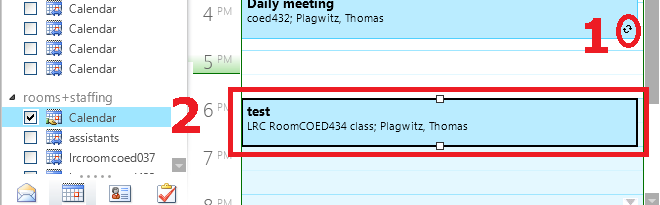
- if the (1) recurrence indicator is missing or if, when browsing your NINERMAIL calendar for the term, your class booking shows up not every week, only during the first?
- Then (2) open your class booking by double-clicking on it.
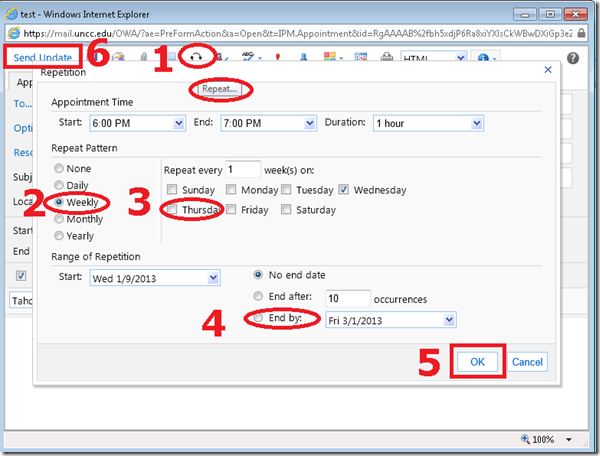
- In the window of your class booking, do these steps (use your own class times, not the ones in the example)
- note how the (1) tooltip for the “repetition” dialogue says “repeat”;
- classes meet (2) “weekly”, but more complex schedules can also be set up (“repeat every x week”)
- don’t forget to (4) “end by” the last day of classes.
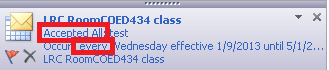
- You will receive an immediate response from the LRC classroom in your NINERMAIL inbox. Check it for and report any problems that you cannot resolve to the LRC reception desk.


Categories: e-infrastructure
2010, autoaccept-agent, calendaring, FAQs, live@edu, meeting-requests, ms-e, office365, recurrence
How you can share MS-Office files via MS-OneNote instead of directly through MS-SkyDrive
2013/01/02
Leave a comment
- Simple steps:
- Drag and drop your MS-Office File to your MS-OneNote page.
- When prompted, choose to “insert a copy” (rather than merely linking the original file).

- This puts a copy of the file in the MS-OneNote folder on your local drive,
- which (file and folder) gets synched with your online (MS-SkyDrive) version,
- which, if you shared it, gets synched with the MS-OneNote folder on the local drive of the PC of the person you are sharing with,
- who, by double-clicking, can open and edit his synched local version of MS-Office file in the corresponding MS-Office application.
- Stepping back:
- Benefit: If you have a working MS-OneNote-based workflow, embedding MS-Office file can quickly extend this workflow.
- Risk: If you do not share the MS-OneNote with other editors, you should have no problem. Be aware, though, that concurrency is limited. Unlike accessing the MS-Office file in MS-Office through Office Web apps from MS-SkyDrive directly, editing the MS-Office file from MS-OneNote does not block updating the MS-Office file on remote computers – so expect synching conflicts later if you do not manage concurrency (e.g. by limiting editing sessions).

Categories: e-infrastructure, office-software
2010, MS-Excel, ms-o, ms-office, ms-onenote, MS-Word
Why MS-OneNote may let you run out of storage space here
2012/10/04
Leave a comment
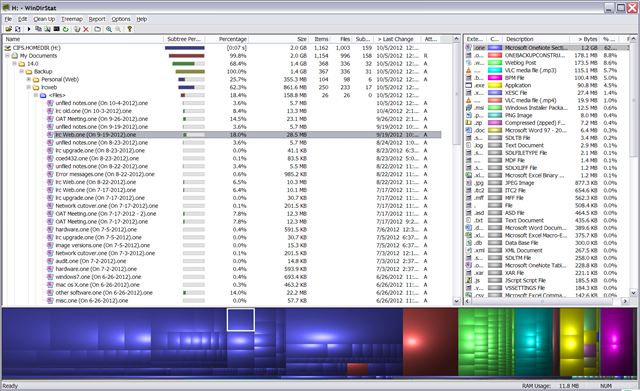
I am running into out of file space issues in a number of applications. Turns out that OneNote is the culprit, but it is not obvious from the OneNote Save & Backup why: 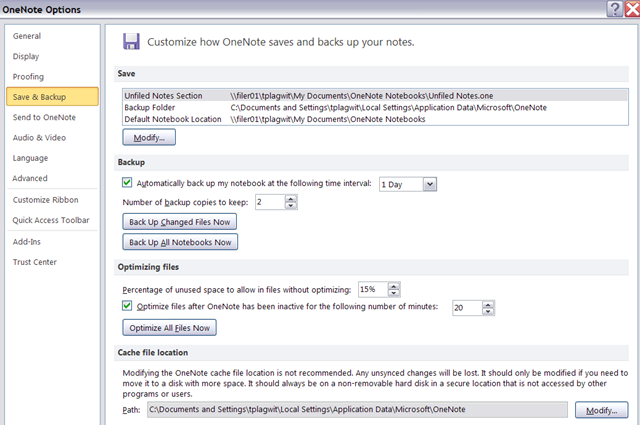
The Reason is that Application Data\Microsoft\OneNote gets redirected to the personal network drive:\My documents folder, the disk quota for which is limited:
Protected: How to show the Developer Tab in the MS-Word 2007/2010 Ribbon
2012/10/04
Enter your password to view comments.
Categories: audience-is-teachers, documentation, office-software, Writing
2007, 2010, developer-tab, MS-Word
Protected: How to share Exchange room and resource mailbox calendars
2012/09/25
Enter your password to view comments.
EWS are working
2012/09/11
Leave a comment
Categories: e-infrastructure, Learning-logs, service-is-programming
2010, ews, langlabemailer, ms-exchange


Questions? Read the About. Or just ask me a quick Our Databases: Resources with calendars -- Language learning material Moodle Sites, multimedia files -- films


FAQs for LRC student staff or for students or for teachers. To search our FAQs, in the browser addressbar, add after "https://plagwitz.wordpress.com/feed/?tag=faqs+/" "+TAG1" (from tag cloud below) OR "https://plagwitz.wordpress.com/feed/tag=faqs
&category_name=" "CAT1" (from category hierarchy below). OR search both categories and tags, and multiple TAGs/CATs (connect with "," for OR-search, with "+" for AND-search), like so: https://plagwitz.wordpress.com/feed/?tag=TAG1+TAG2+...TAGn&category_name=CAT1
+CAT2+...CATn"
Other ways to find help
If you cannot find it here, look there: 5,500 Language-Learning Links and Programs for learning or teaching 150 languages
Shortcuts:Our Lists, Our Maps, LRC Staff Moodle Site,LRC Project Moodle Site, 49erexpress, UNCC Moodle, Student Recordings: s:claslcslrcsanakostudent
Learning usage samples: Sanako oral exam, Kaltura webcam presentation, Dictation with speech recognition, Sanako written exam, Chinese and Japanese interactive stroke-order practice
Test the Sanako Installer, Webbrowser Popup Konfigurator for XP, or Windows7, faster LRC TeacherPC Log-in Let MS facilitate diacritics writing by installing for you US-International keyboard layout
This is my personal blog (Google+). The views expressed on these pages are mine alone and not those of my employer. The information in this weblog is provided “AS IS” with no warranties, and confers no rights.
 Thomas' Work Space