Protected: Example 4: Speech recognition tutorial and voice training in Japanese on Windows 7
2014/09/07
Enter your password to view comments.
Categories: clinics, e-languages, Japanese, Speaking
7, ms-windows, speech-recognition
Protected: Example 3 of Speech recognition dictation exercise in Spanish on Windows 7
2014/09/07
Enter your password to view comments.
Categories: e-languages, Spanish, Speaking, workshops
7, dictation, ms-windows, speech-recognition
Protected: Example 1 of speech recognition dictation exercise in Spanish on Windows 7
2014/09/07
Enter your password to view comments.
Categories: e-languages, Spanish, workshops
7, dictation, ms-windows, speech-recognition
Protected: Example 2 of Speech recognition dictation exercise in Spanish on Windows 7
2014/09/07
Enter your password to view comments.
Categories: e-languages, Spanish, Speaking, workshops
7, dictation, ms-windows, speech-recognition
How to change the display language and speech recognition language on Windows 8 computers
2014/09/07
1 comment
- I seem to be getting a lot of hits on this post for Windows 7 where the globalized language features are still limited to Enterprise and Ultimate SKU (and especially not available in Home and Home basic which most language learning users will work with).
- Windows 8 to the rescue, as per Steven Sinofsky’s blog post:
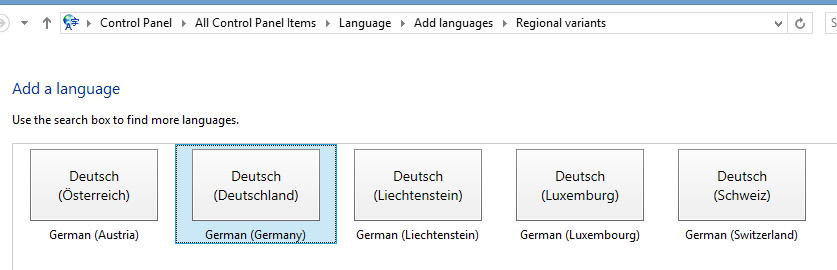
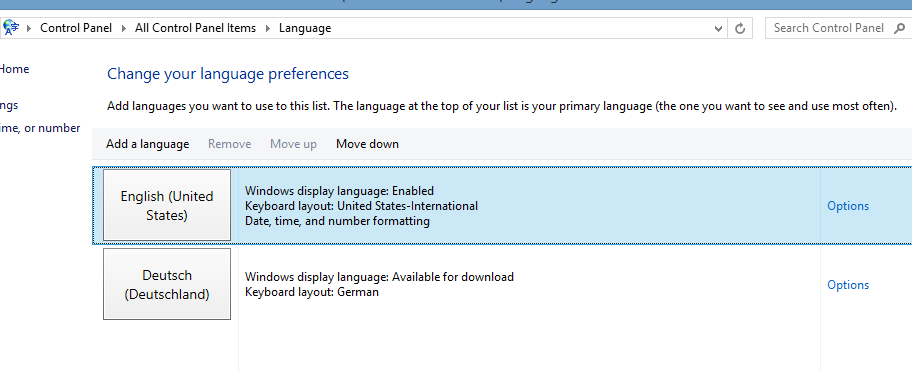
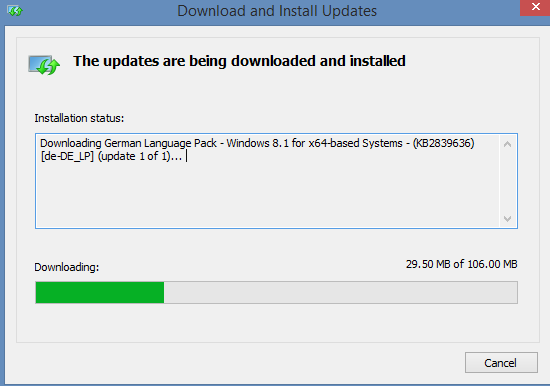
- Or if you need a visual step-by-step, here is me adding German to English on Windows 8.1 Professional:






Just 1 easy option now is they input language: 
Categories: e-languages, os
8.1, display-language, foreign-language-character-input, ms-windows, speech-recognition
Skype video conference live machine translation –“way to go…”?
2014/09/06
Leave a comment
… as in “has a way to go”- there are many more such difficulties in natural language for machine translation.
These sample screenshots from a recent demo show a lot of them in a nutshell.
You can probably sense that something is wrong with this company representative’s smile, 
even if you do not speak German. If you do:
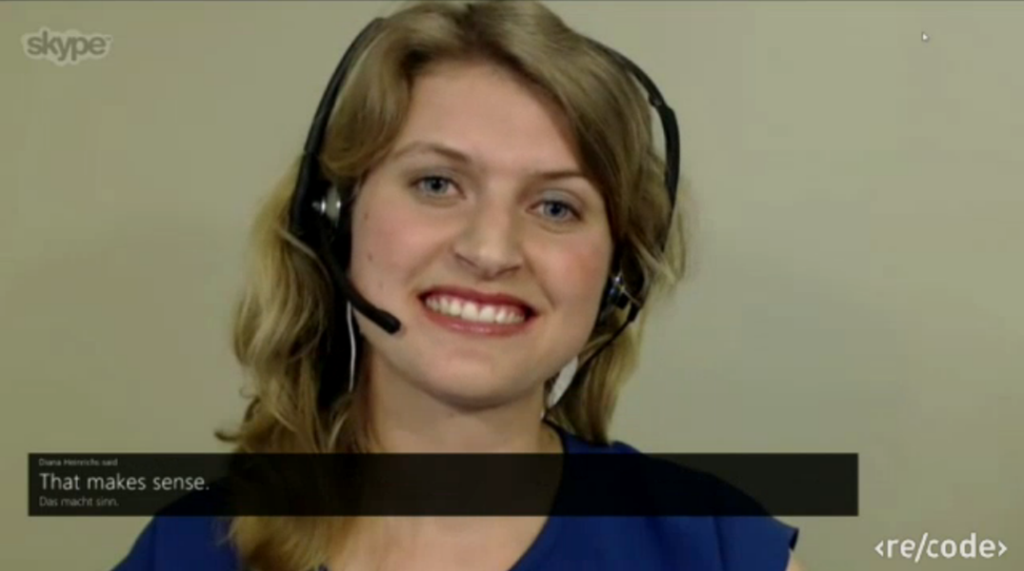
… as in “NOT!”  (Don’t forget, though, that there is an initial speech recognition layer in this demo which seems to have become almost transparent as a technology now? See Gartner’s hype cycle of 2014.)
Categories: English, German, Translation, translation-software
machine-translation, skype, speech-recognition
Windows Live Spaces url forwarding still working
2014/08/28
Leave a comment
- It is a long time ago that I migrated my blog from Windows Live Spaces to WordPress.
- It appeared to me recently that the URL forwarding from the original web pages to WordPress which was part of the migration package that Microsoft offered, had stopped working – regrettably, since I still have old documents pointing to the original pages, and the cryptic URL naming scheme seems to make it difficult to find out where the original ULR pointed to.
- However, it seems that only some forwarding stopped working. If I reformat URL format 1 (which redirects to the WordPress homepage) to format 2, the forward still works:
Categories: blog, e-infrastructure
blogging, redirecting, windows-live-spaces, wordpress
Logging learning center attendance using MS-Exchange Calendars
2014/08/27
Leave a comment
- Over the years, I had to find a number of solutions for monitoring student attendance in the learning center, by repurposing existing infrastructure (there are dedicated solutions which, however, are often too costly for a departmental center, or not shared well). Here is another idea:
- We’ve used the existing campus-wide MS-Exchange infrastructure’s resource mailboxes for room booking and equipment circulation.
- We have creatively repurposed this infrastructure for managing the staffing of “offices” (center help desk and tutors). Here we needed to allow conflicts:
- multiple students staff the help desk.
- 1 tutor staffs the “office”- 1 additional student can book the tutor.
- Additionally, we set up a time clock system, based on an Excel Macro, to prevent cheating:
- Only the person logging in can sign up to the resource;
- while only the help desk can provide the time clock value.
- It looks like that a similar setup could be extended to support the common requirement that students, while taking a certain course, spend a certain amount of time per week working in the learning center:
- which has been traditionally handled using paper-based sign-in-sheets or, at best, spreadsheets.
- With digital input, the data could be basis for analytics and visualizations, taking advantage of existing tools like MS-Calendaranalytics.
- Such a system would, however, require creation of resource calendar per course section that need to monitor learning center attendance. However, this needs to be done only once and would be reusable, since data can be filtered by input time, as long as no entirely new courses/sections come online.
- But hasn’t mandatory weekly learning center attendance been made obsolete by ubiquitous computing and the web?
- Definitely in some of its more antiquated forms: I have worked at institutions where the computer-savvy students attended the learning center once at the beginning of the term to copy all the learning materials on the network share onto a thumb drive, and I would not want to force somebody to come to the learning center continuously for such a trivial purpose as accessing files on a not-web-accessible network share.
- However, there seems to be a lot of unmined pedagogical value in learning center group work and blended instruction (under tutor supervision), like in a homework emporium (provided your program is big enough to have continuous tutor support and sufficient learner overlap).


Questions? Read the About. Or just ask me a quick Our Databases: Resources with calendars -- Language learning material Moodle Sites, multimedia files -- films


FAQs for LRC student staff or for students or for teachers. To search our FAQs, in the browser addressbar, add after "https://plagwitz.wordpress.com/feed/?tag=faqs+/" "+TAG1" (from tag cloud below) OR "https://plagwitz.wordpress.com/feed/tag=faqs
&category_name=" "CAT1" (from category hierarchy below). OR search both categories and tags, and multiple TAGs/CATs (connect with "," for OR-search, with "+" for AND-search), like so: https://plagwitz.wordpress.com/feed/?tag=TAG1+TAG2+...TAGn&category_name=CAT1
+CAT2+...CATn"
Other ways to find help
If you cannot find it here, look there: 5,500 Language-Learning Links and Programs for learning or teaching 150 languages
Shortcuts:Our Lists, Our Maps, LRC Staff Moodle Site,LRC Project Moodle Site, 49erexpress, UNCC Moodle, Student Recordings: s:claslcslrcsanakostudent
Learning usage samples: Sanako oral exam, Kaltura webcam presentation, Dictation with speech recognition, Sanako written exam, Chinese and Japanese interactive stroke-order practice
Test the Sanako Installer, Webbrowser Popup Konfigurator for XP, or Windows7, faster LRC TeacherPC Log-in Let MS facilitate diacritics writing by installing for you US-International keyboard layout
This is my personal blog (Google+). The views expressed on these pages are mine alone and not those of my employer. The information in this weblog is provided “AS IS” with no warranties, and confers no rights.
 Thomas' Work Space