Archive
How to view non-displaying video files on Windows XP, using VideoLan VLC player
Not an uncommon sight when trying to play video files, given that Windows XP is an 11-year old operating system:

It may come as no surprise that Windows XP -despite a number of upgrades of its built-in Windows Media Player application -, lacks native support for newer video codecs (= what the computer needs to understand the compression of video data, does not map 1-to-1 with video file formats. Video codec support in Windows 7 has been much improved).
If you run into the common problem that, when trying to play a video on your computer, only the audio displays, try downloading, installing and playing the freeware, open-source, cross-platform VideoLan VLC player from here.
If VideoLan cannot display your video either, download, extract, start and open the video with this utility from here , to diagnose which codecs your video files uses, like so:
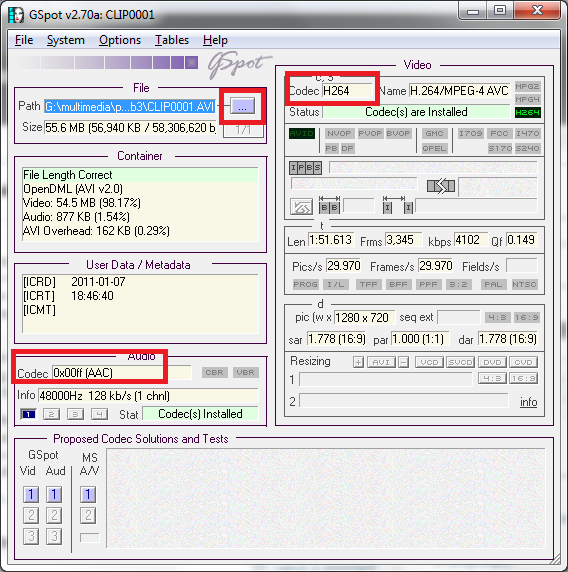
You may find it easier to pass only this codec information to local IT support than the actual video source file. However, before trying to install missing video codecs from unverified internet sources, make sure to consult local IT support (a lot of malware is distributed with video codec packs).
Video mirroring bug on dual screen systems, and a workaround
System: Vista 64-Bit SP2;
Monitors: 2 23’’ LCD screens, side-by-side in portrait mode, with Windows extended to secondary screen.
Video Card: Nvidia 9600GT
Driver Version: 8.17.12.5896 Microsoft windows hardware compatibility publisher
After downloading this driver from Windows Update, I noticed that when spanning a video window (observed in Windows Media Player and LC VideoLan; and codecs: MPEG-2, DivX 5.x/6.x, XviD ISO MPEG-4, H264), mirrors the image (wn Window mode; full screen mode unwilling to span both monitors anyway), like so:
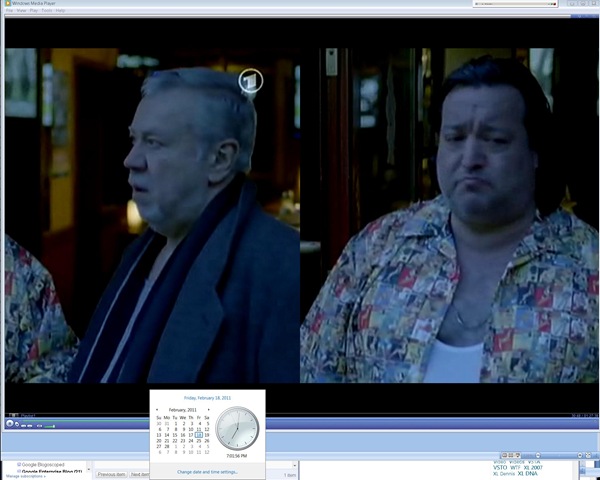
Moving the mouse pointer over the video image (player window is not sufficient), however, fixes the issue:

A bit of a nuisance, but no newer driver has been released yet on Windows Update, so I decided to work around the issue like this .
Wireless voice recorder
The college’s infrastructure offerings now include a wireless-voice-recorder.
The setup consist of a Sony-voice-recorder-pcm-m10, a lavalier microphone, audio-technica freeway-atw1201-transmitter and audio-technica r200-transmitter.
I made these photo and audio materials during a test.

The test audio demonstrates remaining problems with
- mono recorded through micro, stereo expected by recorder
- the transmission breaking up after 60 paces distance (static, then recording stops entirely – I cut that part at the end)
If you cannot make out the person recording in the panoramic photo of the hallway, that can give you an idea of the suitability of the recorder for e.g. large lecture halls.
Bringing 4 bad computers back into the fold: GhostClient update in spite of bad image
The reason why we cannot join these computers to the domain is simple:

The old image we installed in the last installment of this series does not seem to be for the LRC: it does not contain the right drivers for basic hardware, including Ethernet controller, comes up frozen and keeps booting with warning “Windows did not start normally”.

Steps to take to work around this on each of the PCs:
- Boot thawed.
- Changed the computer name from System Properties / tab: Computername
- Install the Ethernet Controller driver INTEL_825XX-GIGABIT-PLATFORM_A04_R272000.exe which I downloaded from DELL, using the service tag, from the driver CD which I burnt.
- Reboot, the PC picks up an IP similar to the ones that the Ghost console can talk to.
- Insert a thumb drive and go to control panel / administrative tools / computer management / disk management , change the thumb drive letter to H:, exit (otherwise ghost client installer will fail if it does not see the home drive on the domain.

- Insert the ghost client upgrade CD I made earlier. Since autorun is disabled in this configuration, browse to \ghost\ghostclientupgrade.bat, and execute this.
- The computer reboots. Once it is back up, check, by hovering over the ghost client icon in the notification bar, whether the ghost client points to the ghost server IP.

Mine did: The Ghost console shows it as “connected”, and the Deepfreeze Console could reboot it thawed.
Bringing 4 bad computers back into the fold: GhostCast Error 19922: Cannot connect to GhostCast session
Error happens when trying to deploy newer image (created with GhostConsole11) with older GhostCast software.
GhostCast is only the old program we are trying to fade out. But in order to get failing computers to start at all, and connect to the network, we need to resurrect it.
19922 is most frequent error according to Google autocomplete. Symantec asks you to try this:
- Do you have the correct NIC driver specified?
- Boot into a ghost boot disk, exit ghost shell to a DOS prompt, type “chkdsk c: /f”, when finished, reboot the machine into ghost and try connecting to GhostCast session again [this found errors, but did not fix the issue in our case. ]
- Can you try another image? [This fixed the issue. Version incompatibilities between images?]
- Recreate the image on the source machine after “chkdsk c: /f”, attempt to deploy newly created image.
GoogleApps.uncc.edu
Symptoms: When clicking on a a sharing link from a GoogleApps document, the recipients may be redirected to the standard Google login page, with their personal Google account user name. Even if they change this user name to their UNCC user name, they cannot log in (Error: wrong password).

Resolution: Do not click on the sharing link in the email. Rather, go to http://googleapps.uncc.edu and log in there. Find the new document shared with you in your documents list.
Wimba Classroom Session with AppSharing for online tutoring or support
Here you can view a 2.5 minutes screencast of how to initiate a Wimba Classroom session with Appsharing.
|
0:28
|
Logging in as participant
|
|
0:44
|
Chime indicates: loading finished
|
|
1:05
|
Demo:hand raising
|
|
1:17
|
Demo:messaging
|
|
1:42
|
Local screen sharing started by remote
|
|
1:57
|
Local dialogue to permit
|
|
2:02
|
Text message: “the app sharing is now displaying Plagwitz’desktop”
|
|
2:07
|
Local frame to select screen portion shared.
|
Now students can share a Moodle or other online assignment or all local text file with their tutor; users in need of computing support the offending application.
Automatically download all documents/files/images linked from a web page
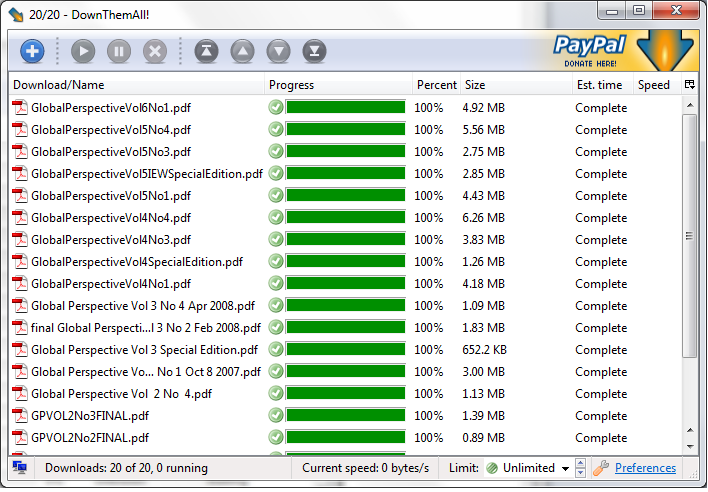
You can easily do this in FireFox with a free extension from Braunschweig (Germany): DownThemAll:
- Right-click on your page with the media you want.
- Make your choices:

- Lean back (or do something else!):

- A chime will alert you when your downloads are ready for consumption. Enjoy!




Questions? Read the About. Or just ask me a quick Our Databases: Resources with calendars -- Language learning material Moodle Sites, multimedia files -- films


FAQs for LRC student staff or for students or for teachers. To search our FAQs, in the browser addressbar, add after "https://plagwitz.wordpress.com/feed/?tag=faqs+/" "+TAG1" (from tag cloud below) OR "https://plagwitz.wordpress.com/feed/tag=faqs
&category_name=" "CAT1" (from category hierarchy below). OR search both categories and tags, and multiple TAGs/CATs (connect with "," for OR-search, with "+" for AND-search), like so: https://plagwitz.wordpress.com/feed/?tag=TAG1+TAG2+...TAGn&category_name=CAT1
+CAT2+...CATn"
Other ways to find help
If you cannot find it here, look there: 5,500 Language-Learning Links and Programs for learning or teaching 150 languages
Shortcuts:Our Lists, Our Maps, LRC Staff Moodle Site,LRC Project Moodle Site, 49erexpress, UNCC Moodle, Student Recordings: s:claslcslrcsanakostudent
Learning usage samples: Sanako oral exam, Kaltura webcam presentation, Dictation with speech recognition, Sanako written exam, Chinese and Japanese interactive stroke-order practice
Test the Sanako Installer, Webbrowser Popup Konfigurator for XP, or Windows7, faster LRC TeacherPC Log-in Let MS facilitate diacritics writing by installing for you US-International keyboard layout
This is my personal blog (Google+). The views expressed on these pages are mine alone and not those of my employer. The information in this weblog is provided “AS IS” with no warranties, and confers no rights.
 Thomas' Work Space