Archive
UNCC LRC Language Placement Test: Web-CAPE Online Placement Exam Step-by-Step
- “The Online Placement Exam is designed to help you determine the first course you should take, based on your ability. This multiple-choice [no speaking, listening or writing required] exam presents questions of different ability levels, adapting the next question’s level according to your answers. The number of questions you will be required to complete depends upon your ability to use the language. The duration of the test varies, but it usually takes 15-20 minutes to complete [but can be finished after only 4 questions, and we will give you up to an hour time to complete the exam]”.
- The proctored exam takes place in the LRC (COED434). The exam schedule is published in the LRC COED434 calendar. Read more on how to view the LRC calendar from within the new NINERMAIL.
- When taking the exam during the proctored session in the language center [do not take the exam on your own], to sign up for the test, you have to go to: https://www.aetip.com/student/RegisterStudent.cfm (note: the “s” behind “http” is required), this now forwards to:https://www.perpetualworks.com/secure/register/student/, for which sthe shortcut is: http://goo.gl/PBjhhS:

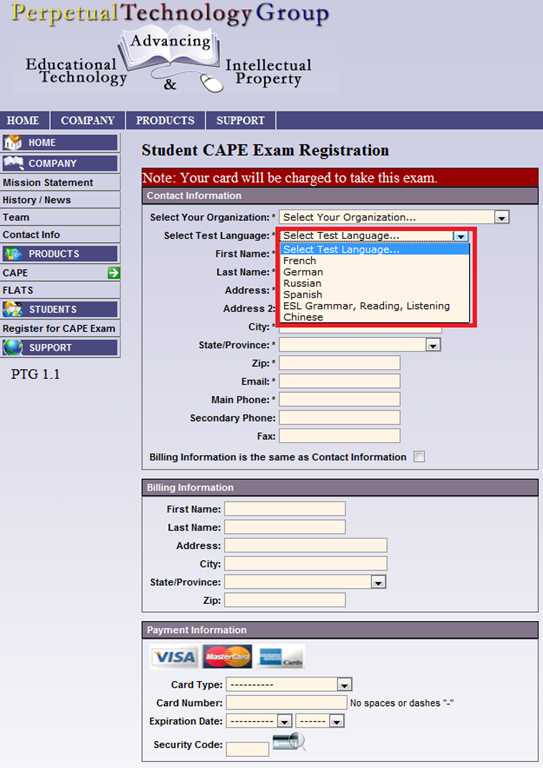
- First chose UNCC (Avoid the common error of choosing another University of the UNC system, you will not be able to take the test if you do):

- Then choose your language – note that UNCC only allows testing in French, German and Spanish.

- Fill out the other form fields with your information.
- Finally, you need one of these credit cards, and the proper billing info, to take the test:

- Next, you will have to enter your NINERNET student id number.
- The exam results will eventually go to your file. However, they will have to be post-processed by the department. Do not take the exam without coordinating with the Department of Language and Culture Studies, or else your exam results will get lost!
- Remember that you can repeat the placement test, even though the number of retries per languages is limited to two (your score will get invalidated after that!).
- Remember also that is not advisable to study for (let alone cheat during) a placement exam, or else you will get placed into a course that is not right for you.



Protected: How to conduct an easy oral exam with Sanako1200 (Model imitation/Question Response) – Part II: Implementation/instruction of examined students
Foreign Language Character Input on Windows XP in the LRC
The LRC offers the following foreign language characters writing support:
| American English | us international | not needed | us-int |
| Arabic | Google;MS;MS-maren;fontboard | maybe later, now osk | demo |
| British English | us international | not needed | us-int |
| Dutch | us international | not needed | us-int |
| Farsi | Google;MS | maybe later, now osk | demo |
| French | us international | not needed | us-int |
| German | us international | not needed | us-int |
| Greek | Google;MS | maybe later, now osk | demo |
| Italian | us international | not needed | us-int |
| Japanese | MS | not needed | |
| Korean | MS | maybe later, now osk | demo |
| Mandarin | MS;pinyinput | not needed | pinyin |
| Portuguese (Brazilian) | us international | not needed | us-int |
| Russian | Google;MS | maybe later, now osk | demo |
| Spanish | us international | not needed | us-int |
The support is best accessed from the “international toolbar”, like so: 
You can also use the windows on-screen keyboard to input non-Western characters on a computer that has not the corresponding keyboard overlay stickers. In the small-group workspaces, which have writing pads, you can also use the MS-Handwriting IME for East-Asian languages.
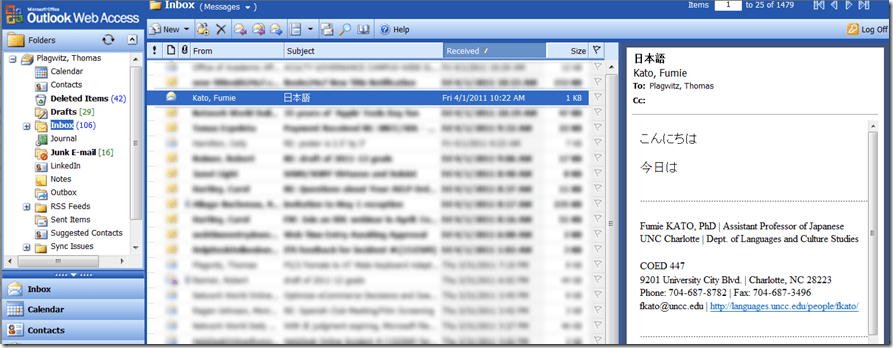
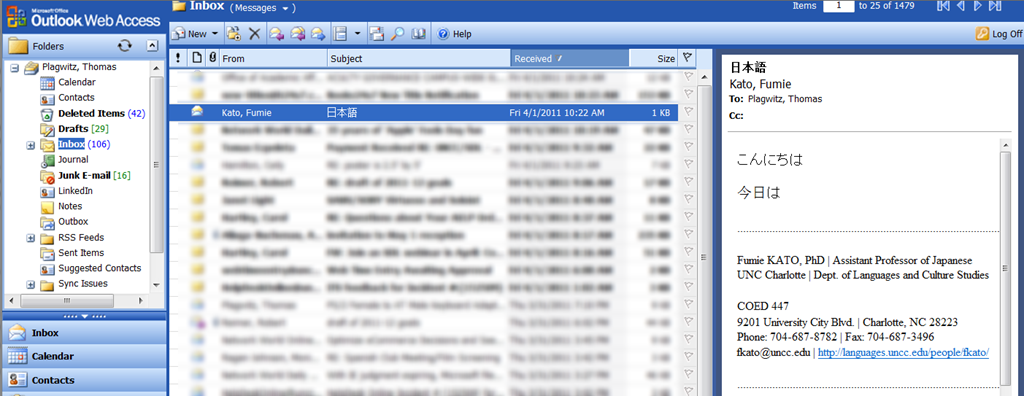
How to: Send email with non-western (e.g. Japanese) characters in Outlook Web Access (e.g. 2003, e.g. from Safari)
- If your emails with Japanese sent from Safari arrive with unreadable characters (squares or question marks, meaning the recipient’s computer cannot decode how to display the character your computer sent), you may have set your browser to the wrong characterr encoding.
- However, the encoding Unicode (e.g. UTF-8) can handle both western and .
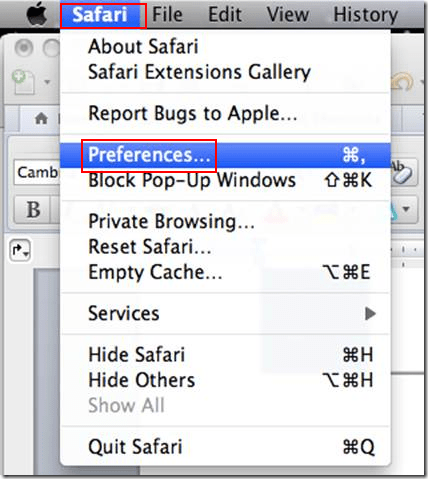
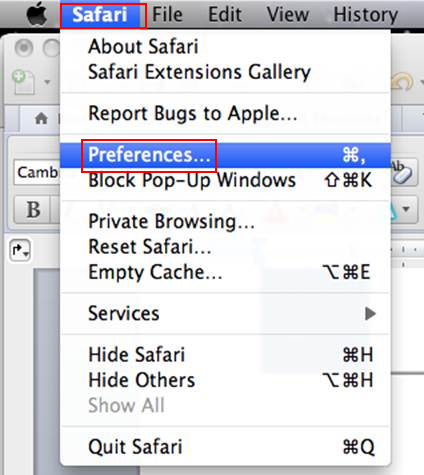
- Simply go to Safari (similarly in other browsers)/ Preferences / Appearances / Default Encoding and change to UTF-8, like so:


- This has been tested to work already from/to OWA 2003.
- However, for your reference, here a matrix of imminent upgrades of email clients on your computer and the corresponding university server software:


|
When? |
Your office computer |
recommended? |
Any computer (travel, home) |
University server |
|
|
mac |
pc |
|
|||
|
soon |
Outlook 2011 |
Outlook 2010 |
is better than |
Outlook web access 2010 |
Exchange 2010 |
|
recommended? |
is better than |
is better than |
|
is better than |
is better than |
|
now |
Entourage (limited support for Exchange) |
Outlook 2007 |
is better than |
Outlook web access 2003 |
Exchange 2003 |
Chinese: Character Input: Stroke order: How to learn
Chinese characters are written in a stroke order (which differs for traditional, simplified, and Kanji). This convention is useful for memorizing characters, but also aids handwriting recognition software, and can be used for looking up Chinese characters.
Some free tools that aid in learning stroke order during SLA:
The tool I remember from supporting my first Chinese program a long time ago in Iowa where also Ted Yao’s Integrated Chinese (Cheng & Tsui) was used, is the Bihua project which lets you search by number of strokes, and displays stroke order animation in the results by means of QuickTime videos. Note that links to the corresponding chapters of Integrated Chinese are included in the results:
`
http://www.csulb.edu/~txie/azi/page1.htm has animated GIFs to teach the stroke order.
http://lost-theory.org/ocrat/chargif/ is also based on animated gif, but the animation is a bit easier to follow since the current stroke gets highlighted, and you can search for characters.
There is some more animated gif material as overview in wikimedia: http://commons.wikimedia.org/wiki/Category:CJK_stroke_order
If you teach simplified, this Taiwanese education ministry website will be of no use to you: http://stroke-order.learningweb.moe.edu.tw/home.do , but maybe the Hong Kong version for primary education is of use for your students, esp since it is partially in bilingual English: http://www.edbchinese.hk/lexlist_en/index.htm
Practice memorization with Google pinyin IME which allows you to look up characters by strokes: “This allows you to input Chinese characters not only by using pinyin but also by using strokes if you do not know how a character is pronounced. First, press “u” to enter the stroke mode. Then use “h” for heng, the horizontal stroke, “s” for shu, the vertical stroke, “p” for pie, the left falling stroke, “n” for na, right falling stroke, “z” for zhe, the turning stroke, and “d” for dian, the dot, to input a Chinese character according to its stroke order. Among these strokes, “n” and “d” are the interchangeable. For example, if you want to input 火, then you press “u” first, and then press “dppn” or “ nppn.” A character often appears before you finish keying in all the strokes. For examples, 煅 appears when you key in “udppdps” without the need to input all the strokes.”
Some non-free tools include the Chinese Character Stroke Order Animator and eStroke (singe license expensive, price comes down to about $35 per seat for a 30 seat site license which may be a good size for a language center)
Animated Gifs and other video-based teaching tools may be a bit to non-interactive, and also too fast (but could be slowed down). Even better would be a pen- or touch-enabled software that allows the learner to practice the stroke, following guiding lines. Unfortunately, pocketChinese which would fit the bill ((on Java enabled phones) seems to not have been updated in almost 3 years.


Questions? Read the About. Or just ask me a quick Our Databases: Resources with calendars -- Language learning material Moodle Sites, multimedia files -- films


FAQs for LRC student staff or for students or for teachers. To search our FAQs, in the browser addressbar, add after "https://plagwitz.wordpress.com/feed/?tag=faqs+/" "+TAG1" (from tag cloud below) OR "https://plagwitz.wordpress.com/feed/tag=faqs
&category_name=" "CAT1" (from category hierarchy below). OR search both categories and tags, and multiple TAGs/CATs (connect with "," for OR-search, with "+" for AND-search), like so: https://plagwitz.wordpress.com/feed/?tag=TAG1+TAG2+...TAGn&category_name=CAT1
+CAT2+...CATn"
Other ways to find help
If you cannot find it here, look there: 5,500 Language-Learning Links and Programs for learning or teaching 150 languages
Shortcuts:Our Lists, Our Maps, LRC Staff Moodle Site,LRC Project Moodle Site, 49erexpress, UNCC Moodle, Student Recordings: s:claslcslrcsanakostudent
Learning usage samples: Sanako oral exam, Kaltura webcam presentation, Dictation with speech recognition, Sanako written exam, Chinese and Japanese interactive stroke-order practice
Test the Sanako Installer, Webbrowser Popup Konfigurator for XP, or Windows7, faster LRC TeacherPC Log-in Let MS facilitate diacritics writing by installing for you US-International keyboard layout
This is my personal blog (Google+). The views expressed on these pages are mine alone and not those of my employer. The information in this weblog is provided “AS IS” with no warranties, and confers no rights.
 Thomas' Work Space