Archive
How to use MS-Skydrive with your university account here
- One of the benefits of live@edu is institutional access to file storage space in the cloud. You need not set anything up for that. Just go to http://skydrive.com and log in with (1) your university account, here is what you get:
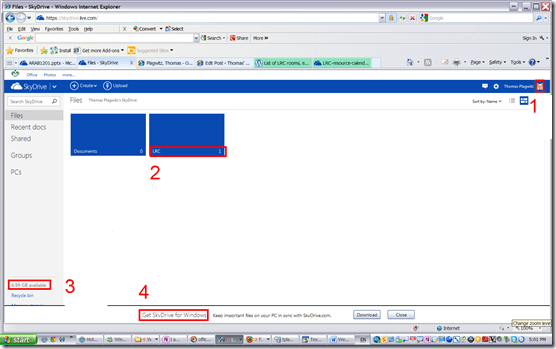
- You can create (or upload) folders and files (this one is from a long time ago, since I briefly could log in when live@edu was first introduced. Students always could log in).
- 7 GB of free space in the cloud should be plenty, including
- for teachers looking for a convenient way to bring files to the classroom beyond the limitations of the H: –drive “ My documents”
- for film students misplacing they backup hardware. No more hogging of checked out cameras just since you did not bring your portable hard drive. Just upload your clips to skydrive.com, access them from home.
- If you install the optional free Skydrive app (available ofr Windows Vista and up and MacOS X.7)
- the file size limit is expanded from 100MB to 2GB.
- files can be automatically synchronized between your classroom and home computer.
- To access files on classroom computers without the skydrive app, just use skydrive.com

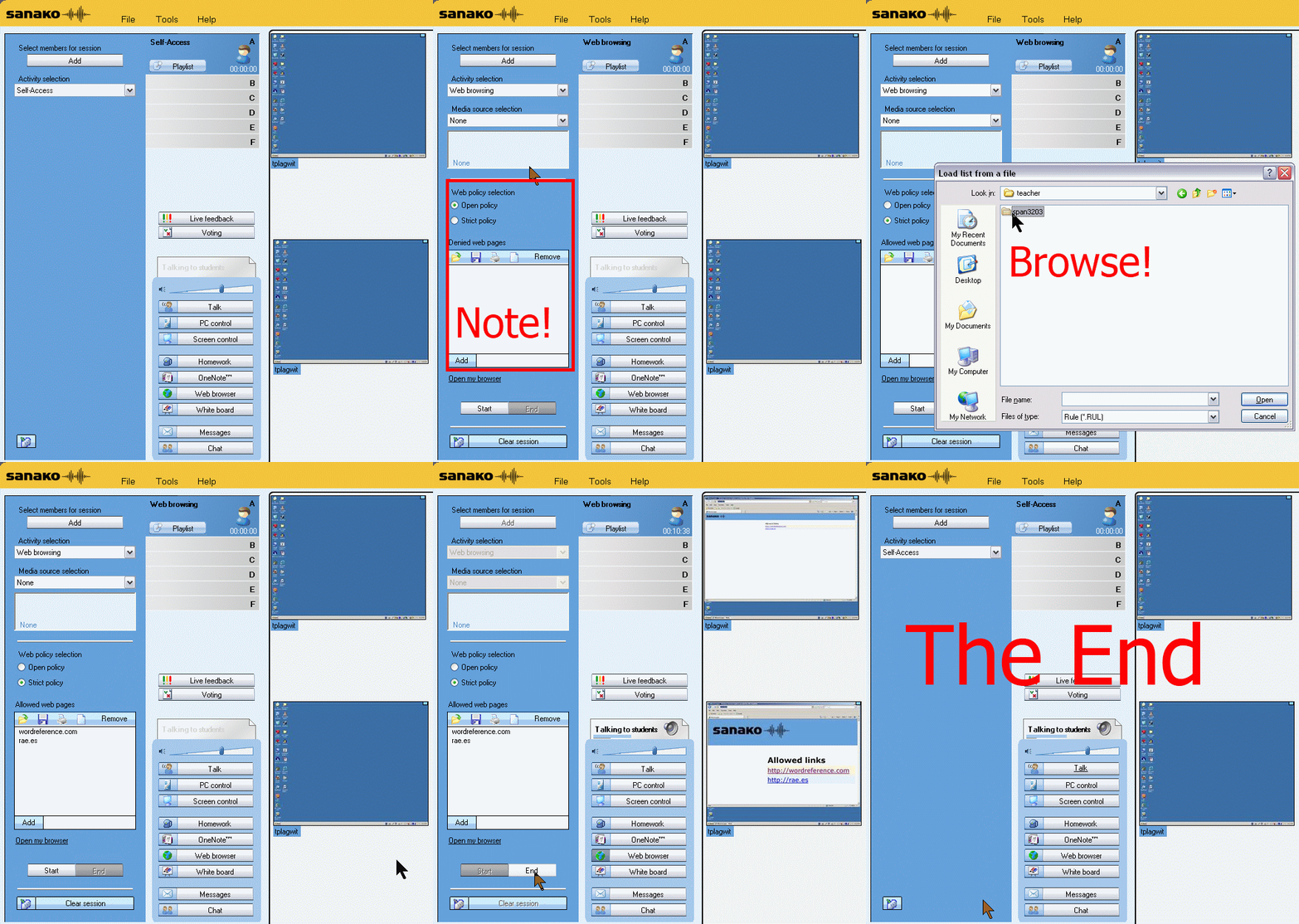
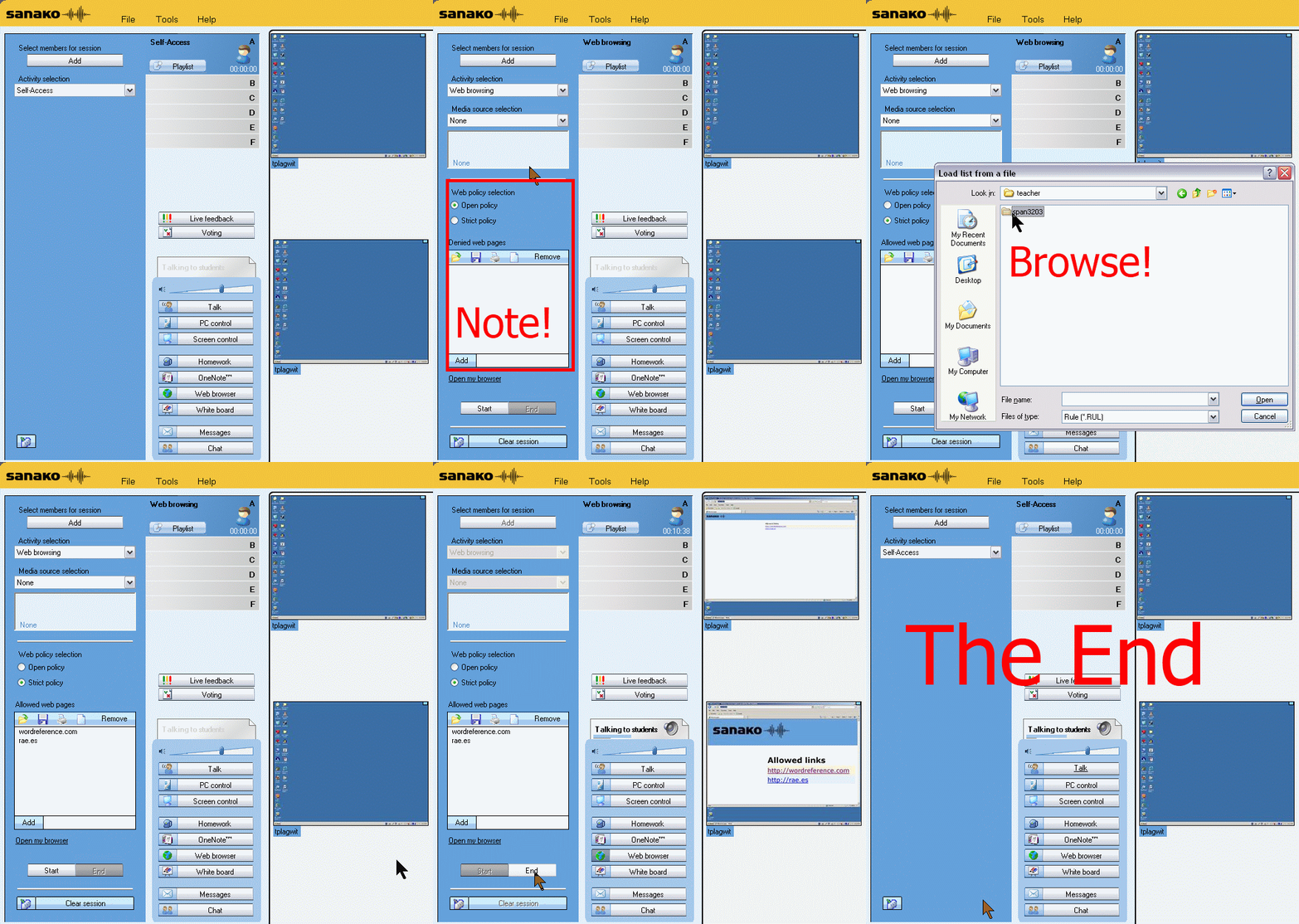
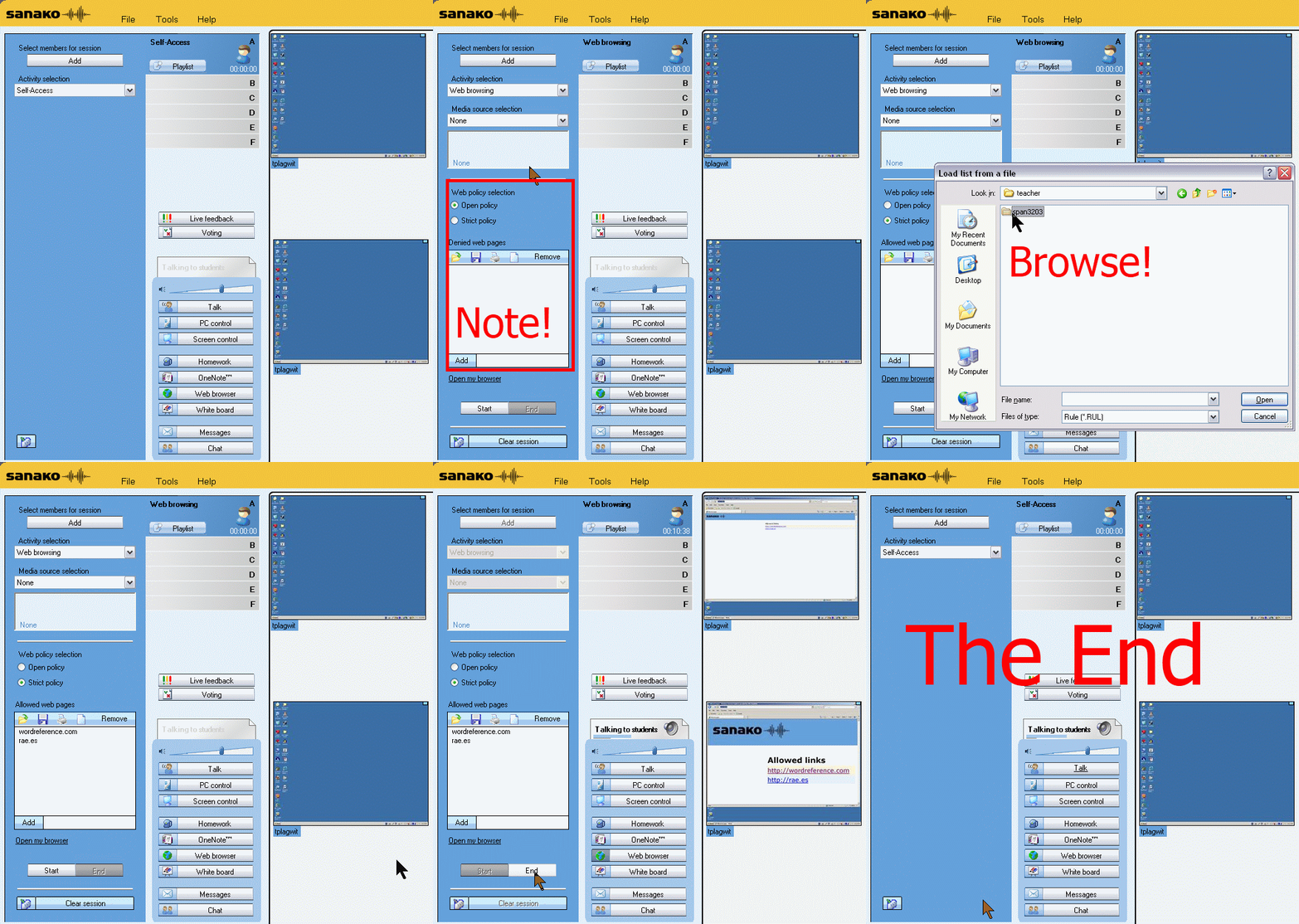
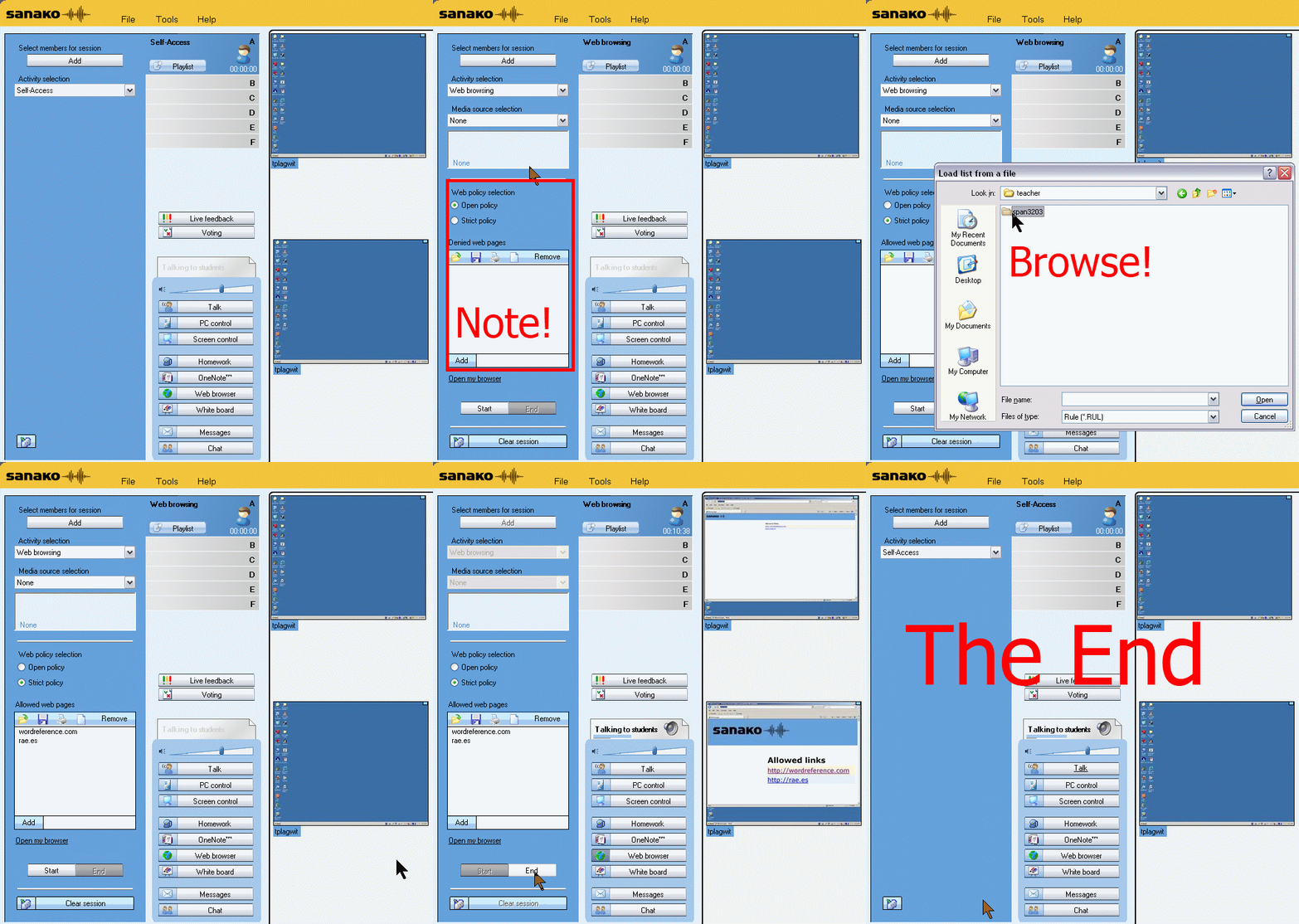
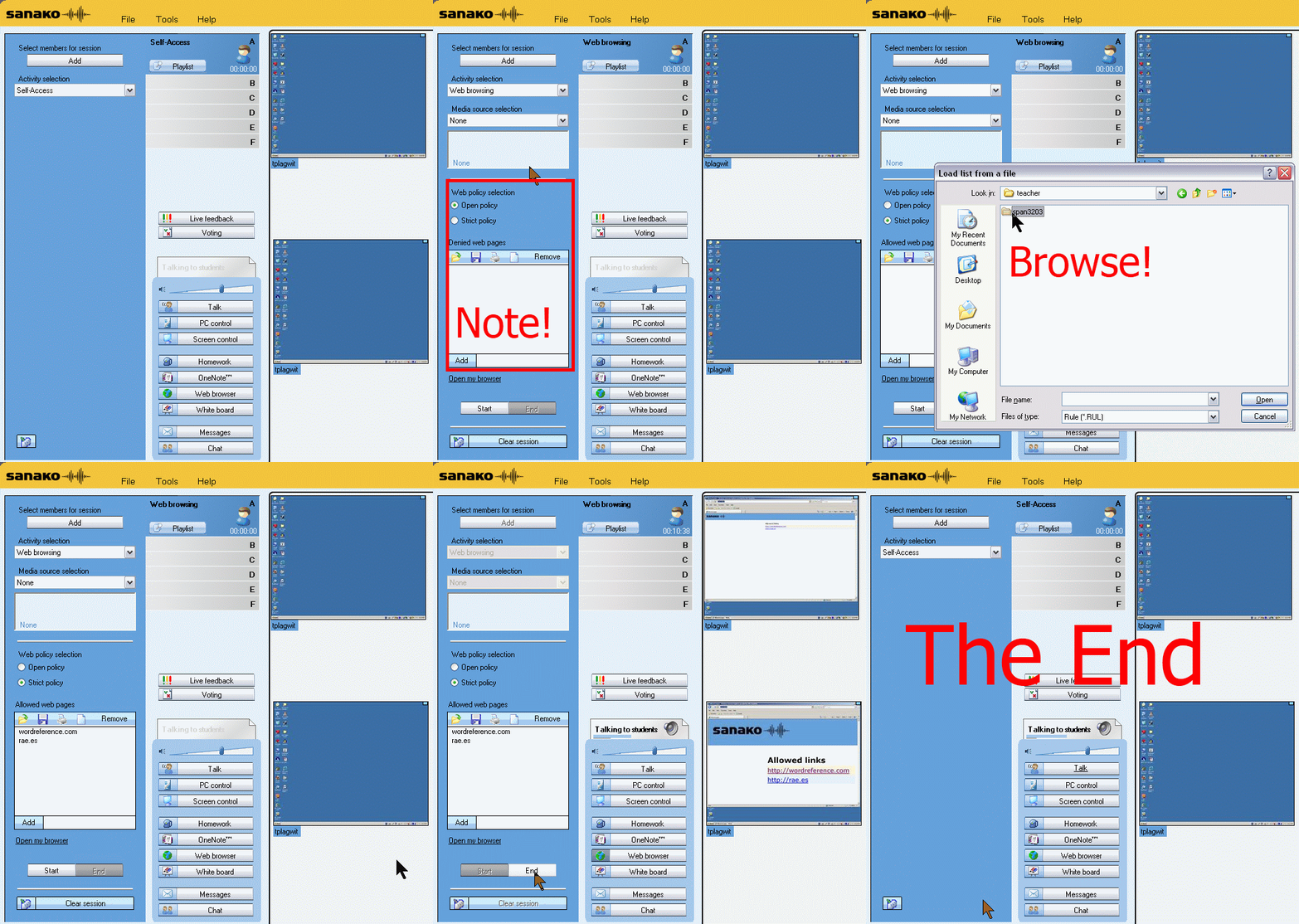
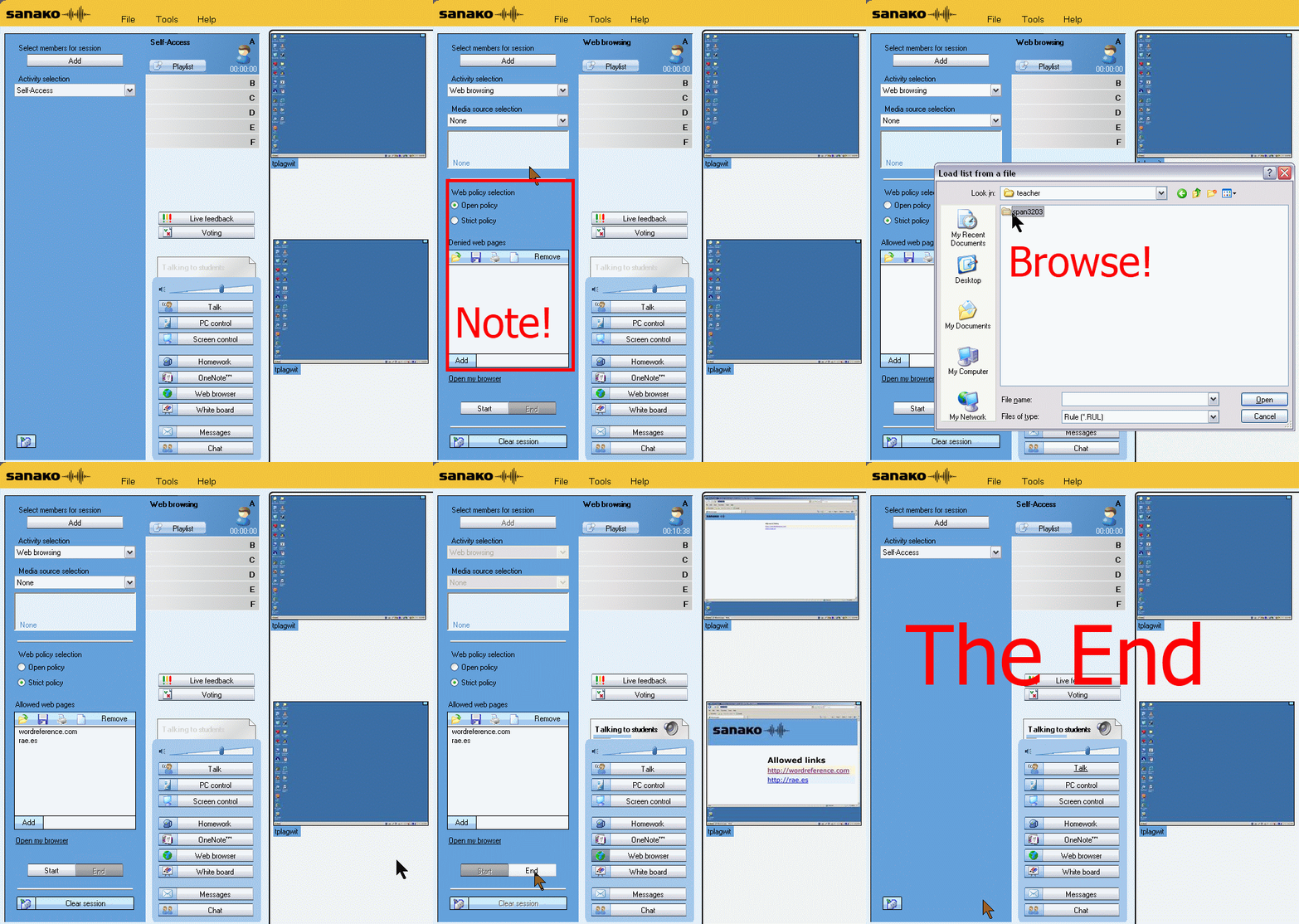
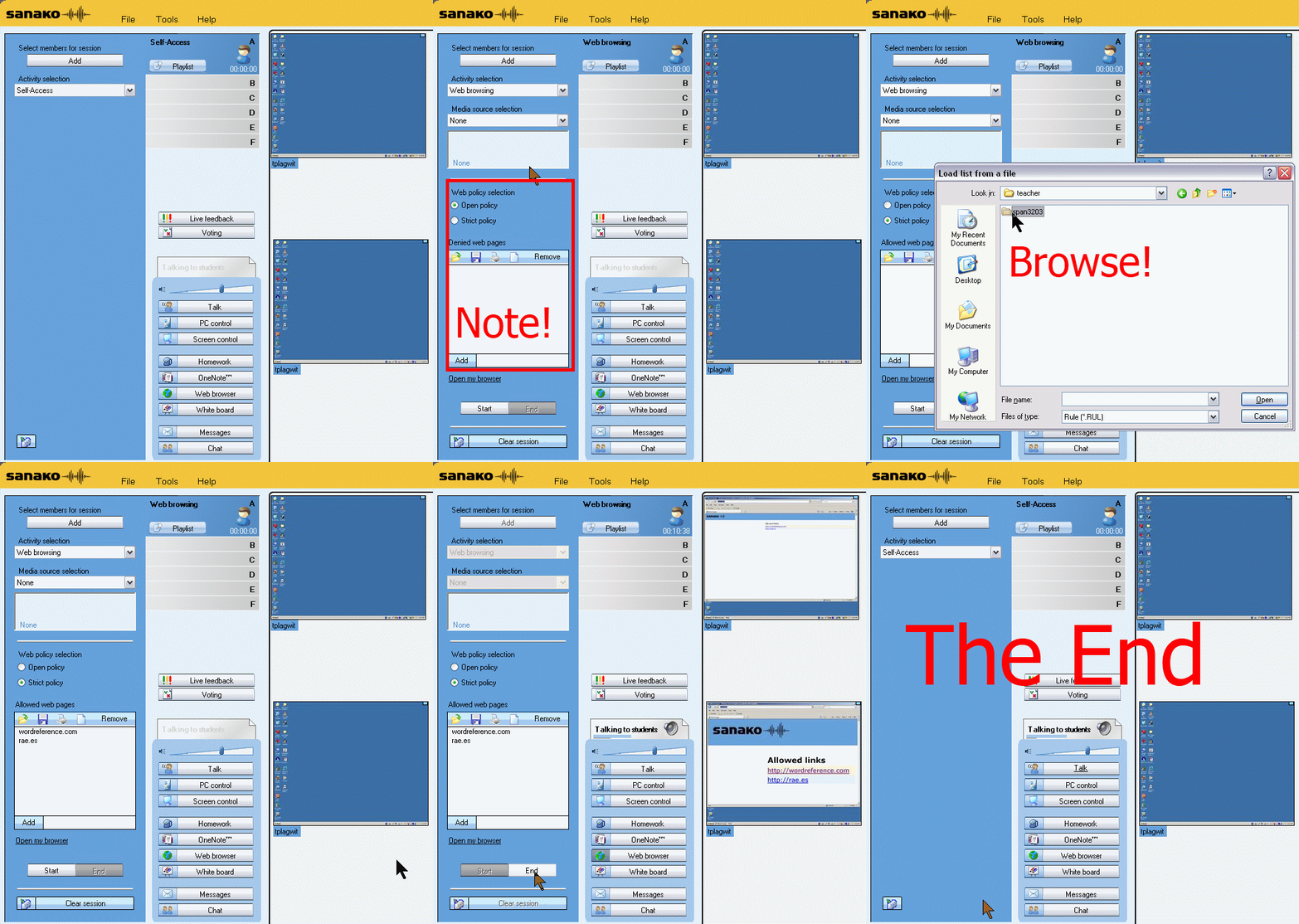
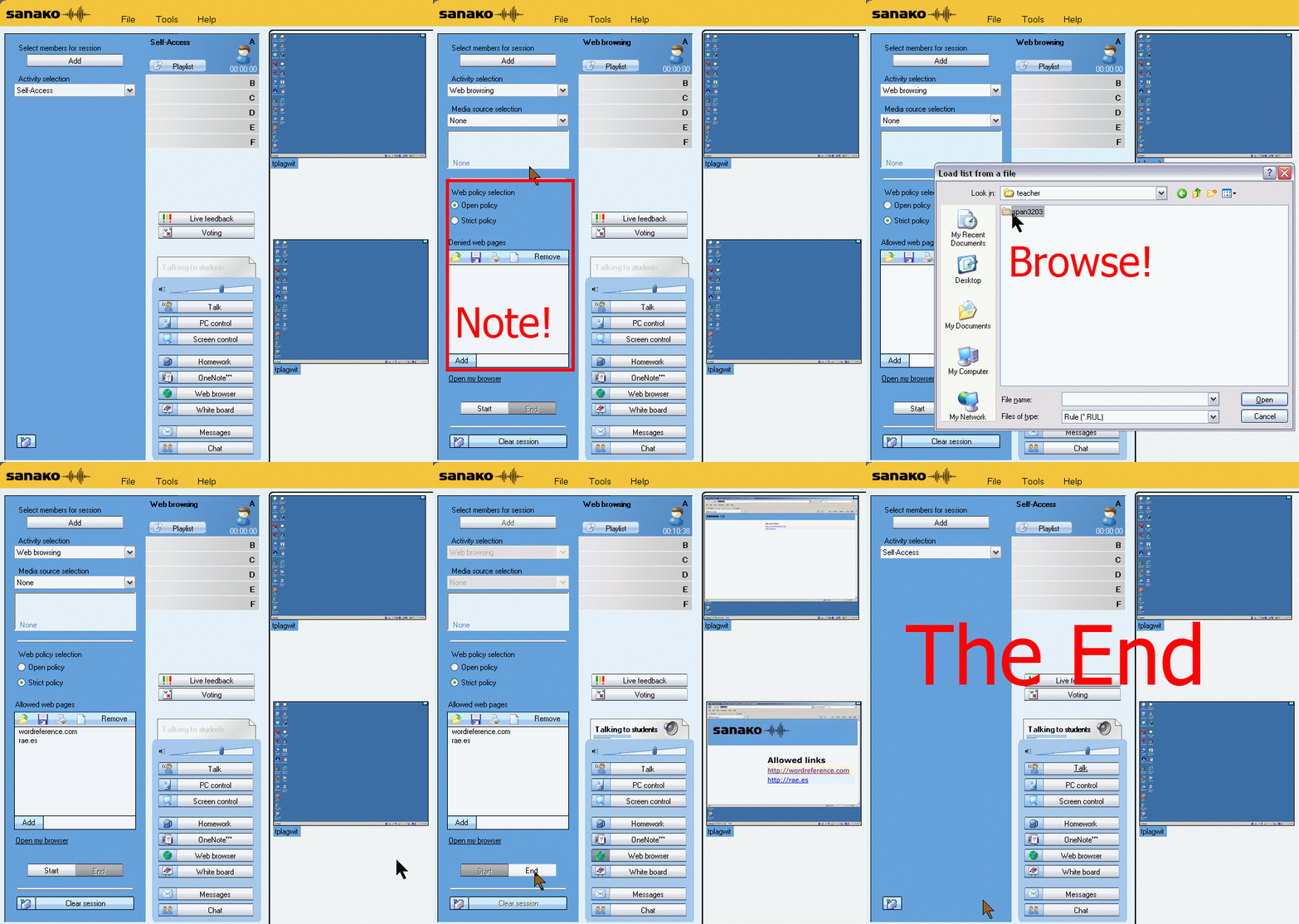
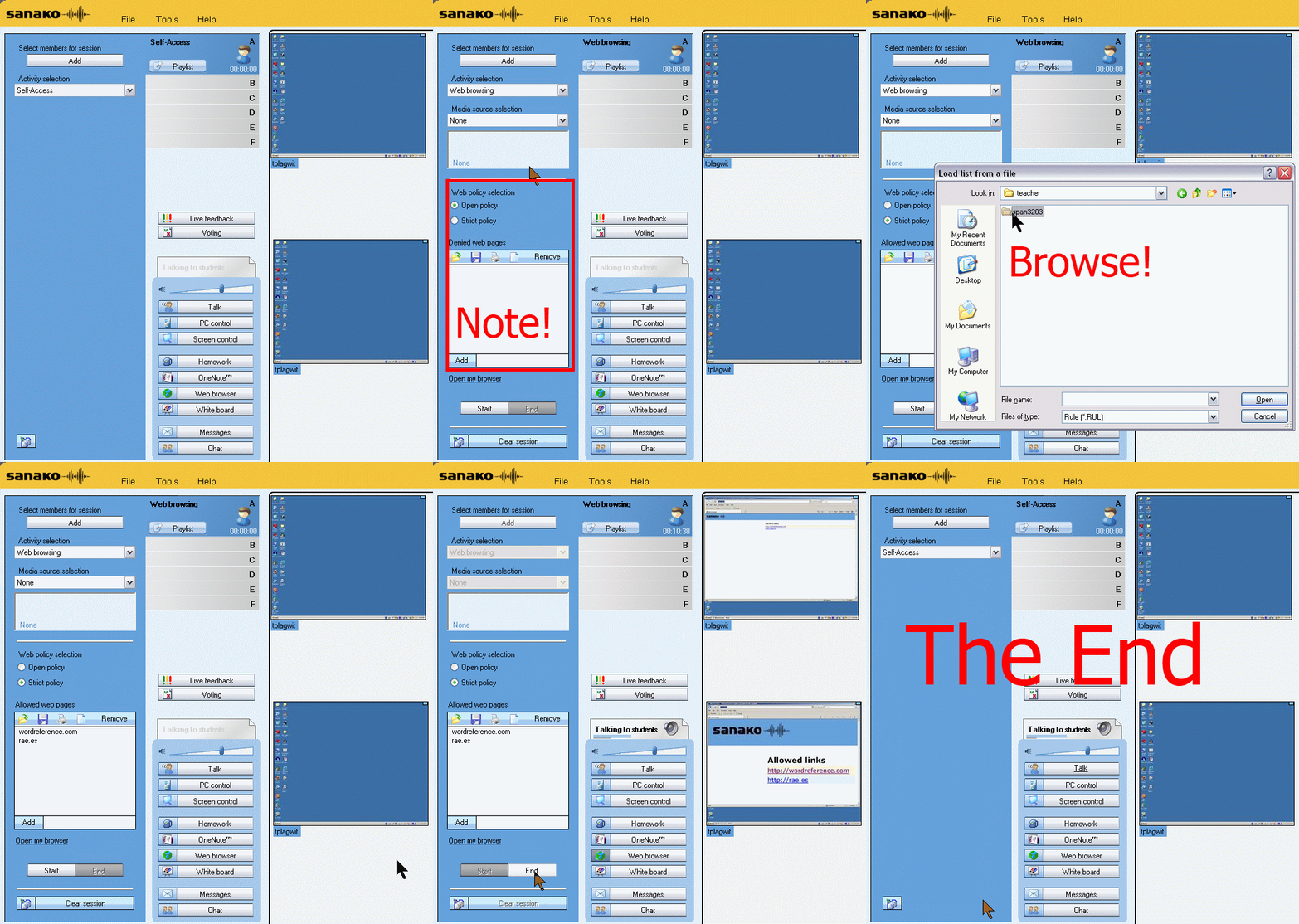
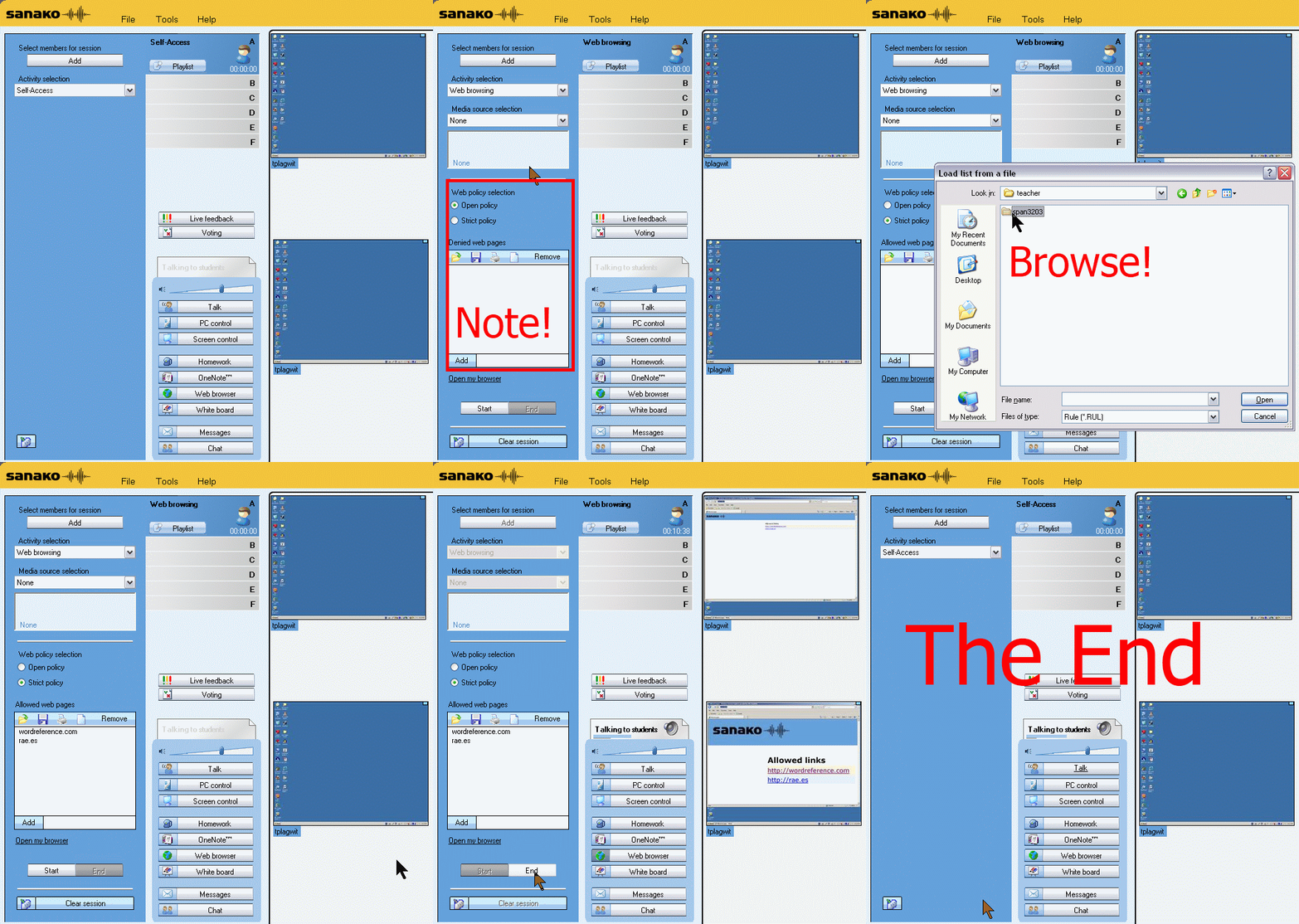
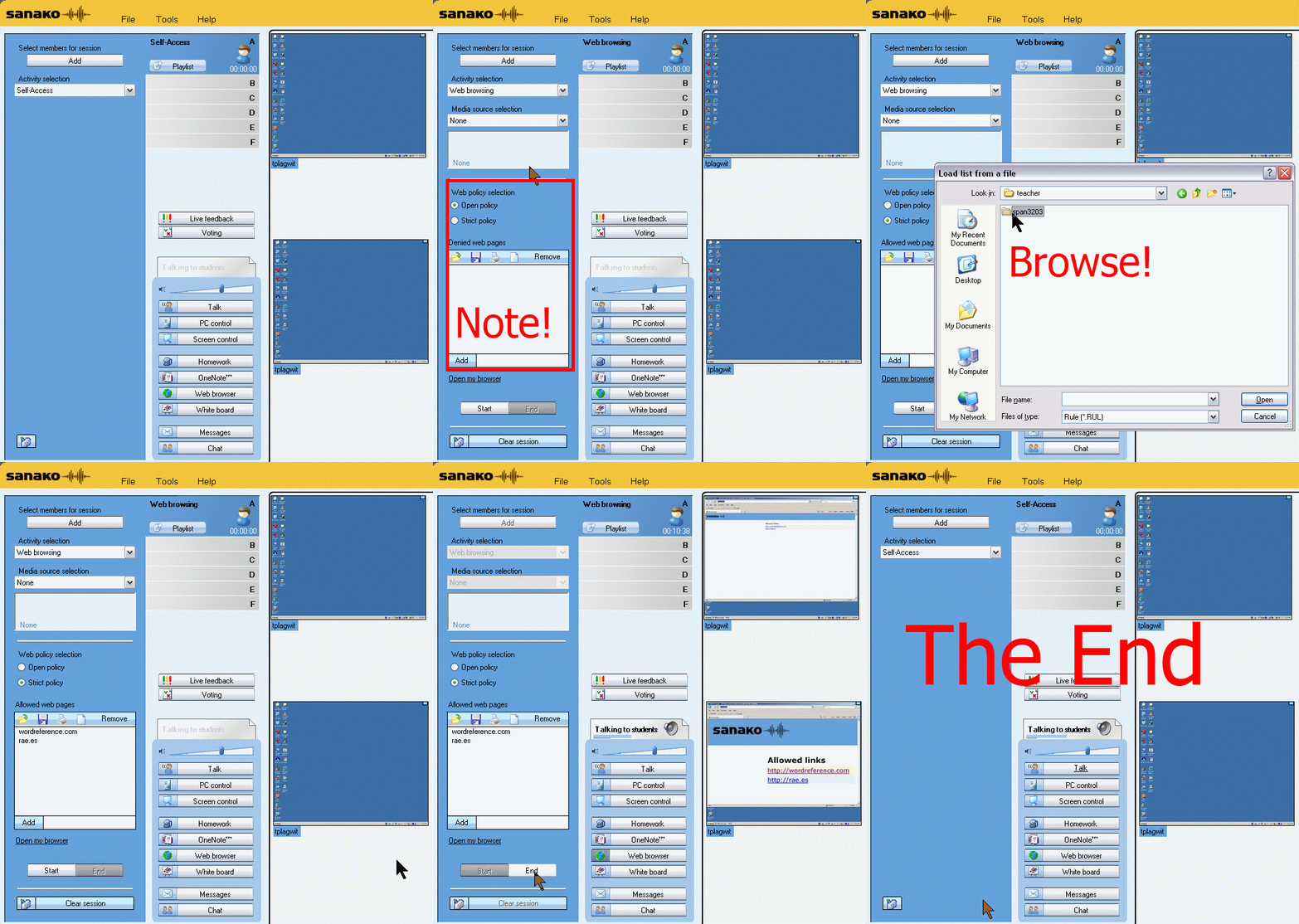
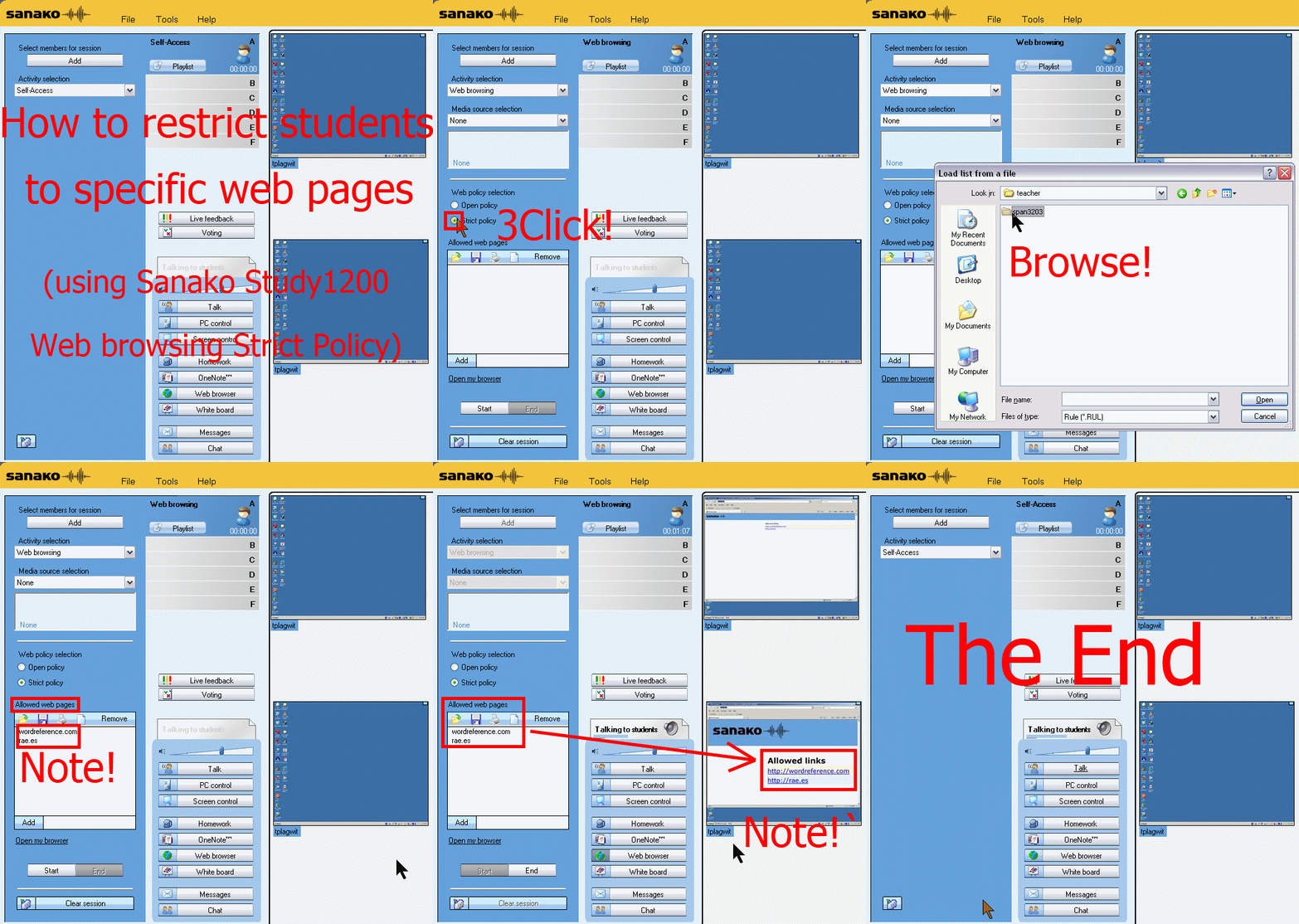
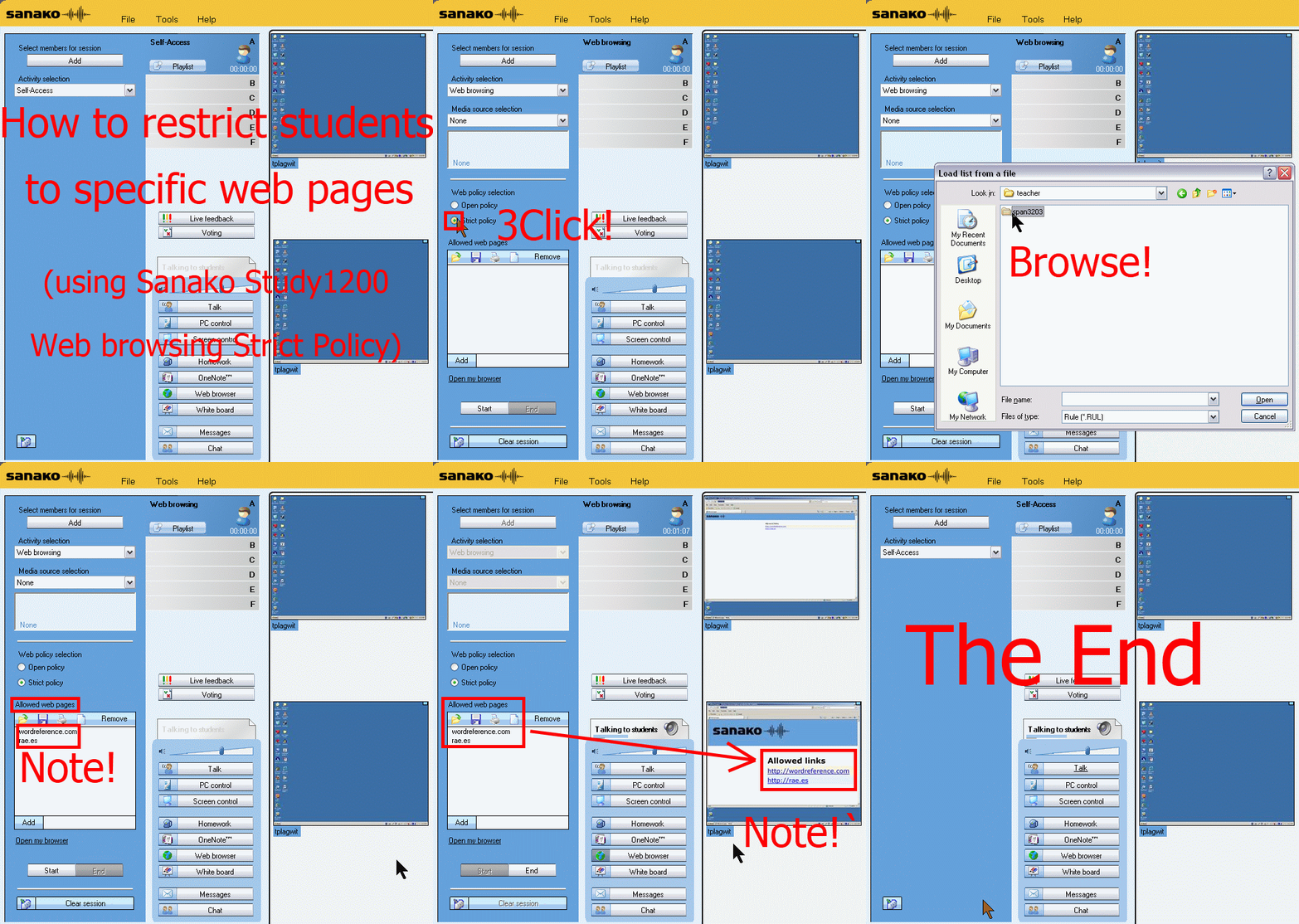
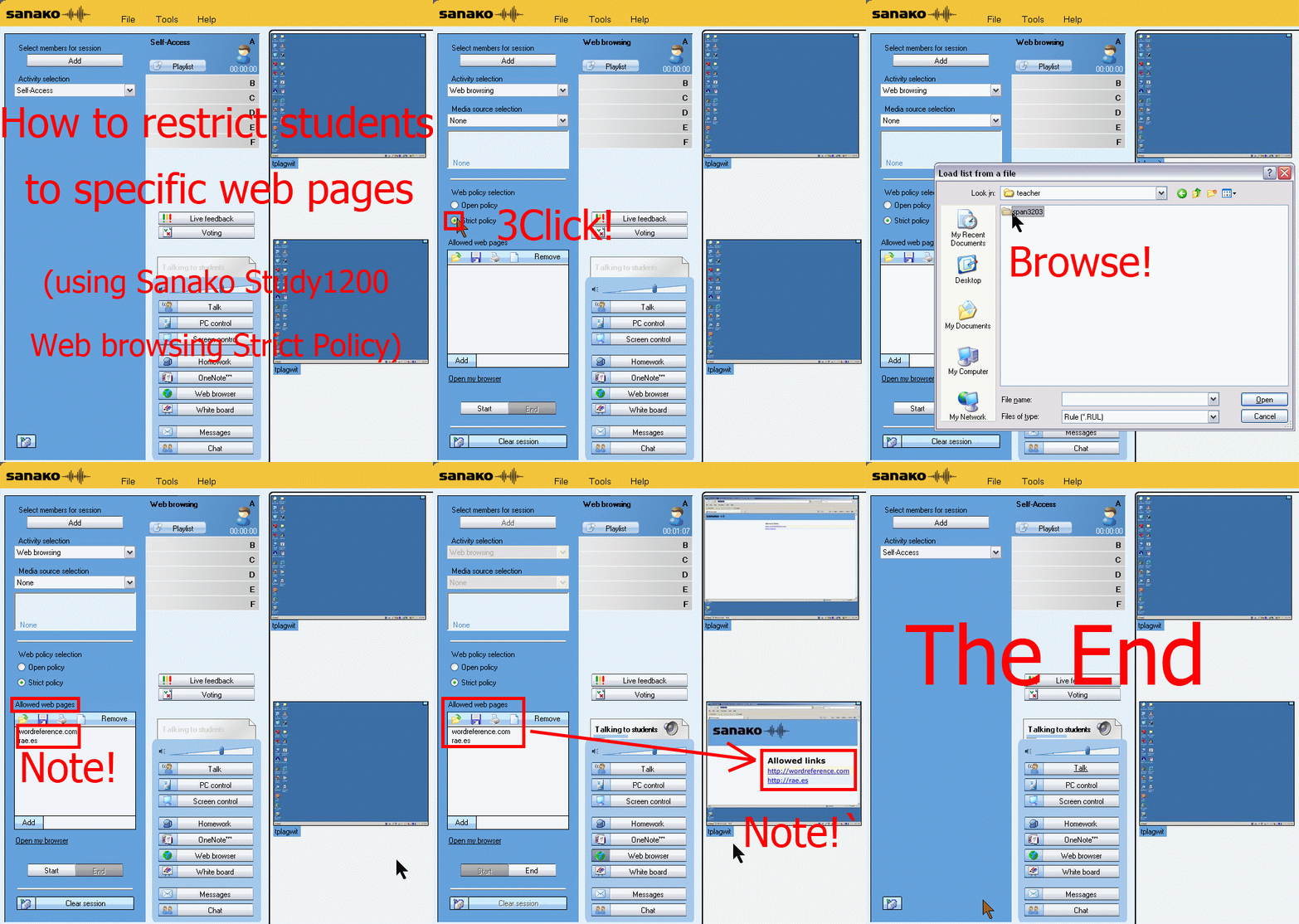
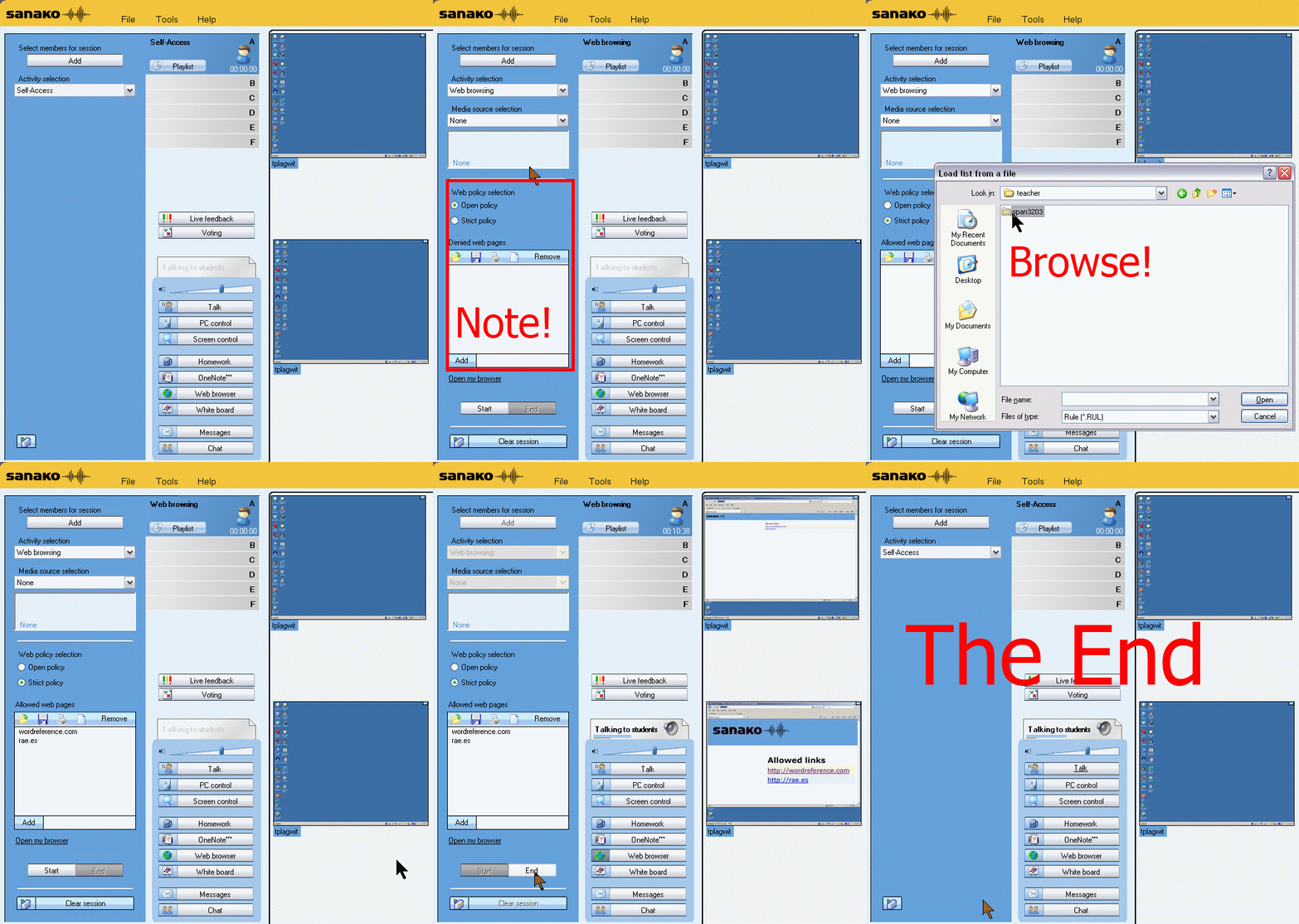
How teachers restrict students to allowed web pages with Sanako Study 1200 web browsing (strict) activity–the ultimate training summary
…using animated GIFs. Load the speed of your choosing (or several, use CTRL-Click to open links in a new tab) into the left screen of the teacher station before administering an oral exam, with the window active, press F5 in your web browser to restart the animation from the beginning:0.50sec,0.75sec,1sec,2sec,3sec,4sec,5sec,6sec,7sec,8sec,9sec,10sec
 .
.
Condensed (instructions only) for recap: 100cs, 200cs, 300cs, 400cs, 500cs, 600cs, 700cs, 800cs, 900cs, 1000cs. And if you need to pause:


Sanako Study 1200 StudentRecorder.exe install in the LRC
Here is the screencast recording I made during local installation:  . It includes the install option “static classroom” and (near the end) our classroom name.
Animated GIFs workflow using MS-OneNote, MS-Paint, Irfanview and UnFREEZ
- To keep things simple (and, at least in our work environment, free) during smaller Animated GIF projects (larger projects may warrant use of ImageMagick, scriptable image editor), you can use
- MS-OneNote screen clipping (configured right, it seems the fastest way to collect source material)
- Update: I recommend now screenshotcaptor instead, if you do screenshot projects more than occasionally. MS-Paint (or pretty much any image editor) to mark up your images
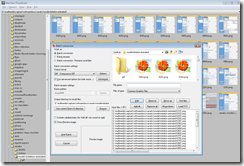
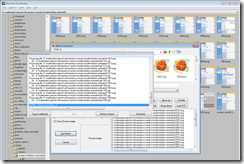
- IrfanView to batch convert to GIF:

- UnFreez to easily create animated GIFs in differing speeds:

 , which can be automated.


More ways of making minor changes to a domain-joined, deepfrozen computer lab image
- Re-imaging a domain-joined, deep-frozen Windows XP language lab using Symantec Ghost and Deepfreeze can be a drawn-out process.
- Minor fixes can be achieved by unfreezing and using a Symantec-Ghost file task and a script that loads the default user registry hive – here is how:
-
sTempHive = """HKEY_USERS\Test"""
'//vista and up: sDefaultUserHive = """%USERPROFILE%\..\Default\NTUSER.DAT"""sDefaultUserHive = """%USERPROFILE%\..\Default User\NTUSER.DAT"""
sSName = oUtility.ScriptName
set oShell = WScript.CreateObject ("Wscript.Shell")
- and alters it before freezing the lab again. Here are some examples of such fixes:
- change the default keyboard (after users logs in):
oLogging.CreateEntry sSName & ": Setting US-International as Default Keyboard Layout",LogTypeInfoRegPath = "HKEY_USERS\Test\Keyboard Layout\Substitutes\"oshell.RegWrite Regpath & "00000409", "00020409", "REG_SZ"
If Err<>0 Then
oLogging.CreateEntry sSName & ": Failed to update Default Keyboard Layout setting",LogTypeErrorZTIProcess=60
Exit Function
End If
- change visibility of the developer tab in the ribbon of MS-Word:
oLogging.CreateEntry sSName & ": Setting MS-Word Developer Toolbar to show",LogTypeInfoRegPath = "HKEY_USERS\Test\Software\Microsoft\Office\14.0\Word\Options\"oshell.RegWrite Regpath & "DeveloperTools", "1", "REG_SZ"
If Err<>0 Then
oLogging.CreateEntry sSName & ": Failed to update S-word developer tools settings",LogTypeErrorZTIProcess=40
Exit Function
End If
- change the SDL-Trados licensing server IP:
oLogging.CreateEntry sSName & ": Setting Default User Trados license server",LogTypeInfoRegPath = "HKEY_USERS\Test\Software\Trados\Shared\Licence"oshell.RegWrite Regpath & "Licence_file", "27000@10.18.189.231", "REG_SZ"
If Err<>0 Then
oLogging.CreateEntry sSName & ": Failed to update Default User Trados license server setting",LogTypeErrorZTIProcess=35
Exit Function
End If
oLogging.CreateEntry sSName & ": Setting Default User Screensaver timeout settings",LogTypeInfoRegPath = "HKEY_LOCAL_MACHINE\SOFTWARE\FLEXlm License Manager"oshell.RegWrite Regpath & "Trados_License_File", "27000@10.18.189.231;27000@xlcs4sbynj1www", "REG_SZ"
If Err<>0 Then
oLogging.CreateEntry sSName & ": Failed to update Screensaver to timeout settings",LogTypeErrorZTIProcess=30
Exit Function
End If
- change the default keyboard (after users logs in):
- On Ghost:
- We create a Ghost file task that points to the wsf file with the current changes we want to implement:

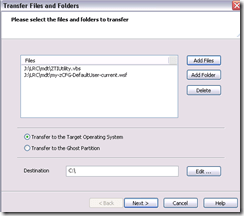
 To apply other changes, just change the filename of your script , e.g.:
- to apply to other computers, just change the target in the ghost task.
- Output:

- These scripts use the ZTIUtility.vbs from the MDT.
- You may have to update the location: <script language="VBScript" src="ZTIUtility.vbs"/>.
- For a while, the logging success made me believe I I had accessed the ntuser.dat and had run into registry permission settings loading it. In fact, I just did not resolve to the XP path of the ntuser.dat. Take advantage of the the logging facilities that come with MDT: Here are your logs on the client:
 .
. - Read the logs with TRACE32, part of the SMS 2003 Toolkit 2.
- Result: Provided the client has been cleanly frozen, and the domain user has no profile created before on this machine, and his profile is based on the altered default user profile, his HKCU will inherit the changes:





Example 7: Exercise dictating in German to an LRC Windows 7 computer
How can we get language students more speaking practice with qualified, but affordable feedback ? Native speaker contact remains difficult to organize even in the days of online conferencing. The LRC hosts language tutoring, but numbers are limited. Enter speech recognition, the holy grail of iCALL, much easier for learners to relate to than the voice graph that digital audio can be broken down to, and thus for a long time a standout feature of costly second-language-acquisition packages like Auralog Tell-me-More (speech recognition in English tested here) – but now the LRC has Windows 7 Enterprise (and its free add-on language packs), and another crucial prerequisite: headphones with excellent microphones.
We are setting up the new Windows 7 computers in the LRC to allow for speech recognition in Chinese, English, French, German, Japanese and Spanish. Here is an example of me using this facility for a practicing my German during a dictation exercise:
Granted, German is my native tongue; but the example text is from the online component for the final chapter of the “Treffpunkt Deutsch” 1st-year textbook in use here, which sends the readers to the website of the Swiss (-German) employment agency.
Apart from infrequent words ("Archiven") and Lehnwörtern ("Bachelor" etc.), Windows 7 speech recognition accuracy seems quite impressive. The above example was actually my first dictation, except that immediately beforehand, I invested a few minutes into the standard Windows 7 speech recognition training (aimed at training the user, although may behind the scenes teach the computer a few things about the speaker already also) and a few more minutes of voice training (this one is meant exclusively for the computer, but the user can also see it fail and why). The – rather simple trick to boost speech recognition results – certainly accessible to our students – seems to be to speak not only clearly, but also slowly, with short pauses between most words.
Speech recognition in these languages is a feature of the Windows 7 (Enterprise/Ultimate version) “language packs” that we installed and switched to – that is why the entire computer interface appears in German. Practicing the L2 with (computer—operating) “voice commands” (instead of with a mouse) is also possible, simpler than replacing the keyboard (mostly) by voice, but not as easy to devise homework exercises for.
Tips for designing exercises using speech recognition: As the example shows ("Archiven") , doing all corrections by voice can quickly become tedious. But there is no pedagogical need to have your students’ bang their heads against this wall. Instead, just ask your students to correct their automatically recognized words manually at the end of their video, after their dictation. This way both you and your students get a clear summary of what they achieved – even clearer if they dictate in MS-Word with the spell and grammar check for the language (automatic with the switch to the language pack for the language) and (using key combination CTRL+SHIFT+E) track changes. We will show you later TBA:how we now enable students to easily record their screen and TBA:upload their screencast into Moodle Kaltura.
Mac Mini (Mid 2010) Overview
Just trying to make the basic troubleshooting information more accessible from the field:

 Taken from: http://manuals.info.apple.com/en_US/Mac_mini_Mid2010_User_Guide.pdf


Questions? Read the About. Or just ask me a quick Our Databases: Resources with calendars -- Language learning material Moodle Sites, multimedia files -- films


FAQs for LRC student staff or for students or for teachers. To search our FAQs, in the browser addressbar, add after "https://plagwitz.wordpress.com/feed/?tag=faqs+/" "+TAG1" (from tag cloud below) OR "https://plagwitz.wordpress.com/feed/tag=faqs
&category_name=" "CAT1" (from category hierarchy below). OR search both categories and tags, and multiple TAGs/CATs (connect with "," for OR-search, with "+" for AND-search), like so: https://plagwitz.wordpress.com/feed/?tag=TAG1+TAG2+...TAGn&category_name=CAT1
+CAT2+...CATn"
Other ways to find help
If you cannot find it here, look there: 5,500 Language-Learning Links and Programs for learning or teaching 150 languages
Shortcuts:Our Lists, Our Maps, LRC Staff Moodle Site,LRC Project Moodle Site, 49erexpress, UNCC Moodle, Student Recordings: s:claslcslrcsanakostudent
Learning usage samples: Sanako oral exam, Kaltura webcam presentation, Dictation with speech recognition, Sanako written exam, Chinese and Japanese interactive stroke-order practice
Test the Sanako Installer, Webbrowser Popup Konfigurator for XP, or Windows7, faster LRC TeacherPC Log-in Let MS facilitate diacritics writing by installing for you US-International keyboard layout
This is my personal blog (Google+). The views expressed on these pages are mine alone and not those of my employer. The information in this weblog is provided “AS IS” with no warranties, and confers no rights.
 Thomas' Work Space