Archive
How to validate an ISBN checksum with an MS-Excel formula

(Sorry, no Excel option in the sourcecode formatter on WordPress)
Varying the speed of animated GIFs for learners – the technology: Shell-scripting ImageMagick
Animated GIFs for visualizing teaching content were the first e-learning tool that I heard a conference presentation on, in the early nineties.
In the recent past, I have been trying to revive animated GIFs for use in minimalistic training materials.
Now, for different learner personalities, and also to accompany each learner in their practice of Chinese character stroke order, as they get more proficient in drawing, I wanted to provide varied animation speeds of the Chinese characters drawings.
This bash script can do this, using a downloaded set with several hundred source characters in one animation speed to produce 75000 animated GIF (via 95000 temporary) files:
#!/bin/sh

shopt -s nocasematch # shopt -s sets the option, whereas shopt -u disables it.; however, Find is an external command and not affected by shopt

echo `date -u`

# todo: parameterize

# -maindir todo: convert param to $maindir

blnskipcreated=1 # 1=do not recreate anims if _mydelaylimit exists

echo "blnskipcreated:" $blnskipcreated

mydelaystep=10

mydelaylimit=1010


# test: what happens if i add zi to maindir

maindir="/cygdrive/G/myfiles/doc/work/students/ms-office/charinput/mandarin_chinese/stroke-order/Zi/Animated-characters/azi"

# todo: the rootdir is unimportant, it contains only a shortcut which points to nothing

rootdir="/cygdrive/G/myfiles/doc/work/students/ms-office/charinput/mandarin_chinese/stroke-order/Zi/Animated-characters"

framefilefilepath=${rootdir}/azi/page1.htm # the actual framefile which loads the azi.html and the character is G:\myfiles\doc\work\students\ms-office\charinput\mandarin_chinese\stroke-order\Zi\Animated characters\azi\page1.htm

# wrong  ${rootdir}/animated-characters.htm

framefilefileextension="htm"

framefilenamenopath="`expr "//$framefilefilepath" : '.*/\([^/]*\)'`"           # remove path to file

framefilenamenoextension="`expr "$framefilenamenopath" : '\(.*\)\.[^.]*$'`"        # remove last suffix ${i}

framefilefilepathnoextension=${rootdir}/${framefilenamenoextension}

echo "DOLLAR 1framefilefilepath, 2framefilefilepathnoextension, 3framefilenamenopath 4framefilenamenoextension:"1${framefilefilepath}:2${framefilefilepathnoextension}:3${framefilenamenopath}:4${framefilenamenoextension}:

# todo DOLLAR framefilefilepathnoextension, framefilenamenopath framefilenamenoextension:


cd $maindir

if [ -d  "$maindir" ] ; then # needs "" around vriable, space before ]

echo "Good!"

else

echo "not a dir"

exit 1

fi


sourcehtmlfilename="azi" # todo: how to i need to reference (enclose) the variables so that can the maindir and sourcehtmlfilename can contain spaces

# todo: document: "give the string one has to add to the maindir to get to the html file that links to the gifs": complication: animated-characters is just al link to azi/azi.htm`- so why not change the maindir to include azi-subdir

sourcehtmlfileextension="htm"

sourcehtmlfilepathnoextension=${maindir}/${sourcehtmlfilename}

sourcehtmlfilepath=${sourcehtmlfilepathnoextension}.${sourcehtmlfileextension}

echo "dollar sourcehtmlfilepath =" $sourcehtmlfilepath # debug

# exit 0 # debug

if [ -e  "$sourcehtmlfilepath" ] ; then # needs "" around vriable, space before ]

echo "Html File good!"

sourcehtmlfileswitch=1

else

echo "$sourcehtmlfilepath not an html file"

# no need, leave the html alone then, but set a switch exit 1

sourcehtmlfileswitch=0

fi

mfiles=`find $maindir  -iname '*.gif'` # Simply enclosing the wildcard in single quotes makes it work! unix find is case-sensitiv

# todo: if you want to be able to resume gif creation, you have to remove (previously created) files that match pattern _[0-9]+.gif

# shopt -s extglob - does this work with find or only ls

# shopt -s extglob

# mfiles=`find $maindir  -name '*!(_[0-9]+).gif'`

# shopt -u extglob

# Find is an external command, so its globbing isn't affected by bash shopt options, but you can use: find . ! -name 's.*.java'

# mfiles=`find $maindir  -name '*!(_[0-9]+).gif'`

# i will include the full path

# done: skip some, not all gifs are animated, e.g. G:\myfiles\doc\work\students\ms-office\charinput\mandarin_chinese\stroke-order\Zi\Animated-characters\azi\18b.gif

k=0 #debug:break

# echo "mfiles:$mfiles"

for i in $mfiles ; do

if [[ $i =~ _([0-9]+|strip).gif ]]; then

echo "skipping previously produced file $i"

else

echo "Converting {$i}..." # this prints 1 line extra per space  in dir - may cause problems with i down the road?

curdelay=0

delaystep=$mydelaystep # cs

delaylimit=$mydelaylimit # cs

filepath=$i

filenamenopath="`expr "//$i" : '.*/\([^/]*\)'`"           # remove path to file

filenamenoextension="`expr "$filenamenopath" : '\(.*\)\.[^.]*$'`"        # remove last suffix ${i}

filepathnoextension=${maindir}/${filenamenoextension}  # test: w/o azi ${maindir}/azi/${filenamenoextension} # todo: stupid workaround, but i supsect i cannot just add /azi to maindir

echo "DOLLAR 1filepathnoextension,2filenamenopath,3filenamenoextension:"1${filepathnoextension}:2${filenamenopath}:3${filenamenoextension}:

#  suffix="`expr "$name" : '.*\.\([^./]*\)$'`"     # extract last suffix

#  name="`expr "$name" : '\(.*\)\.[^.]*$'`"        # remove last suffix


############################################################################################### BREAK APART

# path2name

# as a animation disassembler, producing a summary of animation in terms of IM options

# gif2anim [options] image_anim.gif.

#. gif2anim.sh -s MIFF -b $i  -o ${i}.anim $i

# the s-switch of gif2anim.sh   never worked, can i do without it ? ainim2gif.convert will complain: unable to open idid0_20.gif_001.-s

# -s seems to result in ext -s, miff seems to result in all params fro mmiff on being interpreted as filenames

#. gif2anim.sh  -o ${i}.anim $i

framesfileext="xpm" # change this to give if you not use -x - CASESENSITIVE

. gif2anim.sh  -x -o ${filenamenoextension}.anim $filepath

#. gif2anim.sh -s MIFF -b $i  -o ${i}.anim $i

#. gif2anim.sh MIFF -b $i  -o ${i}.anim $i

#      -c             coalesce animation before parsing

#      -t             Add time synchronization comment before each frame

#      -l             just list the anim file to stdout, no images

#      -v             Be verbose in animation conversions

#      -n             no images, just create the '.anim' file

#1      -g             use an GIF suffix for frame images (default)

#      -x             use an XPM suffix for frame images

#todo: did this work? b0aej.gif_001.-s 1 MIFF      -s suffix      use this suffix for the frame images

#      -i initframe   number of the first frame image (def=1)

#needed?      -b framename   basename for the individual frames

# 1     -o file.anim   output to this .anim file (- for stdout)

#


# grep 'delay ' ${i}.anim # check return 0exit good, 1exit bad - You can see what a commands exit status is by looking at the variable $?.

# might be safer

grep 'delay ' ${filenamenoextension}.anim

if [ $? == 1 ]; then # is no animated gif, skip

echo "NO ANIM GIF grep finds no delay in: " ${i}.anim

# do nothing: # done: if there is no delay in the gif.anim, do not enter while for curdelay, go to next file

else # is animated gif, curdelay

echo "since delay is matched for this gif, ENTERING curdelay WHILE"

while [ $curdelay -lt  $delaylimit ] ; do  # go in step 20cs from 20s = tile, to 40cs - default is 80cs\

echo "CURDELAY : " $curdelay

if [ $curdelay == 0 ]; then # branch into strip producing programm

############################################################################################## MAKE A STRIP

# The "gif_anim_montage" script also the special option '-u' which will also underlay a semi-transparent copy of the coalesced animation.

# interface: if you just output to samename.gif, you can leave the original links intact

# advantage: synchronous overview:

# disadvantage: viewing even more, and pseudo-signs

# gif_anim_montage [options] animation.gif  [output_image]

# done: query how many frame files into a variable and use this as param 1x${frames} of call to gif_anim_montage.sh

if [ -e ${filepathnoextension}_strip.gif ] ; then

echo "skipping found ${filepathnoextension}_strip.gif"

else

striplength=$(ls ${filenamenoextension}.${framesfileext} 2> /dev/null | wc -l) # count matching files, errors redirected

echo "found ${striplength} of frames framesfileext with ${framesfileext}, calling montage 1x${striplength} -u -w ${filepath}  ${filepathnoextension}_strip.gif"

if [ "striplength" != "0" ] ; then

. gif_anim_montage.sh 1x${striplength} -u -w -n ${filepath}  ${filepathnoextension}_strip.gif

#1    -u          Underlay a dimmed coaleased image (context for frame)

#0    -c          Add checkerboard background for transparent areas

#0    -g          Use granite for background

#1    -w          Use a white background

#0    -b          Use a black background

#0    -t image    Use this image (or color image) for background

#0    -r          Use a red border color rather than black

#0 todo: not USE DEFAULT, need column    #x#         tile the images   (default one single row)

#0    -n          Don't label the animation frames (not important)

else

echo "NO STRIP MADE!"

fi

fi # strip file already exists?

else # $curdelay > 0 -> branch into gif producing program

# first you need to stream edit the .anim textfile for each iteration match "-delay 80"/"-delay curdelay"

# echo "CALLING sed $curdelay ${i}.anim  ${filepathnoextension}_${curdelay}.gif.anim" # debug

# sed 's/-delay 80/-delay '$curdelay'/g' ${i}.anim > ${filepathnoextension}_${curdelay}.gif.anim # todo: break delay loop if no match in gif.anim = no animated gif

echo "1:what is i now ${i}  and filepathnoextension.anim is: ${filepathnoextension}.anim"

echo "CALLING sed $curdelay in: ${filepathnoextension}.anim out: ${filepathnoextension}_${curdelay}.anim" # debug

sed 's/\-delay\s.*/-delay '$curdelay'/g' ${filepathnoextension}.anim > ${filepathnoextension}_${curdelay}.anim # todo: break delay loop if no match in

# first stream edit the .anim textfile for each iteration match

# redirection: file is UNCHANGED the modified file is file.bak

# watch variable expansion '/'$license'/p' README.txt

# skip timeconsuming recreate

if [ $blnskipcreated == 1 ] ; then  # if not needed (assuming generated files are correct - todo:parameterize!)

if [ -e ${filepathnoextension}_${mydelaylimit}.gif ] ; then

echo "skipping recreating gifs for ${filepathnoextension}_${mydelaylimit}.gif and below "

else

echo "NOT skipping recreating gifs for ${filepathnoextension}_${mydelaylimit}.gif and below "

############################################################################################### PUT TOGETHER AGAIN - w different delay AS PARAM -cs centiseconds

# read in prior output file .anim

# anim2gif [-b BASENAME] file.anim...

# anim2gif: Failed to convert "/cygdrive/G/myfiles/doc/work/students/ms-office/charinput/mandarin_chinese/stroke-order/Zi/Animated-characters/azi/b0b2_400.gif.anim" into "B0B2_400.GIF.GIF"

echo "CALLING CP  ${filepathnoextension}_${curdelay}.anim ${filepathnoextension}.anim"

cp  ${filepathnoextension}_${curdelay}.anim ${filepathnoextension}.anim #

# now try to call the ${filepathnoextension}.gif w/o${curdelay} to not muddy the output file name

echo "CALLING anim2gif.sh -g ${filepathnoextension}.gif" # debug  exists: idid0.gif.anim - do we have curdelay?

. anim2gif.sh  -g ${filepathnoextension}.anim # determine: we overwrite the ori gif here, does it matter? -> final cleanup

echo "CALLING mv4 ${filepathnoextension}.gif  ${filepathnoextension}_${curdelay}.gif" # debug

mv  ${filepathnoextension}.gif ${filepathnoextension}_${curdelay}.gif

# OPTIONS

#is this needed? not taken from the .anim  ?  -b framename   basename for the individual frames

# 1   -g             Add '.gif' to end of basename, not '_anim.gif'

# we rather want to overwrite the original gif: The "anim2gif" by default will re-create the GIF animation with a "_anim.gif" suffix.

#    -c             Input frames are coalesced, ignore any initial page size

# todo: since there is only one "animated characters.htm", one could append the _curdelay to all the output.gifs

# todo: and once per all gif files within one curdelay iteration, to the occurence of .gif within  "animated characters.htm" and to the filename "animated characters_curdelay.htm"

fi # _mydelaysteplimit.gif already exists, can skip?

fi # blnskipcreated, allowed to skip?

fi # is $curdelay > 0 -> s or gif producing?

echo " before exec:" $curdelay "delaystep:" $delaystep

curdelay=$(( $curdelay + $delaystep )) # 0=20 command not found, does not work here: `expr $curdelay + $delaystep` # increment for next iteration #todo: command not found

# k=$(( $k + 1 ))

echo " afterexec:" $curdelay

if [ $sourcehtmlfileswitch == 1 ] ; then #################### update the azi-html that points to the _curdelay.gif

if [ -e ${sourcehtmlfilepathnoextension}_${curdelay}.${sourcehtmlfileextension} ] ; then # only once per pseudo $curdelay=0=strip

echo "file ${sourcehtmlfilepathnoextension}_${curdelay}.${sourcehtmlfileextension} already exists, nothing to do "

else

# todo: is das cp nicht überflüssig before sed

cp ${sourcehtmlfilepath} ${sourcehtmlfilepathnoextension}_${curdelay}.${sourcehtmlfileextension} # create file

echo "dollar sourcehtmlfilepath =" $sourcehtmlfilepath # debug

sed -e 's/\.gif/_'${curdelay}'\.gif/gI'  $sourcehtmlfilepath > ${sourcehtmlfilepathnoextension}_${curdelay}.${sourcehtmlfileextension} # update gif links in html file to reflect curdelay

fi # if sourcehtmlfilename_curdelay already exists


#################### update the frames-html that points to azi.html

if [ -e ${framefilefilepathnoextension}_${curdelay}.${framefilefileextension} ] ; then # only once per pseudo $curdelay=0=strip

echo "framefile already exists, nothing to do "

else

# todo: is das cp nicht überflüssig before sed

echo "CALLING CP ${framefilefilepath} ${framefilefilepathnoextension}_${curdelay}.${framefilefileextension}"

cp ${framefilefilepath} ${framefilefilepathnoextension}_${curdelay}.${framefilefileextension} # create file

echo "dollar framefilefilepath =" $framefilefilepath # debug

# todo: magic string

sed -e 's/azi.htm/azi_'${curdelay}'\.htm/gI'  $framefilefilepath > ${framefilefilepathnoextension}_${curdelay}.${framefilefileextension} # update gif links in html file to reflect curdelay

fi # if framefilefilename_curdelay already exists

fi # if $sourcehtmlfileswitch=1

# does break jump across below

# obsolete echo " NOBREAK ${i}.anim $curdelay "

done # all curdelay steps to limit

echo " could be BREAK ${i}.anim $curdelay "

# does break go here?

echo " before exec $k:" $k

k=$(( $k + 1 )) # `expr $k + 1` #debug: test only

echo " after exec $k:" $k


if [ $k -gt 6 ] ; then # increased to 2 since 1 is skipped then # the "if [ ... ]" and the "then" commands must be on different lines. Alternatively, the semicolon ";" can separate the

echo "let it run freely , or uncomment the next line"

# exit 0

fi  # debug

fi # is animated gif?


# final cleanup todo: only if the ori gif and ori htmlsource do not get deleted

if [ -e ${filepathnoextension}_${curdelay}.gif ] ; then # this errors now for undeleted non-animated gifs (break)

# todo: ${i} something wrgon is in ${i}

# echo "5: what is in ${i} now"?

rm ${filepathnoextension}.gif # the ori gif name, whatever is not in there is also in ${i}_${curdelay}.gif

fi

fi #skipping previously produced?

done     # all gif files

# final cleanup delete the compromised ori gif and ori htmlsource

# debug this causes to many probs rm $sourcehtmlfilepath  # the ori html name, whatever is not in there is also in ${sourcehtmlfilename}_${curdelay}.${sourcehtmlfileextension}

echo 'animated gif conversion complete!'

# todo: azi.htm is the file to be made into azi_10...1010.htm, ot animated characters

# todo:b1caf_strip.gif wont displaty inphotoviewer, strip gets way too long with empty spots at end

# -> redo only the strips and

# deleate all (after variable creation and loopstarting) and (before grep 'delay ' ${filenamenoextension}.anim)

# delete all after echo "NO STRIP MADE!" except fi and loop closing

# todo:labelling of strips - can one also label the animated gifs

#todo: der erste rame sollte nicht blank sein, sonst kann erst lange gar nichts sichtbar sein

#todo: found 0 of frames, calling montage 1x0 -u -w /cygdrive/G/myfiles/doc/work/students/ms-office/charinput/mandarin_chinese/stroke-order/Zi/Animated-characters/azi/a1f5.gif/cygdrive/G/myfiles/doc/work/students/ms-office/charinput/mandarin_chinese/stroke-order/Zi/Animated-characters/azi/a1f5_strip.gif

# afterexec:10

#dollar sourcehtmlfilepath = /cygdrive/G/myfiles/doc/work/students/ms-office/charinput/mandarin_chinese/stroke-order/Zi/Animated-characters/azi/azi.htm

#CALLING CP  _10.htm

# cp: missing destination file operand after `_10.htm'

#/cygdrive/g/conf/lang/bat/imagemagick/animated-gifs-slow-down.sh: line 26: /cygdrive\

#G\myfiles\doc\work\students\ms-office\charinput\mandarin_chinese\stroke-order\Zi\Animated-characters\animated-characters.htm: No such file or directory

#G:\myfiles\doc\work\students\ms-office\charinput\mandarin_chinese\stroke-order\Zi\Animated-characters\animated-characters.htm
One day, I hope to generalize this script for adapting other animated GIF collections from the Web, e.g . parameterizing it. For now, it can run out of the box on the Chinese website if you setup the necessary environment.
I am running this from mintty using Cygwin’s ImageMagick, to avoid having to port the great shell ImageMagick scripts gif2anim.sh, anim2gif.sh and gif_anim_montage.sh by Anthony Thyssen which you need to put in the same directory as my animated-gifs-slow-down-pub.sh
And if you change the rootdir and maindir to point to the disk location where you downloaded the website package.
Call the script with “animated-gifs-slow-down.sh &>slowing.log” to log the chatty debug information.
If you use it and/or adapt it to process other websites that use animated GIFs, kindly link back.
Hint: When done, be careful when moving such a large set of files. InfoZip’s zip utility ate the last 10000 of my gif files, without warning, as if it can handle only 64k files? Since this happened during a “move into zip-file”operation, this was costly, at least in CPU cycles required to rerun the gif animation script…
AviSynth scripting should be next…
How to download videos from YouTube.com, and other video sites
- Don’t know what this institution recommends – here is a list of software that I have accumulated over time – I stopped a while ago, since there is always something newer coming out - try googling what is currently most popular.
- http://www.viloader.net/addon.htm: You have to click on download, and save the file with the name you want and in the end you have to add .flv that its the video format. Then when the video has been saved to your PC you have to convert the video in a comercial format like wmv, mpg, etc. or download a flv player to be able to see the videos.
- Youtube Catcher can download videos from Youtube, Google Video, Myspace Video, Yahoo video Dailymotion Stage6 Veoh. The downloaded videos can be exported to various formats like MPG,AVI, MP4,3GP, 3G2, WMV, PSP, MOV, FLV with the quality you choose: http://www.teknobites.com/2007/08/23/youtube-catcher-youtube-and-other-video-downloader-tool/
- zamzar.com
- http://userscripts.org/scripts/show/25105,
- http://www.googlewatchblog.de/2008/04/13/youtube-video-als-mp4-herunterladen/
- MPEG Streamclip can download YouTube files. They are always opened or downloaded in MP4 (MPEG-4) format, so they can be used in MPEG Streamclip.
- this works well as of 8/17/2009 1.Go to http://edtech.nwresd.org/?q=node/157 . You will see the words ""download script"" (in blue – a hyperlink). Right click on that text and then on ""Bookmark this link"" (at least that’s what it says using Mozilla Firefox as a browser). You can move this bookmark within your Bookmarks or Favorites Folder wherever you want. 2.Go to YouTube and locate a video you want to save. While the video is actually playing, go to your Bookmarks Folder and click on the ""download script"" link you saved there.3.Next look in the right hand column on the screen – to the right of the video playing. Just below the section that says URL, and EMBED (right below URL) you will see a text that says download as MP4. 4.Right click on that text and then click on SAVE LINK AS. You can choose where you want the file to be saved and you can even rename the file (for me the default name is ""video""). Just to be sure I’d let the video play to the end before checking to see if it actually where you put it.
-
if (document.getElementById(‘download-youtube-video’)==null && !!(document.location.href.match(/http:\/\/[a-zA-Z\.]*youtube\.com\/watch/))) {var yt_mp4_path=’http://www.youtube.com/get_video?fmt=18&video_id=’+swfArgs%5B‘video_id’%5D+’&t=’+swfArgs%5B‘t’%5D; var div_embed=document.getElementById(‘watch-embed-div’);if(div_embed){var div_download=document.createElement(‘div’);div_download.innerHTML=’ <br /><span id="\’download-youtube-video\’"><a href="\”+yt_mp4_path+’\’">Download as MP4</a> ‘+ ((navigator.userAgent.indexOf(‘Safari’)!=-1)?'(control-click and select <i>Download linked file as</i>)’:(‘(right-click and select <i>Save ‘+ (navigator.appName==’Microsoft Internet Explorer’?’target’:’link’) +’ as)</i>’))+’</span>’;div_embed.appendChild(div_download);}}void(0)
-
- Updates for the the 2013/4 academic year:
- YouTube Center, includes download functionality, more on YouTube center here.
- Orbit downloader:
- Claims to be a generic downloader, and looks complicated enough to convince me of that
 .
. - However, I did not have any luck here, at least I did not find a practical (=automated) way to cobbling these clips together (are media outlets, even if they are under non-US legislation and trying so hard, still bound by the fair use legislation?):
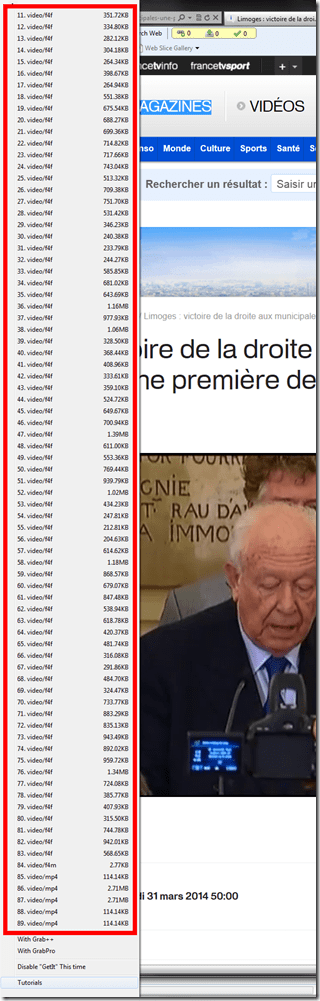
- Also changes your browser home page without asking – I can’t say I like the territory I get myself into with these teacher download requests.
- Claims to be a generic downloader, and looks complicated enough to convince me of that

LRC Outlook/Exchange 2010 Resource Calendaring: How LRC staff can group calendars in Outlook 2010
- You can save the currently loaded calendars as a preset or “group” from the ribbon in the calendar view of outlook 2010, like so:

- The group and its members will be added to your calendar tree, and you can load all members with one click, like so:

- Then you can create multiple presets which correspond to your typical workflows: E.g. when you do not have to check the availability of equivalent sets of equipment, you may want to have an easy overview of staffing in the LRC:
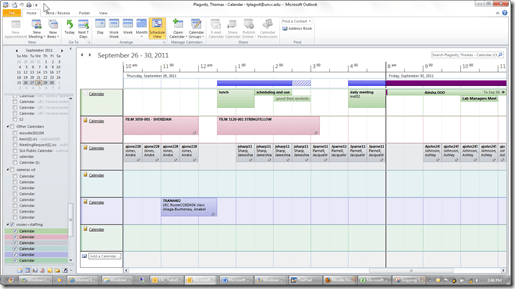
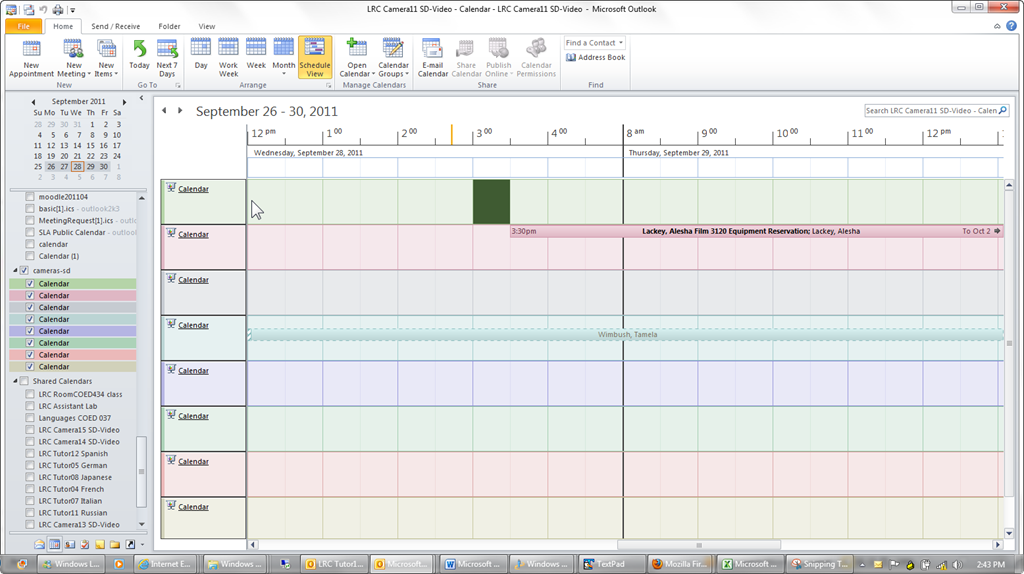
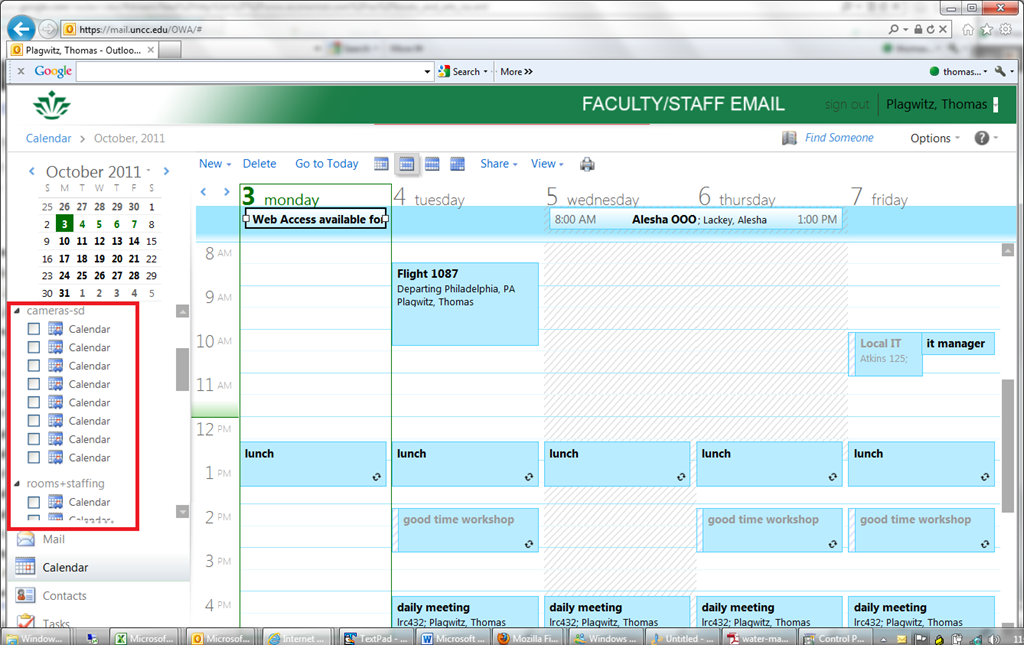
- Note that – while we have to load individually the calendars of other mailboxes we own –, calendar groups we create in Outlook are automagically mirrored in OWA
- But the calendar names get lost in the process? And: the batch select checkbox is missing. And: only up to 5 calendars can be viewed in OWA simultaneously. And: OWA does not support overlay mode for calendars.):

- It would be great if calendar groups, with the help of ActiveSync, even worked their way through to mobile devices, but apparently they do not:



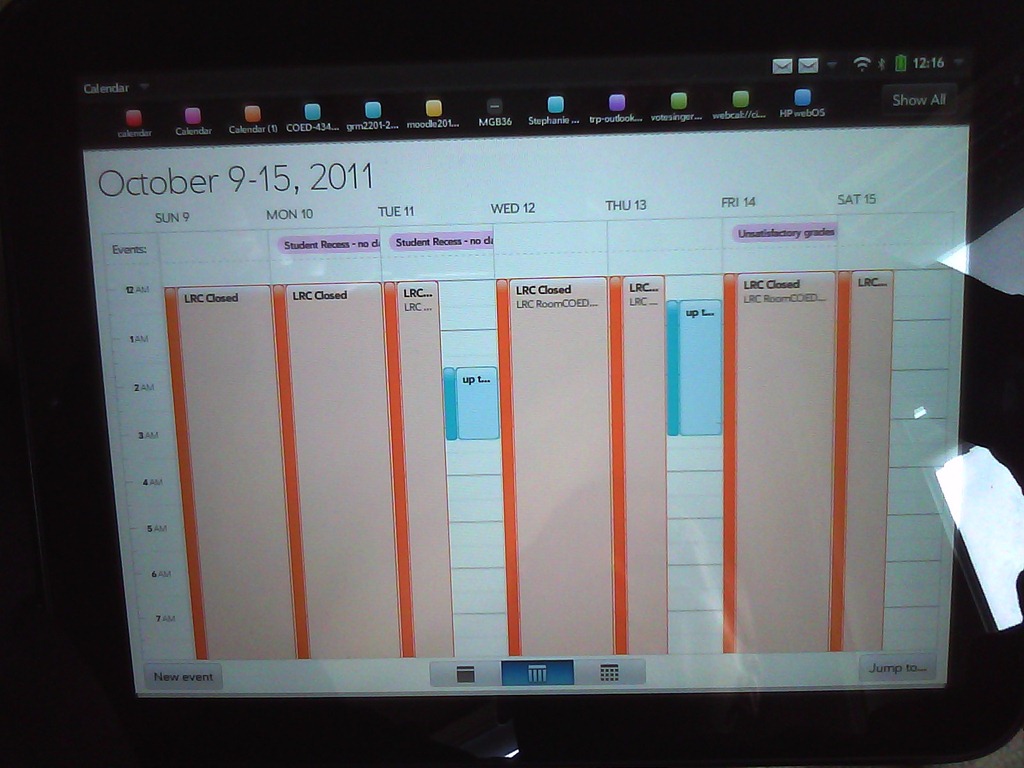
How not to book LRC equipment: Scheduling conflicts
- Do not send a meeting request to an item for a time when the item has a prior meeting request.
- The tab: scheduling assistant within the meeting request you edit is there to tell you when items have prior meeting requests.
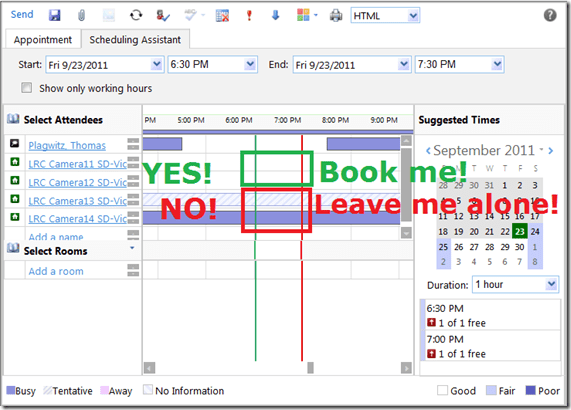
- A “blocked” timeline denotes a prior meeting request: The item has already been booked (solid block) or requested (hatched block) during the start and end time of your meeting. Do not crash their party.
- “blank” timeline means “item is free”. Go ahead: You can request a meeting with this item between your start and end time.
- Once you have this overview, you can easily remove, by right-clicking on the resource, extra resources that you cannot book or could, but which you do not need:

- Once the university has mail-enabled your cloud-accounts on campus, we will have a computer decline such conflicting requests automatically, and force you to start over with a new meeting request. It will be still worth your while memorizing the above: You can save time and avoid disappointment.

LRC Outlook/Exchange 2010 Resource Calendaring: How students can view resource "Calendars from the Internet" in web browser and OWA
- Want a shorter version?
- Students, unless specifically TBA:invited, will encounter a permission problem when trying to view calendars like staff.
- Instead, students can use the scheduling assistant to view a basic version of the resource’s calendar. This works “out of the box”.
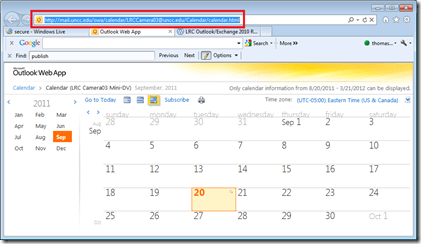
- Students can also view an advanced version of the resource’s calendars (one-time, or bookmark this link in your web browser – hope you know how to synch your bookmarks between all the devices you use…). This requires little work: click on the “view” link in the “student calendar” column of our list of LRC resources that you can book or check out, to see the current calendar in your web browser:

- For students who check the calendar of a resource regularly (e.g. to see when the LRC main classroom is available for your self-access/the tutor in your language, for help), it is better to “bookmark” the resources’ calendars in NINERMAIL. Here is how:
- Copy the URL for the calendar you just opened, from the web browser address bar:
- Go to NINERMAIL, click on the lower left “Calendar-icon”
 to unfold the “My Calendars” list
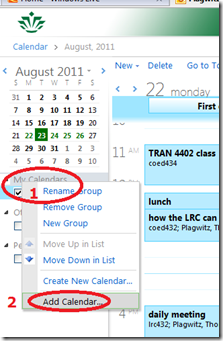
  in the left pane, then right-click on “My Calendars”, choose “Add Calendar”
 .
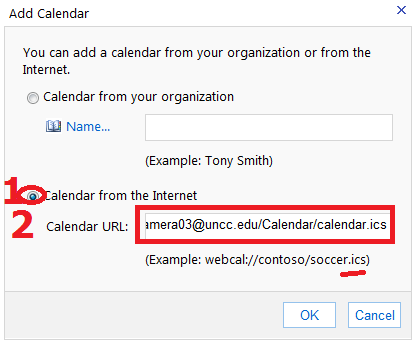
. - In the “Calendar URL” field, paste URL of the calendar you just opened, but replace “html” at the end with “ics”:
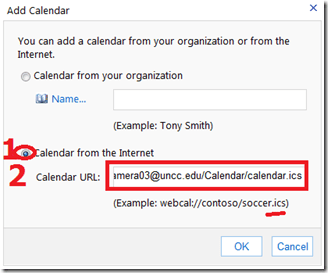 , click “OK”.
 - For on-premise users in OWA (seems OWA stirs on-premise users to the superior intranet calendars, which would be good. But what if the intranet calendar has not been shared with this user, but internet sharing is intended?), This may not work as advertised (neither with protocol http and webcal) OR just need a lot of time (~12hours?) to synchronize,
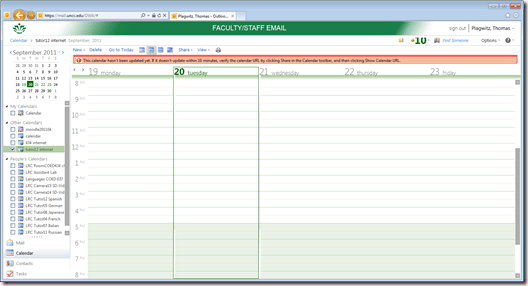 while it works (both with protocol http and webcal) when subscribing from Windows Live?
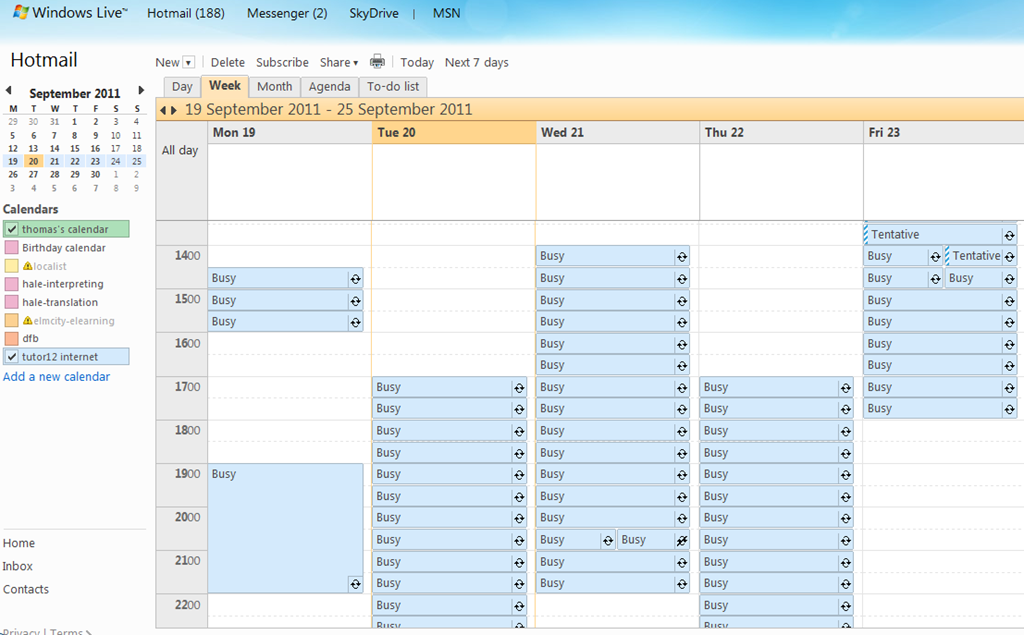
 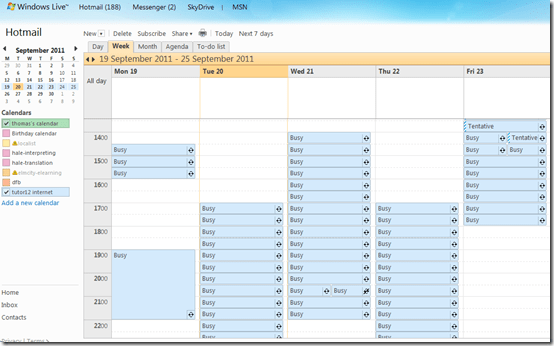 . Most importantly for us (as we have now tested), it works for students with accounts in the cloud from NINERMAI.
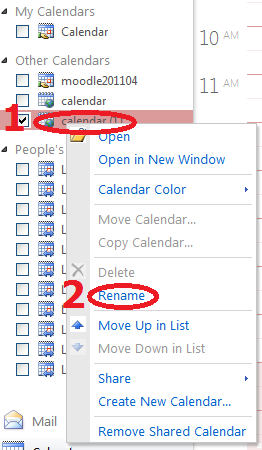
 - OWA remembers your internet calendar subscriptions, and you can easily display or hide them, using the checkboxes it provides. To keep an overview over your calendars added from the internet, you need to rename them, by right-clicking on them, like so:




Room and Equipment handling using MS-Exchange Resource Mailboxes: Sharing Resource Calendars with Students in Outlook Live. A running log
-
Our users can view the free/busy information of our Resource mailboxes in the Scheduling Assistant of their Meeting request – and also, though even less convenient and more limiting, in the GAL.
-
This includes student accounts (hosted) being able to view resource mailboxes (on premise) free/busy – which seems the default, different from the solution to achieve this here – or are resource mailboxes permissions more liberal than regular mailboxes?
-
-
To allow users the more convenient access to the calendar of the resources (without being able to book through this interface), we have used this:
-
# permissions: make default user a reviewer (read-only) of resource mailbox calendar
# so that default user cannot schedule through the calendar & bypass resourcescheduling attendant
Set-MailboxFolderPermission
-Identity LRCLcdproject01@uncc.edu:\Calendar
-AccessRights Reviewer -User Default
# work around apparent permissions bug:
# http://www.flobee.net/found-a-bug-with-set-mailboxfolderpermission/Set-MailboxFolderPermission
-Identity LRCLcdproject01@uncc.edu:\non_ipm_subtree\freebusy data
-AccessRights Reviewer -User Default
-
Based on this, we have successfully tested sharing our resource calendars with staff accounts (which are on premises).
- We have been hoping to share calendars of our resources also with our student user accounts (which are hosted). However, “Default” in the above does not seem to include these. When students use the built-in “Add Calendar”feature from their Outlook Live/NINERMAIL, they receive a permission error: “The calendar for the mailbox you chose can’t be opened. You may not have permission to open this calendar”.
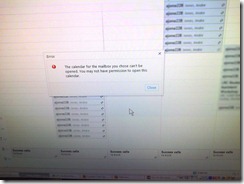
- We have been hoping to share calendars of our resources also with our student user accounts (which are hosted). However, “Default” in the above does not seem to include these. When students use the built-in “Add Calendar”feature from their Outlook Live/NINERMAIL, they receive a permission error: “The calendar for the mailbox you chose can’t be opened. You may not have permission to open this calendar”.
-
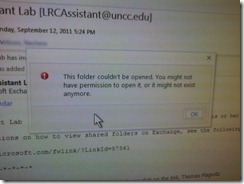
Student staff cannot view the resource calendars. A limited workaround could be to share calendars with individual student staff, so that they can display these calendars to walk-up clients. However, we cannot even share such resource calendars manually with individual students. While, when impersonating the resource, I can send out an invitation email to student staff, the student again gets an error when clicking the “Add calendar” link in the invitation mail: “This folder could not be opened. you might not have permission to open it, or it might not exist anymore”.
-
We also cannot see our student staff’s busy time, even if this busy times when working for us: “No information (Error code: undefined”):


-
A similar issue elsewhere seems to have been addressed successfully by adding federation for
-
multiple tenancies within live@edu in “Sharing Free Busy across the cloud”, example:
Get-FederationInformation
–DomainName <the other Live@edu tenant> | New-OrganizationRelationship
–Name <the other Live@edu tenant>
-FreeBusyAccessEnabled $true
-FreeBusyAccessLevel LimitedDetails
-
and for mixed hosted/on-premises environments “Set up Federated Free/Busy and Calendar Sharing between Exchange 2010 SP1 and Outlook Live”, which is a bit too evolved for posting a short sample/summary here.
-
-
Another workaround could be to add calendar internet publishing privileges to individual resource mailboxes and sharing calendars with student staff, having them display these to walk-up clients.
-
What data gets published needs to be careful considered. However, it should be possible to hide personal information and just display usage of resources, using the built-in sharing levels (note that organizer may have been put in subject by Resourcebookingasssistant configured with AddOrganizerToSubject, so subject should not be included for calendars “LRCAssistant” and “LRCTutor”## which are offices held/resources booked by students):
- CalendarSharingFreeBusySimple Share free/busy hours only
- CalendarSharingFreeBusyDetail Share free/busy hours, subject, and location
- CalendarSharingFreeBusyReviewer Share free/busy hours, subject, location, and the body of the message or calendar item
-
Code samples are given here (for hosted):
-
New-SharingPolicy -Name "Calendar Sharing Policy"-Domains "anonymous:calendarsharingfreebusysimple"set-mailbox <all LRC resource mailboxes here>
-SharingPolicy "Calendar Sharing Policy"
-
-
How to do Sanako Oral Exams with large classes, but few licenses: A workaround using partial classroom layouts
When you open the Study1200 tutor, a dialogue comes up which lets you select you the “classroom layout’. What this actually means – since the physical classroom (LRC layout) is obviously immutable –, is: which computers do you want the Study1200 to connect.
The “template classroom” (this happens to be just the default name within Sanako) tries to connect all students logged in on computer in COED434 to the teacher from the “corridor” (= where Study1200 leaves all computers that it knows of, but that you do “into” want to let into the classroom; the corridor has link in the bottom center of the Study1200 teacher window, and it flashes if there is a change “in “ the corridor Stuy1200 wants to make you aware of) that the Study1200.
However, beyond the 20th client (first come, first serve), this will fail because of licensing restrictions, and a grey exclamation mark will appear in the classroom layout in the Study1200 window for these student icons.
The “left-half”and “right-half” layouts that I created load only the computers in either the left or right half of the COED434 classroom (each without the wall/window-facing computers at the very edges) into the classroom layout (other logged-in students will remain in the “corridor”, linked in the bottom center of the tutor interface, if you want to add select students – note that the student icon will not appear on screen in their approximate physical position in the classroom.
You can also bring up the dialogue from which you can choose classroom layout after the initial startup of the tutor: Go to top menu: file / classroom layout. A 45-second screencast of this switching our classroom layouts in Sanako Study 1200 is available for download (requires Windows Media player).
In the screencast, you can see how the visual layout on screen reflects the physical layout in the classroom (the number labels on top of our computer monitors appear (optionally) in seat numbers): rotate by 90% clock- or counterclockwise (I wish we would have not only more licenses, but also a higher screen resolution. Stay tuned).
This technique of splitting the classroom, unloading and loading half of it at a time, you can exploit for administering oral exams consecutively with class sizes (current maximum is 25/30, depending on level) that exceed the number of licenses we have (currently 20 + teacher).
This technique of excluding computers from connecting to the teacher we could also use to merge the listening station computers, even though they have a different audio hardware configuration (analog headsets only, no Sanako headsets with built-in sound card and disabled on board sound) into the main software image without consuming valuable licenses – not without other problems.


Questions? Read the About. Or just ask me a quick Our Databases: Resources with calendars -- Language learning material Moodle Sites, multimedia files -- films


FAQs for LRC student staff or for students or for teachers. To search our FAQs, in the browser addressbar, add after "https://plagwitz.wordpress.com/feed/?tag=faqs+/" "+TAG1" (from tag cloud below) OR "https://plagwitz.wordpress.com/feed/tag=faqs
&category_name=" "CAT1" (from category hierarchy below). OR search both categories and tags, and multiple TAGs/CATs (connect with "," for OR-search, with "+" for AND-search), like so: https://plagwitz.wordpress.com/feed/?tag=TAG1+TAG2+...TAGn&category_name=CAT1
+CAT2+...CATn"
Other ways to find help
If you cannot find it here, look there: 5,500 Language-Learning Links and Programs for learning or teaching 150 languages
Shortcuts:Our Lists, Our Maps, LRC Staff Moodle Site,LRC Project Moodle Site, 49erexpress, UNCC Moodle, Student Recordings: s:claslcslrcsanakostudent
Learning usage samples: Sanako oral exam, Kaltura webcam presentation, Dictation with speech recognition, Sanako written exam, Chinese and Japanese interactive stroke-order practice
Test the Sanako Installer, Webbrowser Popup Konfigurator for XP, or Windows7, faster LRC TeacherPC Log-in Let MS facilitate diacritics writing by installing for you US-International keyboard layout
This is my personal blog (Google+). The views expressed on these pages are mine alone and not those of my employer. The information in this weblog is provided “AS IS” with no warranties, and confers no rights.

