Archive
Sharing and reusing Moodle learning content using backup and restore, part III: Shared intermediate courses
- You can facilitate the sharing process if you link source and destination Moodle courses via a Moodle course that is itself shared between the teachers (= all teachers can backup from or restore/import into this shared course), but not to students.
- By backing up to and restoring from such a shared Moodle course, you can more easily inspect the shared course content than
- if you’d import into the destination course to inspect,
- or either inspect the unzipped XML of the Moodle course backed-up content format, like here:
- which can be a daunting perspective on your content:

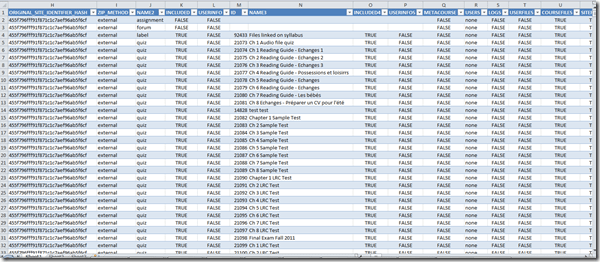
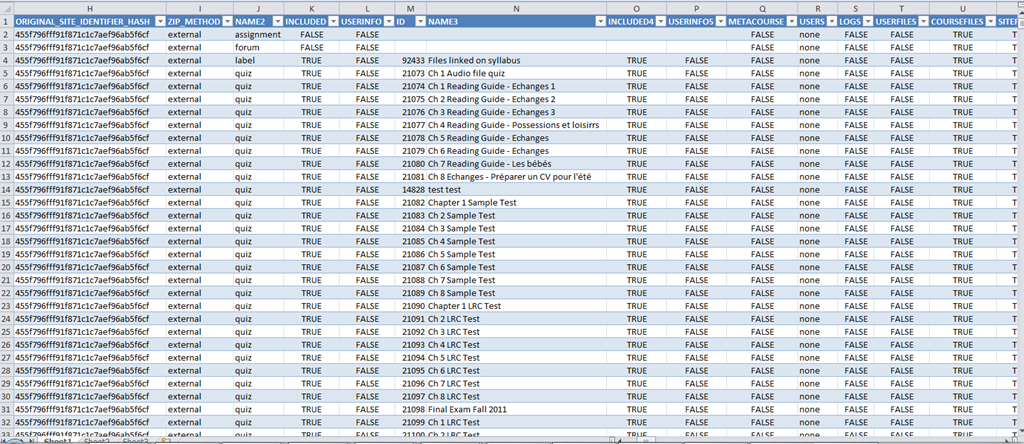
- A little more instructive are the Moodle course export file columns in a handy list, with sample content (where available in our case – sample content does not represent an actual “row”, but merges multiple “rows”, using Excel’s “Paste Special’/ “Skip blanks”):
- As you can see, there are fewer than 254 column (meaning you can even load this into Excel <2007), and apparently you get to actual teaching content already on nesting level 3.

LRC computer and other hardware inventory
- These lists document hardware owned by the LRC:
- Symantec-Ghost generated.
- A handmade overview (partially based on the previous) can be (permissions provided) viewed or edited here.
Video Library: Scheduling for Reserve Desk and Viewings
Lab staff instruction for editing the video-reserves spreadsheet H:\LLC\scheduling\video-reserves&mh441b-showing\video-reserves.xls:
- Lab supervisors build the spreadsheet for the reserve desk and viewing: video-reserves-reservedonthisday-unfold-schedule-viewing.wmv, video-reserves-viewing-selecting-timeslots&venues.wmv
- Lab assistants read the spreadsheet and handle the actual media (i.e. update the reserve desk and show the videos): video-reserves-reservedonthisday-filter-viewing-or-reserve.wmv
Learning materials management: Offline resources (2005-2006)
AKA books, shiny disks, VHS and – oh my! – cassette tapes. All come with shelves. Yuck! Where is Google Books, when you need it?
The media library I had to work with had, as I found it, a content specific labeling system and a language specific sort order on the shelves. This seems an anti-pattern in many modern languages departments: try to avoid complexity by isolating yourself. 1st degree: each language program on its own; 2nd degree: each instructor on his/her own. Atomization leads to idiosyncrasies and duplication of efforts (which must result in lowering of standards, despite, no doubt, individual toiling).

Trying to find an easy answer for complexity: I am afraid I quickly had to throw overboard the suggestion to implement the Library of Congress labeling scheme. I also abandoned trying to represent in one physical order what has to be viewed under multiple perspectives. I introduced a unique id labeling scheme based on a a simple numerical counter, where each new item would be added to the end of the stacks with a label equaling max(counter) + 1, and as a new row at the bottom of an Excel spreadsheet, which supported all discovery and lending with sort, filter, search.
And here is a partial screenshot of the offline_resources.xls:

Way too much complexity still remained: too many fields, all types of resources had to be coerced into records of the same format (hand-coded an access database for records to avoid this requirement – don’t go there!). Should have relied more on full text search, even with the simple regular expressions that come with Excel.
However, the sheet was open all day on the lab assistant’s computer behind the reference desk and worked pretty well, or was at least a major improvement. Remaining issues: speed of spreadsheet (too many complex ISBN validating formulas), lab staff training, more so instructor training (if they did not want to rely on lab staff entirely or on trying to browse the physical stacks looking for a physical order where there was no such system any more: change management problems).


Questions? Read the About. Or just ask me a quick Our Databases: Resources with calendars -- Language learning material Moodle Sites, multimedia files -- films


FAQs for LRC student staff or for students or for teachers. To search our FAQs, in the browser addressbar, add after "https://plagwitz.wordpress.com/feed/?tag=faqs+/" "+TAG1" (from tag cloud below) OR "https://plagwitz.wordpress.com/feed/tag=faqs
&category_name=" "CAT1" (from category hierarchy below). OR search both categories and tags, and multiple TAGs/CATs (connect with "," for OR-search, with "+" for AND-search), like so: https://plagwitz.wordpress.com/feed/?tag=TAG1+TAG2+...TAGn&category_name=CAT1
+CAT2+...CATn"
Other ways to find help
If you cannot find it here, look there: 5,500 Language-Learning Links and Programs for learning or teaching 150 languages
Shortcuts:Our Lists, Our Maps, LRC Staff Moodle Site,LRC Project Moodle Site, 49erexpress, UNCC Moodle, Student Recordings: s:claslcslrcsanakostudent
Learning usage samples: Sanako oral exam, Kaltura webcam presentation, Dictation with speech recognition, Sanako written exam, Chinese and Japanese interactive stroke-order practice
Test the Sanako Installer, Webbrowser Popup Konfigurator for XP, or Windows7, faster LRC TeacherPC Log-in Let MS facilitate diacritics writing by installing for you US-International keyboard layout
This is my personal blog (Google+). The views expressed on these pages are mine alone and not those of my employer. The information in this weblog is provided “AS IS” with no warranties, and confers no rights.
 Thomas' Work Space