Archive
Delete the Flash Global Settings if the iMacs webcam displays black frame only
- Problem: Safari and (not recommended after last testing round) Firefox both hung on iMAC6 when a student tried to do a Moodle Kaltura Webcam assignment and got to the built-in ISight camera display page.
- Cause: maybe a Flash security problem accessing the web cam? maybe security dialogue was not answered by the student correctly earlier, and the “preference”stored in her account?
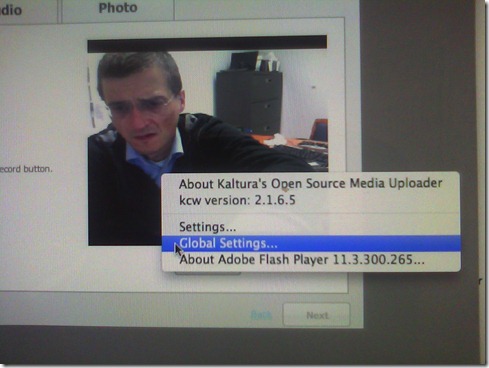
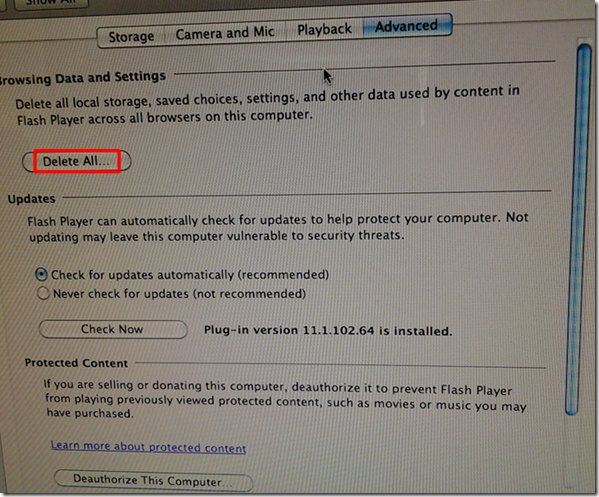
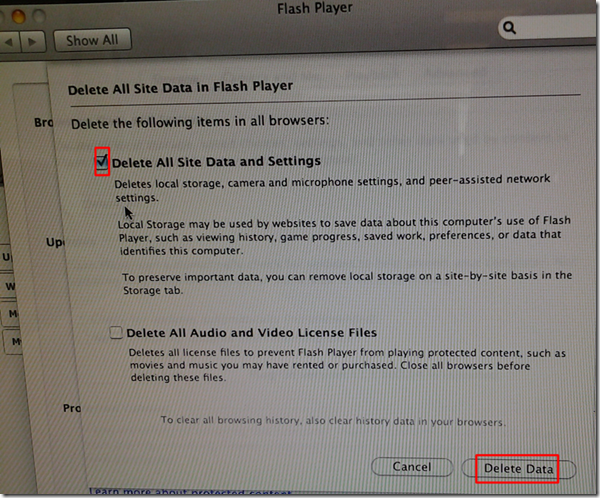
- Solution (presumably): System started working again after I deleted the Flash Global settings, by right-clicking on the webcam video preview window like so:
-
- Ceterum censeo that we need a computer management infrastructure if we want to use MACs for language learning technology. Faronics-Deepfreeze would have prevented this problem, provided we have a software imaging system (CASPER coming up apparently) that can let us start with a usable image, and the staff time to learn and configure 2 usable OS images and dual usable computer management infrastructures. TCO now > TCO dual OS infrastructure > TCO web cams for 45 PCs.


How to link your LRC tutor calendar and Moodle metacourse from your Moodle course

Problems with accented characters in Respondus Lockdown Browser
Update: Just click on the menu item “ A” under Respondus titlebar window to bring the floating accents window back.  Problem is only: this menu disappears now also. Anyhow: using below keyboard shortcuts is faster, and MS FixIT can now enable it for you on your home or office PC also.
Respondus Lockdown browser limits the use of modifier keys (e.g. on Windows CTRL, ALT). This prevents the use of certain traditional keyboard shortcuts for entering foreign language accented characters – including the method from times yore: ALT+number code.
Respondus Lockdown browser can work with a floating toolbar for accented characters. Unfortunately, reports are in that the floating toolbar disappears (may be related to a recent Respondus upgrade?).
Fortunately, Windows US-international keyboard – the default in the LRC – is not as much hampered by Respondus – except in t he few cases where US-international keyboard also relies on ALT- and CTRL-modifier: consult this table.
|
Press (, then release) |
then press |
Example Result |
|
` (accent grave) |
any letter that can have this accent, e.g. “a”, also cedilla ç |
à |
|
‘ (apostrophe) |
á |
|
|
^ (caret)- |
â |
How to get started with Moodle here
- Moodle is the UNCC LMS – it is central to teaching with technology.
- The LRC provides Moodle-information specific to language learning, incuding FAQ’s.
- The CTL (= Center for Teaching and Learning) has oodles of general Moodle help.
- Search the CTL site for Moodle by clicking here, and you will find:
- Moodle specific:
- view Moodle on-demand screencast video tutorials,
- read Moodle FAQ’s (updated).
- sign up for instructor-led (face-to-face or webinars, some of which are archived and available on-demand) training:
- Updated Webinar list, which includes for Moodle (I highlighted the more general ones)
- Avoiding the Moodle Scroll of Death (30 min. Webinar)
- Copying a Moodle Course (30 min. Webinar)
- Find & Embed Videos in Moodle (30-min. Webinar)
- How Do I: Peer Review in Moodle (30 min. Webinar)
- Incorporating Streaming Media into Moodle (30 min. Webinar)
- Making Moodle Beautiful (30 min. Webinar)
- Moodle 2 FAQ (30 min. Webinar)
- Moodle Grade Book and Mail Merge (30-min. Webinar)
- Moodle Under the Hood (30 min. Webinar)
- Using Moodle’s Team Assignment (30 min. Webinar)
- Previous (Moodle 1.9)
- Updated Webinar list, which includes for Moodle (I highlighted the more general ones)
- There is more Moodle-information here, just no way for me to provide a direct, filtered link so just browse the pages:
- the CTL podcasts
- Episode 106 Getting Students to Read Your Syllabus: Quizzing in Moodle
- the CTL podcasts
- Moodle specific:
How to recycle your Moodle Course using backup/restore
Better do this before the first day of classes, but if you need a quick refresher:

How students upload a video file to Moodle using Kaltura
-
My closest related instruction so far has been for teachers, and the CTL also seems to have only instructions for how teachers upload videos for students. However, instructions for students are very similar, follow these steps:
-
Open the kaltura assignment and click “Add video submission”:

-
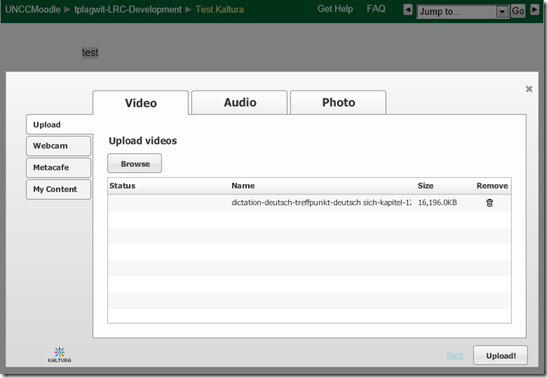
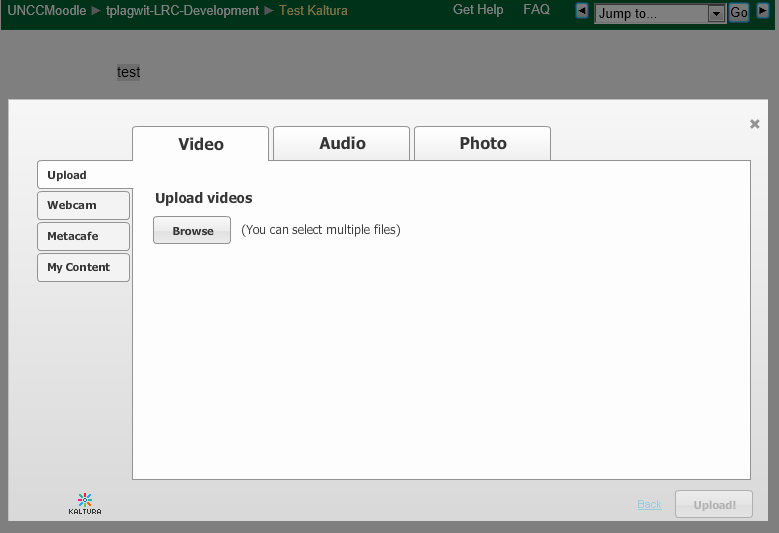
Under left tab “Upload”, Click “Browse”:

-
Browse to your video file (note the “files of type”allow only the upload of certain extensions) and click “Open”:

-
Click “Upload”
-
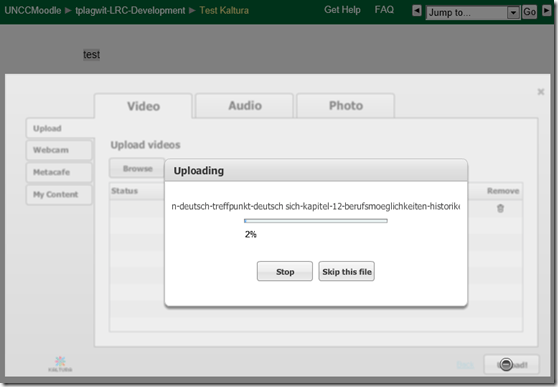
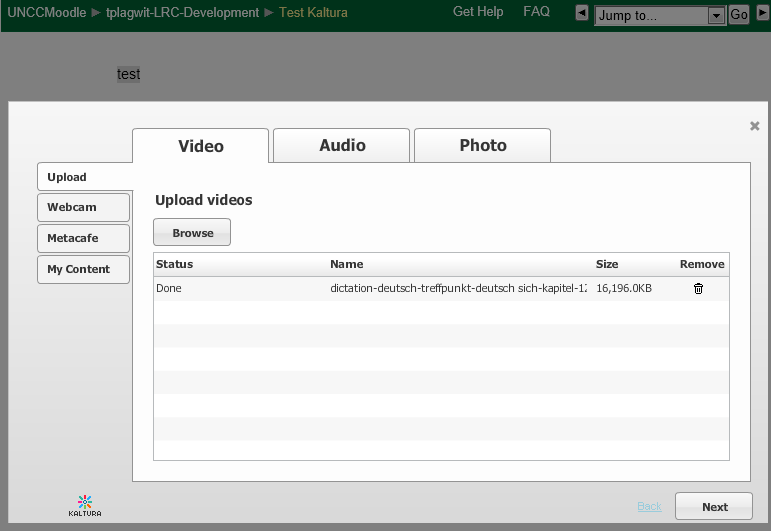
Wait for the upload to complete:
-
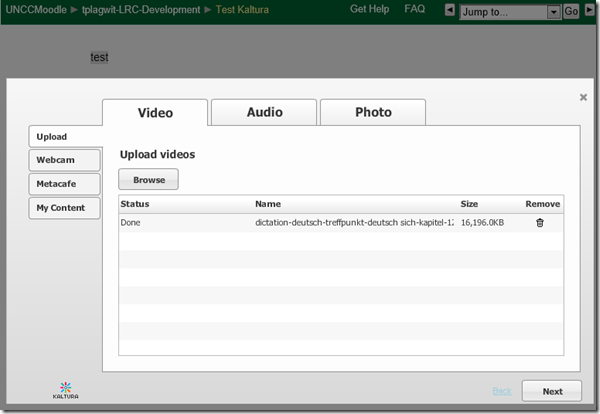
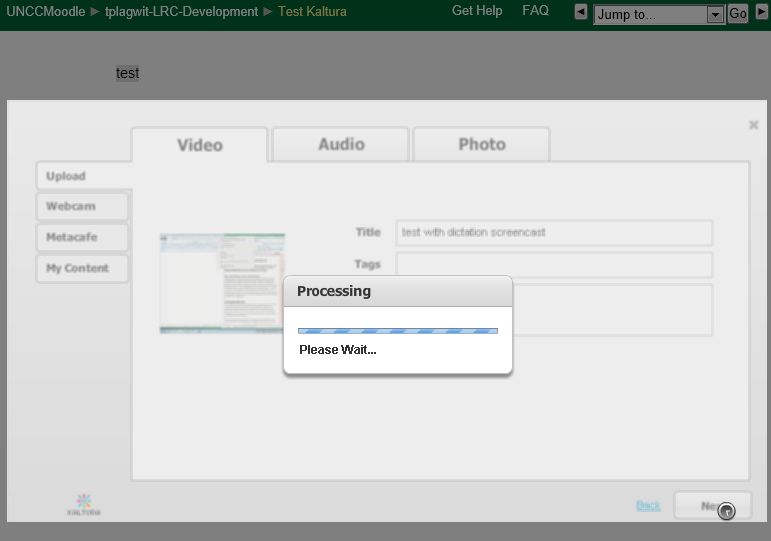
Click “Next” :
-
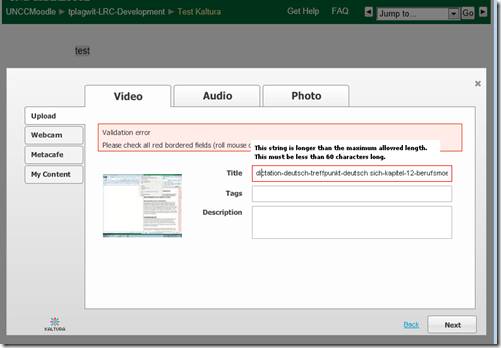
Add at least a “title”, and fix any errors you might get:
-
Click “Next”:
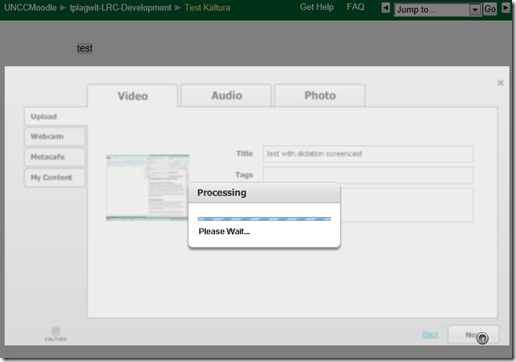
-
Click “Submit”:

-
Look for the success message:

-
You will have to wait for the video preview to become available:
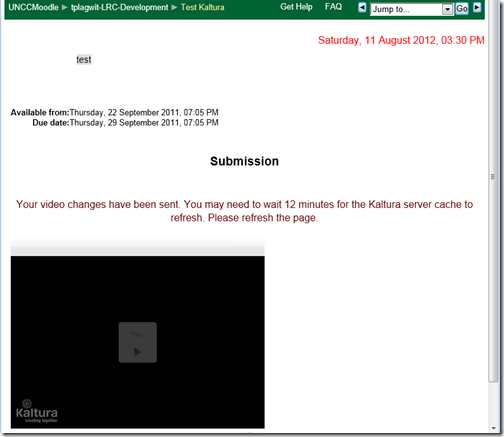
-
If you refresh the page, the wait time gets updated, take the amount with a grain of salt. Here I could already view…

-
Be aware that your video resolution will likely be downscaled (my 1280*1024 screencast in this example ended up pretty grainy).






SOLVED: How to record, in Adobe-Flash, video from my built-in iSight web camera on an 2010 iMac, combined with sound from an external cs100 PnP USB audio device
- Problem : Our new campus-wide Moodle Kaltura installation enables authentic oral proficiency examinations (we have no other Moodle Plugin for audio recordings). However, we still have no webcams on our mainstay PCs. We do have a few iMacs with built-in iSight webcams, but for providing students more privacy during their assignments in the language resource center, we need headphones. We have for spare some old headphones which we would like to use up, but they are analogue. These iMacs do not have an analog headset connector, only a line-in which would require a preamp. We have good sturdy USB headsets from Sanako, but these are too expensive to purchase for the iMacs that have no ways to secure them and little other specialized language learning use which we do not already get from the PCs (and more…).
- Workaround :
- Try an inexpensive USB audio device that has 3.5mm analog headset inputs.
- On my iMac 2010
- If in system preferences / sound/ I direct input and output to the USB PnP device
- test passes playing system sounds
- in audacity (if you CRANK the microphone sensitivity to the max!)
- recording test passes: The headset loudspeakers and micro work (not well, but they work, as a tab on the microphone indicate: there is static, and the recording volume is still softish, but better than the built in webcam microphone)
- in Kaltura,
- Flash only brings up the security dialogue (in Safari 5 and current Firefox ESR and Chrome) for allowing the web application accessing to the built-in iSight web camera, but no options to choose a separate audio device
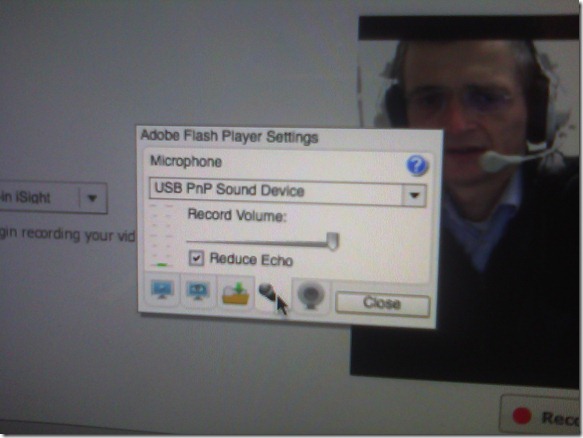
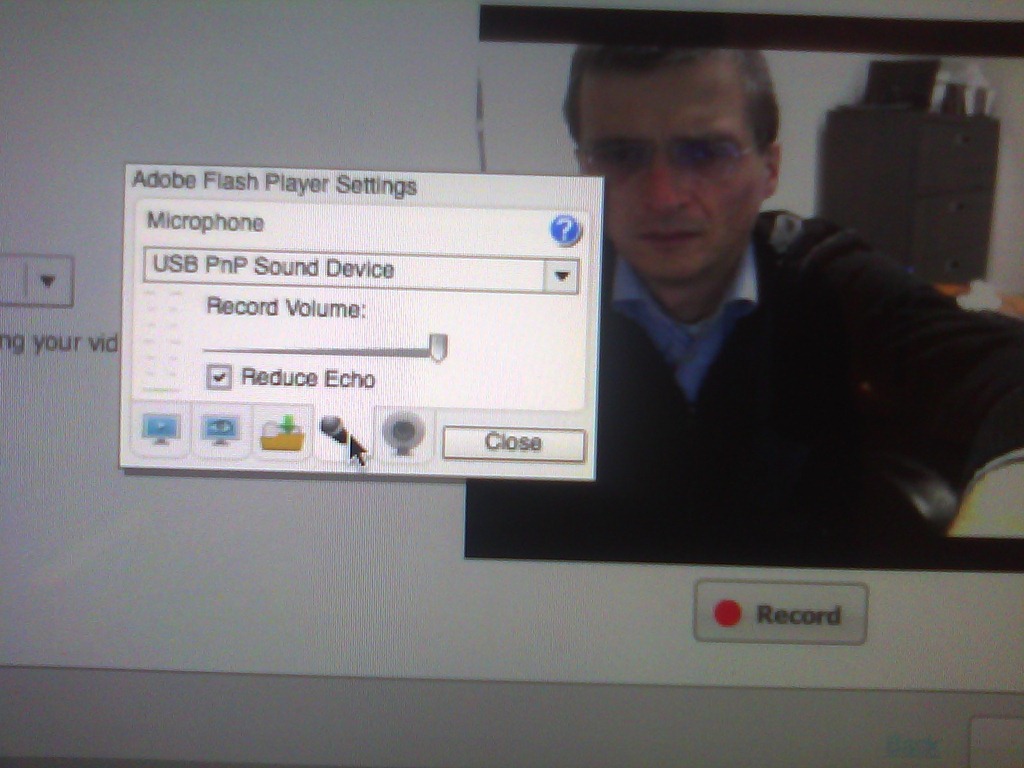
- However, if you control-click on Flash’s a video preview window for the web camera, and click on “settings” (not “global settings”, although that is useful for always allowing access from certain URLs like your LMS) .
- Click on the microphone icon :

- Make sure the USB PnP device is selected.

- You can bring up the settings dialogue, make sure the USB PnP device is chosen for audio and CRANK up the microphone input sensitivity! Then test the volume levels with the built-in volume meter (should show lots of green bars when you speak. You may have to adjust the Califone headset microphone arm so that the microphone is very close in front of your mouth. ) Unlike in the picture, do not choose “reduce echo ”.
- Remaining
- Questions :
- Can this sensitivity setting be permanently stored for all users in the iMac software image, or do our students always have to adjust the microphone sensitivity?
- It remains to be seen whether this inexpensive and unsecurable device survives long when being used by our student population.
- Problem : The review video function of the Moodle Kaltura Flash video remains very temperamental on the Mac OS X (In my testing, one of the numerous problems we had with Moodle Kaltura on the iMacs popped up again: when starting to review the recording, the time counter goes, but the video stalls for a few seconds – afterwards everything seems to play fine, but this is enough to confuse the heck out of my users) . While we made another small step of progress towards enabling Moodle Kaltura webcam recordings in the language resource center, it seems easier to just get web cameras for the PCs.
- Questions :


How to do successful Moodle-Kaltura webcam recording assignments
Kaltura turned out to have a number of limitations, and we have some of our own in the LRC. Both required some debugging and finding of workarounds, which you can benefit of if you follow carefully our step-by-step guides for teachers or for students.



Questions? Read the About. Or just ask me a quick Our Databases: Resources with calendars -- Language learning material Moodle Sites, multimedia files -- films


FAQs for LRC student staff or for students or for teachers. To search our FAQs, in the browser addressbar, add after "https://plagwitz.wordpress.com/feed/?tag=faqs+/" "+TAG1" (from tag cloud below) OR "https://plagwitz.wordpress.com/feed/tag=faqs
&category_name=" "CAT1" (from category hierarchy below). OR search both categories and tags, and multiple TAGs/CATs (connect with "," for OR-search, with "+" for AND-search), like so: https://plagwitz.wordpress.com/feed/?tag=TAG1+TAG2+...TAGn&category_name=CAT1
+CAT2+...CATn"
Other ways to find help
If you cannot find it here, look there: 5,500 Language-Learning Links and Programs for learning or teaching 150 languages
Shortcuts:Our Lists, Our Maps, LRC Staff Moodle Site,LRC Project Moodle Site, 49erexpress, UNCC Moodle, Student Recordings: s:claslcslrcsanakostudent
Learning usage samples: Sanako oral exam, Kaltura webcam presentation, Dictation with speech recognition, Sanako written exam, Chinese and Japanese interactive stroke-order practice
Test the Sanako Installer, Webbrowser Popup Konfigurator for XP, or Windows7, faster LRC TeacherPC Log-in Let MS facilitate diacritics writing by installing for you US-International keyboard layout
This is my personal blog (Google+). The views expressed on these pages are mine alone and not those of my employer. The information in this weblog is provided “AS IS” with no warranties, and confers no rights.
 Thomas' Work Space