Archive
Archive for the ‘Learning-Tool-is-any’ Category
Farsi phonetic input using Behnevis
2012/02/22
Leave a comment
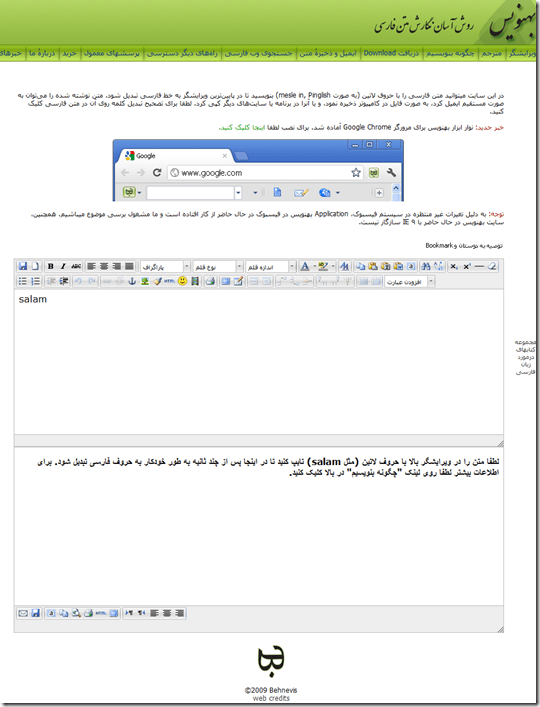
- Behnevis.com (web form or downloadable Google Chrome browser toolbar) offers transliteration of phonetic input in Roman letters into Farsi and is said to be on a par with Google translate (which offers no toolbar) and MS-UIME (which has no toolbar, but can be installed in your browser to alter any web page for users lacking a physical Farsi keyboard (or overlay).

Categories: Farsi, websites, Writing
foreign-language-character-input
Protected: Moodle streaming video recording assignment glitches 3, 4, 5, 6, 7 & 8: A running log
2012/02/21
Enter your password to view comments.
How to display Furigana phonetic guide for Japanese Kanji in MS-Word 2010
2012/02/21
1 comment
- Furigana uses Kana (usually Hiragana) to phonetically transcribe Kanji, above (for horizontally written Kanji) or to the right (if in vertical writing mode), for special characters or audiences (children and second language learners).
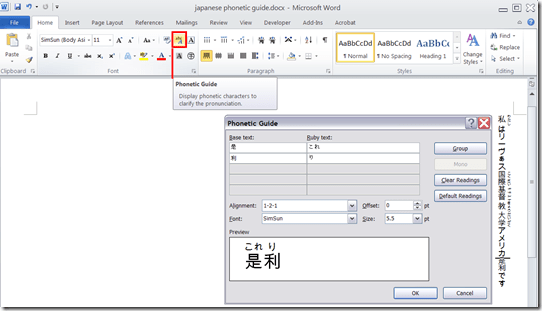
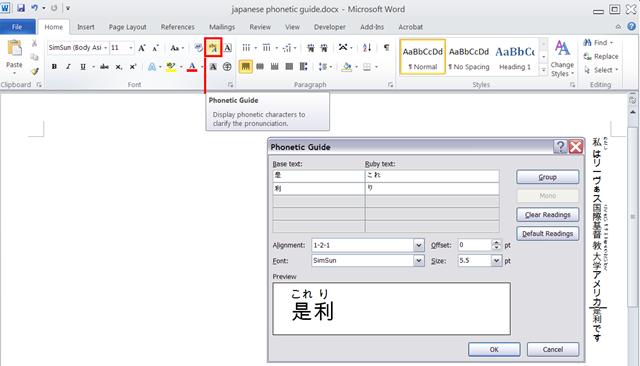
- In MS-Office, if you have a Japanese Input Method Editor selected in MS-Windows, select some Kanji and in the ribbon, under tab: home, section: font; click on the Phonetic guide, to bring up a dialogue that attempts to auto detect the furigana.
- You can make adjustments there, click “OK “to insert. Like so:
Protected: Moodle-Kaltura webcam recording assignment results
2012/02/20
Enter your password to view comments.
Categories: assessments, assignments, audience-is-teachers, Beginner, e-languages, German, iMacs, lms, multimedia-recording, Practice&Demos, Speaking, Videos
kaltura, moodle
Wimba Classroom –> Saba Centra: A running log
2012/02/15
Leave a comment
- http://teaching.uncc.edu/ctl-blog/centra-classroom-replace-wimba
- As this pertains to the LRC, more info will be posted here, as it becomes available, and issues and resolutions, as they come up.
How to fix Canon Vixia “Cannot write on card” error when starting recording by initializing
2012/02/15
Leave a comment
- To fix this error,
- go to: Menu / Function / Tools / Tab: / menu item: Initialize – choose the card slot A or B with the mal-formatted card.
- or view how to access the initializing procedure here TBA
- To avoid this problem: You may get this error after you the SD card has been formatted in another device but the camera (e.g. on your computer, using a memory card reader). If you are trying to delete footage, initialize the card within the camera instead. This page is taken from the Vixia manual, the full manual you can find linked in our list of bookable resources under Vixia.


Things you can try when having trouble playing video from the internet
2012/02/13
1 comment
There are several things you can try when having trouble playing video from the internet. I made a list here (less would be more, but hey, it’s computers, right?):
- Refresh the web page (f5 or ctrl-f5).
- Can you see an error message on the page itself? some video services prevent you from watching video abroad BBC iPlayer used to do this, since it is financed by fees of a local audience – so are ARD and ZDF, but they do not bother restricting by viewer location. However, they assume you are in Germany, and in their time zone, so they restrict you from watching the equivalent of R-rated content during daytime in Germany.
- Restart the web browser.
- Can your web browser play a video from a different website. Good candidates are Youtube.com (may be HTML5 delivered by now), hulu.com, ARD Mediathek if trying ZDF Mediathek or vice versa). Maybe your plug-in has crashed – try restarting your computer.
- Try a different web bowser (chrome, internet explorer, Firefox, safari, opera are all free downloads).
- Can you discern a notification bar on top of your web browser window telling you of an error or asking you to upgrade something?
- At this point it might be easier to come to the LRC and use what we maintain for you there, or, if you are trying to use your office computer, alter the helpdesk.
- Do you have to upgrade your video-plugin? Currently (before HTML5 delivered plug-in free video), most videos are plug-in based. search for adobe flash and MS-Silverlight upgrades.
- Do you have to upgrade your browser?
- Do you have to upgrade your operating system? your computer hardware? Let’s hope you do not get to here in this list…
Categories: audience-is-students, audience-is-teachers, e-infrastructure, Glitches&Errors, Media
FAQs, video
How to navigate your Moodle gradebook more easily by hiding columns
2012/02/09
Leave a comment
- Clicking on the minus-icon next to aggregate columns will hide the assignments in this category; clicking the plus-icon will unhide:

- before (wide)

- after (narrow, better overview)


Categories: audience-is-teachers, documentation, e-learning, lms
gradebook, moodle

Questions? Read the About. Or just ask me a quick Our Databases: Resources with calendars -- Language learning material Moodle Sites, multimedia files -- films


FAQs for LRC student staff or for students or for teachers. To search our FAQs, in the browser addressbar, add after "https://plagwitz.wordpress.com/feed/?tag=faqs+/" "+TAG1" (from tag cloud below) OR "https://plagwitz.wordpress.com/feed/tag=faqs
&category_name=" "CAT1" (from category hierarchy below). OR search both categories and tags, and multiple TAGs/CATs (connect with "," for OR-search, with "+" for AND-search), like so: https://plagwitz.wordpress.com/feed/?tag=TAG1+TAG2+...TAGn&category_name=CAT1
+CAT2+...CATn"
Other ways to find help
If you cannot find it here, look there: 5,500 Language-Learning Links and Programs for learning or teaching 150 languages
Shortcuts:Our Lists, Our Maps, LRC Staff Moodle Site,LRC Project Moodle Site, 49erexpress, UNCC Moodle, Student Recordings: s:claslcslrcsanakostudent
Learning usage samples: Sanako oral exam, Kaltura webcam presentation, Dictation with speech recognition, Sanako written exam, Chinese and Japanese interactive stroke-order practice
Test the Sanako Installer, Webbrowser Popup Konfigurator for XP, or Windows7, faster LRC TeacherPC Log-in Let MS facilitate diacritics writing by installing for you US-International keyboard layout
This is my personal blog (Google+). The views expressed on these pages are mine alone and not those of my employer. The information in this weblog is provided “AS IS” with no warranties, and confers no rights.

