Archive
One can connect to the SANAKO files from home via VPN…
- …, I found when testing (on Window 7) here, but there are some prerequisites:
- You need VPN:
- install the UNCC preconfigured Cisco VPN (once), possibly troubleshoot (supported by IT Service Desk for Faculty/Staff),
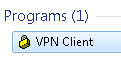
- start the client:
- log in with your UNCC account:

- Use my shortcuts: goo.gl/yqR18 to the Sanako folders.
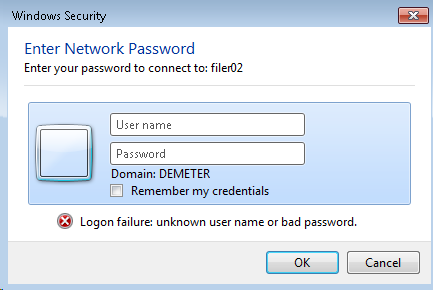
- Even after logging in, I needed to reissue my UNCC network credentials. Use this format: unccharlotte-nt\your-username-here, check “remember"):

- Then you can browse:
 and arrive :
 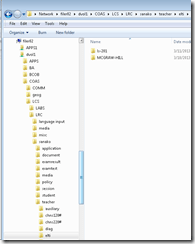 almost like in the office.
 - Make sure you stay connected:
 , not disconnected:
- Live with any (temporary) side effects and conflicts
- I seem to remember I lost my internet during VPN, this may have been fixed).
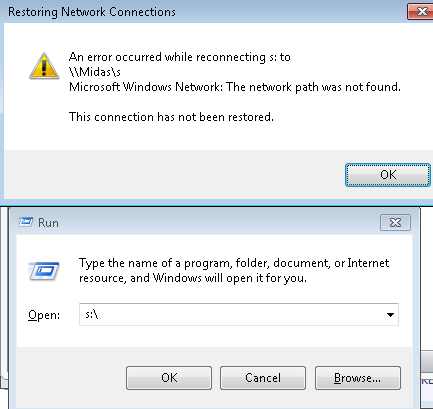
- Drive lettering: not for me
 , YMMV.
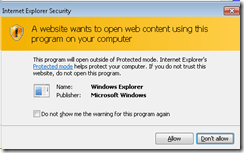
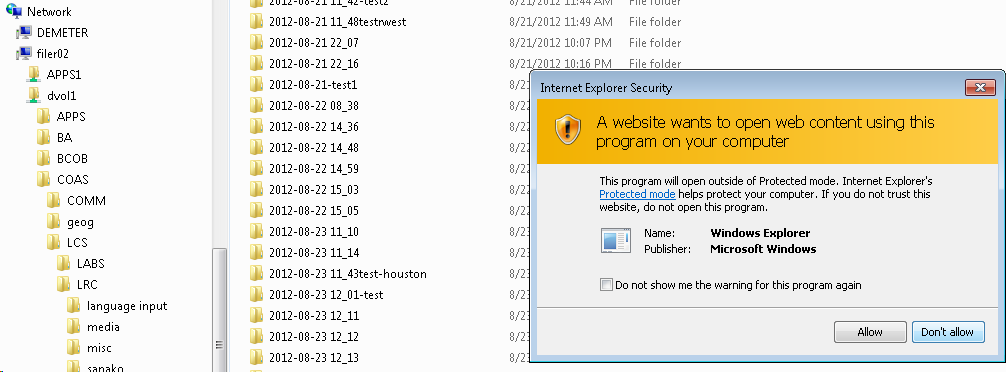
 - Even more security warnings on Adobe Acrobat:
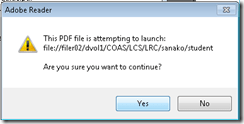 ,
, 
- But you can get to your files eventually:
 .
.





How the LRC tracks volunteer tutoring usage
LRC Volunteer tutors (different from the tracking of CAE tutors; but modeled after their tracking, to be promoted to a CAE tutor), when they arrive AND when they leave the LRC:
- at the LRC reception desk (ask the LRC assistant to show the 49erExpress window),
- log into their NINERMAIL, go to their calendar,
- open their tutor appointment ("series", NOT "occurrence" – however, if this is a non-repeating appointment, create one),
- receive a check-in/out code from the LRC assistant spreadsheet (ask the LRC assistants for that),
- 5. when checking out, also briefly describe work done:
- tutoring done (which student(s),
- what topic(s) and work (make sure to comply with the tutor ethics code)
- how much time spent on each topic.
- "Send update" to meeting request
- log out.
Protected: How teachers can share multimedia files unsuitable for the LMS on MS-SkyDrive
Protected: Block common translator, webmail and/or social web sites during LRC class by loading a RUL file in Sanako Study 1200
Looking forward to the Digital Humanities Unconference at UNC Charlotte
- Why I come to THATCamp Piedmont:
- I am looking for practitioners of NLP in a language and literature teaching context since I am working on Using NLP tools to automate production and correction of interactive learning material (presented at Calico 2012)
- for the Learning Exercise Creation Engines (presented at EUROCALL 2007) I developed.
- A little about myself:
- My Ph.D. thesis expanded the close reading of textual variants in the German editorial schools of Hans Zäch and the use of the computer-generated textual concordances in the interpretation and selection of textual variants into a corpus linguistic-inspired approach, that traced Leitmotifs in the work (partially first digitized by myself) of the foremost Swiss-German classic as a digital corpus using Regular Expressions programming.
- I have since applied my corpus linguistic approach to
- the use of machine translation software
- the automation of learning material creation (glossing, question generation, differentiation) on the basis of natural language processing of textual (film subtitles, news) corpora.
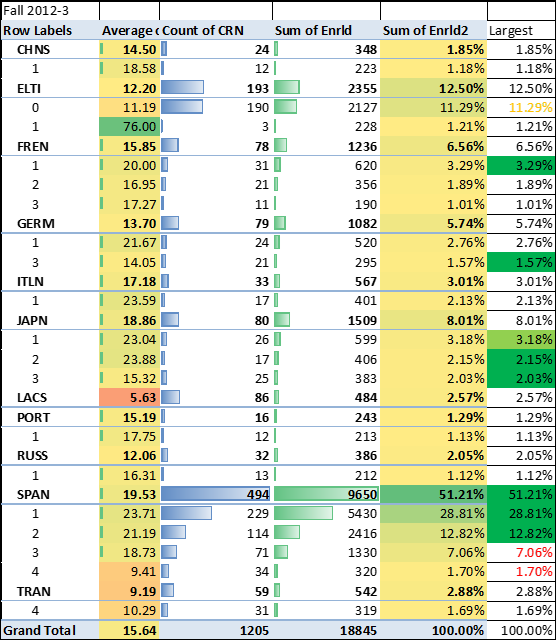
2012/3 enrolment per language in the main LRC constituent departments (LCS and ELTI)
New keyboard shortcuts for diacritics on LRC Teacher PC
- The US international keyboard layout that has come with MS-Windows for many years (though – except in the LRC – not set as default, you need to enable it in the control panel) greatly facilitates typing of characters for most languages that use Roman script with common diacritical marks, but does not cover Pinyin and similar diacritical marks.
- Carly from Carleton, as avid a language teacher as a technologist, had the great idea to extend Microsoft’s US-international keyboard so as to include all the Pinyin tone marks (and other accents useful for linguists). Here is the upshot, extracted from her instructions, but excluding what (either shortcut or (use of common accents within Pinyin is now covered also below) purpose) has not changed from the shortcuts of the non-extended US-international keyboard that used to be the default in the LRC:
-
What you want Which keys you press (before comma is “dead” key = no result until after next key) Example acute accent, pinyin 2nd tone
‘(=apostrophe), vowel
á é í ó ú
grave accent, pinyin 4th tone
`(=grave), vowel
à è ì ò ù
macron accent, pinyin 1st tone
hyphen, vowel
ā ē ī ō ū
pinyin 3rd tone
%(=shift+5), vowel
e.g. ǎ ě ǐ ǒ ǔ
ü with pinyin tones
Accent, double-quote
e.g. ǖ ǘ ǚ ǜ
letter with dot below
; (=shift+period), letter
e.g.

letter with double acute
: (=shift+;) , o or u
ő, ű, Ő, Ű
- We are offering the extended US-international keyboard this as an optional keyboard on the teacher and student PCs with Windows 7.
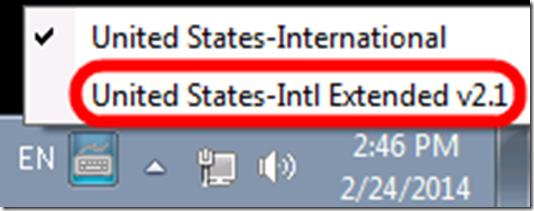
- To select the new keyboard layout, use the language toolbar, click on 2nd option:
- To explore the new keyboard layout use the Windows On-screen keyboard which will let you peek ahead after your pressed a dead key.
- To bypass a special dead key (= get the normal behavior of the key), press SPACE after it.

Recommended settings for a departmental Sanako Lite Recorder installation
The following settings are not in the default installation for the language lab, but rather manually overridden (in the Student Recorder Settings) for installation on faculty office computers: [HKEY_CURRENT_USER\Software\Sanako\Study\Student\Settings]
“My files directory”=”s:\\coas\\lcs\\lrc\\sanako\\teacher\\”
“AlwaysUseRecorderLiteVersion”=dword:00000001
The following setting obviously needs to be generalized:[HKEY_CURRENT_USER\Software\Sanako\Study\Student\Settings]
“Temporary files directory”=”C:\\Documents and Settings\\tplagwit\\Local Settings\\Temp\\”
The helper.exe architecture should be disabled outside of the Sanako classroom (details here):
[HKLM\SYSTEM\CurrentControlSet\Services\Sanako Helper]
“Start”==dword:0×00000004
and for backup:
[HKLM\SYSTEM\ControlSet001\Services\Sanako Helper]
“Start”=dword:0×00000004
Even with the helper.exe neutralized, the “associate media files” option appears too greedy – at least here I cannot get it to associate, as it seems to promise, the media files only when the student.exe is running, rather the following file associations changes seem to get baked into the registry permanently – so the following is not recommended (leave the checkbox in the settings unchecked):
[HKEY_CURRENT_USER\.mff]
“”=”StudyStudent.Document”
“Content Type”=”Application/StudyStudent.Document”
[HKEY_CURRENT_USER\StudyStudent.Document]
“”=”StudyStudent.Document”
[HKEY_CURRENT_USER\StudyStudent.Document\DefaultIcon]
“”=”C:\\Program Files\\Sanako\\Study\\Student\\Student.exe,0”
The following associations seem to be added when checking “associate media files”in admin settings , but it does not look like this association is limited to during run time of the recorder
[HKEY_CURRENT_USER\StudyStudent.Document\shell\open\command]
“”=”C:\\Program Files\\Sanako\\Study\\Student\\Student.exe %1”
[HKEY_CURRENT_USER\.dim]
“”=”StudyStudent.Document”
“Content Type”=”Application/StudyStudent.Document”
[HKEY_CURRENT_USER\.maa]
“”=”StudyStudent.Document”
“Content Type”=”Application/StudyStudent.Document”
[HKEY_CURRENT_USER\.wav]
“”=”StudyStudent.Document”
“Content Type”=”Application/StudyStudent.Document”
[HKEY_CURRENT_USER\.snd]
“”=”StudyStudent.Document”
“Content Type”=”Application/StudyStudent.Document”
[HKEY_CURRENT_USER\.au]
“”=”StudyStudent.Document”
“Content Type”=”Application/StudyStudent.Document”
[HKEY_CURRENT_USER\.aif]
“”=”StudyStudent.Document”
“Content Type”=”Application/StudyStudent.Document”
[HKEY_CURRENT_USER\.aic]
“”=”StudyStudent.Document”
“Content Type”=”Application/StudyStudent.Document”
[HKEY_CURRENT_USER\.aifc]
“”=”StudyStudent.Document”
“Content Type”=”Application/StudyStudent.Document”
[HKEY_CURRENT_USER\.aiff]
“”=”StudyStudent.Document”
“Content Type”=”Application/StudyStudent.Document”
[HKEY_CURRENT_USER\.asf]
“”=”StudyStudent.Document”
“Content Type”=”Application/StudyStudent.Document”
[HKEY_CURRENT_USER\.asx]
“”=”StudyStudent.Document”
“Content Type”=”Application/StudyStudent.Document”
[HKEY_CURRENT_USER\.wax]
“”=”StudyStudent.Document”
“Content Type”=”Application/StudyStudent.Document”
[HKEY_CURRENT_USER\.wm]
“”=”StudyStudent.Document”
“Content Type”=”Application/StudyStudent.Document”
[HKEY_CURRENT_USER\.wma]
“”=”StudyStudent.Document”
“Content Type”=”Application/StudyStudent.Document”
[HKEY_CURRENT_USER\.wmd]
“”=”StudyStudent.Document”
“Content Type”=”Application/StudyStudent.Document”
[HKEY_CURRENT_USER\.wmp]
“”=”StudyStudent.Document”
“Content Type”=”Application/StudyStudent.Document”
[HKEY_CURRENT_USER\.wmx]
“”=”StudyStudent.Document”
“Content Type”=”Application/StudyStudent.Document”
[HKEY_CURRENT_USER\.wp1]
“”=”StudyStudent.Document”
“Content Type”=”Application/StudyStudent.Document”
[HKEY_CURRENT_USER\.wvx]
“”=”StudyStudent.Document”
“Content Type”=”Application/StudyStudent.Document”
[HKEY_CURRENT_USER\.mid]
“”=”StudyStudent.Document”
“Content Type”=”Application/StudyStudent.Document”
[HKEY_CURRENT_USER\.midi]
“”=”StudyStudent.Document”
“Content Type”=”Application/StudyStudent.Document”
[HKEY_CURRENT_USER\.rmi]
“”=”StudyStudent.Document”
“Content Type”=”Application/StudyStudent.Document”
[HKEY_CURRENT_USER\.mp3]
“”=”StudyStudent.Document”
“Content Type”=”Application/StudyStudent.Document”
[HKEY_CURRENT_USER\.m3u]
“”=”StudyStudent.Document”
“Content Type”=”Application/StudyStudent.Document”
[HKEY_CURRENT_USER\.m1v]
“”=”StudyStudent.Document”
“Content Type”=”Application/StudyStudent.Document”
[HKEY_CURRENT_USER\.mp2]
“”=”StudyStudent.Document”
“Content Type”=”Application/StudyStudent.Document”
[HKEY_CURRENT_USER\.mpa]
“”=”StudyStudent.Document”
“Content Type”=”Application/StudyStudent.Document”
[HKEY_CURRENT_USER\.mpe]
“”=”StudyStudent.Document”
“Content Type”=”Application/StudyStudent.Document”
[HKEY_CURRENT_USER\.mpeg]
“”=”StudyStudent.Document”
“Content Type”=”Application/StudyStudent.Document”
[HKEY_CURRENT_USER\.dat]
“”=”StudyStudent.Document”
“Content Type”=”Application/StudyStudent.Document”
[HKEY_CURRENT_USER\.mp2v]
“”=”StudyStudent.Document”
“Content Type”=”Application/StudyStudent.Document”
[HKEY_CURRENT_USER\.mpv2]
“”=”StudyStudent.Document”
“Content Type”=”Application/StudyStudent.Document”
[HKEY_CURRENT_USER\.ogg]
“”=”StudyStudent.Document”
“Content Type”=”Application/StudyStudent.Document”
[HKEY_CURRENT_USER\.mov]
“”=”StudyStudent.Document”
“Content Type”=”Application/StudyStudent.Document”
[HKEY_CURRENT_USER\.qt]
“”=”StudyStudent.Document”
“Content Type”=”Application/StudyStudent.Document”
[HKEY_CURRENT_USER\.mp4]
“”=”StudyStudent.Document”
“Content Type”=”Application/StudyStudent.Document”
[HKEY_CURRENT_USER\.ra]
“”=”StudyStudent.Document”
“Content Type”=”Application/StudyStudent.Document”
[HKEY_CURRENT_USER\.rm]
“”=”StudyStudent.Document”
“Content Type”=”Application/StudyStudent.Document”
[HKEY_CURRENT_USER\.ram]
“”=”StudyStudent.Document”
“Content Type”=”Application/StudyStudent.Document”
[HKEY_CURRENT_USER\.rmm]
“”=”StudyStudent.Document”
“Content Type”=”Application/StudyStudent.Document”
[HKEY_CURRENT_USER\.rmx]
“”=”StudyStudent.Document”
“Content Type”=”Application/StudyStudent.Document”
[HKEY_CURRENT_USER\.swf]
“”=”StudyStudent.Document”
“Content Type”=”Application/StudyStudent.Document”
[HKEY_CURRENT_USER\.smi]
“”=”StudyStudent.Document”
“Content Type”=”Application/StudyStudent.Document”
[HKEY_CURRENT_USER\.rmj]
“”=”StudyStudent.Document”
“Content Type”=”Application/StudyStudent.Document”
[HKEY_CURRENT_USER\.rt]
“”=”StudyStudent.Document”
“Content Type”=”Application/StudyStudent.Document”
[HKEY_CURRENT_USER\.mnd]
“”=”StudyStudent.Document”
“Content Type”=”Application/StudyStudent.Document”
[HKEY_CURRENT_USER\.pls]
“”=”StudyStudent.Document”
“Content Type”=”Application/StudyStudent.Document”


Questions? Read the About. Or just ask me a quick Our Databases: Resources with calendars -- Language learning material Moodle Sites, multimedia files -- films


FAQs for LRC student staff or for students or for teachers. To search our FAQs, in the browser addressbar, add after "https://plagwitz.wordpress.com/feed/?tag=faqs+/" "+TAG1" (from tag cloud below) OR "https://plagwitz.wordpress.com/feed/tag=faqs
&category_name=" "CAT1" (from category hierarchy below). OR search both categories and tags, and multiple TAGs/CATs (connect with "," for OR-search, with "+" for AND-search), like so: https://plagwitz.wordpress.com/feed/?tag=TAG1+TAG2+...TAGn&category_name=CAT1
+CAT2+...CATn"
Other ways to find help
If you cannot find it here, look there: 5,500 Language-Learning Links and Programs for learning or teaching 150 languages
Shortcuts:Our Lists, Our Maps, LRC Staff Moodle Site,LRC Project Moodle Site, 49erexpress, UNCC Moodle, Student Recordings: s:claslcslrcsanakostudent
Learning usage samples: Sanako oral exam, Kaltura webcam presentation, Dictation with speech recognition, Sanako written exam, Chinese and Japanese interactive stroke-order practice
Test the Sanako Installer, Webbrowser Popup Konfigurator for XP, or Windows7, faster LRC TeacherPC Log-in Let MS facilitate diacritics writing by installing for you US-International keyboard layout
This is my personal blog (Google+). The views expressed on these pages are mine alone and not those of my employer. The information in this weblog is provided “AS IS” with no warranties, and confers no rights.
 Thomas' Work Space