Archive
SDL-Trados Studio 2009 Online Training Links
SDL maintains an repository of archived online webinars on Trados here.
SDL maintains a list of upcoming free webinar events here. Here is a sampling of their upcoming live trainings (as of August 2011) here:
Friday 19
Ask the expert – A session dedicated / to the most frequently asked questions / on SDL Trados Studio 2009
15:00 – 16:00 London / 16:00 – 17:00 Paris
Thursday 25
Tips and tricks to get you more productive / with SDL Trados Studio 2009
09:30 – 10:30 London / 10:30 – 11:30 Paris
Type: Product info & demo
Friday 26
An introduction to SDL Trados Studio 2009 for translators
10:00 – 11:00 London / 11:00 – 12:00 Paris
Type: Product info & demo
For what you can expect from these webinars, please note that they also offer full training courses, but these are not free.
Webinar: Respondus 4.0 for Moodle by Vendor
In case you could not make it to this live online presentation shortly before the term start, I taped this respondus-4-moodle-webinar (plays for sure in Windows Media Player on the Lab PCs) for your review. I also made this transcript which can help you jump to the information that interests you most:
|
0: 00 |
question editor |
|
1: 00 |
signing up for a test bank |
|
4: 00 |
importing questions from a test bank (example: human biology) |
|
6: 30 |
editing the quiz based on the test bank |
|
7: 00 |
adding another question, multiple choice |
|
07: 00 |
question types in Moodle and Respondus are similar |
|
08: 00 |
ad advanced formatting, like bold or html or multimedia |
|
09: 00 |
from a local computer or on the web, like youtube.com |
|
10: 00 |
equations |
|
12: 00 |
printing exams |
|
14: 00 |
publishing exams directly into Moodle |
|
14: 00 |
enter your Moodle server information (once; or never, if your administrator has prepopulated these fields for you) |
|
16: 00 |
summary |
|
18: 00 |
lockdown browser: can’t print, capture screen as image or video, can’t browse web or instant messaging programs |
|
20: 00 |
integration with Moodle (Moodle block if hosted, module if self-hosted) |
|
21: 00 |
within Moodle, on the update quiz link, in the section: Respondus lockdown browser |
|
21: 30 |
students perspective: local client software install |
|
23: 30 |
example of taking an exam with the lockdown browser |
|
28: 30 |
what the exam will look like if the students tries to access it with another browser |
|
30: 30 |
admin perspective: info for the lockdown browser license administrator, including for lab administrators with imaging and answer files |
|
34: 30 |
summary |
|
36: 30 |
online documentation |
|
37: 30 |
pricing |
|
38: 30 |
q&a: support for Moodle: 2.0,2.1 yes |
|
39: 30 |
q&a: the admin can in the admin portal prepopulate the server settings for the teachers’ Respondus |
|
40: 30 |
q&a: question types in Moodle are different from blackboard : these get dropped when you change the personality (blackboard/Moodle) within Respondus, but most basic question types simply carry over back and forth |
|
41: 30 |
q&a: default font size: menu: file / menu item: preferences/ tab: edit&publish |
|
42: 30 |
q&a: convert exam view files – go through the publisher of the text bank – or export to word, put the Respondus import markup in, import word into Respondus |
|
44: 30 |
q&a: lockdown browser system requirements: see online http://www.Respondus.com/lockdown/faq.shtml |
|
44: 30 |
q&a: timed exams? Yes, but through Moodle, lockdown browser just passes this through |
|
45: 30 |
q&a: virtual machine: lockdown browser prevents it (no need for vm with windows with new mac version of lockdown browser) |
|
46: 30 |
q&a: dual screen: lockdown browser prevents it , beyond enforcing full screen |
|
47: 30 |
q&a: how to push out the lockdown browser to your students during the first quiz? Best set up a test quiz with just this purpose |
|
48: 30 |
q&a: will the timer from Moodle show in the lockdown browser: yes |
|
49: 30 |
q&a: about hosting |
|
50: 30 |
q&a: multiple questions to a single image |
|
51: 30 |
q&a: publishers |
While I like the impetus of Respondus to facilitate formative assessment, its utility seems limited if you do not have pre-authored publisher test bank for your topic. Or rather the functionality of preformatting text in MS-Word and importing it – not demonstrated in this screencast – seems more convenient (and partially could be automated, especially in SLA quizzes by using NLP) than actually authoring quizzes in Respondus – but is also available in Moodle itself.
Or use a simple quiz-generating MS-Word template if you do not need an LMS, but rather feedback so much faster than on the WWW, as implemented in current LMS, that a difference in quantity difference forms a new quality).
And I can also not say that I see much new in Respondus since 2004, except for the Moodle support, which naturally did not exist then. In the area of Web 2.0, one would wish for more than just publisher-driven test banks (where language are largely absent except for the most popular courses).
First impressions: NC-LOR, the North Carolina K-20 learning materials repository
This web site collects state-wide learning resources. Contained are also the NC-net (“Network for excellence in teaching”) submissions: “The purpose of the North Carolina Network for Excellence in Teaching is to share professional development resources statewide. This helps avoid duplication and encourages replication of best practices. The Resource Exchange offers your college the opportunity to showcase and share its best professional development resources and teaching tools.”
NC-LOR is based on TheLearningEdge’s equella, one of the erepository software systems that I have managed learning materials in.
NC-LOR training materials are hosted on WordPress. Of special interest to us should be the Moodle integration: “How to Use the NCLOR with Moodle 1.9.x (4.1): This tutorial should be reviewed by faculty of institutions who use Moodle as their course management system. This tutorial includes topics like: defining LMS integration, deciding what type of learning activities to put in a course, understanding how to use Moodle with the NCLOR, understanding how to update item links and information on learning object creation”. However, UNCC has not implemented NC-LOR integration as of yet:

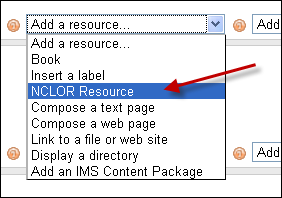
Even without the Moodle integration, while students can access NC-LOR materials only from within Moodle, as member of the UNC system, you can either browse NC-LOR as a Guest, or ask for a Contributor account, my request had a turnaround of only a few minutes. Once you have a contributor profile, you can subscribe to receiving workflow updates from within your profile:

However, what I would like to see, but cannot find is the capability to subscribe to an RSS-feed which notifies me of updates of new submissions in a certain subject-“folder”.
The most important subject folders for LCS and ELTI are here:

There are only about 120 resources (snapshot at bottom) in the root folder, mostly links (reminds me that around 2000, I managed about a 1000 language learning links in a self-adapted PERL-CGI repository…) to freely available internet resources most of which should be in subfolders which, however, are empty.

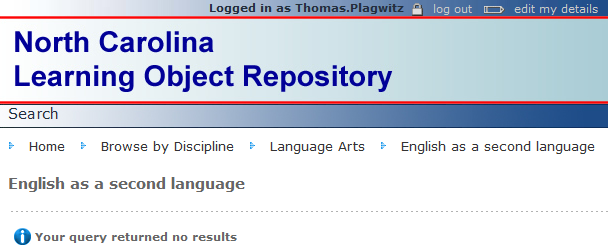
This may be indicative of a number of typical problems I have encountered with learning materials repositories.

Learning Materials eRepositories: Thoughts & Considerations
Cost- and time-saving benefits of learning material eRepositories include:
- sharing and reuse of content for the teacher ad learner
- de-duplication for the IT support
Typical issues I have encountered with learning materials repositories:
- questionable applicability of the software-object-oriented-design (OOD)-derived concept of encapsulated and reusable learning “objects” to highly progressive subjects like language arts;
- also, a not uncommon problem of OOD gone wrong: having a “God-object” vs. SOLID-principled object-design, is even more of a risk with “learning objects”: Don’t they not always tend to be too complex to truly reap the benefits of having a design based on many small encapsulated and reusable objects in software programming?
- licensing & copyright or privacy FERPA restrictions preventing uploads and specialization of interest prevents the network effects which have made the open internet so pervasive (and disruptive to some businesses);
 curation using metadata implementing controlled vocabularies and ontologies , even if crowd-sourced, remains a daunting task for domain specialists for non-librarians, while it has been said to be the secret of librarians:

“als ob er jetzt das Geheimnis dieser Wände aussprechen müßte: ‘Herr General,’ sagt er ‘Sie wollen wissen, wieso ich jedes Buch kenne? Das kann ich Ihnen nun allerdings sagen: Weil ich keines lese!” Weißt du, das war mir nun beinahe wirklich zuviel! Aber er hat es mir, wie er meine Bestürzung gesehen hat, auseinandergesetzt. Es ist das Geheimnis aller guten Bibliothekare, daß sie von der ihnen anvertrauten Literatur niemals mehr als die Büchertitel und das Inhaltsverzeichnis lesen. ‘Wer sich auf den Inhalt einläßt, ist als Bibliothekar verloren!’ hat er mich belehrt. ‘Er wird niemals einen Überblick gewinnen!’” (Robert Musil, Der Mann ohne Eigenschaften)
eRepository implementations I have used:
- Our Moodle instance is still looking for an erepository system to integrate. We are getting some eRepository benefits (easy reuse across courses without need for term-wise recycling/re-upload; de-duplication) by implementing [your language here] metacourses in which we enroll all [your language here] “child courses”
- The equella eRepository is used by NC-LOR, and TBA:I have managed learning materials in it earlier, in conjunction with Blackboard – most recommended (at least then) among educational technologists, but not for the faint of heart, which seems to have limited the faculty adoption (and for which NC-LOR may have been a reference implementation, if I remember correctly). One of the things I did not like about equella when I used it (2006-2008) was the seemingly endless point-and-click-and-WWWait.
- The Blackboard content-system was WebDAV based and therefore, once you had established the connection of your client to the WebDAV share (which MS-VISTA WebDAV updates unfortunately temporarily broke ), featured an extremely user-friendly integration with the MS-Windows shell that allowed for batch-handling of files in a familiar, fast “fat client” interface.
- I was, when it was first released, and its metadata-tagging features advertised by Jon Udell, highly impressed by – and consequently have become an avid proponent of, and much more active photographer itself – MS-Windows Vista (now also in: Live) PhotoGallery which combines intuitive use with great speed . However, requirements for managing and sharing a personal photo and video collection are not nearly as complex as for shared learning materials (although I have also used it managing my personal work ePortfolio).
How can I change the volume on my SANAKO headsets?
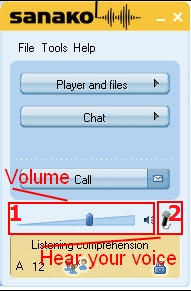
- Q: How can I change the volume on my headsets? Hear my own voice on the headsets? A:Use the Sanako Student Player 1. Volume Slider and 2. (for Sidetone = echo of your speaking) Headset Icon:
-
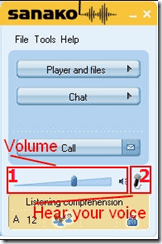
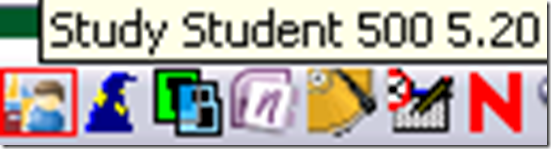
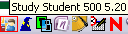
- Q: Where is the Sanako Student Player? A: Show Sanako Student by clicking on the notification bar icon:
How to rip an audio CD in MS-Windows with Windows Media Player
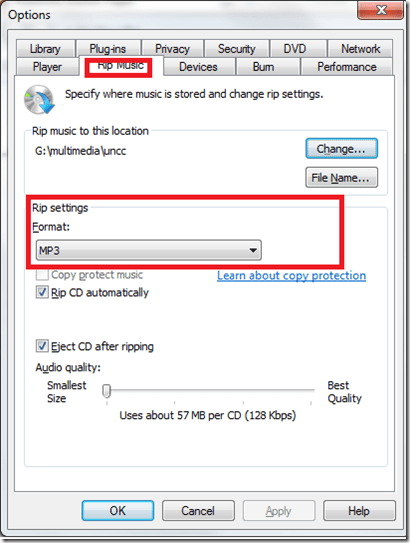
- Windows Media Player has CD-ripping capabilities built-in, WMA-format used to be the only option and is still the default in Windows 7, but can be changed under menu:”tools” / “options”/ tab:”rip music”
Protected: How to conduct an easy oral exam with Sanako1200 (Model imitation/Question Response) – Part II: Implementation/instruction of examined students


Questions? Read the About. Or just ask me a quick Our Databases: Resources with calendars -- Language learning material Moodle Sites, multimedia files -- films


FAQs for LRC student staff or for students or for teachers. To search our FAQs, in the browser addressbar, add after "https://plagwitz.wordpress.com/feed/?tag=faqs+/" "+TAG1" (from tag cloud below) OR "https://plagwitz.wordpress.com/feed/tag=faqs
&category_name=" "CAT1" (from category hierarchy below). OR search both categories and tags, and multiple TAGs/CATs (connect with "," for OR-search, with "+" for AND-search), like so: https://plagwitz.wordpress.com/feed/?tag=TAG1+TAG2+...TAGn&category_name=CAT1
+CAT2+...CATn"
Other ways to find help
If you cannot find it here, look there: 5,500 Language-Learning Links and Programs for learning or teaching 150 languages
Shortcuts:Our Lists, Our Maps, LRC Staff Moodle Site,LRC Project Moodle Site, 49erexpress, UNCC Moodle, Student Recordings: s:claslcslrcsanakostudent
Learning usage samples: Sanako oral exam, Kaltura webcam presentation, Dictation with speech recognition, Sanako written exam, Chinese and Japanese interactive stroke-order practice
Test the Sanako Installer, Webbrowser Popup Konfigurator for XP, or Windows7, faster LRC TeacherPC Log-in Let MS facilitate diacritics writing by installing for you US-International keyboard layout
This is my personal blog (Google+). The views expressed on these pages are mine alone and not those of my employer. The information in this weblog is provided “AS IS” with no warranties, and confers no rights.
 Thomas' Work Space