Archive
Author Archive
How to split an Excel workbook into one file per sheet with VBA (reworked)
2015/09/24
1 comment
- There are other code snippets on stackoverflow.com, but I went with the top match in the Google search.
- Couldn’t get it to work (error # 424 Object required on xWS.copy in Excel 2013, with the VBA run from a separate utilities workbook) until I made these changes:
'TRP reworked http://www.extendoffice.com/documents/excel/628-excel-split-workbook.html
Sub Workbook_Split() 'Updated by TRP 20150924

    Dim xPath As String
    Dim myWorkSheet As Worksheet
    xPath = Application.ActiveWorkbook.Path 'the source workbook needs be saved first
    Application.ScreenUpdating = False
    Application.DisplayAlerts = False

    For Each xWS In ActiveWorkbook.Sheets    'trp: replaced ThisWorkbook.Sheets
        'trp: replaced xWS.Copy 'toask: this fails with 424: object required
        Set myWorkSheet = xWS
        myWorkSheet.Copy 'If you don't specify either Before or After, Microsoft Excel creates a new workbook that contains the copied sheet.
        Application.ActiveWorkbook.SaveAs FileName:=xPath & "\" & myWorkSheet.Name & ".xlsx"
        'trp: replaced xWS.Name & ".xls"
        Application.ActiveWorkbook.Close False    'trp:savechanges:=False
    Next
    Application.DisplayAlerts = True
    Application.ScreenUpdating = True
End Sub
Categories: service-is-programming
MS-Excel, VBA, worksheets
“"Mira, mamá! Sin manos!". Can speech recognition tools be soundly applied for L2 speaking practice?” FLEAT VI, August 11-15 at Harvard University
2015/08/13
Leave a comment
Categories: conferences, presentations
speech-recognition
How to easily rearrange your sections via the headings in MS-Word’s Navigation Pane
2015/07/19
Leave a comment
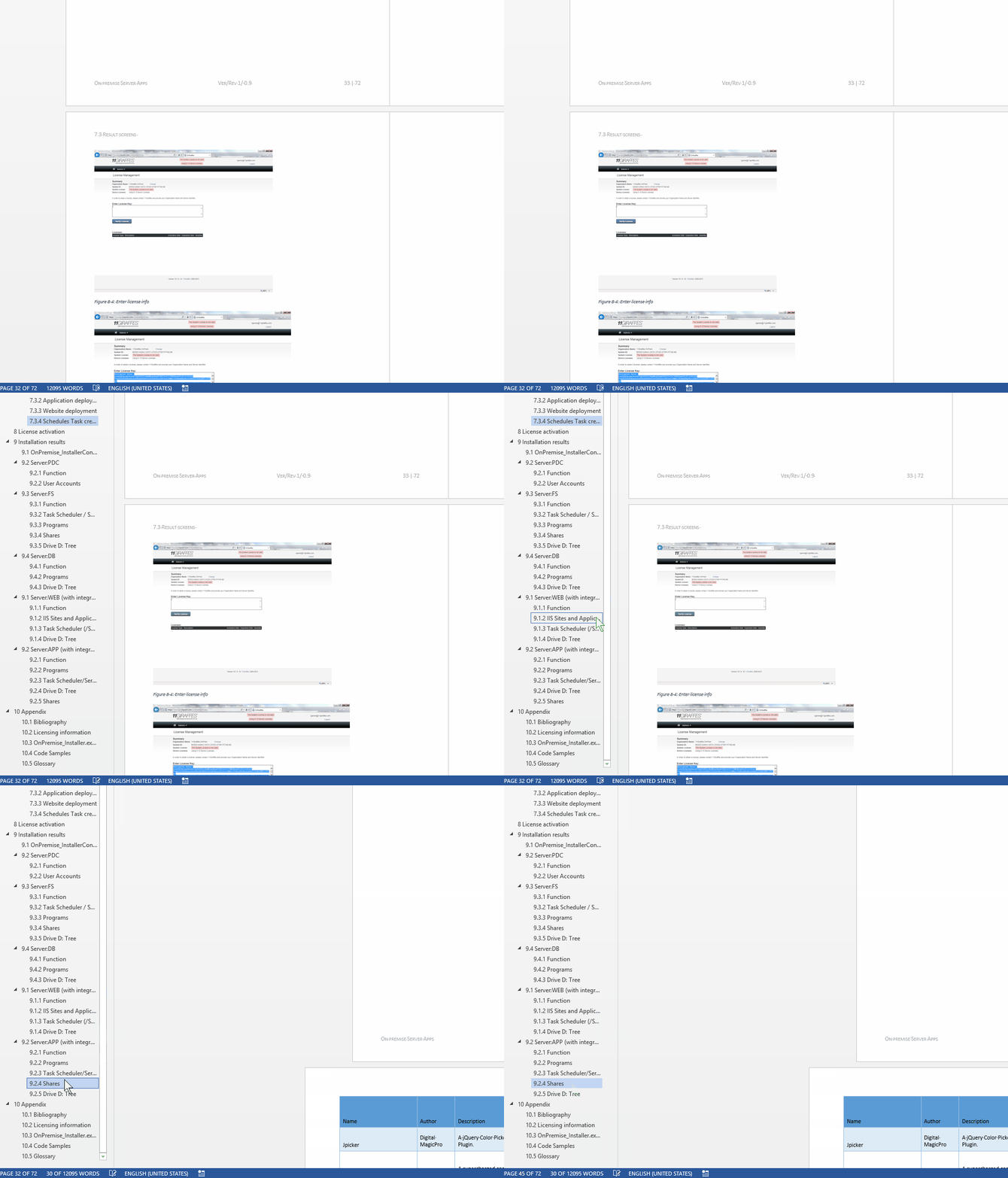
- Short answer Show Navigation (from ribbon ./ View), then Drag&drop/

- Maybe obvious, but had escaped me so far – I thought such ease would only come only with outline view – what a great feature!
Categories: service-is-documenting
2013, headings, MS-Word, navigation-pane
Which UML diagram types are in most demand?
2015/06/07
Leave a comment
- From a recent spot check of over 500 job postings on Indeed.com that mention both “UML” and “diagram”, the following picture emerges:
- There is clearly a Big 4 of UML diagram types, and they are – in order of frequency –
- sequence,
- use-case,
- activity and
- (the only structural diagram type that “counts”) class diagram.
-
UML Diagram Type Count of type activity 19.33% class 15.33% communication 6.00% component 2.67% interaction 1.33% network-architecture 1.33% object 2.00% sequence 23.33% state 8.00% timing 0.67% use-case 20.00% Grand Total 100.00% - It seems you could in practice cover “80%’ of UML with these four diagram types. Even state and communication (collaboration) diagrams are an already very distant 5th and 6th (but get you up to a coverage of about 95%).
- Notably, the majority of UML diagram types – at least in this sample set – do not figure at all:
| Count of type | Diagram |
| 0 | Behavioral state machine |
| 0 | Collaboration use |
| 0 | Composite structure |
| 0 | Deployment |
| 0 | Information flow |
| 0 | Interaction overview |
| 0 | Internal structure |
| 0 | Manifestation |
| 0 | Model |
| 0 | Package |
| 0 | Profile |
| 0 | Protocol state machine |
Note: The vast majority of mentions did not need any, but I attempted some translations of the raw data on indeed.com:
| indeed.com | counted as |
| action | activity |
| collaboration (1) | communication (2) |
| data flow | information flow |
| domain model | class diagram |
| object models | object |
| state charts | state machine |
| process flow | 1 not counted |
| swim lane | sequence |
| prototypes | 1 not counted |
Categories: service-is-documenting
UML
How to ease editing work in MS-Word by automating search/replace operations
2015/05/08
Leave a comment
- If you frequently have to edit documents according to a large number of editorial rules and regulations
- and if you can partially automate these edit operations (or at least highlight suspicious passages for human review) with Word’s search/replace,
- I can recommend an add-in that can automate even the repeated search/replace operations (like the 57 in the video below)
- and even help you manage your search/replace strings and regular expressions in a spreadsheet which it can load from:
- Greg Maxey’s VBA Find & Replace Word Add-in. See it in action (click for full size):

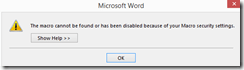
TwoThree Caveats: :- At this point, I cannot get the add-in to work only in Word 2010. Even if I lower Macro security and allow programmatic access to the VBA project, when trying to launch the add-in from the ribbon, Word 2013 complains: “The macro cannot be found or has been disabled due to your macro security settings”:
 .
. - The automation is only as good as your underlying search/replace operations. (Hint: “Some people, when confronted with a problem, think ‘I know, I’ll use regular expressions.’ Now they have two problems.”)
- I think I will refrain from search/replace during “Tracking changes” – as in the video – , and rather use “Compare documents” after the replace operations – too many quirks otherwise…
- At this point, I cannot get the add-in to work only in Word 2010. Even if I lower Macro security and allow programmatic access to the VBA project, when trying to launch the add-in from the ribbon, Word 2013 complains: “The macro cannot be found or has been disabled due to your macro security settings”:


Categories: service-is-documenting
2010, 2013, add-ins, automation, MS-Excel, MS-Word, regular-expressions, replacing, VBA
How to define your own conditional content marker “Internal” for Doxygen
2015/05/06
Leave a comment
- Doxygen comes with a built-in conditional content marker \internal the outputting of which can be controlled with the switch INTERNAL_DOCS in Doxygen’s config file.
- However, I could not get this to work as advertised in Doxygen 1.8.8.
- In cases of similar feature breakage, users are commonly advised to fix the error in the Doxygen source. If you, like I did, lack the time for that, here is a simple workaround which uses another built-in feature that an be controlled via Doxygen’s config file:
- Define as one of the:
ALIASES = "myinternal=\if myinternal <HR><kbd><em>" \ "endmyinternal= </em></kbd> \endif" # HTML is optional, intended to make internal information stand out clearly if outputted - Switch this ALIAS on and off using ENABLED_SECTIONS = # myinternal
- Example usage in a .dox file:
-# A high-low-high-low beep sequence followed by a low-high beep
 sequence indicates successful pairing and connection to the remote
 device.
 @myinternal tested with barcode on lower-end of cradle: gives success
 beep sequence @endmyinternal
 -# A long low, long high beep sequence indicates unsuccessful pairing.
Doxygen config reformatted for Excel
2015/04/16
Leave a comment
- Apart from the almost 150 markup tags Doxygen 1.1. supports (not to mention HTML tags that are supported also),
- the Doxygen config file in version 1.8.8 has over 260 settings, many with complex interrelations.
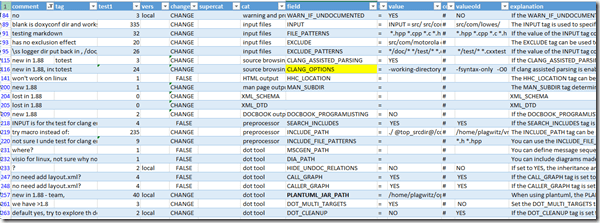
- To facilitate working with so many options, especially when testing. I reformatted the default config file for import into Excel,
- where I can more easily sort, search and filter,
- and export columns L-R whenever I need to update the doxygen.config file:

Below is a live, downloadable view:
Categories: e-infrastructure, Spreadsheets
doxygen, MS-Excel
Paper on use of “Speech recognition Tools for Oral Proficiency” training has appeared in this week’s FLTMag.com
2015/04/06
Leave a comment
- Since I have been asked to advertise this:


- These Speech recognition tools, while an invaluable partial evaluation automation or AI tool, come free with MS-Windows (7 Enterprise/Ultimate, 8 all distributions) – crucial for often resource-strapped language learning environments.
- The tools do not come with pre-built exercises – a blessing in disguise since this makes them easier to integrate them with your existing textbook-based syllabus. I provide some ideas how you can easily derive speech recognition exercises from your syllabus/textbooks.
- I recommend having a look at the entire new issue of FLTMag, the magazine on technology integration in the world language classroom, which
- examines other software that supports second language learning with video conferencing, support for writing and vocabulary learning (on tablets versus print materials) ,
- reviews a book on “Ideas for integrating technology in the classroom”
- and advertises upcoming conferences. Hope to see you there.
Categories: research
speech-recognition


Questions? Read the About. Or just ask me a quick Our Databases: Resources with calendars -- Language learning material Moodle Sites, multimedia files -- films


FAQs for LRC student staff or for students or for teachers. To search our FAQs, in the browser addressbar, add after "https://plagwitz.wordpress.com/feed/?tag=faqs+/" "+TAG1" (from tag cloud below) OR "https://plagwitz.wordpress.com/feed/tag=faqs
&category_name=" "CAT1" (from category hierarchy below). OR search both categories and tags, and multiple TAGs/CATs (connect with "," for OR-search, with "+" for AND-search), like so: https://plagwitz.wordpress.com/feed/?tag=TAG1+TAG2+...TAGn&category_name=CAT1
+CAT2+...CATn"
Other ways to find help
If you cannot find it here, look there: 5,500 Language-Learning Links and Programs for learning or teaching 150 languages
Shortcuts:Our Lists, Our Maps, LRC Staff Moodle Site,LRC Project Moodle Site, 49erexpress, UNCC Moodle, Student Recordings: s:claslcslrcsanakostudent
Learning usage samples: Sanako oral exam, Kaltura webcam presentation, Dictation with speech recognition, Sanako written exam, Chinese and Japanese interactive stroke-order practice
Test the Sanako Installer, Webbrowser Popup Konfigurator for XP, or Windows7, faster LRC TeacherPC Log-in Let MS facilitate diacritics writing by installing for you US-International keyboard layout
This is my personal blog (Google+). The views expressed on these pages are mine alone and not those of my employer. The information in this weblog is provided “AS IS” with no warranties, and confers no rights.
 Thomas' Work Space