Archive
How we provide more computer support for walk-up clients at the LRC reception desk
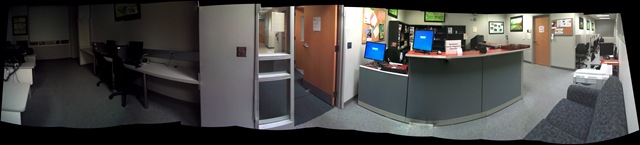
- We have set up 3 PCs at the reception desk. They all contain an exactly identical software configuration (based on Symantec Ghost imaging and Faronics Deepfreeze).
- Except that two (we could not get hold of another monitor) have a secondary screen connected that can extend the Windows Desktop, or mirror it (use CTRL-ALT-F11 and CTRL-ALT-F10 to switch between the modes of the )
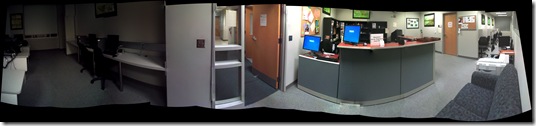

- To aid in this communication over the counter, press CTRL-2 to freeze and on the screen (uses MS-ZoomIt) which helps when pointing out screen elements.
- So that LRC staff and clients can both use the university’s most important web applications, the computers have been configured to automatically launch a number of web browsers on startup, and within each browser, open a number of home pages with(LRC website, Moodle, NINERNET, faculty&staff Mail, WordPress, Excel Web App with he LRC databases for hardware, software, media and learning materials inventories). (When done, instead of closing the browser, use the “sign out” link of each web application).
- As a reminder, the most basic instructions (with keyboard shortcuts) have been posted on both primary and secondary monitor.
- Can we also implement a screen sharing solution allowing for MS-remote assistance, to enable reception desk LRC staff to escalate client questions they cannot resolve, like our IT department?

Adapting a Symantec Ghost 11 Dell Optiplex 760 imaging setup to 780 hardware using Boot Wizard Win-PE editor
-
I have set up locally, and documented, a default installation of Symantec Ghost 11 (Ghost console version 11.5.1.2266) that can image a computer lab of dell OptiPlex 760 (not sure how I ended up with doing even this part).
-
Trying to set to implement use of our new live@edu communications infrastructure in this environment, I need to image a Dell OptiPlex 780 lab with this setup results in an error: “To Virtual Partition Drivers could not be found in the PreOS for the following devices:Manufacturer: "Intel", Description: "Intel(R) ICH10D/DO SATA AHCI Controller", PCI Vendor: 0x8086, PCI Device: 0x3a02, PCI Subsystem: 0x4201028”
-
The institution has not produced any documentation on this adaptation, so here goes: You can get a complete set of MS-Vista 32 drivers (which is the OS version that Ghost 11 Win-PE uses ) for Dell Optiplex 780 from Dell’s Driver CABs Homepage, including a table of contents.
-
You can expand this in Windows Explorer and look for the x86 storage driver, and you will find only one suitable: R222843, Matrix Storage Manager (OS Pre-Install Driver Only), A17, 8.8.0.1009
-
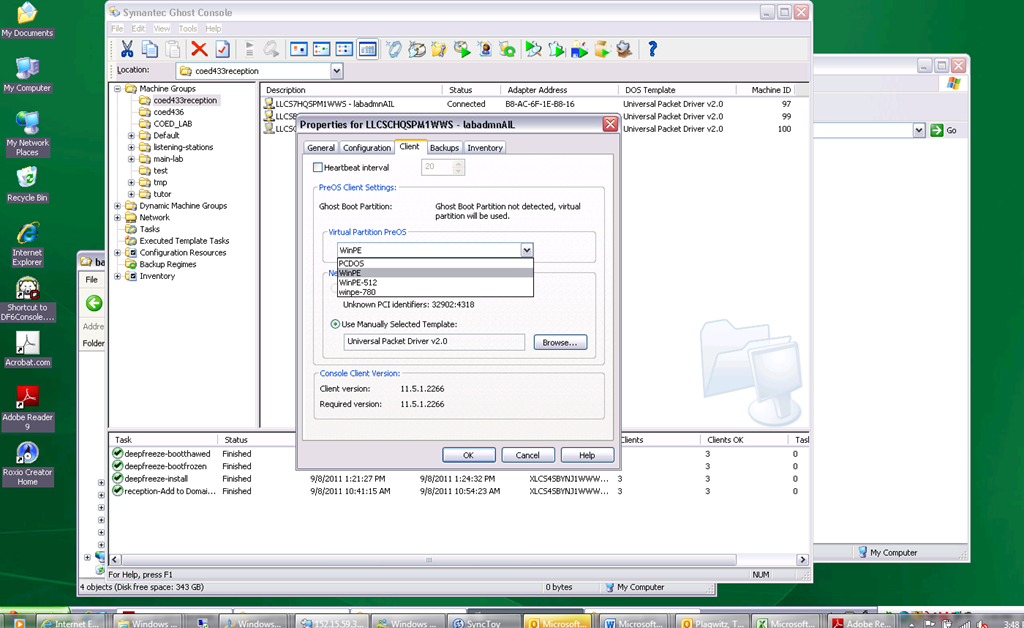
In Ghost console / tools / boot wizard, You can add this driver (entire dir, as long as it has a friendly name for ghost – could you have done this with the entire dell driver cab of 300mb?) to the win-pe-780 (I made a copy of the default win pee environment which I still need to use for a different set of hardware) (which then compiles the win-pe image), and
-
You also have to check the driver , to have it included (which compiles the win-pe image again – why? ).
-
You have to set in Ghost console menu; tools / options / the win-pe as the default remote boot os (this will have to be changed for 760 imaging back to win-pe).
-
Now, did this really “take”?

-
This allows the reception-captureimage task to complete.
-
Additional tasks reception-DeployImage and reception-Add to Domain&AD can be derived from the default installation.
-
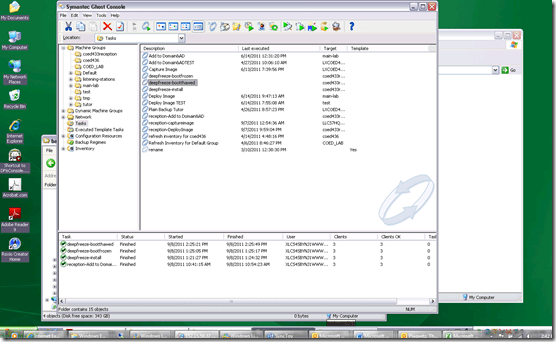
We can also deploy and manage Deepfreeze now from the Ghost Console, bypassing Deepfreeze Console.
-
-
I hope this was my last trip down the “general computing” infrastructure Geisterbahn for a while. I was actually trying to apply productivity software infrastructure to a local business process, and merely to free up some time for elearning pedagogy…
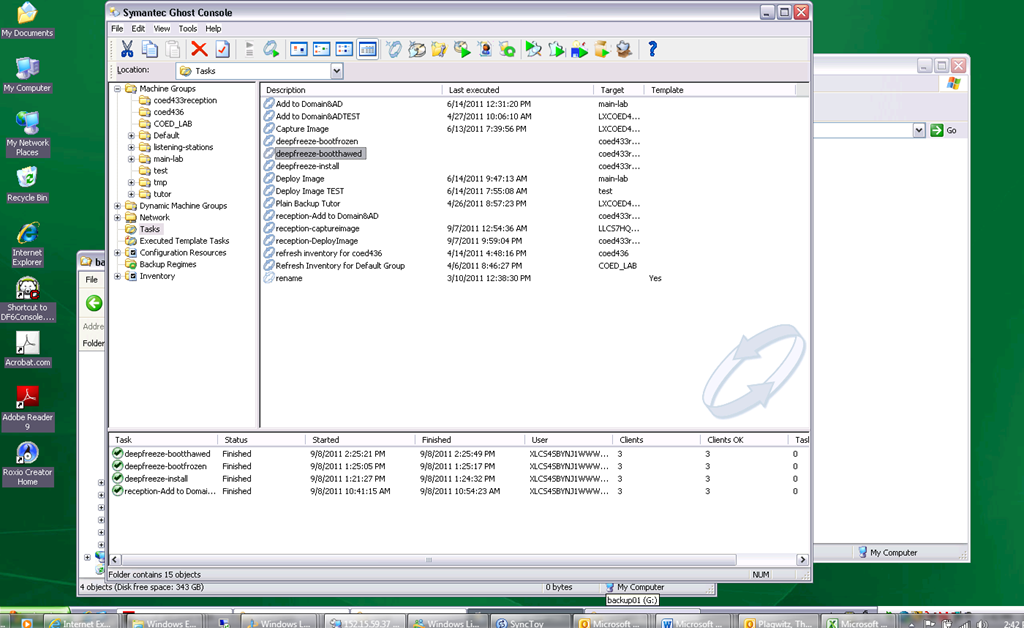
Minor Updates during Computer Lab Imaging with Symantec Ghost Explorer
TBA: intro mit querverweis checklist of lists
You can do minor updates using the file manipulation features of Ghost Explorer (you may have to recompile the image, which adds some time – but not necessarily, even for registry changes – and is still faster than the checklist).
Load the image with Ghost explorer. Browse to a file. Right-click the directory or file to get options. Or simply drag and drop files between the host file system into the Ghost Explorer.
Remember that the Windows registry is also only a file. Save a hive of the registry to the host file system, then use the MS knowledgebase approved method to edit it with regedit on the host system before copying it back:
|
1. Run Regedit.exe from the new installation of Windows, and then click theHKEY_LOCAL_MACHINE key. |
|
2. On the File menu, click Load Hive. |
|
3. Open the %SystemRoot%\System32\Config folder of the original Windows installation, click the System file, and then click Open. |
|
4. In the Load Hive box, type test, and then click OK. The original Windows installation System hive is loaded as a subkey of the current HKEY_LOCAL_MACHINE registry key as "test". |
|
5. [Do what it takes] |
|
6. Unload the test registry subkey: |
|
a. Click test, and then click Unload Hive on the File menu. |
|
b. Click Yes to confirm the unloading. |
Here is a ghost image registry hive loaded as test into the host registry editor:

Using the runonce key of the registry, you can also use this technique to force separate application installs after deployment and before the freezing of the image:

Clone/deploy as normal: Easy, fast. Good luck.
How to get started inventorying hardware and software with Symantec Ghost 11
- Inventorying 50 PCs with different hardware and software configurations, when done manually/pedestrian-wise, can consume a lot of time. If you manage your PCs with Ghost clients updating images, Symantec Ghost console can query and collect your hardware, software and configuration (using MS-WMI).
- Tree node: Report, right-click: new: Build a new report, selecting the ghost client computers to query, and what to query, out of the building blocks in tree node: inventory (you can assemble your own all-inclusive query)

- Tree node: tasks / Refresh inventory
- Tree node: Report, right-click report, run:
- Wait for results:

- Click button: export. Choose the CSV format which is more useful than pretty printing a text report. Note that my results contained some kind of a cross-product. Only the last line per oft repeated machine name contained an extensive set of information (unfortunately the earlier lines contained other non-redundant bits and pieces):

- . The information you can collect seems comprehensive:
-
Field
Sample Content
Machine Name
LXCOED434-PC04 – ITSAdmin
Adapter Address
00-24-E8-23-AD-EC
BiosCharacteristics
[7 9 10 11 12 14 15 16 19 21 24 26 27 28 29 32 33 40 41 42 50 64 65 66 67 68 69 70 71 72 73 74 75 76 77 78 79]
Version
115.01.2266
BIOSVersion
["DELL – 15" "Phoenix ROM BIOS PLUS Version 1.10 A03"]
Tag
\\.\PHYSICALDRIVE0
SerialNumber
Caption
Phoenix ROM BIOS PLUS Version 1.10 A03
CurrentLanguage
en|US|iso8859-1
TotalPhysicalMemoryInMB
4096
ProtocolSupported
16
PNPDeviceID
PCI\VEN_8086&DEV_3A67&SUBSYS_027F1028&REV_02\3&172E68DD&0&D0
VerticalResolution
SettingID
ScanMode
RefreshRate
NumberOfColors
MinRefreshRate
MaxRefreshRate
HorizontalResolution
Description
Caption
Name
Intel(R) ICH10 Family USB Universal Host Controller – 3A67
MaxNumberControlled
Manufacturer
Intel
DeviceID
PCI\VEN_8086&DEV_3A67&SUBSYS_027F1028&REV_02\3&172E68DD&0&D0
MofSelfInstallDirectory
MaxWaitOnEvents
2000
MaxWaitOnClientObjects
60000
MaxLogFileSize
65536
LowThresholdOnEvents
10000000
LowThresholdOnClientObjects
10000000
LoggingLevel
1
LoggingDirectory
C:\WINDOWS\system32\WBEM\Logs\
LastStartupHeapPreallocation
InstallationDirectory
C:\WINDOWS\system32\WBEM
HighThresholdOnEvents
20000000
HighThresholdOnClientObjects
20000000
EnableStartupHeapPreallocation
FALSE
EnableEvents
TRUE
EnableAnonWin9xConnections
DatabaseMaxSize
DatabaseDirectory
C:\WINDOWS\system32\WBEM\Repository
BuildVersion
2600
BackupLastTime
BackupInterval
30
AutoStartWin9X
AutorecoverMofs
["C:\\WINDOWS\\system32\\WBEM\\cimwin32.mof" "C:\\WINDOWS\\system32\\WBEM\\cimwin32.mfl" "C:\\WINDOWS\\system32\\WBEM\\system.mof" "C:\\WINDOWS\\system32\\WBEM\\wmipcima.mof" "C:\\WINDOWS\\system32\\WBEM\\wmipcima.mfl" "C:\\WINDOWS\\system32\\WBEM\\regev
ASPScriptEnabled
ASPScriptDefaultNamespace
root\cimv2
SIDType
SID
PasswordRequired
PasswordExpires
PasswordChangeable
Name
Lockout
LocalAccount
FullName
Domain
Disabled
Description
Caption
AccountType
SIDType
SID
PasswordRequired
PasswordExpires
PasswordChangeable
Name
Lockout
LocalAccount
FullName
Domain
Disabled
Description
Caption
AccountType
Description
Intel(R) ICH10 Family USB Universal Host Controller – 3A67
Caption
Intel(R) ICH10 Family USB Universal Host Controller – 3A67
Type
-2147483645
VideoProcessor
ATI Radeon Graphics Processor (0x95C5)
VideoModeDescription
1280 x 1024 x 4294967296 colors
VideoMode
VideoMemoryType
2
VideoArchitecture
5
SystemPaletteEntries
SpecificationVersion
ReservedSystemPaletteEntries
ProtocolSupported
PNPDeviceID
PCI\VEN_1002&DEV_95C5&SUBSYS_03421028&REV_00\4&904329D&0&0008
NumberOfVideoPages
NumberOfColorPlanes
1
Name
ATI Radeon HD 3450 – Dell Optiplex
Monochrome
FALSE
MinRefreshRate
56
MaxRefreshRate
75
MaxNumberControlled
MaxMemorySupported
InstalledDisplayDrivers
ati2dvag.dll
InfSection
ati2mtag_RV610
InfFilename
InfFileName
oem34.inf
ICMMethod
ICMIntent
DriverVersion
6.14.10.6833
DriverDate
7/18/2008 10:46
DitherType
DeviceSpecificPens
-1
DeviceID
VideoController1
Description
ATI Radeon HD 3450 – Dell Optiplex
CurrentVerticalResolution
1024
CurrentScanMode
4
CurrentRefreshRate
60
CurrentNumberOfRows
0
CurrentNumberOfColumns
0
CurrentNumberOfColors
4294967296
CurrentHorizontalResolution
1280
CurrentBitsPerPixel
32
ColorTableEntries
Caption
ATI Radeon HD 3450 – Dell Optiplex
CapabilityDescriptions
AdapterRAM
536870912
AdapterDACType
Internal DAC(400MHz)
AdapterCompatibility
ATI Technologies Inc.
AcceleratorCapabilities
Path
Name
IPC$
MaximumAllowed
Description
Remote IPC
Caption
Remote IPC
AllowMaximum
TRUE
IsWindowsXPTabletPCEdition
FALSE
IsWindowsXPMediaCenterEdition
FALSE
ServicePackInEffect
Name
InstalledOn
InstalledBy
InstallDate
HotFixID
FixComments
ProtocolSupported
ProtectionManagement
PNPDeviceID
Name
WaitHint
TagId
State
StartName
StartMode
Started
ServiceType
ServiceSpecificExitCode
ProcessId
PathName
Name
ExitCode
ErrorControl
DisplayName
DesktopInteract
Description
CheckPoint
Caption
AcceptStop
AcceptPause
MaxTransferRate
MaxNumberControlled
MaxDataWidth
Manufacturer
Index
HardwareVersion
DriverName
DeviceMap
DeviceID
Description
ControllerTimeouts
Caption
Description
Caption
UntilTime
TimeSubmitted
StartTime
RunRepeatedly
Priority
Owner
Notify
Name
JobStatus
JobId
InteractWithDesktop
InstallDate
ElapsedTime
Description
DaysOfWeek
DaysOfMonth
Command
Caption
Registration
Name
DriverDescription
Version
12.0.4518.1014
Vendor
Microsoft Corporation
SKUNumber
PackageCache
C:\WINDOWS\Installer\5548f4.msi
Name
Microsoft Office 2007 Primary Interop Assemblies
InstallState
5
InstallLocation
InstallDate2
1/6/2011 0:00
InstallDate
20110106
IdentifyingNumber
{50120000-1105-0000-0000-0000000FF1CE}
Description
Microsoft Office 2007 Primary Interop Assemblies
Caption
Microsoft Office 2007 Primary Interop Assemblies
Description
DataSource
CheckID
Caption
FreeDiskSpaceOnWindowsBootDrive
109008
SecondaryBusType
ISA
Synch
SampleRate
Resolution
WorkingSetSize
VirtualSize
UserModeTime
ThreadCount
TerminationDate
ProcessId
Priority
PeakWorkingSetSize
PeakVirtualSize
PeakPageFileUsage
ParentProcessId
VoltageCaps
Version
Model 7, Stepping 10
UpgradeMethod
9
UniqueId
Stepping
10
SocketDesignation
CPU
Role
CPU
Revision
5898
ProcessorType
3
ProcessorId
BFEBFBFF0001067A
PNPDeviceID
OtherFamilyDescription
NumberOfLogicalProcessors
1
NumberOfCores
1
Name
Intel Pentium III Xeon processor
MaxClockSpeed
2992
Manufacturer
GenuineIntel
LoadPercentage
6
Level
6
L2CacheSpeed
2992
L2CacheSize
6144
Family
176
ExtClock
1333
DeviceID
CPU0
Description
x86 Family 6 Model 23 Stepping 10
DataWidth
32
CurrentVoltage
13
CurrentClockSpeed
2992
CpuStatus
1
Caption
x86 Family 6 Model 23 Stepping 10
Architecture
0
AddressWidth
32
PageFileUsage
Name
KernelModeTime
Handle
ExecutionState
ExecutablePath
Description
CreationDate
CommandLine
Caption
QuadSpeedThreshold
10
PointingType
2
PNPDeviceID
USB\VID_0461&PID_4D22\5&1DBE3274&0&1
NumberOfButtons
3
Name
USB Human Interface Device
Manufacturer
(Standard system devices)
InfSection
HID_Inst
InfFileName
input.inf
HardwareType
USB Human Interface Device
Handedness
2
DoubleSpeedThreshold
6
DeviceInterface
162
YResolution
XResolution
VerticalResolution
TTOption
SpecificationVersion
SettingID
Scale
PrintQuality
PelsWidth
PelsHeight
PaperWidth
PaperSize
PaperLength
Orientation
Name
MediaType
LogPixels
ICMMethod
ICMIntent
HorizontalResolution
FormName
Duplex
DriverVersion
DitherType
DisplayFrequency
DisplayFlags
DeviceName
Description
Copies
Color
Collate
Caption
BitsPerPel
DeviceID
USB\VID_0461&PID_4D22\5&1DBE3274&0&1
Description
USB Human Interface Device
Caption
USB Human Interface Device
RevisionNumber
PrimaryBusType
PCI
PNPDeviceID
Name
Motherboard
TypeDetail
128
TotalWidth
64
Tag
Physical Memory 0
Speed
800
SKU
SerialNumber
PositionInRow
1
PartNumber
OtherIdentifyingInfo
Name
Physical Memory
Model
MemoryType
0
Manufacturer
InterleavePosition
1
InterleaveDataDepth
1
FormFactor
8
DeviceLocator
DIMM_1
Description
Physical Memory
DataWidth
64
Caption
Physical Memory
Capacity
1073741824
BankLabel
DeviceID
Motherboard
UserName
ResourceType
WorkOffline
VerticalResolution
UntilTime
StartTime
SpoolEnabled
ShareName
Shared
ServerName
SeparatorFile
RawOnly
Queued
Published
Priority
PrintProcessor
PrintJobDataType
PrinterPaperNames
PortName
PNPDeviceID
Parameters
PaperTypesAvailable
PaperSizesSupported
Network
NaturalLanguagesSupported
Name
MimeTypesSupported
MaxSizeSupported
MaxNumberUp
MaxCopies
MarkingTechnology
Location
Local
LanguagesSupported
KeepPrintedJobs
JobCountSinceLastReset
HorizontalResolution
Hidden
EnableDevQueryPrint
EnableBIDI
DriverName
DoCompleteFirst
Direct
DeviceID
Description
DefaultPriority
DefaultPaperType
DefaultNumberUp
DefaultMimeType
DefaultLanguage
DefaultCopies
DefaultCapabilities
Default
CurrentPaperType
CurrentNaturalLanguage
CurrentMimeType
CurrentLanguage
CurrentCharSet
CurrentCapabilities
Comment
CharSetsSupported
Caption
CapabilityDescriptions
Capabilities
AveragePagesPerMinute
AvailableJobSheets
Attributes
RemotePath
RemoteName
ProviderName
Persistent
Name
LocalName
SupportsQualityofService
SupportsMulticasting
SupportsGuaranteedBandwidth
SupportsGracefulClosing
SupportsFragmentation
SupportsExpeditedData
SupportsEncryption
SupportsDisconnectData
SupportsConnectData
SupportsBroadcasting
PseudoStreamOriented
Name
MinimumAddressSize
MessageOriented
MaximumMessageSize
MaximumAddressSize
InstallDate
GuaranteesSequencing
GuaranteesDelivery
Description
ConnectionlessService
Caption
DisplayType
WindowsDirectory
C:\WINDOWS
Version
5.1.2600
TotalVisibleMemorySize
3405356
TotalVirtualMemorySize
2097024
SystemDrive
C:
SystemDirectory
C:\WINDOWS\system32
SystemDevice
\Device\HarddiskVolume1
SuiteMask
272
SizeStoredInPagingFiles
5334516
ServicePackMinorVersion
0
ServicePackMajorVersion
3
SerialNumber
55274-640-7116042-23849
RegisteredUser
Information And Technology Services
QuantumType
0
QuantumLength
0
ProductType
1
Primary
TRUE
PlusVersionNumber
PlusProductID
OtherTypeDescription
OSType
18
OSProductSuite
OSLanguage
1033
Organization
UNC Charlotte
NumberOfLicensedUsers
Name
Microsoft Windows XP Professional|C:\WINDOWS|\Device\Harddisk0\Partition1
MaxProcessMemorySize
2097024
MaxNumberOfProcesses
-1
Manufacturer
Microsoft Corporation
Locale
409
LocalDateTime
4/6/2011 19:50
LastBootUpTime
4/5/2011 16:47
LargeSystemCache
0
InstallDate
8/12/2010 15:43
ForegroundApplicationBoost
2
EncryptionLevel
168
Distributed
FALSE
Description
Debug
FALSE
DataExecutionPrevention_SupportPolicy
2
DataExecutionPrevention_Drivers
TRUE
DataExecutionPrevention_Available
TRUE
DataExecutionPrevention_32BitApplications
TRUE
CurrentTimeZone
-240
CSName
LXCOED434-PC04
CSDVersion
Service Pack 3
CountryCode
1
CodeSet
1252
Caption
Microsoft Windows XP Professional
BuildType
Uniprocessor Free
BuildNumber
2600
BootDevice
\Device\HarddiskVolume1
Description
ConnectionType
Comment
Caption
AccessMask
Description
Motherboard
Caption
Motherboard
Description
Phoenix ROM BIOS PLUS Version 1.10 A03
Workstations
UserType
UserId
UserComment
UnitsPerWeek
ScriptPath
Profile
Privileges
PrimaryGroupId
PasswordExpires
PasswordAge
Parameters
NumberOfLogons
Name
MaximumStorage
LogonServer
LogonHours
LastLogon
LastLogoff
HomeDirectoryDrive
HomeDirectory
FullName
Flags
Description
CountryCode
Comment
CodePage
Caption
BadPasswordCount
AuthorizationFlags
AccountExpires
InstallableLanguages
1
Version
7.0.5730.13CO
ProductID
55274-640-7116042-23849
Speed
ServiceName
ProductName
Broadcom NetXtreme Gigabit Ethernet
PNPDeviceID
PermanentAddress
NetworkAddresses
NetConnectionID
Name
Broadcom NetXtreme Gigabit Ethernet
MaxSpeed
MaxNumberControlled
0
Manufacturer
MACAddress
Installed
TRUE
Index
1
DeviceID
1
Description
Broadcom NetXtreme Gigabit Ethernet
Caption
[00000001] Broadcom NetXtreme Gigabit Ethernet
AutoSense
AdapterTypeId
AdapterType
Path
C:\Program Files\Internet Explorer
Name
Internet Explorer
Language
English (United States)
IEAKInstall
Yes
ContentAdvisor
Disabled
CipherStrength
128
Build
75730
ActivePrinter
Version
VideoMemoryInMB
512
TotalPhysicalMemoryInMB
4096
SchemaBuildVersion
2
IsWindowsXPTabletPCEdition
FALSE
IsWindowsXPMediaCenterEdition
FALSE
IsVGASupported
TRUE
IsSVGASupported
TRUE
IsPixelShader2Supported
TRUE
WINSSecondaryServer
WINSScopeID
WINSPrimaryServer
WINSHostLookupFile
WINSEnableLMHostsLookup
TRUE
TcpWindowSize
TcpUseRFC1122UrgentPointer
TcpNumConnections
TcpMaxDataRetransmissions
TcpMaxConnectRetransmissions
TcpipNetbiosOptions
0
ServiceName
b57w2k
PMTUDiscoveryEnabled
PMTUBHDetectEnabled
NumForwardPackets
MACAddress
00:24:E8:23:AD:EC
KeepAliveTime
KeepAliveInterval
IPXVirtualNetNumber
IPXNetworkNumber
IPXMediaType
IPXFrameType
IPXEnabled
FALSE
IPXAddress
IPUseZeroBroadcast
IPSubnet
["255.255.254.0"]
IPSecPermitUDPPorts
["0"]
IPSecPermitTCPPorts
["0"]
IPSecPermitIPProtocols
["0"]
IPPortSecurityEnabled
IPFilterSecurityEnabled
FALSE
IPEnabled
TRUE
IPConnectionMetric
20
IPAddress
["152.15.62.165"]
Index
1
IGMPLevel
GatewayCostMetric
[20]
FullDNSRegistrationEnabled
TRUE
ForwardBufferMemory
DomainDNSRegistrationEnabled
FALSE
DNSServerSearchOrder
["152.15.252.38" "152.15.47.129"]
DNSHostName
LxCOED434-PC04
DNSEnabledForWINSResolution
FALSE
DNSDomainSuffixSearchOrder
DNSDomain
uncc.edu
DHCPServer
152.15.252.38
DHCPLeaseObtained
1/23/2009 14:16
DHCPLeaseExpires
1/23/2009 15:16
DHCPEnabled
TRUE
Description
Intel(R) 82567LM-3 Gigabit Network Connection – Packet Scheduler Miniport
DefaultTTL
DefaultTOS
DefaultIPGateway
["152.15.63.253"]
DeadGWDetectEnabled
Caption
[00000001] Broadcom NetXtreme Gigabit Ethernet
ArpUseEtherSNAP
ArpAlwaysSourceRoute
IsDvdCapableDrivePresent
TRUE
Is32BitColorSupported
TRUE
FreeDiskSpaceOn WindowsBootDrive
109008
Publisher
Name
SAS 9.2 Formats Library for Teradata
PNPDeviceID
USB\VID_413C&PID_2105\5&1DBE3274&0&2
Password
NumberOfFunctionKeys
12
Name
Enhanced (101- or 102-key)
Layout
409
IsLocked
DeviceID
USB\VID_413C&PID_2105\5&1DBE3274&0&2
Description
USB Human Interface Device
Caption
Enhanced (101- or 102-key)
InstallDate
HelpLink
EstimatedSizeKb
VariableValue
UserName
SystemVariable
VolumeSerialNumber
VolumeName
VolumeDirty
SupportsFileBasedCompression
SupportsDiskQuotas
Size
QuotasIncomplete
QuotasDisabled
Purpose
ProviderName
PNPDeviceID
VoiceSwitchFeature
Tone
Terminator
SupportsSynchronousConnect
SupportsCallback
StringFormat
SpeakerVolumeMed
SpeakerVolumeLow
SpeakerVolumeInfo
SpeakerVolumeHigh
SpeakerModeSetup
SpeakerModeOn
SpeakerModeOff
SpeakerModeDial
RingsBeforeAnswer
ResponsesKeyName
Reset
Pulse
ProviderName
Properties
Prefix
PortSubClass
PNPDeviceID
Name
ModulationScheme
ModulationCCITT
ModulationBell
ModemInfSection
ModemInfPath
Model
MaxBaudRateToSerialPort
MaxBaudRateToPhone
Index
InactivityTimeout
InactivityScale
FlowControlSoft
FlowControlOff
FlowControlHard
ErrorControlOn
ErrorControlOff
ErrorControlInfo
ErrorControlForced
DriverDate
DialType
DeviceType
DeviceLoader
DeviceID
Description
Default
DCB
ConfigurationDialog
CompressionOn
CompressionOff
CompressionInfo
CompatibilityFlags
Caption
BlindOn
BlindOff
AttachedTo
AnswerMode
NumberOfBlocks
Name
A:
MediaType
5
MaximumComponentLength
FreeSpace
FileSystem
DriveType
2
DeviceID
A:
Description
3 1/2 Inch Floppy Drive
Compressed
Caption
A:
BlockSize
Access
ProtocolSupported
PNPDeviceID
Name
PNPDeviceID
FDC\GENERIC_FLOPPY_DRIVE\5&30A267E2&0&0
NumberOfMediaSupported
NeedsCleaning
Name
Floppy disk drive
MinBlockSize
MaxMediaSize
MaxBlockSize
Manufacturer
(Standard floppy disk drives)
DeviceID
FDC\GENERIC_FLOPPY_DRIVE\5&30A267E2&0&0
Description
Floppy disk drive
DefaultBlockSize
Caption
Floppy disk drive
MaxNumberControlled
Manufacturer
InstallDate
DeviceID
Description
Caption
Name
Description
Caption
ListOfLanguages
["en|US|iso8859-1"]
Manufacturer
Dell Inc.
Name
Phoenix ROM BIOS PLUS Version 1.10 A03
OtherTargetOS
PrimaryBIOS
TRUE
ReleaseDate
4/29/2009 0:00
SerialNumber
16CCLK1
SMBIOSBIOSVersion
A03
ScreenWidth
1280
ScreenHeight
1024
PNPDeviceID
DISPLAY\DEL4048\5&13DF3B4F&0&10000084&01&00
PixelsPerYLogicalInch
120
PixelsPerXLogicalInch
120
Type
Installable File System
StartingOffset
32256
Size
1.59998E+11
Purpose
PrimaryPartition
TRUE
PNPDeviceID
NumberOfBlocks
312496317
Name
Disk #0, Partition #0
InstallDate
Index
0
HiddenSectors
DiskIndex
0
DeviceID
Disk #0, Partition #0
Description
Installable File System
Caption
Disk #0, Partition #0
BootPartition
TRUE
Bootable
TRUE
BlockSize
512
Access
Name
Plug and Play Monitor
MonitorType
Plug and Play Monitor
MonitorManufacturer
(Standard monitor types)
InstallDate
DisplayType
DeviceID
DesktopMonitor1
Description
Plug and Play Monitor
Caption
Plug and Play Monitor
Bandwidth
SMBIOSMajorVersion
2
SMBIOSMinorVersion
5
SMBIOSPresent
TRUE
SoftwareElementID
Phoenix ROM BIOS PLUS Version 1.10 A03
WallpaperTiled
TracksPerCylinder
255
TotalTracks
4960260
TotalSectors
312496380
TotalHeads
255
TotalCylinders
19452
Size
1.59998E+11
Signature
-718416647
SectorsPerTrack
63
SCSITargetId
0
SCSIPort
2
SCSILogicalUnit
0
SCSIBus
0
PNPDeviceID
IDE\DISKST3160318AS_____________________________CC44____\5&49F2CEC&0&0.0.0
Partitions
1
Name
\\.\PHYSICALDRIVE0
Model
ST3160318AS
MinBlockSize
MediaType
Fixed hard disk media
MediaLoaded
TRUE
MaxMediaSize
MaxBlockSize
Manufacturer
(Standard disk drives)
InterfaceType
IDE
InstallDate
Index
0
DeviceID
\\.\PHYSICALDRIVE0
Description
Disk drive
DefaultBlockSize
CompressionMethod
Caption
ST3160318AS
CapabilityDescriptions
Capabilities
[3 4]
BytesPerSector
512
WallpaperStretched
Wallpaper
ScreenSaverTimeout
ScreenSaverSecure
ScreenSaverExecutable
ScreenSaverActive
Pattern
Name
IconTitleWrap
IconTitleSize
IconTitleFaceName
IconSpacing
GridGranularity
DragFullWindows
CursorBlinkRate
CoolSwitch
BorderWidth
SoftwareElementState
3
Status
OK
TargetOperatingSystem
0
Version
DELL – 15
Capabilities
[3 7]
CapabilityDescriptions
Caption
TSSTcorp DVD+-RW TS-L633C
SCSITargetId
0
SCSIPort
3
SCSILogicalUnit
0
SCSIBus
0
RevisionLevel
PNPDeviceID
IDE\CDROMTSSTCORP_DVD+-RW_TS-L633C_______________D300____\316133463534373639384C4B4E20502020202020
NumberOfMediaSupported
Name
TSSTcorp DVD+-RW TS-L633C
MinBlockSize
MfrAssignedRevisionLevel
MaxMediaSize
MaximumComponentLength
MaxBlockSize
Manufacturer
(Standard CD-ROM drives)
Id
D:
FileSystemFlagsEx
FileSystemFlags
Drive
D:
DeviceID
IDE\CDROMTSSTCORP_DVD+-RW_TS-L633C_______________D300____\316133463534373639384C4B4E20502020202020
Workgroup
WakeUpType
6
UserName
TotalPhysicalMemory
3487084544
SystemType
X86-based PC
SystemStartupSetting
0
SystemStartupOptions
["\"Microsoft Windows XP Professional\" /fastdetect /NoExecute=OptIn"]
SystemStartupDelay
30
SupportContactDescription
Roles
["LM_Workstation" "LM_Server" "NT"]
ResetLimit
-1
ResetCount
-1
ResetCapability
1
PrimaryOwnerName
Information And Technology Services
PrimaryOwnerContact
PowerOnPasswordStatus
1
PauseAfterReset
-1
PartOfDomain
TRUE
OEMStringArray
["www.dell.com"]
NumberOfProcessors
1
NumberOfLogicalProcessors
1
NetworkServerModeEnabled
TRUE
NameFormat
Name
LXCOED434-PC04
Model
OptiPlex 760
Manufacturer
Dell Inc.
KeyboardPasswordStatus
2
InitialLoadInfo
InfraredSupported
FALSE
FrontPanelResetStatus
2
EnableDaylightSavingsTime
TRUE
DomainRole
1
Domain
its.uncc.edu
Description
AT/AT COMPATIBLE
DaylightInEffect
TRUE
CurrentTimeZone
-240
Caption
LXCOED434-PC04
BootupState
Normal boot
BootROMSupported
TRUE
BootOptionOnWatchDog
BootOptionOnLimit
AutomaticResetCapability
TRUE
AutomaticResetBootOption
TRUE
AdminPasswordStatus
1
Description
CD-ROM Drive
DefaultBlockSize
CompressionMethod



And here is the chart of the fields we actually have data for:
|
Machine Name
|
LXCOED434-PC07 – ITSadmin
|
|
Adapter Address
|
00-24-E8-23-55-D8
|
|
BiosCharacteristics
|
[7 9 10 11 12 14 15 16 19 21 24 26 27 28 29 32 33 40 41 42 50 64 65 66 67 68 69 70 71 72 73 74 75 76 77 78 79]
|
|
Version
|
115.01.2266
|
|
BIOSVersion
|
["DELL – 15" "Phoenix ROM BIOS PLUS Version 1.10 A03"]
|
|
Tag
|
\\.\PHYSICALDRIVE0
|
|
Caption
|
Phoenix ROM BIOS PLUS Version 1.10 A03
|
|
CurrentLanguage
|
en|US|iso8859-1
|
|
TotalPhysicalMemoryInMB
|
4096
|
|
ProtocolSupported
|
16
|
|
PNPDeviceID
|
PCI\VEN_8086&DEV_3A67&SUBSYS_027F1028&REV_02\3&172E68DD&0&D0
|
|
Name
|
Intel(R) ICH10 Family USB Universal Host Controller – 3A67
|
|
Manufacturer
|
Intel
|
|
DeviceID
|
PCI\VEN_8086&DEV_3A67&SUBSYS_027F1028&REV_02\3&172E68DD&0&D0
|
|
MaxWaitOnEvents
|
2000
|
|
MaxWaitOnClientObjects
|
60000
|
|
MaxLogFileSize
|
65536
|
|
LowThresholdOnEvents
|
10000000
|
|
LowThresholdOnClientObjects
|
10000000
|
|
LoggingLevel
|
1
|
|
LoggingDirectory
|
C:\WINDOWS\system32\WBEM\Logs\
|
|
InstallationDirectory
|
C:\WINDOWS\system32\WBEM
|
|
HighThresholdOnEvents
|
20000000
|
|
HighThresholdOnClientObjects
|
20000000
|
|
EnableStartupHeapPreallocation
|
FALSE
|
|
EnableEvents
|
TRUE
|
|
DatabaseDirectory
|
C:\WINDOWS\system32\WBEM\Repository
|
|
BuildVersion
|
2600
|
|
BackupInterval
|
30
|
|
AutorecoverMofs
|
["C:\\WINDOWS\\system32\\WBEM\\cimwin32.mof" "C:\\WINDOWS\\system32\\WBEM\\cimwin32.mfl" "C:\\WINDOWS\\system32\\WBEM\\system.mof" "C:\\WINDOWS\\system32\\WBEM\\wmipcima.mof" "C:\\WINDOWS\\system32\\WBEM\\wmipcima.mfl" "C:\\WINDOWS\\system32\\WBEM\\regev
|
|
ASPScriptDefaultNamespace
|
root\cimv2
|
|
Description
|
Intel(R) ICH10 Family USB Universal Host Controller – 3A67
|
|
Caption
|
Intel(R) ICH10 Family USB Universal Host Controller – 3A67
|
|
Type
|
-2147483645
|
|
VideoProcessor
|
ATI Radeon Graphics Processor (0x95C5)
|
|
VideoModeDescription
|
1280 x 1024 x 4294967296 colors
|
|
VideoMemoryType
|
2
|
|
VideoArchitecture
|
5
|
|
PNPDeviceID
|
PCI\VEN_1002&DEV_95C5&SUBSYS_03421028&REV_00\4&904329D&0&0008
|
|
NumberOfColorPlanes
|
1
|
|
Name
|
ATI Radeon HD 3450 – Dell Optiplex
|
|
Monochrome
|
FALSE
|
|
MinRefreshRate
|
56
|
|
MaxRefreshRate
|
75
|
|
InstalledDisplayDrivers
|
ati2dvag.dll
|
|
InfSection
|
ati2mtag_RV610
|
|
InfFileName
|
oem34.inf
|
|
DriverVersion
|
6.14.10.6833
|
|
DriverDate
|
7/18/2008 10:46
|
|
DeviceSpecificPens
|
-1
|
|
DeviceID
|
VideoController1
|
|
Description
|
ATI Radeon HD 3450 – Dell Optiplex
|
|
CurrentVerticalResolution
|
1024
|
|
CurrentScanMode
|
4
|
|
CurrentRefreshRate
|
60
|
|
CurrentNumberOfRows
|
0
|
|
CurrentNumberOfColumns
|
0
|
|
CurrentNumberOfColors
|
4294967296
|
|
CurrentHorizontalResolution
|
1280
|
|
CurrentBitsPerPixel
|
32
|
|
Caption
|
ATI Radeon HD 3450 – Dell Optiplex
|
|
AdapterRAM
|
536870912
|
|
AdapterDACType
|
Internal DAC(400MHz)
|
|
AdapterCompatibility
|
ATI Technologies Inc.
|
|
Name
|
IPC$
|
|
Description
|
Remote IPC
|
|
Caption
|
Remote IPC
|
|
AllowMaximum
|
TRUE
|
|
IsWindowsXPTabletPCEdition
|
FALSE
|
|
IsWindowsXPMediaCenterEdition
|
FALSE
|
|
Version
|
12.0.4518.1014
|
|
Vendor
|
Microsoft Corporation
|
|
PackageCache
|
C:\WINDOWS\Installer\5548f4.msi
|
|
Name
|
Microsoft Office 2007 Primary Interop Assemblies
|
|
InstallState
|
5
|
|
InstallDate2
|
1/6/2011 0:00
|
|
InstallDate
|
20110106
|
|
IdentifyingNumber
|
{50120000-1105-0000-0000-0000000FF1CE}
|
|
Description
|
Microsoft Office 2007 Primary Interop Assemblies
|
|
Caption
|
Microsoft Office 2007 Primary Interop Assemblies
|
|
FreeDiskSpaceOnWindowsBootDrive
|
108999
|
|
SecondaryBusType
|
ISA
|
|
Version
|
Model 7, Stepping 10
|
|
UpgradeMethod
|
9
|
|
Stepping
|
10
|
|
SocketDesignation
|
CPU
|
|
Role
|
CPU
|
|
Revision
|
5898
|
|
ProcessorType
|
3
|
|
ProcessorId
|
BFEBFBFF0001067A
|
|
NumberOfLogicalProcessors
|
1
|
|
NumberOfCores
|
1
|
|
Name
|
Intel Pentium III Xeon processor
|
|
MaxClockSpeed
|
2992
|
|
Manufacturer
|
GenuineIntel
|
|
LoadPercentage
|
5
|
|
Level
|
6
|
|
L2CacheSpeed
|
2992
|
|
L2CacheSize
|
6144
|
|
Family
|
176
|
|
ExtClock
|
1333
|
|
DeviceID
|
CPU0
|
|
Description
|
x86 Family 6 Model 23 Stepping 10
|
|
DataWidth
|
32
|
|
CurrentVoltage
|
12
|
|
CurrentClockSpeed
|
2992
|
|
CpuStatus
|
1
|
|
Caption
|
x86 Family 6 Model 23 Stepping 10
|
|
Architecture
|
0
|
|
AddressWidth
|
32
|
|
QuadSpeedThreshold
|
10
|
|
PointingType
|
2
|
|
PNPDeviceID
|
USB\VID_0461&PID_4D22\5&15E6108C&0&1
|
|
NumberOfButtons
|
3
|
|
Name
|
USB Human Interface Device
|
|
Manufacturer
|
(Standard system devices)
|
|
InfSection
|
HID_Inst
|
|
InfFileName
|
input.inf
|
|
HardwareType
|
USB Human Interface Device
|
|
Handedness
|
2
|
|
DoubleSpeedThreshold
|
6
|
|
DeviceInterface
|
162
|
|
DeviceID
|
USB\VID_0461&PID_4D22\5&15E6108C&0&1
|
|
Description
|
USB Human Interface Device
|
|
Caption
|
USB Human Interface Device
|
|
PrimaryBusType
|
PCI
|
|
Name
|
Motherboard
|
|
TypeDetail
|
128
|
|
TotalWidth
|
64
|
|
Tag
|
Physical Memory 0
|
|
Speed
|
800
|
|
PositionInRow
|
1
|
|
Name
|
Physical Memory
|
|
MemoryType
|
0
|
|
InterleavePosition
|
1
|
|
InterleaveDataDepth
|
1
|
|
FormFactor
|
8
|
|
DeviceLocator
|
DIMM_1
|
|
Description
|
Physical Memory
|
|
DataWidth
|
64
|
|
Caption
|
Physical Memory
|
|
Capacity
|
1073741824
|
|
DeviceID
|
Motherboard
|
|
WindowsDirectory
|
C:\WINDOWS
|
|
Version
|
5.1.2600
|
|
TotalVisibleMemorySize
|
3405356
|
|
TotalVirtualMemorySize
|
2097024
|
|
SystemDrive
|
C:
|
|
SystemDirectory
|
C:\WINDOWS\system32
|
|
SystemDevice
|
\Device\HarddiskVolume1
|
|
SuiteMask
|
272
|
|
SizeStoredInPagingFiles
|
5334516
|
|
ServicePackMinorVersion
|
0
|
|
ServicePackMajorVersion
|
3
|
|
SerialNumber
|
55274-640-7116042-23849
|
|
RegisteredUser
|
Information And Technology Services
|
|
QuantumType
|
0
|
|
QuantumLength
|
0
|
|
ProductType
|
1
|
|
Primary
|
TRUE
|
|
OSType
|
18
|
|
OSLanguage
|
1033
|
|
Organization
|
UNC Charlotte
|
|
Name
|
Microsoft Windows XP Professional|C:\WINDOWS|\Device\Harddisk0\Partition1
|
|
MaxProcessMemorySize
|
2097024
|
|
MaxNumberOfProcesses
|
-1
|
|
Manufacturer
|
Microsoft Corporation
|
|
Locale
|
409
|
|
LocalDateTime
|
4/6/2011 19:51
|
|
LastBootUpTime
|
4/6/2011 13:38
|
|
LargeSystemCache
|
0
|
|
InstallDate
|
8/12/2010 15:43
|
|
ForegroundApplicationBoost
|
2
|
|
EncryptionLevel
|
168
|
|
Distributed
|
FALSE
|
|
Debug
|
FALSE
|
|
DataExecutionPrevention_SupportPolicy
|
2
|
|
DataExecutionPrevention_Drivers
|
TRUE
|
|
DataExecutionPrevention_Available
|
TRUE
|
|
DataExecutionPrevention_32BitApplications
|
TRUE
|
|
CurrentTimeZone
|
-240
|
|
CSName
|
LXCOED434-PC07
|
|
CSDVersion
|
Service Pack 3
|
|
CountryCode
|
1
|
|
CodeSet
|
1252
|
|
Caption
|
Microsoft Windows XP Professional
|
|
BuildType
|
Uniprocessor Free
|
|
BuildNumber
|
2600
|
|
BootDevice
|
\Device\HarddiskVolume1
|
|
Description
|
Motherboard
|
|
Caption
|
Motherboard
|
|
Description
|
Phoenix ROM BIOS PLUS Version 1.10 A03
|
|
InstallableLanguages
|
1
|
|
Version
|
7.0.5730.13CO
|
|
ProductID
|
55274-640-7116042-23849
|
|
ProductName
|
Broadcom NetXtreme Gigabit Ethernet
|
|
Name
|
Broadcom NetXtreme Gigabit Ethernet
|
|
MaxNumberControlled
|
0
|
|
Installed
|
TRUE
|
|
Index
|
1
|
|
DeviceID
|
1
|
|
Description
|
Broadcom NetXtreme Gigabit Ethernet
|
|
Caption
|
[00000001] Broadcom NetXtreme Gigabit Ethernet
|
|
Path
|
C:\Program Files\Internet Explorer
|
|
Name
|
Internet Explorer
|
|
Language
|
English (United States)
|
|
IEAKInstall
|
Yes
|
|
ContentAdvisor
|
Disabled
|
|
CipherStrength
|
128
|
|
Build
|
75730
|
|
VideoMemoryInMB
|
512
|
|
TotalPhysicalMemoryInMB
|
4096
|
|
SchemaBuildVersion
|
2
|
|
IsWindowsXPTabletPCEdition
|
FALSE
|
|
IsWindowsXPMediaCenterEdition
|
FALSE
|
|
IsVGASupported
|
TRUE
|
|
IsSVGASupported
|
TRUE
|
|
IsPixelShader2Supported
|
TRUE
|
|
WINSEnableLMHostsLookup
|
TRUE
|
|
TcpipNetbiosOptions
|
0
|
|
ServiceName
|
b57w2k
|
|
MACAddress
|
00:24:E8:23:55:D8
|
|
IPXEnabled
|
FALSE
|
|
IPSubnet
|
["255.255.254.0"]
|
|
IPSecPermitUDPPorts
|
["0"]
|
|
IPSecPermitTCPPorts
|
["0"]
|
|
IPSecPermitIPProtocols
|
["0"]
|
|
IPFilterSecurityEnabled
|
FALSE
|
|
IPEnabled
|
TRUE
|
|
IPConnectionMetric
|
20
|
|
IPAddress
|
["152.15.62.86"]
|
|
Index
|
1
|
|
GatewayCostMetric
|
[20]
|
|
FullDNSRegistrationEnabled
|
TRUE
|
|
DomainDNSRegistrationEnabled
|
FALSE
|
|
DNSServerSearchOrder
|
["152.15.252.38" "152.15.47.129"]
|
|
DNSHostName
|
LXCOED434-PC07
|
|
DNSEnabledForWINSResolution
|
FALSE
|
|
DNSDomain
|
uncc.edu
|
|
DHCPServer
|
152.15.252.38
|
|
DHCPLeaseObtained
|
1/23/2009 14:16
|
|
DHCPLeaseExpires
|
1/23/2009 15:16
|
|
DHCPEnabled
|
TRUE
|
|
Description
|
Intel(R) 82567LM-3 Gigabit Network Connection – Packet Scheduler Miniport
|
|
DefaultIPGateway
|
["152.15.63.253"]
|
|
Caption
|
[00000001] Broadcom NetXtreme Gigabit Ethernet
|
|
IsDvdCapableDrivePresent
|
TRUE
|
|
Is32BitColorSupported
|
TRUE
|
|
FreeDiskSpaceOn WindowsBootDrive
|
108999
|
|
Name
|
SAS 9.2 Formats Library for Teradata
|
|
PNPDeviceID
|
USB\VID_413C&PID_2105\5&15E6108C&0&2
|
|
NumberOfFunctionKeys
|
12
|
|
Name
|
Enhanced (101- or 102-key)
|
|
Layout
|
409
|
|
DeviceID
|
USB\VID_413C&PID_2105\5&15E6108C&0&2
|
|
Description
|
USB Human Interface Device
|
|
Caption
|
Enhanced (101- or 102-key)
|
|
Name
|
A:
|
|
MediaType
|
5
|
|
DriveType
|
2
|
|
DeviceID
|
A:
|
|
Description
|
3 1/2 Inch Floppy Drive
|
|
Caption
|
A:
|
|
PNPDeviceID
|
FDC\GENERIC_FLOPPY_DRIVE\5&30A267E2&0&0
|
|
Name
|
Floppy disk drive
|
|
Manufacturer
|
(Standard floppy disk drives)
|
|
DeviceID
|
FDC\GENERIC_FLOPPY_DRIVE\5&30A267E2&0&0
|
|
Description
|
Floppy disk drive
|
|
Caption
|
Floppy disk drive
|
|
ListOfLanguages
|
["en|US|iso8859-1"]
|
|
Manufacturer
|
Dell Inc.
|
|
Name
|
Phoenix ROM BIOS PLUS Version 1.10 A03
|
|
PrimaryBIOS
|
TRUE
|
|
ReleaseDate
|
4/29/2009 0:00
|
|
SerialNumber
|
CR2CLK1
|
|
SMBIOSBIOSVersion
|
A03
|
|
ScreenWidth
|
1280
|
|
ScreenHeight
|
1024
|
|
PNPDeviceID
|
DISPLAY\DEL4048\5&13DF3B4F&0&10000084&01&00
|
|
PixelsPerYLogicalInch
|
120
|
|
PixelsPerXLogicalInch
|
120
|
|
Type
|
Installable File System
|
|
StartingOffset
|
32256
|
|
Size
|
1.59998E+11
|
|
PrimaryPartition
|
TRUE
|
|
NumberOfBlocks
|
312496317
|
|
Name
|
Disk #0, Partition #0
|
|
Index
|
0
|
|
DiskIndex
|
0
|
|
DeviceID
|
Disk #0, Partition #0
|
|
Description
|
Installable File System
|
|
Caption
|
Disk #0, Partition #0
|
|
BootPartition
|
TRUE
|
|
Bootable
|
TRUE
|
|
BlockSize
|
512
|
|
Name
|
Plug and Play Monitor
|
|
MonitorType
|
Plug and Play Monitor
|
|
MonitorManufacturer
|
(Standard monitor types)
|
|
DeviceID
|
DesktopMonitor1
|
|
Description
|
Plug and Play Monitor
|
|
Caption
|
Plug and Play Monitor
|
|
SMBIOSMajorVersion
|
2
|
|
SMBIOSMinorVersion
|
5
|
|
SMBIOSPresent
|
TRUE
|
|
SoftwareElementID
|
Phoenix ROM BIOS PLUS Version 1.10 A03
|
|
TracksPerCylinder
|
255
|
|
TotalTracks
|
4960260
|
|
TotalSectors
|
312496380
|
|
TotalHeads
|
255
|
|
TotalCylinders
|
19452
|
|
Size
|
1.59998E+11
|
|
Signature
|
-1055229133
|
|
SectorsPerTrack
|
63
|
|
SCSITargetId
|
0
|
|
SCSIPort
|
2
|
|
SCSILogicalUnit
|
0
|
|
SCSIBus
|
0
|
|
PNPDeviceID
|
IDE\DISKST3160318AS_____________________________CC44____\5&49F2CEC&0&0.0.0
|
|
Partitions
|
1
|
|
Name
|
\\.\PHYSICALDRIVE0
|
|
Model
|
ST3160318AS
|
|
MediaType
|
Fixed hard disk media
|
|
MediaLoaded
|
TRUE
|
|
Manufacturer
|
(Standard disk drives)
|
|
InterfaceType
|
IDE
|
|
Index
|
0
|
|
DeviceID
|
\\.\PHYSICALDRIVE0
|
|
Description
|
Disk drive
|
|
Caption
|
ST3160318AS
|
|
Capabilities
|
[3 4]
|
|
BytesPerSector
|
512
|
|
SoftwareElementState
|
3
|
|
Status
|
OK
|
|
TargetOperatingSystem
|
0
|
|
Version
|
DELL – 15
|
|
Capabilities
|
[3 7]
|
|
Caption
|
TSSTcorp DVD+-RW TS-L633C
|
|
SCSITargetId
|
0
|
|
SCSIPort
|
3
|
|
SCSILogicalUnit
|
0
|
|
SCSIBus
|
0
|
|
PNPDeviceID
|
IDE\CDROMTSSTCORP_DVD+-RW_TS-L633C_______________D300____\316433483534373639384C4B4E4D504F20202020
|
|
Name
|
TSSTcorp DVD+-RW TS-L633C
|
|
Manufacturer
|
(Standard CD-ROM drives)
|
|
Id
|
D:
|
|
Drive
|
D:
|
|
DeviceID
|
IDE\CDROMTSSTCORP_DVD+-RW_TS-L633C_______________D300____\316433483534373639384C4B4E4D504F20202020
|
|
WakeUpType
|
6
|
|
TotalPhysicalMemory
|
3487084544
|
|
SystemType
|
X86-based PC
|
|
SystemStartupSetting
|
0
|
|
SystemStartupOptions
|
["\"Microsoft Windows XP Professional\" /fastdetect /NoExecute=OptIn"]
|
|
SystemStartupDelay
|
30
|
|
Roles
|
["LM_Workstation" "LM_Server" "NT"]
|
|
ResetLimit
|
-1
|
|
ResetCount
|
-1
|
|
ResetCapability
|
1
|
|
PrimaryOwnerName
|
Information And Technology Services
|
|
PowerOnPasswordStatus
|
1
|
|
PauseAfterReset
|
-1
|
|
PartOfDomain
|
TRUE
|
|
OEMStringArray
|
["www.dell.com"]
|
|
NumberOfProcessors
|
1
|
|
NumberOfLogicalProcessors
|
1
|
|
NetworkServerModeEnabled
|
TRUE
|
|
Name
|
LXCOED434-PC07
|
|
Model
|
OptiPlex 760
|
|
Manufacturer
|
Dell Inc.
|
|
KeyboardPasswordStatus
|
2
|
|
InfraredSupported
|
FALSE
|
|
FrontPanelResetStatus
|
2
|
|
EnableDaylightSavingsTime
|
TRUE
|
|
DomainRole
|
1
|
|
Domain
|
its.uncc.edu
|
|
Description
|
AT/AT COMPATIBLE
|
|
DaylightInEffect
|
TRUE
|
|
CurrentTimeZone
|
-240
|
|
Caption
|
LXCOED434-PC07
|
|
BootupState
|
Normal boot
|
|
BootROMSupported
|
TRUE
|
|
AutomaticResetCapability
|
TRUE
|
|
AutomaticResetBootOption
|
TRUE
|
|
AdminPasswordStatus
|
1
|
|
Description
|
CD-ROM Drive
|
Computer Lab Imaging with Ghost Console and Deepfreeze Console
0. As of Winter 2011 Novell – AD and Deepfreeze 7 upgrade, flagged for updating: TBA.
1. DEEPFREEZE console
1.1. Unfreeze the image source client
2. Client PREPARE THE IMAGE
2.1. Login as labadmin,
2.1.1.NAL [tba], labtools, icon Microsoft Update (be sure to use icon in launcher it will disable policies that won’t allow it otherwise use windowsupdate.com
2.1.2 Remove the machine from the domain: My Computer / System Properties / Computer Name / Button: Change / Member of: Workgroup: LRC (if it asks for a user/pwd, leave both blank and click OK), restart as prompted using Ghost Console / Add to workgroup
2.2. Login as ITSadmin (work station only)
2.2.1.Create user testuser (Administrator), will be based on past default user template
2.3. Log in as testuser
2.3.1.Document what you are doing by running c:\temp\labscreencastfullhighaudio.wme / menu button: start encoding / when done, menu button: stop encoding, rename output file to not overwrite existing output,
2.3.2.Make changes ß centre_image_request_list_allda
2.3.2.1 if software installs complain about missing H: (home) drive, plug in a thumbdrive and change its driveletter to H:
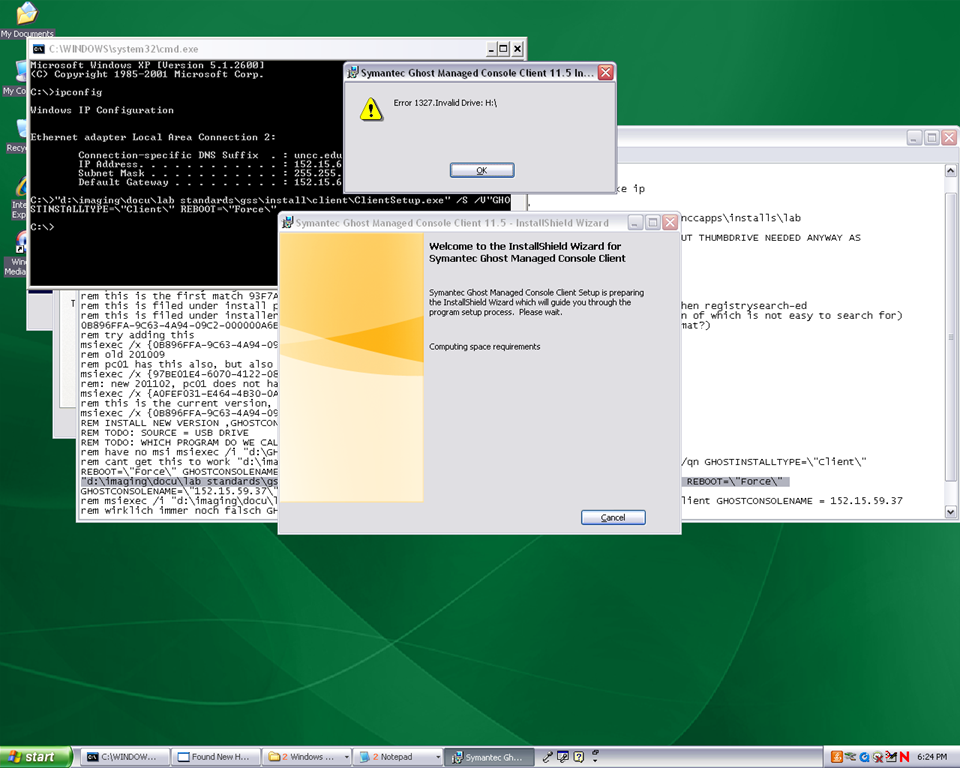
2.3.3.Clean before making testuser default user:
2.3.3.1. control / internet options / clean history and temp files
2.3.3.2. recycling bin: empty
2.3.3.3. right-click start button: / menu item:properties / button:customize / tab:general / button:clear list + tab:advanced: clear list
2.3.3.4. C: / properties /disk cleanup, all, except: “Compress old files”, “cached installers”, “Office setup files”
2.3.3.5 Firefox: menu: tools / clear recent history / time range: “everything”/ check everything and click button “clear now:” 
2.4. Log in as itsadmin
2.4.1.Document what you are doing by running c:\temp\labscreencastfullhighaudio.wme / start encoding / rename to not overwrite existing output,
2.4.2.Manage testuser – default user transition
2.4.2.1. USERS
2.4.2.1.1. Make testuser default user:
2.4.2.1.1.1. Unhide: explorer / tools / folder options / tab:view / show hidden files and folder, unhide protected operating system files
2.4.2.1.1.1.1. make a backup of old documents and settings/default user (entire directory, not only ntuser.dat): zip onto thumbdrive with date/version number )
2.4.2.1.1.2. xp copy profile windowskey+pause/break /tab:advanced / section:user profiles / button:settings, select the profile [you cannot copy the active profile, so log in as itsadmin], button: copy to, new window: copy to, section:copy profile to, button:browse, select c:\documents and settings\default user, button:ok
2.4.2.1.1.3. [not even the ntuser.dat seems necessary, since even the ntuser.dat gets updated by copy profile] c:\document and settings\testuser\ntuser.dat [+dolater:subfolders?]: back up ntuser.dat to ntuser.old, then copy into default user
2.4.2.1.1.4.Re-hide: explorer / tools / folder options / tab:view / do not show hidden files and folder, hide protected operating system files
2.4.2.1.2. Remove other accounts:
2.4.2.1.2.1. system / advanced / user profiles / clean profiles: delete all accounts except default user (it if shows) and itsadmin
2.4.2.1.2.2. administrative tools / computer management / treenode:local users and groups management / delete non built-in users and non-administrative users
2.4.3.Uninstall deepfreeze (by re-running the installer from unccapps/installs / df#wks.exe) (this will restart the computer; log in again as itsadmin)
2.4.4.delete c:\nalcache
2.4.5.backup the c:\temp \*.wmv screencasts onto a thumbdrive
2.4.6.do this as last step: run c:\windows\system32\trend\ImgSetup.exe, which gives a message: “this program has been configured to start whenever the system is restarted.”
2.4.7.if sysprep required (deploying to non-uniform hardware, e.g. dell optiplex 760 vs 780), run
2.4.8.Reboot to login screen
3. Ghost console configuration
3.1. Ghost console: upload/backup and download/deploy/clone the image
3.1.1. configuration resources / images / right-click: new / image pointing to a file with the NAME that includes today’s date in the format MMDDYY
3.1.2 task: “CAPTURE IMAGE” (not run): open
3.1.1.1. ISource machine: set to machine you have created the image on
3.1.1.2. Image: set to config resource that you have just created
3.1.1.3. [IF NOT CHECKED]check tab:general /checkbox: Remove machine from Domain before taking an image. You must remove the computer from its domain if you are going to roll out the image file to a number of computers. [except if using sysprep].
3.1.1.4 button: save, button:execute

4. DEEPFREEZE console
4.1. UNFREEZE ALL CLIENTS [LRC must be closed]
5. Ghost console configuration
5.1. Deploy task:
5.1.1.“DEPLOY IMAGE TEST”:
5.1.1.1. [ITEM IS ONLY FYI]tab:general / check: clone, but uncheck: configuration [tba: NOT unchecked now?] , refresh configuration, refresh inventory [tba: why?]
5.1.1.2. [ITEM IS ONLY FYI]tab: clone: check “use Ghost walker to perform a sid change”
5.1.2.configuration task “ADD TO DOMAIN”
5.1.2.1. [ITEM IS ONLY FYI] Alternative individually: ghost console / default configuration / right click computer / properties/ configuration / edit default configuration / tree: workgroup/domain membership
5.1.2.2. [ITEM IS ONLY FYI]alternative via batch configuration template: task “Add to AD group” to add to AD [for lcs? Is this why we do this separately from the domain?]: tab:general, check configuration , target machine group: browse for your default group / coed434, tab;configuration: browse for “add machines to ad” – based on template “add machines to ad”, check allow template settings, tree: workgroup/domain membership / check apply member of , check uncheck computer name which is already set, no description , workgroup/domain: its.uncc.edu, container:unccharlotte / labs / clas / lcs / workstations, uncheck: Move computers that are currently in a container.
6. Ghost console: TEST DEPLOY/ADD AD with 2 computers:
6.1. Test: template task: download/deploy to 2 clients
6.2. Test: on client:
6.2.1.Are clients joined to domain [cannot log in with domain account if not; global test: tba]
6.2.2.logging in (creating profiles based on default user) as staff and labstudent: language & translation apps coming up?
7. Ghost console : PRODUCTION DEPLOY/ADD AD
7.1. checks: are you deploying the right image? Are all computers turned on? Cancelling a Ghost deploy task is a pain, if it does not reboot to the login screen, run a token task like deepfreeze-boot-unfrozen
7.2. Clone/Download, Add to Domain/AD
7.3. Test the clients are joined to domain
7.3.1.For all: ghost console / default configuration / right click computer / properties/ configuration
8. Clients
8.1. Login as labadmin staff account (domain account ß uncheck “workstation only”, to freeze with this default)
8.2. DEEPFREEZE: install from novell-delivered application, from Ghost console: deepfreeze7-install, reboot to frozen install: from Ghost console:deepfreeze7-bootfrozen
9. DEEPFREEZE console
9.1. Test the clients are frozen (exclamation point denotes "not sure")
9.2 Add your scheduled maintenance window, again, to avoid domain trust issues .
Bringing 4 bad computers back into the fold: GhostClient update in spite of bad image
The reason why we cannot join these computers to the domain is simple:

The old image we installed in the last installment of this series does not seem to be for the LRC: it does not contain the right drivers for basic hardware, including Ethernet controller, comes up frozen and keeps booting with warning “Windows did not start normally”.

Steps to take to work around this on each of the PCs:
- Boot thawed.
- Changed the computer name from System Properties / tab: Computername
- Install the Ethernet Controller driver INTEL_825XX-GIGABIT-PLATFORM_A04_R272000.exe which I downloaded from DELL, using the service tag, from the driver CD which I burnt.
- Reboot, the PC picks up an IP similar to the ones that the Ghost console can talk to.
- Insert a thumb drive and go to control panel / administrative tools / computer management / disk management , change the thumb drive letter to H:, exit (otherwise ghost client installer will fail if it does not see the home drive on the domain.

- Insert the ghost client upgrade CD I made earlier. Since autorun is disabled in this configuration, browse to \ghost\ghostclientupgrade.bat, and execute this.
- The computer reboots. Once it is back up, check, by hovering over the ghost client icon in the notification bar, whether the ghost client points to the ghost server IP.

Mine did: The Ghost console shows it as “connected”, and the Deepfreeze Console could reboot it thawed.
Bringing 4 bad computers back into the fold: GhostCast Error 19922: Cannot connect to GhostCast session
Error happens when trying to deploy newer image (created with GhostConsole11) with older GhostCast software.
GhostCast is only the old program we are trying to fade out. But in order to get failing computers to start at all, and connect to the network, we need to resurrect it.
19922 is most frequent error according to Google autocomplete. Symantec asks you to try this:
- Do you have the correct NIC driver specified?
- Boot into a ghost boot disk, exit ghost shell to a DOS prompt, type “chkdsk c: /f”, when finished, reboot the machine into ghost and try connecting to GhostCast session again [this found errors, but did not fix the issue in our case. ]
- Can you try another image? [This fixed the issue. Version incompatibilities between images?]
- Recreate the image on the source machine after “chkdsk c: /f”, attempt to deploy newly created image.


Questions? Read the About. Or just ask me a quick Our Databases: Resources with calendars -- Language learning material Moodle Sites, multimedia files -- films


FAQs for LRC student staff or for students or for teachers. To search our FAQs, in the browser addressbar, add after "https://plagwitz.wordpress.com/feed/?tag=faqs+/" "+TAG1" (from tag cloud below) OR "https://plagwitz.wordpress.com/feed/tag=faqs
&category_name=" "CAT1" (from category hierarchy below). OR search both categories and tags, and multiple TAGs/CATs (connect with "," for OR-search, with "+" for AND-search), like so: https://plagwitz.wordpress.com/feed/?tag=TAG1+TAG2+...TAGn&category_name=CAT1
+CAT2+...CATn"
Other ways to find help
If you cannot find it here, look there: 5,500 Language-Learning Links and Programs for learning or teaching 150 languages
Shortcuts:Our Lists, Our Maps, LRC Staff Moodle Site,LRC Project Moodle Site, 49erexpress, UNCC Moodle, Student Recordings: s:claslcslrcsanakostudent
Learning usage samples: Sanako oral exam, Kaltura webcam presentation, Dictation with speech recognition, Sanako written exam, Chinese and Japanese interactive stroke-order practice
Test the Sanako Installer, Webbrowser Popup Konfigurator for XP, or Windows7, faster LRC TeacherPC Log-in Let MS facilitate diacritics writing by installing for you US-International keyboard layout
This is my personal blog (Google+). The views expressed on these pages are mine alone and not those of my employer. The information in this weblog is provided “AS IS” with no warranties, and confers no rights.
 Thomas' Work Space