Archive
Posts Tagged ‘powertools-for-openxml’
Fun with .docx to .html transforms by means of HtmlConverter from PowerTools for Open XML
2014/12/15
Leave a comment
- The transform is FOSS and platform-independent:
- It neither requires Office nor Windows (The OpenXML SDK runs on Linux via Mono on the server.
- However, the most recent installment of Powertools for OpenXML, a high-level API to the OpenXML SDK, comes with a PowerShell interface (benefit: no Visual studio requirement).
- Valuable features of the transform, among many other things, are:
- HtmlConverter is able to translate MS-Word styles into CSS (insofar needed – my code style has “No proofing” set, however, this cannot be implemented on the WWW), so the layout is preserved as designed, but w/o need for inline formatting:
        span.pt-StrongEmphasis-000052 {
            font-family: Calibri;
            font-size: 11pt;
            font-style: italic;
            font-weight: bold;
            margin: 0in;
            padding: 0in;
        }

        span.pt-lowCodeConsoleChar0 {
            color: #FFFFFF;
            background: #000000;
            font-family: Consolas;
            font-size: 10pt;
            font-weight: normal;
            margin: 0in;
            padding: 0in;
        }
<h3 dir="ltr" class="pt-000040">
<span class="pt-000041">2.2.1</span><span class="pt-000042"><span class="pt-000043">&nbsp;</span></span><span class="pt-Heading2Char"><b>References</b></span>
</h3>
<p dir="ltr" class="pt-BodyText">
<span class="pt-DefaultParagraphFont-000003"><br />
&lrm;</span><span class="pt-000000">&nbsp;</span>
</p>
<h1 dir="ltr" class="pt-000006">
<span class="pt-000007"><b>3</b></span><span class="pt-000008"><b><span class="pt-000009">&nbsp;</span></b></span><span class="pt-Heading1Char"><b>Introduction</b></span>
</h1>
<h2 dir="ltr" class="pt-000018">
<span class="pt-000019">3.1</span><span class="pt-000020"><span class="pt-000021">&nbsp;</span></span><span class="pt-Heading2Char"><b>Purpose of Document</b></span>
</h2>
- There are many more options that I have not yet tried:
            SimplifyMarkupSettings simplifyMarkupSettings = new SimplifyMarkupSettings
            {
                RemoveComments = true,
                RemoveContentControls = true,
                RemoveEndAndFootNotes = true,
                RemoveFieldCodes = false,
                RemoveLastRenderedPageBreak = true,
                RemovePermissions = true,
                RemoveProof = true,
                RemoveRsidInfo = true,
                RemoveSmartTags = true,
                RemoveSoftHyphens = true,
                RemoveGoBackBookmark = true,
                ReplaceTabsWithSpaces = false,
            };
            MarkupSimplifier.SimplifyMarkup(wordDoc, simplifyMarkupSettings);

            FormattingAssemblerSettings formattingAssemblerSettings = new FormattingAssemblerSettings
            {
                RemoveStyleNamesFromParagraphAndRunProperties = false,
                ClearStyles = false,
                RestrictToSupportedLanguages = htmlConverterSettings.RestrictToSupportedLanguages,
                RestrictToSupportedNumberingFormats = htmlConverterSettings.RestrictToSupportedNumberingFormats,
                CreateHtmlConverterAnnotationAttributes = true,
                OrderElementsPerStandard = false,
                ListItemRetrieverSettings = new ListItemRetrieverSettings()
                {
                    ListItemTextImplementations = htmlConverterSettings.ListItemImplementations,
                },
            };
- One would really wish there was a way to get such HTML cleaned up automatically (ouch!):
<span class="pt-DefaultParagraphFont-000006">M</span>
<span class="pt-DefaultParagraphFont-000006">anaged requirements for system integration&nbsp;</span>
<span class="pt-DefaultParagraphFont-000006">of Center</span>
<span class="pt-DefaultParagraphFont-000006">&nbsp;</span>
<span class="pt-DefaultParagraphFont-000006">software&nbsp;</span>
<span class="pt-DefaultParagraphFont-000006">with&nbsp;</span>
<span class="pt-DefaultParagraphFont-000006">iLearning</span>
<span class="pt-DefaultParagraphFont-000006">&nbsp;and with content production and management (BPD). To mitigate lack of integration of $50k LMS software investment into departmental workflow</span>
<span class="pt-DefaultParagraphFont-000006">,</span>
<span class="pt-DefaultParagraphFont-000006">&nbsp;</span>
<span class="pt-DefaultParagraphFont-000006">developed&nbsp;</span>
<span class="pt-DefaultParagraphFont-000006">and documented&nbsp;</span>
<span class="pt-DefaultParagraphFont-000006">software to automate</span>
<span class="pt-DefaultParagraphFont-000006">&nbsp;creation of 4K+ user accounts p.a., 30K+ learning documents and 100K+ interactive content paths in LMS.</span>
- There are also much more serious conversion errors:
- MS-Word displays a plain text content control and a repeating section content control within a table, containing one Combobox and one plain text content control per row, perfectly:
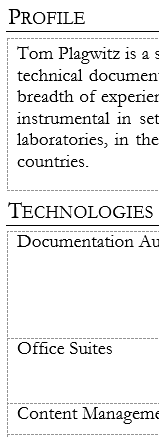
- Convert-DocxToHtml gobbles the content completely (and so does Google Docs Preview):
 The underlying HTML has just a blank table under each heading:
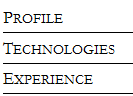
<div class="pt-000001"> <p dir="ltr" class="pt-qiCVHeading1"> <span class="pt-DefaultParagraphFont-000002">Profile</span> </p> </div> <div align="left"> <table border="1" cellspacing="0" cellpadding="0" dir="ltr" class="pt-000003" /> </div> <div class="pt-000001"> <p dir="ltr" class="pt-qiCVHeading1"> <span class="pt-DefaultParagraphFont-000002">Technologies</span> </p> </div> <div align="left"> <table border="1" cellspacing="0" cellpadding="0" dir="ltr" class="pt-000003" /> </div> - MS-Word shows:
 Yet need to look in to the underlying XML to see whether the .docx is to blame for that…
 - But HtmlConverter output in IE or Firefox:
 The underlying HTML reveals that the css does not get applied in the right place:
- MS-Word displays a plain text content control and a repeating section content control within a table, containing one Combobox and one plain text content control per row, perfectly:



<tr>
<td class="pt-000079">
<p dir="ltr" class="pt-BodyTextSmall">
<span class="pt-BodyTextSmallChar-000081">AD</span>
</p>
</td>
<td colspan="2" class="pt-000079">
<p dir="ltr" class="pt-BodyTextSmall">
<span class="pt-BodyTextSmallChar-000081">Active Driector, Microsfot&rsquo;s directory implementation.</span>
</p>
</td>
</tr>
<tr>
<td class="pt-000086">
<p dir="ltr" class="pt-BodyTextSmall">
<span class="pt-000085">&nbsp;</span>
</p>
</td>
<td colspan="2" class="pt-000086">
<p dir="ltr" class="pt-BodyTextSmall">
<span class="pt-000085">&nbsp;</span>
</p>
</td>
</tr>
- One could imagine MS-Word acting less strictly than OpenXML PowerTools:Convert-DocxToHtml, like a web-browser’s parser tolerates and displays bad HTML. However, not only would need to be justified how MS-Word can also serve as the originating HTML WYSIWYG editor. The OpenXML PowerTools:Get-OpenXmlValidationErrors for both of the above documents does not seem to find any OpenXML errors that could explain the bad conversion (other than dozens of Sch_UndeclaredAttribute errors (Version-related? Not sure how this could be) , there is only a Pkg_PartIsNotAllowed relating to a glossary).
- Also yet to do:
- When (not always!) does my page title end up as empty?
<title></title>
- Defaults to doctype xhtml, not html(5).
- When (not always!) does my page title end up as empty?
- Done:
- Pretty-printing. The HtmlConverter output defaults to all content (not css ) on 1 line (e.g. in the example from which above code is taken, 90000chars long). For human readability, and also possibly git tracking, pretty-printing would be better. Can be enforced like so (is there a better way? cannot see a user-configurable option for the SaveOptions enumeration):
openXml\OxPt\OxPtCmdlets\OxPtHelper.cs:var htmlString = html.ToString(SaveOptions.None); // trp: requesting pretty-printing, was:html.ToString(SaveOptions.DisableFormatting);


Questions? Read the About. Or just ask me a quick Our Databases: Resources with calendars -- Language learning material Moodle Sites, multimedia files -- films


FAQs for LRC student staff or for students or for teachers. To search our FAQs, in the browser addressbar, add after "https://plagwitz.wordpress.com/feed/?tag=faqs+/" "+TAG1" (from tag cloud below) OR "https://plagwitz.wordpress.com/feed/tag=faqs
&category_name=" "CAT1" (from category hierarchy below). OR search both categories and tags, and multiple TAGs/CATs (connect with "," for OR-search, with "+" for AND-search), like so: https://plagwitz.wordpress.com/feed/?tag=TAG1+TAG2+...TAGn&category_name=CAT1
+CAT2+...CATn"
Other ways to find help
If you cannot find it here, look there: 5,500 Language-Learning Links and Programs for learning or teaching 150 languages
Shortcuts:Our Lists, Our Maps, LRC Staff Moodle Site,LRC Project Moodle Site, 49erexpress, UNCC Moodle, Student Recordings: s:claslcslrcsanakostudent
Learning usage samples: Sanako oral exam, Kaltura webcam presentation, Dictation with speech recognition, Sanako written exam, Chinese and Japanese interactive stroke-order practice
Test the Sanako Installer, Webbrowser Popup Konfigurator for XP, or Windows7, faster LRC TeacherPC Log-in Let MS facilitate diacritics writing by installing for you US-International keyboard layout
This is my personal blog (Google+). The views expressed on these pages are mine alone and not those of my employer. The information in this weblog is provided “AS IS” with no warranties, and confers no rights.
 Thomas' Work Space