Archive
Posts Tagged ‘ms-windows-7’
When installing apache-maven-3.0.4 on Windows 7 (64-bit), environment variables do not expand in %Path%
2012/05/15
4 comments
- Do not follow the instructions for installing apache-maven-3.0.4 on “Windows 2000/XP”, or your final test running mvn –version to verify that it is correctly installed will fail.
- When adapting the Environment variable path, do not use %M2_HOME%\bin, but rather repeat the explicit path, e.g. “G:\conf\lang\java\apache\maven\apache-maven-3.0.4”
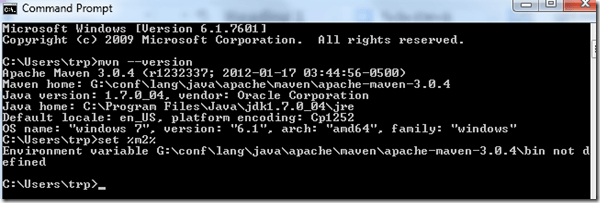
- Why is that?

Students of the Oaklawn Language Academy visited the LRC …
2012/05/03
Leave a comment
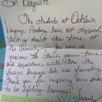
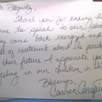
… and sent us a thick envelope chock-full of these very sweet handwritten thank-you notes.
I have twin nieces their age, so I know that it can take a bit to get them to write these notes (I am looking at you, Miss M…!  ).
).
The little man on the screen they mention, that can talk in tongues is the Microsoft-Deskbot, and the headphones they mention were connected to a Sanako Study 1200 digital audio lab.
I hope we can upgrade all this to Windows 7 this summer, and that the Language Academy will be back next spring to admire it all…





Configuring an MS-Exchange mail account from home on a personal laptop with Windows 7 (64-bit), Outlook 2010 (32-bit)
2011/01/12
1 comment
Follow your provider’s official instructions and entry points – this is only to remind myself where I have to jump through which domain qualifying hoops:
- Establish the VPN connection to your MS-Exchange environment
- Go to “Control Panel”, open “Mail Setup”, click button:”E-mail Accounts”
- In dialogue:”Account settings”, click button:”New”

- Select “E-mail account”
- Select “Manually configure …”
- Select “Microsoft Exchange…”
- Enter the info you have been given and click check names.
- In the Windows Security Dialogue, enter the qualifying domain:

- I did not need to enter “More Settings”.
- One of quite a few oddities I observed: After creating the Exchange account in the Control Panel: Mail item, when starting Outlook, the Windows Security dialogue that asks for my credentials appear to not accept my password (it comes up over and over again, asking for the password). However, once I canceled out of it and restarted Outlook, Outlook went right into downloading my Exchange mail etc. (this was with “Remember my credentials”set in the Windows Security dialogue). Go figure!
Categories: e-infrastructure
account, mail-setup, ms-exchange-2003, ms-outlook-2010, ms-windows-7


Questions? Read the About. Or just ask me a quick Our Databases: Resources with calendars -- Language learning material Moodle Sites, multimedia files -- films


FAQs for LRC student staff or for students or for teachers. To search our FAQs, in the browser addressbar, add after "https://plagwitz.wordpress.com/feed/?tag=faqs+/" "+TAG1" (from tag cloud below) OR "https://plagwitz.wordpress.com/feed/tag=faqs
&category_name=" "CAT1" (from category hierarchy below). OR search both categories and tags, and multiple TAGs/CATs (connect with "," for OR-search, with "+" for AND-search), like so: https://plagwitz.wordpress.com/feed/?tag=TAG1+TAG2+...TAGn&category_name=CAT1
+CAT2+...CATn"
Other ways to find help
If you cannot find it here, look there: 5,500 Language-Learning Links and Programs for learning or teaching 150 languages
Shortcuts:Our Lists, Our Maps, LRC Staff Moodle Site,LRC Project Moodle Site, 49erexpress, UNCC Moodle, Student Recordings: s:claslcslrcsanakostudent
Learning usage samples: Sanako oral exam, Kaltura webcam presentation, Dictation with speech recognition, Sanako written exam, Chinese and Japanese interactive stroke-order practice
Test the Sanako Installer, Webbrowser Popup Konfigurator for XP, or Windows7, faster LRC TeacherPC Log-in Let MS facilitate diacritics writing by installing for you US-International keyboard layout
This is my personal blog (Google+). The views expressed on these pages are mine alone and not those of my employer. The information in this weblog is provided “AS IS” with no warranties, and confers no rights.
 Thomas' Work Space